compute
104 Topics
Corrupted VT+ transaction files
We are a small accounting company using VT+ Transaction on a local drive synchronized with OneDrive for backup and file storage. A few days ago when we tried to open the application, we suddenly started receiving the following error messages: Run Time Error 0 and Run Time Error 440, and the program does not start. According to VT+ support the program files are corrupted and the data can only be restored up to the year 2022, as the more recent backups are also affected. Somehow the system is overriding our backups, which makes the latest ones unusable. Any advice what could cause that and how to resolve the issue. Thanks347Views0likes1CommentBackup vaults Vs Recovery Service Vault
Hello Team, Microsoft has introduced multiple vault types, each serving different backup and disaster recovery needs. Below is a high-level differentiation: Recovery Services Vault (RSV) Supports Azure Backup (VMs, SQL, SAP HANA, Files) and Azure Site Recovery (disaster recovery). Offers backup policies, recovery points, replication, and failover management. Backup Vault A newer, streamlined vault designed for Azure Backup only. Supports Backup Short-Term Retention (Instant Restore) and Cross-region Restore. Primarily used with Azure Policy & Backup Center for better management at scale. Microsoft Continuity Center (MCC) A centralized disaster recovery hub in Azure. Integrates Azure Site Recovery (ASR) and backup services into a single pane of glass. Allows for failover, backup monitoring, and business continuity planning. Do we have any document talks about little deeper about the above topics.Solved1.8KViews0likes1Comment
Determining sizing requirements for GPU enabled Azure VM
Greetings, We are trying to determine the correct VM sizing requirement for our AI workload, which is used for NLP processing. This workload does not require any training, but will only be used for inference. We have the following software configuration: a C# application that is heavily multithreaded using a lot of socket I/O. The application has concentrated bursts where 10-20 threads are fired concurrently to perform tasks (mostly socket I/O). This app communicates via dedicated sockets to: a Python application which performs various NLP tasks. This app is also multithreaded to handle multiple incoming requests from the .NET app. This app sends queries to a local LLM (model size will vary based on query type). We estimate we will need to support sub-second performance (at the very least) on a 7B parameter model. Ultimately, we may need to go to larger model sizes if accuracy is insufficient. The amount of text passed to the LLM will range from 300-3000 tokens. In short, we need: a) a CPU with sufficient cores to handle multiple concurrent threads on the .NET side. The app will have 5 or 6 background threads running continuously, and sudden bursts of activity which will require a minimum of 10-20 threads to run shorter-lived tasks. b) a GPU with sufficient VRAM to handle at the very least, a 7B parameter model. Ultimately, we may need to support larger models to perform the same task due to insufficient accuracy. We need the ideal configuration of GPU/VRAM and CPU/RAM to handle these tasks, and also, potentially, larger LLM sizes of up to 14B or 70B parameters. We are looking at the NC-series VMs, with a budget of about $1,000/month (see https://learn.microsoft.com/en-us/answers/questions/2150959/determining-sizing-requirements-for-gpu-enabled-az?comment=question). Any feedback on the optimal configuration in terms of CPU/GPU would be greatly appreciated. Thank you in advance.1.5KViews0likes2Comments
Azure IMDS (Instance Metadata Service) calls to 168.63.129.16 blocked after July 1st, 2025
[ACTION REQUIRED] After 1 July 2025, it will no longer be possible to query Azure IMDS endpoints at the IP address 168.63.129.16. Please begin using 169.254.169.254 to communicate with Azure IMDS as soon as possible. Officially, IMDS APIs can only be queried at 169.254.169.254. However, due to the internal design of Azure, IMDS endpoints can also be queried at the IP address 168.63.129.16 from within a virtual machine. Some customers are using this unofficial pathway to communicate with IMDS. An upcoming change in Azure will permanently block IMDS requests on 168.63.129.16. After 1 July 2025, you won’t be able to access Azure IMDS endpoints with that IP. You can continue to use 168.63.129.16 to call into IMDS APIs until up until that date, but we recommend you begin your transition now. HOW TO CHECK IF YOU ARE IMPACTED Code analysis in your application. IMDS has a reserved IP address of “169.254.169.254" VM’s Private communication channel has reserved IP address of "168.63.129.16". Use code search to evaluate that your client is not using IP address “168.63.129.16” for making metadata requests. All IMDS REST requests starts with “/metadata” and all endpoints can be found at IMDS Public endpoints. REQUIRED ACTION Fix all URLs using 168.63.129.16 to prepare for its decoupling from IMDS. For example, this IMDS token endpoint URL would soon be blocked: curl -s -H Metadata:true --noproxy "*" "http://168.63.129.16/metadata/identity/oauth2/token?api-version=2018-02-01&resource=https://management.azure.com/" To avoid service disruptions, fix URLs to include 169.254.169.254., as in this example: curl -s -H Metadata:true --noproxy "*" "http://169.254.169.254/metadata/identity/oauth2/token?api-version=2018-02-01&resource=https://management.azure.com/”1.8KViews0likes0Comments
Adding VM Instance View Details, e.g. osName, to the VM Resource Object JSON (for Custom Policy Use)
I'm requesting to add more details to the JSON of the VM resource object, particularly from the VM instance view data. This is to include operating system information, such as the name and version (osName and osVersion), for use in a custom Policy. Although these details are visible in the portal, they're not present in the VM's resource object, which is necessary for our custom policy.488Views0likes1CommentXXX virtual machines should enable Azure Disk Encryption or EncryptionAtHost.
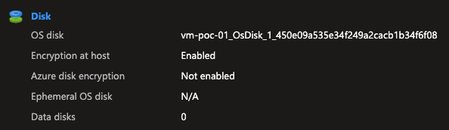
Hello everyone, I'm facing issues related to a policy: Linux virtual machines should enable Azure Disk Encryption or EncryptionAtHost. Windows virtual machines should enable Azure Disk Encryption or EncryptionAtHost. After enabling EncryptionAtHost, it appears as encrypted in the portal. However, the policy does not recognize that it is encrypted and shows it as non-compliant. The same happens when enabling Azure Disk Encryption (ADE): the policy still indicates that it is non-compliant. Has anyone else experienced this?1.3KViews0likes3Comments
Power Management of Client Machines VM: Credential Handling and Solutions
We handle the power on/off operations of client machines as needed. To perform these tasks, we collect AD-APP credentials from clients, as the AD-APP has the necessary permissions to manage the VMs. Problem: We need to gather and securely store AD-APP details from multiple clients. Managing these credentials for each VM individually is becoming a significant overhead. Looking for a Solution: Can we solve this problem with a multi-tenant AD-APP, where we use a single multi-tenant app and request clients to grant access to their VMs? Considerations: Clients will have different accounts with no relation to our subscription. Questions: If a multi-tenant AD-APP is a viable solution, what configurations are required on our side and the client's side? Please share in detail. If it's not possible, is there an alternative way to achieve this?522Views0likes2CommentsAKs Cluster in failed state - Need Assistance
Hello Azure Community, I am facing an issue with my AKS cluster that is currently in a failed state. The cluster has been in this state for three days, and despite not performing any operations, the provisioning status has not resolved automatically. We have this cluster running for about 2 years, with services running. We stop this cluster when not in use and start when required. Last successful running state of cluster was on 9th of May 2024, and stopped on the same day after use. Again, tried to start on 14th May, from then cluster is in failed state. Screenshot shared for reference. Troubleshooting Steps Taken: Checked the status of the cluster in the Azure portal and CLI Reviewed logs of cluster, nodes not provisioned in node pool No able to restart or update the cluster I am seeking assistance from the community to help me troubleshoot and resolve this problem. Any advice, suggestions, or guidance would be greatly appreciated. Thank you in advance for your help.917Views0likes2CommentsMonitor Azure RDS Farm
Hi All I'm usually found working within Microsoft Intune however a new role has me looking after an Azure Compute / IaaS RDS environment too. Anyway, the daily BAU checks are: Are all the servers in the RDS Farm running? Have any servers "escaped" from the RDS Farm? Is the RDS Farm running ok? Any low disk space errors? So, what's the best and most cost effective (this is a charity / non-profit org) to monitor the RDS farm? Info / suggestions very welcome522Views0likes1CommentSavings plan and RIs for compute
Hi Team. I have some questions about saving plans and reserved instances, I would like your help. 1.-When is recommended to use saving plans or reserved instances? how to decides? 2.-If I have a saving plan for 10 USD hourly commitment, to reach this 10 USD, the price for my compute usage is a "pay as you go", or this price includes discount? after that discount will be applied, only if my usage reaches the commit of 10 USD? 3.-If my compute usage is 09 USD in an hour, so it does not reach the hourly commitment (10 USD), will I pay 09 or 10 USD for that hour? 4.-Azure advisor is recommending to me, buy saving plan if I consider 30 look-back days, but if I consider 60 look-back days, Advisor does not show any recommendation appear around saving plans. So, how can I estimate and calculate the hourly commitment? 5.-If I have reserved instance, that in one moment matches with my VM, I understand the cost per hour will include reservation discount, but what happens if I change the VM size for another size does not match the reserved instance or the families/series, will I keep paying for the reserved instances, and additionally I will pay for VM as "pay as you go"? I mean when I buy a reserved instance, I always will pay for it, it does not depend on if I have a matching VM or if I am using the reserved instance? Thank you.787Views0likes1Comment