compute
174 Topics
¿Cómo comprobar que las actualizaciones se instalaron correctamente en Windows Server 2025?
Hola. Estoy usando Windows Server 2025 y quisiera saber qué pasos recomiendan para comprobar que las actualizaciones se instalaron correctamente. Después de reiniciar el servidor, ¿qué herramientas o registros puedo revisar para detectar errores y confirmar que los servicios siguen funcionando con normalidad?159Views0likes1Comment
Corrupted VT+ transaction files
We are a small accounting company using VT+ Transaction on a local drive synchronized with OneDrive for backup and file storage. A few days ago when we tried to open the application, we suddenly started receiving the following error messages: Run Time Error 0 and Run Time Error 440, and the program does not start. According to VT+ support the program files are corrupted and the data can only be restored up to the year 2022, as the more recent backups are also affected. Somehow the system is overriding our backups, which makes the latest ones unusable. Any advice what could cause that and how to resolve the issue. Thanks347Views0likes1Comment
Windows 11 automatically restarting after install security Update — With GPO and WSUS.
Hi everyone, I’m facing a strange behavior with Windows 11 devices that receive updates through WSUS and are fully managed via Group Policy. Here’s the scenario: We have a GPO configured as follows: -Configure Automatic Updates → 4 (Auto download and schedule the install) -Scheduled installation every day at 10:00 -Install during automatic maintenance → disabled -Active Hours configured -Turn off auto-restart for updates during active hours → Enabled -Update deadlines set to 0 (to avoid any forced restart) -No other restart-related policies set in the domain Even with this configuration, after updates are installed, Windows 11 shows the following message: “Your organization manages update settings. We will restart and install this update at X minutes.” And then the device automatically restarts, even when: -a user is logged in -it is outside Active Hours -deadlines are disabled -no-auto-restart is enabled This behavior does not happen on Windows 10 — only on Windows 11.3.5KViews1like1CommentAllow to take RDP from Laptop only and not from IP
Hello Experts, We have scenario where , We want to Allow to take RDP from His Laptop only. Which mean user is allowed to take of RDP of Some Server only from his Laptop and not from any other Computers. We have already checked for Windows firewall but it is working for IP based , and We want for Machine based. as user is roaming between Offices. Please suggest if there is any GPO or Policy or Firewall Rule using which If possible to take RDP using Machine based and not IP based. Thanks109Views0likes0Comments
Active Directory Unable to reset user passwords
I am managing a Windows Server 2025 Active Directory environment with client machines. I created a test user and enabled the option “User must change password at next logon.” I then provided a temporary password to the user, expecting them to get the prompt to change it on first login. However, when the user attempts to change the password, they receive the error: “The user must change password before signing in.” My goal is that when I provide a temporary password to a user: They get the prompt to change the password at next logon. When they change it, it should not throw the “user must change password before signing in” error. I need guidance on how to achieve this so users can reset their passwords successfully.341Views0likes1CommentAdd Passkey support to Active Directory
Everyone, Please go to the feedback hub and upvote my suggestion to add passkey support to Active Directory Domain Services: https://aka.ms/AAw8z54 The reason I am recommending this is because there needs to be a standard way to use passkeys in an AD environment.563Views2likes3CommentsBackup vaults Vs Recovery Service Vault
Hello Team, Microsoft has introduced multiple vault types, each serving different backup and disaster recovery needs. Below is a high-level differentiation: Recovery Services Vault (RSV) Supports Azure Backup (VMs, SQL, SAP HANA, Files) and Azure Site Recovery (disaster recovery). Offers backup policies, recovery points, replication, and failover management. Backup Vault A newer, streamlined vault designed for Azure Backup only. Supports Backup Short-Term Retention (Instant Restore) and Cross-region Restore. Primarily used with Azure Policy & Backup Center for better management at scale. Microsoft Continuity Center (MCC) A centralized disaster recovery hub in Azure. Integrates Azure Site Recovery (ASR) and backup services into a single pane of glass. Allows for failover, backup monitoring, and business continuity planning. Do we have any document talks about little deeper about the above topics.Solved1.8KViews0likes1CommentArquivos .tmp sendo criados no servidor
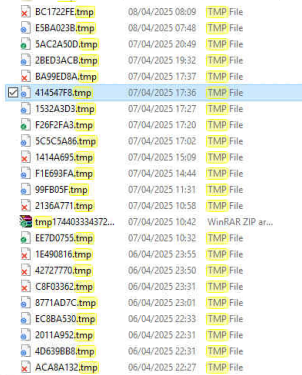
Bom dia. Estou tempo um problema e ja esgotei minhas tentativas de correção. O meu servidor de arquivos esta criando arquivos temporarios conforme a manipulação e criação dos arquivos salvos no servidor. Estes arquivos ficam impossibilitados de serem deletados ate proximo restart do servidor, e em seguida voltam a ser criados novamente. Gostaria de saber se alguem ja presencial um acontecimento deste e se sim, como foi corrigido. Segue a imagem com os arquivos criados. OBS. As pastas do servidor tem sincronismo com o GoogleDrive82Views0likes0Commentsfeature Installation Error
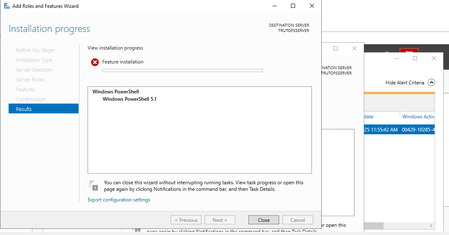
I am facing this issue in Windows Server 2019 STD. i am also tried to solve this issue to select sources\sxs path from the OS media but still i am getting the same error. Mistakenly i have removed .Net framework from this server and after that i am facing this issue. please help me to solve this issue.132Views0likes0Comments
Determining sizing requirements for GPU enabled Azure VM
Greetings, We are trying to determine the correct VM sizing requirement for our AI workload, which is used for NLP processing. This workload does not require any training, but will only be used for inference. We have the following software configuration: a C# application that is heavily multithreaded using a lot of socket I/O. The application has concentrated bursts where 10-20 threads are fired concurrently to perform tasks (mostly socket I/O). This app communicates via dedicated sockets to: a Python application which performs various NLP tasks. This app is also multithreaded to handle multiple incoming requests from the .NET app. This app sends queries to a local LLM (model size will vary based on query type). We estimate we will need to support sub-second performance (at the very least) on a 7B parameter model. Ultimately, we may need to go to larger model sizes if accuracy is insufficient. The amount of text passed to the LLM will range from 300-3000 tokens. In short, we need: a) a CPU with sufficient cores to handle multiple concurrent threads on the .NET side. The app will have 5 or 6 background threads running continuously, and sudden bursts of activity which will require a minimum of 10-20 threads to run shorter-lived tasks. b) a GPU with sufficient VRAM to handle at the very least, a 7B parameter model. Ultimately, we may need to support larger models to perform the same task due to insufficient accuracy. We need the ideal configuration of GPU/VRAM and CPU/RAM to handle these tasks, and also, potentially, larger LLM sizes of up to 14B or 70B parameters. We are looking at the NC-series VMs, with a budget of about $1,000/month (see https://learn.microsoft.com/en-us/answers/questions/2150959/determining-sizing-requirements-for-gpu-enabled-az?comment=question). Any feedback on the optimal configuration in terms of CPU/GPU would be greatly appreciated. Thank you in advance.1.5KViews0likes2Comments