community
58 Topics
UPDATE: VBAF v4.0.0 is complete!
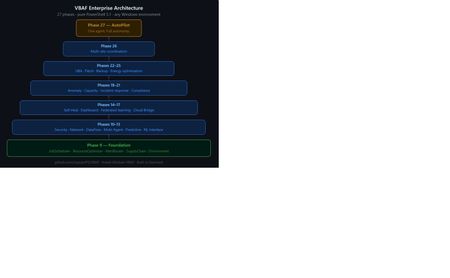
VBAF v4.0.0: Enterprise AI Automation in Pure PowerShell 5.1 27 phases of DQN reinforcement learning — deployed directly on Windows infrastructure. Agents learn from Get-WinEvent, WMI, Get-Counter and Get-ScheduledTask — making autonomous decisions across security, networking, scheduling and resource management. No Python. No Azure required. Runs on any Windows box. github.com/JupyterPS/VBAF | Install-Module VBAF388Views0likes0CommentsVBAF v2.1.0 Complete - Full Machine Learning Framework in Pure PowerShell 5.1
Hello PowerShell Community, I'm pleased to announce that VBAF (Visual Business Automation Framework) is now complete. What started as a roadmap post in this community has grown into a full machine learning framework — 8 phases, 20+ modules, built entirely in PowerShell 5.1 with no external dependencies. **What is VBAF?** VBAF implements machine learning algorithms from scratch in pure PowerShell 5.1. No Python. No pip install. No Jupyter notebooks. Just dot-source one file and you're training models: . .\VBAF.LoadAll.ps1 $data = Get-VBAFDataset -Name "HousePrice" $model = [LinearRegression]::new() $model.Fit($data.X, $data.y) $model.PrintSummary() Every algorithm is readable PowerShell code — making VBAF a genuine teaching tool for IT professionals who want to understand how ML works under the hood. **What's included in v2.1.0:** Phase 1-3: Core Foundation & Reinforcement Learning - Neural networks with backpropagation - Q-Learning, DQN, PPO, A3C algorithms - Multi-agent business simulations - Real-time WinForms visualization dashboards Phase 4-5: Supervised Learning & Data Pipeline - Linear, Ridge, Lasso, Logistic Regression - Decision Trees, Random Forest, Naive Bayes - Full data preprocessing: imputation, scaling, encoding - Feature engineering: polynomial features, PCA, selectors - CSV, JSON, Excel, SQL data I/O Phase 6: Deep Learning - Convolutional Neural Networks (CNN) with image datasets - Recurrent Neural Networks: LSTM, GRU, Bidirectional, Attention - Seq2Seq models Phase 7: Production Features (MLOps) - Model Registry: save, load, version, compare models - Model Server: REST API via HttpListener, batch prediction, A/B testing - MLOps: experiment tracking, data drift detection (PSI), automated retraining triggers, CI/CD pipeline scripts - AutoML: Grid, Random and Bayesian hyperparameter optimization, algorithm selection, feature selection, full pipeline automation - Explainability: permutation importance, SHAP-style analysis Phase 8: Community & Ecosystem - Tutorial series: beginner to advanced - Real-world project examples (House Price MLOps, Anomaly Detection) - Templates & Recipes cookbook with quick reference card - Troubleshooting guide and PS 5.1 best practices **Why PowerShell?** Most ML tutorials assume Python. But many IT professionals live in PowerShell every day — managing infrastructure, automating workflows, writing scripts. VBAF meets them where they are. It's also a teaching project. Every algorithm is implemented from scratch with teaching comments explaining the math and concepts. Reading the source is part of the learning. **Project Resources:** - GitHub Repository : https://github.com/JupyterPS/VBAF - Public Roadmap : https://github.com/users/JupyterPS/projects/2 - PowerShell Gallery: https://www.powershellgallery.com/packages/VBAF - Installation : Install-Module VBAF -Scope CurrentUser **What's next?** Community feedback, issues, and contributions are welcome on GitHub. Best regards, Henning217Views0likes0Comments**A Machine Learning Framework for PowerShell** *Focus: Neural Networks & Reinforcement Learning*
Hi PowerShell Community! 👋 I'm excited to share something I've been building that I believe fills a gap in our ecosystem: **VBAF (Visual Business Automation Framework) - A PowerShell Machine Learning Framework**. This is the first reinforcement learning and neural network framework implemented entirely in PowerShell, designed specifically for IT professionals, automation engineers, and scripters who want to explore ML concepts without leaving PowerShell. ## 🎯 **Why PowerShell for Machine Learning?** PowerShell is installed on every Windows machine and is the automation backbone for millions of IT professionals. But until now, we've never had: - A native neural network engine - A reinforcement learning framework - Multi-agent simulation capabilities - Real-time ML visualization dashboards **VBAF changes that.** ## 🔧 **What's Included:** **Neural Networks:** - Multi-layer perceptrons from scratch - Multiple activation functions (Sigmoid, ReLU, Tanh) - Backpropagation with convergence tracking - Training loops and performance metrics **Reinforcement Learning:** - Q-learning with epsilon-greedy exploration - Experience replay buffer - Reward shaping and policy optimization - Multi-agent environments **Business Automation:** - Company competition simulation - Market dynamics modeling - Resource optimization scenarios - Emergent agent behaviors **Visualization:** - Real-time training dashboards (WinForms) - Learning curve visualization - Network activation displays - 20-30 FPS performance ## 💻 **Quick Start:** ```powershell # Install from PowerShell Gallery Install-Module VBAF -Scope CurrentUser Import-Module VBAF # Train your first neural network (XOR problem) $network = New-VBAFNeuralNetwork -Architecture @(2,3,1) -LearningRate 0.1 $network.Train($xorData, 1000) $network.Predict(@(1,0)) # Create a Q-learning agent $agent = New-VBAFAgent -StateSize 10 -ActionCount 4 $agent.Learn($state, $action, $reward, $nextState) ``` ## 🎓 **Built for Learning:** VBAF is designed with transparency in mind. Unlike TensorFlow or PyTorch, you can: - Read every line of the implementation - Understand exactly how backpropagation works - See Q-learning updates in real-time - Modify algorithms to experiment Perfect for: - Teaching ML concepts to IT professionals - Understanding AI fundamentals - Building automation that learns and adapts - Prototyping RL solutions in familiar syntax ## 🌟 **Real-World Applications:** **IT Operations:** - Predictive server maintenance - Intelligent resource allocation - Log anomaly detection **Business Intelligence:** - Customer churn prediction - Inventory optimization - Dynamic pricing models **Process Automation:** - Adaptive helpdesk routing - Email prioritization by business impact - Workflow optimization ## 🔗 **Links:** - **GitHub:** https://github.com/JupyterPS/VBAF - **PowerShell Gallery:** `Install-Module VBAF` - **Documentation:** Included in module (`Get-VBAFExamples`) ## 🤝 **Community Collaboration:** This is a community project, and I'd love your feedback! Areas open for contribution: - Additional RL algorithms (PPO, A3C, DQN) - Performance optimizations - New business simulation scenarios - Documentation and tutorials - Visualization enhancements ## 🙏 **Why I Built This:** As an educator, I saw students struggle with Python ML examples. They wanted to understand AI concepts in the language they use daily - PowerShell. VBAF bridges that gap. PowerShell has always been about pushing boundaries and empowering IT professionals. I hope this framework becomes a useful tool for learning, experimentation, and building automation that adapts. **What do you think? What would YOU build with a PowerShell ML framework?** Looking forward to your feedback and ideas! #PowerShell #MachineLearning #Automation #ReinforcementLearning310Views0likes0Comments
How to disable automatic updates in Debug Diagnostics 2.1 using PowerShell
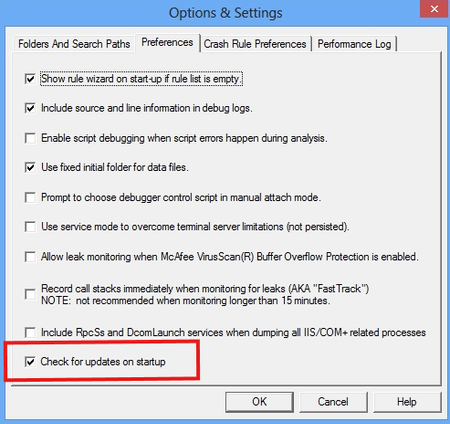
Greetings all. I am writing a PowerShell script to do an unattended install of Debug Diagnostics Tool version 2.2.0.14. The installer is an x64 .msi. The unattended install works fine, but I am unable to find the correct switch/command to disable automatic updates for the tool. Here is the latest code I tried: Execute-MSI -Action 'Install' -Path "<filepath>\DebugDiagx64.msi" -Parameters "/qn /norestart ALLUSERS=2 DISABLE_AUTOUPDATES=1" Other switches I have tried for disabling updates includes DISABLE_UPDATES=1, UPDATES=0 and UPDATES=FALSE. None of these work. Updates can be disabled manually through the Options & Settings GUI. Screenshots for this are attached. I really need a way to disable the automatic updates through PowerShell during an unattended installation. Thanks.210Views0likes1CommentSecure Way to store lots of credentials using powershell
Dear Community I wanted to ask if there is any way I can store lots of creedentials while still being able to use them in Powershell? I dont want to enter anything in a popup window, because there are way to many credentials to to that by hand. Is it possible that I can just put them in some kind of file and then get the wanted informations (while the file or its contents are somehow encrypted)? Thanks in advance MartinSolved23KViews0likes6Comments
Does Microsoft stop support WMIC or WMI?
Hello everyone, Nice to meet you! I heard that MS has plans to deprecate and stop supporting the VB script very soon. I have few queries, please clarify Does Microsoft stop supporting WMIC or WMI along with the VB script? Can we use WMI commands in PowerShell scripts? thanks Madhu236Views0likes1CommentI'm unable to execute powershell command in SharePoint
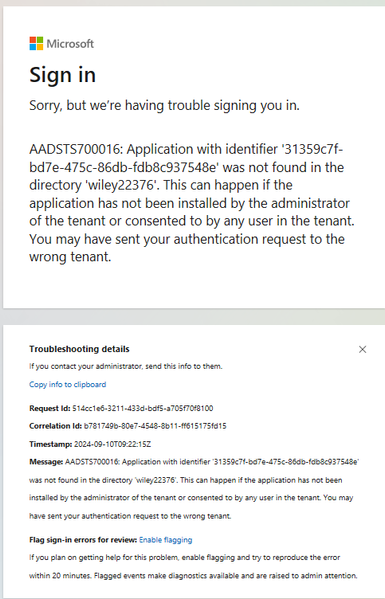
When I execute the PowerShell command, I get a sign-in error. I have tested this in a couple of SharePoint tenants, but I'm unable to run the script. Also, previously, these scripts were working fine. Unable to execute the "Connect-PnPOnline" command. Please someone help with this.526Views0likes2CommentsHow to grant permissions on behalf of the organization Script
Hello everyone! We generated a necessary Script to create a Principal API/APP/Service in Entra ID, and assign some delegated and application permissions. However, I need to consent to these permissions on behalf of the organization, during the Script itself. I have tried several times, in different ways, but all without success. Does anyone know how this can be done? If it can be done? And could you help me with this? Thank you all. Best regards607Views0likes1CommentError - Connect-ExchangeOnline Error Acquiring Token: System.Net.Http.HttpRequestException
Error Connect-ExchangeOnline Error Acquiring Token: System.Net.Http.HttpRequestException: An error occurred while sending the request. ---> System.Net.WebException: Remote name could not be resolved: 'server.proxy.local'1KViews0likes1CommentPS script for uploading files to Sharepoint Online
Hello friends... This process of uploading files from some local storage to Sharepoint Online seems to be the simplest to be carried out via Powershell Script... However, a command/routine in which the password is posted clearly, in plain text, is not " should be" permanent. Do you have any alternative to this? #Copia Arquivos para o Sharepoint Site $FILESP = (Get-ChildItem .\$EXECFOLDER\ -File | Sort-Object LastWriteTime -Descending| Select-Object -First 3).Name foreach ($FILESP in $FILESP) { Write-Host "Arquivo .......... " -NoNewline Write-Host "" $FILESP -foregroundcolor Yellow -NoNewline Write-Host " foi carregado/enviado com êxito!!!" Write-Host "" $WebUrl = "https://organizacao.sharepoint.com/sites/name-site" $LibraryName ="library" $SourceFile=".\$EXECFOLDER\$FILESP" $AdminName ="my-name@domain" $AdminPassword = "my password" #$Credentials = New-Object Microsoft.SharePoint.Client.SharePointOnlineCredentials($AdminName,(ConvertTo-SecureString $AdminPassword -AsPlainText -Force)) $Credential = new-object System.Management.Automation.PSCredential $AdminName, $AdminPassword $Context = New-Object Microsoft.SharePoint.Client.ClientContext($WebUrl) $Context.Credentials = $Credentials $Library = $Context.Web.Lists.GetByTitle($LibraryName) $FileStream = ([System.IO.FileInfo] (Get-Item $SourceFile)).OpenRead() $SourceFileName = Split-path $SourceFile -leaf $FileCreationInfo = New-Object Microsoft.SharePoint.Client.FileCreationInformation $FileCreationInfo.Overwrite = $true $FileCreationInfo.ContentStream = $FileStream $FileCreationInfo.URL = $SourceFileName $FileUploaded = $Library.RootFolder.Files.Add($FileCreationInfo) $Context.Load($FileUploaded) $Context.ExecuteQuery() $FileStream.Close() #Write-Host "" } Contextualizing: A routine/script executes locally, generates some files that must be placed on a website, in a library, on Sharepoint Online Well, I believe this can shed some light535Views0likes0Comments