community
24 Topics
No taskbar after update to windows server 2025
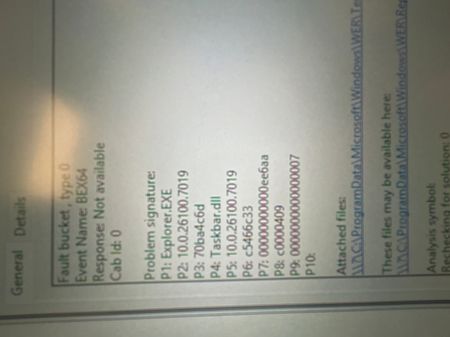
On a machine with windows server 2025 24h2 I recently installed update kb5066835 and after rebooting I was left with no taskbar. I tried restarting explorer.exe 1000 times to no avail as well as sfc and DISM recovery and still the same issue. Along with plenty more fixes online. Any help would be much appreciated1.4KViews0likes1Comment
Hyper V Orphan Checkpoint
Hi, I have a simple setup as follows: - 2 clustered Hyper-V hosts - 1 clustered VM with its VHDX stored on central shared storage After a network disruption, the VM was improperly shut down. Following that, I noticed a checkpoint was automatically created. However, in Hyper-V Manager, the checkpoint has no “Delete” option to merge it back into the main VHDX file. Here’s what I’ve tried so far: 1. Powered off the VM. 2. Edited the disk and manually merged the AVHDX back into the VHDX. 3. Reconfigured the VM to use the merged VHDX file. The VM can now power on normally without issues. However, the “orphaned” checkpoint still appears, and I am unable to perform a Live Migration between hosts. I’ve also attempted to remove the checkpoint using PowerShell (`Remove-VMCheckpoint`), but it failed. I need assistance on how to properly clean up this orphaned checkpoint so Live Migration will work again.197Views0likes0Comments
Migrate 2012 R2 to Server 2022
Hi I have Server 2012 R2 configured on a physical server that acts as a Domain Controller, along with Certificate Authority, DHCP, Single site, Also 2* Additional DC 2016. Below is the scope that I need to execute. Please share any steps if anyone do that, also what is best recommended steps to perform this deployment, also first what action i need to perform after review AD health check?? Should I follow same steps as mentioned as per scope?? Any issues or challenges faced while doing tranisiton? Review and validate existing Active directory health status across all sites. Promoting a new AD 2022 for root domain (3xDC -1 Physical and 2 virtual). Transferring the Flexible Single Master Operations (FSMO) Role. Test Domain functionality after upgrade all domain controllers and Ensure high availability and redundancy. Migrate existing Certificate Authority to a new dedicated CA Sever. Migrate existing DHCP to a new two highly available DHCP Servers (two Virtual Machines). Decommission the old three domain controllers in HQ site. Decommission Azure-DR site (two DCs).957Views0likes2Comments
DHCP Failover local/remote
If I setup two local Windows Server 2022 nodes in a MS DHCP load share failover policy, can I also setup the same pair with a standby policy using a third node at a remote site? I have never used the failover policies, and seem to get contradicting answers when researching this topic. I want to have all the scopes from the primary site failover to the remote site if both primary nodes are down.61Views0likes0CommentsRD Gateway issue after update (Windows Server 2019)
I have pinpointed this to an issue with the aaedge.dll in System32 which has been updated in the latest update Faulting application name: svchost.exe_TSGateway, version: 10.0.17763.3346, time stamp: 0xb6a0daab Faulting module name: aaedge.dll, version: 10.0.17763.6054, time stamp: 0xce1c5805 Exception code: 0xc0000005 Fault offset: 0x000000000005abe2 Faulting process id: 0x480 Faulting application start time: 0x01dae7de27a0f719 Faulting application path: C:\Windows\system32\svchost.exe Faulting module path: c:\windows\system32\aaedge.dll Report Id: 9df5f2de-f650-4f30-846e-872e6ca7e583 Faulting package full name: Faulting package-relative application ID: I am not sure if anyone has found this also or has a fix? It only appears to be with this new version as I have an RD Gateway machine that hasn't been updated yet that works perfectly fine.1.2KViews0likes2Comments
proxy config do not work
I have built a service that can download wap.dat using IIS, and explicitly configured the download URL for wap.dat in the system configuration of the test terminal. The format is http://ip/wpad.dat. It can be observed that the test terminal downloads the file and it takes effect. However, if I delete the download URL and leave the "Auto Detect Settings" on, it can be observed that the test terminal downloads the file but it does not take effect. I do not know why.1.3KViews0likes3Comments
Win2012 uses netstat - e, increasing the number of errors under the network card
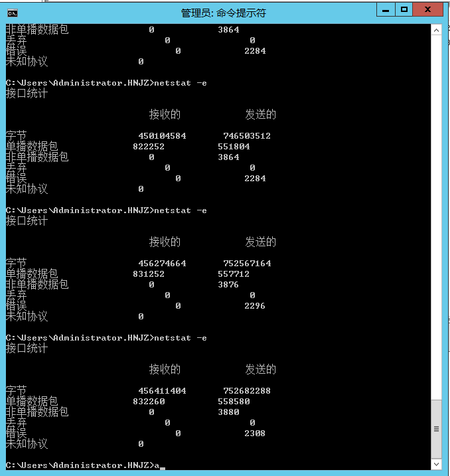
The server is a Windows 2012 R2 operating system and has been clustered. The database is SQL 2014, and always on has been done. Now it is found that regardless of whether there are warnings in the system log, the number of errors under netstat - e will increase. May I ask what is causing this and whether it will have an impact on the cluster and database. thanks471Views0likes1Comment
Remote Apps constantly get focus and coming to the foreground
Hello, we have several Remote Apps published from Windows Server 2022. Users can access them perfectly fine without any connection issues. However, these applications keep coming to the foreground constantly, which becomes annoying when the user is working on other programs on their local machine. For example, a user is typing in a locally installed Word program, and suddenly the RemoteApp for the billing software comes to the foreground, taking focus away from Word. If the user doesn't notice, they continue typing in the Remote App window. We haven't found any relevant settings that could be causing this behavior. We have disabled automatic reconnection to see if it has any impact, but it hasn't helped. Both the client machines and the server hosting the Remote Apps are fully updated with Windows Server 2022. This issue occurs on both Windows 10 and Windows 11 machines. It is truly frustrating and makes it very difficult to use the remote applications since they can never be left in the background. We haven't found a solution in other threads, except for some very old similar situations related to Windows 8 or something similar. Any clues or assistance would be appreciated.1.5KViews0likes3Comments