cognitive services
32 TopicsAzure AI Model Inference API
The Azure AI Model Inference API provides a unified interface for developers to interact with various foundational models deployed in Azure AI Studio. This API allows developers to generate predictions from multiple models without changing their underlying code. By providing a consistent set of capabilities, the API simplifies the process of integrating and switching between different models, enabling seamless model selection based on task requirements.4.5KViews0likes2Comments
Potential Use Cases for Generative AI
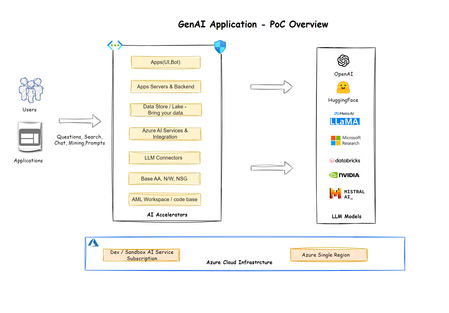
Azure’s generative AI, with its Copilot and Custom Copilot modes, offers a transformative approach to various industries, including manufacturing, retail, public sector, and finance. Its ability to automate repetitive tasks, enhance creativity, and solve complex problems optimizes efficiency and productivity. The potential use cases of Azure’s generative AI are vast and continually evolving, demonstrating its versatility and power in addressing industry-specific challenges and enhancing operational efficiency. As more organizations adopt this technology, the future of these sectors looks promising, with increased productivity, improved customer experiences, and innovative solutions. The rise of Azure’s generative AI signifies a new era of intelligent applications that can generate content, insights, and solutions from data, revolutionizing the way industries operate and grow.10KViews0likes0CommentsCollaboratively build AI apps and share resources with hubs and projects
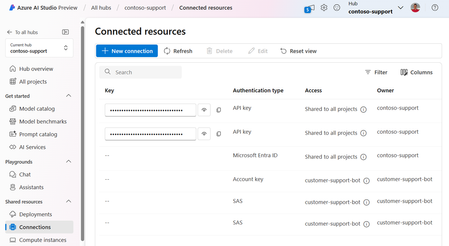
Hubs in Azure AI Studio and Azure Machine help developers to self-serve create project workspaces and access shared company resources without needing an IT administrator's repeated help. Learn how hubs can enable distributed project creation across your organization, while giving IT a centralized resource management experience with controls for security, compute governance and compliance.6.8KViews1like0CommentsUsing Bing with GenAI: from Sales Strategy to Compete Analysis
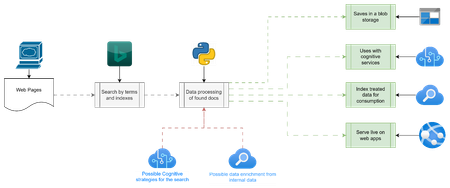
In today's data-driven world, understanding and leveraging data is crucial for maintaining a competitive edge. The integration of Bing as a search engine for extracting data from the internet is transforming how businesses interact with external and internal data sources. This approach not only enriches internal data repositories but also enhances decision-making and operational management processes. Key Highlights: Robust Data Extraction: Establish a sophisticated system for data extraction to access a wealth of information from the internet, crucial for understanding market dynamics and opportunities. Advanced Search Capabilities: Develop an internal data search engine using Bing, enabling rapid and reliable information retrieval to better understand the operational environment. Customized Data Handling: Differentiate between handling external and internal data to optimize data usage — external data for strategic insights and internal data for operational intelligence. Leverage Disruptive Technologies: Utilize Bing combined with generative AI to analyze market shares, customer reviews, and social media, providing deeper insights into market trends and consumer preferences.5.4KViews1like0CommentsGPT-4 Turbo with Vision is now available on Azure OpenAI Service!
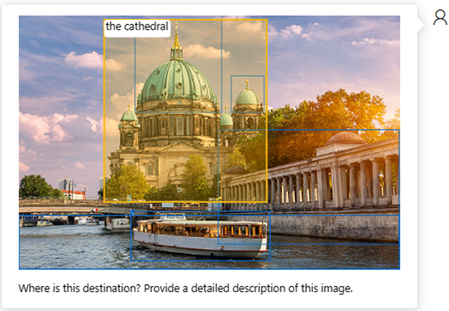
We are excited to announce that GPT-4 Turbo with Vision is now available for public preview on Azure OpenAI Service! This advanced multimodal AI model retains all the powerful capabilities of GPT-4 Turbo while introducing the ability to process and analyze image inputs. This provides the opportunity to utilize GPT-4 for a wider range of tasks, including accessibility improvements, visual data interpretation and analysis, and visual question answering (VQA). All existing Azure OpenAI Service customers now have access to this service. GPT-4 Turbo with Vision can be accessed in the following Azure regions: Australia East, Sweden Central, Switzerland North, and West US. GPT-4 Turbo with Vision + Azure AI Service Additionally, we are releasing curated Azure AI Service enhancements for GPT-4 Turbo with Vision, which introduces an array of advanced functionalities, including: Optical Character Recognition (OCR): Extracts text from images, integrating it with the user's prompt and image to enrich the context. Object grounding: Enhances text responses from GPT-4 Turbo with Vision by identifying and outlining key objects within images. Video prompts: Allows GPT-4 Turbo with Vision to answer questions using the most relevant frames from a video based on the user's prompt. Azure OpenAI Service on your data with images: By combining GPT-4 Turbo with Vision, Azure AI Search, and Azure AI Vision, images can now be added with text data, utilizing vector search to develop a solution that connects with user’s data, enabling an improved chat experience. Example of GPT-4 Turbo with Vision + Azure AI Service (Object grounding) Guide to Deploying GPT-4 Turbo with Vision To deploy GPT-4 Turbo with Vision from the Studio UI, select "GPT-4" and then choose the "vision-preview" version from the dropdown menu. This preview version has a separate quota from the existing GPT-4 versions, which allows you to experiment without affecting your current deployments. Pricing Model Input Output GPT-4 Turbo with Vision 1 $0.01 per 1000 tokens $0.03 per 1000 tokens + Enhanced add-on features for OCR $1.50 per 1000 transactions + Enhanced add-on features for Object Grounding $1.50 per 1000 transactions + Enhanced add-on feature for “Add your Image” Image Embedding $0.10 per 1000 transactions + Enhanced add-on feature for Video prompts integrating Video Retrieval $0.05 per minute for indexing $0.25 per 1000 transactions 2 1 GPT-4 Turbo with Vision pricing explained in detail here. 2 Additional input and output tokens for video prompts: Processing videos will involve the use of extra tokens to identify key frames for analysis. The number of these additional tokens will be roughly equivalent to the sum of the tokens in the text input plus 700 tokens. Tips for Tailoring System Prompts for Enhanced Accuracy and Efficiency Guidelines for Crafting Effective System Prompts with GPT-4 Turbo with Vision To unlock the full potential of GPT-4 Turbo with Vision, it's essential to skillfully tailor system prompt to your specific needs. Here are some guidelines to enhance the accuracy and efficiency of your prompts: Contextual Specificity: For instance, if you're working on image descriptions for a product catalog, ensure your prompt reflects this. A prompt like “Describe images for an outdoor hiking product catalog, focusing on enthusiasm and professionalism” guides the model to generate responses that are both accurate and contextually rich. This level of specificity aids in focusing on relevant aspects and avoiding extraneous details. Task-Oriented Prompts: If your project involves analyzing videos for auto insurance claims, your prompt should be precisely tailored to this task. For example, “Analyze this car damage video for an auto insurance report, focusing on identifying and detailing damage.” This prompt steers the model to concentrate on elements crucial for insurance assessments, thereby improving accuracy and relevancy. Handling Refusals: When the model indicates an inability to perform a task, refining the prompt can be an effective solution. More specific prompts can guide the model towards a clearer understanding and better execution of the task. Prompt Examples for Various Use Cases: Use Case Example System Prompt Image Description "As an AI assistant, provide a clear, detailed sentence describing the content depicted in this image." Image Tagging "Identify and list prevalent tags associated with the content of this image." Defect Detection "Act as a professional defect detector. Compare this test image with a reference image and state 'No defect detected' or 'Defect detected', providing detailed reasoning." Car Insurance Damage Report Writing "Function as a car insurance and accident expert. Extract detailed information about the car's make, model, damage extent, license plate, airbag deployment status, etc., and present the results in JSON format." These guidelines and examples demonstrate how tailored system prompts can significantly enhance the performance of GPT-4 Turbo with Vision, ensuring that the responses are not only accurate but also perfectly suited to the specific context of the task at hand. Preview Note The first version of GPT-4 Turbo with Vision, "gpt-4-vision-preview" is in preview and will be replaced with a stable, production-ready release in the coming weeks. Customer deployments using "gpt-4-vision-preview" will be automatically updated to the GA version of GPT-4 Turbo upon the launch of the stable version. To Get Started, Explore the Following Resources Apply now for access to Azure OpenAI Service Learn more about GPT-4 Turbo with Vision on Azure OpenAI Service AI Studio Quickstart: Get started using GPT-4 Turbo with Vision on your images and videos in Azure AI Studio Azure Open AI Quickstart: Quickstart: Use GPT-4 Turbo with Vision on your images and videos with the Azure Open AI Service Azure Open AI How-To Guide: How to use the GPT-4 Turbo with Vision model on Azure OpenAI Service RAG with GPT-4V Turbo with Vision using your own data: Azure OpenAI on your data with images using GPT-4 Turbo with Vision Use Azure AI Search and GPT-4 Turbo with Vision on your image data (e.g., charts and graphs, like financial reports) using the Retrieval Augmented Generation pattern: GitHub samples repository GPT-4 Turbo with Vision pricing explained in detail: Text and Image tokens Responsible AI: Transparency Note for Azure OpenAI Service54KViews5likes1Comment