codestories
18 TopicsEssential Microsoft Resources for MVPs & the Tech Community from the AI Tour
Unlock the power of Microsoft AI with redeliverable technical presentations, hands-on workshops, and open-source curriculum from the Microsoft AI Tour! Whether you’re a Microsoft MVP, Developer, or IT Professional, these expertly crafted resources empower you to teach, train, and lead AI adoption in your community. Explore top breakout sessions covering GitHub Copilot, Azure AI, Generative AI, and security best practices—designed to simplify AI integration and accelerate digital transformation. Dive into interactive workshops that provide real-world applications of AI technologies. Take it a step further with Microsoft’s Open-Source AI Curriculum, offering beginner-friendly courses on AI, Machine Learning, Data Science, Cybersecurity, and GitHub Copilot—perfect for upskilling teams and fostering innovation. Don’t just learn—lead. Access these resources, host impactful training sessions, and drive AI adoption in your organization. Start sharing today! Explore now: Microsoft AI Tour Resources.
From Multi-Model Chaos to a Governed AI Gateway: Cost Optimization on Azure
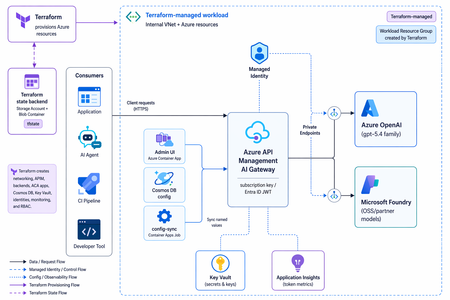
What is Multi-Model Chaos, and what cost and security challenges does it pose? Multi-model chaos describes the sprawl that emerges when an organization rapidly adopts many large language and foundation models—OpenAI, Anthropic, Meta Llama, Mistral, and a long tail of open-source and fine-tuned variants—across teams and applications without any unifying control plane. Instead of a single governed entry point, each team wires its own keys, endpoints, SDKs, and prompts directly to whichever provider it prefers, leaving the enterprise with a fragmented, duplicated, and largely invisible AI estate. On the cost side, this fragmentation makes spend almost impossible to predict or contain, identical workloads run against premium models when cheaper ones would suffice, token consumption goes unmeasured, redundant calls and missing caching inflate bills, and finance teams have no consolidated view to attribute usage back to a team, product, or customer. On the security and governance side, the risks compound: API keys are scattered across code and config files, sensitive or regulated data flows to external endpoints with no data-loss prevention or residency guarantees, prompt-injection and jailbreak attempts go unmonitored, and there is no centralized authentication, rate limiting, auditing, or content filtering. The net effect is an uncontrolled attack surface and a compliance blind spot—precisely the conditions that motivate consolidating model access behind a governed AI gateway. In short, multi-model chaos trades short-term speed for runaway costs and an unmanaged security risk, making a governed AI Gateway essential. What is a Governed AI Gateway, and how do they help reduce cost and improve security? A governed AI gateway is an enterprise control plane built on Azure API Management (APIM) that consolidates every model behind a single, governed endpoint. It unifies Azure OpenAI (the gpt-5.4 family) and Azure AI Foundry (open-source and partner models such as grok-4.3 and DeepSeek-V4-Pro), so consumers reach any of them through one consistent, policy-enforced entry point rather than a tangle of direct connections. Every backend is password-less, authenticated through managed identity, which eliminates scattered API keys. On top of this foundation, the gateway enforces per-consumer model permissions, token-based rate limits, and cost-based budget downgrade—automatically routing teams to more economical models as they approach their spend limits—all administered from a self-service Admin UI. One governed endpoint for every backend. Azure OpenAI and Azure AI Foundry (OSS and partner) models are bundled behind a single governance endpoint. Each backend is reachable only over a private endpoint with key authentication disabled, so APIM authenticates using its own managed identity—no model keys ever live on the gateway. Per-consumer governance, edited live in the Admin UI with no redeployment: Allowed models — a consumer can call only the models explicitly granted to it; anything else returns a 403. Rate limits — per-consumer TPM and token-quota tiers (small / medium / large), returning a 429 once exceeded. Cost budget — a daily USD spend limit; when it is exceeded, requests are automatically downgraded to a cheaper model along a configured ladder, including cross-backend downgrades (e.g. gpt → OSS or OSS → gpt). Self-service Admin UI (React + FastAPI, Entra ID login, gated to an admin group) to issue consumer keys, set model, limit, and budget policies, and review the usage dashboard and request logs. Built-in observability — per-call token metrics, broken down by consumer and model, stream to Application Insights, surfaced through the Admin UI's usage dashboard and a request / blocked & downgrade-event log. Flexible client authentication — an APIM subscription key by default, or an Entra ID JWT (client_auth_mode). How is it different from APIM AI Gateway? APIM already provides useful GenAI gateway primitives: token rate limiting, token-usage metrics, semantic caching, backend routing, endpoint import, authentication, authorization, and monitoring. The difference is that APIM enables the enforcement runtime and policy control point, but not the full operating model required to run a shared, multi-tenant AI platform across teams, models, and budgets. Inside the policy pipeline, APIM remains the load-bearing layer: llm-token-limit enforces per-consumer token-per-minute and quota limits, llm-emit-token-metric streams token usage into our metrics namespace, and standard APIM capabilities handle endpoint exposure, access control, and platform monitoring. The governed AI Gateway adds the governance layer APIM does not provide out of the box: Self-service onboarding — a platform team can issue or revoke consumer keys and manage access from the Admin UI, without raising a pull request or redeploying infrastructure. Per-consumer model entitlements — every consumer has an explicit allow-list of model deployments. The gateway calculates the effective allowed set per request and returns 403 when a caller asks for a model it is not entitled to use. Live configuration without redeployment — entitlements, rate tiers, token quotas, budgets, and downgrade levels live in the configuration store. A sync worker projects those values into APIM named values continuously, so operational changes can take effect without a terraform apply while the policy logic stays version-controlled in IaC. Managed-identity-only, private backends — key-based authentication is disabled on Azure OpenAI and Azure AI Foundry. APIM injects a managed identity token on every backend call, and the backends are reachable only over private endpoints. Cost-based downgrade across backends — when a consumer approaches its budget, the gateway can route to a cheaper model while preserving availability, including cross-backend downgrades between Azure OpenAI and Azure AI Foundry. APIM’s AI gateway is the enforcement runtime while the governed AI Gateway is the platform operating model around it. APIM handles the gateway primitives extremely well, while our governance layer adds identity, self-service administration, entitlement management, live configuration, cost controls, and cross-model routing so teams can safely consume multiple models without creating new cost, security, or compliance sprawl. Solution overview Figure 1 shows the end-to-end architecture of the governed AI gateway. Client applications never talk to the models directly; instead, every request passes through Azure API Management, which acts as the single governed entry point that authenticates callers, applies per-consumer policy, and routes traffic privately to the appropriate model backend. Around this gateway sit the supporting planes for administration, identity, and observability, giving the organization one consistent place to control access, contain cost, and monitor usage across both Azure OpenAI and Azure AI Foundry models. This solution is also completely serverless. Key components: Client / consumer applications — the apps and services that call for model inference, each identified by its own consumer key or Entra ID identity. Azure API Management (the gateway) — the single governance endpoint that handles authentication, allowed-model checks, rate limiting, and cost-based budget downgrade before any request reaches a model. Model backends — Azure OpenAI (the gpt-5.4 family) and Azure AI Foundry (OSS and partner models such as grok-4.3 and DeepSeek-V4-Pro), each reachable only over a private endpoint. Microsoft Entra ID — provides identity for both clients (optional JWT auth) and the gateway's own managed identity used to reach the backends without password credentials. Admin UI (React + FastAPI) — the self-service control plane for issuing consumer keys and setting model, rate-limit, and budget policies. Application Insights — collects per-call token metrics by consumer and model, powering the usage dashboard and request / blocked-event logs. 1: Solution architecture diagram Request flow Authenticate — a client calls the gateway with an APIM subscription key (or an Entra ID JWT) instead of any model key. Authorize the model — APIM checks whether the consumer is permitted to call the requested model; if not, it returns 403. Enforce limits — the gateway applies the consumer's TPM and token-quota tier, returning 429 when the limit is exceeded. Apply the cost budget — if the consumer's daily USD budget is exhausted, the request is automatically downgraded to a cheaper model along the configured ladder. Route to the backend — APIM forwards the request over a private endpoint, authenticating with its managed identity to Azure OpenAI or Azure AI Foundry. Return and record — the model response is returned to the client while per-call token metrics are emitted to Application Insights and surfaced in the Admin UI dashboard and logs. Implement the solution This section describes how to deploy the solution architecture. In this post, you’ll perform the following tasks: Create APIM Create Cosmos DB Create Microsoft foundry with Gpt-5.4, Gpt-5.4-mini, DeepSeek-V4-Pro and Grok-4.3 deployed Create the Admin UI on container apps Create a consumer with an APIM subscription key on the Admin UI Integrate APIM endpoint with Github Copilot chat and Copilot CLI Create a budget and rate limit in the Admin UI Simulate and validate auto downgrade feature Ensure that you have the following prerequisites deployed before moving to the next section An Azure subscription with model quota (Azure OpenAI and, optionally, Azure AI Foundry models). Tools: Git, Terraform ≥ 1.7, Azure CLI, and az login to the subscription. Container images are built remotely in Azure Container Registry, so Docker is not required. VScode and Copilot CLI Deploy the Azure AI Gateway Clone the repository from https://github.com/microsoft/apim-foundry-governance git clone https://github.com/microsoft/apim-foundry-governance git checkout english By default the solution deploys in koreacentral region. Export your custom variables if needed. export location=eastus2 export backend-rg=rg-aigw-tfstate-dev-eastus2 export storage-prefix=staigwtfstate export state-key=ai-gateway-eus2.tfstate Bootstrap the Terraform state backend (once per subscription) This creates an eastus2 resource group + storage account for remote state (Entra auth, public blob access blocked). ./scripts/bootstrap-backend.sh \ --location $location \ --backend-rg $backend-rg \ --storage-prefix $storage-prefix \ --state-key $state-key Set Terraform variables cp infra/terraform.tfvars.example infra/terraform.tfvars # Edit infra/terraform.tfvars: prefix, location, owner, cost_center, apim_publisher_*, budget_* Create the Gateway Core On the first apply, leave worker_image and admin_ui_image empty (default ""). The images don't exist yet, and the worker Job / Admin UI app are count-gated on these variables. cd infra terraform init # If you are moving an existing state from another backend, run `terraform init -migrate-state` instead. terraform apply Build and push the container images with app registrations After the registry is created, build the worker and Admin UI images remotely (no local Docker needed). acr=$(terraform output -raw registry_login_server) reg=$(terraform output -raw registry_name) az acr build --registry $reg --image config-sync-worker:latest ../app/config-sync-worker az acr build --registry $reg --image admin-ui:latest ../app/admin-ui The worker and Admin UI requires entra app registrations for a user to access the frontend. Create the admin security group, BFF API App registrations and SPA public-client app registrations. ./scripts/app-registration.sh Enable the worker and Admin UI From the output above, populate the image references and the three Entra variables from the prerequisites into infra/terraform.tfvars and apply again. worker_image = "<registry_login_server>/config-sync-worker:latest" admin_ui_image = "<registry_login_server>/admin-ui:latest" admin_ui_public = true # external FQDN (still Entra-gated). false = VNet-only admin_group_object_id = "<entra security group object id>" bff_api_audience = "api://<bff app id>" spa_client_id = "<spa app id>" entra_tenant_id = "<tenant id>" CosmosDB Seed configuration Cosmos is private with key auth disabled, so the initial config is seeded from a jumpbox inside the VNet. Default confguration of enable_jumpbox = true in infra/terraform.tfvars triggers Terraform to: provision the jumpbox VM, grant it’s managed identity the Cosmos DB Built-in Data Contributor role (scoped to the config container), and runs a VM run-command that seeds both documents automatically: Global config (id=global) — allowed models + token limits. Per-model pricing (id=pricing) — prompt/completion rates for cost-based budgeting. To seed manually instead (jumpbox connected via Bastion), the same scripts can be run directly: # Global allowed models + limits ./scripts/seed-cosmos-jumpbox.sh https://<cosmos-account>.documents.azure.com:443/ # Per-model pricing (for cost-based budgeting) ./scripts/seed-pricing-jumpbox.sh https://<cosmos-account>.documents.azure.com:443/ Access the AdminUI Update the SPA with your containerapps url spa_app_id="$(az ad app list --display-name "AI Gateway SPA" --query "[].appId" -o tsv)" # spa_client_id fqdn=$(terraform output -raw admin_ui_fqdn) # run from infra/ oid=$(az ad app show --id "$spa_app_id" --query id -o tsv) az rest --method PATCH \ --uri "https://graph.microsoft.com/v1.0/applications/$oid" \ --headers 'Content-Type=application/json' \ --body "{\"spa\":{\"redirectUris\":[\"https://$fqdn\"]}}" Browse to the admin_ui_fqdn, which is also the container apps fqdn. You will need to login via EntraID (Users will need to be added to the Entra group for them to login). Go ahead and register the consumer with a name and issue the API key. The API key is the APIM subscription key and will only be shown once on the UI, so copy and paste it somewhere safe. 2: AI Gateway Consumers and Keys Next, on the left hand tab, click on budgets. This will set the daily budget limit a user is allowed to consume in a day and is also where the model downgrade logic resides. For the purpose of demonstration, set a low budget of $1.8 and select the model priority that you want the downgrade to occur. In this case, gpt-5.4 will be used first, followed by gpt-5.4-mini, DeepSeek then Grok. 3: AI Gateway Budgets Lastly, on the land hand tab, select Rate limits. This sets the amount of tokens a user can consume in a day. It is a daily limit and resets after 24 hours. Select the large tier. 4: AI Gateway Rate Limits Browse to Dashboard, it shows you all the token information, request status codes and group them by consumer and model. You can also view the budget downgrade for a specific user. 5: AI Gateway Captions Integrate endpoint with github copilot chat in vscode In VScode, type “Ctrl + Shift + p” and select “Chat: Manage Language Model”. Select Add Models and choose Azure. 6: Add models toGithubCopilot Chat Follow through the prompts. It will create or edit a chatLanguageModels.json file. Your file should look like this. Take note that you will need to use the /vscode path. [ { "name": "Azure", "vendor": "azure", "models": [ { "id": "gpt-5.4", "name": "gpt-5.4 (APIM)", "url": "https://<REPLACE WITH YOUR APIM ENDPOINT>.azure-api.net/vscode/openai/deployments/gpt-5.4/chat/completions?api-version=2025-01-01-preview", "toolCalling": true, "vision": true, "maxInputTokens": 128000, "maxOutputTokens": 16000, "requestHeaders": { "Ocp-Apim-Subscription-Key": "<REPLACE WITH YOUR SUBSCRIPTION KEY" } } ] } ] Now select the gpt-5.4 (APIM) model and ask it a question. Integrate endpoint with copilot cli As copilot only accepts api-key headers, a separate api is used. Replace and export the following variables before using copilot cli. export COPILOT_PROVIDER_TYPE="azure" export COPILOT_PROVIDER_BASE_URL="<REPLACE WITH YOUR APIM ENDPOINT>" export COPILOT_PROVIDER_API_KEY="<REPLACE WITH YOUR SUBSCRIPTION KEY>" export COPILOT_MODEL="gpt-5.4" export COPILOT_PROVIDER_AZURE_API_VERSION="2025-01-01-preview" export COPILOT_PROVIDER_MODEL_ID="gpt-5.4" You should see a similar response. 7: Integration of APIM to copilot cli Simulate downgrade feature Continue to ask more questions to consume more tokens. Once it hits the 80% cost threshold, you should see that the tag has been switched to “Auto-switch level 1”, meaning it will downgrade to gpt-5.4-mini for future requests. 8: AI Gateway Downgrade Feature Validate by running this command in your terminal with your own endpoints and api-key. curl -sS -i -X POST "https://<REPLACE>.azure-api.net/openai/deployments/gpt-5.4/chat/completions?api-version=2025-01-01-preview" -H "api-key: <REPLACE WITH API KEY>" -H "Content-Type: application/json" -d '{"messages":[{"role":"user","content":"hi"}],"max_completion_tokens":8}' Inspect the headers, you should see that the downgrade level is 1 and the effective model is gpt-5.4-mini despite hitting the same endpoint of gpt-5.4. 9: Model downgrade Conclusion This post started with the problem of multi-model chaos: teams moving quickly with different models, endpoints, SDKs, keys, quotas, and cost profiles, but without a common control plane resulting in ineffective cost control and potential security leaks with model API keys. The governed AI Gateway addresses that by putting Azure OpenAI and Azure AI Foundry behind a single APIM-based entry point, where access, limits, routing, identity, telemetry, and budget behavior can be applied consistently for every consumer. We also walked through how the gateway is different from APIM’s native AI gateway capabilities. APIM provides the enforcement runtime and the GenAI policy primitives, such as token limits, token metrics, semantic caching, and backend routing. The governed AI Gateway builds the operating model around those primitives: self-service onboarding, per-consumer model entitlements, live configuration without redeployment, managed-identity-only private backends, per-call cost telemetry, and cost-based downgrade across model providers. From there, we integrated the APIM endpoint with Github Copilot Chat and Copilot CLI, and validated the downgrade behavior when spend thresholds were reached. The result is not just an AI proxy, but a reusable enterprise pattern for running AI access as a governed platform: developers keep a simple model endpoint experience, while the platform team keeps control over security, cost, observability, and operational change. Overall, this post helps organizations bring multi-model AI usage under one governed entry point, reducing sprawl across endpoints, keys, policies, and cost controls. It also gives platform teams centralized control over model access, rate limits, budgets, telemetry, and private backend access while preserving a simple endpoint experience for developers. References AI gateway capabilities in Azure API Management Policies in Azure API Management Azure API Management policy reference - llm-emit-token-metric Using GitHub Copilot CLI - GitHub Docs AI language models in VS CodeExcited to be at JavaOne 2022 in person!
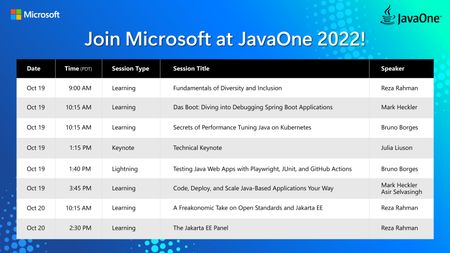
I will be a part of JavaOne’s technical keynote on Day 2 of the conference (Oct 19 at 1:15 PM), where I will talk about how several Microsoft products and divisions run on Java and how we empower Java developers at one of our customer organizations to achieve truly relevant business impact. Below is our line-up of sessions and booth talks. I hope you will join us at JavaOne. I look forward to seeing you there.How To: Retrieve from CosmosDB using Azure API Management
In this How To, I will show a simple mechanism for reading items from CosmosDB using Azure API Management (APIM). There are many scenarios where you might want to do this in order to leverage the capabilities of APIM while having a highly scalable, flexible data store.From Tunisian classroom full of boys to architect for Canadian government: A journey of perseverance
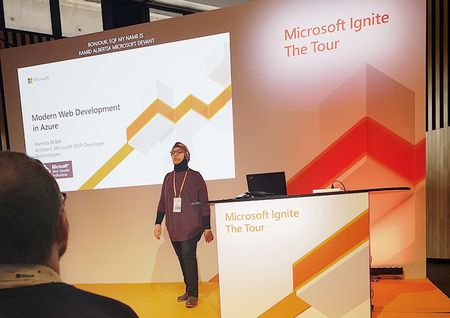
Hamida Rebai Trabelsi is a passionate learner who juggles multiple roles with ease: a senior technology professional at one of Canada’s government agencies, a Microsoft MVP, a mother. Learn more about her.
Postgres as a Distributed Cache Unlocks Speed and Simplicity for Modern .NET Workloads
In the world of high-performance, modern software engineering, developers often face a tough tradeoff: how to achieve lightning-fast data retrieval response rates without adding complexity, sacrificing reliability, or getting locked into specialized, external data caching products or platforms. What if you could harness the power and flexibility of your existing Postgres database to solve this challenge? Enter the Microsoft.Extensions.Caching.Postgres library, a new nuget.org package that brings distributed caching to Postgres, unlocking speed, simplicity, and seamless integration for modern .NET workloads. In this article, we’re going to take a closer look at the Postgres caching store, which introduces a new option for .NET developers planning on implementing a distributed cache, such as HybridCache, paired together with a Postgres database to provide distributed backplane operations. One data platform for multiple workloads Postgres’ reputation for reliability, extensibility, and standards compliance has long been respected, with Postgres databases driving some of today’s largest and most popular platforms. Increasingly developers, data engineers, and entrepreneurs alike all rallying to apply these benefits. One of the most compelling aspects of Postgres is its adaptability: it’s a data platform that can simultaneously handle everything from transactional workloads to analytical queries, JSON documents to geospatial data, and even time-series and vectorized AI search. In an era of specialized services, Postgres is proving that one platform can do it all and do it well. Intrepid engineers have also discovered that Postgres is often just as proficient in handling workloads traditionally supported by other very different technology solutions, such as lake-house, pub-sub, message queues, job schedulers, and session store caches. These roles are all now being powered by Postgres databases, while Postgres simultaneously continues to deliver the same scalable, battle-tested, and mission-critical ACID-compliant core relational database operations we’ve all come to expect. When speed matters most Database-backed cache stores are by no means a new concept; the first version of a database cache library for .NET was made available to developers exploring the nuget.org ecosystem (Microsoft.Extensions.Caching.SqlServer) in June 2016. This library included several impressive features, such as expiration policies, serialization, and dependency injection, making it ideal for multi-instance applications requiring shared cache functionality. It was especially useful in environments where Redis or other cache providers were not available. The convenience of leveraging a transactional database’s usefulness to function as a distributed cache comes with some tradeoffs, especially when compared against services such as Redis or Memcached; in a word: speed. All the features which make your database data durable, reliable, and consistent require precious additional clock cycles and I/O operations, and this “overhead” resulted in performance costs when compared to the alternative memory stores and caching system options. What if it was possible to maintain all those familiar and convenient interfaces for connecting to your database, while simultaneously being able to precisely configure specific tables to throw off the burden of crash consistency and replication logging? What if, for only the tables we selected, we could trade this durability for pure speed? Enter Postgres’ UNLOGGED Tables. Postgres' adaptable performance Another compelling aspect of Postgres databases is the ability to significantly speed up write-performance by bypassing the Write Ahead Log (WAL). The WAL is designed to ensure that data is crash-consistent (and replicable), and writing to your database is comprised of a transparent two-step process: your data is written to your database tables, and these changes are also committed to a separate file to guarantee the data’s persistence. It also happens that in some circumstances, the tradeoff to increase performance can be worth the sacrifice to crash-consistency, especially for short-lived, temporary types of data, like when used as a cache store. This table configuration is scoped to individual tables, which allows for combinations of “logged” and “unlogged” table configurations, both operating side-by-side within the same database instance. The net result: Postgres can provide incredibly performant response times when used as a distributed cache, rivaling the performance of other popular cache stores, while also providing the simplicity, familiarity, and consistency that the Postgres engine naturally offers. HybridCache for your .NET solutions It was this capability*combined with the inspiration from the SQL Server library that inspired the creation of the nuget.org Microsoft.Extensions.Caching.Postgres package. As a longtime .NET developer, I have personally witnessed the incredible evolution of the .NET platform and the amazing growth, enhancements, and improvements to the languages, the tooling, runtimes, and the incredible people behind each of these contributions. The recent addition of HybridCache is especially exciting to consider incorporating into your .NET solutions because it dramatically simplifies the steps required to add caching into your project, while simultaneously linking in-memory cache with a second-level tiered cache service. This seamless integration provides your application with the best of both worlds: blazing fast in-memory retrieval paired with a resilient fail-safe and similarly performant backplane in the event an application instance blinks, scales up/out, etc. Don’t just take my word for it, let’s look at some of the benchmarks between a Redis cache and Postgres database. The tests are comprised of synchronous and async operations across three different sized payloads (128, 1024, and 10240 bytes) for read/write, containing both single and concurrent messages, and at fixed and random positions. The tests are further divided into two types of cache expiration windows: absolute/non-sliding and sliding/relative windows. Consider the output from a suite of benchmarks tests, keeping in mind these results are based on microseconds, meaning 1,000 microseconds equals 1 millisecond: What do these results reveal? In certain respects, there aren’t that many surprises. Bespoke memory-based key-value cache systems like Redis continue to outperform relational databases in terms of pure speed and low latency. What is really exciting to see is that Postgres comes very close to Redis performance for more intensive operations! Finding the right fit for your solution I’m excited to make this Postgres package available to everyone considering distributed caching in their solution designs. The combination of HybridCache paired with your choice of backplane will allow you to select the right technologies and tools that are best suited for your solution. Our GitHub repo also contains a variety of sample applications, which demonstrate how to configure and use HybridCache together with the Postgres distributed cache library within a Console app service, as well as an Aspire-based sample Web API. I encourage you to explore these examples and share your thoughts and ideas. I look forward to any feedback you may have to share about the Microsoft.Extensions.Caching.Postgres package. Keep advancing, keep improving, and keep contributing to be a “builder” and an active part of our incredible community! * This package extension is highly configurable, and you can choose whether to enable/disable bypassing the WAL for your cache table, along with several other options that can be adjusted for your particular use case.
Optimizing Change Data Capture (CDC) on PostgreSQL for Enhanced Data Management
Managing the ODS layer becomes crucial, especially when source systems lack physical primary keys. An Online Data Store (ODS) helps offload OLTP workloads by shifting certain queries to alternative databases. While some customers leverage secondary servers for this purpose, database replication in an active-active mode can enhance efficiency. Typically, customers attempt to use secondary servers to reduce the primary servers' workload. Database replication is an effective strategy in these cases, operating in an active-active mode to ensure operational efficiency. Microsoft Fabric offers a mirroring option on OneLake to optimize resource utilization when moving data from OLTP databases such as SQL Server. This feature allows for data replication without delay, ensuring seamless data availability. The need for such a feature in PostgreSQL environments is evident, especially for customer scenarios. For instance, customers running multiple PostgreSQL OLTP systems aim to enable their ODS and Data Warehouse (DW) on Fabric in both real-time and near real-time. This approach not only reduces workloads on PostgreSQL OLTP systems but also facilitates downstream analytics. However, it's important to note that this functionality is currently available for PostgreSQL in Private Preview only. This article explores the options we have until this option becomes generally available. Identifying Change Data Capture (CDC) on PostgreSQL WAL2JSON Utility: This method utilizes PostgreSQL's Write-Ahead Logging (WAL) to capture data changes in JSON format. It provides flexibility for custom processing and error handling but requires manual intervention for WAL file cleanup and operates in near real-time. RTI (Debezium) CDC Connector: A Fabric-integrated solution that automates data capture from PostgreSQL to Eventhouse using Eventstream. It ensures efficient data movement by storing changes in a structured payload format, including metadata such as operation type and transaction details. However, it requires PostgreSQL administrators to manage WAL slots for optimal performance. Comparison of CDC Options CDC Method Description Pros Cons RTI CDC Connector Efficiently moves data from PostgreSQL to Fabric (Eventstream/Eventhouse). Stores data in a payload format, capturing database type, operation, and changed record. Automated, integrates well with Fabric, captures full change history Requires PostgreSQL team management for WAL slot cleanup WAL2JSON Method Provides programmatic control for error tracking and WAL file cleanup. Operates in near real-time. More direct control, flexible error handling Requires manual intervention, slightly delayed processing Approaches for Data Management Truncate and Load (Direct Source Connection) Establish a direct connection to the source tables in PostgreSQL for efficient data extraction. Truncate and reload tables in the Silver layer to maintain data integrity and consistency. Implement a logging mechanism in the Landing table to ensure modifications are accurately recorded and traceable. Despite initial resistance from the Source PostgreSQL team, increasing workloads on PostgreSQL is necessary to enhance performance and meet project goals. Adding a Row ID Column in the Source Table A row ID column is essential to uniquely identify records and facilitate necessary deletions and insertions. However, the Source Systems have not approved this modification, limiting our ability to implement this approach. Using Transaction ID in PostgreSQL Transaction IDs are inconsistent across operations and may overlap with other database transactions. Due to this inconsistency, they cannot be reliably used for tracking changes. Truncate and Load Using the Landing Table Select distinct records with the latest timestamp from the Landing table and truncate/load them into the Silver layer. Implementation Strategy: Develop two separate procedures, one for tables with a primary key and another for tables without a primary key. Move non-primary key tables to primary key-based tables once key columns become available, as determined by respective table owners. Performance Consideration: Large tables may take significant time to process. Current Outcome: This approach has not yielded the expected results. Replica Identity FULL Approach for only Non Primary key tables REPLICA IDENTITY FULL is enabled for Tables with no primary in Postgre. This helps in capturing data for all columns in WAL log irrespective of if they are changed or not. Sample WAL record: Retrieve old record details from the Before Values JSON, use them for deletions, and insert the updated records into the table. When key columns are unavailable, generate a hash key for the "before values" and use it to identify and delete corresponding records in the target table. To optimize performance, an additional hash key column can be created in the target table, reducing delete operation times. Primary key tables will not use hash key columns & Non-primary key tables will incorporate hash key columns. It is assumed that the application layer will send accurate updates to prevent duplicate records. Considerations: Logging Overhead: Increased Write-Ahead Log (WAL) file generation may impact performance and storage. ETL Recommendation: The Product Team recommends an Extract, Transform, Load (ETL) approach as the preferred solution. Bronze-to-Silver Loading: Re-evaluate the strategy once the Mirroring feature becomes available, as it will be essential for this implementation. Performance Impact: Setting Replica Identity to FULL will increase WAL size and add logging overhead, potentially affecting database performance. Data Integrity: The ETL process must ensure accurate change tracking to maintain data integrity. Testing: Conduct thorough staging environment testing to assess performance implications and validate the replication process. Conclusion Adding a Row ID column (Option 2) is the recommended approach, as it allows precise identification of records. However, if modifying source tables is not feasible, using Replica Identity Full (Option 5) is a viable alternative despite its impact on performance and storage. Establishing a Standard Operating Procedure (SOP) in collaboration with the source system to identify and utilize primary keys or unique keys whenever available will significantly enhance the overall efficiency and accuracy of the process. References Debezium for PostgreSQL Documentation Mirroring Azure Database for PostgreSQL Flexible Server in Microsoft Fabric Add PostgreSQL Database CDC source to an eventstream