cm current branch
157 Topics2609 issue with Reporting Services Point
I updated our Config Manager site last night to version 2609 and I'm seeing an issue with the Reporting Services Point. Every minute in the srsrp.log I'm getting the below error (I replaced the actual server name with Server FQDN), yet reporting services is functioning perfectly fine. I tried removing and re-adding the role this morning and it went right back to this error. The role is functioning properly and everything else that gets written in this log before these lines seems normal. This seems like it may be a bug. (!) InitializeSrsWhenNeeded error = The system cannot find the file specified. Failures reported during periodic health check by the SRS Server (Server FQDN).769Views2likes11Comments
MCM ODBC Error NULL values are not allowed in a column
Hello, I'm facing an error when configuring update for download and installation : [23000][515][Microsoft][ODBC Driver 18 for SQL Server][SQL Server]Cannot insert a NULL value into the ‘IsLatest’ column in the ‘CM_MAB.dbo.CI_ConfigurationItems’ table. This column does not accept NULL values. INSERT failed Need help please. have emergency updates to install82Views0likes1Comment
Latest ODBC Driver 18 for SQL (18.7.1.1) breaks SCCM Site Server > SQL connectivity
We have an automated update configured for ODBC Driver 18 for SQL which kicked in last night and took our install on the site server from 18.6.2.1 to 18.7.1.1 which seems to have completely broken Site Server -> SQL server connectivity. Rolling back to 18.6.2.1 and restarting the Site Server is the fix (for now) but I'm sure our Information Security team will be asking to get patched again soon. For info, the hman.log shows some threads stopping and then just goes dead when the update is applied and the Application event log is filled with "Complus" errors all related to the msodbcsql18.dll... The system has called a custom component and that component has failed and generated an exception. This indicates a problem with the custom component. Notify the developer of this component that a failure has occurred and provide them with the information below. Component Prog ID: 0[ODBC][C:\Windows\system32\msodbcsql18.dll] Method Name: IDispenserDriver::CreateResource Process Name: sitecomp.exe Exception: c0000005 Address: 0X00007FFA85FD2C10 How do we raise this with Microsoft? Has anyone else seen the same? Site Server is on Server 2019 (patched monthly). Our SCCM site is version 2603. Site Server and SQL DB on two different servers. Running E-HTTP mode. I note that something similar happened not too long ago... https://learn.microsoft.com/en-us/troubleshoot/mem/configmgr/setup-migrate-backup-recovery/update-odbc-18611-causes-issues-configmgr Thanks Stuart9.9KViews13likes17Comments
Upgrade task sequence skipping locations and failing
Upgrade task sequence using Operating System upgrade skipping http(s) paths Hi All SCCM Experts, I have an Upgrade to Windows 11 25H2 Task sequence which was working fine until lately. Now all devices on other networks outside my IT network. When it reaches the upgrade operating system step fails and does not download the content. Everything is fine with iis, and package is distributed successfully. The TS was working fine 3 weeks ago. I had success with a collection of devices. Boundary groups are still the same fine too. CAS log is fine no issues either. There is lots of disk space and the cache max size is good too. 1 primary site server which is the DP. *Has anybody encountered this happening with an in place upgrade ts before? If so what was the fix? It should not be skipping and the content should start to download because it does resolve and see the OS Upgrade Image package. The message in smsts.log is as follows: Package location: \_SMSTSCM100465, ://\*\*\*\*\*\*/sms\_dp\_smspkg$/cm100465,https://\*\*\*\*\*/ccmtokenauth\_sms\_dp\_smspkg$/cm100465 OSDUpgradeWindows 01/10/2026 09:06:18 28116 (0x6DD4) Skipping http(s) path: :/\*\*\*\*\*\*/sms\_dp\_smspkg$/cm100465 OSDUpgradeWindows 01/10/2026 09:06:18 28116 (0x6DD4) Skipping http(s) path: ://\*\*\*\*\*\*\*/ccmtokenauth\_sms\_dp\_smspkg$/cm100465 OSDUpgradeWindows 01/10/2026 09:06:18 28116 (0x6DD4)336Views0likes5Comments
MCM V2609 - Release Date?
Everything seems to have gone quiet about Version 2609. It was due for release this month and the month is almost over. Just wondering if any info on when it might be making an appearance? Just finishing up our migration to W11, so finally have time to upgrade from the old version we are running, so would like to get it on ASAP.325Views1like1CommentWinPE network adapter only works after manual drvload, despite driver present in SCCM boot image
Below are three sanitised versions suitable for an SCCM community forum. They retain the technical evidence needed for troubleshooting without disclosing internal server names, domains, IP addresses, MAC addresses, package IDs, or the organisation’s identity. Hi, I am building an SCCM OSD environment and have encountered an issue where the wired network adapter is not initialised automatically after WinPE loads. Environment Microsoft Configuration Manager Current Branch 2603 Current Windows ADK and WinPE add-on x64 WinPE boot image PXE-enabled Distribution Point Lenovo ThinkBook 14-IIL, Type 20SL Realtek PCIe GbE network adapter Realtek driver: rt640x64.inf Driver version: 10.43.723.2020 Symptoms The device successfully: Contacts the correct PXE server Downloads the x64 boot image Starts WinPE Reaches the Configuration Manager screen However, the Task Sequence Wizard does not continue. The task-sequence log shows that WinPE repeatedly fails to download the PXE variable file from the PXE server: Unable to download PXE variable file. Exit code=14. Failed to download PXE variable file after 6 retries. PxeGetPxeData failed with 0x8004016c. Running ipconfig at this point shows no active Ethernet adapter. Troubleshooting completed I have: Imported the Realtek PCIe GbE driver into SCCM Added the driver to the x64 boot image Confirmed the driver is listed under the boot image’s Drivers tab Reloaded the boot image using the current Windows ADK Updated the Distribution Point Confirmed the boot image is distributed successfully Confirmed the PXE copy of the WIM has a current timestamp Mounted the distributed WIM and confirmed the driver is present: Driver: oem5.inf OriginalFileName: rt640x64.inf ProviderName: Realtek ClassName: Net Version: 10.43.723.2020 The driver does not appear to bind or initialise automatically during WinPE startup. Manual workaround If I copy the complete Realtek driver folder to a USB drive and run: drvload "D:\LAN_V02\rt640x64.inf" wpeutil InitializeNetwork`` The driver loads successfully, the device receives a valid DHCP address, and it can reach the SCCM server. The task sequence then proceeds successfully if the driver is loaded before the PXE variable-file retries expire. Question Why would a network driver work correctly when loaded manually with drvload, but not initialise automatically when the same driver is confirmed as present in the distributed WinPE boot image? Is there a recommended way to make this driver load automatically that will scale across multiple laptop and desktop models? I would prefer to avoid: A model-specific prestart command Manually loading drivers from USB Adding complete model driver packs to the boot image Any advice on WinPE driver ranking, Plug and Play initialisation, driver versions, or recommended SCCM boot-image practices would be appreciated.298Views0likes1CommentSCCM Application Model: Which WMI Properties and Classes Correspond to Software Center Tab Fields?
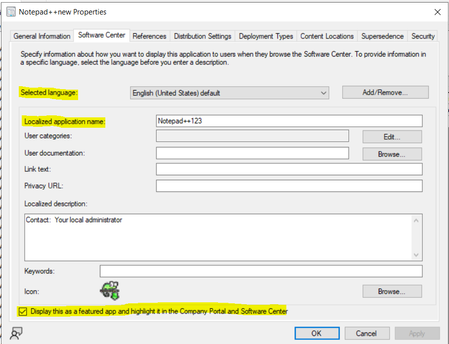
Service: Microsoft Configuration Manager (SCCM / MECM) Scenario: I am working with the Application Model and need to identify the underlying SCCM/WMI property names and associated class names for several fields displayed on the Software Center tab of an Application. Specifically, I am looking for the properties and classes corresponding to the following fields: Selected Language Localized Application Name Display this as a featured app and highlight it in the Company Portal and Software Center Environment: Microsoft Configuration Manager (Current Branch) Application Model What I am looking for: The SCCM/WMI property name associated with each field. The SCCM class name (SMS Provider class) where each property is stored. If applicable, the related SDK object path or SQL view that exposes these values. Troubleshooting Performed: I reviewed the Configuration Manager SDK documentation and application-related classes but could not determine the exact property-to-UI mapping for these Software Center settings. Supporting Material: A screenshot of the Software Center tab highlighting the fields is attached. Could someone help identify the corresponding WMI properties and classes for these settings?190Views0likes0CommentsConfiguration Manager manifest synchronization failing since 8 July 2026
Has anyone else experienced Configuration Manager Updates and Servicing synchronization failures since 8 July 2026? We have three independent Microsoft Configuration Manager hierarchies: Test environment Production T0 environment Production T1 environment All three started showing the same SMS_DMP_DOWNLOADER error during the last three days. The affected request is sent to: https://sccm.manage.microsoft.com/SCCMConnectedService.svc/Manifest Configuration Manager builds a hierarchy-specific request containing the Tenant, Version, Ring, and Branch parameters. However, the endpoint now returns only: OK The resulting file is: ConfigMgr.Update.Manifest.cab Size: 2 bytes Hex: 4F 4B Content: OK Because this is not a valid signed CAB file, dmpdownloader.log records: manifest.cab (http response) size is 2 Error in verifying the trust of file ConfigMgr.Update.Manifest.cab' WARNING: Failed to call IsFileTrusted WARNING: Failed to download and verify the manifest.cab. We cant get info in Updates and Servicing mode.484Views0likes2CommentsExisting required application deployments policy is not sent to devices
I have couple hundred applications in SCCM/MCM that are set to required and whenever there is a new device is built, all these required applications automatically get installed. I am on 2503 and 5 days ago i started seeing this issue. But if modify that deployment with current date and time then the application gets deployed right away if i run Application Deployment evaluation cycle. I also tested by deleting the existing deployment and created a new required deployment and run Application Deployment evaluation cycle then the application installs right away. The problem seems like the Primary server is not sending the policy to the client for existing deployments. The application compliance that we see for every deployment under Monitoring for all the devices moved to Error with Success. Not sure why this is happening. All these changes i noticed in the last one week. A week ago all these Already Compliant and Success status device count is under Success tab. Let me know if you have any suggestions.1.1KViews0likes6Comments
Updates Not Installing by Install Deadline
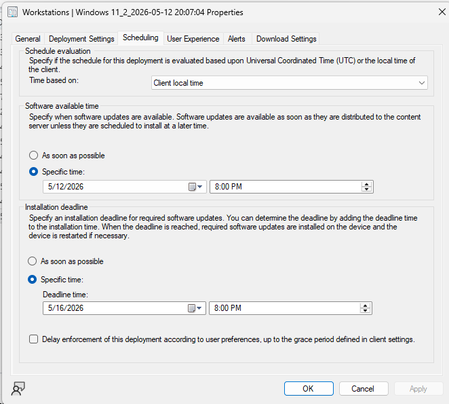
Hello all! We have an organization with about 12,000 Windows 11 Workstations. I'm noticing that even though install deadline is set, and updates are allowed to be installed before install deadline hits, we are noticing in Software Center that updates say "will install after _____" (deadline date). How can I change this? I want updates to install during the maintenance window as well as a reboot. What am I missing? Connor481Views0likes2Comments