cm 2012
25 TopicsMicrosoft Patching is not working until User logon to the newly imaged device
Hi All, I have a customer that they have two separate SCCM and WSUS environments in the same domain and they use SCCM for OS imaging and WSUS for patch updates. The problem is end user hast to logon to the device after imaging the OS using SCCM to kick start the patching process from WSUS. My client's understanding is that it should work without user logon to the device since GPO targeted to all authenticated users. Please also note that the computer objects and other settings are working without any issues. I would appreciate if anyone come across such a behavior and there is any workaround that we can do kick start the patching regardless of user login or is this behavior by design? Thanks, Dilan634Views0likes0Comments
PKI certificate - Management Points IIS
Hi There I'm currently setting up PKI and was wondering in regards to the Configuration Manager IIS Certificate. I have two management points one on the Primary Server (e.g CMPrimary01.contoso.com) and another management point on another server (e.g. CMMP01). I do the following: On CMPrimary01 Expand Personal > Certificates Right Click Certificates > All Tasks > Request New Certificates Before you begin > Click Next Click "Active Directory Enrollment Policy" > Next Select CM DP Certificate and CM IIS Servers Certificate Under CM IIS Server Certificate click - More information required to enroll for this certificate. Click here to configure settings Under Alternative name, select Type = DNS, Value = CMPrimary01.contoso.com and CMPrimary01 and click add. Do I add in the DNS value as well CMMP01 and CMMP01.contoso.com> Do I need to add the certificates as well on CMMP01? THanks979Views0likes0CommentsOne year of support remaining for System Center 2012 Configuration Manager
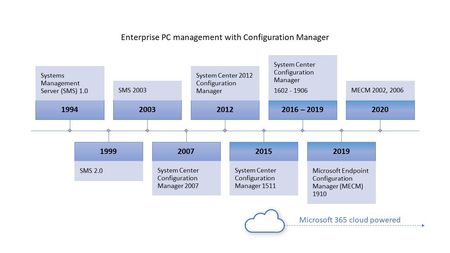
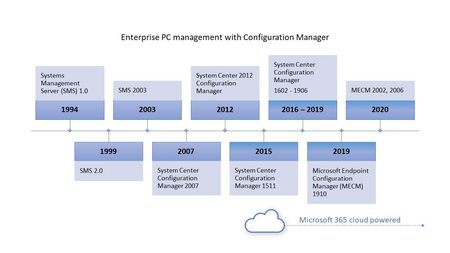
This post is a reminder that there is only 1 year remaining until System Center 2012 Configuration Manager is no longer supported. We recommend that you upgrade your Configuration Manager 2012 and Endpoint Protection 2012 infrastructure as soon as possible to the latest version of Microsoft Endpoint Configuration Manager.13KViews0likes0Comments
Tenant attach - 401 error
Hi, I have recently added Tenant attach to my SCCM server. One PC has successfully added into Intune, but all remote options are disabled saying "Device is blocked or unapproved in MECM". On checking both CMGatewayNotificationWorker and CMGatewaySyncUploadWorker logs, I get a 401 error: <![LOG[Worker CMGatewaySyncUploadWorker failure]LOG]!><time="16:06:46.8307671" date="3-22-2021" component="SMS_SERVICE_CONNECTOR_CMGatewaySyncUploadWorker" context="" type="3" thread="153" file=""> <![LOG[Exception details:]LOG]!><time="16:06:46.8307671" date="3-22-2021" component="SMS_SERVICE_CONNECTOR_CMGatewaySyncUploadWorker" context="" type="3" thread="153" file=""> <![LOG[[Critical][CMGatewaySyncUploadWorker][0][System.Net.WebException][0x80131509] The remote server returned an error: (401) Unauthorized. at Microsoft.ConfigurationManager.ServiceConnector.ExtensionMethods.<GetResponseAsync>d_ 13.MoveNext() --- End of stack trace from previous location where exception was thrown --- at System.Runtime.ExceptionServices.ExceptionDispatchInfo.Throw() at System.Runtime.CompilerServices.TaskAwaiter.HandleNonSuccessAndDebuggerNotification(Task task) at Microsoft.ConfigurationManager.ServiceConnector.ExtensionMethods.<GetResponseAsync>d 11.MoveNext() --- End of stack trace from previous location where exception was thrown --- at System.Runtime.ExceptionServices.ExceptionDispatchInfo.Throw() at System.Runtime.CompilerServices.TaskAwaiter.HandleNonSuccessAndDebuggerNotification(Task task) at Microsoft.ConfigurationManager.ServiceConnector.ExtensionMethods.<GetResponseAsync>d 10.MoveNext() --- End of stack trace from previous location where exception was thrown --- at System.Runtime.ExceptionServices.ExceptionDispatchInfo.Throw() at Microsoft.ConfigurationManager.ServiceConnector.DeltaUploadWorkerBase`1.<ProcessRequestQueueAsync>d 31.MoveNext() --- End of stack trace from previous location where exception was thrown --- at System.Runtime.ExceptionServices.ExceptionDispatchInfo.Throw() at Microsoft.ConfigurationManager.ServiceConnector.DeltaUploadWorkerBase`1.<ProcessRequestQueueAsync>d 31.MoveNext() --- End of stack trace from previous location where exception was thrown --- at System.Runtime.ExceptionServices.ExceptionDispatchInfo.Throw() at System.Runtime.CompilerServices.TaskAwaiter.HandleNonSuccessAndDebuggerNotification(Task task) at Microsoft.ConfigurationManager.ServiceConnector.DeltaUploadWorkerBase`1.<DoWorkAsync>d 23.MoveNext() --- End of stack trace from previous location where exception was thrown --- at System.Runtime.ExceptionServices.ExceptionDispatchInfo.Throw() at System.Runtime.CompilerServices.TaskAwaiter.HandleNonSuccessAndDebuggerNotification(Task task) at Microsoft.ConfigurationManager.ServiceConnector.AadServiceConnectorWorker.<DoWorkAsync>d 16.MoveNext() --- End of stack trace from previous location where exception was thrown --- at System.Runtime.ExceptionServices.ExceptionDispatchInfo.Throw() at System.Runtime.CompilerServices.TaskAwaiter.HandleNonSuccessAndDebuggerNotification(Task task) at Microsoft.ConfigurationManager.ServiceConnector.ServiceConnectorWorkerBase.<ExecuteAsync>d_75.MoveNext() --- End of stack trace from previous location where exception was thrown --- at System.Runtime.ExceptionServices.ExceptionDispatchInfo.Throw() This has been setup for around 5 hours, with the error persisting through out. I have checked the pre-requisites and these are met (that I believe). Any other things to have a look at? Some Policies are not syncing in Intune, so this may be linked. Any help is appreciated Thanks Conor1.2KViews0likes0CommentsSystem Center 2012 Configuration Manager is Approaching End of Support
On July 12, 2022, System Center 2012 Configuration Manager and System Center 2012 Endpoint Protection will reach end of support. We recommend that you upgrade your Configuration Manager 2012 and Endpoint Protection 2012 infrastructure as soon as possible to the latest version of Microsoft Endpoint Configuration Manager.19KViews4likes0CommentsVideo Tutorial: App-V 5.0 Client - Application Deployment Part 14
Hello everyone, here is part 14 of a series focusing on Application Deployment in Configuration Manager. This session discusses how ConfigMgr together with App-V 5.0, work to deploy virtualized applications, including the use of virtual environments (App-V 5.0 connection groups).8KViews0likes0CommentsVideo Tutorial: App-V 5.0 Sequencer - Application Deployment Part 13
Hello everyone, here is part 13 of a series focusing on Application Deployment in Configuration Manager. This session focuses on the App-V 5.0 sequencer and how it can be used to sequence packages to run in the App-V virtual environment.7.2KViews0likes1CommentVideo Tutorial: App-V Overview - Application Deployment Part 12
Hello everyone, here is part 12 of a series focusing on Application Deployment in Configuration Manager. This session presents an overview of App-V, discussing what App-V is, it's benefits and the components of a standalone environment.7.9KViews0likes0CommentsVideo Tutorial: Clients and Applications Behind the Scenes - Application Deployment Part 10
Hello everyone, here is part 10 of a series focusing on Application Deployment in Configuration Manager. This session continues to focus on the client and walks through the detailed flow of events that takes place when a sample application is installed.4.5KViews0likes0Comments