cloud platform security
23 TopicsModernizing Terraform Pipelines on Azure: OIDC Federation for GitHub Actions and Azure DevOps
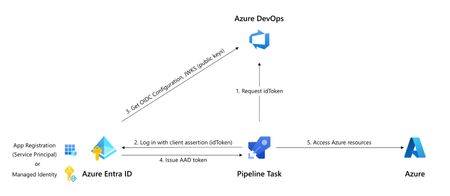
The secret nobody wants to rotate Most Terraform-on-Azure pipelines we see still authenticate the same way they did three years ago. A long-lived ARM_CLIENT_SECRET sitting in GitHub Actions or Azure DevOps, set once, copied around, and rotated only when something breaks. It's the most ignored credential in the cloud, and statistically the most likely one to leak. A developer screenshots a variable group. A pipeline log echoes a value. A fork inherits a secret. Or the secret simply expires on a Friday evening and takes production deployments with it. Workload Identity Federation (WIF) makes this whole class of problem go away. The pipeline mints a short-lived token at runtime, exchanges it for an Azure access token via Microsoft Entra, and never touches a secret. GitHub Actions has supported it since 2021. Azure DevOps service connections went GA with WIF in February 2024. The azurerm Terraform provider has supported it since v3.7. This post walks through the pattern end-to-end, for both GitHub Actions and Azure DevOps, the way I've rolled it out across multiple customer estates. How the exchange actually works Before any YAML, it helps to picture what's happening: The CI system (GitHub or ADO) signs a short-lived JWT describing exactly what's running- which repo, which branch, which environment, which service connection. The pipeline sends that JWT to Microsoft Entra ID. Entra checks it against a federated identity credential you've configured on a managed identity or app registration. The iss, sub, and aud claims must match case-sensitively. If it matches, Entra returns an Azure access token valid for the duration of the job. Terraform uses it. The job ends. The token expires. Nothing persists. The token is bound to a specific subject like repo:contoso/platform:environment:prod or sc://contoso/platform/azure-prod. It can't be reused from another repo, branch, or pipeline. Recommended Architecture A few choices that usually hold up in production: Decision Choice Identity type User-assigned managed identity (UAMI), not app registration Identity granularity One UAMI per environment (not per pipeline) Trust scope Pinned to the environment claim, not the branch RBAC scope Resource group, not subscription Remote state OIDC + use_azuread_auth = true, shared key access disabled Why UAMIs? They live in your subscription, don't need Application Administrator rights to manage, and follow the lifecycle of the resource group they belong to. Why one per environment? Pipeline-per-identity explodes into hundreds of identities. Environment-per-identity maps cleanly to deployment scopes. Part 1 - GitHub Actions Step 1: Create the identity and federate it Two commands per environment. That's it. az identity create -g rg-platform-identity -n id-tf-prod -l eastus az identity federated-credential create \ --name github-prod \ --identity-name id-tf-prod \ --resource-group rg-platform-identity \ --issuer https://token.actions.githubusercontent.com \ --subject repo:contoso/platform:environment:prod \ --audiences api://AzureADTokenExchange Repeat for nonprod. No secret is created anywhere. Step 2: Wire it up in GitHub In repo Settings → Environments, create nonprod and prod. On prod, add required reviewers and a branch rule restricting deployments to main. Then add three environment variables (not secrets - these aren't sensitive): AZURE_CLIENT_ID, AZURE_TENANT_ID, AZURE_SUBSCRIPTION_ID. The workflow itself stays small: permissions: id-token: write contents: read jobs: apply: runs-on: ubuntu-latest environment: prod env: ARM_USE_OIDC: "true" ARM_CLIENT_ID: ${{ vars.AZURE_CLIENT_ID }} ARM_TENANT_ID: ${{ vars.AZURE_TENANT_ID }} ARM_SUBSCRIPTION_ID: ${{ vars.AZURE_SUBSCRIPTION_ID }} steps: - uses: actions/checkout@v4 - uses: hashicorp/setup-terraform@v3 - run: terraform init && terraform apply -auto-approve Three things make this secure: id-token: write is the only elevated permission, and it doesn't grant write access to anything in GitHub, it just lets the runner mint a JWT. The environment: line picks the right AZURE_CLIENT_ID and drives the sub claim. The federation refuses anything else. No azure/login step is needed for Terraform. The azurerm provider reads GitHub's OIDC environment variables automatically. Part 2 - Azure DevOps The model is identical. The mechanics are different. ADO offers two creation paths for a WIF service connection: automatic (it creates an app registration for you) and manual (you bring your own UAMI). For platform teams, manual + UAMI is almost always the better choice to ensure identity lives where governance lives. The flow is a small dance between the two portals: In Azure DevOps, create a new ARM service connection → choose Workload Identity Federation (manual) → fill in your UAMI's client ID, tenant ID, and subscription. Save as draft. ADO shows you an issuer URL and a subject identifier. In Azure, on the UAMI, add a federated credential using the values ADO showed you. The subject looks like sc://contoso/platform/azure-prod. Back in ADO, click Verify and save. In the pipeline, the service connection only "activates" if a task in the job loads it. The simplest way is the AzureCLI@2 task: - task: AzureCLI@2 inputs: azureSubscription: azure-prod # the WIF service connection scriptType: bash scriptLocation: inlineScript inlineScript: | terraform init && terraform apply -auto-approve env: ARM_USE_OIDC: "true" ARM_CLIENT_ID: $(AZURE_CLIENT_ID) ARM_TENANT_ID: $(AZURE_TENANT_ID) ARM_SUBSCRIPTION_ID: $(AZURE_SUBSCRIPTION_ID) ARM_ADO_PIPELINE_SERVICE_CONNECTION_ID: $(SERVICE_CONNECTION_ID) SYSTEM_ACCESSTOKEN: $(System.AccessToken) SYSTEM_OIDCREQUESTURI: $(System.OidcRequestUri) For teams converting dozens of legacy connections, the Azure DevOps team published a PowerShell helper that walks every ARM service connection in a project and converts them in place. There's a 7-day rollback window on each connection, which makes the migration genuinely low-risk. Don't forget the state file The Terraform state is your real blast radius. With OIDC, it's almost free to lock it down too. The same UAMI can read and write blob data without the storage account key: backend "azurerm" { resource_group_name = "rg-tfstate" storage_account_name = "sttfstateprodeastus" container_name = "platform-prod" key = "platform.tfstate" use_oidc = true use_azuread_auth = true } Grant the UAMI Storage Blob Data Contributor on the container (not the account), disable shared key access on the storage account, and you've removed the last secret in the pipeline. RBAC and break-glass Federation removes a credential, not a privilege. A few habits worth keeping: Scope role assignments to resource groups, not subscriptions. The whole point of federation is that scoping is now trivially easy. Use Role Based Access Control Administrator instead of User Access Administrator if your Terraform creates role assignments. It's a more recent, narrower role. Have a documented break-glass. If GitHub or ADO has a token-service incident, you still need a path to ship a hotfix. A single hardware-key-protected emergency app registration in a separate identity boundary works well, audited monthly. Monitor sign-ins. Every federated exchange shows up in Entra sign-in logs as a service principal sign-in. Pipe these to Sentinel and alert on anomalies like sign-ins outside expected hours, or from IPs outside GitHub's published ranges. The errors you will hit (and what they really mean) Symptom What it actually is AADSTS70021: No matching federated identity record found Case-sensitive mismatch in iss, sub, or aud. Almost always a trailing slash or a capitalised character AADSTS700016: Application not found in directory Wrong client ID or tenant. Not a federation problem 403 on a resource even though token exchange worked Federation is fine. Your RBAC isn't. Check the exact scope Unable to determine OIDC token (ADO) No task in the job loaded the service connection. Add an AzureCLI@2 step Works on main, fails on tags You pinned sub to a branch ref. Add a second federated credential for tags, or move to environment-based scoping Migrating without a maintenance window You almost never get to do this on a greenfield repo. The order that has worked for me on legacy estates: Create the new UAMI alongside the old service principal, with the same role assignments. Federate one canary pipeline. Verify it deploys equivalently. Cut over pipelines in waves, lowest-risk environment first. Once a full release cycle passes cleanly, disable the old SP's secret. Wait another cycle. Then delete the SP entirely. Add a CI gate that fails any new pipeline introducing ARM_CLIENT_SECRET. The old and new auth methods coexist on the same subscription throughout. There's no hard cutover and no maintenance window, just a steady drift toward zero secrets. Wrapping up If you do nothing else after reading this, do one thing: search your CI variable groups for ARM_CLIENT_SECRET. Every result is an outage or a breach waiting to happen. Federation is one of those rare changes that's both more secure and less work to operate. Once you've set it up, you stop thinking about credential rotation, secret expiry, and quarterly access reviews for service principals. The pipeline simply runs, and the audit trail is in Entra where it belongs. That's a good trade.1.7KViews17likes10CommentsDefending the cloud: Azure neutralized a record-breaking 15 Tbps DDoS attack
On October 24, 2025, Azure DDOS Protection automatically detected and mitigated a multi-vector DDoS attack measuring 15.72 Tbps and nearly 3.64 billion packets per second (pps). This was the largest DDoS attack ever observed in the cloud and it targeted a single endpoint in Australia. By utilizing Azure’s globally distributed DDoS Protection infrastructure and continuous detection capabilities, mitigation measures were initiated. Malicious traffic was effectively filtered and redirected, maintaining uninterrupted service availability for customer workloads. The attack originated from Aisuru botnet. Aisuru is a Turbo Mirai-class IoT botnet that frequently causes record-breaking DDoS attacks by exploiting compromised home routers and cameras, mainly in residential ISPs in the United States and other countries. The attack involved extremely high-rate UDP floods targeting a specific public IP address, launched from over 500,000 source IPs across various regions. These sudden UDP bursts had minimal source spoofing and used random source ports, which helped simplify traceback and facilitated provider enforcement. Attackers are scaling with the internet itself. As fiber-to-the-home speeds rise and IoT devices get more powerful, the baseline for attack size keeps climbing. As we approach the upcoming holiday season, it is essential to confirm that all internet-facing applications and workloads are adequately protected against DDOS attacks. Additionally, do not wait for an actual attack to assess your defensive capabilities or operational readiness—conduct regular simulations to identify and address potential issues proactively. Learn more about Azure DDOS Protection at Azure DDoS Protection Overview | Microsoft Learn50KViews6likes3CommentsBuilding Azure Right: A Practical Checklist for Infrastructure Landing Zones
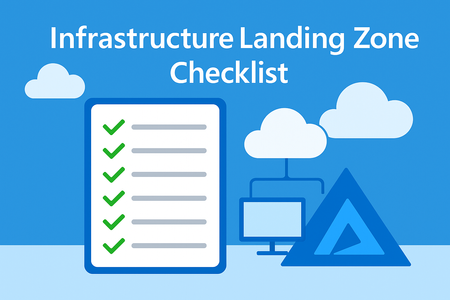
When the Gaps Start Showing A few months ago, we walked into a high-priority Azure environment review for a customer dealing with inconsistent deployments and rising costs. After a few discovery sessions, the root cause became clear: while they had resources running, there was no consistent foundation behind them. No standard tagging. No security baseline. No network segmentation strategy. In short—no structured Landing Zone. That situation isn't uncommon. Many organizations sprint into Azure workloads without first planning the right groundwork. That’s why having a clear, structured implementation checklist for your Landing Zone is so essential. What This Checklist Will Help You Do This implementation checklist isn’t just a formality. It’s meant to help teams: Align cloud implementation with business goals Avoid compliance and security oversights Improve visibility, governance, and operational readiness Build a scalable and secure foundation for workloads Let’s break it down, step by step. 🎯 Define Business Priorities Before Touching the Portal Before provisioning anything, work with stakeholders to understand: What outcomes matter most – Scalability? Faster go-to-market? Cost optimization? What constraints exist – Regulatory standards, data sovereignty, security controls What must not break – Legacy integrations, authentication flows, SLAs This helps prioritize cloud decisions based on value rather than assumption. 🔍 Get a Clear Picture of the Current Environment Your approach will differ depending on whether it’s a: Greenfield setup (fresh, no legacy baggage) Brownfield deployment (existing workloads to assess and uplift) For brownfield, audit gaps in areas like scalability, identity, and compliance before any new provisioning. 📜 Lock Down Governance Early Set standards from day one: Role-Based Access Control (RBAC): Granular, least-privilege access Resource Tagging: Consistent metadata for tracking, automation, and cost management Security Baselines: Predefined policies aligned with your compliance model (NIST, CIS, etc.) This ensures everything downstream is both discoverable and manageable. 🧭 Design a Network That Supports Security and Scale Network configuration should not be an afterthought: Define NSG Rules and enforce segmentation Use Routing Rules to control flow between tiers Consider Private Endpoints to keep services off the public internet This stage sets your network up to scale securely and avoid rework later. 🧰 Choose a Deployment Approach That Fits Your Team You don’t need to reinvent the wheel. Choose from: Predefined ARM/Bicep templates Infrastructure as Code (IaC) using tools like Terraform Custom Provisioning for unique enterprise requirements Standardizing this step makes every future deployment faster, safer, and reviewable. 🔐 Set Up Identity and Access Controls the Right Way No shared accounts. No “Owner” access to everyone. Use: Azure Active Directory (AAD) for identity management RBAC to ensure users only have access to what they need, where they need it This is a critical security layer—set it up with intent. 📈 Bake in Monitoring and Diagnostics from Day One Cloud environments must be observable. Implement: Log Analytics Workspace (LAW) to centralize logs Diagnostic Settings to capture platform-level signals Application Insights to monitor app health and performance These tools reduce time to resolution and help enforce SLAs. 🛡️ Review and Close on Security Posture Before allowing workloads to go live, conduct a security baseline check: Enable data encryption at rest and in transit Review and apply Azure Security Center recommendations Ensure ACC (Azure Confidential Computing) compliance if applicable Security is not a phase. It’s baked in throughout—but reviewed intentionally before go-live. 🚦 Validate Before You Launch Never skip a readiness review: Deploy in a test environment to validate templates and policies Get sign-off from architecture, security, and compliance stakeholders Track checklist completion before promoting anything to production This keeps surprises out of your production pipeline. In Closing: It’s Not Just a Checklist, It’s Your Blueprint When implemented well, this checklist becomes much more than a to-do list. It’s a blueprint for scalable, secure, and standardized cloud adoption. It helps teams stay on the same page, reduces firefighting, and accelerates real business value from Azure. Whether you're managing a new enterprise rollout or stabilizing an existing environment, this checklist keeps your foundation strong. Tags - Infrastructure Landing Zone Governance and Security Best Practices for Azure Infrastructure Landing Zones Automating Azure Landing Zone Setup with IaC Templates Checklist to Validate Azure Readiness Before Production Rollout Monitoring, Access Control, and Network Planning in Azure Landing Zones Azure Readiness Checklist for Production6.4KViews6likes3CommentsInfrastructure Landing Zone - Implementation Decision-Making:
🚀 Struggling to choose the right Infrastructure Landing Zone for your Azure deployment? This guide breaks down each option—speed, flexibility, security, and automation—so you can make the smartest decision for your cloud journey. Don’t risk costly mistakes—read now and build with confidence! 🔥4.6KViews4likes7CommentsMicrosoft Azure Cloud HSM is now generally available
Microsoft Azure Cloud HSM is now generally available. Azure Cloud HSM is a highly available, FIPS 140-3 Level 3 validated single-tenant hardware security module (HSM) service designed to meet the highest security and compliance standards. With full administrative control over their HSM, customers can securely manage cryptographic keys and perform cryptographic operations within their own dedicated Cloud HSM cluster. In today’s digital landscape, organizations face an unprecedented volume of cyber threats, data breaches, and regulatory pressures. At the heart of securing sensitive information lies a robust key management and encryption strategy, which ensures that data remains confidential, tamper-proof, and accessible only to authorized users. However, encryption alone is not enough. How cryptographic keys are managed determines the true strength of security. Every interaction in the digital world from processing financial transactions, securing applications like PKI, database encryption, document signing to securing cloud workloads and authenticating users relies on cryptographic keys. A poorly managed key is a security risk waiting to happen. Without a clear key management strategy, organizations face challenges such as data exposure, regulatory non-compliance and operational complexity. An HSM is a cornerstone of a strong key management strategy, providing physical and logical security to safeguard cryptographic keys. HSMs are purpose-built devices designed to generate, store, and manage encryption keys in a tamper-resistant environment, ensuring that even in the event of a data breach, protected data remains unreadable. As cyber threats evolve, organizations must take a proactive approach to securing data with enterprise-grade encryption and key management solutions. Microsoft Azure Cloud HSM empowers businesses to meet these challenges head-on, ensuring that security, compliance, and trust remain non-negotiable priorities in the digital age. Key Features of Azure Cloud HSM Azure Cloud HSM ensures high availability and redundancy by automatically clustering multiple HSMs and synchronizing cryptographic data across three instances, eliminating the need for complex configurations. It optimizes performance through load balancing of cryptographic operations, reducing latency. Periodic backups enhance security by safeguarding cryptographic assets and enabling seamless recovery. Designed to meet FIPS 140-3 Level 3, it provides robust security for enterprise applications. Ideal use cases for Azure Cloud HSM Azure Cloud HSM is ideal for organizations migrating security-sensitive applications from on-premises to Azure Virtual Machines or transitioning from Azure Dedicated HSM or AWS Cloud HSM to a fully managed Azure-native solution. It supports applications requiring PKCS#11, OpenSSL, and JCE for seamless cryptographic integration and enables running shrink-wrapped software like Apache/Nginx SSL Offload, Microsoft SQL Server/Oracle TDE, and ADCS on Azure VMs. Additionally, it supports tools and applications that require document and code signing. Get started with Azure Cloud HSM Ready to deploy Azure Cloud HSM? Learn more and start building today: Get Started Deploying Azure Cloud HSM Customers can download the Azure Cloud HSM SDK and Client Tools from GitHub: Microsoft Azure Cloud HSM SDK Stay tuned for further updates as we continue to enhance Microsoft Azure Cloud HSM to support your most demanding security and compliance needs.7.3KViews3likes2Comments
Private DNS and Hub–Spoke Networking for Enterprise AI Workloads on Azure
Introduction As organizations deploy enterprise AI platforms on Azure, security requirements increasingly drive the adoption of private-first architectures. Private networking only Centralized firewalls or NVAs Hub–and–spoke virtual network architectures Private Endpoints for all PaaS services While these patterns are well understood individually, their interaction often exposes hidden failure modes, particularly around DNS and name resolution. During a recent production deployment of a private, enterprise-grade AI workload on Azure, several issues surfaced that initially appeared to be platform or service instability. Closer analysis revealed the real cause: gaps in network and DNS design. This post shares a real-world technical walkthrough of the problem, root causes, resolution steps, and key lessons that now form a reusable blueprint for running AI workloads reliably in private Azure environments. Problem Statement The platform was deployed with the following characteristics: Hub and spoke network topology Custom DNS servers running in the hub Firewall / NVA enforcing strict egress controls AI, data, and platform services exposed through Private Endpoints Azure Container Apps using internal load balancer mode Centralized monitoring, secrets, and identity services Despite successful infrastructure deployment, the environment exhibited non-deterministic production issues, including: Container Apps intermittently failing to start or scale AI platform endpoints becoming unreachable from workload subnets Authentication and secret access failures DNS resolution working in some environments but failing in others Terraform deployments stalling or failing unexpectedly Because the symptoms varied across subnets and environments, root cause identification was initially non-trivial. Root Cause Analysis After end-to-end isolation, the issue was not AI services, authentication, or application logic. The core problem was DNS resolution in a private Azure environment. 1. Custom DNS servers were not Azure-aware The hub DNS servers correctly resolved: Corporate domains On‑premises records However, they could not resolve Azure platform names or Private Endpoint FQDNs by default. Azure relies on an internal recursive resolver (168.63.129.16) that must be explicitly integrated when using custom DNS. 2. Missing conditional forwarders for private DNS zones Many Azure services depend on service-specific private DNS zones, such as: privatelink.cognitiveservices.azure.com privatelink.openai.azure.com privatelink.vaultcore.azure.net privatelink.search.windows.net privatelink.blob.core.windows.net Without conditional forwarders pointing to Azure’s internal DNS, queries either: Failed silently, or Resolved to public endpoints that were blocked by firewall rules 3. Container Apps internal DNS requirements were overlooked When Azure Container Apps are deployed with: internal_load_balancer_enabled = true Azure does not automatically create supporting DNS records. The environment generates: A default domain .internal subdomains for internal FQDNs Without explicitly creating: A private DNS zone matching the default domain *, @, and *.internal wildcard records internal service-to-service communication fails. 4. Private DNS zones were not consistently linked Even when DNS zones existed, they were: Spread across multiple subscriptions Linked to some VNets but not others Missing links to DNS server VNets or shared services VNets As a result, name resolution succeeded in one subnet and failed in another, depending on the lookup path. Resolution No application changes were required. Stability was achieved entirely through architectural corrections. ✅ Step 1: Make custom DNS Azure-aware On all custom DNS servers (or NVAs acting as DNS proxies): Configure conditional forwarders for all Azure private DNS zones Forward those queries to: 168.63.129.16 This IP is Azure’s internal recursive resolver and is mandatory for Private Endpoint resolution. ✅ Step 2: Centralize and link private DNS zones A centralized private DNS model was adopted: All private DNS zones hosted in a shared subscription Linked to: Hub VNet All spoke VNets DNS server VNet Any operational or virtual desktop VNets This ensured consistent resolution regardless of workload location. ✅ Step 3: Explicitly handle Container Apps DNS For Container Apps using internal ingress: Create a private DNS zone matching the environment’s default domain Add: * wildcard record @ apex record *.internal wildcard record Point all records to the Container Apps Environment static IP Add a conditional forwarder for the default domain if using custom DNS This step alone resolved multiple internal connectivity issues. ✅ Step 4: Align routing, NSGs, and service tags Firewall, NSG, and route table rules were aligned to: Allow DNS traffic (TCP/UDP 53) Allow Azure service tags such as: AzureCloud CognitiveServices AzureActiveDirectory Storage AzureMonitor Ensure certain subnets (e.g., Container Apps, Application Gateway) retained direct internet access where required by Azure platform services Key Learnings 1. DNS is a Tier‑0 dependency for AI platforms Many AI “service issues” are DNS failures in disguise. DNS must be treated as foundational platform infrastructure. 2. Private Endpoints require Azure DNS integration If you use: Custom DNS ✅ Private Endpoints ✅ Then forwarding to 168.63.129.16 is non‑negotiable. 3. Container Apps internal ingress has hidden DNS requirements Internal Container Apps environments will not function correctly without manually created DNS zones and .internal records. 4. Centralized DNS prevents environment drift Decentralized or subscription-local DNS zones lead to fragile, inconsistent environments. Centralization improves reliability and operability. 5. Validate networking first, then the platform Before escalating issues to service teams: Validate DNS resolution Verify routing Check Private Endpoint connectivity In many cases, the perceived “platform issue” disappears. Quick Production Validation Checklist Before go-live, always validate: ✅ Private FQDNs resolve to private IPs from all required VNets ✅ UDR/NSG rules allow required Azure service traffic ✅ Managed identities can access all dependent resources ✅ AI portal user workflows succeed (evaluations, agents, etc.) ✅ terraform plan shows only intended changes Conclusion Running private, enterprise-grade AI workloads on Azure is absolutely achievable—but it requires intentional DNS and networking design. By: Making custom DNS Azure-aware Centralizing private DNS zones Explicitly handling Container Apps DNS Aligning routing and firewall rules an unstable environment was transformed into a repeatable, production-ready platform pattern. If you are building AI solutions on Azure with Private Endpoints and hub–spoke networking, getting DNS right early will save weeks of troubleshooting later.998Views2likes0CommentsKubernetes Center: Security & LTS/Out-of-Support Version Insights Now Available
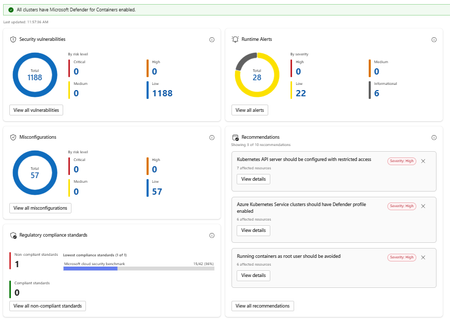
What's New Security Insights: The new Security page in Kubernetes Center gives you an immediate, all clusters or Kubernetes Fleet Manager-wide view of your security posture without leaving the portal. At the summary level you can see: Security vulnerabilities broken down by risk level Runtime alerts categorized by severity Non-compliant regulatory standards, with visibility into which benchmarks your clusters are falling short on Drilling deeper into the security detail view exposes four distinct panels: Security Vulnerabilities show a total count of vulnerabilities across all clusters, broken down by risk tier. Runtime Alerts surfaces live alerts from Defender for Containers categorized by High, Medium, Low, and Informational severity. You can see at a glance whether any active threats require immediate attention, and drill into the full alert list with one click. Misconfigurations show a count of configuration issues detected across your clusters, again broken down by risk level. Regulatory Compliance Standards lets you see which compliance standards your clusters are enrolled in, which are passing, and which are failing. The view surfaces the lowest-performing standard with its pass rate, so you know exactly where to focus remediation effort. Recommendations are shown alongside these panels, providing actionable and prioritized guidance. Each recommendation shows affected resource counts and links directly to remediation details. Note: Security insights require Microsoft Defender for Containers to be enabled. Kubernetes Center will confirm at a glance whether all your clusters have it enabled. Cluster Version Support Status: Stay Ahead of End-of-Support Running an out-of-support Kubernetes version is one of the most common and preventable sources of risk in production environments. The new Cluster Version Support Status panel in Kubernetes Center gives you a clear picture of where every cluster stands. The view breaks your clusters down into four states: Status What it means In support Running a supported Kubernetes version. No action needed. Expiring soon Version support is ending soon. Plan your upgrade. Out of support (LTS eligible) Out of support but eligible for Long Term Support. An easy path to extend coverage. Out of support No longer supported and not LTS eligible. Upgrade required. You can filter the view by cluster tier (Premium, Standard, or Free) to understand exposure by tier and prioritize accordingly. For clusters that are out of support but LTS eligible, a single Enable LTS for Eligible Clusters button lets you act immediately without navigating away. Kubernetes Center brings this into a single, always-on view so platform teams can: Catch version drift before it becomes an incident Spot misconfiguration patterns across clusters, not just within one Act on recommendations without switching tools Report on compliance posture without manual aggregation Try It Out These features are available now in Kubernetes Center in the Azure portal. → Open Security -Kubernetes Center in the Azure portal We'd love to hear what you think. Try the new security and version views with your clusters and share your feedback directly through the portal using the feedback button. FAQ Do I need Microsoft Defender for Containers enabled to use the security features? Yes. Security vulnerabilities, runtime alerts, and misconfiguration data are powered by MS Defender for Containers. Kubernetes Center will show you if any clusters don't have it enabled so you can quickly close that gap. Does this work across all my subscriptions and clusters? Kubernetes Center aggregates data across all AKS clusters you have access to. Make sure you have the appropriate RBAC permissions across the subscriptions you want visibility into. What is LTS and should I enable it for eligible clusters? Long Term Support (LTS) extends the supported lifecycle of a Kubernetes version beyond its standard window. It's available for clusters on eligible versions running the Premium tier. If you have clusters showing "Out of support, LTS eligible," enabling LTS is the fastest way to restore support coverage while you plan a full version upgrade. Is there a cost to use Kubernetes Center? Kubernetes Center itself is part of the Azure portal experience and there is no additional charge. Note that Microsoft Defender for Containers, which powers the security features, is a paid add-on. See the Defender for Containers pricing page for details. Where can I learn more about the Kubernetes version lifecycle? See the AKS Kubernetes version support policy documentation for full details on version support windows, LTS eligibility, and upgrade guidance.640Views1like0CommentsCaliptra 2.1: An Open-Source Silicon Root of Trust With Enhanced Protection of Data At-Rest
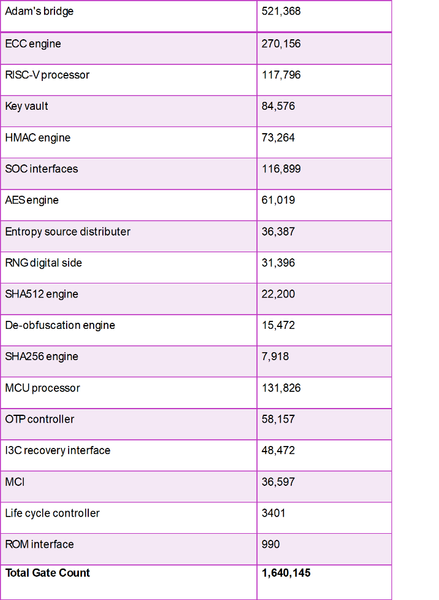
Introducing Caliptra 2.1: an open-source silicon Root of Trust subsystem, providing enhanced protection of data at-rest. Building upon Caliptra 1.0, which included capabilities for identity and measurement, Caliptra 2.1 represents a significant leap forward. It provides a complete RoT security subsystem, quantum resilient cryptography, and extensions to hardware-based key management, delivering defense in depth capabilities. The Caliptra 2.1 subsystem represents a foundational element for securing devices, anchoring through hardware a trusted chain for protection, detection, and recovery.7.7KViews1like0CommentsDesigning Reusable Bicep Modules: A Databricks Example
In this blog, I’ll walk you through how to design a reusable Bicep module for deploying Azure Databricks, a popular analytics and machine learning platform. We'll focus on creating a parameterized and composable pattern using Bicep and Azure Verified Modules (AVM), enabling your team to replicate this setup across environments with minimal changes. Why Reusability in Bicep Matters: As your Azure environment scales, manually copying and modifying Bicep files for every service or environment becomes error-prone and unmanageable. Reusable Bicep modules help: Eliminate redundant code Enforce naming, tagging, and networking standards Accelerate onboarding of new services or teams Enable self-service infrastructure in CI/CD pipelines Here, we’ll create a reusable module to deploy an Azure Databricks Workspace with: Consistent naming conventions Virtual network injection (VNet) Private endpoint integration (UI, Blob, DFS) Optional DNS zone configuration Role assignments AVM module integration Module Inputs (Parameters) Your Bicep pattern uses several key parameters: Parameterizing the Pattern These parameters allow the module to be flexible yet consistent across multiple environments. Naming conventions: The nameObject structure is used to build consistent names for all resources: var adbworkspaceName = toLower('${nameObject.client}-${nameObject.workloadIdentifier}-${nameObject.environment}-${nameObject.region}-adb-${nameObject.suffix}') Configuring Private Endpoints and DNS The module allows defining private endpoint configurations for both Databricks and storage: This logic ensures: Private access to the Databricks UI Optional DNS zone integration for custom resolution You can extend this to include Blob and DFS storage private endpoints, which are essential for secure data lake integrations. Plugging in the AVM Module: The actual deployment leverages an Azure Verified Module (AVM) stored in an Azure Container Registry (ACR): Example usage: Using the module in your main Bicep deployment: Conclusion This Bicep-based or any reusable modules or patterns enable consistent, secure, and scalable deployments across your Azure environments. Whether you're deploying a single workspace or rolling out 50 across environments, this pattern helps ensure governance and simplicity. Resources Azure Bicep Documentation Azure Verified Modules Azure Databricks Docs691Views1like0Comments