cloud platform security
23 TopicsModernizing Terraform Pipelines on Azure: OIDC Federation for GitHub Actions and Azure DevOps
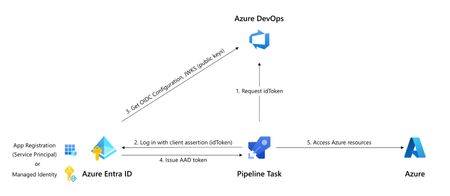
The secret nobody wants to rotate Most Terraform-on-Azure pipelines we see still authenticate the same way they did three years ago. A long-lived ARM_CLIENT_SECRET sitting in GitHub Actions or Azure DevOps, set once, copied around, and rotated only when something breaks. It's the most ignored credential in the cloud, and statistically the most likely one to leak. A developer screenshots a variable group. A pipeline log echoes a value. A fork inherits a secret. Or the secret simply expires on a Friday evening and takes production deployments with it. Workload Identity Federation (WIF) makes this whole class of problem go away. The pipeline mints a short-lived token at runtime, exchanges it for an Azure access token via Microsoft Entra, and never touches a secret. GitHub Actions has supported it since 2021. Azure DevOps service connections went GA with WIF in February 2024. The azurerm Terraform provider has supported it since v3.7. This post walks through the pattern end-to-end, for both GitHub Actions and Azure DevOps, the way I've rolled it out across multiple customer estates. How the exchange actually works Before any YAML, it helps to picture what's happening: The CI system (GitHub or ADO) signs a short-lived JWT describing exactly what's running- which repo, which branch, which environment, which service connection. The pipeline sends that JWT to Microsoft Entra ID. Entra checks it against a federated identity credential you've configured on a managed identity or app registration. The iss, sub, and aud claims must match case-sensitively. If it matches, Entra returns an Azure access token valid for the duration of the job. Terraform uses it. The job ends. The token expires. Nothing persists. The token is bound to a specific subject like repo:contoso/platform:environment:prod or sc://contoso/platform/azure-prod. It can't be reused from another repo, branch, or pipeline. Recommended Architecture A few choices that usually hold up in production: Decision Choice Identity type User-assigned managed identity (UAMI), not app registration Identity granularity One UAMI per environment (not per pipeline) Trust scope Pinned to the environment claim, not the branch RBAC scope Resource group, not subscription Remote state OIDC + use_azuread_auth = true, shared key access disabled Why UAMIs? They live in your subscription, don't need Application Administrator rights to manage, and follow the lifecycle of the resource group they belong to. Why one per environment? Pipeline-per-identity explodes into hundreds of identities. Environment-per-identity maps cleanly to deployment scopes. Part 1 - GitHub Actions Step 1: Create the identity and federate it Two commands per environment. That's it. az identity create -g rg-platform-identity -n id-tf-prod -l eastus az identity federated-credential create \ --name github-prod \ --identity-name id-tf-prod \ --resource-group rg-platform-identity \ --issuer https://token.actions.githubusercontent.com \ --subject repo:contoso/platform:environment:prod \ --audiences api://AzureADTokenExchange Repeat for nonprod. No secret is created anywhere. Step 2: Wire it up in GitHub In repo Settings → Environments, create nonprod and prod. On prod, add required reviewers and a branch rule restricting deployments to main. Then add three environment variables (not secrets - these aren't sensitive): AZURE_CLIENT_ID, AZURE_TENANT_ID, AZURE_SUBSCRIPTION_ID. The workflow itself stays small: permissions: id-token: write contents: read jobs: apply: runs-on: ubuntu-latest environment: prod env: ARM_USE_OIDC: "true" ARM_CLIENT_ID: ${{ vars.AZURE_CLIENT_ID }} ARM_TENANT_ID: ${{ vars.AZURE_TENANT_ID }} ARM_SUBSCRIPTION_ID: ${{ vars.AZURE_SUBSCRIPTION_ID }} steps: - uses: actions/checkout@v4 - uses: hashicorp/setup-terraform@v3 - run: terraform init && terraform apply -auto-approve Three things make this secure: id-token: write is the only elevated permission, and it doesn't grant write access to anything in GitHub, it just lets the runner mint a JWT. The environment: line picks the right AZURE_CLIENT_ID and drives the sub claim. The federation refuses anything else. No azure/login step is needed for Terraform. The azurerm provider reads GitHub's OIDC environment variables automatically. Part 2 - Azure DevOps The model is identical. The mechanics are different. ADO offers two creation paths for a WIF service connection: automatic (it creates an app registration for you) and manual (you bring your own UAMI). For platform teams, manual + UAMI is almost always the better choice to ensure identity lives where governance lives. The flow is a small dance between the two portals: In Azure DevOps, create a new ARM service connection → choose Workload Identity Federation (manual) → fill in your UAMI's client ID, tenant ID, and subscription. Save as draft. ADO shows you an issuer URL and a subject identifier. In Azure, on the UAMI, add a federated credential using the values ADO showed you. The subject looks like sc://contoso/platform/azure-prod. Back in ADO, click Verify and save. In the pipeline, the service connection only "activates" if a task in the job loads it. The simplest way is the AzureCLI@2 task: - task: AzureCLI@2 inputs: azureSubscription: azure-prod # the WIF service connection scriptType: bash scriptLocation: inlineScript inlineScript: | terraform init && terraform apply -auto-approve env: ARM_USE_OIDC: "true" ARM_CLIENT_ID: $(AZURE_CLIENT_ID) ARM_TENANT_ID: $(AZURE_TENANT_ID) ARM_SUBSCRIPTION_ID: $(AZURE_SUBSCRIPTION_ID) ARM_ADO_PIPELINE_SERVICE_CONNECTION_ID: $(SERVICE_CONNECTION_ID) SYSTEM_ACCESSTOKEN: $(System.AccessToken) SYSTEM_OIDCREQUESTURI: $(System.OidcRequestUri) For teams converting dozens of legacy connections, the Azure DevOps team published a PowerShell helper that walks every ARM service connection in a project and converts them in place. There's a 7-day rollback window on each connection, which makes the migration genuinely low-risk. Don't forget the state file The Terraform state is your real blast radius. With OIDC, it's almost free to lock it down too. The same UAMI can read and write blob data without the storage account key: backend "azurerm" { resource_group_name = "rg-tfstate" storage_account_name = "sttfstateprodeastus" container_name = "platform-prod" key = "platform.tfstate" use_oidc = true use_azuread_auth = true } Grant the UAMI Storage Blob Data Contributor on the container (not the account), disable shared key access on the storage account, and you've removed the last secret in the pipeline. RBAC and break-glass Federation removes a credential, not a privilege. A few habits worth keeping: Scope role assignments to resource groups, not subscriptions. The whole point of federation is that scoping is now trivially easy. Use Role Based Access Control Administrator instead of User Access Administrator if your Terraform creates role assignments. It's a more recent, narrower role. Have a documented break-glass. If GitHub or ADO has a token-service incident, you still need a path to ship a hotfix. A single hardware-key-protected emergency app registration in a separate identity boundary works well, audited monthly. Monitor sign-ins. Every federated exchange shows up in Entra sign-in logs as a service principal sign-in. Pipe these to Sentinel and alert on anomalies like sign-ins outside expected hours, or from IPs outside GitHub's published ranges. The errors you will hit (and what they really mean) Symptom What it actually is AADSTS70021: No matching federated identity record found Case-sensitive mismatch in iss, sub, or aud. Almost always a trailing slash or a capitalised character AADSTS700016: Application not found in directory Wrong client ID or tenant. Not a federation problem 403 on a resource even though token exchange worked Federation is fine. Your RBAC isn't. Check the exact scope Unable to determine OIDC token (ADO) No task in the job loaded the service connection. Add an AzureCLI@2 step Works on main, fails on tags You pinned sub to a branch ref. Add a second federated credential for tags, or move to environment-based scoping Migrating without a maintenance window You almost never get to do this on a greenfield repo. The order that has worked for me on legacy estates: Create the new UAMI alongside the old service principal, with the same role assignments. Federate one canary pipeline. Verify it deploys equivalently. Cut over pipelines in waves, lowest-risk environment first. Once a full release cycle passes cleanly, disable the old SP's secret. Wait another cycle. Then delete the SP entirely. Add a CI gate that fails any new pipeline introducing ARM_CLIENT_SECRET. The old and new auth methods coexist on the same subscription throughout. There's no hard cutover and no maintenance window, just a steady drift toward zero secrets. Wrapping up If you do nothing else after reading this, do one thing: search your CI variable groups for ARM_CLIENT_SECRET. Every result is an outage or a breach waiting to happen. Federation is one of those rare changes that's both more secure and less work to operate. Once you've set it up, you stop thinking about credential rotation, secret expiry, and quarterly access reviews for service principals. The pipeline simply runs, and the audit trail is in Entra where it belongs. That's a good trade.2KViews17likes11CommentsKubernetes Center: Security & LTS/Out-of-Support Version Insights Now Available
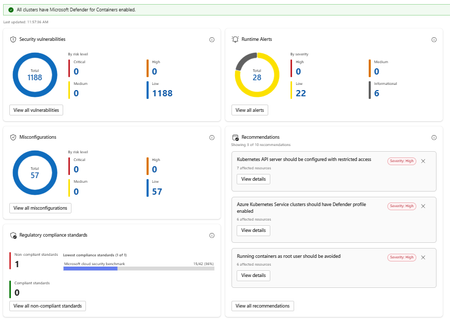
What's New Security Insights: The new Security page in Kubernetes Center gives you an immediate, all clusters or Kubernetes Fleet Manager-wide view of your security posture without leaving the portal. At the summary level you can see: Security vulnerabilities broken down by risk level Runtime alerts categorized by severity Non-compliant regulatory standards, with visibility into which benchmarks your clusters are falling short on Drilling deeper into the security detail view exposes four distinct panels: Security Vulnerabilities show a total count of vulnerabilities across all clusters, broken down by risk tier. Runtime Alerts surfaces live alerts from Defender for Containers categorized by High, Medium, Low, and Informational severity. You can see at a glance whether any active threats require immediate attention, and drill into the full alert list with one click. Misconfigurations show a count of configuration issues detected across your clusters, again broken down by risk level. Regulatory Compliance Standards lets you see which compliance standards your clusters are enrolled in, which are passing, and which are failing. The view surfaces the lowest-performing standard with its pass rate, so you know exactly where to focus remediation effort. Recommendations are shown alongside these panels, providing actionable and prioritized guidance. Each recommendation shows affected resource counts and links directly to remediation details. Note: Security insights require Microsoft Defender for Containers to be enabled. Kubernetes Center will confirm at a glance whether all your clusters have it enabled. Cluster Version Support Status: Stay Ahead of End-of-Support Running an out-of-support Kubernetes version is one of the most common and preventable sources of risk in production environments. The new Cluster Version Support Status panel in Kubernetes Center gives you a clear picture of where every cluster stands. The view breaks your clusters down into four states: Status What it means In support Running a supported Kubernetes version. No action needed. Expiring soon Version support is ending soon. Plan your upgrade. Out of support (LTS eligible) Out of support but eligible for Long Term Support. An easy path to extend coverage. Out of support No longer supported and not LTS eligible. Upgrade required. You can filter the view by cluster tier (Premium, Standard, or Free) to understand exposure by tier and prioritize accordingly. For clusters that are out of support but LTS eligible, a single Enable LTS for Eligible Clusters button lets you act immediately without navigating away. Kubernetes Center brings this into a single, always-on view so platform teams can: Catch version drift before it becomes an incident Spot misconfiguration patterns across clusters, not just within one Act on recommendations without switching tools Report on compliance posture without manual aggregation Try It Out These features are available now in Kubernetes Center in the Azure portal. → Open Security -Kubernetes Center in the Azure portal We'd love to hear what you think. Try the new security and version views with your clusters and share your feedback directly through the portal using the feedback button. FAQ Do I need Microsoft Defender for Containers enabled to use the security features? Yes. Security vulnerabilities, runtime alerts, and misconfiguration data are powered by MS Defender for Containers. Kubernetes Center will show you if any clusters don't have it enabled so you can quickly close that gap. Does this work across all my subscriptions and clusters? Kubernetes Center aggregates data across all AKS clusters you have access to. Make sure you have the appropriate RBAC permissions across the subscriptions you want visibility into. What is LTS and should I enable it for eligible clusters? Long Term Support (LTS) extends the supported lifecycle of a Kubernetes version beyond its standard window. It's available for clusters on eligible versions running the Premium tier. If you have clusters showing "Out of support, LTS eligible," enabling LTS is the fastest way to restore support coverage while you plan a full version upgrade. Is there a cost to use Kubernetes Center? Kubernetes Center itself is part of the Azure portal experience and there is no additional charge. Note that Microsoft Defender for Containers, which powers the security features, is a paid add-on. See the Defender for Containers pricing page for details. Where can I learn more about the Kubernetes version lifecycle? See the AKS Kubernetes version support policy documentation for full details on version support windows, LTS eligibility, and upgrade guidance.689Views1like0Comments
Building Secure AI Platforms in Banking Using Azure Enterprise Architecture
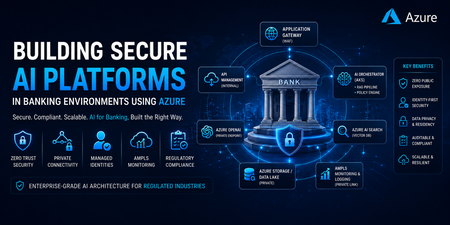
1. Introduction: AI in Banking Is Not Just a Model Problem Modern banking institutions are no longer asking “Can we use AI?” The real question is: “Can we use AI without violating regulatory, security, and data residency constraints?” Unlike public AI applications, banking systems must ensure: No public internet exposure Strict identity-based access control End-to-end auditability Data residency compliance Fully controlled inference pipelines 👉 In enterprise environments, AI success is driven by secure infrastructure—not just model accuracy. 2. Core Design Principle: Controlled Intelligence System Every AI request must follow a security-enforced execution pipeline: User Request ↓ Secure Edge (Application Gateway + WAF) ↓ API Governance Layer (API Management - Internal Mode) ↓ AI Orchestration Layer (AKS / App Services) ↓ Retrieval + Policy Layer (RAG + Guardrails) ↓ Private AI Services (Azure OpenAI) ↓ Observability Layer (AMPLS) ↓ Final Response Key Insight: This is not just an architecture—it is a controlled and auditable execution model. 3. Azure Enterprise AI Architecture (Production-Ready Pattern) A real-world architecture used in banking environments: 4. Private Connectivity Model (Critical for Compliance) Key components: Private Endpoints → Secure PaaS isolation Private DNS Zones → Controlled name resolution VNet Integration → Internal service communication Azure Firewall → Traffic inspection and control ⚠️ Common Production Failure: AKS pods fail to resolve Azure OpenAI private endpoint Root cause: Missing Private DNS links Incorrect VNet configuration 👉 This is one of the most frequent failures in enterprise AI deployments. “Debugging Private Endpoint Failures” Include: nslookup behavior in AKS DNS zone linking check VNet integration validation UDR / Firewall inspection 5. Identity-First Security Model (No Secrets Architecture) Modern banking architectures eliminate static credentials entirely. Authentication Flow: AKS Workload → Managed Identity → Azure AD → Azure Services Key Principle: 👉 Identity is the new security perimeter. Benefits: No API keys or secrets Simplified access management RBAC-based governance Fully auditable access 6. Secure AI Inference Pipeline A production AI request flow: def process_request(user_request): # 1. Authenticate user via Azure AD identity = authenticate_aad(user_request.token) if not identity or not identity.is_valid: return "ACCESS_DENIED" # 2. Enforce rate limiting per identity if not rate_limit(identity): return "RATE_LIMIT_EXCEEDED" # 3. Apply prompt security guardrails (injection protection) safe_prompt = apply_prompt_guardrails(user_request.prompt) # 4. Content safety filtering (PII / harmful content detection) if not content_filter(safe_prompt): return "CONTENT_BLOCKED" # 5. Retrieve secure RAG context context = retrieve_rag_context( query=safe_prompt, secure_mode=True ) # 6. Build final prompt final_prompt = merge_prompt_and_context(safe_prompt, context) # 7. Call Azure OpenAI with circuit breaker protection response = circuit_breaker( lambda: call_openai( prompt=final_prompt, identity=ManagedIdentity() ) ) # 8. Validate and sanitize model output validated_output = sanitize(response) # 9. Log everything for audit + compliance (AMPLS / SIEM) log_to_ampls( identity=identity, request=user_request, response=validated_output ) return validated_output Security controls include: Prompt injection filtering Context grounding (RAG) Output sanitization Full audit logging 7. RAG Architecture: Enterprise AI Backbone User Query → Embedding Model → Azure AI Search (Vector Store) → Context Retrieval → Azure OpenAI → Final Response Why RAG is preferred in banking: No model retraining required Controlled data exposure Easier compliance validation Real-time knowledge updates In banking systems, retrieval is not just about relevance—it is about controlled disclosure of sensitive context 8. Observability with AMPLS (A Critical Yet Overlooked Layer) AI telemetry flows through: Azure Services → Private Link → AMPLS → Log Analytics / App Insights Why this matters: Logs may contain: Sensitive financial data PII Prompt inputs 👉 AMPLS ensures telemetry remains private and compliant. 9. Regulatory Mapping: Banking Requirements to Azure Capabilities Requirement Azure Implementation No public exposure Private Endpoints Identity-based security Azure AD + Managed Identity Audit compliance Log Analytics + AMPLS Data protection Customer-Managed Keys (CMK) Network isolation VNet + Firewall Access governance RBAC + PIM 10. Real-World Production Challenges Common failure points in enterprise AI systems: DNS Misconfiguration – Private endpoints fail resolution Latency Chains – Excessive service hops OpenAI Rate Limits – High enterprise load Identity Propagation Issues – Cross-subscription failures Observability Gaps – Missing distributed tracing 11. Enterprise Architecture Best Practices Design with zero-trust principles Treat AI as a distributed system, not a single component Centralize governance using API Management Never expose AI services publicly Use identity everywhere—no secrets Separate: Control Plane (governance) Data Plane (inference execution) 12. Azure Service Mapping (Quick Reference) Layer Azure Services Edge Security Application Gateway (WAF) API Layer API Management Compute AKS / App Services AI Services Azure OpenAI Retrieval Azure AI Search Data Azure Storage / SQL Identity Azure AD + Managed Identity Networking Private Link + VNet Observability AMPLS + Log Analytics 13. Common Failure Patterns Issue Root Cause AI endpoint unreachable DNS / Private endpoint misconfig Data leakage risk Missing prompt filtering High latency Over-layered architecture Unauthorized access Identity misconfiguration Poor response quality Weak RAG implementation 14. Final Thought In enterprise banking AI systems: Models are replaceable. Architecture is not. The real challenge is designing a system where AI is: Secure Controlled Observable Fully compliant680Views0likes0CommentsDeploying Azure Resources with Managed HSM Keys Using Bicep
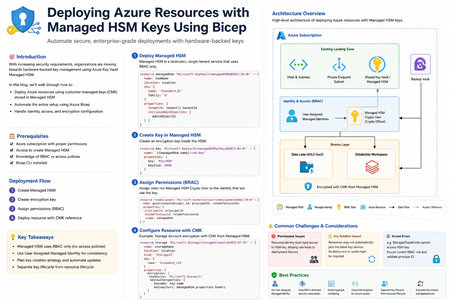
Architecture Overview The deployment includes: Managed HSM instance Key creation inside HSM User-assigned managed identity / service principal Role assignments for key access Azure resource (e.g., Storage / Databricks / Disk) using CMK Flow: Create Managed HSM Create encryption key Assign permissions Deploy resource with CMK reference Prerequisites Before starting, ensure: Azure subscription with proper permissions Access to create Managed HSM Knowledge of RBAC vs access policies Bicep CLI installed Step 1: Deploy Managed HSM Managed HSM is different from regular Key Vault: Uses RBAC only (no access policies) Requires security domain initialization Bicep snippet: resource managedHsm 'Microsoft.KeyVault/managedHSMs@2023-02-01' = { name: hsmName location: location sku: { name: 'Standard_B1' family: 'B' } properties: { tenantId: tenant().tenantId initialAdminObjectIds: [ adminObjectId ] } } Step 2: Create Key in Managed HSM resource key 'Microsoft.KeyVault/managedHSMs/keys@2023-02-01' = { name: '${managedHsm.name}/cmk-key' properties: { kty: 'RSA-HSM' keySize: 2048 } } Step 3: Assign Permissions Since Managed HSM uses RBAC, assign roles like: Managed HSM Crypto User Managed HSM Crypto Officer resource roleAssignment 'Microsoft.Authorization/roleAssignments@2022-04-01' = { name: guid(resourceGroup().id, principalId, roleDefinitionId) properties: { principalId: principalId roleDefinitionId: roleDefinitionId scope: managedHsm } } Step 4: Configure Resource with CMK Example: Storage Account encryption resource storage 'Microsoft.Storage/storageAccounts@2023-01-01' = { name: storageName location: location kind: 'StorageV2' sku: { name: 'Standard_LRS' } properties: { encryption: { keySource: 'Microsoft.Keyvault' keyvaultproperties: { keyname: key.name keyvaulturi: managedHsm.properties.hsmUri } } } } Common Challenges 1. Permission Issues Resource identity must have access to HSM key Missing role → deployment failure 2. Key Rotation Impact When keys are rotated: Resource may not automatically pick latest version You may need to redeploy or update configuration 3. Deployment Errors Typical issue: Storage/Databricks cannot access HSM key Fix: Ensure correct RBAC role assignment Validate principal ID used during deployment Key Rotation Strategy Managed HSM supports: Manual rotation Rotation policies Best practice: Use version-less key URI if supported Automate redeployment pipeline When to Use Managed HSM vs Key Vault Feature Managed HSM Key Vault FIPS Level Level 3 Level 2 Multi-tenant isolation No (dedicated) Yes RBAC only Yes Optional Cost Higher Lower Conclusion Using Managed HSM with Bicep enables: Stronger security with hardware-backed keys Full automation via Infrastructure as Code Enterprise-grade compliance However, it requires careful handling of: RBAC permissions Key rotation Resource integration295Views0likes0Comments
How AI Agents Are Turning Threat Intelligence Into Validated Detections
The promise of AI-assisted cybersecurity has long been hampered by a fundamental measurement problem: how do organizations validate whether an AI agent can actually perform the complex, multi-step work that security analysts do every day? Traditional benchmarks test whether models can recall MITRE ATT&CK techniques or classify threat actor tactics, but they miss the harder question—can an agent translate raw threat intelligence into production-ready detection rules that find real attacks?microsoft Microsoft Research has addressed this gap with CTI-REALM (Cyber Threat Intelligence Real World Evaluation and LLM Benchmarking), an open-source benchmark that evaluates AI agents on end-to-end detection engineering workflows. Released in March 2026, CTI-REALM measures whether agents can read threat intelligence reports, explore telemetry schemas, iteratively refine KQL queries, and produce validated Sigma rules and KQL detection logic—exactly the workflow security analysts follow when building detections for platforms like Microsoft Sentinel.microsoft Why Traditional Benchmarks Fall Short Existing cybersecurity AI benchmarks primarily test parametric knowledge—can a model name the technique behind a log entry, or correctly label a tactic from a threat report? While useful, these assessments evaluate isolated skills rather than the operational capability security teams actually need: translating narrative threat intelligence into working detection logic that identifies attacks in production environments.microsoft CTI-REALM fills this gap by measuring three critical dimensions that earlier benchmarks overlook:microsoft Operationalization over recall: Agents must produce working Sigma rules and KQL queries validated against real attack telemetry, not just answer multiple-choice questions about threat actors. Complete workflow evaluation: The benchmark scores intermediate decision quality—CTI report selection, MITRE technique mapping, data source identification, and iterative query refinement—not just final output. Realistic tooling: Agents use the same tools security analysts rely on: CTI repositories, schema explorers, Kusto query engines, and MITRE ATT&CK databases. This granular, checkpoint-based scoring reveals precisely where AI agents struggle in the detection pipeline, helping security leaders understand whether performance gaps stem from comprehension failures, query construction issues, or detection specificity problems.microsoft The Benchmark: Real Threat Intelligence, Real Azure Environments Microsoft curated 37 CTI reports from public sources including Microsoft Security, Datadog Security Labs, Palo Alto Networks, and Splunk, selecting scenarios that could be faithfully simulated in sandboxed environments with telemetry suitable for detection development.microsoft The benchmark spans three Azure-relevant platforms: Linux endpoints: Traditional host-based detection scenarios Azure Kubernetes Service (AKS): Container and orchestration layer attacks Azure cloud infrastructure: Multi-source, APT-style attack chains requiring correlation across identity, resource, and network logs Ground-truth scoring validates detection rules at every workflow stage, from technique identification through final KQL query accuracy.microsoft Key Findings: What Works, What Doesn't Microsoft evaluated multiple frontier AI models on CTI-REALM-50, a subset spanning all three platforms. The results reveal both promise and clear limitations:microsoft Performance drops sharply across platform complexity: Linux endpoint detections scored 0.585, AKS scenarios dropped to 0.517, and Azure cloud infrastructure plummeted to 0.282. This reflects the reality that multi-source correlation across identity logs, Azure Activity, and resource-specific telemetry remains exceptionally difficult for AI agents—precisely the scenario SOC teams working in Microsoft Sentinel face when investigating sophisticated, multi-stage cloud attacks.microsoft More reasoning isn't always better: Within model families, medium reasoning configurations consistently outperformed high reasoning modes, suggesting that overthinking hurts performance in tool-rich, iterative agentic environments.microsoft Structured guidance closes performance gaps: Providing smaller models with human-authored workflow guidance improved threat technique identification and closed approximately one-third of the performance gap to much larger models.microsoft What This Means for Azure Security Operations For security architects and SOC teams working with Microsoft Sentinel, CTI-REALM's findings have immediate practical implications: Traditional Detection Engineering AI-Assisted Detection Engineering Analyst reads threat report manually AI agent parses CTI report and extracts techniques Analyst identifies relevant MITRE techniques Agent maps techniques to data sources automatically Analyst explores schema, writes KQL queries Agent iterates on KQL queries using schema tools Analyst validates detection against test data Agent generates Sigma rule + KQL validated against telemetry Process takes hours to days per report Process completes in minutes with human validation The benchmark demonstrates that AI agents can meaningfully accelerate detection development, particularly for Linux and AKS scenarios where success rates exceed 50%. However, the 28% success rate for Azure cloud infrastructure detections underscores a critical reality: human expertise remains essential for validating complex, multi-source detections before operational deployment.microsoft+1 Security teams should view AI agents as analyst augmentation tools rather than replacements. The checkpoint-based scoring in CTI-REALM helps organizations identify where human review is most critical—typically in cloud correlation logic, detection specificity tuning, and false positive reduction. Responsible Adoption: Human-in-the-Loop Remains Non-Negotiable Microsoft's research reinforces that AI-generated detection rules require validation before production use. Organizations adopting AI-assisted detection workflows should implement structured governance:microsoft Validate AI-generated KQL queries against test datasets before enabling in Sentinel analytics rules Require peer review for detections targeting cloud infrastructure, where AI performance is weakest Benchmark models using CTI-REALM before considering downstream operational use Maintain detection metadata tracking whether rules originated from AI or human analysts to support incident response context The benchmark's open-source availability on the Inspect AI repository enables security teams to test models against their own operational requirements before adoption.microsoft The Path Forward CTI-REALM represents a foundational shift in how the security industry evaluates AI capabilities—moving from knowledge recall to operational competence. For Azure practitioners, this matters because the benchmark's platforms (Linux, AKS, Azure cloud) and output formats (Sigma rules, KQL queries) directly mirror working with Microsoft Sentinel's analytics engine.microsoft As Microsoft continues integrating AI capabilities into Security Copilot and the broader unified SIEM+XDR vision, benchmarks like CTI-REALM provide the measurement framework security leaders need to adopt AI responsibly—understanding both capabilities and limitations before operationalizing agent-assisted workflows. The benchmark is freely available to model developers and security teams. Organizations interested in contributing, benchmarking, or exploring partnership opportunities can access the repository and contact Microsoft Research at msecaimrbenchmarking@microsoft.com.microsoft About the Research: CTI-REALM was developed by Microsoft Research and announced March 20, 2026. The full technical paper is available at CTI-REALM: A new benchmark for end-to-end detection rule generation with AI agents | Microsoft Security Blog925Views0likes0Comments
Private DNS and Hub–Spoke Networking for Enterprise AI Workloads on Azure
Introduction As organizations deploy enterprise AI platforms on Azure, security requirements increasingly drive the adoption of private-first architectures. Private networking only Centralized firewalls or NVAs Hub–and–spoke virtual network architectures Private Endpoints for all PaaS services While these patterns are well understood individually, their interaction often exposes hidden failure modes, particularly around DNS and name resolution. During a recent production deployment of a private, enterprise-grade AI workload on Azure, several issues surfaced that initially appeared to be platform or service instability. Closer analysis revealed the real cause: gaps in network and DNS design. This post shares a real-world technical walkthrough of the problem, root causes, resolution steps, and key lessons that now form a reusable blueprint for running AI workloads reliably in private Azure environments. Problem Statement The platform was deployed with the following characteristics: Hub and spoke network topology Custom DNS servers running in the hub Firewall / NVA enforcing strict egress controls AI, data, and platform services exposed through Private Endpoints Azure Container Apps using internal load balancer mode Centralized monitoring, secrets, and identity services Despite successful infrastructure deployment, the environment exhibited non-deterministic production issues, including: Container Apps intermittently failing to start or scale AI platform endpoints becoming unreachable from workload subnets Authentication and secret access failures DNS resolution working in some environments but failing in others Terraform deployments stalling or failing unexpectedly Because the symptoms varied across subnets and environments, root cause identification was initially non-trivial. Root Cause Analysis After end-to-end isolation, the issue was not AI services, authentication, or application logic. The core problem was DNS resolution in a private Azure environment. 1. Custom DNS servers were not Azure-aware The hub DNS servers correctly resolved: Corporate domains On‑premises records However, they could not resolve Azure platform names or Private Endpoint FQDNs by default. Azure relies on an internal recursive resolver (168.63.129.16) that must be explicitly integrated when using custom DNS. 2. Missing conditional forwarders for private DNS zones Many Azure services depend on service-specific private DNS zones, such as: privatelink.cognitiveservices.azure.com privatelink.openai.azure.com privatelink.vaultcore.azure.net privatelink.search.windows.net privatelink.blob.core.windows.net Without conditional forwarders pointing to Azure’s internal DNS, queries either: Failed silently, or Resolved to public endpoints that were blocked by firewall rules 3. Container Apps internal DNS requirements were overlooked When Azure Container Apps are deployed with: internal_load_balancer_enabled = true Azure does not automatically create supporting DNS records. The environment generates: A default domain .internal subdomains for internal FQDNs Without explicitly creating: A private DNS zone matching the default domain *, @, and *.internal wildcard records internal service-to-service communication fails. 4. Private DNS zones were not consistently linked Even when DNS zones existed, they were: Spread across multiple subscriptions Linked to some VNets but not others Missing links to DNS server VNets or shared services VNets As a result, name resolution succeeded in one subnet and failed in another, depending on the lookup path. Resolution No application changes were required. Stability was achieved entirely through architectural corrections. ✅ Step 1: Make custom DNS Azure-aware On all custom DNS servers (or NVAs acting as DNS proxies): Configure conditional forwarders for all Azure private DNS zones Forward those queries to: 168.63.129.16 This IP is Azure’s internal recursive resolver and is mandatory for Private Endpoint resolution. ✅ Step 2: Centralize and link private DNS zones A centralized private DNS model was adopted: All private DNS zones hosted in a shared subscription Linked to: Hub VNet All spoke VNets DNS server VNet Any operational or virtual desktop VNets This ensured consistent resolution regardless of workload location. ✅ Step 3: Explicitly handle Container Apps DNS For Container Apps using internal ingress: Create a private DNS zone matching the environment’s default domain Add: * wildcard record @ apex record *.internal wildcard record Point all records to the Container Apps Environment static IP Add a conditional forwarder for the default domain if using custom DNS This step alone resolved multiple internal connectivity issues. ✅ Step 4: Align routing, NSGs, and service tags Firewall, NSG, and route table rules were aligned to: Allow DNS traffic (TCP/UDP 53) Allow Azure service tags such as: AzureCloud CognitiveServices AzureActiveDirectory Storage AzureMonitor Ensure certain subnets (e.g., Container Apps, Application Gateway) retained direct internet access where required by Azure platform services Key Learnings 1. DNS is a Tier‑0 dependency for AI platforms Many AI “service issues” are DNS failures in disguise. DNS must be treated as foundational platform infrastructure. 2. Private Endpoints require Azure DNS integration If you use: Custom DNS ✅ Private Endpoints ✅ Then forwarding to 168.63.129.16 is non‑negotiable. 3. Container Apps internal ingress has hidden DNS requirements Internal Container Apps environments will not function correctly without manually created DNS zones and .internal records. 4. Centralized DNS prevents environment drift Decentralized or subscription-local DNS zones lead to fragile, inconsistent environments. Centralization improves reliability and operability. 5. Validate networking first, then the platform Before escalating issues to service teams: Validate DNS resolution Verify routing Check Private Endpoint connectivity In many cases, the perceived “platform issue” disappears. Quick Production Validation Checklist Before go-live, always validate: ✅ Private FQDNs resolve to private IPs from all required VNets ✅ UDR/NSG rules allow required Azure service traffic ✅ Managed identities can access all dependent resources ✅ AI portal user workflows succeed (evaluations, agents, etc.) ✅ terraform plan shows only intended changes Conclusion Running private, enterprise-grade AI workloads on Azure is absolutely achievable—but it requires intentional DNS and networking design. By: Making custom DNS Azure-aware Centralizing private DNS zones Explicitly handling Container Apps DNS Aligning routing and firewall rules an unstable environment was transformed into a repeatable, production-ready platform pattern. If you are building AI solutions on Azure with Private Endpoints and hub–spoke networking, getting DNS right early will save weeks of troubleshooting later.1.1KViews2likes0CommentsGuardrails for Generative AI: Securing Developer Workflows
Generative AI is revolutionizing software development that accelerates delivery but introduces compliance and security risks if unchecked. Tools like GitHub Copilot empower developers to write code faster, automate repetitive tasks, and even generate tests and documentation. But speed without safeguards introduces risk. Unchecked AI‑assisted development can lead to security vulnerabilities, data leakage, compliance violations, and ethical concerns. In regulated or enterprise environments, this risk multiplies rapidly as AI scales across teams. The solution? Guardrails—a structured approach to ensure AI-assisted development remains secure, responsible, and enterprise-ready. In this blog, we explore how to embed responsible AI guardrails directly into developer workflows using: Azure AI Content Safety GitHub Copilot enterprise controls Copilot Studio governance Azure AI Foundry CI/CD and ALM integration The goal: maximize developer productivity without compromising trust, security, or compliance. Key Points: Why Guardrails Matter: AI-generated code may include insecure patterns or violate organizational policies. Azure AI Content Safety: Provides APIs to detect harmful or sensitive content in prompts and outputs, ensuring compliance with ethical and legal standards. Copilot Studio Governance: Enables environment strategies, Data Loss Prevention (DLP), and role-based access to control how AI agents interact with enterprise data. Azure AI Foundry: Acts as the control plane for Generative AI turning Responsible AI from policy into operational reality. Integration with GitHub Workflows: Guardrails can be enforced in IDE, Copilot Chat, and CI/CD pipelines using GitHub Actions for automated checks. Outcome: Developers maintain productivity while ensuring secure, compliant, and auditable AI-assisted development. Why Guardrails Are Non-Negotiable AI‑generated code and prompts can unintentionally introduce: Security flaws — injection vulnerabilities, unsafe defaults, insecure patterns Compliance risks — exposure of PII, secrets, or regulated data Policy violations — copyrighted content, restricted logic, or non‑compliant libraries Harmful or biased outputs — especially in user‑facing or regulated scenarios Without guardrails, organizations risk shipping insecure code, violating governance policies, and losing customer trust. Guardrails enable teams to move fast—without breaking trust. The Three Pillars of AI Guardrails Enterprise‑grade AI guardrails operate across three core layers of the developer experience. These pillars are centrally governed and enforced through Azure AI Foundry, which provides lifecycle, evaluation, and observability controls across all three. 1. GitHub Copilot Controls (Developer‑First Safety) GitHub Copilot goes beyond autocomplete and includes built‑in safety mechanisms designed for enterprise use: Duplicate Detection: Filters code that closely matches public repositories. Custom Instructions: Enhance coding standards via .github/copilot-instructions.md. Copilot Chat: Provides contextual help for debugging and secure coding practices. Pro Tip: Use Copilot Enterprise controls to enforce consistent policies across repositories and teams. 2. Azure AI Content Safety (Prompt & Output Protection) This service adds a critical protection layer across prompts and AI outputs: Prompt Injection Detection: Blocks malicious attempts to override instructions or manipulate model behaviour. Groundedness Checks: Ensures outputs align with trusted sources and expected context. Protected Material Detection: Flags copyrighted or sensitive content. Custom Categories: Tailor filters for industry-specific or regulatory requirements. Example: A financial services app can block outputs containing PII or regulatory violations using custom safety categories. 3. Copilot Studio Governance (Enterprise‑Scale Control) For organizations building custom copilots, governance is non‑negotiable. Copilot Studio enables: Data Loss Prevention (DLP): Prevent sensitive data leaks from flowing through risky connectors or channels. Role-Based Access (RBAC): Control who can create, test, approve, deploy and publish copilots. Environment Strategy: Separate dev, test, and production environments. Testing Kits: Validate prompts, responses, and behavior before production rollout. Why it matters: Governance ensures copilots scale safely across teams and geographies without compromising compliance. Azure AI Foundry: The Platform That Operationalizes the Three Pillars While the three pillars define where guardrails are applied, Azure AI Foundry defines how they are governed, evaluated, and enforced at scale. Azure AI Foundry acts as the control plane for Generative AI—turning Responsible AI from policy into operational reality. What Azure AI Foundry Adds Centralized Guardrail Enforcement: Define guardrails once and apply them consistently across: Models, Agents, Tool calls and Outputs. Guardrails specify: Risk types (PII, prompt injection, protected material) Intervention points (input, tool call, tool response, output) Enforcement actions (annotate or block) Built‑In Evaluation & Red‑Teaming: Azure AI Foundry embeds continuous evaluation into the GenAIOps lifecycle: Pre‑deployment testing for safety, groundedness, and task adherence Adversarial testing to detect jailbreaks and misuse Post‑deployment monitoring using built‑in and custom evaluators Guardrails are measured and validated, not assumed. Observability & Auditability: Foundry integrates with Azure Monitor and Application Insights to provide: Token usage and cost visibility Latency and error tracking Safety and quality signals Trace‑level debugging for agent actions Every interaction is logged, traceable, and auditable—supporting compliance reviews and incident investigations. Identity‑First Security for AI Agents: Each AI agent operates as a first‑class identity backed by Microsoft Entra ID: No secrets embedded in prompts or code Least‑privilege access via Azure RBAC Full auditability and revocation Policy‑Driven Platform Governance: Azure AI Foundry aligns with the Azure Cloud Adoption Framework, enabling: Azure Policy enforcement for approved models and regions Cost and quota controls Integration with Microsoft Purview for compliance tracking How to Implement Guardrails in Developer Workflows Shift-Left Security Embed guardrails directly into the IDE using GitHub Copilot and Azure AI Content Safety APIs—catch issues early, when they’re cheapest to fix. Automate Compliance in CI/CD Integrate automated checks into GitHub Actions to enforce policies at pull‑request and build stages. Monitor Continuously Use Azure AI Foundry and governance dashboards to track usage, violations, and policy drift. Educate Developers Conduct readiness sessions and share best practices so developers understand why guardrails exist—not just how they’re enforced. Implementing DLP Policies in Copilot Studio Access Power Platform Admin Center Navigate to Power Platform Admin Centre Ensure you have Tenant Admin or Environment Admin role Create a DLP Policy Go to Data Policies → New Policy. Define data groups: Business (trusted connectors) Non-business Blocked (e.g., HTTP, social channels) Configure Enforcement for Copilot Studio Enable DLP enforcement for copilots using PowerShell Set-PowerVirtualAgentsDlpEnforcement ` -TenantId <tenant-id> ` -Mode Enabled Modes: Disabled (default, no enforcement) SoftEnabled (blocks updates) Enabled (full enforcement) Apply Policy to Environments Choose scope: All environments, specific environments, or exclude certain environments. Block channels (e.g., Direct Line, Teams, Omnichannel) and connectors that pose risk. Validate & Monitor Use Microsoft Purview audit logs for compliance tracking. Configure user-friendly DLP error messages with admin contact and “Learn More” links for makers. Implementing ALM Workflows in Copilot Studio Environment Strategy Use Managed Environments for structured development. Separate Dev, Test, and Prod clearly. Assign roles for makers and approvers. Application Lifecycle Management (ALM) Configure solution-aware agents for packaging and deployment. Use Power Platform pipelines for automated movement across environments. Govern Publishing Require admin approval before publishing copilots to organizational catalog. Enforce role-based access and connector governance. Integrate Compliance Controls Apply Microsoft Purview sensitivity labels and enforce retention policies. Monitor telemetry and usage analytics for policy alignment. Key Takeaways Guardrails are essential for safe, compliant AI‑assisted development. Combine GitHub Copilot productivity with Azure AI Content Safety for robust protection. Govern agents and data using Copilot Studio. Azure AI Foundry operationalizes Responsible AI across the full GenAIOps lifecycle. Responsible AI is not a blocker—it’s an enabler of scale, trust, and long‑term innovation.2.7KViews0likes0CommentsDefending the cloud: Azure neutralized a record-breaking 15 Tbps DDoS attack
On October 24, 2025, Azure DDOS Protection automatically detected and mitigated a multi-vector DDoS attack measuring 15.72 Tbps and nearly 3.64 billion packets per second (pps). This was the largest DDoS attack ever observed in the cloud and it targeted a single endpoint in Australia. By utilizing Azure’s globally distributed DDoS Protection infrastructure and continuous detection capabilities, mitigation measures were initiated. Malicious traffic was effectively filtered and redirected, maintaining uninterrupted service availability for customer workloads. The attack originated from Aisuru botnet. Aisuru is a Turbo Mirai-class IoT botnet that frequently causes record-breaking DDoS attacks by exploiting compromised home routers and cameras, mainly in residential ISPs in the United States and other countries. The attack involved extremely high-rate UDP floods targeting a specific public IP address, launched from over 500,000 source IPs across various regions. These sudden UDP bursts had minimal source spoofing and used random source ports, which helped simplify traceback and facilitated provider enforcement. Attackers are scaling with the internet itself. As fiber-to-the-home speeds rise and IoT devices get more powerful, the baseline for attack size keeps climbing. As we approach the upcoming holiday season, it is essential to confirm that all internet-facing applications and workloads are adequately protected against DDOS attacks. Additionally, do not wait for an actual attack to assess your defensive capabilities or operational readiness—conduct regular simulations to identify and address potential issues proactively. Learn more about Azure DDOS Protection at Azure DDoS Protection Overview | Microsoft Learn50KViews7likes3CommentsCaliptra 2.1: An Open-Source Silicon Root of Trust With Enhanced Protection of Data At-Rest
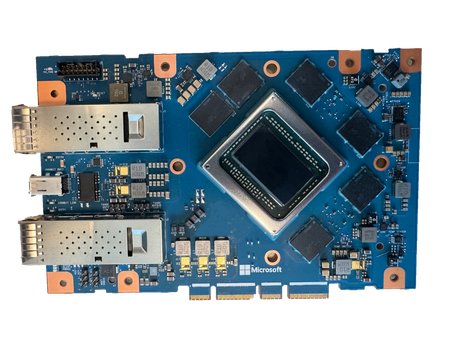
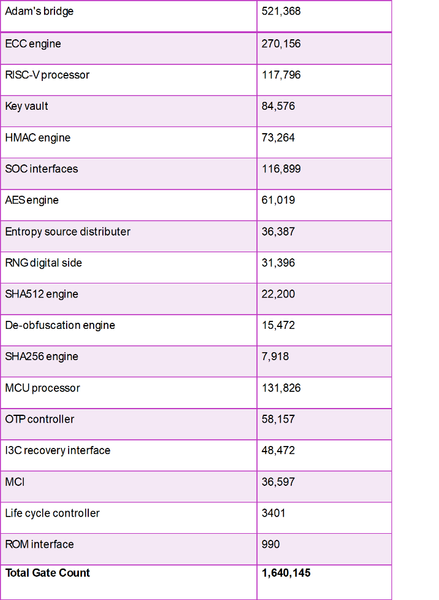
Introducing Caliptra 2.1: an open-source silicon Root of Trust subsystem, providing enhanced protection of data at-rest. Building upon Caliptra 1.0, which included capabilities for identity and measurement, Caliptra 2.1 represents a significant leap forward. It provides a complete RoT security subsystem, quantum resilient cryptography, and extensions to hardware-based key management, delivering defense in depth capabilities. The Caliptra 2.1 subsystem represents a foundational element for securing devices, anchoring through hardware a trusted chain for protection, detection, and recovery.8.1KViews1like0Comments