cloud app security
524 Topics
Defender for Cloud Apps Outdated Browsers - Wrong User Agent String
Hi, I have been creating Activity Policies to detect logins from outdated browsers. Frustratingly, users who I know have up to date browsers installed, are still being detected by the policy for running the likes of Chrome 96 and Edge 18. I have seen an old thread discussing something similar but there is no response or workaround for this issue. - https://techcommunity.microsoft.com/t5/microsoft-defender-for-cloud/outdated-browser-and-operating-system-user-agent-tags/m-p/906620 I don't want to change the policy to only look for certain browser versions. I'd like the policy to work as advertised and only detect interactive logins via outdated browsers. It looks as though the wrong User Agent tags are being read, as I know the users are not running the browser versions displayed. How can I get around
Executive Report by Api and/or Progammatically ?
Hello, Is it possible to have non-portal access to the executive Report Discovery either : - Via Api (requests to be made but do you have the endpoint)? Or Graph Explorer ? - Via Module Posh or Azcli ? Is there already a module or an existing function ? Thank you and have a great day.2.2KViews0likes5Comments
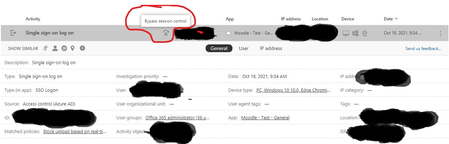
BYPASS SESSION CONTROL
I am testing a real-time content inspection policy (Block upload) in conditional access app control. The policy is setup to block the upload of any files containing an SSN into a browser session app. The problem is the policy fails to block the upload although it logs a match anytime I try uploading a file into the app. I have tried with both Microsoft edge and Google chrome. Below is a screen shot. I will like to know what "Bypass session control" also means since that is what I suspect might be the clue to resolving the issue.6.1KViews1like3Comments
Why is this a High severity Alert with Suspicious Activity as classification?
System alert: Network Requirements Update for API Connectors There must be better ways of allowing customers to deal with Connector-updates? I also couldn't find a Policy or Template in which I could tune/manipulate severity, threshold or turning it off?
About MCAS access policy
This is my first post here.Nice to meet you. Is it possible to restrict which browsers can access Microsoft 365 with MCAS access policy? I'd like to limit it to Edge, Chrome and Safari if possible. I appreciate everyone's help. ※This is a translation, so it may not be natural.Solved
Using Powershell to run MCAS REST API. Limit issues
Hi all, I am working on using the MCAS REST API via powershell to retrieve activities from one user. I have been able to get a powershell script to run successfully but i have issues raising the limit of records to 5000. By default it is 100 but using the Scanning mode (isScan = "true") feature in the filter section, i am able to get 500 but not 5000. Firstly, does anyone use powershell to perform their REST API call? is there a easier way? I cannot install python on my device so only have what is standard on Windows. Secondly, can anyone help me on how to raise the limit to 5000 (or more if possible)? Thanks1.7KViews0likes1Comment