cloud app security
529 Topics
Connecting to multiple Microsoft services with the same session
Hi guys. Working on a script that needs to connect to ExchangeOnlineManagement, TeamsOnlineManagement, SharePointOnlineManagement.... The script will be used across many different tenants, and I also plan to make it publicly available, so 1) I don't really want to pre-configure some complicated key setup and 2) I don't really want to have login pop-ups over and over again... For ExchangeOnline, I learned (accidentally), if I do this: $upn = Read-Host -Prompt "input yer wahawha" Connect-ExchangeOnline -userprimaryname $upn Connect-IPPSsession -userprimaryname $upn And login to MY tenant, I don't get prompted for login. I think likely because my device is Entra-joined, and it's using my Microsoft account. But even if I use a different account, it will only prompt me once - reusing it for the other. This is great, and exactly how I wanted things to flow - but now I'm trying to do Connect-SPOService (sharepoint) and Connect-MicrosoftTeams... and while both of these are part of the tenant, they don't take the -userprimaryname param - so I can specify to use the account I'm logged into my PC with.. The end-goal is to have this script run with minimal user input. I've SORT OF found a workaround for SharePoint, where I can get the SharePointSite from ExchangeOnline, then modify it a bit and use it as input for Connect-SPOService... but Teams, while it doesn't have the URL param requirement, DOES prompt me to login again. Is there a way to use the existing session for either of these, like I've done with ExchangeOnline / IPPSSession? We have MFA enabled, though not required from within our company network - but when I try to use Get-Credential, it errors me out because it wants MFA.769Views1like7CommentsScript to convert .log files to JSON
Recently setup a pipeline from AWS S3 to our SIEM (Microsoft Sentinel) using a lambda function to ingest our AWS WAF logs. There is a succesful connection between the two but I noticed that the logs weren't being pushed. The logs are stored in .log format and after converting the format to JSON they went through and I could see them in the SIEM. The problem is we had to do this manually and need to find a way to automate this. Is there a powershell script that could automate the conversion of a .log file to JSON? The lambda function is a powershell script so this would be easy to add.6.4KViews0likes1Comment
Defender for Cloud Apps Outdated Browsers - Wrong User Agent String
Hi, I have been creating Activity Policies to detect logins from outdated browsers. Frustratingly, users who I know have up to date browsers installed, are still being detected by the policy for running the likes of Chrome 96 and Edge 18. I have seen an old thread discussing something similar but there is no response or workaround for this issue. - https://techcommunity.microsoft.com/t5/microsoft-defender-for-cloud/outdated-browser-and-operating-system-user-agent-tags/m-p/906620 I don't want to change the policy to only look for certain browser versions. I'd like the policy to work as advertised and only detect interactive logins via outdated browsers. It looks as though the wrong User Agent tags are being read, as I know the users are not running the browser versions displayed. How can I get around
Executive Report by Api and/or Progammatically ?
Hello, Is it possible to have non-portal access to the executive Report Discovery either : - Via Api (requests to be made but do you have the endpoint)? Or Graph Explorer ? - Via Module Posh or Azcli ? Is there already a module or an existing function ? Thank you and have a great day.2.2KViews0likes5Comments
BYPASS SESSION CONTROL
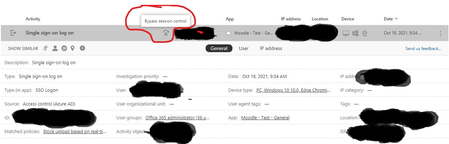
I am testing a real-time content inspection policy (Block upload) in conditional access app control. The policy is setup to block the upload of any files containing an SSN into a browser session app. The problem is the policy fails to block the upload although it logs a match anytime I try uploading a file into the app. I have tried with both Microsoft edge and Google chrome. Below is a screen shot. I will like to know what "Bypass session control" also means since that is what I suspect might be the clue to resolving the issue.6.1KViews1like3Comments
Why is this a High severity Alert with Suspicious Activity as classification?
System alert: Network Requirements Update for API Connectors There must be better ways of allowing customers to deal with Connector-updates? I also couldn't find a Policy or Template in which I could tune/manipulate severity, threshold or turning it off?
About MCAS access policy
This is my first post here.Nice to meet you. Is it possible to restrict which browsers can access Microsoft 365 with MCAS access policy? I'd like to limit it to Edge, Chrome and Safari if possible. I appreciate everyone's help. ※This is a translation, so it may not be natural.Solved