change alerts
51 Topics
Microsoft massaging center
Hi everyone, we use Cloud O365 and there is something related to security, where we have the cloud update without even our acceptation and we follow Microsoft massaging center just to be updated about the changes that Microsoft makes but we don't have the control for these kind of things. For example See the massage that they sent for Microsoft to do update. "In MC215678 (June 2020), we announced that Microsoft To Do would support list sharing between personal Microsoft accounts and work or school accounts. We paused the rollout to incorporate your feedback. We are pleased to announce we are moving forward with this feature. Once available, this feature will be enabled by default if you have not customized the setting for your tenant." As a security perspective sharing personal account with work account is not recommended and most of companies will not turn that on. They don't even classify their updates (regular update, emergency update, new feature ...ext.) my question is what should i do?, is there any policy that could control these kind of things or should we have a written policy or procedure for it? Thanks3.4KViews0likes2Comments
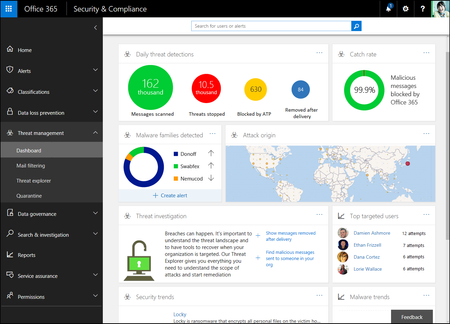
Setup Alert when user creates a new inbox rule
Hi, I am looking for an way to setup a new Office 365 Alert that would send me an email when a user creates a new inbox rule. I have looked at tech articles and have created them via manage alerts, but they don't seem to be working as I never get the email notification.50KViews3likes20CommentsOffice 365 news in September at Ignite—intelligence, security and collaboration
At Microsoft’s Ignite Conference in Atlanta, Georgia, Microsoft announced updates across Office 365 to help IT professionals drive digital transformation within their organizations. I was excited to showcase new intelligent cloud services that help make your employees more productive and your organization more secure. Here’s a breakdown of today’s key news, including new services for Office apps like Word, Excel and PowerPoint, as well as new security capabilities, richer communication features and enhancements for team collaboration across Office 365. Lighting up Office apps with new intelligent services Increasing trust with intelligence enhancements to security and compliance Making collaboration smarter, more connected and effective Read more on Office Blogs.941Views1like0CommentsExtract list of Third party apps integrated with Users profile
We are on E3 plan and i am looking for way to extract the list of third party apps which are integrated by our end users. Anybody has any idea how do i do it? I know E5 has admin panel to deal with same. I need to do this on E3 plan. ThanksSolved1.4KViews0likes2CommentsOffice 365 news in January—updates to OneDrive, Activity feed and more
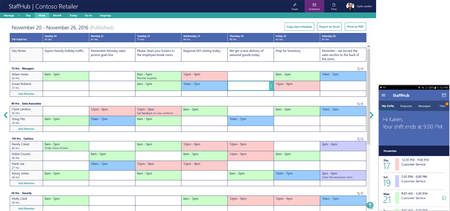
Happy New Year from Office! We’re kicking off 2017 with updates to OneDrive, the Activity feed within the Office apps, StaffHub and more. Updates include: OneDrive for Business updates Activity feed is now available for consumers Office Lens integration on Android Announcing Office Insider for iPhone and iPad Microsoft StaffHub is generally available Read more on Office Blogs.1.4KViews3likes0CommentsSocial Media Connections: Let's Network!
I love the Microsoft Tech Community and find it to be an incredible source of information, discussion, feedback, and comradery. I also use LinkedIn and Twitter to keep in touch with my professional network. Do you? Share your usernames in the comments and let's connect! I'll start 🙂 Twitter: Brian_Levenson LinkedIn: https://www.linkedin.com/in/brianlevenson4.5KViews7likes17Comments
Quarantine spoofing and reporting phishing emails
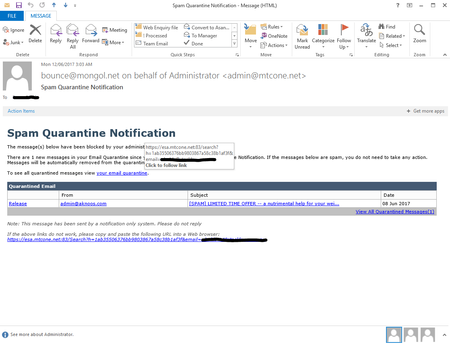
This morning when I opened Outlook, I found an email from "Administrator" titled "Spam Quarantine Notification". Being the administrator of our Exchange Online network, I know this is not an Office365 notification - it's clearly a phishing email - but it looks pretty darn close to our normal spam quarantine notifications that I fear that some of our users may not know the difference. I would very much like it if Microsoft Office365/Exchange Online would build a "report this email as phishing scam" feature in to new versions of Outlook and maybe even make a publicly available add-in for existing versions. You have the feature in Outlook Mail - the free webmail hosting - yet it isn't available for the paying customer's using corporate hosting and costly (in a relative sense) full desktop products. I find this quite alarming actually. In addition to this, it would also be darn helpful if administrators of a network had an easy way to blacklist or whitelist emails and/or domains from the Outlook email client. I know this is a public forum and not a support centre, but it would be great to know if my concerns and requests are valid. Thanks and regards Reece - "Long term Microsoft user and cloud hosting advocate"4.5KViews0likes1CommentNew White Paper - Office 365 empowers Microsoft employees and enables Microsoft IT
As Microsoft has moved users, teams, and documents to the cloud with Office 365, the company's IT department has been transforming from server and systems management to organization empowerment. Formerly MSIT and now called Core Services Engineering (CSE), the teams are focused on delivering technology based services that enhance the company's ability to achieve our mission: to empower every person and every organization on the planet to achieve more. Software-as-a-service solutions like Office 365 delivered from the cloud are always up to date and constantly improving. Rather than spend time racking and stacking servers, deploying patches, and planning costly upgrade projects, CSE resources are freed to develop solutions to business problems and enable a productive and collaborative - yet secure and protected - workforce. To learn more about MSIT's transformation aided by Office 365, check out the new white paper: http://aka.ms/MSITservers2services4KViews5likes0Comments
Email bounces back. He is unable to receive my calendar invites in outlook.
Here is the error code that I got from the exchange online, Reason: [{LED=554 5.2.0 STOREDRV.Deliver.Exception:QuotaExceededException.MapiExceptionShutoffQuotaExceeded; Failed to process message due to a permanent exception with message Move/Copy messages failed. 16.55847:A5000000, 17.43559:00000000AD010000000000000000000000000000, 20.52176:140F97810500101068010000, 20.50032:140F9781754.3KViews0likes3Comments