ccf
16 TopicsImprove Campaign Reach and Measurement with Azure Confidential Clean Rooms
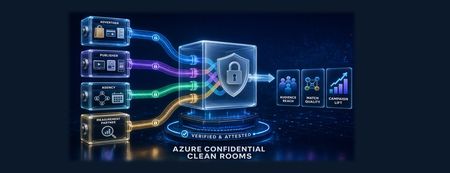
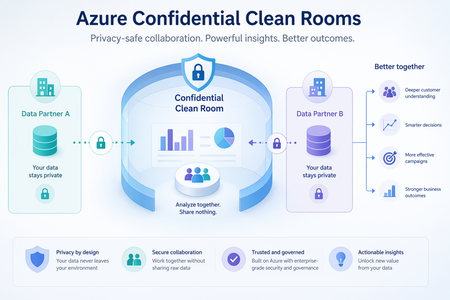
Why campaign performance now depends on trusted data collaboration For many years, third-party cookies helped advertisers, publishers, and measurement partners recognize users across parts of the open web. That model continues to evolve as browsers and mobile platforms introduce stronger privacy protections and limit access to certain cross-site and device-level identifiers. As a result, some advertisers and publishers are placing greater emphasis on the first-party data they collect directly to support audience activation and campaign measurement. Advertising partnerships may involve identifiers and behavioral data covered by privacy, data-protection, or industry rules. Data that has been altered to reduce direct identification—such as hashed email addresses or advertising identifiers—may still be linked to individuals and should not automatically be considered anonymous. Depending on the law and context, it may be treated as personally identifiable information (PII) or personal data under the European Union’s General Data Protection Regulation (GDPR). Organizations must have an appropriate legal basis and a clear purpose for using such data. The European Union’s Digital Markets Act (DMA) also affects how designated digital platforms combine certain personal data across services. In the United States, health information held by organizations covered by the Health Insurance Portability and Accountability Act (HIPAA) may be subject to additional restrictions, including for some marketing uses. The requirements for each collaboration depend on the parties, data, purpose, consent or authorization, and jurisdiction. Together, these changes create a practical challenge: campaign analysis increasingly depends on combining detailed records held by different organizations, but privacy, security, and governance obligations make unrestricted exchange of customer-level data difficult. Advertisers and publishers therefore need a controlled way to match audiences and measure outcomes using only authorized data—without exposing or freely sharing the underlying records. Azure Confidential Clean Rooms is designed to address this challenge. It allows each party’s detailed data to be used for an agreed analysis while helping protect raw data from access by other participants. This provides a controlled, verifiable environment for audience matching and campaign measurement without unrestricted file sharing. What campaign leaders should look for: the potential to broaden addressable audiences, strengthen evidence of campaign lift, reduce operational risk, and establish a repeatable model for trusted collaboration across media and measurement partners. Campaign decisions with secure multiparty analytics Azure Confidential Clean Rooms is a fully managed service that enables advertisers, publishers, agencies, and measurement partners to analyze sensitive datasets together while helping protect each participant’s raw data. The current preview supports analytics through Spark SQL queries agreed by the participants. These queries run in a hardware-protected environment called a Trusted Execution Environment (TEE), helping protect participants’ raw data from other collaborators and the Azure operator throughout its lifecycle. For a deeper explanation of the technology and architecture, see our earlier blog, Preview of multiparty analytics with Azure Confidential Clean Rooms. The following scenarios show how this model supports specific campaign decisions: Audience activation — Which high-value customers might this media partner reach? The advertiser contributes first-party customer data, such as securely transformed contact details, postal addresses, loyalty IDs, and purchase history. The publisher contributes its audience-matching data, on-site behavior, and consented interest or demographic segments. Azure Confidential Clean Rooms can compare identifiers that the participants have agreed to use for matching and release a reachable audience segment without exposing the underlying records. Campaign leaders can use the result to estimate potential reach and direct investment toward more relevant audiences. Identity enrichment — Can we improve match quality while protecting partner data? An agency or identity partner can contribute a third dataset to connect approved identifiers across email, mobile advertising IDs, devices, or households and add consented demographic or business attributes. Because the matching happens inside the confidential clean room, participants may improve match rates without exposing the identity partner’s underlying data or copying another party’s identifiers. Stronger matching can help expand reach and reduce media waste caused by fragmented customer identities. Measurement and attribution — Did the campaign contribute to additional business outcomes? The publisher contributes ad-exposure records, while the advertiser contributes outcomes such as purchases, order values, subscriptions, or app installs. Comparing these approved datasets can help measure unique reach and frequency, results across publishers, and the difference between groups that were and were not exposed to the campaign. For example, a retailer and a streaming publisher can compare exposure data with purchase outcomes to estimate campaign lift without revealing who saw a specific ad or made a purchase. This can give campaign leaders stronger evidence for campaign optimization and future budget allocation. These scenarios can help campaign leaders assess whether secure data collaboration may improve audience reach, matching quality, or confidence in campaign measurement. Why campaign leaders should consider Azure Confidential Clean Rooms The collaboration model is designed to give each participant greater control over how its data is accessed, used, and shared. Four capabilities are central to building trust among advertisers, publishers, agencies, and measurement partners: No centralized data pooling — Collaborators can keep source datasets in their own storage instead of copying them into a shared, permanent repository. The confidential environment verifies that expected code is running before it securely retrieves authorized data for temporary processing. This can reduce unnecessary data movement and exposure while supporting an approved analysis across partners. Controlled release of approved results — Before analysis begins, collaborators can agree which data may be used, approve the analysis, and specify who may receive the results. Safeguards can also prevent results for very small groups from being released, helping reduce the risk of identifying an individual. Verifiable governance and tamper-resistant audit trails — Participants can verify key properties of the environment instead of relying only on the clean-room provider’s claims. Open-source components and hardware-backed verification help participants confirm that the expected Microsoft-provided code is running. Tamper-resistant audit trails generated in the confidential environment can support compliance reviews. Data protection throughout the process — Each party can encrypt its data before it leaves its environment. Participants allow access to encryption keys only after the confidential environment verifies that expected code is running. Try Azure Confidential Clean Rooms Consider a campaign where better partner data could help improve audience reach, matching quality, or measurement confidence. Sign up to participate in a preview of multiparty analytics with Azure Confidential Clean Rooms. The Microsoft team will contact you to discuss the campaign scenario, participating datasets, and governance requirements. Learn more Sign-up: Preview of multiparty analytics with Azure Confidential Clean Rooms Preview blog: Multiparty analytics with Azure Confidential Clean Rooms Azure documentation: Confidential Clean RoomsAccelerate connectors development using AI agent in Microsoft Sentinel
Today, we’re excited to announce the public preview of a Sentinel connector builder agent, via VS code extension, that helps developers build Microsoft Sentinel codeless connectors faster with low-code and AI-assisted prompts. This new capability brings guided workflows directly into the tooling developers already use, helping accelerate time to value as the Sentinel ecosystem continues to grow. Learn more at Create custom connectors using Sentinel connector AI agent Why this matters As the Microsoft Sentinel ecosystem continues to expand, developers are increasingly tasked with delivering high‑quality, production‑ready connectors at a faster pace, often while working across different cloud platforms and development environments. Building these integrations involves coordinating schemas, configuration artifacts, Azure deployment concepts, and validation steps that provide flexibility and control, but can span multiple tools and workflows. As connector development scales across more partners and scenarios, there is a clear opportunity to better integrate these capabilities into the developer environments teams already rely on. The new Sentinel connector builder agent, using GitHub Copilot in the Sentinel VS code extension, brings more of the connector development lifecycle -- authoring, validation, testing, and deployment into a single, cohesive workflow. By consolidating these common steps, it helps developers move more easily from design to validation and deployment without disrupting established processes. Read the full announcement here: Accelerate connectors development using AI agent in Microsoft Sentinel Original Publication: Microsoft Security Community Blog, March 30th, 2026258Views0likes0Comments
Building Microsoft Sentinel Connectors in Minutes with the Sentinel Connector Builder Agent
Overview We previously announced the public preview of the Microsoft Sentinel connector builder agent via VS code extension, that helps developers build Microsoft Sentinel codeless connectors faster with low-code and AI-assisted prompts. This post walks through a hands-on lab using a mock Network Log API to demonstrate how the Sentinel connector builder agent simplifies building Codeless Connector Framework (CCF) pull connectors. Instead of manually creating ingestion infrastructure and configuration files, you’ll use a guided, conversational workflow in VS Code to generate connector artifacts, test them against a live API, and deploy them into Microsoft Sentinel. The lab focuses on the end-to-end experience ranging from API setup to validated connector deployment so you can see how quickly a working integration can be produced. For additional guidance beyond this lab, refer to our MS Learn documentation. The Lab Environment This lab is built around a mock Network Log API hosted as an Azure Function App. The purpose of the lab environment is to give us a live API that we can use to build, validate, and test the Sentinel CCF connector builder agent against end to end. The API exposes 50 synthetic network activity records that look and behave like a real product data source, including web traffic, DNS requests, blocked remote access attempts, malware command-and-control blocks, VPN activity, and other common network events. That makes it a useful stand-in for the type of telemetry many teams want to onboard into Microsoft Sentinel. The API is intentionally shaped like the kind of source a customer might expose for telemetry retrieval. It uses API key authentication through the X-API-Key header, returns paginated results through a nextLink model, and provides a predictable response structure that the builder agent can map into a pull connector configuration. The repo contains everything needed for the walkthrough. There is an ARM template to deploy the Function App, reference documentation for the API, and a sample connector package showing the generated polling config, table schema, DCR, and connector definition. The end goal of the lab is straightforward: use the builder agent to generate a CCF pull connector that ingests this API into the custom NetworkLogAPIGetNetworkLogs_CL table in Sentinel. Follow the full walkthrough here: Building Microsoft Sentinel Connectors in Minutes with the Sentinel Connector Builder Agent Original Publication: Microsoft Sentinel Blog, August 11th, 2026259Views0likes0CommentsEmpower Real-Time Security with Microsoft Sentinel’s CCF Push Feature
In today’s rapidly evolving threat landscape, organizations need security solutions that deliver actionable insights in real time, not minutes or hours after the fact. Microsoft Sentinel continues to expand its capabilities, driven by a commitment to empower customers and partners with cutting-edge tools for proactive defense. Today, we are excited to announce the public preview of our latest innovation, the Sentinel Codeless Connector Framework (CCF) Push feature. CCF Push addresses a critical need: enabling seamless, automated, and immediate delivery of security data to Sentinel, so teams can respond to threats as they happen. What Is CCF Push and Why Does It Matter? Microsoft Sentinel connectors generally follow two patterns. In the polling pattern, partners and customers expose their web‑facing REST API endpoints and use our traditional CCF connectors to poll those endpoints at intervals to gather data for ingestion into Sentinel. In the push pattern, partners and customers send data directly to a Sentinel workspace. Our new CCF Push capability was built to streamline and accelerate time to adoption for this second pattern. Read the full announcement here: Empower Real-Time Security with Microsoft Sentinel’s CCF Push Feature Original Publication: Microsoft Sentinel Blog, February 12th, 2026222Views0likes0CommentsExtending Sentinel Data Integration: Azure Blob Storage Support for CCF Connectors
As organizations scale their security operations, the ability to ingest, process, and analyze high volumes of data reliably becomes increasingly critical. Microsoft Sentinel continues to expand its ecosystem through the Codeless Connector Framework (CCF), enabling ISVs to build and deliver integrations with Sentinel faster while simplifying deployment for customers. Today, CCF extends even further with support for Azure Blob Storage, introducing a new pattern for how data can be delivered into Sentinel. Expanding Connector Patterns with Azure Blob Storage CCF has traditionally enabled connectors that integrate directly with partner APIs and data sources. With this latest enhancement, ISVs can now build connectors that read data from Azure Blob Storage—unlocking new flexibility in how security data is collected and delivered. In this model, an ISV writes data to an Azure Blob Storage account. The Sentinel connector then reads from that storage layer, using Azure-native components such as Event Grid and storage queues to process events and forward them through data collection rules (DCR) into Log Analytics workspace. This approach introduces a durable data layer between the data source and Sentinel, enabling more resilient and scalable ingestion scenarios. Read the full announcement here: Extending Sentinel Data Integration: Azure Blob Storage Support for CCF Connectors Original Publication: Microsoft Sentinel Blog, May 5th, 2026333Views0likes0Comments
Ingesting Logs through Azure Private Link
Hi, We are currently using Azure Private Link within our environment and we are attempting to ingest logs into Log Analytics. When I reached out to Microsoft Support, it appears that the CCF connectors will not work using Private Link and the Azure Functions connectors are becoming depricated. Has anyone else run into this issue and what is the solution for getting logs into Sentinel through the Private Link, specifically API log sources? Did this require a custom app for each of these log sources or some sort of custom script that lives on an AMA host within the Private Link to ingest the logs? Any advice here would be greatly appeciated. Thank you,461Views0likes4CommentsPreview of multiparty analytics with Azure Confidential Clean Rooms
Today, we are excited to announce the preview of multiparty analytics feature of Azure Confidential Clean Rooms, a fully managed service that allows customers and their partners to securely analyze privacy-sensitive datasets from multiple parties. It uses confidential compute enabled Apache Spark-based big-data analytics (Spark SQL) which helps protect their raw data from other collaborators and from the Azure operator by performing computations in a Trusted Execution Environment (TEE). Privacy-sensitive datasets include personally identifiable information (PII), protected health information (PHI) and cryptographic secrets. Organizations across industries are increasingly looking to supplement their data with data from business partners, to build a complete view of their business. For example, brands, publishers, and their partners need to collaborate using datasets containing Intellectual Property (IP) to improve the relevance of their campaigns. Confidential data clean rooms help solve this challenge by enabling organizations to share and analyze granular datasets in a secure environment that helps prevent raw data exfiltration—protecting intellectual property, preserving customer privacy, and addressing concerns around regulatory compliance. You can sign up for the preview here Key Features Fully Managed: Azure takes care of the infrastructure provisioning and scaling with no user intervention. This significantly reduces your onboarding effort allowing you to focus on the queries and insights, not on infra management. Confidential Spark SQL: Spark SQL allows you to query large datasets and run complex queries in a distributed computing environment. In the confidential computing enabled version, the Spark driver and executors are fully attested policy-governed enclaves running as virtual nodes on confidential Azure Container Instances (ACI) which helps prevent exfiltration of collaborators’ data during query execution. Governance: Helps manage membership to cleanrooms, enables and verifies approval for queries from relevant collaborators before executing them and verifies consent to access sensitive collaborator data. It also helps generate tamper-resistant audit trails containing salient clean room events. This is made possible with the help of an implementation of the Confidential Consortium Framework (CCF). Telemetry: Throughout every clean-room run, detailed logs are streamed out in real time to monitor performance, troubleshoot issues, and keep the analytics healthy — all without ever exposing the collaborators’ data at any time. Verifiable trust: Cryptographic remote attestation viz. full attestation based on confidential hardware reports allows independent verification of the TEE along with along with all components that are part of it, without just trusting the cloud provider, before sensitive data and decryption keys are made available to the TEE Open-source containers: All Microsoft provided cleanroom containers and sidecars are open-sourced here and can be verified for provenance and integrity guarantees using GitHub artifact attestation Use Cases Multi-party confidential big-data analytics unlocks value in scenarios where data sensitivity, regulatory pressure, or competitive concerns previously blocked collaboration. These are some early scenarios that can benefit from this. Media & Advertising Collaboration of advertiser CRM data with publisher data for audience targeting and segment activation. Collaboration of audience data with measurement partners for measurement and attribution. Banking & Finance Collaboration between banks and insurance firms to upsell relevant products to existing bank customers without sharing raw data from either side Collaboration with retailers to generate customized offers for bank customers, without exposing either party’s underlying data. Government & Public Sector Secure collaboration of data across government departments to deliver better citizen welfare outcomes. Secure collaboration between government and private enterprises on shared-interest workloads such as traffic monitoring and weather systems. Healthcare Enable healthcare firms — including biopharma organizations — to combine their data with third-party institutions to accelerate clinical development, like identifying eligible participants for a clinical trial, without exposing underlying patient data. Combine patient datasets across hospitals to study disease patterns or outcomes without exposing sensitive protected health information. "A higher standard for protecting user privacy and trust, the phase-out of third-party cookies, and global regulations demand more sophisticated data collaboration tools to support advertising marketplaces. Azure Confidential Cleanrooms (ACCR) provides a secure, feature-rich, and flexible foundation to implement privacy-preserving functions and enable insights without sharing privacy-sensitive data outside of organization boundaries. Built on the Azure Confidential Compute (ACC) platform and offering cohesion with Azure's diverse set of services, ACCR offers the attestation, audit, fine-grained access control, and verifiable trust tools required for secure and privacy-safe data collaboration in today's world." — Andrei Mackenzie, Engineering Manager, Microsoft AI "Azure Confidential Clean Rooms enabled our team to evaluate how clean room capabilities can support secure, governed data collaboration at scale. Through the Proof-of-Concept (PoC), we explored how privacy-preserving workflows, trusted access controls, and scalable compute can create a stronger foundation for responsibly leveraging first-party data. This helps reduce operational friction while supporting business growth, improving customer engagement, and enabling more relevant customer experiences." — Nic Dregne, Director, Microsoft AdTech Engineering Beyond Spark SQL Realizing other multi-party scenarios like custom analytics, ML training and inferencing on Azure Confidential Clean Rooms is in our roadmap. If you have such a scenario to be realized, you can fill in and submit the preview signup form with the details of your scenario and we’ll get back to you. Learn More · Signup for the preview of Azure Confidential Clean Rooms for Analytics · Confidential Consortium Framework (CCF) · Virtual Nodes on Azure Container Instances