calendar
57 Topics
Calendar items not sent to new members of group
Hello, I have created some calendar items in outlook that are sent to a group. Whenever I make a change in that group (either add or delete members) this calendar item is not updated. This means that new group members do not receive an invitation for existing meetings. What I need to do to resolve this, is to edit each such meeting, eg make a change in description, and then send it again. Only this way the new group members will get invited. I come from Google, where this feature works flawlessly and it seems very strange for outlook to force me to update each calendar item, just to update the recipients. It kind of defeats the whole purpose of using groups in calendar. Is there any way you can fix this please? Thank you! Kostas11KViews1like7CommentsRestrict group calendar edit permissions?
For our org wide team, we would like to start posting events to the group calendar, but want to restrict who can do this. I found a couple of threads like this one from 4-5 years ago indicating that this wasn't fully possible at the time, but I'm hoping it has changed in the interim. Is it possible to change group calendar permission to read only for members, and grant specific people write access?12KViews0likes4Comments
Scheduling meetings on behalf group's calendar in desktop app
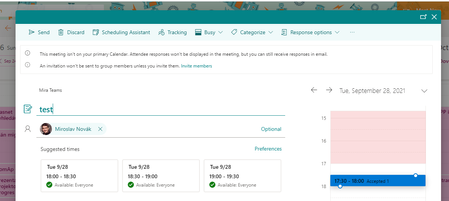
Hello, I have found a way how to schedule a meeting in Group calendar in Outlook online that the meeting is scheduled on behalf the group or it looks like. It is really useful for our scenario because everyone in group can edit the meeting. I would like to schedule the meeting the same way from desktop Outlook but when I add the calendar I am not able to do the same. How to set Outlook destkop, what to change or what to do that I can schedule it? When I schedule it in desktop and try to add another people it is always changed that the organizer is me. Thank you Mirek675Views0likes0Comments
Group calendars in 3rd party application
Hi, I couldn't find a way to show events (created/accepted in a group calendar) in a third app application (calndar in MacOs, Calendar in Spark Mail app, ...). This is crucial, as moving back and forth from different devices and workplaces should be a seamless operation during these days. I can only see events in my "Calendar" from Outlook (where of course I see all the events, also those coming from groups). Thanks684Views0likes0Comments
Groups - to hide or not to hide.... that is the question!
I created a Group in Outlook. The email address appears in Outlook GAL and the group name appears in Outlook navigation under Groups. I created a group in Teams while creating the Team. The email address appears in Outlook GAL and the group name appears in Outlook navigation under Groups. It was my understanding that Groups created through the process of creating a Team would not appear in Outlook. Help me understand why it is appearing. If I run the PowerShell to hide the email address and group name in Outlook, then I am not able to see the group calendar that gets created because as we know, my Outlook calendar will display by default and to only view the group's calendar, I have to un-tick my calendar and tick the group's calendar. But, since the group is hidden, I don't have an option to make it visible in Outlook. It was my hope that only MEMBERS/OWNERS of a group could see the email address in Outlook GAL and group calendar, but I guess that isn't true? Either I am doing something wrong or there is a lack of vision in how this process should work. Any assistance would be greatly appreciated!1.6KViews0likes4Comments
Group calendar
Hi all, I would need advice on the next issue. The user wants us to create him the O365 Group calendar. For example, if I have a group "GRP-NAME", how can I enable a calendar for the whole group? I've found some articles, but they all give me the same resolution, to do it from my Outlook app. Is there maybe some other idea? Kind regards, DinoSolved1.7KViews0likes5CommentsWhen adding a new user to my 365 group, do they get added to existing calendar invites?
We have new employees joining all the time and after I've added them to my 365 group, do they automatically get calendar meeting invites that were sent to the 365 group alias? Or do I have to resend the invites to the10KViews1like2CommentsO365 Group Calendar
Trying to configure the permissions on a O365 Group Calendar. What I am looking for is a way that the calendar will automatically show up in Outlook for all of the users (members); however, when I added them as members, each time an event is added to that calendar, they are notified to accept or decline the event (meeting). I do not want the later to occur. Background. Trying to create a Who's Here and Who's Out Calendar, so people know rather an employee is in the office. Yes, IM presence would be great; but dealing with users that want to see all of the employees that are out of the office instead of having to search an employee in Skype or enter their name in Outlook. We used to have this easily on our intranet page when users were forced to log in and out every day but that system has been removed (a good thing). I did create a web part for our new SharePoint site that feeds that information from the O365 Calendar but people still want to see it in their Outlook Calendar views as well.4.5KViews0likes7CommentsDelete, unshare, or hide an Office 365 Group's calendar
I see that when creating an Office 365 Group that a calendar is also automatically created for that group and that it appears in the list of calendars for all members of the Group regardless of their follow status of the group. My users would rather not have any calendars for Groups. How can I remove or hide them for the members of the Group?25KViews0likes6Comments