business intelligence
115 Topics
SQL Data Discrepancy check
SQL issue - Power BI Excel/CSV files imported into SQL Tables and I need to do data discrepancy check - find logical discrepancy - find out dependency of fields and tables, Null, duplicates, Unwanted Fields, Junk elements, Logical Discrepancy, check tables I have tables as below 1) ACTIVECUSTOMER, 2) Bank_Departure,3) CreditCard, 4) CUSTOMERINFO, 5) EXITCUSTOMER,6) GENDER, 7) GEOGRAPHY based on these tables how to check data discrepancy into SQL server, any inputs are much appreciated33Views0likes1Comment
The hardest part of modernizing enterprise BI is NOT the dashboard
For my team, a whole lotta enterprise BI modernization discussions start with the visualization layer, mostly around: Which dashboard should be rebuilt? Should the reports use Direct Lake? Should the organization move to a Lakehouse? How should Power BI capacity be configured? Those are important questions, but there is another one that tends to surface later: Where should the business logic live? In a multi-source environment, the same KPI can be derived from SAP, operational systems, spreadsheets, or application databases. If each report implements the calculation independently, moving the data into a modern platform doesn't automatically create consistent reporting. A more maintainable pattern is to separate the responsibilities: Ingestion: bring source data into the platform with appropriate batch or event-based patterns. Transformation: clean, conform, and standardize data before it reaches reporting. Business layer: define reusable measures and business rules in the semantic model. Security: apply access rules at the appropriate data or semantic layer rather than duplicating them across individual reports. Visualization: keep reports focused on analysis and user experience rather than embedding large amounts of transformation logic. Microsoft Fabric, in that same environment, makes it feasible to bring several of these capabilities into one unified platform, but the architecture still needs clear boundaries between them. I have found this distinction especially important when upgrading reporting environments that have accumulated years of spreadsheet logic and report-specific calculations. For those working on enterprise BI modernization, where do you draw the line between data transformation logic and semantic-model/business logic? And what has worked best for keeping KPI definitions consistent across multiple Power BI reports?31Views0likes0Comments✨ FabCon + SQLCon Europe 2026: Partner Know Before You Go Guide is Now Live!
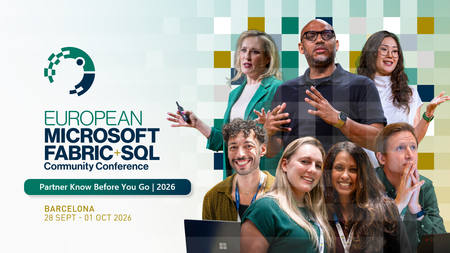
Barcelona is just around the corner, and we're excited to welcome our partner community to the first-ever co-located FabCon + SQLCon Europe experience! To help you make the most of your time onsite, the Partner Know Before You Go Guide is now available. This guide brings together everything partners need to know before arriving, including exclusive partner programming, networking opportunities, important deadlines, and event resources. What You'll Find Inside ✅ Partner Day agenda and key sessions ✅ Partner Happy Hour details ✅ Partner Elevator Pitch Challenge information ✅ Executive Meetings with Fabric & SQL Leadership Team ✅ 1:1 Meetings with the Partner Success Team ✅ AMA Session with the Partner Success Team ✅ Fabric Certification Recognition opportunities ✅ Testimonial Video nominations ✅ Fabric + SQL in the Wild Partner Photo Scavenger Hunt ✅ Cvent Event App guidance and Partner Community information Event Details 📍 Centre de Convencions Internacional de Barcelona (CCIB) 📅 September 28 - October 1, 2026 🌍 Barcelona, Spain Whether you're attending Partner Day, meeting with Microsoft leaders, showcasing your expertise, or connecting with peers from around the world, we've built partner-exclusive experiences to help you learn, connect, and accelerate your Microsoft Fabric business. 📘 Download the Partner Know Before You Go Guide below. ⬇️ We can't wait to see you in Barcelona! #FabConEurope #SQLConEurope #MicrosoftFabric #MicrosoftPartners #DataAndAI #FabCon2026 #PartnerCommunity808Views2likes0Comments2026 FabCon + SQLCon Europe Fabric in the Wild: Photo Scavenger Hunt
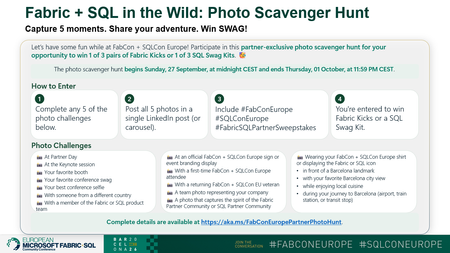
📸 Fabric + SQL in the Wild: Photo Scavenger Hunt at FabCon + SQLCon Europe Heading to FabCon + SQLCon Europe in Barcelona? Get ready to explore, connect, and have some fun with the Fabric community! We're excited to launch the Fabric + SQL in the Wild: Photo Scavenger Hunt, an exclusive experience for Microsoft partners attending the event. Whether you're networking at Partner Day, taking in the keynotes, meeting fellow partners, or discovering Barcelona, you'll have the opportunity to capture your adventure and win some exclusive Fabric swag. 🏆 Win Fabric Kicks or a SQL Swag Kit Complete the challenge by sharing photos from any five scavenger hunt moments and you'll be entered for a chance to win 1 of 3 pairs of Fabric Kicks or 1 of 3 SQL Swag Kits. 📷 How It Works ✅ Complete any 5 photo challenges from the hunt ✅ Share all 5 photos in a single LinkedIn post or carousel ✅ Include: #FabConEurope #SQLConEurope #FabricSQLPartnerSweepstakes That's it. You're in! The scavenger hunt is all about celebrating the people, experiences, and energy that make the Microsoft Fabric partner community special. From Partner Day and keynotes to new connections and iconic Barcelona landmarks, we can't wait to see Fabric in the wild through your lens. Drop your photos, showcase your creativity, and share your FabCon + SQLCon story with the community! 🌍 See you in Barcelona. For more information about FabCon + SQLCon Europe, visit aka.ms/fabconeu #FabConEurope #SQLConEurope #FabricSQLPartnerSweepstakes280Views1like0Comments🚀 Join the FY27 Fabric Engineering Connection Kickoff Call
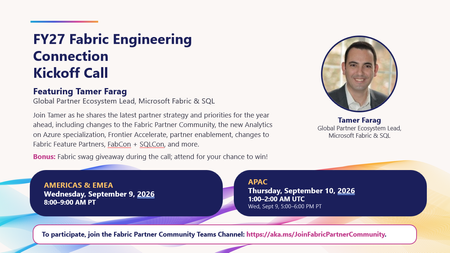
We're excited to kick off FY27 with the first Fabric Engineering Connection call of the year! Join Tamer Farag, Global Partner Ecosystem Lead for Microsoft Fabric & SQL, as he shares the latest strategy, priorities, and opportunities for partners in the year ahead. What we'll cover ✅ Fabric Partner Community updates and upcoming changes ✅ Analytics on Azure Specialization updates ✅ Frontier Accelerate program highlights ✅ Partner enablement plans and resources ✅ Fabric Feature Partner program updates ✅ FabCon and SQLCon insights and opportunities ✅ Open Q&A with the community 🎁 Bonus: Attend live for a chance to win Fabric swag during the call! Event Details Americas & EMEA 📅 Wednesday, September 9, 2026 🕗 8:00 AM – 9:00 AM PT APAC 📅 Thursday, September 10, 2026 🕐 1:00 PM – 2:00 PM UTC (Wednesday, September 9, 5:00 PM – 6:00 PM PT) How to Join To participate, join the Fabric Partner Community Teams channel: 🔗 https://aka.ms/JoinFabricPartnerCommunity Whether you're a long-time community member or just beginning your Microsoft Fabric journey, this is a great opportunity to hear directly from the team, get aligned on FY27 priorities, and connect with fellow partners around the world. We look forward to seeing you there!392Views1like2Comments🎉 Save the Date: FY26 Fabric Partner Community Year‑End Celebration
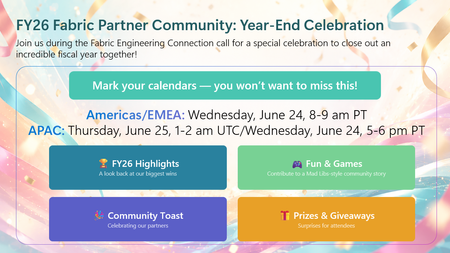
As we prepare to wrap up FY26, we’re closing the year the same way we built it — together. This year‑end celebration will be held as part of the final Fabric Engineering Connection calls of FY26, giving us space to pause, look back on what we built together, and celebrate the partners who make this community what it is. 🌎Americas & EMEA Wednesday, June 24 | 8:00–9:00 AM PT 🌍APAC Thursday, June 25 | 1:00–2:00 AM UTC / Wednesday, June 24 | 5:00–6:00 PM PT) ✨ What to expect: A look back at the moments that defined FY26 along with partner updates to take you into FY27 Fun & games — including a Mad Libs–style community story built live by partners A community toast and a few surprises along the way 👉 Important: This call is open to members of the Fabric Partner Community on Microsoft Teams. If you’re not already a member, you can join here: https://aka.ms/JoinFabricPartnerCommunity This isn’t just a year‑end recap. It’s a thank‑you to the partners who showed up, shared openly, asked great questions, and helped each other grow real Microsoft Fabric practices. Mark your calendars. We can't wait to celebrate with you! 🥳 🥂176Views1like0Comments
SQL Server issue but don't know what - please help!
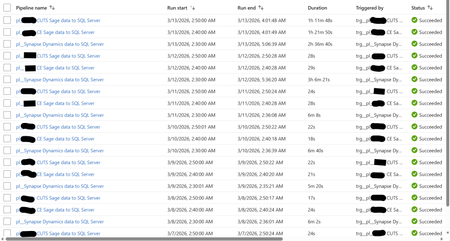
Hi, I'm facing a SQL Server focused issue that I don't understand why it's occurring and would like your help to identify and resolve, please. I will provide an in-depth breakdown of the scenario. Two years ago, I created a Azure Data Factory (ADF) Pipeline to take data from Azure Synapse to Azure SQL Server, and two other Pipelines to take data from an On-Premises Sage server to the same Azure SQL Server. These Pipelines were working perfectly up until two days ago (11/03/26) when the Pipelines still always complete successfully but the duration have increased greatly. The below screenshot shows the log of these three Pipeline for the past week. Note how prior to the 12/03/26 the Synapse Pipeline took about 6 minutes to complete and the two Sage Pipelines took around 25 seconds. Also note how on the 12/03/26 the Synapse Pipeline took over 3 hours but the two Sage Pipelines continued with their normal 25 seconds. Notice today (13/03/26) the Synapse Pipeline was still slow but now the two Sage Pipelines are taking over an hour. I'll note here that the Pipelines still complete successfully (so the config must be correct as it has been for two years). Each Pipeline contains a single (for Sage) or several (for Synapse) 'Copy data' objects. The objects have their source configuration to simply extract from the source (so either Synapse or Sage) and then the sink configuration has a 'Pre-Copy script' which simply Truncates the target SQL Server table, before loading to the SQL Server table. The screenshot below is one example - each Pre-Copy script is populated the same but just with the tables being different. When I look at the log for the Pipelines, I see a common theme for each and that is the 'Pre-Copy script' (the Truncate) is consuming 99% of the time. The screenshot below shows this common theme. So at this point, I ask the question why, after two years of all working well and completing very quickly, are the Pipelines taking so long to complete? This also seems to be an intermittent problem as I have performed several manual executions which will take a long while, then revert back to the quick several minutes again (so good), then revert once more to taking a long while again. It is intermittent. See the screenshot below. Notice how the same Pipeline have different durations. It's intermittent. The reason why I think it is a SQL Server focused issue for the following reasons: 1) Synapse - Performing simple commands (Select Top) returns data within seconds. 2) SQL Server - Performing simple commands (Select Top) usually takes seconds but during the past two days is often taking half hour. 3) SQL Server - When amending a SQL View it would take a split second to complete. During the past two days, it goes over ten minutes and still doesn't complete (I was amending the View for testing purposes). 4) SQL Server - When looking at the Views node under a database, during the past two days, it intermittently doesn't show the View. Sometimes, it will work if I log out and then back into SQL Server. 5) Power BI - Refreshing a Power BI report, whether from the Power BI Service or Desktop, call SQL Server Views. These SQL Server Views read from several SQL Server tables. These report refreshes are failing due to an IDbCommand interface error. These Power BI report data refreshes simply read from a SQL Server table via a SQL View. They don't reference or consider at all the any ADF Pipelines. The Pipelines execute between 2am and 3am each morning. The Power BI report refresh their data around 12pm to 5pm. As SQL Server seems to be problematic at the point of the 'Pre-Copy script', which is one of the end to end process, and then problematic at the very other end where Power BI reports consumes SQL Views - leads me to believe the issue is with SQL Server. I am a report developer and not an ADF expert. I've built the ADF process on the side. I haven't changed any development/configuration/etc... between this all working and failing. Our I.T. department have advised they have made no changes to contribute to this issue. Please can someone advise on what's happening here and why this issue has arose when for two years all was fine? Thanks.136Views0likes0Comments🚀 FabCon + SQLCon Partner Social Sprint
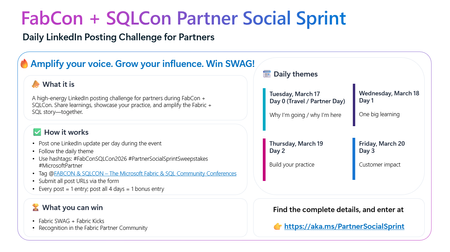
A 4‑Day LinkedIn Challenge for Partners Attending FabCon + SQLCon in Atlanta If you’re joining us in Atlanta this March for FabCon + SQLCon 2026, we’ve got a new way for you to amplify your impact: the Partner Social Sprint — a daily LinkedIn challenge designed to spotlight partner voices, share real‑world insights, and have some fun along the way. Whether you’re presenting, staffing a booth, or attending sessions, this is your chance to tell your story and connect with the global Microsoft Fabric & SQL community. 🔥 What Is the Partner Social Sprint? A 4‑day LinkedIn posting challenge running during FabCon + SQLCon 2026 in Atlanta. Each day has a theme, and every post earns you entries to win exclusive Fabric SWAG, including the fan‑favorite Fabric Kicks. 🗓 Daily Themes (Conference Week) Tuesday, March 17 – Day 0 (Travel / Partner Day) Why I’m going / why I’m here Wednesday, March 18 – Day 1 One big learning Thursday, March 19 – Day 2 Build your practice Friday, March 20 – Day 3 Customer impact ✅ How It Works If you’re a partner attending FabCon + SQLCon in Atlanta: Post once per day on LinkedIn during the event, following the daily theme. Use the hashtags: #FabConSQLCon26 #PartnerSocialSprintSweepstakes #MicrosoftPartner Tag the FabCon & SQLCon – The Microsoft Fabric & SQL Community Conferences LinkedIn page. Submit all your LinkedIn post URLs via the entry form. 👉 Each post = 1 entry, and if you post all 4 days, you’ll get 1 bonus entry. 🏆 What You Can Win Fabric SWAG Fabric Kicks Recognition in the Fabric Partner Community and across our channels 🌐 Who Should Join? Microsoft partners attending FabCon + SQLCon in Atlanta Partner sellers, architects, engineers, and community champions who want to: Share key learnings in real time Highlight their Fabric & SQL practices Showcase customer success and impact 👉 Ready to Sprint With Us? Get all the details and submit your posts here: https://aka.ms/PartnerSocialSprint Let’s light up LinkedIn with the stories, insights, and innovation coming out of FabCon + SQLCon. We can’t wait to see your posts from Atlanta!344Views1like0Comments🚀 This Week on the Fabric Engineering Connection!
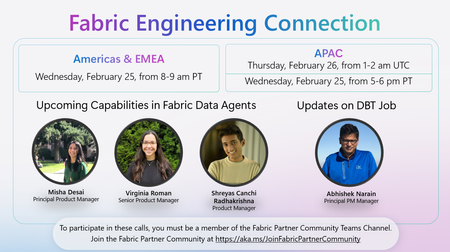
Excited to share what’s ahead for this week’s Fabric Engineering Connection sessions — your weekly opportunity to hear directly from the Microsoft Fabric engineering teams and stay ahead of what’s coming next in the platform. 🎙️ Featured Topics & Speakers: 🔧 Updates on DBT Job Abhishek Narain, Principal PM Manager 🤖 Upcoming Capabilities in Fabric Data Agents Misha Desai, Principal Product Manager Virginia Roman, Senior Product Manager Shreyas Canchi Radhakrishna, Product Manager 🌍 Americas & EMEA 📅 Wednesday, February 25 ⏰ 8:00–9:00 AM PT 🌏 APAC 📅 Thursday, February 26 ⏰ 1:00–2:00 AM UTC (Also available Wednesday, February 25, 5:00–6:00 PM PT) Whether you're deep in deployment, scaling customer workloads, or exploring new Fabric capabilities, these sessions are packed with insights to help you accelerate your practice. 👉 Not yet part of the Fabric Partner Community? Join here: https://lnkd.in/g_PRdfjt Let’s keep learning, building, and shaping the future of Fabric—together. 💡176Views1like0Comments✨ FabCon + SQLCon 2026: Partner Know Before You Go Now Live!
Heading to FabCon + SQLCon 2026 in Atlanta? We’ve put together your full Partner Know Before You Go Guide — everything you need to navigate the week, maximize value, and make the most of all partner‑exclusive opportunities. 🚀 Here’s what you’ll find inside: 📅 Partner Day (Mar 17) — A full day of partner‑only learning, strategy, and networking. - SOLD OUT! 🍻 Partner Happy Hour — Connect with other partners and the Microsoft team. 🎤 AMA with the Fabric Partner Success Team — Bring your biggest questions around Data & AI priorities, partner opportunities, funding, enablement, and certifications. 🤝 1:1 Meetings — Book time with Fabric LT or the Partner Success Team to accelerate your strategy and unlock customer wins. 🎤 Partner Elevator Pitch Search — Submit your 2‑min pitch to be featured live on stage! 🔥 Partner Social Media Sprint — Daily LinkedIn challenge + chances to win Fabric SWAG. 🎓 Certification Spotlight — Get recognized during Arun’s keynote for hitting 100+ Fabric certs. 🎥 Testimonial Videos — Share your Fabric customer stories with global visibility. 📱 Whova Event App — Build your schedule, access slides, network, and join the partner community inside the app. 📘The full KBYG guide is attached below.1.8KViews4likes0Comments