bts
19 TopicsImplementing / Migrating the BizTalk Server Aggregator Pattern to Azure Logic Apps Standard
While the article focuses on the migration path from BizTalk Server, the template is equally suited for new (greenfield) implementations any team looking to implement the Aggregator pattern natively in Azure Logic Apps can deploy it directly from the Azure portal without prior BizTalk experience. The template source code is open source and available in the Azure LogicAppsTemplates GitHub repository. For full details on the original BizTalk implementation, see the BizTalk Server Aggregator SDK sample. Why is it important? BizTalk Server End of life has been confirmed and if you have not started your migration to Logic Apps, you should start soon. This is one of many articles in BizTalk Migration. More information can be found here: https://aka.ms/biztalkeolblog. The migration at a glance: BizTalk orchestration vs. Logic Apps workflow The BizTalk SDK implements the pattern through an orchestration (Aggregate.odx) that uses correlation sets, receive shapes, loop constructs, and send pipelines. The Logic Apps Standard template replicates the same logic using a stateful workflow with Azure Service Bus and CorrelationId-based grouping. The BizTalk solution includes: Component Purpose Aggregate.odx Main orchestration that collects correlated messages and executes the send pipeline FFReceivePipeline.btp Receive pipeline with flat file disassembler Invoice.xsd Document schema for invoice messages InvoiceEnvelope.xsd Envelope schema for output interchange PropertySchema.xsd Property schema with promoted properties for correlation XMLAggregatingPipeline.btp Send pipeline to assemble collected messages into XML interchange The Azure Logic Apps Standard implementation The Logic Apps Standard workflow replicates the same Aggregator pattern using a stateful workflow with Azure Service Bus as the message source and CorrelationId-based grouping. The template is publicly available in the Azure portal templates gallery. Figure 2: The “Aggregate messages from Azure Service Bus by CorrelationId” template in the Azure portal templates gallery, published by Microsoft. Receives messages from Service Bus in batches, groups them by CorrelationId, decodes flat files, and responses with the aggregated result via HTTP. Side-by-side comparison: BizTalk Server vs. Azure Logic Apps Understanding how each component maps between platforms is essential for a smooth migration: Concept BizTalk Server (Aggregate.odx) Azure Logic Apps Standard Messaging infrastructure MessageBox database (SQL Server) Azure Service Bus (cloud-native PaaS) Message source Receive Port / Receive Location Service Bus trigger (peekLockQueueMessagesV2) Message decoding Receive Pipeline (Flat File Disassembler) Decode_Flat_File_Invoice action (FlatFileDecoding) Correlation mechanism Correlation Sets on promoted properties (DestinationPartnerURI) CorrelationId from Service Bus message properties Message accumulation Loop shape + Message Assignment shapes ForEach loop + CorrelationGroups dictionary variable Completion condition Loop exit (10 messages or 1-minute timeout) Batch-based: processes all messages in current batch Aggregated message construction Construct Message shape + XMLAggregatingPipeline Build_Aggregated_Messages ForEach + Compose actions Result delivery Send Port (file, HTTP, or other adapter) HTTP Response or any other regarding business need Error handling Exception Handler shapes + SuspendMessage.odx Scope + error handler actions Schema support BizTalk Flat File Schemas (XSD) Same XSD schemas in Artifacts/Schemas folder State management Orchestration dehydration/rehydration Stateful workflow with run history Key architectural differences Aspect BizTalk Server Azure Logic Apps Standard Processing model Convoy pattern (long-running, event-driven) Batch-based (processes N messages per trigger) Scalability BizTalk Host instances (manual scaling) Elastic scale (Azure App Service Plan) Retry logic Adapter-level retries Built-in HTTP retry policy (3 attempts, 10s interval) Architecture Monolithic orchestration Decoupled: aggregation + downstream processing Monitoring BizTalk Admin Console / HAT Azure portal run history + Azure Monitor Schema reuse BizTalk project schemas Direct XSD reuse in Artifacts/Schemas Deployment MSI / BizTalk deployment ARM templates, Azure DevOps, GitHub Actions How the workflow works 1. Trigger: Receive messages from Service Bus The workflow uses the built-in Service Bus trigger to retrieve messages in batches from a non-session queue. This is analogous to BizTalk's Receive Location polling the message source. 2. Process and correlate: Group messages by CorrelationId Each message is processed sequentially (like BizTalk's ordered delivery). The workflow: Extracts the CorrelationId from Service Bus message properties (equivalent to BizTalk's promoted property used in the Correlation Set) Decodes flat file content with zero refactoring using the XSD schema (equivalent to BizTalk's Flat File Disassembler pipeline component) Groups messages into a dictionary keyed by CorrelationId (equivalent to BizTalk's loop + message assignment pattern) 3. Build aggregated output Once all messages in the batch are processed, the workflow constructs a result object for each correlation group containing the CorrelationId, message count and the array of decoded messages. 4. Deliver results The aggregated output is sent to a target workflow via HTTP POST, following a decoupled architecture pattern. This is analogous to BizTalk's Send Port delivering the result to the destination system. You can substitute this action for another endpoint as needed. This, will depend on your business case. Azure Service Bus: The cloud-native replacement for BizTalk’s MessageBox In BizTalk Server, the MessageBox database is the central hub for all message routing, subscription-based delivery, and correlation. It’s the engine that enables patterns like the Aggregator — messages are published to the MessageBox, and the orchestration subscribes to them based on promoted properties and correlation sets. In Azure Logic Apps Standard, there is no MessaeBox equivalent. Instead, Azure Service Bus serves as the cloud-native messaging backbone. Service Bus provides the same publish/subscribe semantics, message correlation (via the built-in CorrelationId property), peek-lock delivery, and reliable queuing — but as a fully managed, elastically scalable PaaS service with no infrastructure to maintain. This is a fundamental shift in architecture: you move from a centralized SQL Server-based message broker (MessageBox) to a distributed, cloud-native messaging service (Service Bus) that scales independently and integrates natively with Logic Apps through the built-in Service Bus connector. Important: Service Bus is not available on-premises. However, RabbitMQ is available to cover these needs, on-premises. RabbitMQ offers a fantastic alternative for customers looking to replicate BizTalk message routing, subscription-based delivery, and correlation. Decode Flat File Invoice: Reuse your BizTalk schemas with zero refactoring One of the biggest concerns during any BizTalk migration is: “What happens to our flat file schemas and message formats?” The workflow template includes a Decode Flat File action (type FlatFileDecoding) that converts positional or delimited flat file content into XML — exactly like BizTalk’s Flat File Disassembler pipeline component. The key advantage: your original BizTalk XSD flat file schemas work as-is. Upload them to the Logic Apps Artifacts/Schemas folder and reference them by name in the workflow — no modifications, no refactoring. This means: Your existing message formats don’t change — upstream and downstream systems continue sending and receiving the same flat file messages Your BizTalk schemas are directly reusable — the same Invoice.xsd from your BizTalk project works seamlessly with the FlatFileDecoding action Migration effort is significantly reduced — no need to redesign schemas, re-validate message structures, or update trading partner agreements Time-to-production is faster — focus on workflow logic and connectivity instead of rewriting message definitions Notice that, if you need to process XML data, as your data might arrive in XML format, use the XML Operations: Validate, Transform, Parse, and Compose XML with schema. You can find more information at Compose XML using Schemas in Standard Workflows - Azure Logic Apps | Microsoft Learn. The message with correlation Id Each message in the Service Bus queue is a flat file invoice the same positional/delimited text format used in the BizTalk SDK sample. Here's an example: INVOICE12345 DestinationPartnerURI:http://www.contoso.com?ID=1E1B9646-48CF-41dd-A0C0-1014B1CE5064 BILLTO,US,John Connor,123 Cedar Street,Mill Valley,CA,90952 101-TT Plastic flowers 10 4.99 Fragile handle with care 202-RR Fertilizer 1 10.99 Lawn fertilizer 453-XS Weed killer 1 5.99 Lawn weed killer The message structure combines positional and delimited fields: Line 1: Invoice identifier (fixed-length record) Line 2: Destination partner URI — in BizTalk, this value is promoted as a context property and used in the Correlation Set to group related messages Line 3: Bill-to header (comma-delimited: country, name, address, city, state, ZIP) Line 4: Line items (positional fields: item code, description, quantity, unit price, notes) Why CorrelationId is essential In BizTalk Server, the orchestration promotes `DestinationPartnerURI` from the message body into a context property and uses it as the Correlation Set to match related messages. This requires a Property Schema, promoted properties, and pipeline configuration. In Azure Logic Apps Standard, correlation is decoupled from the message body. The `CorrelationId` is a native Azure Service Bus message property with a first-class header set by the message producer when sending to the queue. This means: No schema changes needed: the flat file content stays exactly the same No property promotion: Service Bus provides the correlation identifier out of the box Simpler architecture: the workflow reads `CorrelationId` directly from the message metadata, not from the payload Producer flexibility any system sending to Service Bus can set the `CorrelationId` header using standard SDK methods, without modifying the message body This is why the Aggregator pattern maps so naturally to Service Bus: the correlation mechanism that BizTalk implements through promoted properties and correlation sets is already built into the messaging infrastructure. Step-by-step guide: Deploy the template from the Azure portal The “Aggregate messages from Azure Service Bus by CorrelationId” template is publicly available in the Azure Logic Apps Standard templates gallery. Follow these steps to deploy it: Prerequisites Before you begin, make sure you have: An Azure subscription. If you don’t have one, sign up for a free Azure account . An Azure Logic Apps Standard resource deployed in your subscription. If you need to create one, see Create an example Standard logic app workflow . An Azure Service Bus namespace with a non-session queue configured. A flat file XSD schema (for example, Invoice.xsd) ready to upload to the logic app’s Artifacts/Schemas folder. A target workflow with an HTTP trigger to receive the aggregated results (optional, can be created after deployment). Step 1: Open the templates gallery Sign in to the Azure portal. Navigate to your Standard logic app resource. On the logic app sidebar menu, select Workflows. On the logic app sidebar menu, select Workflows. On the Workflows page, select + Create to create a new workflow. In the “Create a new workflow” pane, select Use Template to open the templates gallery and select Create button. Step 2: Find the Aggregator template In the templates gallery, use the search box and type “Aggregate” or “Aggregator”. Optionally, filter by: o Connectors: Select Azure Service Bus o Categories: All Locate the template named “Aggregate messages from Azure Service Bus by CorrelationId”. o The template card shows the labels Workflow and Event as the solution type and trigger type. o The template is published by Microsoft. Step 3: Review the template details Select the template card to open the template overview pane. On the Summary tab, review: o Connections included in this template: Azure Service Bus (in-app connector) o Prerequisites: Requirements for Azure Service Bus, flat file schema, and connection configuration o Details: Description of the Aggregator enterprise integration pattern implementation Source code: Link to the GitHub repository Select the Workflow tab to preview the workflow design that the template creates and when you are ready select Use this template. Step 4: Provide workflow information In the Create a new workflow from template pane, on the Basics tab: o Workflow name: Enter a name for your workflow, for example, wf-aggregator-invoices o State type: Select Stateful (recommended for aggregation scenarios that require run history and reliable processing) Select Next. Step 5: Create connections On the Connections tab, create the Azure Service Bus connection: o Select Connect next to the Service Bus connection. o Provide your Service Bus connection string or select the managed identity authentication option. For managed identity (recommended), make sure your logic app’s managed identity has the Azure Service Bus Data Receiver role on the Service Bus namespace. 2. Select Next. Step 6: Configure parameters On the Parameters tab, provide values for the workflow parameters: Parameter Description Example value Azure Service Bus queue name The queue to monitor for incoming messages invoice-queue Maximum batch size Number of messages per batch (1-100) 10 Flat file schema name XSD schema name in Artifacts/Schemas Invoice.xsd Default CorrelationId Fallback value for messages without CorrelationId NO_CORRELATION_ID Target workflow URL HTTP endpoint of the downstream workflow https://your-logicapp.azurewebsites.net/... Target workflow timeout HTTP call timeout in seconds 60 Enable sequential processing Maintain message order true 2. Select Next. Step 7: Review and create On the Review + create tab, review all the provided information. Select Create. When the deployment completes, select Go to my workflow. Step 8: Upload the flat file schema Navigate to your logic app resource in the Azure portal. On the sidebar menu, under Artifacts, select Schemas. Select + Add and upload your Invoice.xsd. Confirm the schema appears in the list. Notice that: for this scenario we are using the Invoice.xsd schema, you can/must use the schema your scenario needs. Step 9: Verify and test On the workflow sidebar, select Designer to review the created workflow. Verify all actions are configured correctly. Send test messages to your Service Bus queue with different CorrelationId values. Monitor the Run history to verify successful execution and aggregation. For more information on creating workflows from templates, see Create workflows from prebuilt templates in Azure Logic Apps. Conclusion The Aggregator pattern is a cornerstone of enterprise integration, and migrating it from BizTalk Server to Azure Logic Apps Standard doesn’t mean starting from scratch. By using this template, you can: Reuse your existing XSD flat file schemas directly from your BizTalk projects Replace BizTalk Correlation Sets with CorrelationId-based message grouping via Azure Service Bus Deploy in minutes from the Azure portal templates gallery Scale elastically with Azure App Service Plan Monitor with Azure-native tools instead of the BizTalk Admin Console The template is open source and available at: GitHub PR: Azure/LogicAppsTemplates#108 Template name in Azure portal: “Aggregate messages from Azure Service Bus by CorrelationId” Source code: GitHub repository Whether you’re migrating from BizTalk Server or building a new integration solution from scratch, this template gives you a solid, production-ready starting point. I encourage you to try it, customize it for your scenarios, and contribute back to the community. Resources BizTalk Server Aggregator SDK sample Create workflows from prebuilt templates in Azure Logic Apps Create and publish workflow templates for Azure Logic Apps Flat file encoding and decoding in Logic Apps Azure Service Bus connector overview BizTalk to Azure migration guide BizTalk Migration Starter tool813Views0likes0CommentsLogic Apps Aviators Newsletter - January 2026
In this issue: Ace Aviator of the Month News from our product group Community Playbook News from our community Ace Aviator of the Month January's Ace Aviator: Sagar Sharma What's your role and title? What are your responsibilities? I’m a cross-domain Business Solution Architect specializing in delivering new business capabilities to customers. I design end-to-end architectures specially on Azure platforms and also in the Integration domain using azure integration services. My role involves marking architectural decisions, defining standards, ensuring platform reliability, guiding teams, and helping organizations transition from legacy integration systems to modern cloud-native patterns. Can you give us some insights into your day-to-day activities and what a typical day in your role looks like? My day usually blends architecture work with hands-on collaboration. I review integration designs, refine patterns, help teams troubleshoot integration flows, and ensure deployments run smoothly through DevOps pipelines. A good part of my time is spent translating business needs into integration patterns and making sure the overall platform stays secure, scalable, and maintainable. What motivates and inspires you to be an active member of the Aviators/Microsoft community? The community has shaped a big part of my career. Many of my early breakthroughs came from blogs, samples, and talks shared by others. Contributing back feels like closing the loop. I enjoy sharing real-world lessons, learning from peers, and helping others adopt integration patterns with confidence. The energy of the community and the conversations it creates keep me inspired. Looking back, what advice do you wish you had been given earlier that you'd now share with those looking to get into STEM/technology? Focus on core concepts—messaging, APIs, security, and distributed systems—because tools evolve, but fundamentals stay relevant. Share your learning early, even if it feels small. Be curious about the “why” behind patterns. Build side projects, not just follow tutorials. And don’t fear a nonlinear career path—diverse experience is an asset in technology. What has helped you grow professionally? Hands-on customer work, strong mentors, and consistent learning habits have been key. Community involvement—writing, speaking, and collaborating—has pushed me to structure my knowledge and stay current. And working in environments that encourage experimentation has helped me develop faster and with more confidence. If you had a magic wand that could create a feature in Logic Apps, what would it be and why? I’d love to see a unified, out-of-the-box business transaction tracing experience across Logic Apps, Service Bus, APIM, Functions, and downstream services. Something that automatically correlates events, visualizes the full journey of a transaction, and simplifies root-cause analysis. This would make operational troubleshooting dramatically easier in enterprise environments. News from our product group Microsoft BizTalk Server Product Lifecycle Update BizTalk Server 2020 will be the final release, with support extending through 2030. Microsoft encourages a gradual transition to Azure Logic Apps, offering migration tooling, hybrid deployment options, and reuse of existing BizTalk artifacts. Customers can modernize at their own pace while maintaining operational continuity. Data Mapper Test Executor: A New Addition to Logic Apps Standard Test Framework The Data Mapper Test Executor adds native support for testing XSLT and Data Mapper transformations directly within the Logic Apps Standard test framework. It streamlines validation, improves feedback cycles, and integrates with the latest SDK to enable reliable, automated testing of map generation and execution. Announcing General Availability of AI & RAG Connectors in Logic Apps (Standard) Logic Apps Standard AI and RAG connectors are now GA333, enabling native document processing, semantic search, embeddings, and agentic workflows. These capabilities let teams build intelligent, context‑aware automations using their own data, reducing complexity and enhancing decisioning across enterprise integrations. Logic Apps Labs The Logic Apps Labs, which introduces Azure Logic Apps agentic workflows learning path, offering guided modules on building conversational and autonomous agents, extending capabilities with MCP tools, and orchestrating multi‑agent workflows. It serves as a starting point for hands‑on labs covering design, deployment, and advanced patterns for intelligent automation. News from our community Handling Empty SQL Query Results in Azure Logic Apps Post by Anitha Eswaran If a SQL stored procedure returns no rows, you can detect the empty result set in Logic Apps by checking whether the output’s ResultSets object is {}. When empty, the workflow can be cleanly terminated or used to trigger alerts, ensuring predictable behavior and more resilient integrations. Azure Logic Apps MCP Server Post by Laveesh Bansal Our own Laveesh Bansal spent some time creating an Azure Logic Apps MCP Server that enables natural‑language debugging, workflow inspection, and updates without using the portal. It supports both Standard and Consumption apps, integrates with AI clients like Copilot and Claude, and offers tools for local or cloud‑hosted setups, testing, and workflow lifecycle operations. Azure Logic Apps: Change Detection in JSON Objects and Arrays Post by Suraj Somani Logic Apps offers native functions to detect changes in JSON objects and arrays without worrying about field or item order. Using equals() for objects and intersection() for arrays, you can determine when data has truly changed and trigger workflows only when updates occur, improving efficiency and reducing unnecessary processing. Logic Apps Standard: A clever hack to use JSON schemas in your Artifacts folder for JSON message validation (Part 1) Post by Şahin Özdemir Şahin outlines a workaround for using JSON schemas stored in the Artifacts folder to validate messages in Logic Apps Standard. It revisits integration needs from BizTalk migrations and shows how to bring structured validation into modern workflows without relying on Integration Accounts. This is a two part series and you can find part two here. Let's integrate SAP with Microsoft Video by Sebastian Meyer Sebastian has a new video out, and in this episode he and Martin Pankraz break down SAP GROW and RISE for Microsoft integration developers, covering key differences and integration options across IDoc, RFC, BAPI, SOAP, HTTPS, and OData, giving a concise overview of today’s SAP landscape and what it means for building integrations on Azure. Logic Apps Initialize variables action has a max limit of 20 variables Post by Sandro Pereira Logic Apps allows only 20 variables per Initialize variables action, and exceeding it triggers a validation error. This limit applies per action, not per workflow. Using objects, parameters, or Compose actions often reduces the need for many scalars and leads to cleaner, more maintainable workflows. Did you know that? It is a Friday Fact!Logic Apps Aviators Newsletter - December 2025
In this issue: Ace Aviator of the Month News from our product group Community Playbook News from our community Ace Aviator of the Month December’s Ace Aviator: Daniel Jonathan What's your role and title? What are your responsibilities? I’m an Azure Integration Architect at Cnext, helping organizations modernize and migrate their integrations to Azure Integration Services. I design and build solutions using Logic Apps, Azure Functions, Service Bus, and API Management. I also work on AI solutions using Semantic Kernel and LangChain to bring intelligence into business processes. Can you give us some insights into your day-to-day activities and what a typical day in your role looks like? My day usually begins by attending customer requests and handling recent deployments. Most of my time goes into designing integration patterns, building Logic Apps, mentoring the team, and helping customers with technical solutions. Lately, I’ve also been integrating AI capabilities into workflows. What motivates and inspires you to be an active member of the Aviators/Microsoft community? The community is open, friendly, and full of knowledge. I enjoy sharing ideas, writing posts, and helping others solve real-world challenges. It’s great to learn and grow together. Looking back, what advice do you wish you had been given earlier that you'd now share with those looking to get into STEM/technology? Start small and stay consistent. Learn the basics well—like messaging, retries, and error handling—before diving into complex tools. Keep learning and share what you know. What has helped you grow professionally? Hands-on experience, teamwork, and continuous learning. Working across different projects taught me how to design reliable and scalable systems. Exploring AI with Semantic Kernel and LangChain has also helped me think beyond traditional integrations. If you had a magic wand that could create a feature in Logic Apps, what would it be and why? I’d add an “Overview Page” in Logic Apps containing the HTTP URLs for each workflow, so developers can quickly access to test from one place. It would save time and make working with multiple workflows much easier. News from our product group Logic Apps Community Day 2025 Playlist Did you miss or want to catch up on individual sessions from Logic Apps Community Day 2025? Here is the full playlist – choose your favorite sessions and have fun! The future of integration is here and it's agentic Missed Kent Weare and Divya Swarnkar session at Ignite? It is here for you to watch on demand. Enterprise integration is being reimagined. It’s no longer just about connecting systems, but about enabling adaptive, agentic workflows that unify apps, data, and systems. In this session, discover how to modernize integration, migrate from BizTalk, and adopt AI-driven patterns that deliver agility and intelligence. Through customer stories and live demos, see how to bring these workflows to life with Agent Loop in Azure Logic Apps. Public Preview: Azure Logic Apps Connectors as MCP Tools in Microsoft Foundry Unlock secure enterprise connectivity with Azure Logic Apps connectors as MCP tools in Microsoft Foundry. Agents can now use hundreds of connectors natively—no custom code required. Learn how to configure and register MCP servers for seamless integration. Announcing AI Foundry Agent Service Connector v2 (Preview) AI Foundry Agent Service Connector v2 (Preview) is here! Azure Logic Apps can now securely invoke Foundry agents, enabling low-code AI integration, multi-agent workflows, and faster time-to-value. Explore new operations for orchestration and monitoring. Announcing the General Availability of the XML Parse and Compose Actions in Azure Logic Apps XML Parse and Compose Actions are now GA in Azure Logic Apps! Easily handle XML with XSD schemas, streamline workflows, and support internationalization. Learn best practices for arrays, encoding, and safe transport of content. Clone a Consumption Logic App to a Standard Workflow Clone your Consumption Logic Apps into Standard workflows with ease! This new feature accelerates migration, preserves design, and unlocks advanced capabilities for modern integration solutions. Announcing the HL7 connector for Azure Logic Apps Standard and Hybrid (Public Preview) Connect healthcare systems effortlessly! The new HL7 connector for Azure Logic Apps (Standard & Hybrid) enables secure, standardized data exchange and automation using HL7 protocols—now in Public Preview. Announcing Foundry Control Plane support for Logic Apps Agent Loop (Preview) Foundry Control Plane now supports Logic Apps Agent Loop (Preview)! Manage, govern, and observe agents at scale with built-in integration—no extra steps required. Ensure trust, compliance, and scalability in the agentic era. Announcing General Availability of Agent Loop in Azure Logic Apps Agent Loop transforms Logic Apps into a multi-agent automation platform, enabling AI agents to collaborate with workflows and humans. Build secure, enterprise-ready agentic solutions for business automation at scale. Agent Loop Ignite Update - New Set of AI Features Arrive in Public Preview We are releasing a broad set of Agent Loop new and powerful AI-first capabilities in Public Preview that dramatically expand what developers can build: run agents in the Consumption SKU ,bring your own models through APIM AI Gateway, call any tool through MCP, deploy agents directly into Teams, secure RAG with document-level permissions, onboard with Okta, and build in a completely redesigned workflow designer. Announcing MCP Server Support for Logic Apps Agent Loop Agent Loop in Azure Logic Apps now supports Model Context Protocol (MCP), enabling secure, standardized tool integration. Bring your own MCP connector, use Azure-managed servers, or build custom connectors for enterprise workflows. Enabling API Key Authentication for Logic Apps MCP Servers Logic Apps MCP Servers now support API Key authentication alongside OAuth2 and Anonymous options. Configure keys via host.json or Azure APIs, retrieve and regenerate keys easily, and connect MCP clients securely for agentic workflows. Announcing Public Preview of Agent Loop in Azure Logic Apps Consumption Agent Loop now brings AI-powered automation to Logic Apps Consumption with a frictionless, pay-as-you-go model. Build autonomous and conversational agents using 1,400+ connectors—no dedicated infrastructure required. Ideal for rapid prototyping and enterprise workflows. Moving the Logic Apps Designer Forward Major redesign of Azure Logic Apps designer enters Public Preview for Standard workflows. Phase I focuses on faster onboarding, unified views, draft mode with auto-save, improved search, and enhanced debugging. Feedback will shape future phases for a seamless development experience. Announcing the General Availability of the RabbitMQ Connector RabbitMQ Connector for Azure Logic Apps is now generally available, enabling reliable message exchange for Standard and Hybrid workflows. It supports triggers, publishing, and advanced routing, with global rollout underway for robust, scalable integration scenarios. Duplicate Detection in Logic App Trigger Prevent duplicate processing in Logic Apps triggers with a REST API-based solution. It checks recent runs using clientTrackingId to avoid reprocessing items caused by edits or webhook updates. Works with Logic App Standard and adaptable for Consumption or Power Automate. Announcing the BizTalk Server 2020 Cumulative Update 7 BizTalk Server 2020 Cumulative Update 7 is out, adding support for Visual Studio 2022, Windows Server 2022, SQL Server 2022, and Windows 11. Includes all prior fixes. Upgrade from older versions or consider migrating to Azure Logic Apps for modernization. News from our community Logic Apps Local Development Series Post by Daniel Jonathan Last month I shared an article from Daniel about debugging XSLT in VS Code. This month, I bumped into not one, but five articles in a series about Build, Test and Run Logic Apps Standard locally – definitely worth the read! Working with sessions in Agentic Workflows Post by Simon Stender Build AI-powered chat experiences with session-based agentic workflows in Azure Logic Apps. Learn how they enable dynamic, stateful interactions, integrate with APIs and apps, and avoid common pitfalls like workflows stuck in “running” forever. Integration Love Story with Mimmi Gullberg Video by Ahmed Bayoumy and Robin Wilde Meet Mimmi Gullberg, Green Cargo’s new integration architect driving smarter, sustainable rail logistics. With experience from BizTalk to Azure, she blends tech and business insight to create real value. Her mantra: understand the problem first, then choose the right tools—Logic Apps, Functions, or AI. Integration Love Story with Jenny Andersson Video by Ahmed Bayoumy and Robin Wilde Discover Jenny Andesson’s inspiring journey from skepticism to creativity in tech. In this episode, she shares insights on life as an integration architect, tackling system challenges, listening to customers, and how AI is shaping the future of integration. You Can Get an XPath value in Logic Apps without returning an array Post by Luis Rigueira Working with XML in Azure Logic Apps? The xpath() function always returns an array—even for a single node. Or does it? Found how to return just the values you want on this Friday Fact from Luis Rigueira. Set up Azure Standard Logic App Connectors as MCP Server Video by Srikanth Gunnala Expose your Azure Logic Apps integrations as secure tools for AI assistants. Learn how to turn connectors like SAP, SQL, and Jira into MCP tools, protect them with Entra ID/OAuth, and test in GitHub Copilot Chat for safe, action-ready AI workflows. Making Logic Apps Speak Business Post by Al Ghoniem Stop forcing Logic Apps to look like business diagrams. With Business Process Tracking, you can keep workflows technically sound while giving business users clear, stage-based visibility into processes—decoupled, visual, and KPI-driven.617Views0likes0Comments
An Automated Tool for Collecting PSSDiag BizTalk Traces Using Event Logs
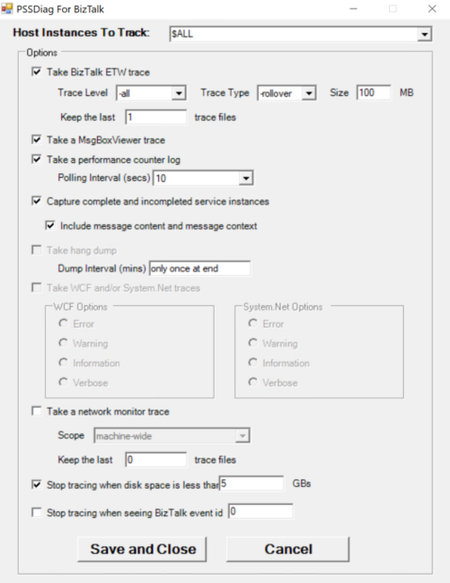
Often, users encounter intermittent event log errors from BizTalk that require further investigation using a BizTalk PSSDiag trace. However, since the timing of the next occurrence is unpredictable, troubleshooting becomes challenging. In such scenarios, a tool is needed to continuously collect PSSDiag traces until the error reoccurs, at which point the tool can automatically stop tracing and save the output. To address this need, I’ve developed a tool that automates this process based on user requirements. PSSDiag for BizTalk is a specialized diagnostic data collection tool tailored for troubleshooting BizTalk Server environments. Built as an extension of PSSDiag (Product Support Services Diagnostics), a widely used tool for diagnosing Microsoft SQL Server issues, it collects a comprehensive set of logs and diagnostic data specific to BizTalk. This includes information crucial for identifying and resolving performance, connectivity, or configuration issues. The tool runs from a console interface, and data collection can be stopped manually by pressing Ctrl+C. I have developed a console application PSSDiagCollector that launches PSSDiag to monitor the event log and automatically stops the PSSDiag collection once a specific event is detected. You can download the tool from this GitHub repository: https://github.com/huidongl/PSSDiagCollector The PSSDiagCollector.exe must be saved in the same folder as PSSDiagForBizTalk. Users can open a command prompt, navigate to the PSSDiagForBizTalk directory, and run PSSDiagCollector from there. The command can specify the Event ID, Event Source, or Event Type to capture, as well as the number of events required to stop the collection. Additionally, users can set a delay (in seconds) before stopping the trace. Detailed instructions for using the tool to collect PSSDiag BizTalk traces can be found in the repository. Run the following command to begin the collection: PSSDiagCollector.exe -eid <EventID> -c <EventCount> -p <PauseDuration> -es "<EventSource>" -lc "<LogCategory>" For example: PSSDiagCollector.exe -eid 7195 -c 3 -p 30 -es "BizTalk Server" -lc "Application" Please make sure to configure the Trace Type, Keep the last _ trace files in the Initialize.exe before running this tool to avoid the trace file being filled up.349Views2likes0CommentsLegacy SQL Adapter (Deprecated)
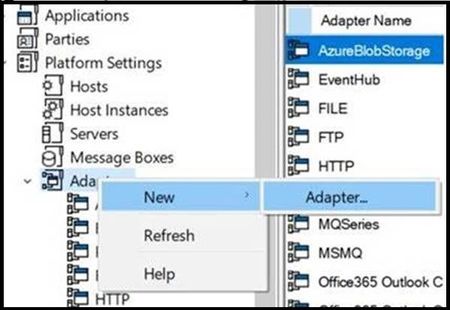
BizTalk Legacy SQL Adapter was announced deprecated long ago and was removed from the CD image in BizTalk Server 2020 release. Many of our customers who are now moving to 2020 release, find an additional work item to upgrade to using WCF-SQL Adapter in place of Legacy SQL. Here is a stop-gap-approach to deal with this change.4.2KViews6likes1Comment