browser
45 Topics
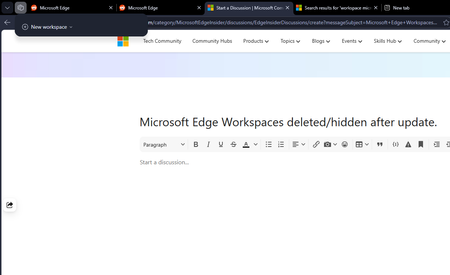
Microsoft Edge Workspaces deleted/hidden after update.
All my workspaces in Edge are hidden and/or are deleted. I updated my windows yesterday night (the restart also updated Edge which was pending) and noticed this issue this morning. I had 10+ workspaces and none of them are here to be found. Tried restarting the browser but no luck there.271Views0likes2Comments
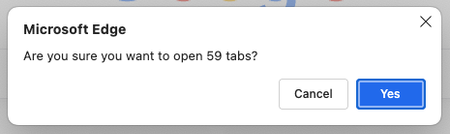
How to disable confirmation pop-up in Edge Browser when opening many tabs
I have bookmarks arranged in multiple folders, varying from 10 to 500 or more links per folder. Whenever I try to click on the bookmark folder to open all of them at once, I always get this Pop-up, which is very annoying to me (I was ignoring that pop-up for more than a year). Is there any built-in setting to disable or increase the limit? P.S: FYI, I am on a very high-end laptop(M4 pro with increased RAM & SSD) and due to my use case, I have to regularly, almost every day open many links121Views0likes0Comments
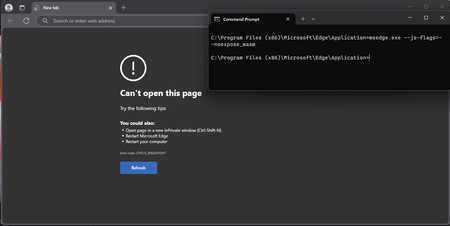
--js-flags=--noexpose_wasm launch flag causes STATUS_BREAKPOINT
Version 135.0.3179.73 (Official build) (64-bit), Windows 11 Education, also occurs on Windows 10 Education and Windows 10 Pro, been testing this since probably version 129 of Edge. --js-flags=--noexpose_wasm as a launch flag causes STATUS_BREAKPOINT, this is regardless of default configuration and with or without extensions. WASM can be used to discover privileged information about a machine, and this seems to be working in the past according to some users online, but no longer does now. Please can someone advise?407Views0likes1Comment
Edge error RESULT_CODE_MISSING_DATA or RESULT_CODE_KILLED_BAD_MESSAGE even in the settings menu.
After the KB5050021 (Windows 11 (23H2)) update, Edge stopped working. The same error appears on all tabs and even in the settings: Error code: RESULT_CODE_MISSING_DATA. I deleted the update, but Edge still didn't work. Edge only partially worked in compatibility mode with Windows 8. Does anyone know what the problem could be? Without compatibility, the error is either RESULT_CODE_MISSING_DATA or RESULT_CODE_KILLED_BAD_MESSAGE, and on any tabs and even in the settings menu. Edge Version 134.0.3124.93 (Official Build) (64-bit) DEV/BETA/CAN also don't work with the same errors. UDP. After the KB5053602 (Windows 11 (23H2)) update, Edge still not working. Is there a solution to this problem?345Views0likes0CommentsCopilot or Discover browser extension not working as expected for managed Edge browser
If your organization manages the MS Edge browser or has decided to limit the availability of Copilot (previously known as Discover in Edge) until administrators have a handle on its capabilities and risks, then this post may be helpful. You will find in the following article -- https://learn.microsoft.com/en-us/copilot/edge#summarization-by--in-edge -- Microsoft suggests for Admins who want to manage Copilot in Edge, they can "use multiple group policy settings to manage the behavior of the Copilot in Edge sidebar:" # I have found it very strange, especially when referencing brand new tools like Copilot, that Microsoft documentation suggests admins are still using, or should use group policy as opposed to more modern management tools like Intune # The article suggests the below "group policy settings" can be used to manage Copilot behavior in Edge: To allow or block Copilot in Edge from using browsing context, use the https://learn.microsoft.com/en-us/deployedge/microsoft-edge-policies policy. This prevents Copilot from using webpage or PDF content from being used to respond to prompts. To disable Copilot in Edge entirely, use the https://learn.microsoft.com/en-us/deployedge/microsoft-edge-policies policy. Blocking Copilot in Edge automatically blocks all Edge sidebar apps from being enabled. Now according to these instructions, you would use the https://learn.microsoft.com/en-us/deployedge/microsoft-edge-policies policy to allow Copilot in Edge to use browsing context and seemingly (since https://learn.microsoft.com/en-us/deployedge/microsoft-edge-policies is used to disable Copilot) you would set https://learn.microsoft.com/en-us/deployedge/microsoft-edge-policies to enabled in order to force Copilot to appear and be available for your users. To an admin still using group policy to set these maybe everything works fine -- In previous testing I have hacked my registry to create the above keys and can't remember the results, but it was kind of a pointless test since I personally use Intune to manage our Edge browser. If you're like me and use Intune to manage Edge's browser configuration at your organization, then seeing the keys above may prompt you to head to the Intune settings catalog to look for equivalent settings that you can use to set similar policy. Next, I'll share my findings from diving into how I might use something available in the Intune settings catalog. My findings are as follows: Show Copilot -- you will find this setting if you nav down through edge://settings/sidebar. With no settings configured related to Copilot you will see this in the off state and when you hover the briefcase icon where you would usually see "this setting is managed by your organization," you will just see a blank textbox. Right out of the gate this is a weird behavior and the only thing I have been able to chalk it up to so far is a bug -- my thinking is if your browser is managed by the organization then by default the Show Copilot setting will be in the off state. Ok, so now how do we actually get this thing on if we are ready for our users to use it? Discover feature In Microsoft Edge -- this is a setting you can find in the Intune settings catalog. Previously Copilot in Edge was called Bing Discover and it had a "B" icon. If you configure this setting today and set it to enabled you might expect it to display Discover or Copilot, however, when you check the edge://policy report you will find that EdgeDiscoverEnabled (as it shows up on the report) actually errors out and is described as an "unknown policy," and there will be no effect to the browser or to the Show Copilot setting I discussed above. https://learn.microsoft.com/en-us/deployedge/microsoft-edge-policies -- now back to the HubsSidebarEnabled setting referenced in the linked Microsoft documentation. Supposedly you would use this setting to "disable Copilot in Edge entirely." Now you can find a setting called Show Hubs Sidebar in the Intune settings catalog and you can set it to enabled. When you nav to the edge://policy report you will even see it successfully configured and reporting in as OK. However, in my testing I have not seen this have any effect on the Always show sidebar setting found at edge://settings/sidebar, and I have not seen this have any effect on the Show Copilot setting found at edge://settings/sidebar when you drill into the Copilot settings. So, my only conclusion here is that the HubsSidebarEnabled from the Intune settings catalog isn't ready for showtime. https://learn.microsoft.com/en-us/deployedge/microsoft-edge-policies -- This is a setting you can find in the Intune settings catalog called Enable Discover access to page contents for AAD profiles. This setting will successfully configure and report back as OK in edge://policy report, however, I have not tested any further and can't tell you if it is actually doing what it intends to since I have not successfully configured Copilot using the other Intune settings. The only success I have found so far in all of this Copilot, Discover and Sidebar research are the following two extension IDs that can be added to your force install extension list -- and as a result the Copilot browser extension should appear. If you are new to using Intune to manage browser policy and aren't sure what I mean by the 'force install extension list,' drop a comment and I'll be happy to add some detail about that. Extension IDs: nkbndigcebkoaejohleckhekfmcecfja ofefcgjbeghpigppfmkologfjadafddi I found these extension IDs by using ctrl + f on the edge://sidebar-internals page looking for results related to the search term "Discover." At the moment this seems like the best way to enable and test Copilot until the Intune settings currently available begin working as they are described. This is not meant to criticize the speed at which Microsoft has made settings available or set them up to work perfectly, but to prompt discussion and help others who might be going in circles trying to figure out if they're configuring something incorrectly. TL;DR There are currently settings in the Intune settings catalog that don't seem to work as expected if you are trying to enable/disable Copilot for a managed instance of Edge at your organization. As a workaround there are a couple extension IDs that can be added to your ForceInstallExtension list to help display Copilot in the Edge sidebar. I've attached some screenshots related to different things referenced in this post.Solved16KViews4likes6CommentsFeature Request - Collections & Etc.
I would like the ability to add all open tabs in a window to a collection instead of having to individually add them one by one. And also maybe some extra customization/tweaks like what Vivaldi has (Different methods of grouping; Stacked, Two Level, or Compact Fitted to single tab width, Tab Tiling; Multi-Window tabs in a single browser window, Lots more UI customization/configuration; completely custom theme(s), and a Toolbar Editor). I know this isnt stuff that can just be added on a whim, but i would like to see if any Edge devs see this post. My main request so far is just the collections one i mentioned. Thank you634Views1like0Comments- 794Views0likes1Comment

Microsoft Edge HP officejet printer error
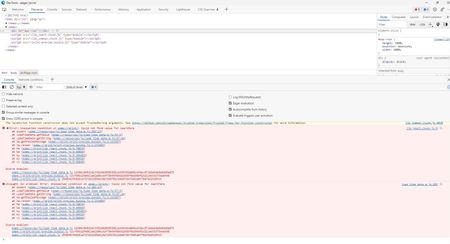
Hi, I never had issues until 06/20/2022 to print out of my edge browser. Since yesterday I was facing problems. The page it’s supposed to show print options and Print, is just blank. I literally tried everything, restart, cookies and cache, hp officejet reinstall. I have checked inspect element today and saw this. Any solution on what’s happened and how to fix is much appreciated!825Views0likes1CommentHow to close Specific tab on Edge Browser programmatically?
Hi All, We were previously using Internet Explorer and now planning to support Microsoft Edge. We have .NET 4.8 based desktop application that launches Internet explorer and closes it by process Id. But we are not able to achieve the same flow using Microsoft Edge. We understand that the architecture is different for Internet explorer and Edge. Edge uses a multi-processor architecture and killing the browser/tab instance doesn't work by killing the processId of the window/tab. We need to close a specific tab programmatically (c#). Kindly suggest an approach to close specific tab on Edge Browser programmatically. Thanks & Regards, Kavitha10KViews1like8Comments