blazor
132 Topics
Enhanced Security hinders performance of WASM applications (Including Blazor)
Hi, is there any official advice on what to do about "enhanced security" absolutely nuking performance of WASM? https://github.com/dotnet/aspnetcore/issues/48754 https://github.com/dotnet/aspnetcore/issues/56806 These existing tickets that were closed on the AspNetCore side, and it's been many years it seems and this is still an issue? I've submitted feedback through edge on this before but I have no way of knowing if this has been answered/looked at. We have a user who's required to have it on by policy and can't add it to the whitelist, and it's causing a pretty severe performance degradation. It just seems odd to me that the same company can produce two tools, and one of them absolutely breaks the other with seemingly no way to manage the downside at all.245Views0likes2CommentsHttp requests from client to server project with cookie auth
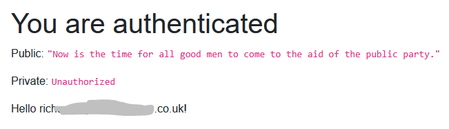
Start a new Blazor app with individual accounts. Add a controller to the server project. [ApiController] [Route("api/[controller]")] [Authorize] public class TestController : ControllerBase { private readonly ILogger _logger; public TestController(ILogger logger) { _logger = logger; } [HttpGet("public")] [ProducesResponseType(typeof(string), StatusCodes.Status200OK)] [AllowAnonymous] public IActionResult GetPublic() { return Ok(JsonConvert.SerializeObject("Now is the time for all good men to come to the aid of the public party.")); } [HttpGet("private")] [ProducesResponseType(typeof(string), StatusCodes.Status200OK)] public IActionResult GetPrivate() { return Ok(JsonConvert.SerializeObject($"Now is the time for all good men and {User.Identity.Name} to come to the aid of the private party.")); } And route it in in Program.cs ... builder.Services.AddControllers(); // + ... app.MapControllers(); // + Create a HttpClient for the API public class CookieHandler : DelegatingHandler { public CookieHandler() { InnerHandler = new HttpClientHandler() { AllowAutoRedirect = false }; } protected override Task SendAsync( HttpRequestMessage request, CancellationToken cancellationToken) { request.SetBrowserRequestCredentials(BrowserRequestCredentials.Include); request.Headers.Add("X-Requested-With", ["XMLHttpRequest"]); return base.SendAsync(request, cancellationToken); } } public class LocalHttpClient : HttpClient { public LocalHttpClient(CookieHandler h) : base(h) { } } in the <em>client</em> project and register it in <em>both</em> the client and the server project. builder.Services.AddTransient(); builder.Services.AddTransient(); Update the client side page Auth.razor to use it @page "/auth" @using Microsoft.AspNetCore.Authorization @attribute [Authorize] @* @rendermode InteractiveWebAssembly *@ @rendermode InteractiveAuto @inject LocalHttpClient _HttpClient @code{ protected override async Task OnInitializedAsync() { HttpResponseMessage rx = await _HttpClient.GetAsync("https://localhost:7131/api/Test/public"); Public = await rx.Content.ReadAsStringAsync(); rx = await _HttpClient.GetAsync("https://localhost:7131/api/Test/private"); Private = await rx.Content.ReadAsStringAsync(); if(!rx.IsSuccessStatusCode) { Private = (Private ?? "") + rx.StatusCode.ToString(); } await base.OnInitializedAsync(); } string Public { get; set; } string Private { get; set; } } <PageTitle>Auth</PageTitle> <h1>You are authenticated</h1> <p>Public: <code>@Public</code></p> <p>Private: <code>@Private</code></p> <AuthorizeView Context="AuthorizeViewContext"> Hello @AuthorizeViewContext.User.Identity?.Name! </AuthorizeView> The authorisation doesn't work.252Views0likes1CommentBlazor parameter passed by reference
I got the impression that in Blazor parameters are always effectively passed by value which is why you need to use EventCallback for two-way binding to send a change in the parameter value back up to the component that passed it. But not so; reference types really are passed by reference. Therefore if a child component updates a parameter value that is a reference type then the value in the parent is changed and all you need to do is call `StateHasChanged` on the parent. Is this as intended? Have I misunderstood the documentation? Example: https://drive.google.com/file/d/1i1Rh36nHU1Z2voyHDtLVZ9GyziLw9AQq/view?usp=sharing (Don't seem to be able to attach here and it's not really feasible to inline a whole Blazor project.)422Views0likes2Comments
Singleton Class with Async
I'm working on building a Blazor Web App (.net 9) for an internal company portal. I want to load some persistent data to be used throughout the app into a class and then load that class as a scoped service. Most of the data will be fairly static, but expensive data to retrieve, ie: graph api call for members of groups, etc. So that data will also be loaded asynchronously. Everything I've found regarding loading data into a class asynchronously basically points back to a post by Stephen Cleary on Asynchronous Lazy Initialization: https://blog.stephencleary.com/2012/08/asynchronous-lazy-initialization.html My question is, given that this post was originally posted back in 2012, is this still an acceptable way of loading data asynchronously for a singleton or are there other, more modern approaches to this scenario?201Views0likes0CommentsBuild Scalable Web Apps and APIs with ASP.NET Core, Blazor, Angular for Modern Web Apps
I’m starting this discussion because many developers today need guidance on how to build modern, scalable web applications and APIs by combining ASP.NET Core, Blazor, and Angular—three powerful technologies within the .NET ecosystem. Whether you're focused on server-side development, creating dynamic client-side apps, or integrating both, these frameworks provide incredible capabilities to enhance your projects ASP.NET Core for API Development: ASP.NET Core is a robust, high-performance framework that allows you to create powerful APIs. Some of the best practices we’ll cover include: - Designing RESTful APIs with ASP.NET Core - Utilizing Entity Framework Core for efficient database access - Securing APIs with JWT and OAuth - Handling asynchronous requests for optimal performance - Implementing API versioning and changes over time Building Dynamic Web Apps with Blazor: Blazor enables you to create interactive web applications using C# instead of JavaScript. We will discuss: - Blazor Web Assembly vs. Blazor Server: Differences and use cases - Creating reusable Blazor components for UI - Integrating third-party JavaScript libraries with Blazor - Using SignalR for real-time features - Optimizing Blazor for performance Angular for Full-Featured Client-Side Development: Angular is a powerful, full-featured front-end framework that excels in creating dynamic and complex user interfaces. In this section, we'll dive into: - Why you might choose Angular over Blazor in certain cases - Using Angular CLI to scaffold, build, and maintain apps - Managing state in Angular with NgRx or RxJS - Connecting Angular with ASP.NET Core APIs for data handling - Working with Angular components, services, and routing for a seamless user experience Combining Angular and Blazor in a Single Application: You may have use cases where you want to combine both Blazor and Angular in one application to leverage the strengths of each framework: - When to use Angular for complex frontend features (e.g., dynamic forms, complex data visualization) and Blazor for simpler components or backend-heavy apps. - Managing communication between Angular and Blazor components in a single page (e.g., using - JavaScript Interop to pass data between the two). - Handling authentication and state management across both frameworks. Integration between Frontend (Blazor/Angular) and Backend (ASP.NET Core): No matter whether you're using Angular or Blazor for the frontend, integrating these with your backend API is key. We'll discuss: - Setting up HttpClient for making API calls from both Blazor and Angular - Working with SignalR to enable real-time features in both frontends - Managing authentication and authorization across both Angular and Blazor (JWT, OAuth) - Best practices for passing data and sharing state between the frontend and backend Scalable and Maintainable Web Apps: When building full-stack web applications, it's important to focus on scalability and maintainability. Here are some practices for achieving this: - Structuring your application code to separate concerns (e.g., services, components, repositories) - Utilizing Dependency Injection for flexible and testable code - Modularizing your codebase for easier updates and maintenance - Using Lazy Loading for Angular and Blazor components to improve performance - Leveraging Caching strategies to enhance response times Testing and Continuous Deployment: For any modern application, testing and deployment are crucial. We’ll discuss: - Unit and integration testing in ASP.NET Core, Blazor, and Angular - Automated end-to-end testing (e.g., with Cypress for Angular, bUnit for Blazor) - Continuous Integration/Continuous Deployment (CI/CD) strategies for seamless deployment to cloud platforms like Azure or AWS When to Choose Angular, Blazor, or Both: It’s essential and interesting to know when to use each of these frameworks depending on your project’s needs. Some scenarios we’ll explore: - When to go for Blazor for a unified C# experience in both frontend and backend - Why you might opt for Angular when building highly interactive, feature-rich web applications - Hybrid approaches where you can use Blazor and Angular together for a robust full-stack solution SO: Combining ASP.NET Core, Blazor, and Angular allows developers to choose the right tool for the right job, creating flexible, scalable, and maintainable web applications. Whether you’re leveraging Blazor for its deep integration with .NET or Angular for its powerful frontend capabilities, these technologies offer a powerful suite of tools to build modern web applications. What are your thoughts? How have you integrated Angular or Blazor with ASP.NET Core in your projects? Share your experiences and challenges, and let's collaborate on solutions!1KViews9likes5Comments
Blazor server app closes without error during debugging
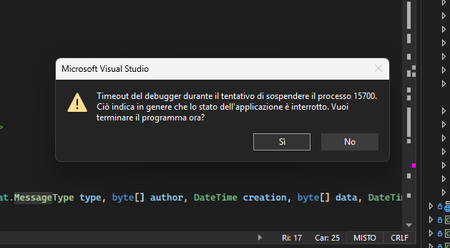
The application started in debug mode stops reacting unexpectedly, without errors being intercepted and/or exceptions being generated. I don't know if this behavior can also happen when starting in release mode. In practice, the web application stops reacting in the browser. However, if I pause the execution in Visual Studio, a message warns me that the debug has timed out because the underlying application is no longer running. The attempts I made to solve the problem are: I tried to hook the unhandled errors with: AppDomain.CurrentDomain.UnhandledException += (handling code) But unhandled errors are not intercepted. I tried to remove the automatic start of the browser when the app starts in order to disconnect the closing of the browser with the end of the execution of the application. It does not solve the problem. Notes: It is a Blazor server application, it uses .NET 9 (but even with .NET 8 I encountered the problem). I updated visual studio, and all the nughet packages connected to the application. The application, terminating without there being any clues as to the cause because the debugging does not stop anywhere, can no longer be fixed. Thanks I tried to catch unhandled errors, but it seems that the app does not close due to exceptions during execution (debugging does not catch errors). I use Edge browser. I tried to remove breakpoints from the code.200Views0likes0Comments
.NET Core render modes
I moved my Blazor webassembly application form .NET 8 to .NET 9. Previously it was basicly two projects: Client (static webassembly content served in docker by nginx on port 5007 with API address set to port 5007) Server (database app with API on port 5009) and the typical usage was that I connect in the browser to port 5007, webassembly content was downloaded to the browser and display data gathered form the API on port 5007. After migration to .NET 9 I can no loger download web assemby package (connection reset), but instead everything is served on port 5009 (old webassemby content and API). Moreover everything is working considerably faster but I`m confused: Why and how it is even working (how content from client appear in the server)? Which render mode I`m using currently? Do I still need my second container with nginx? How should I clean my Startup.cs in the Server project after taht migration? namespace eTabelki.Server { public class Startup { readonly string CorsOrigins = "CorsOrigins"; public Startup(IConfiguration configuration) { Configuration = configuration; } public IConfiguration Configuration { get; } // This method gets called by the runtime. Use this method to add services to the container. // For more information on how to configure your application, visit https://go.microsoft.com/fwlink/?LinkID=398940 public void ConfigureServices(IServiceCollection services) { services.AddDbContext<ApplicationDbContext>(options => options.UseSqlite(Configuration.GetConnectionString("DefaultConnection"))); services.AddAutoMapper(AppDomain.CurrentDomain.GetAssemblies()); services.AddControllersWithViews(); services.AddRazorPages().AddJsonOptions(options => { options.JsonSerializerOptions.ReferenceHandler = System.Text.Json.Serialization.ReferenceHandler.Preserve; options.JsonSerializerOptions.PropertyNamingPolicy = null; }); services.AddCors(options => { options.AddPolicy(CorsOrigins, builder => builder.WithOrigins("http://10.0.10.3:5007", "https://10.0.10.3:5008") .AllowAnyOrigin() .AllowAnyMethod() .AllowAnyHeader()); }); services.AddTransient<IGenerateInvoiceService, GenerateInvoiceService>(); services.AddTransient<IExportService, ExportService>(); } // This method gets called by the runtime. Use this method to configure the HTTP request pipeline. public void Configure(IApplicationBuilder app, IWebHostEnvironment env) { if (env.IsDevelopment()) { app.UseDeveloperExceptionPage(); app.UseWebAssemblyDebugging(); using (IServiceScope scope = app.ApplicationServices.GetRequiredService<IServiceScopeFactory>().CreateScope()) { var context = scope.ServiceProvider.GetRequiredService<ApplicationDbContext>(); context.Database.Migrate(); ApplicationDbContextExtensions.EnsureSeedData(context).GetAwaiter().GetResult(); ApplicationDbContextExtensions.EnsureSeedTemplates(context).GetAwaiter().GetResult(); } } else { app.UseExceptionHandler("/Error"); // The default HSTS value is 30 days. You may want to change this for production scenarios, see https://aka.ms/aspnetcore-hsts. app.UseHsts(); using (IServiceScope scope = app.ApplicationServices.GetRequiredService<IServiceScopeFactory>().CreateScope()) { var context = scope.ServiceProvider.GetRequiredService<ApplicationDbContext>(); context.Database.Migrate(); ApplicationDbContextExtensions.EnsureSeedTemplates(context).GetAwaiter().GetResult(); } } var cultureInfo = new CultureInfo("pl-PL"); CultureInfo.DefaultThreadCurrentCulture = cultureInfo; CultureInfo.DefaultThreadCurrentUICulture = cultureInfo; app.UseHttpsRedirection(); app.UseBlazorFrameworkFiles(); app.UseStaticFiles(); app.UseRouting(); app.UseCors(CorsOrigins); app.UseEndpoints(endpoints => { endpoints.MapRazorPages(); endpoints.MapControllers(); endpoints.MapFallbackToFile("index.html"); }); } } }178Views0likes0Comments
Solutions for Blazor problems
Hi, I've significantly reduced render times, section rendering and configuration, API exposure, ... And I am starting thinking of sharing. I've never done this before, so I am wondering how to offer my Blazor framework API. Feacures I've implemented: Defer rendering (on standard component level - as naturalrendering pipeline) Custom sections (with custom state proagation and optimization minimizing render requests - my sections allow for full generic settings usable in section definition component with any amount of RenderFragment or other parameters): <YourSection Param1="StateWatchedParam1" Param2="StateWatchedParam2"> <RenderFragment1> StateWatchedContent with single render on whole section outlet </RenderFragment1> <RenderFragment2> StateWatchedContent with single render on whole section outlet </RenderFragment2> </YourSection> Unit of Work system with unltimited dependency tree of steps described by FluentAPI and accessed only by input model from client side - thus limiting any API exposure. You would have to know descriptor, rights and then guess allowed steps and stil only can fill model with input data - nothing more ... LinQ projector pattern with lego building FluentAPI system - where any business logic can be break into named step in specific named projector, so you are out of ordinary expression tree completely. That projector pattern is correctly written to check for Queryable Provider and to work with the same expression tree also for Enumerable. (Thus the same lego pieces can work for client.) Blazor component messagging done on direct Task API system - so without any queue or backlog. You can directly pass any data between any Blazor component and you are doing it in direct way without any delay or data transfer. Here I have SignalR also in the same system - allowing server to communicate with any component needed. And whole system is communicating with ToastLogger, thus any issue/unhandled exception can be (and it is) instantly logged and toasted to user. Background runner - thus any Task in Blazor can be called to just RunInBackground and it is immediately handled in Task lock mechanism, Exception mechanism and with correct Blazor stae update pipeline thus allowing for partial renders and mid render switch to background process finishing later and rendering from that deferred background.194Views0likes0CommentsGraph API getAsync() in C#
This is cross posted in Azure as well. If I use graph in a console application I get the information that I request. Such as test = await graphClient.Users.GetAsync(); If I try this in a WebMethod in the code behind of a page or in an .asmx, it never returns with the data. I know this has been mentioned before in many forums, but I did not have issues in V1.0 of the SDK. When I try to use V5+ I can't seem to get the information back. Any ideas on overcoming the issue? Any help would be great.148Views0likes0Comments
Module object available in .NET 6 Blazor WASM Project, but not in .NET 8+ After Upgrade
I have a working project in .NET 6 that calls the following JS code: export function synchronizeFileWithIndexedDb(filename) { return new Promise((res, rej) => { const db = window.indexedDB.open('SqliteStorage', 1); db.onupgradeneeded = () => { db.result.createObjectStore('Files', { keypath: 'id' }); }; db.onsuccess = () => { const req = db.result.transaction('Files', 'readonly').objectStore('Files').get('file'); req.onsuccess = () => { Module.FS_createDataFile('/', filename, req.result, true, true, true); res(); }; }; }); } And behind the scenes in OnInitializedAsync: if (RuntimeInformation.IsOSPlatform(OSPlatform.Create("browser"))) { // create SQLite database file in browser var module = await _js.InvokeAsync<IJSObjectReference>("import", "./dbstorage.js"); await module.InvokeVoidAsync("synchronizeFileWithIndexedDb", SqliteDbFilename); } This works perfectly in .NET 6, which is unfortunately now EOL. Simply upgrading it to .NET 8 causes "Module" (see line 11) to no longer be defined. I ran into the same problem using a brand new .NET 9 project as well. If it's .NET 6 it works, .NET 8 or higher it breaks. Is this a known issue? I'm afraid of upgrading anything with JS Interop now 😛 Is there a path forward? I tried changing Module to DotNet, based on reading MSFT docs, but that didn't work. I don't want to go back to .NET 6 to solve this if I don't have to :) You can try it yourself simply by upgrading the following Sqlite WASM project: https://github.com/TrevorDArcyEvans/BlazorSQLiteWasmSolved221Views0likes1Comment