biztalk modernization
32 TopicsMicrosoft BizTalk Server Product Lifecycle Update
For more than 25 years, Microsoft BizTalk Server has supported mission-critical integration workloads for organizations around the world. From business process automation and B2B messaging to connectivity across industries such as financial services, healthcare, manufacturing, and government, BizTalk Server has played a foundational role in enterprise integration strategies. To help customers plan confidently for the future, Microsoft is sharing an update to the BizTalk Server product lifecycle and long-term support timelines. BizTalk Server 2020 will be the final version of BizTalk Server. Guidance to support long-term planning for mission-critical workloads This announcement does not change existing support commitments. Customers can continue to rely on BizTalk Server for many years ahead, with a clear and predictable runway to plan modernization at a pace that aligns with their business and regulatory needs. Lifecycle Phase End Date What’s Included Mainstream Support April 11, 2028 Security + non-security updates and Customer Service & Support (CSS) support Extended Support April 9, 2030 CSS support, Security updates, and paid support for fixes (*) End of Support April 10, 2030 No further updates or support (*) Paid Extended Support will be available for BizTalk Server 2020 between April 2028 and April 2030 for customers requiring hotfixes for non-security updates. CSS will continue providing their typical support. BizTalk Server 2016 is already out of mainstream support, and we recommend those customers evaluate a direct modernization path to Azure Logic Apps. Continued Commitment to Enterprise Integration Microsoft remains fully committed to supporting mission-critical integration, including hybrid connectivity, future-ready orchestration, and B2B/EDI modernization. Azure Logic Apps, part of Azure Integration Services — which includes API Management, Service Bus, and Event Grid — delivers the comprehensive integration platform for the next decade of enterprise connectivity. Host Integration Server: Continued Support for Mainframe Workloads Host Integration Server (HIS) has long provided essential connectivity for organizations with mainframe and midrange systems. To ensure continued support for those workloads, Host Integration Server 2028 will ship as a standalone product with its own lifecycle, decoupled from BizTalk Server. This provides customers with more flexibility and a longer planning horizon. Recognizing Mainframe modernization customers might be looking to integrate with their mainframes from Azure, Microsoft provides Logic Apps connectors for mainframe and midrange systems, and we are keen on adding more connectors in this space. Let us know about your HIS plans, and if you require specific features for Mainframe and midranges integration from Logic Apps at: https://aka.ms/lamainframe Azure Logic Apps: The Successor to BizTalk Server Azure Logic Apps, part of Azure Integration Services, is the modern integration platform that carries forward what customers value in BizTalk while unlocking new innovation, scale, and intelligence. With 1,400+ out-of-box connectors supporting enterprise, SaaS, legacy, and mainframe systems, organizations can reuse existing BizTalk maps, schemas, rules, and custom code to accelerate modernization while preserving prior investments including B2B/EDI and healthcare transactions. Logic Apps delivers elastic scalability, enterprise-grade security and compliance, and built-in cost efficiency without the overhead of managing infrastructure. Modern DevOps tooling, Visual Studio Code support, and infrastructure-as-code (ARM/Bicep) ensure consistent, governed deployments with end-to-end observability using Azure Monitor and OpenTelemetry. Modernizing Logic Apps also unlocks agentic business processes, enabling AI-driven routing, predictive insights, and context-aware automation without redesigning existing integrations. Logic Apps adapts to business and regulatory needs, running fully managed in Azure, hybrid via Arc-enabled Kubernetes, or evaluated for air-gapped environments. Throughout this lifecycle transition, customers can continue to rely on the BizTalk investments they have made while moving toward a platform ready for the next decade of integration and AI-driven business. Charting Your Modernization Path Microsoft remains fully committed to supporting customers through this transition. We recognize that BizTalk systems support highly customized and mission-critical business operations. Modernization requires time, planning, and precision. We hope to provide: Proven guidance and recommended design patterns A growing ecosystem of tooling supporting artifact reuse Unified Support engagements for deep migration assistance A strong partner ecosystem specializing in BizTalk modernization Potential incentive programs to help facilitate migration for eligible customers (details forthcoming) Customers can take a phased approach — starting with new workloads while incrementally modernizing existing BizTalk deployments. We’re Here to Help Migration resources are available today: Overview: https://aka.ms/btmig Best practices: https://aka.ms/BizTalkServerMigrationResources Video series: https://aka.ms/btmigvideo Feature request survey: https://aka.ms/logicappsneeds Reactor session: Modernizing BizTalk: Accelerate Migration with Logic Apps - YouTube Migration Agent (Complete refactoring from BizTalk to Logic Apps): Bringing all your Integration workloads to Logic Apps Standard | Microsoft Community Hub We encourage customers to engage their Microsoft accounts team early to assess readiness, identify modernization opportunities, and explore assistance programs. Your Modernization Journey Starts Now BizTalk Server has played a foundational role in enterprise integration success for more than two decades. As you plan ahead, Microsoft is here to partner with you every step of the way, ensuring operational continuity today while unlocking innovation tomorrow. To begin your transition, please contact your Microsoft account team or visit our migration hub. Thank you for your continued trust in Microsoft and BizTalk Server. We look forward to partnering closely with you as you plan the future of your integration platforms. Frequently Asked Questions Do I need to migrate now? No. BizTalk Server 2020 is fully supported through April 11, 2028, with paid Extended Support available through April 9, 2030, for non-security hotfixes. CSS will continue providing their typical support. You have a long and predictable runway to plan your transition. Will there be a new BizTalk Server version? No. BizTalk Server 2020 is the final version of the product. What happens after April 9, 2030? BizTalk Server will reach End of Support, and security updates or technical assistance will no longer be provided. Workloads will continue running but without Microsoft servicing. Is paid support available past 2028? Yes. Paid extended support will be available through April 2030 for BizTalk Server 2020 customers looking for non-security hotfixes. CSS will continue to provide the typical support. What is the end of sale date for BizTalk Server? We will announce an end of sale date for BizTalk Server on July 2026. What about BizTalk Server 2016 or earlier versions? Those versions are already out of mainstream support. We strongly encourage moving directly to Logic Apps rather than upgrading to BizTalk Server 2020. Will Host Integration Server continue? Yes. Host Integration Server (HIS) 2028 will be released as a standalone product with its own lifecycle and support commitments. Can I reuse BizTalk Server artifacts in Logic Apps? Yes. Most of BizTalk maps, schemas, rules, assemblies, and custom code can be reused with minimal effort using Microsoft and partner migration tooling. We welcome feature requests here: https://aka.ms/logicappsneeds Does modernization require moving fully to the cloud? No. Logic Apps supports hybrid deployments for scenarios requiring local processing or regulatory compliance, and fully disconnected environments are under evaluation. More information of the Hybrid deployment model here: https://aka.ms/lahybrid. Does modernization unlock AI capabilities? Yes. Logic Apps enables AI-driven automations through Agent Loop, improving routing, decisioning, and operational intelligence. Where do I get planning support? Your Microsoft account team can assist with assessment and planning. Migration resources are also linked in this announcement to help you get started. Microsoft CorporationAnnouncing the BizTalk Server 2020 Cumulative Update 7
The BizTalk Server product team has released the Cumulative Update 7 for BizTalk Server 2020. The Cumulative Update 7 contains all released functional and security fixes for customer-reported issues for BizTalk Server 2020. Also, CU7 includes support for the following new Microsoft platforms: Microsoft Visual Studio 2022 Microsoft Windows Server 2022 Microsoft SQL Server 2022 Microsoft Windows 11 BizTalk Server 2016 is currently out of support with its end of life in 2027. If you are running BizTalk 2016, or earlier versions of the product, you must upgrade to BizTalk Server 2020 CU6 or strongly consider migrating to Azure Logic Apps. Please fill this survey: https://aka.ms/biztalklogicapps. More Information about the CU7: This is an optional update only if you require VS 2022. If you don’t need VS2022, you can continue running on BizTalk Server CU6. CU7 requires that you re-create BizTalk groups for BizTalk Server instances that already were part of a BizTalk group before the installation. Existing BizTalk groups can't have different instances at different cumulative update level. We will provide support to our CU6 and CU7 customers. You can obtain the software from the Microsoft 365 admin center or the Visual Studio Subscriber site. For more information about the BizTalk Server 2020 CU7, read the Microsoft Knowledgebase article posted to https://aka.ms/BTS2020CU7KB .1.7KViews3likes2CommentsAnnouncing the BizTalk Server 2020 Cumulative Update 6
The BizTalk Server product team has released the Cumulative Update 6 for BizTalk Server 2020. The Cumulative Update 6 contains all released functional and security fixes for customer-reported issues for BizTalk Server 2020. Also, CU6 includes support for the following new Microsoft platforms: Microsoft Windows Server 2022 Microsoft SQL Server 2022 Microsoft Windows 11 BizTalk Server 2016 is currently out of support with its end of life in 2027. If you are running BizTalk 2016, or earlier versions of the product, you must upgrade to BizTalk Server 2020 CU6 or strongly consider migrating to Azure Logic Apps. Please fill this survey: https://aka.ms/biztalklogicapps. More Information about the CU6: This cumulative update includes all the product components. However, only those components that are currently installed on the system are updated. This CU6 includes fixes for the following areas: BizTalk Server Adapters Updates WCF-SAP adapter SFTP adapter BizTalk Server Administration Tools and Management APIs Lost changes to SQL Server Agent jobs You can obtain the software from the Microsoft Download Center, at https://aka.ms/BTS2020CU6. For more information about the BizTalk Server 2020 CU6, read the Microsoft Knowledgebase article posted to https://aka.ms/BTS2020CU6KB.1.1KViews3likes1CommentHybrid Logic Apps deployment on Rancher K3s Kubernetes cluster
K3s is a lightweight Kubernetes distribution, certified by the Cloud Native Computing Foundation (CNCF) and originally developed by Rancher. It is optimized for on-premises environments with limited resources, making it ideal for edge computing and lightweight hybrid scenarios. Unlike a full Kubernetes distribution, K3s reduces overhead while maintaining full Kubernetes API compatibility. This makes K3s an ideal choice for hosting Logic Apps Standard near your data sources—such as on-premises SQL Server or local file shares—when you have lightweight workloads. There are 5 steps which are followed to setup the Hybrid Logic Apps including infrastructure which is illustrated in the following diagram. Most of these 5 steps are same as discussed in the Hybrid Logic Apps doc except the K3s Setup part Set up your own infrastructure for Standard logic app workflows - Azure Logic Apps | Microsoft Learn. Step 1: Prepare the K3s Cluster Docker desktop setup - In this case, the host machine is Windows 11 so decided to user Docker with WSL2 to setup the containers. Install the docker desktop using WSL2 Docker Desktop: The #1 Containerization Tool for Developers | Docker and make sure we select WSL2 Install K3s on your infrastructure and create single node cluster using k3d. #Install choco , kubectl and Helm Set-ExecutionPolicy Bypass -Scope Process -Force; [System.Net.ServicePointManager]::SecurityProtocol = [System.Net.ServicePointManager]::SecurityProtocol -bor 3072; iex ((New-Object System.Net.WebClient).DownloadString('https://community.chocolatey.org/install.ps1')) powershell choco install kubernetes-cli -y choco install kubernetes-helm -y choco install k3d -y k3d cluster create "k3d-rancher" # open in new powershell window powershell k3d cluster create # deleting the default load balancer Traefik as it conflicts with 80 and 443 port - we can configure the load balancer to other ports if needed kubectl delete svc traefik -n kube-system kubectl delete deployment traefik -n kube-system Next two steps are same as given Set up your own infrastructure for Standard logic app workflows - Azure Logic Apps | Microsoft Learn Step 2: Connect the Kubernetes cluster to Azure Arc Step 3: Setup the Azure Container Apps extension and environment You need to skip the core DNS setup required for Azure Local as given in Update CoreDNS Step 4: Conduct the Storage Configuration for SQL and SMB SQL Database (Runtime Store): Hybrid Logic Apps use SQL database for runtime operations and run history. In this scenario I used on-premise SQL server using SQL Authentication. I setup the SQL Server 2022 on the Windows host machine, enabled SQL server authentication and added new SQL admin user. Please follow the link for more details.. The SQL connection string can be validated using following PowerShell script $connectionString = "Server=<server IP address>;Initial Catalog=<databaseName>;Persist Security Info=False;User ID=<sqluser>;Password=<password>;MultipleActiveResultSets=False;Encrypt=True;TrustServerCertificate=True;Connection Timeout=30;" try { $connection = New-Object System.Data.SqlClient.SqlConnection $connection.ConnectionString = $connectionString $connection.Open() Write-Host "✅ Connection successful" $connection.Close() } catch { Write-Host "❌ Connection failed: $($_.Exception.Message)" } SMB is used as local file share on Windows host machine; it is advised to use a new user for the Windows SMB share $Username = "k3suser" $Password = ConvertTo-SecureString "<password complex>" -AsPlainText -Force $FullName = "K3s user" $Description = "Created via PowerShell" # Create the user New-LocalUser -Name $Username -Password $Password -FullName $FullName -Description $Description Add-LocalGroupMember -Group "Users" -Member $Username Once the above user is created you can use Windows hosted machine to create Artifacts folder and allow read and write access. Please follow the link for more details Step 5: Create your Logic App (Hybrid) With all prerequisites and infrastructure in place for creating Hybrid Logic Apps, the next step is to build the Logic Apps using the specified connection string and SMB share path. This can be accomplished through the Azure Portal, as outlined below. Now you can create Logic Apps workflows using the designer and execute the Logic Apps workflow.1.1KViews2likes1Comment
Announcing Flat File Schema Generation support in Azure Logic Apps Standard
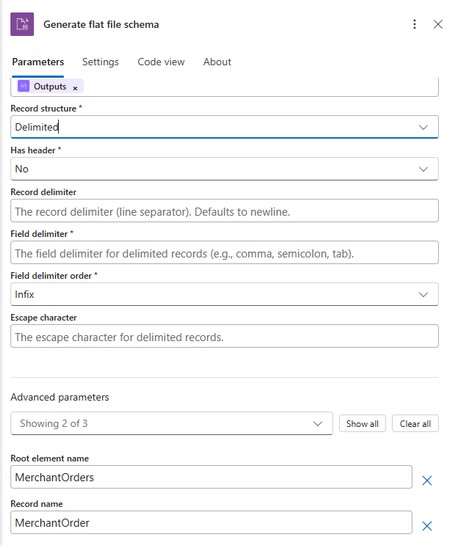
We’re excited to announce the preview of Flat File Schema Generation for Azure Logic Apps Standard. This new built-in action helps integration teams move faster by generating BizTalk compatible flat-file XSD schemas directly from sample flat-file payloads, reducing the manual effort required to model CSV, delimited, and positional files before encoding or decoding them in workflows. Why this matters Flat files continue to power enterprise mission critical integrations, from partner feeds and batch exports to finance ledgers, operational reports, and legacy system exchanges. While Azure Logic Apps already helps teams encode and decode flat files, creating the required flat-file schema has often been a separate design-time step. With Flat File Schema Generation, you can now accelerate that onboarding experience by generating a starter schema from real sample data within the workflow itself. What’s new The new Flat File Schema Generation action generates a flat-file XSD schema from sample content that you pass into the action. The generated schema includes BizTalk-compatible flat-file annotations, making it suitable for downstream Flat File Encoding and Flat File Decoding actions in Azure Logic Apps Standard workflows. Runtime schema generation: Generate schemas directly from sample flat-file payloads in the workflow. Delimited and positional support: Create schemas for common CSV, semicolon-delimited, tab-delimited, and fixed-width files. BizTalk-compatible annotations: Use generated schemas with the existing flat-file processing model familiar to BizTalk and enterprise integration teams. Flexible naming: Configure root element names, namespaces, record names, delimiters, and field positions to match your integration needs. How it works You provide a representative sample payload, specify whether the file structure is delimited or positional, and configure the relevant parsing details such as field delimiters, record delimiters, header handling, or fixed-width field positions. Once you run the workflow, the action returns the generated XSD schema as XML output, which can then be passed into subsequent flat-file operations or stored as part of your onboarding flow. Get started To try the preview, add the Flat File Schema Generation action to a Logic Apps Standard workflow, provide a sample flat-file payload, choose the record structure, and configure the field or record settings that match your format. Use the generated schema output with Flat File Decoding or Encoding in the same workflow or incorporate it into your broader onboarding process for flat-file integrations. Reference document: Encode, Decode, or Generate Schemas for Flat Files - Azure Logic Apps | Microsoft Learn. A walkthrough of generating a flat-file schema from sample data Use the following walkthrough to try the preview end to end with a simple customer order file. The same pattern can be adapted for semicolon-delimited, tab-delimited, or fixed-width positional files. Delimited sample: For this example, assume a trading partner sends a comma-separated order file with a header row and repeating order records. Sample file: OrderId,CustomerName,OrderDate,Amount,Region 10001,Contoso Retail,2026-07-01,1250.75,North 10002,Fabrikam Foods,2026-07-02,890.00,West 10003,Northwind Traders,2026-07-03,2400.50,South Configuration values Parameter Example value Record Structure Delimited Has header Yes Record delimiter newline Field delimiter , Field delimiter order Infix Escape character Double quote, if the source file uses quoted values Root element name (Advanced Parameters) Orders Record name (Advanced Parameters) Order Target namespace (Advanced Parameters) http://schemas.contoso.com/orders In the Azure portal, open your Logic Apps Standard resource and select the workflow where you want to generate the schema. Add a trigger, such as When an HTTP request is received, or use any trigger/action that provides the sample flat-file content. Add a new action and search for Flat File. Select the Flat File Schema Generation action. In the action, provide the sample flat-file content. Select the file structure type. For this example, choose Delimited. Enter the schema metadata under advanced parameters, such as the root element name, record name, and target namespace. Configure the delimiter settings, including the field delimiter and record delimiter. If the first row contains column names, enable the option to use the first row as headers. Save and run the workflow. Open the workflow run history and review the action output. The action returns a generated XSD schema with flat-file annotations. Review the generated schema, validate field names and inferred data types, and use the schema with Flat File Decoding or Flat File Encoding in your workflow. Positional sample: Fixed-width customer order file Use this example when the source flat file doesn’t use delimiters. In a positional, or fixed-width, file each field starts and ends at a known character position. The schema generation action needs those field positions so it can split each record correctly. Sample positional file: 10001CONTOSO00120260701000125075NORTH 10002FABRIKAM0120260702000089000WEST· 10003NORTHWIND120260703000240050SOUTH Note: The dot symbol in the second record represents a trailing space used for fixed-width padding. Replace it with an actual space in your real sample payload. Field position map Field Start position Length Justification Example value OrderId 1 5 Right 10001 CustomerCode 6 10 Left CONTOSO001 OrderDate 16 8 Right 20260701 Amount 24 9 Right 000125075 Region 33 5 Left NORTH Configuration values for the positional sample Parameter Example value Record Structure Positional Has Header No Record delimiter newline Field positions Use the field names, lengths, and justification values from the field position map. Root element name (Advanced Parameters) Orders Record name (Advanced Parameters) Order Target namespace (Advanced Parameters) http://schemas.contoso.com/orders/positional Step-by-step walkthrough for positional files In the Azure portal, open your Logic Apps Standard resource and select the workflow where you want to generate the schema. Add a trigger, such as When an HTTP request is received, or use an existing action that provides the fixed-width file content. Add a new action and search for Flat File. Select the Flat File Schema Generation action. Paste the positional sample payload into the sample content input. Make sure every record has the same total length. For the structure type, choose Positional. Enter the schema metadata, including root element name, record name, and target namespace. Configure the record delimiter. For this example, use newline. Add the field positions in order: OrderId length 5, CustomerCode length 10, OrderDate length 8, Amount length 9, and Region length 5. Set justification for each field. Use Right for numeric or date-like fields and Left for text fields that may contain trailing space padding. Save and run the workflow. Open the workflow run history and review the generated XSD schema output. Confirm that the field names, order, lengths, and positional annotations match the source record layout. Use the generated schema with Flat File Decoding to parse incoming fixed-width files into XML, or with Flat File Encoding to generate outbound fixed-width files. Limitations and known issues Limitation Description Type inference uses a single record. The first non-empty data record determines column types. Single record type only The action generates one repeating record structure and doesn't support heterogeneous record layouts. No nested or hierarchical records The generated schema is flat, meaning you have a root element with one repeating child record and fields. Positional boundaries aren't automatically detected. You must provide exact field lengths in field Positions. UTF-8 code page only Generated schema sets codepage="65001" and doesn't expose encoding selection. Escape-character behavior is literal. Escape handling matches literal value and skips only the next single character. recordName default If unspecified, defaults to {RootElementName}_Record. Designer justification input fieldPositions[].justification supports only Left and Right. Looking ahead This preview is another step toward making Azure Logic Apps Standard, a more complete and productive platform for enterprise integration modernization. Whether you are onboarding new partner feeds, modernizing BizTalk-style flat-file processing, or automating recurring operational files, Flat File Schema Generation helps reduce setup friction and get integration workflows moving faster.Bringing all your Integration workloads to Logic Apps Standard
We recently announced the end of life of BizTalk Server and provided a path forward for our customers. As part of that commitment, we’re investing in tooling and guidance that reduces migration complexity and helps teams modernize confidently to Azure Logic Apps Standard. Because enterprise integration programs are rarely “lift and shift,” we’re pairing automation with best practices, reference architectures, and field-proven guidance to support you from assessment through cutover. In our December 2025 announcement, we outlined a long-term direction for enterprise integration: Azure Logic Apps is the successor to BizTalk Server. Customers can modernize at a pace that balances continuity with innovation—while moving to a cloud platform designed for scale, hybrid operations, DevOps, and AI-assisted automation. The strategy centers on three principles: a predictable BizTalk lifecycle runway, preservation of existing investments, and a practical, guided migration path to Logic Apps. What makes this strategy credible is not just the vision—but the concrete tooling and guidance that back it up. Announcing the Logic Apps Migration Agent: An Open-source project to provide an AI End-to-End Modernization Experience Today we’re announcing the Logic Apps Migration Agent—an open-source Microsoft project that delivers an AI-assisted, end-to-end modernization experience with a structured, stage-gated workflow. Built by the product group and shaped by direct field feedback, the agent operationalizes how migrations should be executed: discover what you have, plan what you’ll modernize, convert incrementally, and validate continuously. The result is a repeatable approach that helps customers (and partners) migrate from BizTalk and other integration platforms to Azure Logic Apps with greater speed and confidence—without compromising governance or correctness. The agent reinforces the modernization strategy through: Discovery → Planning → Conversion: Aligns to Microsoft modernization guidance so teams understand scope, dependencies, and gaps before committing to conversion. Human-in-the-loop checkpoints: Uses AI to accelerate analysis and baseline conversions while enforcing review and approval steps for mission-critical correctness and governance. VS Code + GitHub Copilot integration: Brings migrations into a code-first workflow—enabling developer-centric refactoring, DevOps practices, and consistent implementation patterns for Logic Apps. Incremental, flow-group migration: Modernize one logical unit at a time to reduce risk, support phased cutovers, and avoid big-bang rewrites. Bring-your-own black-box testing: Import existing files, test cases, and specifications to validate behavior and reduce custom test harness work. In short, the Migration Agent turns high-level modernization guidance into a repeatable, auditable process teams can trust. This alignment is critical for customers running mission‑critical integrations. It replaces uncertainty with a clear path: modernize incrementally, reuse what works, validate every step, and emerge on Azure Logic Apps with a platform ready for the next decade of integration and AI-driven automation. What you should focus on? Target architecture decisions: the agent will propose integration patterns, but will not choose partitioning strategy, reliability approach, or network topology—you will decide what “great” looks like. Semantic equivalence: The Agent will generate baseline artifacts, but domain-specific mapping, transformation nuances, error handling semantics, and edge cases still require human validation. Connector and parity gaps must be addressed: if a source platform capability has no 1:1 equivalent, the migration may require redesign (custom code, Local Functions, API Management, Service Bus patterns, or alternative connectors). Performance, security, and operations hardening remain essential: identity, secrets, policies, monitoring, cost controls, and SRE practices are not “one-click.” Cutover planning is outside the scope of automation: data/backlog reconciliation, dual-run strategies, and rollback plans remain project workstreams. More mission critical features for Logic Apps Standard and Hybrid We are weeks away from shipping the following features, aimed at any customers in the Enterprise Application Integration space: HL7 In-App operations in general availability. MLLP Receive/Send In-App connector in Public Preview. Rules Engine In-App operation for XML facts in Public Preview. MSMQ In-App connector in Public Preview. Oracle DB In-App connector in Public Preview. Flat File generation In-App operations in Public Preview. Support for local container registry (Hybrid deployment model). Integration accounts support (Hybrid On premises). NMS In-App connector in Public Preview. Improvements to our EDI capabilities. BizTalk Mapper to Data Mapper Migration path What about other integration platforms? Yes—the Logic Apps Migration Agent is designed to be customizable so you can migrate from any integration platform to Logic Apps (not just BizTalk). The open architecture lets you plug in new discovery, analysis, and conversion skills for the source product you’re modernizing, while keeping the same stage-gated workflow and human-in-the-loop checkpoints. We provide guidance and examples to help you extend the agent for other platforms than BizTalk —so you can tailor mappings, transformation rules, and validation to your customer’s standards and target patterns in Logic Apps. Benefits Faster time to value with a guided process: A structured discovery→planning→conversion workflow reduces uncertainty and helps teams move from assessment to execution with clear checkpoints. Higher confidence migrations: Human-in-the-loop validation, artifacts generation, and black-box testing support mission‑critical correctness and governance. Customizable for your source platform and standards: Extend the agent with product-specific discovery and conversion steps, tailor mappings and transformation rules, and align outputs with your target Logic Apps patterns and engineering conventions. Open-source transparency and control: Review how the tool works end-to-end, validate what it produces, and adopt changes at your pace without waiting for a closed release cycle. Community-driven innovation: Benefit from contributions across Microsoft, partners, and customers—new adapters, mapping packs, and best practices can be shared and reused. Lower total migration cost: Automating repeatable tasks reduces manual effort while preserving the ability to invest partner expertise where it matters most (architecture, governance, reliability, and operations). Reusable accelerators for partners: Partners can create differentiated offerings by packaging templates, validation suites, CI/CD pipelines, and domain-specific patterns on top of the agent. For companies providing professional services: this agent is meant to augment your delivery—not replace it. By automating repeatable groundwork (inventory, baseline conversion, and validation scaffolding), it frees your teams to focus on the higher‑value work customers rely on you for: defining target architecture, refining mappings and patterns, hardening security and governance, implementing CI/CD, performance tuning, and driving cutover and operating model changes. Because the project is open source and extensible, partners can also package reusable accelerators (templates, connectors, mapping packs, test harnesses) and build differentiated migration offerings on top of the same trusted process. Review our public documentation here: https://learn.microsoft.com/en-us/azure/logic-apps/migration/migration-agent-overview Recommendations: Consider the following recommendations when using the Agent: Structure your projects along with all dependencies in directories. Include bindings, MSIs. configuration files, source code, schemas, maps, pipelines, even documentation. Review each stage thoroughly. Suggest changes to tailor each stage to include all dependencies, and your architecture and requirements preference. While you can run the agent in any workstation with VSCode, if you want to test your Logic Apps solution, make sure your VSCode workstation has access to a test environment if you want the agent to test against any target system or dependencies. Make sure you increase the Maximum number of requests for the Copilot Chat as follows (we recommend changing the value from 60 to 1000) Check the following video for a demonstration on how the Agent works and let us know if you have any questions in the comments.1.7KViews1like0CommentsLogic Apps Newsletter - May 2026
In this issue: Ace Aviator of the Month News from our product group News from our community Ace Aviator of the Month May 2026's Ace Aviator: Yahya Ajwad What's your role and title? What are your responsibilities? I work as Chief Architect and AI Lead at Epical. My role is centered around technical leadership, architecture, and advisory mostly within cloud adoption and transformation programs. I help customers design and implement integration platforms. I also support customers in navigating the AI landscape, with a focus on how integration platforms impact AI readiness and how AI can be used to create value in the platforms we build. Internally at Epical, I lead our Microsoft and Azure cloud integration offering, as well as our CoreAI team and AI initiatives. Can you give us some insights into your day-to-day activities? One moment it is about how we can utilize AI to deliver things cheaper and faster without compromising security, governance and quality. Next, a customer contacts us with an undocumented BizTalk environment asking us what to do next (that's where the fun begins). Usually followed up by the question about how much does their future integration platform in Azure will cost down to the last cent (good luck answering that 😜 hint: the right answer is always: "less than BizTalk"). And hey, public cloud might not be good enough for their security, so thank God for private connectivity. I also spend time helping customers identify the best cloud integration strategies and patterns and for their business needs, choosing the right platforms and components for specific use cases, and ensuring that the platforms we design are as secure, scalable, maintainable, and cost-efficient as possible. Increasingly, this also includes sprinkling AI so bosses are happy (joking I'm a true AI believer myself). Internally, I support Epical with technical business development and help ensure that we stay relevant. What motivates and inspires you to be an active member of the Aviators/Microsoft community? I honestly believe that IT in general would never have been the same without communities and the willingness to share knowledge and support one another. The Logic Apps and Azure Integration community is especially unique because it is both practical and open. People share real experiences which makes it incredibly valuable when trying to solve real-world challenges. What motivates me is the opportunity to learn by sharing, receive feedback, and be part of a community where everyone contributes to each other’s growth. Between us, I'm here for the stickers ;) Looking back, what advice do you wish you had been given earlier? Be kind, stay curious and be helpful. Share what you know, even if it feels small or irrelevant. Those small insights often help others more than you think and that will definitely help you grow. Also, focus on learning the fundamentals. Tools and platforms change quickly, and what is popular today might not matter in a few weeks. Strong basics will always stay relevant. Keep learning and try new things all the time. What has helped you grow professionally? Being around kind, skilled, and generous people both in the community and at work who are willing to teach, challenge my thinking, and share their knowledge. Also, finding mentors who are open to mentor me, listen to all my questions even the silly ones, and who are willing to guide me and correct me when I’m hallucinating. If you had a magic wand that could create a feature in Logic Apps, what would it be? I don’t need to wish for one, you guys (Shout-out to Harold, Dyvia and the team) have already created it: Logic Apps Migration Assistant Agents. That stuff is definitely magic. News from our product group Network Connectivity Check APIs for Logic App Standard This post introduces built-in network troubleshooting APIs for Logic App Standard when integrated with a virtual network. Three endpoints—connectivityCheck, dnsCheck, and tcpPingCheck—let you validate end‑to‑end connectivity to services such as Azure SQL, Key Vault, Storage, Service Bus, and Event Hubs, perform DNS resolution, and test TCP reachability from the actual worker hosting your workflows. It covers supported provider types, credential options including Managed Identity and app settings, example payloads, and known limitations (e.g., SMB port 445 cannot be tested). Step-by-step guidance shows how to call the APIs via Azure API Playground or CLI to quickly isolate network issues. Service Bus SBMP Retirement: What BizTalk Server 2020 Customers Need to Know Azure Service Bus will retire the Service Bus Messaging Protocol (SBMP) on September 30, 2026, impacting BizTalk Server 2020 customers using the SB‑Messaging adapter. Microsoft has released a hotfix that adds Advanced Message Queuing Protocol (AMQP) support to the adapter for CU6 and CU7. With the hotfix, AMQP becomes the default transport while SBMP remains an opt‑in fallback; an updated hotfix based on the new Service Bus SDK is expected in June. Guidance includes migrating configurations to AMQP, installing and validating the hotfix in non‑production, and testing large message/file scenarios. The hotfix can be requested via support (KB5091375). Migrate Data Ingestion from Data Collector to Log Ingestion With the HTTP Data Collector API for Log Analytics deprecated and heading out of support in September 2026, this guide shows Logic Apps users how to move to the Log Ingestion API. It explains impacts—such as 403 errors for new Data Collector connections and missing data in newly created custom log tables—and provides a migration path using the HTTP action. Steps include creating a Data Collection Endpoint (DCE) and Data Collection Rule (DCR), deriving the full ingestion URL, mapping sample data to define schema, assigning the Monitoring Metrics Publisher role to the Logic App’s managed identity, and verifying success (HTTP 204). Introducing AI Skill Assessment in Azure API Center Azure API Center now includes automated AI skill assessment, providing governance and quality scoring for skills at scale using an “LLM‑as‑a‑judge” approach. The system evaluates outputs against defined criteria and ships with four default dimensions—Documentation Clarity, Help Completeness, Discoverability, and Safe Usage—each scored 1–5 with configurable thresholds. Developers get detailed reports showing pass/fail, per‑dimension scores, structural checks, and schema validation, helping them decide which skills are production‑ready. Platform administrators can extend or customize criteria to match organizational standards. The feature centralizes oversight and reduces manual review effort, improving confidence when adopting AI skills across integration solutions. Introducing the plugin marketplace for Azure API Center Azure API Center adds a plugin marketplace endpoint (public preview) that exposes a version‑controlled catalog of organizational AI plugins—such as MCP servers and skills—directly from your API Center data plane. Developers can discover and install plugins from familiar tools like Claude Code and GitHub Copilot CLI using simple marketplace commands. The endpoint inherits the API Center portal’s authentication model, ensuring governance and security while platform teams control publication. The article explains the problem it addresses, the marketplace.git URL format, quick start commands, and documentation to enable the feature—streamlining how teams curate, manage, and consume AI plugins in enterprise environments. News from our community Control the Initial State of Logic Apps Standard Workflows Post by Sandro Pereira This tip explains how to prevent Logic Apps Standard workflows from auto-starting after deployment, a risky default in production. Unlike Consumption, Standard doesn’t expose a state property in ARM. Instead, each workflow’s initial state is controlled via App Service application settings using the pattern “Workflows.<WorkflowName>.FlowState=Disabled.” The post shows how to define these keys in local.settings.json (or pipelines/Bicep), deploy with workflows disabled, and enable them when ready. It also notes acceptable values (Disabled/disabled) and clarifies that omitting the keys leaves workflows enabled by default—reducing unwanted executions and noisy alerts. 10 Azure Function App Limitations for Enterprise Integration Post by Tarun Garg The post outlines ten reasons Azure Function Apps may be a poor fit for enterprise integration workloads. Issues include cold-start latency, limited orchestration and state management, operational complexity at scale, and the need to hand-roll observability. It also highlights security and network isolation challenges, cost variability under heavy throughput, strong dependence on custom code, risks around versioning and breaking changes, and insufficient governance controls for integration use cases. The takeaway: Function Apps excel at granular compute, but integration programs often benefit from managed orchestration layers and patterns better aligned to enterprise requirements. Logic Apps Standard: how accidentally blocking access from Edge results in CORS errors Post by Şahin Özdemir Şahin Özdemir explains a troubleshooting case where Logic Apps Standard action inputs/outputs stopped loading in the Azure portal, appearing like a CORS issue. The root cause was a blocked “Local Network Access” permission in Microsoft Edge, not misconfigured CORS. The article advises checking Edge’s site permissions and re-enabling local network access before diving into CORS diagnostics. By validating browser settings first, engineers can avoid unnecessary changes to integration apps and resolve portal rendering failures quickly—saving time and reducing confusion when workflow views suddenly fail to load. Logic apps – Handling AND OR conditions Post by Anitha Eswaran Anitha Eswaran explains how to correctly implement combined AND/OR logic in Azure Logic Apps when the designer view becomes confusing. Using a real example—validating item numbers—she shows how to check for empty values or specific suffixes (W/WN) and when to terminate processing. The article demonstrates building expressions to explicitly control evaluation order and outcomes, avoiding unintended behavior from default AND logic. Practical screenshots and expression snippets help readers structure conditions, handle arrays from trigger data, and create maintainable workflows that reflect real business rules. Why Enterprises Are Migrating from Logic Apps (Consumption) to Logic Apps (Standard): Practical Insights from the Field Post by Kunal Saha Kunal Saha outlines why organizations reach an inflection point where Logic Apps Standard becomes a better fit than Consumption. Drawing from field experience, he highlights drivers like consolidated app-level management, richer local development workflows, environment isolation, and cost predictability for sustained workloads. The piece discusses when per-execution billing ceases to be efficient, how Standard’s hosting model supports enterprise governance, and migration considerations around triggers, connectors, and stateful patterns. The article encourages teams to evaluate workload characteristics and operational needs to determine the right time to modernize to Standard. Event Debouncing with Logic Apps and Azure Table Storage Post by Daniel Jonathan This article presents an event debouncing pattern for webhook-heavy systems using three Logic Apps and a single Azure Table Storage table. Incoming events are buffered by upserting rows keyed by entity ID, ensuring only the latest state is retained. A timer-driven workflow processes pending rows after a cooldown window, fetches fresh state from the source, and calls downstream APIs, deleting entries on success or resetting on failure. Benefits include implicit deduplication, reduced downstream load, and operational transparency in Storage Explorer. The pattern suits moderate scale without Service Bus, with caveats for strict ordering or very high throughput scenarios. XML to JSON in Logic Apps: Fixing the “Object vs Array” Trap Post by Prashant Singh Prashant Singh explains a common pitfall when converting XML to JSON in Logic Apps: json(xml(...)) yields an array when multiple nodes exist, but a single object when only one node is present—breaking For each loops. He outlines three remedies: debatch directly with xpath() to always return a node set; wrap the target node with array() to normalize object/array differences; or use coalesce() with array() to safely handle missing nodes. With clear examples and expressions, the post helps engineers avoid brittle assumptions and build resilient workflows that handle single, multiple, or absent records cleanly. DevUP Talks 02 - 2026 Q1 Reflections with Ahmed Bayoumy, Sebastian Meyer and Andrew Wilson Video by Mattias Lögdberg This 12‑minute panel discussion surveys how AI and automation are changing day‑to‑day engineering work. Mattias Lögdberg hosts Ahmed Bayoumy, Sebastian Meyer, and Andrew Wilson to share early field perspectives: the shift from experimentation to production, emerging testing responsibilities around AI‑assisted code, and how integration teams are adapting operating models and skills. The conversation favors practical observations over hype, offering a snapshot of what practitioners are seeing at the start of 2026. It’s a compact watch for leaders tracking real impacts rather than theoretical roadmaps. How low can you code? From ‘drag-and-drop’ dreams to try–catch reality Post by Sonny Gillissen Sonny Gillissen argues that early low‑code promised simplicity but often obscured complexity with visual designers and limited tooling. He suggests AI can shift low‑code from diagramming boxes to describing intent—letting teams express business behavior in natural terms, with systems generating implementations. The piece calls for focusing on domain clarity, robust data/APIs, and guardrails over chasing more drag‑and‑drop. For integration engineers, it frames a path where Logic Apps and related platforms become orchestration shells around AI‑assisted specifications, improving maintainability without hiding the hard parts. Legacy Integration to Azure: 40% Cost Savings and Faster Delivery Post by Adaptiv (post by Simon Clendon) This piece outlines lessons from migrating legacy integration platforms to Microsoft Azure. It details the discovery work needed to untangle historical integrations, the diplomacy required with stakeholders, and the engineering patterns that de-risk cutovers. Highlights include modernizing HR workflows, establishing clear migration decision trees, and treating AI as a force multiplier rather than a silver bullet. The article emphasizes measurable outcomes—around 40% cost savings and faster delivery—while cautioning against underestimating analysis, testing, and organizational change, and recommending experienced partners to accelerate the journey. Using the Right Tool Is Not Over‑Engineering Post by Marcelo Gomes Marcelo Gomes argues that many integration failures stem from tool misalignment rather than flawed logic. Using a market‑stall analogy, he outlines when to rely on API Management for exposure and control, where Logic Apps should orchestrate rather than absorb all work, and why Azure Storage underpins durable, production‑ready designs. The piece encourages architects to map responsibilities explicitly—governance at the edge, orchestration in workflows, compute where it belongs—so systems scale cleanly without masking complexity under a single service. Choosing fit‑for‑purpose components, he suggests, is discipline—not over‑engineering. Using Event Grid to detect deleted files and trigger Logic App Post by Sandro Pereira (author: Luis Rigueira) This walkthrough shows how to capture Azure Storage blob deletion events with Event Grid and invoke a Logic App for downstream actions like audit, recovery, or notifications. It explains why native Blob triggers don’t fire on delete, then sets up a System Topic on the storage account, configures a Logic App with the “When a resource event occurs” trigger for Microsoft.Storage.BlobDeleted, and parses the event payload for container, file name, content‑type, and timestamp. The post provides expressions and screenshots to build the flow end‑to‑end, enabling reliable reactions to file deletions without custom functions.Logic Apps Agentic Workflows with SAP - Part 1: Infrastructure
When you integrate Azure Logic Apps with SAP, the “hello world” part is usually easy. The part that bites you later is data quality. In SAP-heavy flows, validation isn’t a nice-to-have — it’s what makes the downstream results meaningful. If invalid data slips through, it can get expensive fast: you may create incorrect business documents, trigger follow-up processes, and end up in a cleanup path that’s harder (and more manual) than building validation upfront. And in “all-or-nothing” transactional patterns, things get even more interesting: one bad record can force a rollback strategy, compensating actions, or a whole replay/reconciliation story you didn’t want to own. See for instance Handling Errors in SAP BAPI Transactions | Microsoft Community Hub to get an idea of the complexity in a BizTalk context. That’s the motivation for this post: a practical starter pattern that you can adapt to many data shapes and domains for validating data in a Logic Apps + SAP integration. Note: For the full set of assets used here, see the companion GitHub repository (workflows, schemas, SAP ABAP code, and sample files). 1. Introduction Scenario overview The scenario is intentionally simple, but it mirrors what shows up in real systems: A Logic App workflow sends CSV documents to an SAP endpoint. SAP forwards the payload to a second Logic App workflow that performs: rule-based validation (based on pre-defined rules) analysis/enrichment (market trends, predictions, recommendations) The workflow either: returns validated results (or validation errors) to the initiating workflow, or persists outputs for later use For illustration, I’m using fictitious retail data. The content is made up, but the mechanics are generic: the same approach works for orders, inventory, pricing, master data feeds, or any “file in → decision out” integration. You’ll see sample inputs and outputs below to keep the transformations concrete. What this post covers This walkthrough focuses on the integration building blocks that tend to matter in production: Calling SAP RFCs from Logic App workflows, and invoking Logic App workflows from SAP function modules Using the Logic Apps SAP built-in trigger Receiving and processing IDocs Returning responses and exceptions back to SAP in a structured, actionable way Data manipulation patterns in Logic Apps, including: parsing and formatting inline scripts XPath (where it fits, and where it becomes painful). Overall Implementation A high-level view of the implementation is shown below. The source workflow handles end-to-end ingestion—file intake, transformation, SAP integration, error handling, and notifications—using Azure Logic Apps. The destination workflows focus on validation and downstream processing, including AI-assisted analysis and reporting, with robust exception handling across multiple technologies. I’ll cover the AI portion in a follow-up post. Note on AI-assisted development Most of the workflow “glue” in this post—XPath, JavaScript snippets, and Logic Apps expressions—was built with help from Copilot and the AI assistant in the designer (see Get AI-assisted help for Standard workflows - Azure Logic Apps | Microsoft Learn). In my experience, this is exactly where AI assistance pays off: generating correct scaffolding quickly, then iterating based on runtime behavior. I’ve also included SAP ABAP snippets for the SAP-side counterpart. You don’t need advanced ABAP knowledge to follow along; the snippets are deliberately narrow and integration-focused. I include them because it’s hard to design robust integrations if you only understand one side of the contract. When you understand how SAP expects to receive data, how it signals errors, and where transactional boundaries actually are, you end up with cleaner workflows and fewer surprises. 2. Source Workflow This workflow is a small, end‑to‑end “sender” pipeline: it reads a CSV file from Azure Blob Storage, converts the rows into the SAP table‑of‑lines XML shape expected by an RFC, calls Z_GET_ORDERS_ANALYSIS via the SAP connector, then extracts analysis or error details from the RFC response and emails a single consolidated result. The name of the data file is a parameter of the logic app. At a high level: Input: an HTTP request (used to kick off the run) + a blob name. Processing: CSV → array of rows → XML (…) → RFC call Output: one email containing either: the analysis (success path), or a composed error summary (failure path). The diagram below summarizes the sender pipeline: HTTP trigger → Blob CSV (header included) → rows → SAP RFC → parse response → email. Two design choices are doing most of the work here. First, the workflow keeps the CSV transport contract stable by sending the file as a verbatim list of lines—including the header—wrapped into … elements under IT_CSV . Second, it treats the RFC response as the source of truth: EXCEPTIONMSG and RETURN/MESSAGE drive a single Has errors gate, which determines whether the email contains the analysis or a consolidated failure summary. Step-by-step description Phase 0 — Trigger Trigger — When_an_HTTP_request_is_received The workflow is invoked via an HTTP request trigger (stateful workflow). Phase 1 — Load and split the CSV Read file — Read_CSV_orders_from_blob Reads the CSV from container onlinestoreorders using the blob name from @parameters('DataFileName'). The name of the data file is a parameter of the logic app. Split into rows — Extract_rows Splits the blob content on \r\n, producing an array of CSV lines. Design note: Keeping the header row is useful when downstream validation or analysis wants column names, and it avoids implicit assumptions in the sender workflow. Phase 2 — Shape the RFC payload Convert CSV rows to SAP XML — Transform_CSV_to_XML Uses JavaScript to wrap each CSV row (including the header line) into the SAP line structure and XML‑escape special characters. The output is an XML fragment representing a table of ZTY_CSV_LINE rows. Phase 3 — Call SAP and extract response fields Call the RFC — [RFC]_ Z_GET_ORDERS_ANALYSIS Invokes Z_GET_ORDERS_ANALYSIS with an XML body containing … built from the transformed rows. Note that a <DEST>...</DEST> element can also be provided to override the default value in the function module definition. Extract error/status — Save_EXCEPTION_message and Save_RETURN_message Uses XPath to pull: EXCEPTIONMSG from the RFC response, and the structured RETURN / MESSAGE field. Phase 4 — Decide success vs failure and notify Initialize output buffer — Initialize_email_body Creates the EmailBody variable used by both success and failure cases. Gate — Has_errors Determines whether to treat the run as failed based on: EXCEPTIONMSG being different from "ok", or RETURN / MESSAGE being non‑empty. Send result — Send_an_email_(V2) Emails either: the extracted ANALYSIS (success), or a concatenated error summary including RETURN / MESSAGE plus message details ( MESSAGE_V1 … MESSAGE_V4 ) and EXCEPTIONMSG . Note: Because the header row is included in IT_CSV , the SAP-side parsing/validation treats the first line as column titles (or simply ignores it). The sender workflow stays “schema-agnostic” by design. Useful snippets Snippet 1 — Split the CSV into rows split(string(body('Read_CSV_orders_from_blob')?['content']), '\r\n') Tip: If your CSV has a header row you don’t want to send to SAP, switch back to: @skip(split(string(body('Read_CSV_orders_from_blob')?['content']), '\r\n'), 1) Snippet 2 — JavaScript transform: “rows → SAP table‑of‑lines XML” const lines = workflowContext.actions.Extract_rows.outputs; function xmlEscape(value) { return String(value) .replace(/&/g, "&") .replace(//g, ">") .replace(/"/g, """) .replace(/'/g, "'"); } // NOTE: we don't want to keep empty lines (which can be produced by reading the blobs) // the reason being that if the recipient uses a schema to validate the xml, // it may reject it if it does not allow empty nodes. const xml = lines .filter(line => line && line.trim() !== '') // keep only non-empty lines .map(line => `<zty_csv_line><line>${xmlEscape(line)}</line></zty_csv_line>`) .join(''); return { xml }; Snippet 3 — XPath extraction of response fields (namespace-robust) EXCEPTIONMSG: @xpath(body('[RFC]_Call_Z_GET_ORDERS_ANALYSIS')?['content'], 'string( /*[local-name()="Z_GET_ORDERS_ANALYSISResponse"] /*[local-name()="EXCEPTIONMSG"])') RETURN/MESSAGE: @xpath(body('[RFC]_Call_Z_GET_ORDERS_ANALYSIS')?['content'], 'string( /*[local-name()="Z_GET_ORDERS_ANALYSISResponse"] /*[local-name()="RETURN"] /*[local-name()="MESSAGE"])') Snippet 4 — Failure email body composition concat( 'Error message: ', outputs('Save_RETURN_message'), ', details: ', xpath(body('[RFC]_Call_Z_GET_ORDERS_ANALYSIS')?['content'], 'string(//*[local-name()=\"MESSAGE_V1\"])'), xpath(body('[RFC]_Call_Z_GET_ORDERS_ANALYSIS')?['content'], 'string(//*[local-name()=\"MESSAGE_V2\"])'), xpath(body('[RFC]_Call_Z_GET_ORDERS_ANALYSIS')?['content'], 'string(//*[local-name()=\"MESSAGE_V3\"])'), xpath(body('[RFC]_Call_Z_GET_ORDERS_ANALYSIS')?['content'], 'string(//*[local-name()=\"MESSAGE_V4\"])'), '; ', 'Exception message: ', outputs('Save_EXCEPTION_message'), '.') 3. SAP Support To make the SAP/Logic Apps boundary simple, I model the incoming CSV as a table of “raw lines” on the SAP side. The function module Z_GET_ORDERS_ANALYSIS exposes a single table parameter, IT_CSV , typed using a custom line structure. Figure: IT_CSV is a table of CSV lines ( ZTY_CSV_LINE ), with a single LINE field ( CHAR2048 ). IT_CSV uses the custom structure ZTY_CSV_LINE , which contains a single component LINE ( CHAR2048 ). This keeps the SAP interface stable: the workflow can send CSV lines without SAP having to know the schema up front, and the parsing/validation logic can evolve independently. The diagram below shows the plumbing that connects SAP to Azure Logic Apps in two common patterns: SAP sending IDocs to a workflow and SAP calling a remote-enabled endpoint via an RFC destination. I’m showing all three pieces together—the ABAP call site, the SM59 RFC destination, and the Logic Apps SAP built-in trigger—because most “it doesn’t work” problems come down to a small set of mismatched configuration values rather than workflow logic. The key takeaway is that both patterns hinge on the same contract: Program ID plus the SAP Gateway host/service. In SAP, those live in SM59 (TCP/IP destination, registered server program). In Logic Apps, the SAP built-in trigger listens using the same Program ID and gateway settings, while the trigger configuration (for example, IDoc format and degree of parallelism) controls how messages are interpreted and processed. Once these values line up, the rest of the implementation becomes “normal workflow engineering”: validation, predictable error propagation, and response shaping. Before diving into workflow internals, I make the SAP-side contract explicit. The function module interface below shows the integration boundary: CSV lines come in as IT_CSV , results come back as ANALYSIS , and status/error information is surfaced both as a human-readable EXCEPTIONMSG and as a structured RETURN ( BAPIRET2 ). I also use a dedicated exception ( SENDEXCEPTIONTOSAPSERVER ) to signal workflow-raised failures cleanly. Contract (what goes over RFC): Input: IT_CSV (CSV lines) Outputs: ANALYSIS (analysis payload), EXCEPTIONMSG (human-readable status) Return structure: RETURN ( BAPIRET2 ) for structured SAP-style success/error Custom exception: SENDEXCEPTIONTOSAPSERVER for workflow-raised failures Here is the ABAP wrapper that calls the remote implementation and normalizes the result. FUNCTION z_get_orders_analysis. *"---------------------------------------------------------------------- *" This module acts as a caller wrapper. *" Important: the remote execution is determined by DESTINATION. *" Even though the function name is the same, this is not recursion: *" the call runs in the remote RFC server registered under DESTINATION "DEST". *"---------------------------------------------------------------------- *" Contract: *" TABLES it_csv "CSV lines *" IMPORTING analysis "Result payload *" EXPORTING exceptionmsg "Human-readable status / error *" CHANGING return "BAPIRET2 return structure *" EXCEPTIONS sendexceptiontosapserver *"---------------------------------------------------------------------- CALL FUNCTION 'Z_GET_ORDERS_ANALYSIS' DESTINATION dest IMPORTING analysis = analysis TABLES it_csv = it_csv CHANGING return = return EXCEPTIONS sendexceptiontosapserver = 1 system_failure = 2 MESSAGE exceptionmsg communication_failure = 3 MESSAGE exceptionmsg OTHERS = 4. CASE sy-subrc. WHEN 0. exceptionmsg = 'ok'. "Optional: normalize success into RETURN for callers that ignore EXCEPTIONMSG IF return-type IS INITIAL. return-type = 'S'. return-message = 'OK'. ENDIF. WHEN 1. exceptionmsg = |Exception from workflow: SENDEXCEPTIONTOSAPSERVER { sy-msgv1 }{ sy-msgv2 }{ sy-msgv3 }{ sy-msgv4 }|. return-type = 'E'. return-message = exceptionmsg. WHEN 2 OR 3. "system_failure / communication_failure usually already populate exceptionmsg IF exceptionmsg IS INITIAL. exceptionmsg = |RFC system/communication failure.|. ENDIF. return-type = 'E'. return-message = exceptionmsg. WHEN OTHERS. exceptionmsg = |Error in workflow: { sy-msgv1 }{ sy-msgv2 }{ sy-msgv3 }{ sy-msgv4 }|. return-type = 'E'. return-message = exceptionmsg. ENDCASE. ENDFUNCTION. The wrapper is intentionally small: it forwards the payload to the remote implementation via the RFC destination and then normalizes the outcome into a predictable shape. The point isn’t fancy ABAP — it’s reliability. With a stable contract ( IT_CSV, ANALYSIS, RETURN, EXCEPTIONMSG ) the Logic Apps side can evolve independently while SAP callers still get consistent success/error semantics. Important: in 'CALL FUNCTION 'Z_GET_ORDERS_ANALYSIS' DESTINATION dest' the name of the called function should be the same as the name of the ABAP wrapper function module, the reason being that the SAP built-in trigger in the logic app uses the function module signature as the contract (i.e. metadata). Also note that in the provided companion artifacts, a default value was assigned to 'dest' in the function module definition. But it can also be specified in the request (DEST element). Z_GET_ORDERS_ANALYSIS . To sum up, the integration is intentionally shaped around three outputs: the raw input table ( IT_CSV ), a standardized SAP return structure ( RETURN / BAPIRET2 ), and a readable status string ( EXCEPTIONMSG ). The custom exception ( SENDEXCEPTIONTOSAPSERVER ) gives me a clean way to surface workflow failures back into SAP without burying them inside connector-specific error payloads. This is depicted in the figure below. 4. Destination Workflow The diagram below shows the destination workflow at a high level. I designed it as a staged pipeline: guard early, normalize input, validate, and then split the workload into two paths—operational handling of invalid records (notifications and optional IDoc remediation) and analysis of the validated dataset. Importantly, the SAP response is intentionally narrow: SAP receives only the final analysis (or a structured error), while validation details are delivered out-of-band via email. How to read this diagram Guardrail: Validate requested action ensures the workflow only handles the expected request. Normalize: Create CSV payload converts the inbound content into a consistent CSV representation. Validate: Data Validation Agent identifies invalid records (and produces a summary). Operational handling (invalid data): invalid rows are reported by email and may optionally be turned into IDocs (right-hand block). Analyze (valid data): Analyze data runs only on the validated dataset (invalid IDs excluded). Outputs: users receive Email analysis, while SAP receives only the analysis (or a structured error) via Respond to SAP server. Figure: Destination workflow with staged validation, optional IDoc remediation, and an SAP response . Reading the workflow top-to-bottom, the main design choice is separation of concerns. Validation is used to filter and operationalize bad records (notify humans, optionally create IDocs), while the SAP-facing response stays clean and predictable: SAP receives the final analysis for the validated dataset, or an error if the run can’t complete. This keeps the SAP contract stable even as validation rules and reporting details evolve. Step‑by‑step walkthrough Phase 0 — Entry and routing Trigger — When a message is received The workflow starts when an inbound SAP message is delivered to the Logic Apps SAP built‑in trigger. Guardrail — Validate requested action (2 cases) The workflow immediately checks whether the inbound request is the operation it expects (for example, the function/action name equals Z_GET_ORDERS_ANALYSIS ). If the action does not match: the workflow sends an exception back to SAP describing the unexpected action and terminates early (fail fast). If the action matches: processing continues. Phase 1 — Normalize input into a workflow‑friendly payload Prepare input — Create CSV payload The workflow extracts CSV lines from the inbound (XML) SAP payload and normalizes them into a consistent CSV text payload that downstream steps can process reliably. Initialize validation state — Initialize array of invalid order ids The workflow creates an empty array variable to capture order IDs that fail validation. This becomes the “validation output channel” used later for reporting, filtering, and optional remediation. Phase 2 — Validate the dataset (AI agent loop) Validate — Data Validation Agent (3 cases) This stage performs rule‑based validation using an agent pattern (backed by Azure OpenAI). Conceptually, it does three things (as shown in the diagram’s expanded block): Get validation rules: retrieves business rules from a SharePoint‑hosted validation document. The location of the validation rules file is a parameter of the logic app. Get CSV payload: loads the normalized CSV created earlier. Summarize CSV payload review: evaluates the CSV against the rules and produces structured validation outputs. Outputs produced by validation: A list of invalid order IDs The corresponding invalid CSV rows A human‑readable validation summary Note: The detailed AI prompt/agent mechanics are covered in Part 2. In Part 1, the focus is on the integration flow and how data moves. Phase 3 — Operational handling of invalid records (email + optional SAP remediation) After validation, the workflow treats invalid records as an operational concern: they are reported to humans and can optionally be routed into an SAP remediation path. This is shown in the right‑hand “Create IDocs” block. Notify — Send verification summary The workflow sends an email report (Office 365) to configured recipients containing: the validation summary the invalid order IDs the invalid CSV payload (or the subset of invalid rows) Transform — Transform CSV to XML The workflow converts the invalid CSV lines into an XML format that is suitable for SAP processing. Optional remediation — [RFC] Create all IDocs (conditional) If the workflow parameter (for example, CreateIDocs) is enabled, the workflow calls an SAP RFC (e.g., Z_CREATE_ONLINEORDER_IDOC ) to create IDocs from the transformed invalid data. Why this matters: Validation results are made visible (email) and optionally actionable (IDocs), without polluting the primary analysis response that SAP receives. Phase 4 — Analyze only the validated dataset (AI analysis) The workflow runs AI analysis on the validated dataset, explicitly excluding invalid order IDs discovered during the validation phase. The analysis prompt instructs the model to produce outputs such as trends, predictions, and recommendations. Note: The AI analysis prompt design and output shaping are covered in Part 2. Phase 5 — Post‑process the AI response and publish outputs Package results — Process analysis results (Scope) The workflow converts the AI response into a format suitable for email and for SAP consumption: Parse the OpenAI JSON response Extract the analysis content Convert markdown → HTML using custom JavaScript formatting Outputs Email analysis: sends the formatted analysis to recipients. Respond to SAP server: returns only the analysis (and errors) to SAP. Key design choice: SAP receives a clean, stable contract—analysis on success, structured error on failure. Validation details are handled out‑of‑band via email (and optionally via IDoc creation). Note: the analysis email sent by the destination workflow is there for testing purposes, to verify that the html content remains the same as it is sent back to the source workflow. Useful snippets Snippet 1 - Join each CSV line in the XML to make a CSV table: join( xpath( xml(triggerBody()?['content']), '/*[local-name()=\"Z_GET_ORDERS_ANALYSIS\"] /*[local-name()=\"IT_CSV\"] /*[local-name()=\"ZTY_CSV_LINE\"] /*[local-name()=\"LINE\"]/text()' ), '\r\n') Note: For the sake of simplicity, XPath is used here and throughout all places where XML is parsed. In the general case however, the Parse XML with schema action is the better and recommended way to strictly enforce the data contract between senders and receivers. More information about Parse XML with schema is provided in Appendix 1. Snippet 2 - Format markdown to html (simplified): const raw = workflowContext.actions.Extract_analysis.outputs; // Basic HTML escaping for safety (keeps <code> blocks clean) const escapeHtml = s => s.replace(/[&<>"]/g, c => ({'&':'&','<':'<','>':'>','"':'"'}[c])); // Normalize line endings let md = raw; // raw.replace(/\r\n/g, '\n').trim(); // Convert code blocks (``` ... ```) md = md.replace(/```([\s\S]*?)```/g, (m, p1) => `<pre><code>${escapeHtml(p1)}</code></pre>`); // Horizontal rules --- or *** md = md.replace(/(?:^|\n)---+(?:\n|$)/g, '<hr/>'); // Headings ###### to # for (let i = 6; i >= 1; i--) { const re = new RegExp(`(?:^|\\n)${'#'.repeat(i)}\\s+(.+?)\\s*(?=\\n|$)`, 'g'); md = md.replace(re, (m, p1) => `<h${i}>${p1.trim()}</h${i}>`); } // Bold and italic md = md.replace(/\*\*([^*]+)\*\*/g, '<strong>$1</strong>'); md = md.replace(/\*([^*]+)\*/g, '<em>$1</em>'); // Unordered lists (lines starting with -, *, +) md = md.replace(/(?:^|\n)([-*+]\s.+(?:\n[-*+]\s.+)*)/g, (m) => { const items = m.trim().split(/\n/).map(l => l.replace(/^[-*+]\s+/, '').trim()); return '\n<ul>' + items.map(i => `<li>${i}</li>`).join('\n') + '</ul>'; }); // Paragraphs: wrap remaining text blocks in <p>...</p> const blocks = md.split(/\n{2,}/).map(b => { if (/^<h\d>|^<ul>|^<pre>|^<hr\/>/.test(b.trim())) return b; return `<p>${b.replace(/\n/g, '<br/>')}</p>`; }); const html = blocks.join(''); return { html }; 5. Exception Handling To illustrate exception handling, we supposed that multiple workflows may listen to the same program id (by design or unexpectedly) and could therefore receive messages that were meant for others. So the first thing that happens is validate that the function name is as expected. It is shown below. In this section I show three practical ways to surface workflow failures back to SAP using the Logic Apps action “Send exception to SAP server”, and the corresponding ABAP patterns used to handle them. The core idea is the same in all three: Logic Apps raises an exception on the SAP side, SAP receives it as an RFC exception, and your ABAP wrapper converts that into something predictable (for example, a readable EXCEPTIONMSG , a populated RETURN , or both). The differences are in how much control you want over the exception identity and whether you want to leverage SAP message classes for consistent, localized messages. 5.1 Default exception This first example shows the default behavior of Send exception to SAP server. When the action runs without a custom exception name configuration, the connector raises a pre-defined exception that can be handled explicitly in ABAP. On the Logic Apps side, the action card “Send exception to SAP server” sends an Exception Error Message (for example, “Unexpected action in request: …”). On the ABAP side, the RFC call lists SENDEXCEPTIONTOSAPSERVER = 1 under EXCEPTIONS , and the code uses CASE sy-subrc to map that exception to a readable message. The key takeaway is that you get a reliable “out-of-the-box” exception path: ABAP can treat sy-subrc = 1 as the workflow‑raised failure and generate a consistent EXCEPTIONMSG . This is the simplest option and works well when you don’t need multiple exception names—just one clear “workflow failed” signal. 5.2 Message exception If you want more control than the default, you can configure the action to raise a named exception declared in your ABAP function module interface. This makes it easier to route different failure types without parsing free-form text. The picture shows Advanced parameters under the Logic Apps action, including “Exception Name” with helper text indicating it must match an exception declared in the ABAP function module definition. This option is useful when you want to distinguish workflow error categories (e.g., validation vs. routing vs. downstream failures) using exception identity, not just message text. The contract stays explicit: Logic Apps raises a named exception, and ABAP can branch on that name (or on sy-subrc mapping) with minimal ambiguity. 5.3 Message class exception The third approach uses SAP’s built-in message class mechanism so that the exception raised by the workflow can map cleanly into SAP’s message catalog ( T100 ). This is helpful when you want consistent formatting and localization aligned with standard SAP patterns. On the Logic Apps side, the action shows advanced fields including Message Class, Message Number, and an Is ABAP Message toggle, with helper text stating the message class can come from message maintenance ( SE91 ) or be custom. On the ABAP side, the code highlights an error-handling block that calls using sy-msgid , sy-msgno , and variables sy-msgv1 … sy-msgv4 , then stores the resulting text in EXCEPTIONMSG . This pattern is ideal when you want workflow exceptions to look and behave like “native” SAP messages. Instead of hard-coding strings, you rely on the message catalog and let ABAP produce a consistent final message via FORMAT_MESSAGE . The result is easier to standardize across teams and environments—especially if you already manage message classes as part of your SAP development process. Refer to Appendix 2 for further information on FORMAT_MESSAGE . 5.4 Choosing an exception strategy that SAP can act on Across these examples, the goal is consistent: treat workflow failures as first‑class outcomes in SAP, not as connector noise buried in run history. The Logic Apps action Send exception to SAP server gives you three increasingly structured ways to do that, and the “right” choice depends on how much semantics you want SAP to understand. Default exception (lowest ceremony): Use this when you just need a reliable “workflow failed” signal. The connector raises a pre-defined exception name (for example, SENDEXCEPTIONTOSAPSERVER ), and ABAP can handle it with a simple EXCEPTIONS … = 1 mapping and a sy-subrc check. This is the fastest way to make failures visible and deterministic. Named exception(s) (more routing control): Use this when you want SAP to distinguish failure types without parsing message text. By raising an exception name declared in the ABAP function module interface, you can branch cleanly in ABAP (or map to different return handling) and keep the contract explicit and maintainable. Message class + number (most SAP-native): Use this when you want errors to look and behave like standard SAP messages—consistent wording, centralized maintenance, and better alignment with SAP operational practices. In this mode, ABAP can render the final localized string using FORMAT_MESSAGE and return it as EXCEPTIONMSG (and optionally BAPIRET2 - MESSAGE ), which makes the failure both human-friendly and SAP-friendly. A practical rule of thumb: start with the default exception while you stabilize the integration, move to named exceptions when you need clearer routing semantics, and adopt message classes when you want SAP-native error governance (standardization, maintainability, and localization). Regardless of the option, the key is to end with a predictable SAP-side contract: a clear success path, and a failure path that produces a structured return and a readable message. 6. Response Handling This section shows how the destination workflow returns either a successful analysis response or a workflow exception back to SAP, and how the source (caller) workflow interprets the RFC response structure to produce a single, human‑readable outcome (an email body). The key idea is to keep the SAP-facing contract stable: SAP always returns a Z_GET_ORDERS_ANALYSISResponse envelope, and the caller workflow decides between success and error using just two fields: EXCEPTIONMSG and RETURN / MESSAGE . To summarize the steps: Destination workflow either: sends a normal response via Respond to SAP server, or raises an exception via Send exception to SAP server (with an error message). SAP server exposes those outcomes through the RFC wrapper: sy-subrc = 0 → success ( EXCEPTIONMSG = 'ok') sy-subrc = 1 → workflow exception ( SENDEXCEPTIONTOSAPSERVER ) sy-subrc = 2/3 → system/communication failures Source workflow calls the RFC, extracts: EXCEPTIONMSG RETURN / MESSAGE and uses an Has errors gate to choose between a success email body (analysis) or a failure email body (error summary). The figure below shows the full return path for results and failures. On the right, the destination workflow either responds normally (Respond to SAP server) or raises a workflow exception (Send exception to SAP server). SAP then maps that into the RFC outcome ( sy-subrc and message fields). On the left, the source workflow parses the RFC response structure and populates a single EmailBody variable using two cases: failure (error details) or success (analysis text). Figure: Response/exception flow Two things make this pattern easy to operationalize. First, the caller workflow does not need to understand every SAP field—only EXCEPTIONMSG and RETURN / MESSAGE are required to decide success vs failure. Second, the failure path intentionally aggregates details ( MESSAGE_V1 … MESSAGE_V4 plus the exception text) into a single readable string so errors don’t get trapped in run history. Callout: The caller workflow deliberately treats EXCEPTIONMSG != "ok" or RETURN / MESSAGE present as the single source of truth for failure, which keeps the decision logic stable even if the response schema grows. Detailed description Phase 1 — Destination workflow: choose “response” vs “exception” Respond to SAP server returns the normal response payload back to SAP. Send exception to SAP server raises a workflow failure with an Exception Error Message (the screenshot shows an example beginning with “Unexpected action in request:” and a token for Function Name). Outcome: SAP receives either a normal response or a raised exception for the RFC call. Phase 2 — SAP server: map workflow outcomes to RFC results The SAP-side wrapper code shown in the figure calls: CALL FUNCTION ' Z_GET_ORDERS_ANALYSIS ' DESTINATION DEST ... It declares exception mappings including: SENDEXCEPTIONTOSAPSERVER = 1 system_failure = 2 MESSAGE EXCEPTIONMSG communication_failure = 3 MESSAGE EXCEPTIONMSG OTHERS = 4 Then it uses CASE sy-subrc . to normalize outcomes (the figure shows WHEN 0. setting EXCEPTIONMSG = 'ok'., and WHEN 1. building a readable message for the workflow exception). Outcome: regardless of why it failed, SAP can provide a consistent set of fields back to the caller: a return structure and an exception/status message. Phase 3 — Source workflow: parse response and build one “email body” After the RFC action ([RFC] Call Z GET ORDERS ANALYSIS ) the source workflow performs: Save EXCEPTION message Extracts EXCEPTIONMSG from the response XML using XPath. Save RETURN message Extracts RETURN / MESSAGE from the response XML using XPath. Initialize email body Creates EmailBody once, then sets it in exactly one of two cases. Has errors (two cases) The condition treats the run as “error” if either: EXCEPTIONMSG is not equal to "ok", or RETURN / MESSAGE is not empty. Set email body (failure) / Set email body (success) Failure: builds a consolidated string containing RETURN / MESSAGE , message details ( MESSAGE_V1 ..V4), and EXCEPTIONMSG . Success: sets EmailBody to the ANALYSIS field extracted from the response. Outcome: the caller produces a single artifact (EmailBody) that is readable and actionable, without requiring anyone to inspect the raw RFC response. Note: the email recipient is set as a logic app parameter. 7. Destination Workflow #2: Persisting failed rows as custom IDocs In this section I zoom in on the optional “IDoc persistence” branch at the end of the destination workflow. After the workflow identifies invalid rows (via the Data Validation Agent) and emails a verification summary, it can optionally call a second SAP RFC to save the failed rows as IDocs for later processing. This is mainly included to showcase another common SAP integration scenario—creating/handling IDocs—and to highlight that you can combine “AI-driven validation” with traditional enterprise workflows. The deeper motivation for invoking this as part of the agent tooling is covered in Part 2; here, the goal is to show the connector pattern and the custom RFC used to create IDocs from CSV input. The figure below shows the destination workflow at two levels: a high-level overview at the top, and a zoomed view of the post-validation remediation steps at the bottom. The zoom starts from Data Validation Agent → Summarize CSV payload review and then expands the sequence that runs after Send verification summary: Transform CSV to XML followed by an SAP RFC call that creates IDocs from the failed data. The key point is that this branch is not the main “analysis response” path. It’s a practical remediation option: once invalid rows are identified and reported, the workflow can persist them into SAP using a dedicated RFC ( Z_CREATE_ONLINEORDER_IDOC ) and a simple IT_CSV payload. This keeps the end-to-end flow modular: analysis can remain focused on validated data, while failed records can be routed to SAP for follow-up processing on their own timeline. Callout: This branch exists to showcase an IDoc-oriented connector scenario. The “why this is invoked from the agent tooling” context is covered in Part 2; here the focus is the mechanics of calling Z_CREATE_ONLINEORDER_IDOC with IT_CSV and receiving ET_RETURN / ET_DOCNUMS . The screenshot shows an XML body with the RFC root element and an SAP namespace: <z_create_onlineorder_idoc xmlns="http://Microsoft.LobServices.Sap/2007/03/Rfc/"> <iv_direction>...</iv_direction> <iv_sndptr>...</iv_sndptr> <iv_sndprn>...</iv_sndprn> <iv_rcvptr>...</iv_rcvptr> <iv_rcvprn>...</iv_rcvprn> <it_csv> @{ ...Outputs... } </it_csv> <et_return></et_return> <et_docnums></et_docnums> </z_create_onlineorder_idoc> What to notice: the workflow passes invalid CSV rows in IT_CSV , and SAP returns a status table ( ET_RETURN ) and created document numbers ( ET_DOCNUMS ) for traceability. The payload includes standard-looking control fields ( IV_DIRECTION , IV_SNDPTR , IV_SNDPRN , IV_RCVPTR , IV_RCVPRN ) and the actual failed-row payload as IT_CSV . IT_CSV is populated via a Logic Apps expression (shown as @{ ...Outputs... } in the screenshot), which is the bridge between the prior transform step and the RFC call. The response side indicates table-like outputs: ET_RETURN and ET_DOCNUMS . 7.1 From CSV to IDocs I’ll cover the details of Destination workflow #2 in Part 2. In this post (Part 1), I focus on the contract and the end-to-end mechanics: what the RFC expects, what it returns, and how the created IDocs show up in the receiving workflow. Before looking at the RFC itself, it helps to understand the payload we’re building inside the IDoc. The screenshot below shows the custom segment definition used by the custom IDoc type. This segment is intentionally shaped to mirror the columns of the CSV input so the mapping stays direct and easy to reason about. Figure: Custom segment ZONLINEORDER000 (segment type ZONLINEORDER ) This segment definition is the contract anchor: it makes the CSV-to-IDoc mapping explicit and stable. Each CSV record becomes one segment instance with the same 14 business fields. That keeps the integration “boringly predictable,” which is exactly what you want when you’re persisting rejected records for later processing. The figure below shows the full loop for persisting failed rows as IDocs. The source workflow calls the custom RFC and sends the invalid CSV rows as XML. SAP converts each row into the custom segment and creates outbound IDocs. Those outbound IDocs are then received by Destination workflow #2, which processes them asynchronously (one workflow instance per IDoc) and appends results into shared storage for reporting. This pattern deliberately separates concerns: the first destination workflow identifies invalid rows and decides whether to persist them, SAP encapsulates the mechanics of IDoc creation behind a stable RFC interface, and a second destination workflow processes those IDocs asynchronously (one per IDoc), which is closer to how IDoc-driven integrations typically operate in production. Destination workflow #2 is included here to show the end-to-end contract and the “receipt” side of the connector scenario: Triggered by the SAP built-in trigger and checks FunctionName = IDOC_INBOUND_ASYNCHRONOUS extracts DOCNUM from the IDoc control record ( EDI_DC40 / DOCNUM ) reconstructs a CSV payload from the IDoc data segment (the fields shown match the segment definition) appends a “verification info” line to shared storage for reporting The implementation details of that workflow (including why it is invoked from the agent tooling) are covered in Part 2. 7.2 Z_CREATE_ONLINEORDER_IDOC - Contract overview The full source code for Z_CREATE_ONLINEORDER_IDOC is included in the supporting material. It’s too long to reproduce inline, so this post focuses on the contract—the part you need to call the RFC correctly and interpret its results. A quick note on authorship: most of the implementation was generated with Copilot, with manual review and fixes to resolve build errors and align the behavior with the intended integration pattern. The contract is deliberately generic because the goal was to produce an RFC that’s reusable across more than one scenario, rather than tightly coupled to a single workflow. At a high level, the RFC is designed to support: Both inbound and outbound IDoc creation It can either write IDocs to the SAP database (inbound-style persistence) or create/distribute IDocs outbound. Multiple IDoc/message/segment combinations IDoc type ( IDOCTYP ), message type ( MESTYP ), and segment type ( SEGTP ) are configurable so the same RFC can be reused. Explicit partner/port routing control Optional sender/receiver partner/port fields can be supplied when routing matters. Traceability of created artifacts The RFC returns created IDoc numbers so the caller can correlate “these failed rows” to “these IDocs.” Contract: Inputs (import parameters) IV_DIRECTION (default: 'O') — 'I' for inbound write-to-db, 'O' for outbound distribute/dispatch IV_IDOCTYP (default: ZONLINEORDERIDOC ) IV_MESTYP (default: ZONLINEORDER ) IV_SEGTP (default: ZONLINEORDER ) Optional partner/port routing fields: IV_SNDPRT , IV_SNDPRN , IV_RCVPRT , IV_RCVPRN , IV_RCVPOR Tables IT_CSV (structure ZTY_CSV_LINE ) — each row is one CSV line (the “table-of-lines” pattern) ET_RETURN (structure BAPIRET2 ) — success/warning/error messages (per-row and/or aggregate) ET_DOCNUMS (type ZTY_DOCNUM_TT ) — list of created IDoc numbers for correlation/traceability Outputs EV_DOCNUM — a convenience “primary / last created” DOCNUM value returned by the RFC 8. Concluding Remarks Part 1 established a stable SAP ↔ Logic Apps integration baseline: CSV moves end‑to‑end using explicit contracts, and failures are surfaced predictably. The source workflow reads CSV from Blob, wraps rows into the IT_CSV table‑of‑lines payload, calls Z_GET_ORDERS_ANALYSIS , and builds one outcome using two fields from the RFC response: EXCEPTIONMSG and RETURN / MESSAGE . The destination workflow gates requests, validates input, and returns only analysis (or errors) back to SAP while handling invalid rows operationally (notification + optional persistence). On the error path, we covered three concrete patterns to raise workflow failures back into SAP: the default connector exception ( SENDEXCEPTIONTOSAPSERVER ), named exceptions (explicit ABAP contract), and message‑class‑based errors (SAP‑native formatting via FORMAT_MESSAGE ). On the remediation side, we added a realistic enterprise pattern: persist rejected rows as custom IDocs via Z_CREATE_ONLINEORDER_IDOC ( IT_CSV in, ET_RETURN + ET_DOCNUMS out), using the custom segment ZONLINEORDER000 as the schema anchor and enabling downstream receipt in Destination workflow #2 (one run per IDoc, correlated via DOCNUM ). Part 2 is separate because it tackles a different problem: the AI layer. With contracts and error semantics now fixed, Part 2 can focus on the agent/tooling details that tend to iterate—rule retrieval, structured validation outputs, prompt constraints, token/history controls, and how the analysis output is generated and shaped—without muddying the transport story. Appendix 1: Parse XML with schema In this section I consider the CSV payload creation as an example, but parsing XML with schema applies in every place where we get an XML input to process, such as when receiving SAP responses, exceptions, or request/responses from other RFCs. Strong contract The Create_CSV_payload step in the shown implementation uses an xpath() + join() expression to extract LINE values from the incoming XML: join( xpath( xml(triggerBody()?['content']), '/*[local-name()="Z_GET_ORDERS_ANALYSIS"] /*[local-name()="IT_CSV"] /*[local-name()="ZTY_CSV_LINE"] /*[local-name()="LINE"]/text()' ), '\r\n' ) That approach works, but it’s essentially a “weak contract”: it assumes the message shape stays stable and that your XPath continues to match. By contrast, the Parse XML with schema action turns the XML payload into structured data based on an XSD, which gives you a “strong contract” and enables downstream steps to bind to known fields instead of re-parsing XML strings. The figure below compares two equivalent ways to build the CSV payload from the RFC input. On the left is the direct xpath() compose (labeled “weak contract”). On the right is the schema-based approach (labeled “strong contract”), where the workflow parses the request first and then builds the CSV payload by iterating over typed rows. What’s visible in the diagram is the key tradeoff: XPath compose path (left): the workflow creates the CSV payload directly using join(xpath(...), '\r\n') , with the XPath written using local-name() selectors. This is fast to prototype, but the contract is implicit—your workflow “trusts” the XML shape and your XPath accuracy. Parse XML with schema path (right): the workflow inserts a Parse XML with schema step (“ Parse Z GET ORDERS ANALYSIS request ”), initializes variables, loops For each CSV row, and Appends to CSV payload, then performs join(variables('CSVPayload'), '\r\n') . Here, the contract is explicit—your XSD defines what IT_CSV and LINE mean, and downstream steps bind to those fields rather than re-parsing XML. A good rule of thumb is: XPath is great for lightweight extraction, while Parse XML with schema is better when you want contract enforcement and long-term maintainability, especially in enterprise integration / BizTalk migration scenarios where schemas are already part of the integration culture. Implementation details The next figure shows the concrete configuration for Parse XML with schema and how its outputs flow into the “For each CSV row” loop. This is the “strong contract” version of the earlier XPath compose. This screenshot highlights three practical implementation details: The Parse action is schema-backed. In the Parameters pane, the action uses: Content: the incoming XML Response Schema source: LogicApp Schema name: Z_GET_ORDERS_ANALYSIS The code view snippet shows the same idea: type: "XmlParse" with content: " @triggerBody()?['content'] " and schema: { source: "LogicApp", name: "Z_GET_ORDERS_ANALYSIS.xsd" }. The parsed output becomes typed “dynamic content.” The loop input is shown as “ JSON Schema for element 'Z_GET_ORDERS_ANALYSIS: IT_CSV' ”. This is the key benefit: you are no longer scraping strings—you are iterating over a structured collection that was produced by schema-based parsing. The LINE extraction becomes trivial and readable. The “Append to CSV payload” step appends @item()?['LINE'] to the CSVpayload variable (as shown in the code snippet). Then the final Create CSV payload becomes a simple join(variables('CSVPayload'), '\r\n') . This is exactly the kind of “workflow readability” benefit you get once XML parsing is schema-backed. Schema generation The Parse action requires XSD schemas, which can be stored in the Logic App (or via a linked Integration Account). The final figure shows a few practical ways to obtain and manage those XSDs: Generate Schema (SAP connector): a “Generate Schema” action with Operation Type = RFC and an RFC Name field, which is a practical way to bootstrap schema artifacts when you already know the RFC you’re calling. Run Diagnostics / Fetch RFC Metadata: a “Run Diagnostics” action showing Operation type = Fetch RFC Metadata and RFC Name, which is useful to confirm the shape of the RFC interface and reconcile it with your XSD/contract. If you don’t want to rely solely on connector-side schema generation, there are also classic “developer tools” approaches: Infer XSD from a sample XML using .NET’s XmlSchemaInference (good for quick starting points). Generate XSD from an XML instance using xsd.exe (handy when you already have representative sample payloads) or by asking your favorite AI prompt. When to choose XPath vs Parse XML with schema (practical guidance) Generally speaking, choose XPath when… You need a quick extraction and you’re comfortable maintaining a single XPath. You don’t want to manage schema artifacts yet (early prototypes). Choose Parse XML with schema when… You want a stronger, explicit contract (XSD defines what the payload is). You want the designer to expose structured outputs (“JSON Schema for element …”) so downstream steps are readable and less brittle. You expect the message shape to evolve over time and prefer schema-driven changes over XPath surgery. Appendix 2: Using FORMAT_MESSAGE to produce SAP‑native error text When propagating failures from Logic Apps back into SAP (for example via Send exception to SAP server), I want the SAP side to produce a predictable, human‑readable message without forcing callers to parse connector‑specific payloads. ABAP’s FORMAT_MESSAGE is ideal for this because it converts SAP’s message context—message class, message number, and up to four variables—into the final message text that SAP would normally display, but without raising a UI message. What FORMAT_MESSAGE does FORMAT_MESSAGE formats a message defined in SAP’s message catalog ( T100 / maintained via SE91 ) using the values in sy-msgid , sy-msgno , and sy-msgv1 … sy-msgv4 . Conceptually, it answers the question: “Given message class + number + variables, what is the rendered message string?” This is particularly useful after an RFC call fails, where ABAP may have message context available even if the exception itself is not a clean string. Why this matters in an RFC wrapper In the message class–based exception configuration, the workflow can provide message metadata (class/number/type) so that SAP can behave “natively”: ABAP receives a failure ( sy-subrc <> 0), formats the message using FORMAT_MESSAGE , and returns the final text in a field like EXCEPTIONMSG (and/or in BAPIRET2 - MESSAGE ). The result is: consistent wording across systems and environments easier localization (SAP selects language-dependent text) separation of concerns: code supplies variables; message content lives in message maintenance A robust pattern After the RFC call, I use this order of precedence: Use any explicit text already provided (for example via system_failure … MESSAGE exceptionmsg), because it’s already formatted. If that’s empty but SAP message context exists ( sy-msgid / sy-msgno ), call FORMAT_MESSAGE to produce the final string. If neither is available, fall back to a generic message that includes sy-subrc . Here is a compact version of that pattern: DATA: lv_text TYPE string. CALL FUNCTION 'Z_GET_ORDERS_ANALYSIS' DESTINATION dest IMPORTING analysis = analysis TABLES it_csv = it_csv CHANGING return = return EXCEPTIONS sendexceptiontosapserver = 1 system_failure = 2 MESSAGE exceptionmsg communication_failure = 3 MESSAGE exceptionmsg OTHERS = 4. IF sy-subrc <> 0. "Prefer explicit message text if it already exists IF exceptionmsg IS INITIAL. "Otherwise format SAP message context into a string IF sy-msgid IS NOT INITIAL AND sy-msgno IS NOT INITIAL. CALL FUNCTION 'FORMAT_MESSAGE' EXPORTING id = sy-msgid no = sy-msgno v1 = sy-msgv1 v2 = sy-msgv2 v3 = sy-msgv3 v4 = sy-msgv4 IMPORTING msg = lv_text. exceptionmsg = lv_text. ELSE. exceptionmsg = |RFC failed (sy-subrc={ sy-subrc }).|. ENDIF. ENDIF. "Optionally normalize into BAPIRET2 for structured consumption return-type = 'E'. return-message = exceptionmsg. ENDIF. Common gotchas FORMAT_MESSAGE only helps if sy-msgid and sy-msgno are set. If the failure did not originate from an SAP message (or message mapping is disabled), these fields may be empty—so keep a fallback. Message numbers are typically 3-digit strings (e.g., 001, 012), matching how messages are stored in the catalog. FORMAT_MESSAGE formats text; it does not raise or display a message. That makes it safe to use in RFC wrappers and background processing. Bottom line: FORMAT_MESSAGE is a simple tool that helps workflow‑originated failures “land” in SAP as clean, SAP‑native messages—especially when using message classes to standardize and localize error text. References Logic Apps Agentic Workflows with SAP - Part 2: AI Agents Handling Errors in SAP BAPI Transactions | Microsoft Community Hub Access SAP from workflows | Microsoft Learn Create common SAP workflows | Microsoft Learn Generate Schemas for SAP Artifacts via Workflows | Microsoft Learn Parse XML using Schemas in Standard workflows - Azure Logic Apps | Microsoft Learn Announcing XML Parse and Compose for Azure Logic Apps GA Exception Handling | ABAP Keyword Documentation Handling and Propagating Exceptions - ABAP Keyword Documentation SAP .NET Connector 3.1 Overview SAP .NET Connector 3.1 Programming Guide All supporting content for this post may be found in the companion GitHub repository.Logic Apps Aviators Newsletter - February 2026
In this issue: Ace Aviator of the Month News from our product group News from our community Ace Aviator of the Month February 2026’s Ace Aviator: Camilla Bielk What's your role and title? What are your responsibilities? I’m a developer and solution architect, working as a consultant (at XLENT) in teams involved across the integration lifecycle—from understanding business needs and building new solutions to operations. Previously I worked a lot with BizTalk and with customers using both Azure and BizTalk. In my current role, I work exclusively with Azure. Can you give us some insights into your day-to-day activities and what a typical day in your role looks like? A typical day starts by syncing operational status with the team to ensure everything is running as expected (Logic Apps, Service Bus, Functions, API Management, etc.) and discussing any findings from the previous day. Then I continue with ongoing work, ranging from stakeholder meetings and designing new integration flows to C# development, operations, and maintenance of the existing landscape. I enjoy being involved across the entire chain. Working closely with operational issues provides valuable input into design decisions, and vice versa, which strengthens me as a designer and architect. What motivates and inspires you to be an active member of the Aviators/Microsoft community? The openness to feedback and knowledge sharing from both community developers and the product team motivates me to stay active, continuously learn, and become the best consultant I can be. Passing knowledge to new team members is rewarding and completes the circle. Integration conferences are inspiring - networking with amazing people and discussing the technology we use every day. That’s also why we started the Nordic Integration Summit: to give more people the chance to take part in such an inspiring event. Looking back, what advice do you wish you had been given earlier that you'd now share with those looking to get into STEM/technology? Your social skills are more valuable than you might think. Teamwork is everything, and understanding business needs—even from non-technical colleagues—is just as important as technology. Listen to your heart and find environments where you can thrive. Programming languages change over time; the real takeaway is mastering common concepts and patterns and developing the ability to learn continuously. Stay curious and embrace new things as they come! What has helped you grow professionally? 100% of my professional growth comes from working with kind, humble, and collaborative people—teams where knowledge is shared freely in all directions, mistakes are allowed, and learning from them is encouraged. If you had a magic wand that could create a feature in Logic Apps, what would it be and why? Better cost transparency—clearly showing which actions drive costs (executions, retries, data volume, logging) with visibility before production deployment. Design-time guidance that warns about expensive operations, anti-patterns, and inefficient configurations. News from our product group Introducing Unit Test Agent Profiles for Logic Apps & Data Maps Focused unit test agent profiles help Logic Apps Standard teams discover workflows and data maps, write reusable specifications, generate typed mocks/test data, and implement MSTest suites against the Automated Test SDK. The approach promotes spec-first testing, consistent artifacts, and reliable validations across scenarios (happy path, error handling, boundaries). The project demonstrates how GitHub Copilot custom agents and prompts can accelerate unit test authoring while enforcing constraints for maintainability in enterprise integrations. Automated Test Framework - Missing Tests in Test Explorer If Logic Apps Standard tests disappear from VS Code’s Test Explorer, the cause is typically a MSTest version mismatch introduced by a recent C# DevKit update. The fix is to update package references in the project (MSTest, Test SDK, and related dependencies) to supported versions. After adjusting packages and restarting VS Code, tests reappear and run as expected. The extension is being updated, but existing projects should apply the manual changes to restore a stable testing experience. Upcoming Agentic Azure Logic Apps Workshops Free workshops introduce Agentic Business Processes in Azure Logic Apps, including MCP Server integrations and agent loop patterns. Sessions cover connecting the enterprise with MCP Servers from Copilot Studio and building agentic workflows in a day using Logic Apps (Standard). Registration links are provided, with dates set in January. These events help practitioners explore agent tools, orchestration patterns, and practical scenarios for intelligent automation in modern integration landscapes. News from our community Enterprise AI ≠ Copilot Post by Al Ghoniem, MBA Deploying Copilot is not the same as building an enterprise AI strategy. This article distinguishes between adopting a product versus developing a core organizational capability. It explores why many AI rollouts stall when treated as point solutions and outlines what it takes to embed AI as a strategic, scalable function across the enterprise. For leaders evaluating their AI roadmaps, this piece offers a framework for thinking beyond tools toward sustainable transformation. BizTalk Server and WinSCP Error Post by Sandro Pereira A common SFTP adapter issue resurfaces when BizTalk Server cumulative updates are applied. This troubleshooting guide explains why the WinSCPnet assembly fails to load after upgrading from CU5 to CU6 and provides a version compatibility matrix for BizTalk Server 2020. It includes step-by-step instructions to resolve the error by copying the correct WinSCP binaries to the BizTalk installation folder, along with an automated PowerShell script for streamlined remediation. More on finding application registrations used by Logic Apps Post by Mikael Sand Building on earlier work around API connection discovery, this post extends KQL queries to find Logic Apps that authenticate via Client ID and secret in HTTP actions. Using Azure Resource Graph Explorer, the technique scans workflow parameters to identify application registration references. While the approach assumes parameters are used for credentials, it provides a practical method for auditing which Logic Apps depend on a given app registration across subscriptions. MCP Servers in Azure Logic Apps Agent Loops (Step-by-Step) Video by Stephen W. Thomas This walkthrough demonstrates how to move tool logic out of Logic App Agent loops and into reusable Model Context Protocol servers. The video covers setting up an MCP server, registering tools, and invoking them from within an agent workflow. By decoupling tool definitions from orchestration logic, developers can build modular, maintainable agentic systems that scale across multiple workflows and scenarios. From Rigid Choreography to Intelligent Collaboration: Agentic Orchestration as the Evolution of SOA Post by Steef-Jan Wiggers Integration has evolved from rigid, deterministic workflows to adaptive, goal-driven orchestrations powered by intelligent agents. This article traces the journey from BizTalk-era SOA composites to modern agentic patterns, explaining how AI-enabled orchestrators dynamically plan, self-correct, and communicate intent rather than follow fixed sequences. With examples from Azure Logic Apps Agent Loop, it shows how integration professionals can leverage existing connectors and APIs as tools within reasoning-based architectures. Azure Integrations That Actually Work in Production Post by Devarajan Gurusamy Architecture diagrams often look perfect in presentations but fail under real-world conditions. This article examines what it takes to build Azure integrations that survive production workloads, covering resilience patterns, error handling strategies, and operational considerations that separate proof-of-concepts from enterprise-grade solutions. It offers practical guidance for teams moving beyond demos toward reliable, maintainable integration implementations. Configuring BizTalk Server Backup Jobs for Azure Blob Storage Post by Sandro Pereira Modernizing BizTalk infrastructure can start with small, targeted improvements. This guide shows how to redirect native BizTalk backup jobs to Azure Blob Storage using SQL Server’s BACKUP TO URL feature. It covers generating SAS tokens, creating SQL credentials, updating job steps, and validating backups. The approach improves disaster recovery posture with geo-redundant cloud storage while keeping the BizTalk environment unchanged—no new components or custom code required. Building an AI Agent with Logic Apps Consumption and Agent Loop Post by Stephen W. Thomas Logic Apps Consumption with AgentLoop offers a fast path to practical AI agents, particularly for experimentation and low-volume workloads. This post walks through building a stateful poker-playing agent, demonstrating tool orchestration, agent instructions, and execution tracing. It compares Consumption and Standard tiers, explores cost efficiency, and shows how to offload reasoning to external models. At roughly a dollar for 25 runs, it’s an accessible entry point for agentic development. Microsoft Agent Framework Post by Al Ghoniem, MBA Microsoft’s open-source Agent Framework provides a comprehensive toolkit for building, orchestrating, and deploying AI agents in Python and .NET. It features graph-based workflows with streaming and checkpointing, multi-agent patterns, built-in observability via OpenTelemetry, and support for multiple LLM providers. The repository includes quickstart samples, migration guides from Semantic Kernel and AutoGen, and experimental labs for benchmarking and reinforcement learning. Storage Account: You do not have permissions to list the data using your user account with Entra ID Post by Sandro Pereira Being an Owner of an Azure Storage Account does not automatically grant access to its data. This common confusion trips up many developers working with Logic Apps and blob storage. The article explains the distinction between management roles and data-plane permissions, then walks through assigning Storage Blob Data roles via Access Control (IAM) to resolve the “You do not have permissions” error when authenticating with Microsoft Entra ID. Using Office 365 Outlook Connector in Logic Apps Standard Post by Srikanth Gunnala When configuring Office 365 Outlook (V2) with Managed Identity in Logic Apps Standard, the workflow designer may fail to auto-bind existing API connections—even when runtime works correctly. This post details the issue, explaining how a null referenceName in the workflow JSON causes the trigger to appear unbound. The fix involves manually setting the connection reference name in the workflow definition, after which the designer immediately recognizes the connection. Inside Logic Apps Standard: Understanding Compute Units (CU) for Storage Scaling Post by Daniel Jonathan High-volume Logic Apps can hit Azure Storage throttling limits. This deep-dive explains how Compute Units enable horizontal storage scaling by distributing workflow execution data across up to 32 storage accounts. It covers CU routing via Run ID suffixes, table distribution patterns, and configuration via host.json. Understanding this architecture is essential for building monitoring tools, querying run histories programmatically, or troubleshooting performance at scale. E59 - Roles & Personas Video by Sebastian Meyer This episode recaps highlights from SAP TechEd and Microsoft Ignite, with a focus on the SAP Innovation Guide and Logic Apps announcements. It explores roles and personas in the integration space, discussing how different team members contribute to enterprise integration projects. The conversation provides context for practitioners following both SAP and Microsoft ecosystems and offers insights into recent platform developments relevant to hybrid integration scenarios. Architecting Trust: Leveraging Microsoft Foundry to Solve AI Governance Challenges Post by Kent Weare As organizations scale AI deployments, governance becomes critical. This article explores how Microsoft Foundry addresses common AI governance challenges including model management, access controls, auditability, and compliance. It outlines architectural patterns for building trust into AI systems from the ground up and provides guidance for teams navigating the balance between innovation velocity and responsible AI practices in enterprise environments.Logic Apps Aviators Newsletter - January 2026
In this issue: Ace Aviator of the Month News from our product group Community Playbook News from our community Ace Aviator of the Month January's Ace Aviator: Sagar Sharma What's your role and title? What are your responsibilities? I’m a cross-domain Business Solution Architect specializing in delivering new business capabilities to customers. I design end-to-end architectures specially on Azure platforms and also in the Integration domain using azure integration services. My role involves marking architectural decisions, defining standards, ensuring platform reliability, guiding teams, and helping organizations transition from legacy integration systems to modern cloud-native patterns. Can you give us some insights into your day-to-day activities and what a typical day in your role looks like? My day usually blends architecture work with hands-on collaboration. I review integration designs, refine patterns, help teams troubleshoot integration flows, and ensure deployments run smoothly through DevOps pipelines. A good part of my time is spent translating business needs into integration patterns and making sure the overall platform stays secure, scalable, and maintainable. What motivates and inspires you to be an active member of the Aviators/Microsoft community? The community has shaped a big part of my career. Many of my early breakthroughs came from blogs, samples, and talks shared by others. Contributing back feels like closing the loop. I enjoy sharing real-world lessons, learning from peers, and helping others adopt integration patterns with confidence. The energy of the community and the conversations it creates keep me inspired. Looking back, what advice do you wish you had been given earlier that you'd now share with those looking to get into STEM/technology? Focus on core concepts—messaging, APIs, security, and distributed systems—because tools evolve, but fundamentals stay relevant. Share your learning early, even if it feels small. Be curious about the “why” behind patterns. Build side projects, not just follow tutorials. And don’t fear a nonlinear career path—diverse experience is an asset in technology. What has helped you grow professionally? Hands-on customer work, strong mentors, and consistent learning habits have been key. Community involvement—writing, speaking, and collaborating—has pushed me to structure my knowledge and stay current. And working in environments that encourage experimentation has helped me develop faster and with more confidence. If you had a magic wand that could create a feature in Logic Apps, what would it be and why? I’d love to see a unified, out-of-the-box business transaction tracing experience across Logic Apps, Service Bus, APIM, Functions, and downstream services. Something that automatically correlates events, visualizes the full journey of a transaction, and simplifies root-cause analysis. This would make operational troubleshooting dramatically easier in enterprise environments. News from our product group Microsoft BizTalk Server Product Lifecycle Update BizTalk Server 2020 will be the final release, with support extending through 2030. Microsoft encourages a gradual transition to Azure Logic Apps, offering migration tooling, hybrid deployment options, and reuse of existing BizTalk artifacts. Customers can modernize at their own pace while maintaining operational continuity. Data Mapper Test Executor: A New Addition to Logic Apps Standard Test Framework The Data Mapper Test Executor adds native support for testing XSLT and Data Mapper transformations directly within the Logic Apps Standard test framework. It streamlines validation, improves feedback cycles, and integrates with the latest SDK to enable reliable, automated testing of map generation and execution. Announcing General Availability of AI & RAG Connectors in Logic Apps (Standard) Logic Apps Standard AI and RAG connectors are now GA333, enabling native document processing, semantic search, embeddings, and agentic workflows. These capabilities let teams build intelligent, context‑aware automations using their own data, reducing complexity and enhancing decisioning across enterprise integrations. Logic Apps Labs The Logic Apps Labs, which introduces Azure Logic Apps agentic workflows learning path, offering guided modules on building conversational and autonomous agents, extending capabilities with MCP tools, and orchestrating multi‑agent workflows. It serves as a starting point for hands‑on labs covering design, deployment, and advanced patterns for intelligent automation. News from our community Handling Empty SQL Query Results in Azure Logic Apps Post by Anitha Eswaran If a SQL stored procedure returns no rows, you can detect the empty result set in Logic Apps by checking whether the output’s ResultSets object is {}. When empty, the workflow can be cleanly terminated or used to trigger alerts, ensuring predictable behavior and more resilient integrations. Azure Logic Apps MCP Server Post by Laveesh Bansal Our own Laveesh Bansal spent some time creating an Azure Logic Apps MCP Server that enables natural‑language debugging, workflow inspection, and updates without using the portal. It supports both Standard and Consumption apps, integrates with AI clients like Copilot and Claude, and offers tools for local or cloud‑hosted setups, testing, and workflow lifecycle operations. Azure Logic Apps: Change Detection in JSON Objects and Arrays Post by Suraj Somani Logic Apps offers native functions to detect changes in JSON objects and arrays without worrying about field or item order. Using equals() for objects and intersection() for arrays, you can determine when data has truly changed and trigger workflows only when updates occur, improving efficiency and reducing unnecessary processing. Logic Apps Standard: A clever hack to use JSON schemas in your Artifacts folder for JSON message validation (Part 1) Post by Şahin Özdemir Şahin outlines a workaround for using JSON schemas stored in the Artifacts folder to validate messages in Logic Apps Standard. It revisits integration needs from BizTalk migrations and shows how to bring structured validation into modern workflows without relying on Integration Accounts. This is a two part series and you can find part two here. Let's integrate SAP with Microsoft Video by Sebastian Meyer Sebastian has a new video out, and in this episode he and Martin Pankraz break down SAP GROW and RISE for Microsoft integration developers, covering key differences and integration options across IDoc, RFC, BAPI, SOAP, HTTPS, and OData, giving a concise overview of today’s SAP landscape and what it means for building integrations on Azure. Logic Apps Initialize variables action has a max limit of 20 variables Post by Sandro Pereira Logic Apps allows only 20 variables per Initialize variables action, and exceeding it triggers a validation error. This limit applies per action, not per workflow. Using objects, parameters, or Compose actions often reduces the need for many scalars and leads to cleaner, more maintainable workflows. Did you know that? It is a Friday Fact!