basic authentication
5 Topics
Microsoft Edge Enterprise — Intermittent Blue Coat Proxy Authentication Prompt
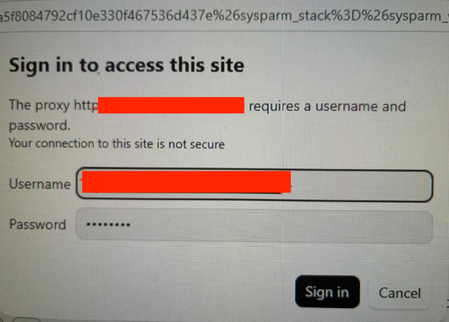
Product: Microsoft Edge for Business / Microsoft Edge Enterprise Component: Proxy authentication, HTTP networking and integrated authentication Operating system: Windows 11 Enterprise Proxy: Blue Coat / Broadcom forward proxy, port 8080 Proxy authentication configuration: Basic Auth/ IWARealm exact authentication method to be confirmed Affected browser: Microsoft Edge for Business Comparison browser: Mozilla Firefox, where the same behaviour has not been observed Impact: Intermittent interruption of browsing and loss of access to existing tabs until the user reauthenticates We are experiencing intermittent, unexpected proxy authentication prompts in Microsoft Edge for Business. The dialog states: Sign in to access this site. The proxy http://[bluecoat-host-url]:8080 requires a username and password. Your connection to this site is not secure. The prompt appears sporadically, sometimes while the browser is idle or while tabs displaying otherwise idle ServiceNow, deepl etc. pages cannot be accessed until user reauthenticates with autofill if proxy password is saved in order to be able to access those sites again. No explicit navigation or user interaction is necessarily taking place when the dialog appears. This behaviour was not observed previously and has become noticeable more recently especially since the migration of a lot of our workloads to the microsoft cloud. Firefox does not appear to exhibit the same symptom under comparable. We suspect that a background request, a new or reused proxy connection, proxy-session reauthentication, or an incomplete integrated-authentication exchange may be triggering the prompt. However, we have not yet identified the exact request or established whether the root cause is Edge, the proxy configuration, PAC routing, or the authentication infrastructure. usage conditions. Edge should silently authenticate to the configured enterprise proxy through the organisation's approved authentication mechanism, without unexpectedly displaying a credential prompt during normal browsing or background activity.54Views0likes1CommentHeard from TEC: How Exchange Online Stopped 70 Million Basic Authentication Connects Daily
At the TEC 2023 conference in Atlanta, Greg Taylor (Microsoft) analyzed the four-year project he led to remove basic authentication from Exchange Online. Microsoft will reuse the methods and tools developed for this project when it removes other features from Microsoft 365. https://practical365.com/basic-authentication-tec2023/428Views0likes0Comments
How to access Shared Inboxes with OAuth via IMAP (Basic Authentication Deprecation)
Since Microsoft is deprecating basic auth in the future I cannot use IMAP to access shared inboxes the way I used to: Email address: sharedmailbox[AT]domain.com Incoming Mail Server (IMAP) Username: mymailbox[AT]domain.com/sharedmailbox Hostname: outlook.office365.com Outgoing Mail Server (SMTP) Username: mymailbox[AT]domain.com Hostname: outlook.office365.com In order for the above to work I had to disable security defaults. By 01. October this will stop working. I use the native Apple mail app for managing mails. Now for the life of me I cannot figure out how I could possibly access shared inboxes via OAuth. When I choose to add an "Microsoft Exchange" account (which is the only way I found to use OAuth) I put in sharedmailbox[AT]domain.com as the mail address (which is the shared inbox I want to manage) and as username I choose my account mymailbox[AT]domain.com. When I do that the mail address is simply ignored and I end up adding my personal mailbox instead of the shared mailbox. Trying to login as mymailbox[AT]domain.com/sharedmailbox doesn't work either. Has anyone an idea how to get this working? I'm really used to working with my separate mailboxes and I really can't afford to put licenses on them.5KViews0likes2Comments
Connect-MicrosoftTeams with credential
Hello Community Members, We are currently using the `Connect-MicrosoftTeams -Credential ` to automate our powershell script that signs in with usename and password. We wonder if the basic authentication deprecation in Exchange Online will impact the basic auth in the Teams module in any way? If not, is there any risk of using this method moving forward (e.g. deprecation plan in the roadmap)? Thanks in advance for your help.4.3KViews0likes4CommentsModern Authentication in on premises Exchage
Dear All Recently CISA commanded all online exchange authentication should be done by Modern Authentication in place of Basic Authentication. (https://www.cisa.gov/sites/default/files/publications/switch-to-modern-authentication-in-exchange-online-062822-508.pdf) My question is, for more security to the Exchange Server, can anyone suggest to me, is there any way to implement this Modern Authentication in place of Basic Authentication in MS Exchange 2016 with AD 2016? Both of my servers are on-premises.2.5KViews0likes2Comments