backup
40 Topics
Moving files to Azure
We are looking to movie files, not just back them up to Azure. We have an on-prem server that we use as a file repository. We would like to accomplish the following Is there a way to configure backup services, or another app, to move the data to the cloud, not just create a backup? I would like it if the program could pull the files and folders off the on-prem server, to make room, and store them in the cloud. Can we configure it so the data is moved after a certain time frame say everything after 6 months, based on file modification date, is moved to the cloud?1.4KViews0likes1CommentAzure Backup hosts Ask Me Anything session
The Azure Backup team will host a special Ask Me Anything session on Twitter, Tuesday, July 10, 2018 from 7:30 AM to 11:30 AM PST. You can tweet to @AzureBackup or @AzureSupport with #AzureBackupAMA. Read more about it in the Azure blog.1KViews0likes0CommentsBackup your applications on Azure Stack with Azure Backup
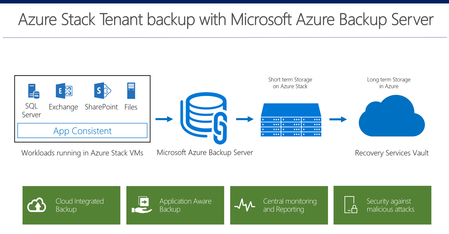
Earlier this month, we announced Azure Stack expanding availability to 92 countries. Today, we are announcing the capability to backup files and applications data using Microsoft Azure Backup Server. Azure Stack tenants can now take app consistent backup of their data in Azure Stack VMs, store them on the stack for operational recoveries, and send the data to Azure for long-term retention and offsite copy needs. Read more about it in the Azure blog.2.9KViews0likes0CommentsCustomer success stories with Azure Backup: Somerset County Council
This is a continuation of our customer success story blog series for Azure Backup. In the previous case study we covered Russell Reynolds, here we will discuss how United Kingdom’s Somerset County Council are able to improve their backup and restore efficiency and reduce their backup cost using Azure Backup. United Kingdom’s Somerset County Council provides government services to its 550,000 residents. It is one of the oldest local governments in the world, established about 700 A.D. Somerset had been using an in-house storage manager platform for their data backup and restore on-premises. Read about it in the Azure blog.885Views0likes0CommentsAzure Backup now supports storage accounts secured with Azure Storage Firewalls and Virtual Networks
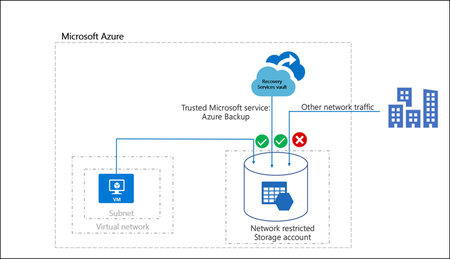
We are happy to announce the Azure IaaS VM backup support for network restricted storage accounts. With storage firewalls and Virtual Networks, you can allow traffic only from selected virtual networks and subnets. With this you can create a secure network boundary for your unmanaged disks in storage accounts. You can also grant access for on-premises networks and other trusted internet traffic, by using network rules based on IP address ranges. With this announcement, we provide an ability for the user to perform and continue with scheduled and ad-hoc IaaS VM backups and restores for these VNET configured storage accounts. Read about it in the Azure blog.2KViews0likes0CommentsSecure your backups, not just your data!
In today's digital world where data is the new currency, protecting this data has become more important than ever before. In 2017, attackers had a huge impact on businesses as we saw a large outbreak of ransomware attacks like WannaCry, Petya and Locky. According to a report from MalwareBytes, ransomware detections were up 90 and 93 percent for businesses and consumers respectively in 2017. When a machine gets attacked by ransomware, backups are usually the last line of defense that customers resort to. With increasing innovations in the ransomware space, attackers are no longer restricting themselves to only data corruption. Backups are becoming the next line of attack for ransomware tools and when you are in a situation with no data or its backups you end up being hostage to the ransomware attacker. This month saw the advent of a new ransomware, Zenis (found by the MalwareHunterTeam) which not only encrypts your files but also purposely deletes your backups. Read more about it in the Azure blog.1.1KViews0likes0Comments
Azure backup reporting costs
Hi Guys, I'm currently on the Azure pay as you go plan. When I click on backup reports it sends me to turn on diagnostic settings which sends me to -Archive to storage account -Stream to event hub -Send to log analytics How do I find pricing for these additional item or is it inclusive of the service. Thanks !836Views0likes0CommentsHow to remove duplicated data from Azure Backup Recovery Vault
I have a scenario where I have moved data that was previously being backed up using Azure Backup Server to a machine that is backing it up using Azure Backup Agent (I don't need local disk recovery points for this data) The problem is both in Azure and on premise, I have recovery points that have this moved data still in it from the Azure Backup Server. Now Azure Backup Server tells me that these recovery points will eventually roll off and I can reclaim that data, but in my Recovery Vault in Azure, I can find no way to delete these recovery points and reclaim that space. So the current result is I'm paying for 3TB of duplicated data. How can I clear these ABS recover points so that the only recovery points are the ones being stored by ABA?1.2KViews0likes0CommentsIntroducing backup for Azure file shares
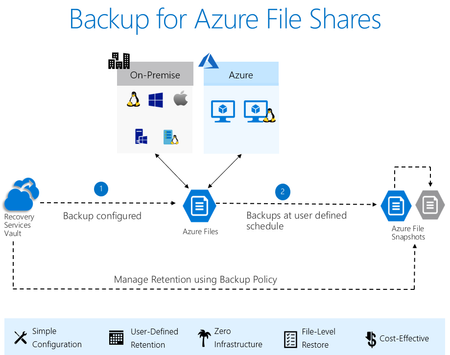
Today, we are excited to announce the public preview of backup for Azure file shares. Azure Files is a cloud-first file share solution with support for industry standard SMB protocol. Through this preview, Azure Backup enables a native backup solution for Azure file shares, a key addition to the feature arsenal to enable enterprise adoption of Azure Files. Using Azure Backup, via Recovery Services vault, to protect your file shares is a straightforward way to secure your files and be assured that you can go back in time instantly. Read about it in the Azure blog.2.2KViews2likes0Comments