azure vmware solution
70 TopicsBring Azure AI to your private workloads on Azure VMware Solution
Overview A global enterprise has migrated thousands of VMware vSphere virtual machines (VMs) to Microsoft Azure as part of their application modernization strategy. Having exited their on-premises data centers and relocated their legacy application VMs to Azure VMware Solution, the next phase of that strategy is no longer about where the workloads run, but about what the organization can do with the data inside them. Those applications hold the enterprise's most valuable data, yet they sit on private networks that Azure AI services cannot reach by default. What should Azure VMware Solution look like when the goal is to make private workloads AI-accessible in place? Azure VMware Solution is a VMware validated first party Azure service from Microsoft that provides private clouds containing VMware vSphere clusters built from dedicated bare-metal Azure infrastructure. It enables customers to leverage their existing investments in VMware skills and tools, allowing them to focus on developing and running their VMware-based workloads on Azure. That is why organizations move their VMware estates to Azure VMware Solution in the first place: they get to modernize on their own terms, lifting and shifting mission-critical applications into Azure exactly as they run today, with no rewrites, no re-platforming, and no big-bang migration. Azure AI Foundry is the Azure platform for building, deploying, and governing AI agents, providing managed model deployments, an agent runtime, tool integration, and end-to-end tracing under Microsoft Entra identity. Agents in Foundry reach external systems through the Model Context Protocol (MCP), an open standard that describes a system to an agent as a small, explicit set of tools. MCP matters here because it turns "connect the agent to a workload" into a contract rather than a custom integration: the agent learns one way to ask, and each workload is fronted by a server that translates it. But the "leave it as it is" strength of Azure VMware Solution has a quiet side effect. The systems holding your most valuable data, such as core databases, file servers, and line-of-business applications, keep running on private networks inside the private cloud. Meanwhile, Azure's AI services live in the Azure control plane and, by default, reach only public endpoints. When the mandate arrives to "add AI everywhere," your Azure VMware Solution workloads are often the one place AI cannot reach. Not because the data isn't valuable, but because it's private by design. In this post, I will introduce the challenge of reaching private workloads with Azure AI, describe the Azure VMware Solution and Azure AI Foundry architectural components that close the gap, and describe the security and design considerations for doing it safely. The pattern is deliberately workload-agnostic: a managed agent in Azure AI Foundry that reaches private Azure VMware Solution systems through small, purpose-built bridges, one per workload type, while your data stays put, read-only, and inside your network. I will prove it with a working SQL example (two private databases behind a single bridge), then show how the same pattern extends to file shares, APIs, and beyond. The full deployment kit is on GitHub, so you can try it in your own environment. In the next section, I will introduce the architectural components of Azure VMware Solution. Architectural Components The diagram below describes the architectural components of the Azure VMware Solution. Figure 1 – Azure VMware Solution Architectural Components Each Azure VMware Solution architectural component has the following function: Azure Subscription: Used to provide controlled access, budget, and quota management for the Azure VMware Solution. Azure Region: Physical locations around the world where we group data centers into Availability Zones (AZs) and then group AZs into regions. Azure Resource Group: Container used to place Azure services and resources into logical groups. Azure VMware Solution Private Cloud: Uses VMware software, including vCenter Server, NSX-T Data Center software-defined networking, vSAN software-defined storage, and Azure bare-metal ESXi hosts to provide compute, networking, and storage resources. Azure NetApp Files, Azure Elastic SAN, and Pure Cloud Block Store are also supported. Azure VMware Solution Resource Cluster: Uses VMware software, including vSAN software-defined storage, and Azure bare-metal ESXi hosts to provide compute, networking, and storage resources for customer workloads by scaling out the Azure VMware Solution private cloud. Azure NetApp Files, Azure Elastic SAN, and Pure Cloud Block Store are also supported. VMware HCX: Provides mobility, migration, and network extension services. VMware Site Recovery: Provides Disaster Recovery automation and storage replication services with VMware vSphere Replication. Third party Disaster Recovery solutions Zerto Disaster Recovery and JetStream Software Disaster Recovery are also supported. Dedicated Microsoft Enterprise Edge (D-MSEE): Router that provides connectivity between Azure cloud and the Azure VMware Solution private cloud instance. Azure Virtual Network (VNet): Private network used to connect Azure services and resources together. Azure Route Server: Enables network appliances to exchange dynamic route information with Azure networks. Azure Virtual Network Gateway: Cross premises gateway for connecting Azure services and resources to other private networks using IPSec VPN, ExpressRoute, and VNet to VNet. Azure ExpressRoute: Provides high-speed private connections between Azure data centers and on-premises or colocation infrastructure. Azure Virtual WAN (vWAN): Aggregates networking, security, and routing functions together into a single unified Wide Area Network (WAN). Those components describe where your workloads run. In the next section, I will introduce the pattern that makes the data inside them reachable by Azure AI, without changing any of it. The idea in one picture One managed agent in Azure AI Foundry talks to your private Azure VMware Solution workloads through a set of small Model Context Protocol (MCP) servers, one bridge per workload type. SQL databases are live today; a file-share bridge or an API bridge is the same shape with different tools. Figure 2: Solution overview A single managed agent in Azure AI Foundry reaches private Azure VMware Solution workloads through per-workload MCP servers running on VNet-integrated Azure Container Apps, connected to the private cloud over ExpressRoute. Three ideas carry the design: MCP is the universal contract. Every workload is exposed through the same small set of tools. For the SQL bridge, that’s list_sources, get_schema, and run_query. The agent learns one way to ask a question; each bridge translates it for its workload. One lightweight bridge per workload type. Each MCP server is a VNet-integrated Azure Container App that can legitimately see both worlds: Azure on one side, the private Azure VMware Solution network over ExpressRoute on the other. Want to make another workload AI-accessible? Add another bridge. The agent doesn’t change. Managed identity end to end. No passwords in code or config. The agent presents a Microsoft Entra token; each bridge pulls the credentials it needs from Azure Key Vault at runtime. One pattern, every workload The power of the design is that it’s workload-agnostic. The agent, the network path, the Entra identity, and the governance model are built once. Each new workload is just a new MCP server that speaks the same tool contract, so you can light up your estate incrementally, highest-value workloads first, without re-architecting anything. Azure VMware Solution workload MCP bridge Example tools What it unlocks SQL databases (SQL Server, PostgreSQL, Oracle, MySQL) SQL MCP server (live in this post) list_sources, get_schema, run_query Natural-language questions and cross-database corroboration File shares (SMB / NFS, document stores) File MCP server list_dirs, search, read_file Q&A and summarization over contracts, drawings, PDFs, logs Line-of-business apps (REST / SOAP) API MCP server list_operations, call_operation Conversational access to ERP, ticketing, claims, orders NoSQL / message systems Connector MCP server list_collections, query, peek Reasoning over document stores and event streams Mainframe / other systems Adapter MCP server workload-specific Bringing legacy systems into modern AI workflows Every bridge is small, independently deployable, and governed the same way: read-only by default, private over ExpressRoute, and locked to your agent’s managed identity. The pattern is the product; the bridges are how you grow it. To make it concrete, here’s the first proof of the pattern: a secure, read-only agent over two private SQL databases in Azure VMware Solution. Reference architecture The reference deployment runs in a single Azure region, with the Azure resources in one resource group alongside the Azure VMware Solution private cloud. Figure 3: Reference architecture A question from the managed agent in Azure AI Foundry crosses into your virtual network, where the MCP server on Azure Container Apps validates the caller's Entra token, reads the database password from Key Vault with its own managed identity, and runs a single read-only SELECT against the SQL Server VMs inside the Azure VMware Solution private cloud. Component Resource Type Azure VMware Solution private cloud avs-private-cloud Microsoft.AVS/privateClouds MCP server avs-mcp-server Microsoft.App/containerApps Container Apps environment avs-mcp-env Microsoft.App/managedEnvironments AI Foundry account avs-sql-foundry Microsoft.CognitiveServices/accounts Foundry project avs-sql-foundry/avs-sql-agent .../accounts/projects Container registry avssqlacr Microsoft.ContainerRegistry/registries Secrets avs-sql-kv-01 Microsoft.KeyVault/vaults Network avs-hub-vnet (10.40.0.0/16) Microsoft.Network/virtualNetworks ExpressRoute gateway avs-ergw virtualNetworkGateways Foundry private endpoint avs-sql-foundry-pe (+ privatelink DNS zones) privateEndpoints Logs avs-sql-logs OperationalInsights/workspaces The data itself lives on VMs inside the Azure VMware Solution private cloud, on a VMware NSX segment (avs-workload-01, 192.168.131.0/24): VM IP Database SQL VM #1 192.168.131.55 SalesDB (Products, Customers, Orders) SQL VM #2 192.168.131.56 InventoryDB (Products, Stock) The bridge works because the Container Apps subnet routes to the Azure VMware Solution private cloud over ExpressRoute, while Foundry is reachable privately through a private endpoint. Figure 4: Network topology The MCP server runs in a delegated aca-subnet and reaches the workload segment over ExpressRoute. Foundry sits behind a private endpoint with privatelink DNS zones, so the portal and jump host reach it privately. The agent’s tool call to the bridge is a single outbound HTTPS request carrying an Entra token. The data bridge: a small, read-only MCP server The first bridge is the SQL MCP server, a small Python service (FastMCP over streamable HTTP) that exposes three read-only tools. It’s engine-agnostic (SQLAlchemy) and pulls its credentials from Key Vault at runtime: @mcp.tool() def list_sources() -> str: """List the databases across the Azure VMware Solution workloads and what each contains.""" @mcp.tool() def get_schema(source: str) -> str: """Return tables and columns for a source (call list_sources first).""" @mcp.tool() def run_query(source: str, query: str) -> str: """Run ONE read-only SELECT and return up to the source's row cap.""" Guardrails are built in. Only SELECT / WITH statements are allowed, one statement at a time; DML and DDL keywords are blocked; and every result set is row-capped. The agent gets to read and reason, but never to mutate. Onboarding a database is configuration, not code. A single sources.yaml catalog describes each source and its governance: sources: sales: type: mssql connection: { host: 192.168.131.55, port: 1433, database: SalesDB } auth: { kind: sql, username: agentreader, secret: sql-agentreader-password } governance: { allow_schemas: [dbo], max_rows: 200 } inventory: type: mssql connection: { host: 192.168.131.56, port: 1433, database: InventoryDB } auth: { kind: sql, username: agentreader, secret: sql-agentreader-password } governance: { allow_schemas: [dbo], max_rows: 200 } The service is containerized (with the ODBC Driver 18 / msodbcsql18), pushed to the container registry, and run on the VNet-integrated Container Apps environment. It has a system-assigned managed identity with Key Vault Secrets User on the vault, so it can fetch the read-only database credential without ever storing it. The managed agent in Azure AI Foundry The agent lives entirely in Azure AI Foundry (avs-sql-foundry, project avs-sql-agent), running on a small, cost-efficient model deployment. It’s configured with: A schema-first workflow. Discover the available sources, read the schema, write a read-only query, then corroborate the results. An MCP tool pointing at the Container App’s /mcp endpoint, authenticated with Microsoft Entra using the project’s managed identity. Generic, source-agnostic instructions. The agent discovers structure at runtime rather than hard-coding any schema, so the same agent works against any workload behind an MCP server, not just these two databases. Figure 5: The agent in Azure AI Foundry The agent is attached as a tool with the private MCP data server and authenticated via managed identity. Once the tool is attached, answering a question is a single, auditable round trip. The agent discovers the available sources, reads only the schema it needs, issues a read-only query, and corroborates the results, all over private connectivity and with managed-identity authentication end to end. Figure 6: How a question becomes an answer. The agent calls list_sources, validates its managed-identity token, reads each schema, and runs read-only SELECTs over ExpressRoute. Key Vault supplies the credentials, and the corroborated answer flows back to the user. Security and governance, by design Because these are your crown-jewel systems, security is the starting point rather than a layer on top: No secrets in code. Database credentials live in Key Vault; the server fetches them through its managed identity (DefaultAzureCredential to SecretClient). Entra managed-identity auth from the agent to the bridge, with no shared keys and automatically rotating tokens. Private connectivity. The bridge reaches Azure VMware Solution over ExpressRoute; the SQL VMs are never exposed to the internet; Foundry sits behind a private endpoint. Read-only guardrails. Only SELECT is allowed; writes and DDL are blocked; result sets are capped. Least-privilege caller lock. The bridge accepts tokens only from the Foundry project’s managed identity. The payoff: answers no single system can give The value here isn’t “query a table.” It’s corroboration, the kind a single database can’t do on its own. Our two databases share a ProductID, so the agent queries both and joins them itself. Ask a plain-language question about stock health, and you get: Widget A: sold 500, stock 40 (below the reorder point of 50), so REORDER NOW Gizmo C: high stock, low sales, so OVERSTOCKED Contraption E: present in Sales, missing from Inventory, flagged as a DISCREPANCY Figure 7: A natural-language question answered from two private Azure VMware Solution databases, with reorder, overstock, and discrepancy flags surfaced directly in the agent’s reply. Figure 8: The run trace Every tool call and query is visible and auditable (list_sources, then get_schema, then run_query on each source), so you can see exactly how the answer was produced. The same shape generalizes far beyond retail: claims versus policy, orders versus fulfillment, and tickets versus assets. Anywhere the truth is split across silos, the agent can bring it back together. Adding the next workload Coverage grows at two levels: within a bridge, and across bridges. Within the SQL bridge (another database), it’s configuration, not code. SQLAlchemy gives one code path for SQL Server, PostgreSQL, MySQL, and Oracle; the source type selects the dialect. Adding a PostgreSQL VM, for example, takes no changes to the server code: add the driver, a source block (type: postgresql, allow_schemas: [public]), and a Key Vault secret, then rebuild. Across workload types (a file share, an API), you add a new bridge that implements the same tool contract with connectors suited to that workload (read_file / search for a document store, call_operation for a REST or SOAP app), then attach it to the same agent. Nothing about the agent, the network, or the identity model changes. Your estate lights up one bridge at a time. Deploy it yourself The entire bridge is packaged as an open, reusable kit on GitHub, Azure VMware Solution AI Data Agent, with a Bicep template (and a compiled ARM equivalent), a parameters file, and a one-command deploy script. # Build and push the MCP image az acr build --registry <your-acr> --image avs-mcp:v4 . # Deploy to the VNet-integrated Container Apps environment az containerapp update -n avs-mcp-server -g avs-sql-rg \ --image "<your-acr>.azurecr.io/avs-mcp:v4" # Store the read-only SQL credential in Key Vault az keyvault secret set --vault-name avs-sql-kv-01 \ --name sql-agentreader-password --value '<password>' The script provisions the delegated subnet, the container registry, Key Vault (with the read-only secret), the VNet-integrated Container Apps environment and MCP server, and the managed-identity role assignments, optionally including the Azure AI Foundry account and model deployment. You point it at the VNet already connected to your Azure VMware Solution private cloud and supply a read-only database credential. All that’s left is creating the read-only login and attaching the MCP tool to your agent in the Foundry portal. What’s next This SQL example is deliberately just the first bridge. A few directions we’re excited about: Meet users where they are. Surface the agent in Microsoft Teams or Microsoft 365 Copilot, so anyone in the organization can ask questions of Azure VMware Solution workloads in natural language. One agent, every workload. Grow from databases to file shares, REST/SOAP apps, NoSQL, and message systems, each a new bridge behind the same agent. A workload catalog. A library of ready-made bridges, so onboarding a new Azure VMware Solution workload becomes a deploy-and-configure step rather than a project. Bringing it together With a managed agent in Azure AI Foundry, lightweight MCP servers on VNet-integrated Azure Container Apps, and private connectivity over ExpressRoute, workloads that used to be “off-limits to AI” become conversational, while staying inside your network, read-only, and credential-less, using the same identity and governance model you already rely on across Azure. The SQL example is just the beginning. Because every workload is reached the same way, enabling AI across your Azure VMware Solution estate becomes a repeatable motion: pick the next workload, add a small bridge, and it’s live, with no data movement, no re-platforming, and no new trust boundary. For organizations on Azure VMware Solution, that reframes what Azure VMware Solution is for. Not just where your VMware workloads run, but where they become AI-accessible, one bridge at a time, securely and in place. Ready to try it? Grab the Azure VMware Solution AI Data Agent kit on GitHub, point it at your Azure VMware Solution-connected VNet, and stand up your first bridge. We’d love to hear what you connect first. Next Steps Start by identifying which Azure VMware Solution workloads hold the highest-value data, typically core databases, document stores, and line-of-business applications, and pick one as your first bridge. Deploy the kit into the virtual network already connected to your Azure VMware Solution private cloud, create a dedicated read-only login for the agent, and validate the full path end to end in a non-production private cloud before going further. With large enterprise solutions for strategic and major customers, an Azure VMware Solution Solutions Architect from Azure, Broadcom, or a trusted VMware Partner should be engaged to review the network path, the identity model, and the data governance boundaries before a production rollout. This should also include a data classification and application dependency assessment, to establish which sources the agent may read, where data gravity lies, and which traffic flows and latency dependencies the ExpressRoute path must support. Beyond the first bridge, a few directions we are excited about: Meet users where they are. Surface the agent in Microsoft Teams or Microsoft 365 Copilot, so anyone in the organization can ask questions of Azure VMware Solution workloads in natural language. One agent, every workload. Grow from databases to file shares, REST/SOAP apps, NoSQL, and message systems, each a new bridge behind the same agent. A workload catalog. A library of ready-made bridges, so onboarding a new Azure VMware Solution workload becomes a deploy-and-configure step rather than a project. Summary In this post, I took a closer look at the challenge of making private Azure VMware Solution workloads reachable by Azure AI, the architectural building blocks that close the gap (a managed agent in Azure AI Foundry, lightweight per-workload MCP servers on VNet-integrated Azure Container Apps, and private connectivity over ExpressRoute), and the security and governance model that keeps your data read-only, credential-less, and inside your network. I also discussed the next steps to continue enabling Azure AI across an Azure VMware Solution estate. The SQL example is just the beginning. Because every workload is reached the same way, enabling AI across your Azure VMware Solution estate becomes a repeatable motion: pick the next workload, add a small bridge, and it's live, with no data movement, no re-platforming, and no new trust boundary. For organizations on Azure VMware Solution, that reframes what the service is for. Not just where your VMware workloads run, but where they become AI-accessible, one bridge at a time, securely and in place. Ready to try it? Grab the Azure VMware Solution AI Data Agent kit on GitHub, point it at your Azure VMware Solution-connected virtual network, and stand up your first bridge. I'd love to hear what you connect first. If you are interested in Azure VMware Solution, please use these resources to learn more about the service and the Azure AI building blocks used in this post: Azure VMware Solution Homepage: Azure VMware Solution Documentation: Azure VMware Solution SLA: SLA for Azure VMware Solution Azure Regions: Azure Products by Region Service Limits: Azure VMware Solution subscription limits and quotas Well-Architected Framework: Azure VMware Solution workloads Cloud Adoption Framework: Introduction to the Azure VMware Solution adoption scenario Enterprise Scale Landing Zone: Enterprise-scale for Microsoft Azure VMware Solution GitHub repository: Azure/azure-vmware-solution Learning Resources: Azure VMware Solution (microsoft.github.io) Networking and connectivity Network connectivity scenarios: Enterprise-scale network topology and connectivity for Azure VMware Solution Network Security: Azure VMware Solution Network Security Internet Connectivity: Internet connectivity design considerations Security and governance Identity & Access Management: Enterprise-scale identity and access management Security Recommendations: Concepts - Security recommendations for Azure VMware Solution Security Baseline: Azure security baseline for Azure VMware Solution WAF: Security considerations for Azure VMware Solution workloads Defender for Cloud: Integrate Microsoft Defender for Cloud with Azure VMware Solution Customer-managed keys: Configure customer-managed key encryption at rest Azure AI and the agent platform Azure AI Foundry: Azure AI Foundry Foundry Agent Service: What is Azure AI Foundry Agent Service? Model Context Protocol: Model Context Protocol specification Azure Container Apps: Azure Container Apps overview VNet integration: Networking in Azure Container Apps environments Managed identities: What are managed identities for Azure resources? Azure Key Vault: About Azure Key Vault Private endpoints: What is Azure Private Endpoint? Deployment kit: Azure VMware Solution AI Data Agent Tooling and automation Azure CLI: Azure Command-Line Interface (CLI) Overview PowerShell module: Az.VMware Module Azure Resource Manager: Microsoft.AVS/privateClouds REST API: Azure VMware Solution REST API Terraform provider: azurerm_vmware_private_cloud Terraform Registry Enterprise Scale GitHub repository: Azure/Enterprise-Scale-for-AVS Author Bio Nivas Narayanasamy is a Senior Software Engineer on the Azure VMware Solution team at Microsoft. He works across the private cloud platform, networking, and automation that customers rely on to run VMware workloads on Azure and is currently focused on secure patterns for bringing Azure AI to private enterprise data.Fast cloud migration, measurable ROI: Forrester Total Economic Impact study of Azure VMware Solution
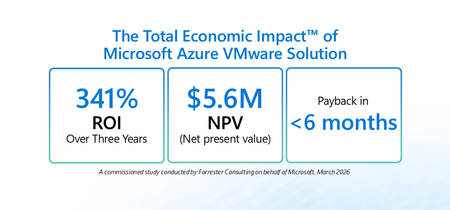
Many organizations are balancing near-term continuity for VMware-based workloads with longer-term cloud modernization goals – all while managing cost, security, and resiliency. Azure VMware Solution (AVS) is built for this moment: a Microsoft-managed service verified by VMware that enables running VMware Cloud Foundation (VCF) workloads (vSphere, NSX-T, vSAN, HCX) on dedicated Azure infrastructure. It gives organizations a practical way to move or extend VMware environments into Azure while maintaining operational consistency and leveraging the skills of existing VMware teams. To help leaders quantify the potential value of this approach, Microsoft commissioned Forrester Consulting to conduct The Total Economic Impact™ (TEI) of Microsoft Azure VMware Solution (March 2026). The study models the financial impact over three years and risk-adjusts results. Access the full study here: aka.ms/AVS-TEI Here’s what the study found and how IT leaders can use it as a framework for decision-making: Topline results from the study Forrester’s risk-adjusted financial analysis for a composite organization 1 found: 341% ROI over three years 2 $5.6M net present value (NPV) 3 <6 months payback 4 These metrics are meaningful on their own, but the bigger story for leadership is where the value comes from: improved operational stability, reduced infrastructure costs driven by data center exit and hardware refresh avoidance, and the ability to redeploy skilled IT resources from maintenance to modernization. The customer journey: why organizations turn to AVS AVS offers a bridge: Lift and shift VMware workloads into Azure without forcing immediate re-platforming then, modernize at a pace aligned to business priorities. In the study, Forrester interviewed decision-makers with experience using AVS. Interviewees described common challenges that led them to invest in AVS, including: Fragmented systems that complicated and slowed operations: Inherited stacks, duplicated tools, and unclear ownership of orphan machines made operations and governance harder. Rising cost and complexity of on-premises operation: Colocation fees, energy and cooling costs, server refresh cycles, and tooling renewals were difficult to justify against cloud economics. Limited capacity and skills to refactor at scale: Teams wanted the cost and agility benefits of the cloud but didn’t have the time or skills to rewrite hundreds (or thousands) of VMs on aggressive timelines. Security and audit pressure: Disparate environments and legacy access models elevated risk and created audit friction. Operational variability and end-user experience: VPN dependencies, inconsistent remote tooling, and endpoint logistics led to slow first-call resolution and downtime risks. Three quantified benefits that drive the business case 1) Reduction in downtime and associated costs by 80% In the study, interviewees reported that moving VMware workloads to AVS improved day-to-day reliability by eliminating fragile on-premises workflows and leveraging Azure’s managed infrastructure. Examples included fewer VPN-related failures, faster issue resolution through centralized tooling, and stronger service-level performance. For leadership teams, this benefit is about more than avoided cost. Better up time protects customer experience, employee productivity, and reduces the operational noise that can slow modernization programs. 2) Reduced infrastructure costs through data center exit, refresh avoidance, and cleanup A second driver is the ability to avoid or eliminate significant portions of data center cost and refresh spend. In the study, interviewees described using AVS to close data centers, avoid upcoming hardware refresh cycles, and reduce ongoing capital and operating costs. Importantly, interviewees also reported that migration waves prompted additional savings through portfolio hygiene by validating each VM, decommissioning redundant systems, and rightsizing oversized workloads. Those actions helped organizations reduce their ongoing compute, storage, and licensing footprint after migration. 3) Redeployment of 50% of IT team members from maintenance to modernization The TEI study quantifies a practical advantage of a managed VMware environment in Azure: fewer hours spent on hardware lifecycle, cluster patching, upgrades, and other routine data center tasks. In practice, many leaders treat this as capacity created rather than budget eliminated: the opportunity to shift experienced engineers toward modernization, automation, cloud governance, proactive incident prevention, and higher-value business initiatives. Unquantified benefits organizations should weigh Beyond the quantified categories, the study also highlights benefits that are strategically important, but not fully quantified in the model: Acceleration of future modernization: With workloads running in Azure via AVS, organizations can integrate platform services across security, identity, data, and analytics and build a runway for new capabilities, including AI-driven scenarios in Azure. Fast, cost-effective migration of legacy workloads: Interviewees described avoiding major consulting or hiring costs that would have been required to refactor complex workloads into cloud-native designs. Improved audit readiness and security posture: Consolidating fragmented environments into governed Azure landing zones can simplify audit preparation and strengthen governance and monitoring. For many leadership teams, these benefits strengthen the business case because they support broader transformation outcomes that extend beyond infrastructure cost alone. Things to consider in your own decision process If you’re building a business case to move workloads to Azure, whether it be lifting and shifting to AVS or replatforming and refactoring to Azure IaaS and managed services, consider mapping your environment across these areas: Data center timelines: Refresh cycles, colocation exit deadlines, and contract constraints. Operating model readiness: How quickly teams can adopt cloud-native services versus preserving VMware operations during transition. Modernization roadmap: Determine which applications are candidates for investment in replatforming, refactoring, replacement, or retirement once in Azure. Next steps Read the full TEI study: aka.ms/AVS-TEI Explore more about AVS: aka.ms/AzureVMwareSolution Get the VMware to Azure VMware Solution Planning Guide: aka.ms/VMwareToAVSguide Learn more about the Azure Copilot migration agent: aka.ms/migrate/AMA Join the AVS Pros group on LinkedIn for the latest updates and news: aka.ms/AVSPros 1 Composite organization: Forrester designed a composite organization based on characteristics of the interviewees’ organizations. 2 Return on Investment (ROI): A project’s expected return in percentage terms. ROI is calculated by dividing net benefits (benefits less costs) by costs. 3 Net present value (NPV): The present or current value of (discounted) future net cash flows given an interest rate (the discount rate). A positive project NPV normally indicates that the investment should be made unless other projects have higher NPVs. 4 Payback: The breakeven point for an investment. This is the point in time at which net benefits (benefits minus costs) equal initial investment or cost.Migrate & Modernize Your VMware Platform Using Azure VMware Solution Gen 2
This video series by Microsoft Global Blackbelts, Carlos Villuendas (CarlosV) and Trevor Davis (tredavis), guides users from configuring prerequisites to deploying, migrating on-premises VMware workloads to Azure VMware Solution, then integrating VMware workloads with Azure Native services for enhanced value. These are the first two videos, much more to come, please check back often. For requests, leave comments in the notes. Enjoy! 1 - Prerequisites 2 - DeploymentUPDATED: Broadcom VMware Licensing Changes: What Azure VMware Solution Customers Need to Know
UPDATED: Broadcom has announced changes are coming to its VMware licensing model on hyperscalers beginning in its new fiscal year on November 1, 2025. If you’re an Azure VMware Solution customer, here’s what you need to know about the new requirements and how they will affect your cloud deployments. What’s changing? Broadcom is changing its VMware licensing policies across all hyperscaler platforms to require customers to “bring your own” portable subscription for VMware Cloud Foundation (VCF). This means customers must purchase portable VCF subscriptions directly from Broadcom to use with cloud services in the future, including Azure VMware Solution. Azure VMware Solution already supports “bring your own” licensing model The good news is that Azure VMware Solution is ready for this change. The Azure VMware Solution VCF BYOL option is available in all 39 AVS regions worldwide, allowing customers to run AVS using their own VCF subscriptions. This BYOL solution is priced lower than AVS with bundled VCF subscription. No product changes to Azure VMware Solution These updates are about licensing only—there are no product changes to how Azure VMware Solution works. Microsoft will continue to deliver Azure VMware Solution as a fully managed VCF private cloud service on Azure. In practice, this means that Microsoft takes care of all infrastructure and VMware host level software management, patches and upgrades. You don’t need to worry about hardware maintenance or manual VMware host updates. Key dates and transition details Microsoft will stop selling Azure VMware Solution with VCF subscriptions included after October 15, 2025. After this date, new Azure VMware Solution node purchases will require you to provide a VCF subscription purchased from Broadcom. UPDATED If you purchase Azure VMware Solution Reserved Instances (RIs) on or before October 15, 2025, you can continue to use your Azure VMware Solution nodes without any licensing or product changes until August 30, 2027. On August 30, 2027, as a result of the latest Broadcom VCF licensing change, the AVS license-included SKUs will be retired. You can continue to use the AVS managed service with no technical changes if you choose to bring a portable VCF license from Broadcom prior to August 30, 2027. Learn more. Azure VMware Solution with license included PayGo nodes can continue to operate without any licensing or product changes through October 31, 2026. Helpful resources We’re committed to making this transition as smooth as possible for our customers and partners. Here are some helpful links with more details: How to use portable VCF subscriptions with Azure VMware Solution Self-service exchanges and refunds for Azure Reservations Broadcom Blog announcing the VMware licensing change If you need to purchase VCF subscriptions and do not have a Broadcom contract, leverage one of the Broadcom channel partners here. We will be reaching out directly to current Azure VMware Solution customers with more details. If you have any questions, reach out to your Microsoft account representative so we can help you navigate this transition.Take Control of Your Azure VMware Solution Maintenance Schedule
Overview Azure VMware Solution is a VMware validated first party Azure service from Microsoft that provides private clouds containing VMware vSphere clusters built from dedicated bare-metal Azure infrastructure. It enables customers to leverage their existing investments in VMware skills and tools, allowing them to focus on developing and running their VMware-based workloads on Azure. At Microsoft, we’re continuously evolving our services based on customer feedback and Azure VMware Solution is no exception. As a fully Microsoft-managed service, Azure VMware Solution takes care of the end-to-end lifecycle management of your VMware environment, from ESXi host patching to vCenter Server and NSX upgrades. This ensures your private cloud stays secure, compliant, and up-to-date. Historically, planned maintenance for Azure VMware Solution was scheduled by Microsoft, and customers who needed the schedule adjustments had to open a support request to modify their maintenance windows. But that’s changing. Introducing Self-Service Maintenance Scheduling We’re thrilled to introduce Self-Service Scheduling for planned maintenance events in Azure VMware Solution. Go ahead and schedule your next Azure VMware Solution maintenance on your terms and let the built-in health checks guide you to a smooth upgrade: Self-Service the planned Maintenance events – An Azure Portal feature that gives customers a user interface to view upcoming maintenance and schedule it to a preferred time without contacting support. Private Cloud “Maintainable State” Indicator – A built-in pre-check that determines if your private cloud is in a maintenance-ready state. If not, it will show which issues need attention to make the environment ready for upgrade. Designed for Agility and Peace of Mind These features mark a significant step toward a more agile and transparent Azure VMware Solution maintenance experience. You maintain the benefits of a fully managed service, expert-managed upgrades, built-in security, and full support, while gaining precise control over the timing of your upgrades. Whether you're planning around critical business windows or simply want more predictability, the new self-service capabilities help ensure smoother, more efficient Azure VMware Solution operations. Ready to try it out? Step 1 - Log in to the Azure portal and take control of your next maintenance event. It’s maintenance, your way. Step 2 - From the Azure VMware Solution private cloud Overview page in the Azure Portal, look for the maintenance message and click the schedule link or under the Operations option, select the Maintenance page. Step 3 - From the Maintenance page, check the "Maintenance ready" status for each item and use the "Reschedule" link to change the upgrade date and time. Step 4 - If the Maintenance ready status is "No", check the detailed message for the remediation plan to unblock the upgrade. Summary Self-Service Maintenance Scheduling is now in Public Preview, use this instead of opening a service request to change your Azure VMware Solution planned maintenance. If you are interested in the Azure VMware Solution, please use these resources to learn more about the service: Homepage: Azure VMware Solution Documentation: Azure VMware Solution SLA: SLA for Azure VMware Solution Azure Regions: Azure Products by Region Self-Service Maintenance: Plan self-service maintenance for Azure VMware Solution Author Bios Hetal Prashnani is a Technical Program Manager in the Azure VMware Solution product group at Microsoft. René van den Bedem is a Principal Technical Program Manager in the Azure VMware Solution product group at Microsoft. His background is in enterprise architecture with extensive experience across all facets of the enterprise, public cloud & service provider spaces, including digital transformation and the business, enterprise, and technology architecture stacks. René works backwards from the problem to be solved and designs solutions that deliver business value with the minimum of risk. In addition to being the first quadruple VMware Certified Design Expert (VCDX), he is also a Dell Technologies Certified Master Enterprise Architect, a Nutanix Platform Expert (NPX), and a VMware vExpert.Azure VMware Solution Broadcom VMSA-2025-0013 Remediation
Broadcom has released a new Critical Security Advisory, VMSA-2025-0013 with a CVSS base score range of 7.1 to 9.3. With Microsoft’s commitment to the security of our platform and our improved lifecycle management process, we were able to quickly assemble a global team to work on the acceleration and validation of the ESXi 8.0 U3f + Hot Patch (VAIO bug fix) Build 24797835 security patch . We have nearly finished qualifying the security patch that will mitigate VMSA-2025-0013 across our fleet. As a result, with the public release of this vulnerability we expect to be able to patch your existing Azure VMware Solution infrastructure next week. We are committing to completing the remediation within 30-days. Microsoft will communicate the scheduled date of patching over the next three weeks. Any Azure VMware Solution private cloud deployed next week will be provisioned with the patch already applied to the environment. Microsoft takes an in-depth approach to vulnerability and risk management. With our new and improved partnership with Broadcom, this allows us to enhance our overall security and quickly address vulnerabilities in VMware solutions. If you are interested in the Azure VMware Solution, please use these resources to learn more about the service: Homepage: Azure VMware Solution Documentation: Azure VMware Solution SLA: SLA for Azure VMware Solution Azure Regions: Azure Products by Region Known Issues: Azure VMware Solution Software Versions: Azure VMware Solution Security Advisories: Broadcom Release Notes: vCenter Server 8.0 U3e Build 24674346 Release Notes: ESXi 8.0 U3f + Hot Patch (VAIO bug fix) Build 24797835 Author Bios Rahi Patel is a Senior Technical Program Manager in the Azure VMware Solution product group at Microsoft. René van den Bedem is a Principal Technical Program Manager in the Azure VMware Solution product group at Microsoft. His background is in enterprise architecture with extensive experience across all facets of the enterprise, public cloud & service provider spaces, including digital transformation and the business, enterprise, and technology architecture stacks. René works backwards from the problem to be solved and designs solutions that deliver business value with the minimum of risk. In addition to being the first quadruple VMware Certified Design Expert (VCDX), he is also a Dell Technologies Certified Master Enterprise Architect, a Nutanix Platform Expert (NPX), and a VMware vExpert.New Automation enhancements in AVS Landing Zone for Migration-Ready Infrastructure
Azure VMware Solution (AVS) Landing Zone offers PowerShell automation scripts that streamline deployment and management of key AVS components—jumpbox for secure access, HCX Connector for hybrid connectivity, and HCX Service Mesh for workload mobility—enabling consistent, repeatable setups that reduce manual effort, improve operational readiness, and accelerate migration timelines across multiple environments and regions.HCX 4.11.0 Upgrade and What it means for Current HCX Users
Overview Azure VMware Solution is a VMware validated first party Azure service from Microsoft that provides private clouds containing VMware vSphere clusters built from dedicated bare-metal Azure infrastructure. It enables customers to leverage their existing investments in VMware skills and tools, allowing them to focus on developing and running their VMware-based workloads on Azure. VMware HCX is the mobility and migration software used by the Azure VMware Solution to connect remote VMware vSphere environments to the Azure VMware Solution. These remote VMware vSphere environments can be on-premises, co-location or cloud-based instances. Figure 1 – Azure VMware Solution with VMware HCX Service Mesh Broadcom has announced the end-of-life (EOL) for VMware HCX version 4.10.x, effective July 27, 2025. To proactively address this change and ensure continued support, Microsoft will begin upgrading all Azure VMware Solution customers using HCX Manager to HCX version 4.11.0. What Changes are introduced as part of HCX 4.11.0? With the release of HCX 4.11.0, Broadcom has made significant changes to the way HCX will be available for download and upgrades. Local Mode From HCX 4.11.0 onwards, HCX will only be available in local mode. This means that HCX systems running 4.11.0 or later will no longer receive upgrade notifications under the System updates section from Broadcom. Once HCX systems are upgraded to 4.11.0 using the offline bundle they will operate in Local mode only. Connection to VMware & Hybridity Depot. As of 4.11.0 activation key-based licensing has been deprecated. Activation keys in HCX 4.11.0 will stop working 450 days after the upgrade to HCX 4.11.0 takes place. HCX systems running versions prior to 4.11.0 that are currently using the activation keys will stop working when connect.hcx.vmware.com is decommissioned later this year. Please note, the following HCX functionality is deprecated in HCX 4.11.0 and will be removed in a future release. HCX is 4.11.0 will no longer be supported as of December 24 th , 2025. Customers should plan to migrate to an alternative solution at the earliest if they use any of the following features. HCX V2T Migration HCX WAN Optimization HCX Disaster Recovery vCenter Server Plug-in for HCX HCX UI – Tracking page in Migration interface What actions will customers need to take? To ensure smooth migration, customers will be required to upgrade any paired HCX connectors and service mesh appliances to HCX 4.11.0. Furthermore, customers may be required to execute a resync operation on each HCX service mesh on both the source and connector sides to ensure that no errors have occurred due to the upgrade. All Azure VMware Solution customers have now been notified of their preliminary scheduled upgrade date. Customers have the option to reschedule using the Azure VMware Solution portal but must complete this upgrade during US work hours before July 31. Microsoft will only upgrade the HCX Cloud Manager, the on-prem HCX manager and service mesh appliances will need to be upgraded by the customer. Once upgraded, customers will find previous and current versions of the HCX connector bundles, including HCX 4.11.0, in their vSAN datastore for cluster-1, under a folder named “AVS_Official_HCX_Connector_Binaries” The HCX 4.11.0 bundle should be used by customers to upgrade their on-prem HCX connector. Summary Microsoft is working towards upgrading all Azure VMware Solution customers that are using HCX by the end of July 2025. Customers are currently being notified of when their upcoming HCX upgrade will take place. For additional information on VMware HCX 4.11, please review the following Knowledge base article from Broadcom. Upgrade Bundle Download from 443 UI will Fail in All HCX versions prior to 4.11 If you are interested in the Azure VMware Solution, please use these resources to learn more about the service. Homepage: Azure VMware Solution Learn: Run VMware resources on Azure VMware Solution Training Documentation: Azure VMware Solution Azure CLI: Azure Command-Line Interface (CLI) Overview PowerShell module: Az.VMware Module Terraform provider: azurerm_vmware_private_cloud Terraform Registry GitHub repository: Azure/azure-vmware-solution Cloud Adoption Framework: Introduction to the Azure VMware Solution adoption scenario Network connectivity scenarios: Enterprise-scale network topology and connectivity for Azure VMware Solution Enterprise Scale Landing Zone: Enterprise-scale for Microsoft Azure VMware Solution Enterprise Scale GitHub repository: Azure/Enterprise-Scale-for-AZURE VMWARE SOLUTIONS VMware homepage: VMware to Azure Migration Solutions VMware Ports and Protocols for HCX VMware HCX - VMware Ports and Protocols Author Bios Ricky Perez is a Senior Technical Program Manager in the Azure VMware Solution product group at Microsoft. His background is in solution architecture with experience in public cloud and core infrastructure services. Varun Hariharan is a Senior Product Manager on the Azure VMware Solution team at Microsoft, where he is focusing on observability and workload strategies for customers. His background is in Infrastructure as a Service (IaaS), log management, enterprise software, and DevOps.Azure VMware Solution now available in Korea Central
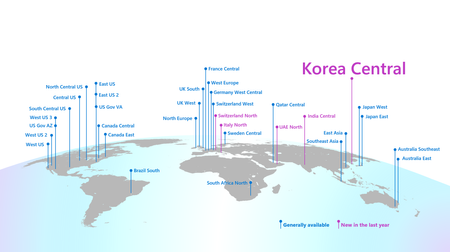
We are pleased to announce that Azure VMware Solution is now available in Korea Central. Now in 34 Azure regions, Azure VMware Solution empowers you to seamlessly extend or migrate existing VMware workloads to Azure without the cost, effort or risk of re-architecting applications or retooling operations. Azure VMware Solution supports: Rapid cloud migration of VMware-based workloads to Azure without refactoring. Datacenter exit while maintaining operational consistency for the VMware environment. Business continuity and disaster recovery for on-premises VMware environments. Attach Azure services and innovate applications at your own pace. Includes the VMware technology stack and lets you leverage existing Microsoft licenses for Windows Server and SQL Server. For updates on current and upcoming region availability, visit the product by region page here. Streamline migration with new offers and licensing benefits, including a 20% discount. We recently announced the VMware Rapid Migration Plan, where Microsoft provides a comprehensive set of licensing benefits and programs to give you price protection and savings as you migrate to Azure VMware Solution. Azure VMware Solution is a great first step to the cloud for VMware customers, and this plan can help you get there. Learn MoreAzure VMware Solution now available in the new AV48 node size in Japan East.
Today we're announcing the availability of the Azure VMware Solution AV48 SKU in Japan East. This SKU modernizes the CPU to the Intel Sapphire Rapids architecture and increases the deployed cores and memory per server to better accommodate today’s workloads. Key features of the new AV48 in Japan East: Dual Intel Xeon Gold 6442Y CPUs (Sapphire Rapids microarchitecture) with 24 cores/CPU @ 2.6 GHz / 3.3Ghz All Core Turbo / 4.0 GHz Max Turbo, Total 48 physical cores (96 logical cores with hyperthreading) 1TB of DRAM Memory 19.2TB storage capacity with all NVMe based SSDs 1.5TB of NVMe Cache For pricing reach out to your Microsoft Account Team, or visit the Azure Portal quota request page. Learn More