azure stack hci
94 Topics
Azure Site Recovery for Azure Local Is Now Generally Available!
Today, we are excited to announce the general availability of Azure Site Recovery (ASR) for Azure Local, making enterprise-grade disaster recovery for on-premises virtual machine workloads simpler, more secure, and more accessible than ever before. Since its public preview, Azure Site Recovery for Azure Local has helped organizations protect their business-critical workloads running on Azure Local clusters by replicating virtual machine workloads to Azure. With today’s release, we’re delivering a streamlined experience built on customer feedback and introducing key capabilities that remove the last friction points standing between organizations and a robust disaster recovery posture. What’s changing with General Availability: Azure Site Recovery for Azure Local is now fully supported for production workloads and available in all Azure Local-supported regions. Simple Deployment Wizard Before today, enabling Azure Site Recovery for Hyper-V involved a complex, multi-step setup process across multiple Azure portal blades. With this solution, you can now prepare your entire Azure Local environment for disaster recovery through a single, streamlined one-page wizard directly within the Azure Local resource in the Azure portal. The wizard handles everything in a single operation: It creates your Recovery Services Vault and a Hyper-V site, automatically downloads and installs the ASR agent on every node in the cluster, associates a replication policy, and registers each host with the Azure Site Recovery service, all without requiring you to repeat steps per node or jump between portal resources. How the wizard works: Navigate to Disaster Recovery From the Azure Local resource overview in the Azure portal, select the Capabilities tab and choose the Disaster Recovery tile. Launch Prepare Infrastructure Select “Protect VM workloads,” then “Prepare infrastructure.” The wizard opens. Configure in one place Select or create (or reuse) a Recovery Services Vault, a Hyper-V site, and a replication policy, all from the same page. Configure your proxy settings if required. Let Azure do the rest Click Prepare Infrastructure. Azure automatically installs the ASR agent on every node, registers the cluster, and associates with your policy. Monitor progress via the Notifications bell. Enable replication Once infrastructure is prepared, select Enable Replication to choose which VMs to protect. Replication begins immediately. See the wizard in action New in GA: WDAC Enforcement Mode Support Windows Defender Application Control (WDAC) is a foundational security capability in Azure Local that restricts which applications and code are allowed to run on cluster nodes. Many production and highly regulated environments, including government, financial services, and healthcare organizations, operate with WDAC in enforced mode as a mandatory part of their security posture. During public preview, customers using WDAC in enforced mode were required to temporarily switch to audit mode to install the Azure Site Recovery agent, an operationally disruptive workaround that reduced security assurance during deployment. This limitation has now been fully addressed. Azure Site Recovery for Azure Local now fully supports WDAC in enforce mode! Customers can prepare their Azure Local environment for disaster recovery without disabling or relaxing any Application Control policies. The ASR agent installation is WDAC-compliant and works seamlessly within enforced policy environments. New in GA: Built-In Proxy Support Enterprise networks commonly route outbound internet traffic through a proxy server, a requirement that is especially prevalent in regulated industries, government environments, and organizations with strict network egress controls. During public preview, configuring proxy settings for Azure Site Recovery required manual steps outside of the primary setup flow. With general availability, proxy configuration is now a first-class part of the one-page wizard. Customers who need to route ASR traffic through a proxy can configure proxy host, port, and credential settings directly within the Prepare Infrastructure wizard, in the same operation that sets up the rest of the disaster recovery infrastructure. This means no separate configuration files, no post-install manual steps, and no guesswork about whether proxy settings were applied correctly to each node. The wizard ensures consistent proxy configuration across the entire cluster as part of a single, atomic setup operation. Complete Disaster Recovery Lifecycle Azure Site Recovery for Azure Local supports the full disaster recovery lifecycle, giving organizations everything they need to meet recovery time objectives (RTO) and recovery point objectives (RPO) for on-premises workloads. Continuous Replication VM disks are replicated continuously to an Azure Storage Account, ensuring minimal data loss in the event of a disaster. Test Failover Validate your disaster recovery plan with non-disruptive test failovers that spin up snapshot of replicated VMs in Azure in an isolated network without impacting production replication. Failover to Azure (planned or unplanned) Fail over Windows and Linux VMs (Gen 1 and Gen 2) to Azure with a few clicks. Run workloads in Azure until your on-premises environment is restored. Recovery Plans Orchestrate failover for entire applications, not just individual VMs, with sequencing, automation, and dependency control. Failback Once your primary site is restored, fail back from Azure to your on-premises Azure Local environment and resume normal operations. Reverse Replicate Reverse replicate your VMs back to Azure to restore continuous replication and maintain ongoing protection against data loss, enabling rapid recovery in the event of another disaster. Who Should Enable Azure Site Recovery for Azure Local Today Azure Site Recovery for Azure Local is well-suited for any organization running business-critical workloads on Azure Local that requires a defined and tested disaster recovery strategy. It is particularly compelling for: Regulated industries such as financial services, healthcare, government, and the public sector who often operate in proxy-constrained network environments where BCDR requirements are mandatory and WDAC enforcement is a standard security requirement. With this GA release, the security and operational compromises that previously complicated adoption have been eliminated. Any organization that wants to use Azure as an extension of their on-premises environment for disaster recovery and business continuity. This cloud-integrated approach enables capabilities such as test failover, orchestrated recovery plans, and automated failback, all managed directly through the Azure portal. For organizations that prefer on-premises disaster recovery over cloud failover, a future option will support failback to an alternate on-premises location. Prerequisites and Getting Started To enable Azure Site Recovery on your Azure Local environment, ensure the following prerequisites are in place before you begin. For machines hosting the VMs you want to protect, internet access to Azure is required for the replication traffic, or a configured proxy, which can now be set up directly in the wizard. Support for Trusted Launch VMs is also planned for a future release. Start Protecting Your Azure Local Workloads Today Azure Site Recovery for Azure Local is generally available now. Open the Azure portal, navigate to your Azure Local resource, and launch the Prepare Infrastructure wizard to get started. Read the Documentation → Open the Azure Portal → Share feedback on the Azure Feedback Portal →1.2KViews1like3CommentsWe're moving!
Hello friends, Last week at Microsoft Ignite 2024 we introduced Azure Local, cloud infrastructure for distributed locations enabled by Azure Arc. Azure Local is an exciting new chapter for adaptive cloud. It replaces Azure Stack HCI and adds important new options like lower-cost edge devices (preview) and disconnected operations (preview). There is no action required for existing Azure Stack HCI customers: you'll transition seamlessly to Azure Local. If you haven’t already, check out the announcement blog. Azure Local is powered by Azure Arc, so it makes sense to unite the Tech Community blogs. Going forward, we’ll use the Azure Arc blog for Azure Local. We’ll migrate all the old content from the Azure Stack blog soon, to ensure that nothing is lost. On behalf of the team, I want to say a heartfelt thank you for all your enthusiasm, comments, and questions over the years. In the last decade, we’ve published more than 100 posts on this Azure Stack blog, and you’ve read them more than 1.3 million times! Technological progress is a journey with no end, but what really matters is the friends we made along the way. <3 Now… go follow the Azure Arc blog! We’re excited to keep the party going over there. - Cosmos and the Azure Local team1.4KViews2likes1CommentPublic Preview of Azure Migrate from VMware to Azure Stack HCI
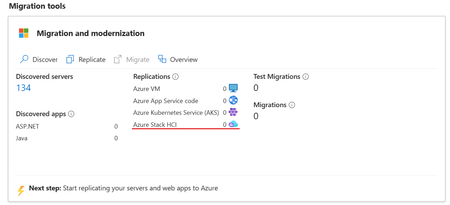
We are excited to announce the public preview of Azure Migrate's latest functionality: seamless migration from VMware to Azure Stack HCI. This significant enhancement extends the power of cloud migration to the edge, offering cutting-edge performance and security while keeping your data securely on-premises. With Azure Migrate’s agent-less replication, minimal downtime, and network traffic optimized data transfer, this new capability ensures an efficient, smooth transition for your virtualized workloads. Explore the Azure Migrate today and experience the next evolution of virtualization and cloud integration.12KViews15likes17CommentsApply critical update for Azure Stack HCI VMs to maintain Azure verification
Recently, Microsoft rolled out critical updates for Azure verification for VMs on Azure Stack HCI, and we strongly recommend current users to apply these latest cumulative updates for continued, seamless functionality of your Azure benefits on Azure Stack HCI VMs.7.8KViews3likes12CommentsLogical Networks in Azure Portal for HCI: Setting the Stage for Software Defined Networking
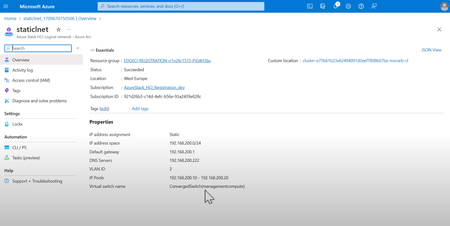
Logical networks have finally been brought into Azure Portal for Azure Stack HCI! Learn about how logical network support is necessary to bring our north star of SDN virtual networks and security benefits that will be coming later this year.3.9KViews2likes0CommentsHyper-V VM Migration to Azure Stack HCI, version 23H2
Written by Kerim Hanif, Senior Program Manager on the Azure Edge & Platform team Azure Migrate is a unified platform that simplifies migration, modernization, and optimization of on-premises resources to Azure. We have been working very closely with Azure Migrate team to add more destinations for Azure Migrate like VMware and Hyper-V. Last year we launched the private preview of Hyper-V virtual machine (VM) migration with Azure Migrate, and today we are very happy to announce the public preview of this capability. Note: VMware migration is currently in private preview. Please fill this form if you would like to be part of the private preview and help us build a high-quality migration capability. What is new in this public preview? This feature enables you to migrate your Windows and Linux VMs running on Hyper-V to Azure Stack HCI, version 23H2 clusters (GA as of Feb 1 st of this year). A wide range of source environments starting from Hyper-V on Windows Server 2012 R2 to Windows Server 2022 are supported. This feature uses the agentless migration option of Azure Migrate. This means that you don't need any prep such as installing an agent on the source VMs. All you need are two appliances, one on the source, and one on the target. While you can manage, monitor, and configure via the cloud (Azure Migrate), the data transfer between the source and the target is kept local. All the migrated VMs are Arc-enabled by default. This means that the full power of Arc VM management is immediately available to you once the migration is complete. Migrating variety of VMs (Windows and Linux) from Hyper-V to Azure Stack HCI How to get started? Make sure that you have an Azure Stack HCI cluster running version 23H2. Create a migration project in Azure Migrate. Discover the VMs on your source Hyper-V servers and clusters. Select the VMs you want to migrate and start replicating them to the target Azure Stack HCI cluster (source VMs can continue running at this stage). When ready, start the migration, and migrate your VMs with minimal downtime. Track the progress from the Azure portal. Where to learn more? For more information and detailed steps, please visit the following links: Options for migrating virtual machines to Azure Stack HCI (preview) Use Azure Migrate to move Hyper-V VMs to Azure Stack HCI (preview)11KViews7likes6CommentsAzure Stack HCI version 23H2 is generally available
Today we’re announcing the general availability of Azure Stack HCI version 23H2, and the Azure Arc infrastructure needed to provision virtual machines and Kubernetes clusters, and Azure Virtual Desktop for Azure Stack HCI. Together, these capabilities enable an adaptive cloud approach, empowering customers to deploy and operate everything from hardware to applications using Azure Resource Manager and core Azure management services. 42KViews10likes53Comments
Possible MAC address assignment strategies for tenant VMs running on Stack-HCI environment
Azure Stack HCI is a hyperconverged infrastructure (HCI) cluster solution consists of windows servers (Hyper-V), Storage Spaces Direct, and Azure-inspired SDN. All clustered servers share common configurations and resources by leveraging the Windows Server Failover Clustering feature. A Windows Failover Cluster consists of multiple windows servers running in a cluster to provide high availability i.e. If one server node goes down, then another node takes over. We can create multiple VMs on the failover cluster. VMs can be connected to different tenant networks. In this case we need to make sure VM connected on network 'A' with static ip should persist same network configuration even if it gets migrated from one node to another within a cluster. This is possible by assigning static MAC/static IP for the VM. But how to get free and unique MAC to assign to VM, there are different ways to solve this problem. In this article we will discuss some of them with pros and cons. (Note: solutions discussed in this article are just to suggestions, can not be considered optimal solutions)5.1KViews1like4Comments