azure stack hci
145 Topics
Azure Site Recovery for Azure Local Is Now Generally Available!
Today, we are excited to announce the general availability of Azure Site Recovery (ASR) for Azure Local, making enterprise-grade disaster recovery for on-premises virtual machine workloads simpler, more secure, and more accessible than ever before. Since its public preview, Azure Site Recovery for Azure Local has helped organizations protect their business-critical workloads running on Azure Local clusters by replicating virtual machine workloads to Azure. With today’s release, we’re delivering a streamlined experience built on customer feedback and introducing key capabilities that remove the last friction points standing between organizations and a robust disaster recovery posture. What’s changing with General Availability: Azure Site Recovery for Azure Local is now fully supported for production workloads and available in all Azure Local-supported regions. Simple Deployment Wizard Before today, enabling Azure Site Recovery for Hyper-V involved a complex, multi-step setup process across multiple Azure portal blades. With this solution, you can now prepare your entire Azure Local environment for disaster recovery through a single, streamlined one-page wizard directly within the Azure Local resource in the Azure portal. The wizard handles everything in a single operation: It creates your Recovery Services Vault and a Hyper-V site, automatically downloads and installs the ASR agent on every node in the cluster, associates a replication policy, and registers each host with the Azure Site Recovery service, all without requiring you to repeat steps per node or jump between portal resources. How the wizard works: Navigate to Disaster Recovery From the Azure Local resource overview in the Azure portal, select the Capabilities tab and choose the Disaster Recovery tile. Launch Prepare Infrastructure Select “Protect VM workloads,” then “Prepare infrastructure.” The wizard opens. Configure in one place Select or create (or reuse) a Recovery Services Vault, a Hyper-V site, and a replication policy, all from the same page. Configure your proxy settings if required. Let Azure do the rest Click Prepare Infrastructure. Azure automatically installs the ASR agent on every node, registers the cluster, and associates with your policy. Monitor progress via the Notifications bell. Enable replication Once infrastructure is prepared, select Enable Replication to choose which VMs to protect. Replication begins immediately. See the wizard in action New in GA: WDAC Enforcement Mode Support Windows Defender Application Control (WDAC) is a foundational security capability in Azure Local that restricts which applications and code are allowed to run on cluster nodes. Many production and highly regulated environments, including government, financial services, and healthcare organizations, operate with WDAC in enforced mode as a mandatory part of their security posture. During public preview, customers using WDAC in enforced mode were required to temporarily switch to audit mode to install the Azure Site Recovery agent, an operationally disruptive workaround that reduced security assurance during deployment. This limitation has now been fully addressed. Azure Site Recovery for Azure Local now fully supports WDAC in enforce mode! Customers can prepare their Azure Local environment for disaster recovery without disabling or relaxing any Application Control policies. The ASR agent installation is WDAC-compliant and works seamlessly within enforced policy environments. New in GA: Built-In Proxy Support Enterprise networks commonly route outbound internet traffic through a proxy server, a requirement that is especially prevalent in regulated industries, government environments, and organizations with strict network egress controls. During public preview, configuring proxy settings for Azure Site Recovery required manual steps outside of the primary setup flow. With general availability, proxy configuration is now a first-class part of the one-page wizard. Customers who need to route ASR traffic through a proxy can configure proxy host, port, and credential settings directly within the Prepare Infrastructure wizard, in the same operation that sets up the rest of the disaster recovery infrastructure. This means no separate configuration files, no post-install manual steps, and no guesswork about whether proxy settings were applied correctly to each node. The wizard ensures consistent proxy configuration across the entire cluster as part of a single, atomic setup operation. Complete Disaster Recovery Lifecycle Azure Site Recovery for Azure Local supports the full disaster recovery lifecycle, giving organizations everything they need to meet recovery time objectives (RTO) and recovery point objectives (RPO) for on-premises workloads. Continuous Replication VM disks are replicated continuously to an Azure Storage Account, ensuring minimal data loss in the event of a disaster. Test Failover Validate your disaster recovery plan with non-disruptive test failovers that spin up snapshot of replicated VMs in Azure in an isolated network without impacting production replication. Failover to Azure (planned or unplanned) Fail over Windows and Linux VMs (Gen 1 and Gen 2) to Azure with a few clicks. Run workloads in Azure until your on-premises environment is restored. Recovery Plans Orchestrate failover for entire applications, not just individual VMs, with sequencing, automation, and dependency control. Failback Once your primary site is restored, fail back from Azure to your on-premises Azure Local environment and resume normal operations. Reverse Replicate Reverse replicate your VMs back to Azure to restore continuous replication and maintain ongoing protection against data loss, enabling rapid recovery in the event of another disaster. Who Should Enable Azure Site Recovery for Azure Local Today Azure Site Recovery for Azure Local is well-suited for any organization running business-critical workloads on Azure Local that requires a defined and tested disaster recovery strategy. It is particularly compelling for: Regulated industries such as financial services, healthcare, government, and the public sector who often operate in proxy-constrained network environments where BCDR requirements are mandatory and WDAC enforcement is a standard security requirement. With this GA release, the security and operational compromises that previously complicated adoption have been eliminated. Any organization that wants to use Azure as an extension of their on-premises environment for disaster recovery and business continuity. This cloud-integrated approach enables capabilities such as test failover, orchestrated recovery plans, and automated failback, all managed directly through the Azure portal. For organizations that prefer on-premises disaster recovery over cloud failover, a future option will support failback to an alternate on-premises location. Prerequisites and Getting Started To enable Azure Site Recovery on your Azure Local environment, ensure the following prerequisites are in place before you begin. For machines hosting the VMs you want to protect, internet access to Azure is required for the replication traffic, or a configured proxy, which can now be set up directly in the wizard. Support for Trusted Launch VMs is also planned for a future release. Start Protecting Your Azure Local Workloads Today Azure Site Recovery for Azure Local is generally available now. Open the Azure portal, navigate to your Azure Local resource, and launch the Prepare Infrastructure wizard to get started. Read the Documentation → Open the Azure Portal → Share feedback on the Azure Feedback Portal →1.1KViews1like3Comments
AKS on AzureLocal: KMSv1 -> KMSv2
Hey, quick question on AKS Arc — we're running moc-kms-plugin:0.2.172-official on an Arc-enabled AKS cluster on Azure Local and currently have KMSv1=true as a feature gate to keep encryption at rest working. KMSv1 is deprecated in 1.28+ and we want to migrate to KMSv2 before it gets removed. Since moc-kms-plugin is a Microsoft-managed component we can't just swap it out ourselves. A few questions: Does version 0.2.172 already support the KMSv2 gRPC API, or is that coming in a later release? Is there a supported migration path for AKS Arc specifically, or does this come automatically through a platform update? Any docs or internal guidance you can point us to? Thanks!268Views0likes1Comment
Issue with Hyper-V VM on Tagged VLAN – Traffic Reaches Local Hosts but Not External Networks
Hi everyone, I’m having an issue getting a Hyper-V VM to work correctly when using a tagged VLAN interface. I have a test VM configured with a trunk port and a tagged VLAN. Here is the configuration I’m using: Set-VMNetworkAdapterVlan -VMName "testvlan" -Trunk -NativeVlanId 2 -AllowedVlanIdList "4" The strange part is this: When the VM is on VLAN 4 (tagged), it can reach other resources on the same VLAN as long as those resources are running on the same Hyper-V host. But if the target resource is outside the Hyper-V host, the VM cannot reach it at all. The hardware vendor has already ruled out any issue with the top-of-rack switches interconnecting the hosts. If I reconfigure the VM’s network adapter in access mode on the same VLAN, then all traffic works normally and the VM can reach resources outside the host without any problem. So it seems that traffic leaves the host correctly only when the adapter is in access mode, not when using a trunk with VLAN tagging. Has anyone seen this behavior before or has suggestions on what to check next?535Views0likes1Comment
AVD on Azure Local: Increase memory of Sessionhosts after Hostpool deployment
Hi there, Is there a best practice for increasing the RAM of the session hosts in an Azure Virtual Desktop host pool? We are using the autoscaler to start and stop VMs on demand. Since this is an automated process, all the settings changed via HyperV-Manager get overwritten, presumably by the host pool template. Can someone confirm that I am on the right track and maybe give me a hint or a how-to on how to change the RAM for my session hosts? Hostpool Type: Pooled Uses Session Host Config: No Thanks in Advance, Maik649Views0likes2Comments
Error Depoloying Azure Stack?
I keep getting this message when I try to deploy azure stack Any idea would be appreciated thanks Exception Type 'SetAzureStackHostsPreConfiguration' of Role 'HostNetwork' raised an exception: Stopping execution after intent provisioning failed with [ ProvisioningFailed ] for intent "compute_management" on host "NODE1". Configuration Status: Failed Compute: True Management: True Storage: False at TestNetworkAtcIntentStatus, C:\NugetStore\Microsoft.AS.Network.Deploy.HostNetwork.1.2411.1.8\content\Powershell\Roles\HostNetwork\HostNetwork.psm1: line 1714 at ConfigureHostAdaptersWithNetworkAtcForHosts, C:\NugetStore\Microsoft.AS.Network.Deploy.HostNetwork.1.2411.1.8\content\Powershell\Roles\HostNetwork\HostNetwork.psm1: line 2183 at Set-HostAdaptersWithNetworkAtc, C:\NugetStore\Microsoft.AS.Network.Deploy.HostNetwork.1.2411.1.8\content\Powershell\Roles\HostNetwork\HostNetwork.psm1: line 2315 at Invoke-ConfigureHostAdaptersWithNetworkAtc<Process>, C:\NugetStore\Microsoft.AS.Network.Deploy.HostNetwork.1.2411.1.8\content\Powershell\Roles\HostNetwork\HostNetwork.psm1: line 2586 at Invoke-ConfigureAzureStackHostNetworkingWithATC, C:\NugetStore\Microsoft.AS.Network.Deploy.HostNetwork.1.2411.1.8\content\Powershell\Roles\HostNetwork\HostNetwork.psm1: line 3781 at Invoke-SetAzureStackHostsPreConfiguration, C:\NugetStore\Microsoft.AS.Network.Deploy.HostNetwork.1.2411.1.8\content\Powershell\Roles\HostNetwork\HostNetwork.psm1: line 3916 at SetAzureStackHostsPreConfiguration, C:\NugetStore\Microsoft.AS.Network.Deploy.HostNetwork.1.2411.1.8\content\Powershell\Classes\HostNetwork\HostNetwork.psm1: line 66 at <ScriptBlock>, C:\CloudDeployment\ECEngine\InvokeInterfaceInternal.psm1: line 139 at Invoke-EceInterfaceInternal, C:\CloudDeployment\ECEngine\InvokeInterfaceInternal.psm1: line 134 at <ScriptBlock>, <No file>: line 33475Views0likes1Comment
Azure Stack HCI 23h2 upgrade & Azure local Resource
Good evening, After upgrading from 22H2 to 23H2, we encountered an issue where the Azure Local resource in the Azure portal appears as "not connected recently." Additionally, we are not seeing the "Your cluster can be upgraded to the latest version" option, likely due to this connection issue. Despite successful connectivity tests and extensive troubleshooting, the resource remains unsynchronised with Azure. As a result, we tried deleting the Azure Local resource and re-registering the nodes. Now, while both nodes are successfully registered and connected to Azure and passing the Invoke-AzStackHciUpgradeValidation , we are unable to find a way to re-register the Azure Local resource to proceed with the "Install the solution upgrade via Azure portal" step. The only option I see is going through the "Deploy Azure Local" process in Azure Arc. However, I believe this would overwrite existing settings and VMs, causing significant disruption—especially since this is a production cluster upgraded from 22H2. Is there a way to re-register the cluster and restore the Azure Local resource using existing settings, so we can proceed with deploying the rest of the solution upgrade via the Azure portal? Any guidance would be greatly appreciated907Views0likes3CommentsWe're moving!
Hello friends, Last week at Microsoft Ignite 2024 we introduced Azure Local, cloud infrastructure for distributed locations enabled by Azure Arc. Azure Local is an exciting new chapter for adaptive cloud. It replaces Azure Stack HCI and adds important new options like lower-cost edge devices (preview) and disconnected operations (preview). There is no action required for existing Azure Stack HCI customers: you'll transition seamlessly to Azure Local. If you haven’t already, check out the announcement blog. Azure Local is powered by Azure Arc, so it makes sense to unite the Tech Community blogs. Going forward, we’ll use the Azure Arc blog for Azure Local. We’ll migrate all the old content from the Azure Stack blog soon, to ensure that nothing is lost. On behalf of the team, I want to say a heartfelt thank you for all your enthusiasm, comments, and questions over the years. In the last decade, we’ve published more than 100 posts on this Azure Stack blog, and you’ve read them more than 1.3 million times! Technological progress is a journey with no end, but what really matters is the friends we made along the way. <3 Now… go follow the Azure Arc blog! We’re excited to keep the party going over there. - Cosmos and the Azure Local team1.4KViews2likes1CommentAzure Stack HCI - adding NIC to Network ATC Intent
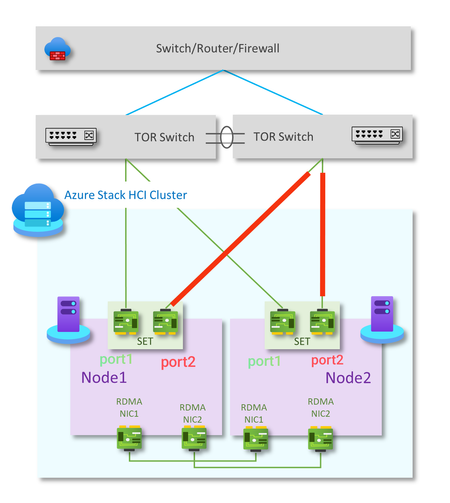
Hello fellow Azure Stack HCI Admins, I currently have a compute_management Intent for my two node switchless cluster with only one pNIC per node (port1) assigned. I now want to add port2 of each node to the intent for redundancy. (See image) I found this command-set on learn: https://learn.microsoft.com/en-us/azure-stack/hci/manage/manage-network-atc?tabs=21H2&pivots=azure-stack-hci Get-NetIntentStatus -ClusterName <YourClusterName> Update-NetIntentAdapter -IntentName <YourIntentName> -AdapterName pNIC2 Get-NetIntentStatus -ClusterName <YourClusterName> Is that the correct command set to archive that? Or is there another way to do so? I am a bit anxious on running those commands because I already have workloads deployed on that cluster and I don't want to break it. Thanks in advance! :) PS: I chose only one NIC per node because at the time of deployment I only had one ToR switch available.Solved611Views1like2Comments
Issues with Azure stack HCI 23H2 and and NVMe Drives 5520 Series
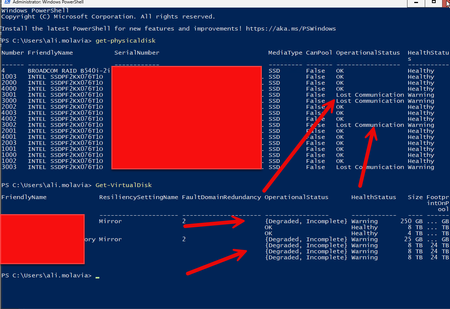
We recently purchased a Lenovo MX630 V3 Integrated System for Azure Stack HCI 23H2 deployment with 16 x 5520 series NVMe drives (Lenovo NVMe part number is 4XB7A13943/SSDPF2KX076T1O and the server model is 7D6U). We are using version 10.2408.0.29 25398.1085 of Azure Stack HCI. In the past few days, we have encountered some weird issues. The storage cluster degraded because the physical disks keep going to "Lost Communication," causing the storage volume to go into detached mode. We are using firmware version Lenovo NVMe 9CV10450, which is approved by Lenovo. I see that the newer driver is 9CV10490, and I was wondering if anyone had a similar experience with these drives and if the August update fixed it. The reason I ask is that using Solidigm driver/firmware is not supported by Lenovo. So far, we have replaced one disk, but when I observed the last problem, it seemed to fix itself.693Views0likes3Comments