azure sql
729 Topics3 Reasons Enterprise SQL Server Migrations Slow Down - and How to Avoid Them
Summary Many of Enterprises around the globe have relied on SQL Server for over 3 decades to run their mission critical business applications. Their SQL Server estates face pressure from downtime risk, cost volatility, end of support timelines and modernization demands. As these customers get ready to modernize their data to use the latest capabilities of A.I and cloud native application trends, they want to migrate and modernize their SQL Servers to use Azure SQL with a modernization strategy built on confidence of customer success. Enterprise migrations rarely fail because of migration tools. They slow down because organizations struggle to answer three questions: How much downtime can we tolerate? What will it cost after migration? Are we choosing the right target platform? The organizations that answer these questions early move faster and with less risk. For the DB Administrators, Data architects, application architect and cloud-cost decision makers there are important technical considerations before, during and after data modernization to avoid long term costs and operational concerns. The Microsoft SQL Team has helped many customers modernize their SQL. We discuss important guidelines that can help resolve the 3 major concerns that block or slow SQL Server migration and modernization in Enterprises. This is covered in the episode of DataExposed for which this companion blog goes into the details. What are important triggers that cause customers and partners to consider SQL modernization? There are many business triggers that force Enterprises to migrate their data to public cloud. As SQL Server 2012 to SQL Server 2016 are already in the end of support stage of their lifecycle, customers need to upgrade SQL Server in place or migrate to AzureSQL. Due to cyber security threats, customers are feeling more vulnerable to attackers. Moving their data into a secure environment is essential for protecting not just their data but their business. Customers are reporting the need to free up IT dollars to invest into other parts of the business that may need it more. These may be anything from datacenter contract expirations, need for Hardware refreshes to software license renewals. As the business grows or becomes cyclical, there is surge in demand. Capacity constraints become a barrier for such expansions. These are triggers that cause them to rethink their data modernization strategy. Data modernization and moving the data to a elastic, scalable, secure and resilient data platform such as Azure SQL, becomes essential. The Three Migration Blockers However, data modernization and migration is not without any risk. Based on our customers experience, here are three key reasons that we have commonly encountered that halt or slow down SQL modernization. 1. Downtime Risk Business stakeholders often require strict service level commitments before authorizing production cutovers. Even when migrations are technically feasible, organizations may delay projects if they believe downtime windows could impact revenue, customer experience, or regulatory obligations. Most customers are still offered offline migration paths which can take hours to days, even though zero-downtime migrations are possible which take seconds to minutes. 2. Cost uncertainty Many modernization projects are approved based on expected cost savings. However, if infrastructure sizing, licensing assumptions, storage consumption, or disaster recovery requirements are not evaluated properly, the actual operational cost can exceed initial expectations. Cost uncertainty often slows executive approval processes and extends migration timelines. 3. Compatibility and Feature Fit When migrating SQL Server, Azure SQL has several deployment offerings from IaaS to PaaS. These include SQL Server on Azure VM, Azure SQL Managed Instance, Azure SQL DB Hyperscale and Azure SQL in Microsoft Fabric. Many customers maybe using SQL Server features like Cross-database queries, CLR, SSIS, SQL Agent, and linked servers. They make a safe decision to lift and shift migrate to SQL Server on Azure VMs IaaS instead of modernizing to a PaaS service like Azure SQL Managed Instance. However, in the process, they lose the opportunity to use the PaaS capabilities, manageability and AI/Fabric capabilities in Azure by making this choice. Enterprise Architects, Application Architects, Database developers and DB Administrators have to make the right choice taking both development as well as operational costs and compatibility when they make their SQL modernization decisions. Here are best practices some of the biggest and successful SQL migrations have used to make the migration and modernization journey with confidence. While we cannot disclose specific customer names, these guidelines are based on helping many large to small Enterprise customers. Azure SQL Managed Instance as the Resiliency Anchor Azure SQL Managed Instance is often the platform that helps organizations overcome all three concerns simultaneously because it combines near-full SQL Server compatibility with platform-as-a-service benefits. Azure SQL Managed Instance (Azure SQL MI) Next-gen General Purpose is now generally available, bringing a built-in performance and scale upgrade for General Purpose workloads, including up to 500 databases per instance, up to 32 TB storage, lower latency, and higher IOPS. The release also adds more flexible cost-performance tuning with independent vCore, IOPS, and memory scaling, plus faster management operations to adapt to changing workload demand. For enterprise SQL Server modernization, this positions Azure SQL MI as a stronger path for high-compatibility migrations that need better price-performance without moving to a full replatform. Let us dive deeper into how this helps address the downtime risk concerns by enables three levels of resiliency and high availability features. Local Redundancy Azure SQL Managed Instance provides first layer of Local Redundancy — built into every Azure SQL MI instance at no extra cost. Azure SQL Managed Instance uses local redundancy by default to keep workloads available during node, VM, rack, maintenance, and other local failures within a single datacenter, with Service Fabric orchestrating failover. In General Purpose (including Next-gen GP), this is implemented as stateless compute plus remote stateful storage; during failover, the engine process moves to another compute node and reattaches data, which can cause temporary performance impact due to cold cache. In Business Critical, local redundancy uses multiple synchronized replicas with local SSD storage (Always On-like architecture), enabling fast failover and read scale-out on secondaries.Next-gen General Purpose is an architectural upgrade to the existing General Purpose service tier that uses an upgraded remote storage layer that stores instance data and log files on Elastic SAN instead of page blobs and maintains it locally. Local redundancy protects against local infrastructure issues. This gives you a 99.99% SLA but not full datacenter/zone disasters, so zone redundancy (where supported) or disaster recovery (DR) options like failover groups/geo-restore are needed for broader resilience. Zone Redundancy The second layer is Zone Redundancy, which is accomplished placing data replicas across availability zones. Your Azure SQL MI resources are distributed across multiple availability zones within a region. This protects against the failure of an entire datacenter because each Azure availability zone is a separate physical location with independent power, cooling and networking. It relies on synchronous replication using zone-redundant storage for General Purpose. For Business critical, it uses Always On Availability group replicas across zones for Business Critical. Always On availability group technology replicates data changes from the primary instance to standby replicas in other availability zones. In the event of an outage, there's an automatic failover that seamlessly transitions one of the standby replicas to be prima. These replicas are always in sync — which means zero data loss. Failover typically happens in under 30 seconds, and your SLA jumps to 99.995%. Failover Groups The third layer is Failover Groups. This is your cross-region disaster recovery solution. It asynchronously replicates all user databases to a secondary Azure SQL MI instance in a different Azure region. Because it is asynchronous replication, there is potential for momentary data loss in the case of a datacenter outage. But it still protects the data against the worst case failure — a full regional outage. If the replica is a standby replica, there is no license required and it is used only for disaster recovery. Using these options, business stakeholders can get their assurance that they have Enterprise grade availability and resiliency platform of AzureSQL for running their mission critical workloads. You can read more about these HA and Resiliency options in Microsoft Learn. Cost Governance for Enterprise Buyers The total cost of data modernization and migration is not a one-time estimate but an ongoing one. In this case, Azure SQL MI provides Enterprise DB Administrators many levers through pricing model choice, right-sizing, elasticity, serverless options and dev/test free tiers. Let us explore how these can be combined for smart cost estimations. Lets also look at the best offering for the cost-conscious Enterprises - Azure SQL DB Hyperscale. With Azure SQL DB Hyperscale, you get the SQL Server engine, T-SQL compatibility, High Availability, Disaster recovery, security, backups, and management all bundled into the service price. No separate cost for SQL Server license. Hyperscale separates compute and storage that can scale independently and does not force you to overprovision. You have to only pay what you use which is ideal for seasonal workloads, Dev/Test, SaaS applications, predictable daytime trends, and up to 60% savings when you use Elastic pools. Azure Hybrid benefit (AHB)- Azure Hybrid Benefit lets you bring your existing SQL Server investments to Azure and reduce compute costs, accelerating your ROI from cloud migration while preserving all the benefits of Azure SQL Azure SQL DB Free offer – is the strongest product offering. Enterprises can use all features of Azure SQL at no cost for up to 10 Azure SQL DB free-tier. 100,000 vCore-seconds of serverless compute per month, 32GB data storage, 32 GB backup storage, serverless auto-scaling and auto-pause if you hit the limit per month. Run your POCs at no cost and evaluate before you move to Azure SQLDB, especially SMB& some enterprise Azure SQL Managed Instance also offers 1 free Azure SQL MI instance per Azure subscription giving you 720vCore hours per month, 64GB storage, up to 500 databases, automated backups and 12 months free. And if data migration is not possible due to data compliance or data proximity purposes, Azure Arc Pay-As-You-Go (PAYG) gives you cloud-style SQL licensing for servers running anywhere—on-premises, at the edge, or in other clouds. Instead of making large up-front licensing investments, you only pay for SQL Server while it's running, while still gaining access to Azure Arc management, security, monitoring, and modernization capabilities. For seasonal, variable, or growth-oriented workloads, PAYG can improve cash flow and reduce licensing complexity. Reserved instances allow Enterprise customers to commit to using Azure SQL resource for a period of one or three years to receive a significant discount. This option combined with AHB can save you even more up to 80%. We have a comprehensive licensing guide for on-premises SQL Server for your reference. Azure SQL enables a variety of cloud cost-models for a wide range of enterprise workload needs to help Enterprise cloud cost decision makers and DB Administrators make the right choice for their workloads. Target selection guidance While Azure SQL has multiple deployment options to migrate your on-premises work loads, it is critical to make the right choice long term. Customers can install SQL Server on-premises, they can use Azure SQL deployment options, and also run SQL Server in other clouds like Amazon Web Services and Google Cloud. If there is an Enterprise workload that is not ready to modernize, you have the ability to lift and shift into SQL Server in Azure VM. It is a low cost migration option, because the application does not need any modification and it gives DB Administrators full control over the SQL server and underlying Windows or Linux OS. This can be a first step to modernization for some customers who are risk-averse. For those Enterprise customers who are willing to modernize their workloads and SQL Server instances, Azure SQL DB Hyperscale is the best option. Azure SQL Database Hyperscale helps organizations modernize their most demanding database workloads with virtually unlimited growth, high performance, and cloud-scale economics. Customers can scale storage and compute independently, support large multi-terabyte databases, accelerate application performance with read-scale replicas, and eliminate the operational complexity of managing infrastructure, backups, patching, and high availability. They can build cloud-native applications or cloud-enable existing applications. However, if Enterprise customers want good compatibility with their on-premises SQL Server but continue down the modernization path - their best option is Azure SQL Managed Instance. They can modernize the instance and not impact the application as there is no application change required. Applications will continue to work and the DB Administrators do not need to worry about managing infrastructure and all the overhead that comes with managing, self-managing your SQL Server virtual machines. For SQL Server customers, PostgreSQL may look like an attractive low cost option. However, it requires re-platforming that could add significant hidden cost due to retraining all their DBAs and their developers to do performance optimization, performance best practices and operational maintenance. Lastly, our same SQL engine is also available to customers as a SaaS-ified version, Fabric SQL database as well. All these options use the exact same SQL engine which makes it easier for Database developers and DB Administrators continue to use the same expertise, tools and process. Making the right choice of Azure SQL deployment is not just on the fastest way to modernize but the right long term approach. Conclusion and Next steps Enterprise SQL Server migrations rarely stall because of migration technology. More often, they are delayed by concerns around downtime, cost predictability, and platform selection. Organizations that address these questions early can accelerate modernization while reducing operational risk. Azure SQL provides multiple modernization paths—from SQL Server on Azure Virtual Machines to Azure SQL Managed Instance and Azure SQL Database—allowing organizations to balance compatibility, operational simplicity, resiliency, and cost efficiency based on their business requirements. As modernization initiatives accelerate, the most successful projects are those that treat migration not as a one-time infrastructure event, but as a long-term platform strategy. Whether its the newest and the fastest way for us to migrate customers, we have all the comprehensive Copilot enabled AI-assisted migration tooling, technical training and support you need. Look for more blogs, whitepapers, guides and training based on best practices used real-world data modernization projects.237Views0likes0CommentsBuilding an Azure architecture that’s ready for every signature
At Exclaimer, we help organizations manage email signatures at scale, so every message can carry a consistent, compliant, on-brand signature without IT teams manually updating thousands of mailboxes. This is more difficult than it may seem, especially when you're doing it for more than 80,000 customers, around 9.6 million seats, and more than 21 billion emails a year. Every signature must show up in the right place, with the right details, for the right sender, recipient, device, and business rule. Behind that are constantly changing employee records, customer-specific policies, email chains, recipient lists, regional disclaimers, and brand requirements. Because our platform sits directly in the email flow, availability is critical. And because many of our customers operate in regulated industries, they also need confidence that data stays in-region and configured signatures are applied consistently. To support that level of scale and reliability, we’ve spent the last several years evolving our architecture on Microsoft Azure. Today, Azure Kubernetes Service (AKS), Azure SQL Database, Azure Database for PostgreSQL, Azure Cosmos DB, Azure Data Explorer, and Azure Databricks help us run a global platform that’s more responsive, more resilient, and more cost-efficient. Reading the signs that our architecture needed to change In the beginning, our cloud product ran more like a multi-server, on-premises product hosted on Azure Virtual Machines (VMs). The platform was split into a smaller number of core services, and the team relied heavily on VM-based infrastructure to keep those services running. As Exclaimer grew, our architecture had to keep pace with higher volumes, more regions, and more complex customer requirements. Regional demand shifted throughout the day, but scaling infrastructure up and down still relied on scripts, pre-baked VMs, and operational coordination. That created more risk during maintenance and failover. We run parallel data centers in regional pairs so we can move traffic away from one site when needed. But when traffic moves, the receiving environment has to be ready to handle the full load. In the VM world, that meant someone or something had to remember to scale up standby resources at the right moment. At the same time, our product was becoming more service-oriented. We were moving away from a smaller set of larger services toward well over 100 microservices. Every new service created more conversations about VM sizing, images, patching, and operational overhead. It was time for a model that could scale faster, run more efficiently, and reduce the amount of infrastructure work required to ship and operate the product. Signing on to AKS for faster, more efficient scaling By moving many workloads to Linux containers on AKS, we gained a smaller footprint, faster startup times, and a more consistent way to package and deploy services. AKS also gave us a managed Kubernetes foundation for running those containers at global scale, with autoscaling capabilities that better matched our traffic patterns. With Horizontal Pod Autoscaler, services can react to load in seconds rather than minutes. With Cluster Autoscaler, we can add or remove node capacity based on what the platform actually needs. That means we can pack workloads onto nodes more efficiently, scale down during quiet periods, and scale up quickly when demand returns. The operational difference is just as important. During an incident, maintenance event, or regional failover, our teams have fewer manual steps to think about. If traffic shifts, the platform can scale with it. That takes away one more thing for engineers to worry about when they should be focused on keeping the customer experience steady. The move to containers and a more streamlined CI/CD workflow also improved our deployment cadence by making it easier to build, test, and deploy changes across the platform. In 2021, we deployed 285 changes, features, and fixes to production over the course of the entire year. Today, we deploy that many every few days. Cost has improved, too. Since 2024, when the bulk of our migration to containerized services took place, we’ve reduced our average cost per user by about 39 percent, even as the product has grown more complex and we’ve added more capabilities for customers. We achieved that through a combination of containerized architecture, AKS autoscaling, and expanded reservations across compute and storage technologies. Choosing the right database for the right kind of data We started with a strong Microsoft SQL Server foundation, and Azure SQL Database remains core to our platform today. It stores critical customer configuration data and continues to give us the reliability, replication, resizing flexibility, and regional scale we need. But not every workload belongs in the same database. Customer configuration, relational service data, key-value storage, usage events, and business intelligence (BI) all have different access patterns. That principle led us to Azure Database for PostgreSQL flexible server for one of our most important migrations. We had used Azure Table storage for a core service that needed to retrieve customer data quickly. It was cost-effective and stable for a long time, but as the product evolved, the data became more relational, and we found ourselves adding complexity in application code that a relational database could handle more naturally. Azure Database for PostgreSQL gave us that relational model with low management overhead, fast read replicas, reserved instances for predictable workloads, and a path to future scale. After the migration, average request time for a critical service dropped from 18.6 milliseconds to 1.79 milliseconds. That’s a 90 percent improvement across a service that handles around 9 billion requests each month. Azure Cosmos DB plays a different role, supporting key-value and document storage where we need scale, availability, low latency, encryption at rest, and straightforward dev/test support. Optimized for unstructured data and high-performance reads and writes, it gives us a highly scalable foundation for workloads that don't fit a traditional relational model. We use it to store customer assets for signatures and video branding, high-volume metadata for internal message-processing operations, audit events that help customers track account changes, and tokens used to collect data from third-party systems on behalf of customers. It also gives us a clean way to keep data and services aligned. Azure Data Explorer solved another scaling challenge: usage and billing data. We need to be able to audit the number of messages we process for our customers so we can bill accurately, and at more than 20 billion emails a year, our previous SQL-based usage pipeline became difficult to manage. With Azure Data Explorer, we can ingest massive volumes of event data at low storage cost, connect to Azure Event Hubs, and avoid maintaining custom plumbing. That move reduced the cost of the system by around 70 percent. Azure Databricks rounds out the picture as our BI and data platform, giving our teams a shared foundation for transformations, analysis, and reporting across product and business data. Keeping every region ready for business Our customers are everywhere, so our platform has to be, too. Exclaimer runs in seven distinct geographic locations: Australia, Canada, Europe, Germany, the United Arab Emirates, the United Kingdom, and the United States. That global footprint helps us meet customer expectations around availability and data residency. Many organizations want their data to stay in-region, and Azure gives us the coverage we need to support that. Availability is especially important because our platform is part of a live communication flow. When someone sends an email, they expect it to keep moving. Our Azure architecture helps us support that expectation across the stack. AKS lets compute scale with regional demand. Azure SQL and Azure Database for PostgreSQL support critical relational workloads. Azure Cosmos DB gives us scalable, low-latency storage for document and key-value patterns. Azure Data Explorer handles very high-volume usage ingestion without the complexity of our former custom pipeline. Across the board, these managed Azure services reduce the amount of operational work our engineers have to carry. We can spend less time maintaining the basics and more time tuning performance, improving stability, and building the capabilities our customers need next. Building for the future on a stronger foundation The biggest sign that our architecture is working may be how little we have to reinvent when we build something new. As we develop upcoming product capabilities, we already have many of the foundational pieces in place: AKS for compute, Azure Cosmos DB for state, and Azure Service Bus for messaging. We also have Azure SQL for core data, Azure Database for PostgreSQL where relational service data needs room to scale, Azure Data Explorer for high-volume event analysis, and Azure Databricks for BI tooling. Together, these services make our platform faster, more efficient, and more resilient. Email signatures may look simple on the surface. Behind every one, there’s a set of decisions about performance, scale, data, availability, and trust. With Azure, we’ve built an architecture that helps us keep every signature moving, wherever our customers do business. About the authors Phil Vetter started in engineering at Exclaimer as a developer at the start of 2013, and now sits at the helm as VP of Engineering. Lee Jones started at Exclaimer in 2013 in the IT department, and now serves as Director of Platform Engineering, managing the infrastructure and resilience of Exclaimer Cloud.237Views1like0CommentsAzure SQL DB Fabric Mirroring with Private Endpoint
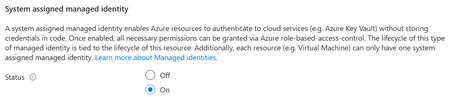
Introduction Overview steps for configuration of Mirroring between Azure SQL Database to Fabric Mirrored Database over Private Endpoint and Public Connectivity Disabled on source. Prerequisites #1 - The minimum requirement for the source Azure SQL Database tier is - it is Standard Tier with DTUs equal or greater than 100. Free, Basic Tier, or <100 DTUs are NOT supported. All vCore model tiers supported. #2 - System Assigned Managed Identity (SAMI) must be enabled on the Azure SQL logical server. #3 - Microsoft.PowerPlatform should be registered as a source provider at the subscription level. If this step is not completed, you'll face error in the next steps, while creating the 'Virtual Network Data Gateway', example below. #4 - The Virtual Network Subnet of the configured Private Endpoint should have the following selected. Select Microsoft.PowerPlatform/netaccesslinks for the Subnet Delegation tab. This is a required step, otherwise the subnet is grayed out to select while configuration of the Virtual Network Data Gateway at Fabric level. High Level Configuration Steps #1 - Go to Fabric Portal > Settings Click on Settings button on top right > Click on Manage Connections and Gateways Go to 'Virtual Network Data Gateway' tab > Click New In the new page, Select your Capacity, Subscription, Resource Group, VNET and Subnet of the source Azure SQL DB and create it. #2 - Go back to your workspace, and click new item > Search 'Mirrored Azure SQL Database' #3 - Here, in Data Gateway section, chose your new created gateway which we created in previous step, and fill the required source Azure SQL Database details and click connect. #4 - Select the tables to be mirrored in the next steps and you will be able to successfully mirror from Azure SQL Database to Mirrored Azure SQL Database without Public Connectivity and using Private Endpoint.152Views1like0CommentsGenerally Available: Microsoft Entra Server Principals and Server Roles for Azure SQL Database
The problem we're solving Previously, Microsoft Entra identities in Azure SQL Database could only be created as contained database users - principals scoped to a single database with no server-level presence. That meant: No granular server-level delegation. You couldn't assign a server role such as ##MS_ServerStateReader## (to query DMVs across databases) or ##MS_LoginManager## (to manage logins) to an Entra principal. Only the Entra admin or a SQL login could perform these server-scoped tasks. Per-database provisioning overhead. Each Entra principal had to be created separately as a contained database user in every database that required access, with no way to inherit server-scoped permissions. No centralized “disable” switch. Offboarding meant tracking down a contained database user in every database - there was no server-level login to disable. These gaps forced many teams to keep SQL authentication for administrative tasks, even when they wanted to go password-less with Entra. What changes with GA Microsoft Entra logins become first-class server principals in the logical master database, just like SQL logins. This capability has been in public preview on Azure SQL Database (and is already generally available on Azure SQL Managed Instance and SQL Server 2022+); with this release it reaches general availability on Azure SQL Database, unlocking three things for production use: 1. Server role assignment for Entra identities Azure SQL Database's seven fixed server-level roles can be assigned to Entra server principals(logins). These roles cover database connectivity, database management, definition and security-definition reads, login management, and server-state read/manage. This means you can give your monitoring service principal read-only DMV access across all databases (##MS_ServerStateReader##), delegate login management to a security team member (##MS_LoginManager##), or let a DevOps app create databases (##MS_DatabaseManager##). All without SQL auth, all with Entra identities. 2. Server-wide login model Instead of provisioning contained users independently in every database, you can create database users mapped to a server login (CREATE USER ... FROM LOGIN). These users inherit server-scoped permissions automatically. One login, many databases — managed from a single place. For the T-SQL syntax, see Create and utilize Microsoft Entra server logins. 3. Centralized logins enable/disable ALTER LOGIN [user@contoso.com] DISABLE - one command blocks that identity from connecting to every database on the server. No more hunting down per-database users during an offboarding or incident response. When you re-enable the login, access is restored everywhere. Note: ALTER LOGIN ... DISABLE applies only to login-based users, not contained database users. It blocks new connections only; existing sessions remain active until terminated with KILL if needed. For immediate effect, see cache propagation. Microsoft Entra group logins are not supported; see the server principals documentation for alternatives. What does this unlock for your organization Ability to go password-less. With server principals and roles now generally available, organizations can adopt Entra-only authentication without a remaining server-level functionality gap. Entra logins bring parity with SQL logins closer, making it practical to disable SQL authentication entirely and using Entra as the sole authentication path. Least-privilege administration. Server-level roles simplify permission management by enabling customers to delegate common management and monitoring responsibilities without requiring admin privileges, enabling adherence to least privilege and separation of duties at scale, while making administration across databases on the same logical server much easier. Server roles let you scope access precisely, previously, the only server-wide option for an Entra identity was the all-powerful Entra admin. Give your security auditors ##MS_SecurityDefinitionReader## role instead of 'db_owner'. Give your monitoring tools ##MS_ServerStateReader## instead of an over-privileged administrator role. Zero-touch DevOps. A service principal with ##MS_DatabaseManager## and ##MS_LoginManager## can automate database and user provisioning end-to-end. After the initial Entra admin bootstrap, no human needs to be in the loop for routine operations. Faster incident response. When a principal is compromised, disable the login at the server level. New connections are blocked across all databases immediately - without needing to know which databases the user had access to. To cut off active sessions immediately, flush the authentication caches and KILL existing sessions. Geo-replica support. Entra logins created on the primary server are automatically available on geo-replicas, with read-only access to replicated databases. Key things to know Bootstrap requirements. The Microsoft Entra admin must create the first Entra login. After that, any Entra principal with ALTER ANY LOGIN or ##MS_LoginManager## membership can create additional logins. Entra admin takes precedence. If a principal is both the Entra admin and has a login, the admin permissions win. The login permissions have no additional effect. Cache propagation. Role membership and permission changes take effect on the next connection. For immediate effect, clear the auth cache with DBCC FLUSHAUTHCACHE and DBCC FREESYSTEMCACHE('TokenAndPermUserStore'). EXECUTE AS LOGIN is not supported for Entra logins on Azure SQL Database (it is supported on Managed Instance). Get started Configure a Microsoft Entra admin on your logical server Create your first Entra login and assign server roles (step-by-step tutorial) Understand the server roles and their permissions Consider enabling Entra-only authentication to eliminate SQL auth entirely Ready to migrate from SQL Authentication? If you're looking to move your existing SQL logins to Entra, check out Securing Azure SQL Database with Microsoft Entra password-less authentication - migration guide. It walks through the end-to-end journey from SQL auth to Entra, including how to identify SQL login dependencies, convert them to Entra principals, and enable Entra-only mode. Learn more Microsoft Entra server principals (logins) - full reference: syntax, permissions, limitations. Azure SQL Database server roles - role descriptions, permission matrix, examples. Microsoft Entra authentication overview - how Entra auth works with Azure SQL. Manage logins and users - login lifecycle management.407Views1like1Comment
Integrating Tableau to a Azure Internal Database
Hi everyone, I wanted to ask if it's possible if I can connect Tableau to an internal database that I'm planning to build. Not just Tableau but Monday.com too. And yeah, I know I need to build the database first, and sort everything out first, but it's for my presentation. I would really be grateful if someone can answer this and show me a bit of how I can do that. Do I need some token from tableau or something?Solved78Views0likes4CommentsTransparent data encryption in Azure SQL Database now supports AES keys (Public Preview)
For teams thinking about long-term cryptographic resilience, this preview is especially relevant. TDE with customer-managed keys has traditionally used asymmetric RSA-based key protectors, while broader industry guidance is increasingly focused on preparing for a post-quantum cryptographic (PQC) future and adopting cryptographic approaches that are better aligned with that transition. This update aligns with broader security guidance, including the NSA’s CNSA 2.0 recommendations, which emphasize modern cryptographic planning for a quantum-resistant future. For organizations building crypto agility into their platforms, AES support is a practical step in that direction. Why it matters Preparing for a post‑quantum world With current technology, breaking asymmetric algorithms such as Elliptic Curve and RSA-2048 using the best-known classical methods would take billions of years. Even with large-scale distributed computing, it is still considered computationally infeasible. Asymmetric algorithms are vulnerable to Shor’s algorithm, which means a sufficiently powerful quantum computer could break RSA-2048 much faster. That said, this would require millions of stable qubits, and current quantum systems are still far from that point. AES, as a symmetric algorithm, is not affected by Shor’s algorithm and remains more resistant to known quantum attacks, including Grover’s algorithm, when used with larger key sizes such as AES-256. The figure below highlights the difference in the estimated effort required to break RSA-2048 and AES-256. For context, the green dashed line represents the age of the universe, about 13.8 billion years. Aligning with modern security guidance Security guidance is moving toward stronger crypto agility and long-term resilience. By supporting AES keys for TDE protectors, Azure SQL Database gives customers a way to align data-at-rest protection with evolving security and compliance expectations. For a broader overview of quantum computing and cryptography, see Microsoft’s post-quantum cryptography overview. How it works (high level) At a high level, nothing changes about the purpose of TDE: it still protects data at rest by encrypting the Database Encryption Key (DEK) with a TDE protector. What changes in this preview is the type of key you can use to protect, or wrap, the AES DEK. The AES DEK encrypts database data files and log files. The TDE protector encrypts the DEK. With TDE with customer‑managed keys, the TDE protector is stored in Azure Key Vault or Azure Key Vault Managed HSM. With this preview, the TDE protector can now be a symmetric AES key instead of an RSA key. For background on customer-managed TDE, see the Customer-managed transparent data encryption (TDE) Get started If you want to try the preview, make sure the following prerequisites are in place: An Azure SQL Database logical server or database with customer-managed TDE enabled. An Azure Key Vault Managed HSM with support for AES keys. Soft-delete and purge protection enabled on the key store. The required permissions for Azure SQL Database to access the key. You can review the full prerequisites in Microsoft Learn under requirements to configure customer-managed TDE. The setup flow for AES keys is essentially the same as for RSA-based TDE protectors. The main difference is the type of key you create and register. Create an AES key (for example, AES‑256) in Azure Key Vault Managed HSM. Add the key to your Azure SQL logical server. Set the AES key as the TDE protector. Verify that encryption is enabled using system views. For step-by-step configuration guidance, see Microsoft Learn on Create Azure SQL Database Logical Server Configured with User-Assigned Managed Identity and Customer-Managed TDE. Example configuration (PowerShell) The following example shows the basic PowerShell flow: create an AES key, register it with the logical server, and then set it as the TDE protector. # Variables $hsmName = "MyHSM" $keyName = "TDE-AES-Key" $sqlServerName = "my-sql-server" $sqlResourceGroup = "my-sql-rg" # Create an AES-256 HSM-backed key in MHSM Add-AzKeyVaultKey ` -HsmName $hsmName ` -Name $keyName ` -KeyType oct-HSM ` -Size 256 # Get key URI $key = Get-AzKeyVaultKey -HsmName $hsmName -Name $keyName # Register the key with the SQL server Add-AzSqlServerKeyVaultKey ` -ResourceGroupName $sqlResourceGroup ` -ServerName $sqlServerName ` -KeyId $key.Id # Set the key as the TDE protector Set-AzSqlServerTransparentDataEncryptionProtector ` -ResourceGroupName $sqlResourceGroup ` -ServerName $sqlServerName ` -Type AzureKeyVault ` -KeyId $key.Id After you enable TDE with AES keys, you can verify the database encryption status by running the following query: SELECT DB_NAME(database_id) AS DatabaseName, encryption_state_desc, encryptor_type FROM sys.dm_database_encryption_keys WHERE database_id <> 2; If the database is encrypted, the view returns an ENCRYPTED state, or ENCRYPTION_IN_PROGRESS while encryption is still underway, with SYMMETRIC_KEY shown as the encryptor type. Public preview notice Transparent data encryption in Azure SQL Database with AES keys support is currently in Public Preview. Preview features are provided for evaluation purposes and are subject to the Azure Preview Supplemental Terms . Availability is rolling out gradually across Azure regions. You may see this capability appear over time depending on your region and service deployment status. Azure SQL Database is the first SQL offering to receive this feature, with additional SQL platforms planned in the future. Learn more Microsoft Learn: customer-managed transparent data encryption for Azure SQL Database Microsoft Learn: configure customer-managed TDE for Azure SQL Database Microsoft Research: post-quantum cryptography overview Conclusion AES key support for customer-managed TDE gives Azure SQL Database customers a practical way to strengthen their encryption strategy while preparing for long-term cryptographic change, including post quantum cryptography. Because the setup experience remains familiar, teams can evaluate this preview without rethinking how TDE works operationally. We want your feedback If you’re exploring this preview, now is a good time to test it in your environment and share feedback with the product group before general availability.393Views2likes0Comments
Why do I see many VDI_CLIENT_WORKER sessions in Azure SQL Database — and do they impact performance?
Sometimes you’ll notice many sessions showing the command VDI_CLIENT_WORKER in Azure SQL Database—often around scaling, replica/copy workflows, or internal seeding operations. These sessions can look alarming, especially during a performance investigation, but they are typically internal background workers. This post explains how to recognize them, what’s safe to do (and what isn’t), and how to focus on the real bottlenecks like blocking/deadlocks or log rate throttling when you’re troubleshooting slowness. Why you might see VDI_CLIENT_WORKER sessions in Azure SQL Database The symptom You run a session query (for example, using sys.dm_exec_requests or a monitoring tool) and observe: Many sessions with command text VDI_CLIENT_WORKER They may appear to be “stuck,” persist longer than expected, and can’t be killed Teams may worry these sessions are “the cause” of slowness Why it shows up in Azure SQL In Azure SQL, VDI_CLIENT_* wait types and VDI_CLIENT_WORKER sessions are commonly associated with platform operations that involve copying/seeding—for example: Scaling operations (service objective changes) Geo-replication / copy workflows Replica seeding-like behaviors Important: The presence of these sessions does not automatically mean they are the bottleneck. How to validate whether VDI_CLIENT_WORKER is benign? 1) Correlate to recent platform operations. Ask: did you recently perform (or did the platform perform) one of these? Scale up/down. Creation of replicas / geo-secondary operations. Any database copy-like workflow. If yes, it’s a strong indicator you’re seeing background workers tied to that lifecycle event. 2) Check whether they consume resources. A practical approach: Look for CPU/IO/log pressure at the database level. Compare the timing of slowness reports with spikes in waits/locks/log write percentage. If these sessions show minimal resource consumption and are just “present,” treat them as background noise while you investigate real contention. 3) Don’t try to kill them! These sessions are typically system/internal. Attempts to kill them may fail or be ineffective—and generally aren’t recommended. 4) If you need them to disappear. In many cases, these internal workers naturally age out. If they remain visible and you need a cleanup path, operational actions like failover/restart may clear stale workers (use change control / maintenance windows as appropriate for your environment). (This is a practical operational observation; always weigh downtime/impact.) When performance is actually slow: focus on what usually hurts. In many real-world incidents, the main causes of slowness are: Blocking chains / deadlocks. Transaction log rate throttling (LOG_RATE_GOVERNOR) during heavy DML. Hot queries running concurrently and contending on the same objects. Key takeaways Seeing many VDI_CLIENT_WORKER sessions is often expected around platform copy/seeding workflows and doesn’t automatically indicate a bottleneck. Don’t attempt to kill system/internal workers; instead, validate resource impact and focus on actual bottlenecks. For real slowness, prioritize diagnosing blocking/deadlocks and LOG_RATE_GOVERNOR-driven DML throttling.112Views0likes0CommentsRegex support for LOB types in T-SQL—available in Azure SQL & SQL Server 2025
At a glance — Native regular expression (regex) functions in T-SQL now accept varchar(max) and nvarchar(max) inputs of up to 2 MB across all seven regex functions, including the two table-valued functions (REGEXP_MATCHES and REGEXP_SPLIT_TO_TABLE). This capability ships in SQL Server 2025 CU5 and is already available in Azure SQL Database, SQL Database in Fabric and Azure SQL Managed Instance configured with the Always-up-to-date update policy. It will reach Managed Instances on the SQL Server 2025 update policy as part of the CU5 rollout. You no longer need to split log files, HTML documents, or large JSON payloads into 8,000-byte chunks just to run a pattern match. 1. Introduction Regular expressions have long been a cornerstone of modern data processing — used for validation, parsing, transformation, and extracting structured insights from unstructured text. With SQL Server 2025 and Azure SQL, regex is now a first-class T-SQL capability, removing the historical need to rely on SQLCLR functions or application-tier processing. While the initial release made native regex broadly available, large-object (LOB) inputs were not yet supported on every function. CU5 closes that gap. Under the hood, T-SQL regex implements POSIX Extended Regular Expression (ERE) semantics, augmented by a curated set of Perl-style features, and is powered by the RE2 engine. RE2 is a linear-time, non-backtracking implementation, which means it is not susceptible to catastrophic backtracking (a class of denial-of-service issue commonly known as ReDoS). That guarantee becomes far more important when the input is a 1.8 MB log blob than when it is an 8,000-byte string. Release timeline Milestone What shipped Ignite 2025 — General Availability Regex went GA in SQL Server 2025 and Azure SQL. LOB inputs were initially supported only on REGEXP_LIKE, REGEXP_COUNT, and REGEXP_INSTR. LOB support on REGEXP_REPLACE and REGEXP_SUBSTR was deferred, and the two table-valued functions (TVFs) accepted only non-LOB string types. Azure SQL (post-GA service updates) LOB inputs enabled across all seven functions. SQL Server 2025 CU5 LOB inputs up to 2 MB enabled on all seven functions in the SQL Server. What’s new in CU5 varchar(max) and nvarchar(max) inputs are accepted on every regex function. The input string is capped at 2 MB per function call. The pattern is still capped at 8,000 bytes, which is far larger than any maintainable regular expression should ever need. Behavior is consistent between Azure SQL and SQL Server, so code you write today is fully portable. Note — The 2 MB limit applies to the input passed to a single function call, not to the column or row. A single value in a varchar(max) column can still store up to 2 GB; the constraint is that no single regex evaluation can consume more than 2 MB of that value. Prerequisites SQL Server 2025 CU5 or later, or Azure SQL Database, or SQL Database in Fabric or Azure SQL Managed Instance configured with the SQL Server 2025 / Always-up-to-date update policy. The two table-valued functions (REGEXP_MATCHES and REGEXP_SPLIT_TO_TABLE) require database compatibility level 170, unless the database-scoped configuration ALLOW_BUILTIN_TVF_IN_ALL_COMPAT_LEVELS (preview) is enabled. Note — On Azure SQL Managed Instance (Always-up-to-date), this capability is rolling out region by region. It is already live in regions where the rollout has completed and will light up in the remaining regions as the deployment finishes. Instances on the SQL Server 2025 update policy will receive it as part of the CU5 rollout — coming soon. Verify compatibility level (170 required for the TVFs) – SELECT name, compatibility_level FROM sys.databases WHERE name = DB_NAME(); -- If necessary: -- ALTER DATABASE [<your-database>] SET COMPATIBILITY_LEVEL = 170; 2. Working with LOB Data This section demonstrates the CU5 capabilities against a realistic LOB data. We build a LogEntries table whose RawPayload column holds multi-KB to multi-MB chunks of web server and application output, plus an HtmlPages table for HTML cleansing examples. 2.1 Create the sample schema and data IF OBJECT_ID('dbo.LogEntries', 'U') IS NOT NULL DROP TABLE dbo.LogEntries; IF OBJECT_ID('dbo.HtmlPages', 'U') IS NOT NULL DROP TABLE dbo.HtmlPages; CREATE TABLE dbo.LogEntries ( LogId BIGINT IDENTITY(1,1) PRIMARY KEY, Source SYSNAME NOT NULL, IngestedAt DATETIME2(3) NOT NULL DEFAULT SYSUTCDATETIME(), RawPayload VARCHAR(MAX) NOT NULL -- LOB column ); CREATE TABLE dbo.HtmlPages ( PageId INT IDENTITY(1,1) PRIMARY KEY, Url NVARCHAR(2048) NOT NULL, Body NVARCHAR(MAX) NOT NULL -- LOB column (Unicode) ); Now generate realistically large rows. The REPLICATE(CAST(... AS varchar(max)), n) pattern is required because REPLICATE returns NULL when the result would exceed 8,000 bytes unless its first argument is a max type. -- Synthetic web access-log payload (~252 KB in row 1, plus a separate ~586 KB row). DECLARE @logLine VARCHAR(500) = '127.0.0.1 - alice [21/May/2026:10:15:32 +0000] "GET /api/orders/42 HTTP/1.1" 200 1532 ' + 'user-agent="Mozilla/5.0" ip=10.0.0.7 email=alice@contoso.com card=4111-1111-1111-1234' + CHAR(10); DECLARE @bigLog VARCHAR(MAX) = REPLICATE(CAST(@logLine AS VARCHAR(MAX)), 1500) -- ~252 KB + '127.0.0.1 - mallory [21/May/2026:10:16:01 +0000] "POST /login HTTP/1.1" 500 0 ' + 'ip=203.0.113.99 ssn=123-45-6789' + CHAR(10); INSERT INTO dbo.LogEntries (Source, RawPayload) VALUES ('web-01', @bigLog), -- ~252 KB ('web-02', REPLICATE(CAST('OK ' AS VARCHAR(MAX)), 200000)); -- ~586 KB -- Synthetic HTML page (~775 KB / ~396,000 characters). DECLARE @htmlChunk NVARCHAR(MAX) = N'<div class="row"><p>Hello <b>world</b>! Contact <a href="mailto:bob@contoso.com">bob</a>.</p></div>'; INSERT INTO dbo.HtmlPages (Url, Body) VALUES (N'https://contoso.example/page-1', N'<html><head><title>Big Page</title></head><body>' + REPLICATE(@htmlChunk, 4000) + N'</body></html>'); -- Confirm payload sizes in bytes. SELECT LogId, Source, DATALENGTH(RawPayload) AS PayloadBytes FROM dbo.LogEntries; SELECT PageId, DATALENGTH(Body) AS BodyBytes, LEN(Body) AS BodyChars FROM dbo.HtmlPages; Results: LogId Source PayloadBytes 1 web-01 258,110 2 web-02 600,000 PageId BodyBytes BodyChars 1 792,124 396,062 Before CU5, feeding any of these payloads into REGEXP_REPLACE, REGEXP_SUBSTR, REGEXP_MATCHES, or REGEXP_SPLIT_TO_TABLE would have failed with a type-mismatch error or required a LEFT(RawPayload, 8000)-style truncation. The same queries now run end-to-end. 2.2 REGEXP_LIKE — Filter rows by LOB content -- Find logs that contain at least one HTTP 5xx response. SELECT LogId, Source, DATALENGTH(RawPayload) AS PayloadBytes FROM dbo.LogEntries WHERE REGEXP_LIKE(RawPayload, '"[A-Z]+\s[^"]+\sHTTP/1\.[01]"\s5[0-9]{2}\s'); REGEXP_LIKE is a Boolean predicate: it evaluates to true when the pattern matches anywhere in the input and false otherwise. Because it returns a Boolean rather than a bit, use it directly in WHERE, CASE WHEN, IIF, or CHECK constraint contexts — do not compare it with = 1 or = 0 (the parser rejects that syntax). Note — REGEXP_LIKE itself requires database compatibility level 170. The other scalar regex functions (REGEXP_COUNT, REGEXP_INSTR, REGEXP_REPLACE, REGEXP_SUBSTR) are available at all compatibility levels. Results: LogId Source PayloadBytes 1 web-01 258,110 2.3 REGEXP_COUNT — Counting at scale -- Per-row tally of GET requests, POST requests, and 5xx responses -- across the entire LOB payload. SELECT LogId, Source, REGEXP_COUNT(RawPayload, '"GET\s') AS Gets, REGEXP_COUNT(RawPayload, '"POST\s') AS Posts, REGEXP_COUNT(RawPayload, '\s5[0-9]{2}\s') AS ServerErrors FROM dbo.LogEntries; Results: LogId Source Gets Posts ServerErrors 1 web-01 1,500 1 1 2 web-02 0 0 0 2.4 REGEXP_INSTR — Locate the first error -- 1-based character position (or 0 if no match) of the FIRST 5xx response in each payload. SELECT LogId, Source, REGEXP_INSTR(RawPayload, '\s5[0-9]{2}\s', 1, 1, 0) AS FirstErrorPos FROM dbo.LogEntries; Parameter recap: REGEXP_INSTR(string, pattern, start, occurrence, return_option [, flags [, group ]]). A return_option of 0 returns the starting position of the match; 1 returns the position immediately after the last character of the match. Results: LogId Source FirstErrorPos 1 web-01 258,072 2 web-02 0 2.5 REGEXP_REPLACE — Redact sensitive data in place PII redaction over LOB payloads was one of the most-requested CU5 scenarios. Before CU5, it required a custom chunked-replace routine; it is now a single expression. -- Redact credit-card-shaped tokens, U.S. SSN-shaped tokens, and email addresses -- across the entire payload. SELECT LogId, REGEXP_REPLACE( REGEXP_REPLACE( REGEXP_REPLACE( RawPayload, '\b[0-9]{4}[- ]?[0-9]{4}[- ]?[0-9]{4}[- ]?[0-9]{4}\b', '****-****-****-****'), '\b[0-9]{3}-[0-9]{2}-[0-9]{4}\b', '***-**-****'), '\b[A-Za-z0-9._%+\-]+@[A-Za-z0-9.\-]+\.[A-Za-z]{2,}\b', '[redacted-email]' ) AS RedactedPayload FROM dbo.LogEntries; Or strip every HTML tag from an nvarchar(max) page in a single call: SELECT PageId, LEN(Body) AS OriginalLen, LEN(REGEXP_REPLACE(Body, N'<[^>]+>', N'')) AS TextOnlyLen FROM dbo.HtmlPages; Results — the ~775 KB HTML document collapses from 396,062 to 100,008 characters of plain text in a single call: PageId OriginalLen TextOnlyLen 1 396,062 100,008 2.6 REGEXP_SUBSTR — Extract a single value -- Pull the first IPv4 address out of each log payload. SELECT LogId, REGEXP_SUBSTR(RawPayload, '\b(?:[0-9]{1,3}\.){3}[0-9]{1,3}\b', 1, -- start position 1, -- occurrence 'c', -- flags: case-sensitive 0 -- group: 0 returns the whole match ) AS FirstIp FROM dbo.LogEntries; To return the contents of a specific capture group instead of the entire match, pass its 1-based group number as the final argument. Results: LogId FirstIp 1 127.0.0.1 2 NULL 2.7 REGEXP_MATCHES — Every match, set-based This is where the combination of TVF and LOB delivers the largest productivity gain: extract every structured value from a megabyte of unstructured text in a single set-based query, with no client round-trips. REGEXP_MATCHES returns one row per match with these columns: Column Type Description match_id bigint Sequence number of the match (1-based). start_position int 1-based start index of the match. end_position int 1-based end index of the match. match_value same type as string_expression The entire matched substring. substring_matches json JSON array describing each capture group, with the shape [{"value":"…","start":N,"length":N}, …]. -- Every email address in every log payload, alongside its row of origin. SELECT l.LogId, m.match_id, m.match_value AS EmailFound FROM dbo.LogEntries AS l CROSS APPLY REGEXP_MATCHES( l.RawPayload, '\b[A-Za-z0-9._%+\-]+@[A-Za-z0-9.\-]+\.[A-Za-z]{2,}\b' ) AS m ORDER BY l.LogId, m.match_id; Capture groups are even more useful — you can project the parts of every log line as columns by reading from the substring_matches JSON document: -- Parse Common-Log-Format-ish entries into ip, user, status, and bytes columns. -- The pattern has four capture groups, accessed below as $[0] through $[3]. SELECT l.LogId, m.match_id, JSON_VALUE(m.substring_matches, '$[0].value') AS Ip, JSON_VALUE(m.substring_matches, '$[1].value') AS UserName, JSON_VALUE(m.substring_matches, '$[2].value') AS Status, JSON_VALUE(m.substring_matches, '$[3].value') AS Bytes FROM dbo.LogEntries AS l CROSS APPLY REGEXP_MATCHES( l.RawPayload, '^([0-9.]+)\s-\s(\S+)\s\[[^\]]+\]\s"[^"]+"\s([0-9]{3})\s([0-9]+)', 'm' -- multi-line: ^ and $ anchor to each line, not just the whole input ) AS m ORDER BY l.LogId, m.match_id; Important — Without the 'm' flag, the ^ anchor matches only at the start of the entire 250 KB input, so you would receive exactly one match for the first line. The multi-line flag is what unlocks per-line extraction. Results (first two parsed rows): LogId match_id Ip UserName Status Bytes 1 1 127.0.0.1 alice 200 1532 1 2 127.0.0.1 alice 200 1532 2.8 REGEXP_SPLIT_TO_TABLE — Shred a LOB into rows -- Project the entire log payload as one row per non-empty line. SELECT l.LogId, s.ordinal AS [LineNo], s.value AS LineText FROM dbo.LogEntries AS l CROSS APPLY REGEXP_SPLIT_TO_TABLE(l.RawPayload, '\r?\n') AS s WHERE l.LogId = 1 AND s.value <> '' ORDER BY s.ordinal; You now have a tabular projection of a multi-megabyte text blob without leaving the engine. You can feed it into a CTE, aggregate it, join it to dimension tables, or materialize it into a staging table — all set-based. Results (first three rows): LogId ordinal LineText (first 80 chars) 1 1 127.0.0.1 - alice [21/May/2026:10:15:32 +0000] "GET /api/orders/42 HTTP/1.1" 200 1 2 127.0.0.1 - alice [21/May/2026:10:15:32 +0000] "GET /api/orders/42 HTTP/1.1" 200 1 3 127.0.0.1 - alice [21/May/2026:10:15:32 +0000] "GET /api/orders/42 HTTP/1.1" 200 Tip — composing LOB regex pipelines — CROSS APPLY (and OUTER APPLY when you need to preserve rows that produce no matches) is the primary composition primitive. You can stack REGEXP_SPLIT_TO_TABLE (lines) feeding REGEXP_MATCHES (fields per line) feeding ordinary aggregates, all within a single query plan. 2.9 The 2 MB ceiling — strategies for larger inputs The 2 MB limit applies to the input string of a single regex call. If the value passed to a regex function exceeds 2 MB, the call raises an error (error number 19311, severity 16) rather than silently truncating. That is the intended behavior — silent truncation would hide correctness bugs. In practice, 2 MB is a generous ceiling: a single log file or HTML document of that size is already unusual, and most real-world LOB data sit comfortably below it. When individual values do exceed the limit, the most reliable approach is to split them into smaller logical units before they land in the column you want to query — for example, by writing one log line, one document section, or one record per row at ingestion time. Because every regex function (including the two TVFs) shares the same 2 MB ceiling, sharding at query time is not generally feasible; doing it at the load path keeps every regex call well under the limit and avoids per-query workarounds. Bytes vs. characters — The 2 MB limit is measured in bytes, not characters, and the byte count is based on the UTF-8 encoding of the input regardless of the column’s declared type. ASCII characters take 1 byte each, so plain ASCII text can run to roughly two million characters; non-ASCII characters take 2–4 bytes in UTF-8, so fewer characters fit. Keep in mind that DATALENGTH() reports storage size in the column’s own encoding, which may differ from the UTF-8 byte count used by the limit, and LEN() (which counts characters) is best avoided as a sizing check here. To measure the UTF-8 byte length that the limit actually checks, cast the value to varchar(max) under a UTF-8 collation and take its DATALENGTH: SELECT DATALENGTH( CONVERT(varchar(max), Body COLLATE Latin1_General_100_CI_AS_SC_UTF8) ) AS Utf8Bytes FROM dbo.HtmlPages; Anything above 2 * 1024 * 1024 (2,097,152) bytes will be rejected by a regex call on that value. Have a scenario that genuinely needs more than 2 MB? If your workload requires regex evaluation on individual values larger than the current 2 MB ceiling, we would like to hear about it. Please share the details — data shape, payload size, pattern, and business need — on the Azure SQL feedback portal. Customer feedback directly informs how we prioritize future limit changes. 2.10 Cleanup DROP TABLE IF EXISTS dbo.LogEntries; DROP TABLE IF EXISTS dbo.HtmlPages; 3. Summary What changed in CU5 Before CU5 — LOB inputs were accepted on REGEXP_LIKE, REGEXP_COUNT, and REGEXP_INSTR. The remaining functions — REGEXP_REPLACE, REGEXP_SUBSTR, and the two TVFs (REGEXP_MATCHES, REGEXP_SPLIT_TO_TABLE) — required non-LOB string inputs, which often meant truncating with LEFT(..., 8000) or chunking in the application tier. After CU5 (and already in Azure SQL) — All seven functions accept varchar(max) and nvarchar(max) inputs of up to 2 MB. The pattern remains capped at 8,000 bytes. Quick reference Function Returns LOB input (CU5) Common use case REGEXP_LIKE Boolean (predicate) Yes Filter rows in WHERE / CASE / CHECK predicates REGEXP_COUNT int Yes Count occurrences of a pattern REGEXP_INSTR int Yes Position of the nth match REGEXP_REPLACE string Yes Redact, cleanse, or normalize text REGEXP_SUBSTR string Yes Extract a single value REGEXP_MATCHES (TVF) (match_id, start_position, end_position, match_value, substring_matches) Yes Extract every match plus capture groups (via JSON), set-based REGEXP_SPLIT_TO_TABLE (TVF) (value, ordinal) Yes Split a LOB into rows by a regex delimiter Further reading Official documentation: REGEXP_LIKE, REGEXP_COUNT, REGEXP_INSTR, REGEXP_REPLACE, REGEXP_SUBSTR, REGEXP_MATCHES, REGEXP_SPLIT_TO_TABLE. Regular expressions overview. SQL Server 2025 CU5 release notes. Closing thought. Native regex was already a significant quality-of-life improvement when it became generally available. CU5 completes the picture: every function, every input size up to 2 MB, every shape — scalar or table-valued. The next time you are tempted to export a column out of the database in order to grep it, try one of the seven regex functions first. Happy matching. 🧠280Views0likes0CommentsAutomatic Connectivity Tests for Azure SQL Managed Instance
To further enhance connectivity monitoring and improve service reliability, we’re introducing automatic internal connectivity tests for all Azure SQL Managed Instances. These tests are fully automated and require no action from you. Beginning May 2026, the tests will be continuously performed at regular intervals on all managed instances. By proactively monitoring internal network connections, we’re able to quickly identify potential issues and maintain stable end-to-end connectivity. These tests are performed from a pair of internal IP addresses from the subnet range that hosts the managed instance, so they do not require any external inbound or outbound connectivity. Please note that additional IP addresses will be reserved for these tests and that tests may leave traces in your observability logs. Automatic tests diagnose issues in internal service and network availability. This results in accelerated issue discovery and shorter time to mitigate incidents that involve degraded connectivity of managed instances’ internal networking components. This suite of connectivity tests examines internal network connections at several levels, boosting the supportability and visibility into the service’s internal state and offering you peace of mind regarding your managed instances. Do note that your audit and security systems, if configured to track certain types of events emitted by SQL Server, may record failed login attempts. Those are normal and expected byproducts of the end-to-end connectivity test suite. If you would prefer to not have those events register in your SQL Server audit logs, SQL error logs, or captured Extended Events, we provide you with their event signatures so you can set up event filters or configure your SIEM system to ignore them: Observing failed logins caused by end-to-end tests. You can read more about the automated connectivity tests at Automatic internal connectivity tests for Azure SQL Managed Instance.376Views0likes0Comments
Dynamic Data Masking – What it is, What it isn’t, and How to use it effectively
In this post, we’ll explain the core purpose of Dynamic Data Masking (to ease application development), how it works, and its proper use cases – as well as its limitations. If you’re considering using Dynamic Data Masking or reviewing your data security strategy, this information will help you make informed decisions. What Dynamic Data Masking is designed for Dynamic Data Masking Dynamic Data Masking - SQL Server | Microsoft Learn is a database feature that can be used to alter how certain data elements are presented in query results for users who do not have privileged access or required permission. For example, a query on an email column may return a masked value such as jXXX@XXXX.com rather than the full address, depending on user permissions, while the original data remains unchanged in storage. Masking rules are defined within the database schema and are applied to query results for applicable users at runtime. This approach can simplify application developer’s job and reduce the need for application‑level logic that modifies how sensitive values are displayed across different application(s) or reports. DDM can help prevent accidental or casual exposure of sensitive information. How Does DDM differ from other security features? Dynamic Data Masking affects only what users see in query results—it does not protect the underlying data. Unlike encryption Always Encrypted - SQL Server | Microsoft Learn or Row‑Level security Row-Level Security - SQL Server | Microsoft Learn, DDM does not encrypt data, filter rows, or override SQL permissions. Users with elevated privileges (such as UNMASK, db_owner, or sysadmin) always see unmasked data or can modify or remove masking rules. What DDM doesn’t protect against Because Dynamic Data Masking is applied when query results are returned, there are several considerations to be aware of: Inference through queries: In some scenarios, users with database access may be able to make inferences about masked values by applying query filters or conditions that rely on underlying stored data. The database is still comparing the real values under the hood, so these queries work. It’s an expected behavior given DDM’s design. Privileged users: Users who are granted sufficient database permissions, such as the ability to alter table schemas, can directly disable or remove masking. Users with sysadmin, db_owner or CONTROL permission can view unmasked data. Thus, controlling and auditing who holds such privileges is vital. Metadata visibility: Masking rules and associated columns can be discoverable through system metadata. Data movement: Because masking is defined at the schema level in a given database instance, backups or exported datasets may contain unmasked values depending on permissions and configuration. Understanding these design characteristics is important when incorporating DDM into a broader data governance or privacy strategy. Proper use and best practices for DDM Organizations may consider using Dynamic Data Masking in scenarios where consistent display of sensitive values is needed across application(s) or reporting environments. Some implementation considerations include: Using DDM to help standardize how sensitive fields are displayed in query results and reduce developmental effort for data masking Combining DDM with other database or access‑control features as part of a layered data protection strategy Reviewing which users are granted permissions to view unmask data or alter masking configurations. Implementing auditing or monitoring database activity as part of broader governance practices Educating internal stakeholders on how masking operates at the query‑result level Testing masking configurations in non‑production environments prior to deployment Conclusion Dynamic Data Masking can be useful in scenarios where organizations want to manage how sensitive data is displayed in application outputs without modifying stored values. It is designed to operate as part of a broader data access or governance approach rather than as a standalone protection mechanism for stored data. When implemented alongside complementary database features and appropriate access controls, DDM may help support more consistent handling of sensitive values across environments.336Views0likes0Comments