azure sql managed instance
310 TopicsModernizing SSRS And A Step-by-Step Guide to Bringing ReportServer Databases to SQL Managed Instance
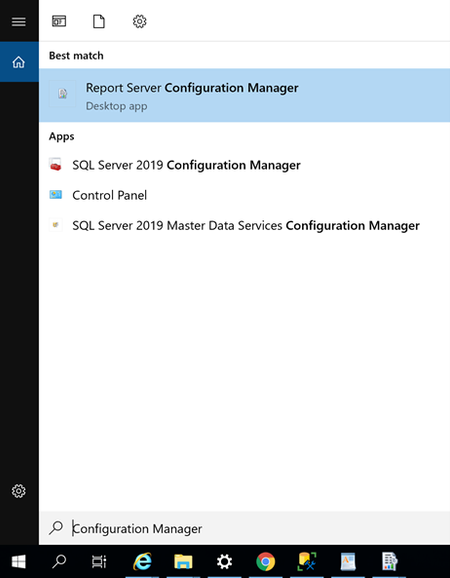
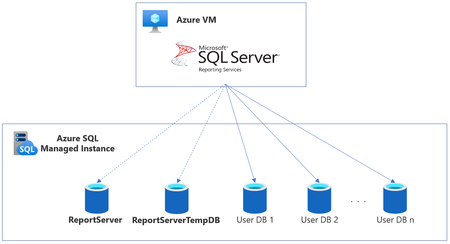
This article summarizes various options that can be taken to modernize SQL Server Reporting Services (SSRS) and then provides a detailed step-by-step guide to bringing report server databases to Azure SQL Managed Instance.59KViews8likes5CommentsChanging default MAXDOP in Azure SQL Database and Azure SQL Managed Instance
To improve customer workload performance and reduce unnecessary resource utilization, the default MAXDOP setting for new databases and managed instances in Azure SQL is changing from the previous default of 0 (unlimited) to 8.49KViews3likes8Comments
Increase data file size to improve HammerDB workload performance on General Purpose Managed Instance
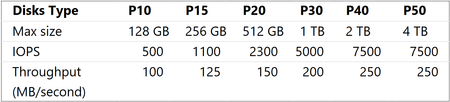
The General Purpose tier of Managed Instance uses Azure Premium Storage to store database files. In Azure Premium Storage IO performance depends on the file size. Increasing file size might be an easy way to improve your performance. In this post you will see how to increase performance of HammerDB workload from 20K transactions/minute to 100K-300K transactions/minute by increasing the database file size.46KViews3likes5CommentsStorage performance best practices and considerations for Azure SQL DB Managed Instance (General Purpose)
First published on MSDN on Jul 20, 2018 Reviewed by: Kun Cheng, Borko Novakovic, Jovan Popovic, Denzil Ribeiro, Rajesh Setlem, Arvind Shyamsundar, Branislav UzelacIn this article, we describe database storage architecture on Azure SQL Database Managed Instance (MI), for General Purpose (GP) instances specifically.45KViews2likes4CommentsMonitoring options available for Azure SQL Managed Instance
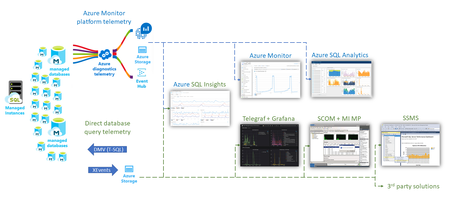
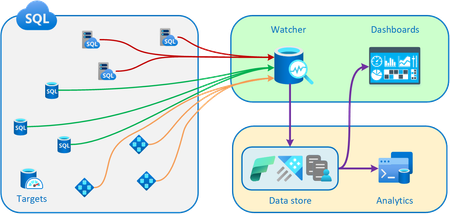
For customers in production with Azure SQL Managed Instance, to ensure business continuity you might want to consider continuously monitoring and tuning the instance performance. This article provides a single point of view describing options available to you in setting up resource, performance monitoring and alerting on your managed instance.37KViews10likes2CommentsIntroducing Azure SQL Managed Instance Next-gen GP
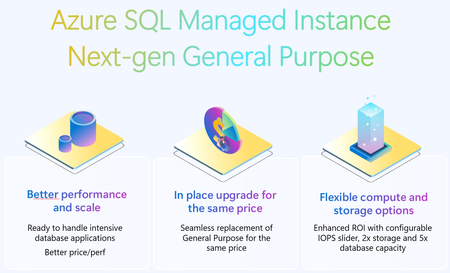
The next generation of the general purpose service tier for Azure SQL Managed Instance is a major upgrade that will considerably improve the storage performance of your instances while keeping the same price as current general purpose tier. Key improvements in the next generation of general purpose storage include support for 32 TB of storage, support for 500 DBs, lower storage latency, improved storage performance, and the ability to configure the amount of IOPS (I/O operations per second).36KViews10likes10CommentsAzure Data Studio Retirement
We’re announcing the upcoming retirement of Azure Data Studio (ADS) on February 6, 2025, as we focus on delivering a modern, streamlined SQL development experience. ADS will remain supported until February 28, 2026, giving developers ample time to transition. This decision aligns with our commitment to simplifying SQL development by consolidating efforts on Visual Studio Code (VS Code) with the MSSQL extension, a powerful and versatile tool designed for modern developers. Why Retire Azure Data Studio? Azure Data Studio has been an essential tool for SQL developers, but evolving developer needs and the rise of more versatile platforms like VS Code have made it the right time to transition. Here’s why: Focus on innovation VS Code, widely adopted across the developer community, provides a robust platform for delivering advanced features like cutting-edge schema management and improved query execution. Streamlined tools Consolidating SQL development on VS Code eliminates duplication, reduces engineering maintenance overhead, and accelerates feature delivery, ensuring developers have access to the latest innovations. Why Transition to Visual Studio Code? VS Code is the #1 developer tool, trusted by millions worldwide. It is a modern, versatile platform that meets the evolving demands of SQL and application developers. By transitioning, you gain access to cutting-edge tools, seamless workflows, and an expansive ecosystem designed to enhance productivity and innovation. We’re committed to meeting developers where they are, providing a modern SQL development experience within VS Code. Here’s how: Modern development environment VS Code is a lightweight, extensible, and community-supported code editor trusted by millions of developers. It provides: Regular updates. An active extension marketplace. A seamless cross-platform experience for Windows, macOS, and Linux. Comprehensive SQL features With the MSSQL extension in VS Code, you can: Execute queries faster with filtering, sorting, and export options for JSON, Excel, and CSV. Manage schemas visually with Table Designer, Object Explorer, and support for keys, indexes, and constraints. Connect to SQL Server, Azure SQL (all offerings), and SQL database in Fabric using an improved Connection Dialog. Streamline development with scripting, object modifications, and a unified SQL experience. Optimize performance with an enhanced Query Results Pane and execution plans. Integrate with DevOps and CI/CD pipelines using SQL Database Projects. Stay tuned for upcoming features—we’re continuously building new experiences based on feedback from the community. Make sure to follow the MSSQL repository on GitHub to stay updated and contribute to the project! Streamlined workflow VS Code supports cloud-native development, real-time collaboration, and thousands of extensions to enhance your workflows. Transitioning to Visual Studio Code: What You Need to Know We understand that transitioning tools can raise concerns, but moving from Azure Data Studio (ADS) to Visual Studio Code (VS Code) with the MSSQL extension is designed to be straightforward and hassle-free. Here’s why you can feel confident about this transition: No Loss of Functionality If you use ADS to connect to Azure SQL databases, SQL Server, or SQL database in Fabric, you’ll find that the MSSQL extension supports these scenarios seamlessly. Your database projects, queries, and scripts created in ADS are fully compatible with VS Code and can be opened without additional migration steps. Familiar features, enhanced experience VS Code provides advanced tools like improved query execution, modern schema management, and CI/CD integration. Additionally, alternative tools and extensions are available to replace ADS capabilities like SQL Server Agent and Schema Compare. Cross-Platform and extensible Like ADS, VS Code runs on Windows, macOS, and Linux, ensuring a consistent experience across operating systems. Its extensibility allows you to adapt it to your workflow with thousands of extensions. If you have further questions or need detailed guidance, visit the ADS Retirement page. The page includes step-by-step instructions, recommended alternatives, and additional resources. Continued Support With the Azure Data Studio retirement, we’re committed to supporting you during this transition: Documentation: Find detailed guides, tutorials, and FAQs on the ADS Retirement page. Community Support: Engage with the active Visual Studio Code community for tips and solutions. You can also explore forums like Stack Overflow. GitHub Issues: If you encounter any issues, submit a request or report bugs on the MSSQL extension’s GitHub repository. Microsoft Support: For critical issues, reach out to Microsoft Support directly through your account. Transitioning to VS Code opens the door to a more modern and versatile SQL development experience. We encourage you to explore the new possibilities and start your journey today! Conclusion Azure Data Studio has served the SQL community well,but the Azure Data Studio retirement marks an opportunity to embrace the modern capabilities of Visual Studio Code. Transitioning now ensures you’re equipped with cutting-edge tools and a future-ready platform to enhance your SQL development experience. For a detailed guide on ADS retirement , visit aka.ms/ads-retirement. To get started with the MSSQL extension, check out the official documentation. We’re excited to see what you build with VS Code!35KViews4likes31Comments