azure sql hyperscale
1 TopicAzure SQL Database Hyperscale - Now for any size workload
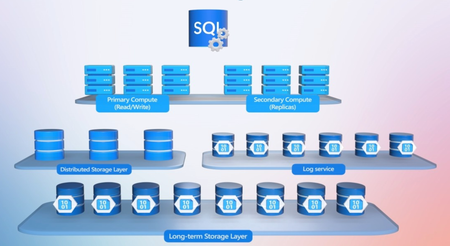
Run serverless compute that scales with demand and auto-pauses, so you stop paying for idle compute. Pool databases across tenants or business units and run cross-database joins and transactions natively. Build AI apps on the same SQL engine. Store relational data, JSON and vectors together, run hybrid vector search across more than 1 billion rows with DiskANN indexes, and move read-heavy workloads to named replicas with no data copy. Connect Foundry agents through a SQL MCP Server, control their access down to the individual cell, and turn on automatic index compaction to keep queries running at speed. Bob Ward, Principal Architect, SQL, shares how to size and deploy the right Hyperscale configuration from a single prompt with a GitHub Copilot skill in VS Code. Peak hours scale up. Quiet hours scale down. Idle hours cost nothing for compute. Serverless with auto-pause in Azure SQL Hyperscale matches spend to real usage. Watch the demo. One query. Every database in the pool. Azure SQL Hyperscale now runs cross-database joins and remote transactions natively across elastic pools. Watch it work. Fewer pages. Fewer logical reads. Faster queries. Automatic index compaction in Azure SQL Hyperscale tightens bloated indexes in the background. Watch it in action. 👥 Who it’s for: DBAs, database developers and app developers building on Azure SQL, plus solution architects planning multi-tenant, high-scale or AI-powered workloads. ⏱️ Chapters: 00:00 Run small to massive workloads on Hyperscale 00:56 How Hyperscale’s distributed layers scale independently 02:01 No separate SQL Server license required 02:37 Size and deploy with a GitHub Copilot skill 03:27 Serverless compute scales up and down 03:58 Auto-pause stops billing for idle compute 04:34 Share capacity across databases with elastic pools 06:28 Cross-database joins and remote transactions 07:15 Store relational data, JSON and vectors together 07:38 Hybrid vector search with reciprocal rank fusion 08:38 Search 1 billion+ rows in milliseconds 09:12 Offload reads to named replicas, no data copy 10:04 Build Foundry agents with a SQL MCP Server 11:07 Control agent access down to the cell 11:36 Automatic index compaction for faster queries 13:16 Try the Copilot skill and go deeper Azure SQL Database Hyperscale is a fully managed, cloud-native SQL database built on the familiar SQL Database engine. Compute, page servers, a log service and long-term Azure Storage each run as separate layers that scale independently, with storage up to 128 TB and zone redundancy for automatic failover. The name describes room to grow, not a minimum size. Hyperscale provisions in minutes, updates continuously and needs no separate SQL Server license. The demo takes a patient scheduling app from a single serverless database to a three-clinic elastic pool sharing 24 vCores. Cross-database views find open appointments across every clinic, and remote transactions keep bookings consistent end to end. On the AI side, a biomedical evidence explorer runs hybrid vector and keyword search, merges the results with reciprocal rank fusion, and then scales to 192 vCores and about 8 TB. Up to 30 named replicas share the primary’s page servers and vector index, spin up in minutes, and take search and reporting load off the primary. A research agent in the Foundry Agent Service uses a SQL MCP Server to search evidence, compare sources and write up a briefing. Automatic index compaction, which you enable with ALTER DATABASE in SSMS, uses background tasks to compact sparse index pages. The result is fewer logical reads and faster dashboards. 🔗 Related links: — Try the Azure SQL Hyperscale configuration skill at https://aka.ms/SQLHyperscaleMechanics — Get started at https://aka.ms/SQLHyperscale — Read Bob Ward’s book on Hyperscale at https://aka.ms/sqlhyperscaleunveiled Unfamiliar with Microsoft Mechanics? Microsoft’s Official Video Series for IT — Subscribe https://www.youtube.com/c/MicrosoftMechanicsSeries — Microsoft Tech Community: https://techcommunity.microsoft.com/t5/microsoft-mechanics-blog/bg-p/MicrosoftMechanicsBlog — Podcast: https://microsoftmechanics.libsyn.com/podcast Join us on social: — https://twitter.com/MSFTMechanics — https://www.linkedin.com/company/microsoft-mechanics/ — https://www.instagram.com/msftmechanics/ — https://www.tiktok.com/@msftmechanics Video Transcript: - Today we’re going to take a look at how you can run your smallest to your most demanding workloads on Azure SQL Database Hyperscale. We’re going to show you how you can start small and have your workload scale up or down automatically using serverless with auto pause where you’re also not billed for idle time. Unify different databases into an elastic pool so that you can run cross-database queries. Bring AI experiences like vector search at scale, including agent-based automation using the SQL engine and tools you already know. And take advantage of automatic index compaction to avoid having to rebuild your indexes. I’m joined today by Bob Ward. It’s great to have you back on the show. - Hey, thanks for having me back. - Thanks for coming back on. You know, SQL is always a favorite topic on Mechanics, and we’re just focusing on Azure SQL database Hyperscale today. So for anyone who’s new to it right now, what is it and what are we solving for? - So Hyperscale essentially is a cloud native SQL Database. It’s fully managed and it uses the familiar SQL Database engine. But instead of instances tied to a server or VM, it has a distributed cloud architecture. Each component is its own separate layer. At the top layer, you have your primary replica compute, and they have a special caching layer for memory efficiency. And then a separate storage layer comprising of page servers, which provide additional caching for faster data access. And a log service to host any transaction changes. And finally, there’s a long-term storage layer that uses Azure Storage, which includes snapshots of your data for faster disaster recovery at any point in time. Each layer is independently scalable and scales in or out automatically as your workload demand changes, up to 120 terabytes for storage. And Hyperscale is also zoned redundant. So if the infrastructure or an entire data center goes down, failure is automatic. And don’t be fooled by the name, Hyperscale describes the room you have to grow. It doesn’t mean you need a huge database to get started. - Right so you can start super small in scale as needed. So why don’t we clear up another common question I hear is, do I need a SQL Server license for this? - You know, you don’t. It isn’t software you purchase and maintain. It’s a cloud native service provisioned in minutes and updated continuously. - All right so where would you start then? Let’s say you’ve got a new app and you’re not sure what resources you need for that to deploy. - It’s really easy, in this case, I want to build a patient scheduling app, and there are a few options. Creating a new Hyperscale Database for Azure often starts in the portal. And I have a lot of options, I need to choose a server, backup choices, security choices, and configure things like the number of cores provisioned and secondary replicas. And if you don’t know where to start, AI can help you. We’ve built an Azure SQL Hyperscale configuration skill in GitHub Copilot that you can use inside of Visual Studio Code. In GitHub, you can see the skill gives Copilot instructions how to deploy a Hyperscale Database based on your requirements. You can get it at aka.ms/SQLHyperscaleMechanics. Now I’ve already got the skill deployed inside Visual Studio Code. I’ll paste it in a prompt detailing my requirements and submit that. That’s going to run for a moment. And you’ll see it’s recommending a serverless configuration, scaling from 1 to 8 cores with an auto pause built in by default. We can now approve the deployment. And the skill completes the action. The database has been deployed. With it running, our application can now use this Hyperscale database for patient scheduling. This is a simulation of our patient scheduling app using Hyperscale, you can see here activity of the staff signing in and out on the left and the cores being used elastically, scaling on demand on the right. As more people use the system, core count goes up and it peaks during the middle of the day as the staff use the system. Then as people start signing out, the core usage goes down, showing the power of Hyperscale not only to scale up, but also scale down based on demand. Now to save time, we’ll fast forward a few hours after usage has stopped. You can see now the database has been paused because it’s been idle for an hour. Now I’ll sign back in and resume the load on the database. And more cores are starting to get used as the staff signs in and patients get scheduled. - So when it scales down like that all the way down to zero cores, in that case, do we still have to pay for the pause and the resume? - Well, let’s look in the Azure portal. Here we can see billing that’s occurred. These are the minimums. Anything above these are periods with usage spikes. And this is really important, this is the gap where we’re not charged for the compute idle time when the database was paused. And you can see billing starts again only when the database is resumed. - And this is great when you’re scaling a single application, but what happens then, when you’re running lots of databases across different tenants or business units? - Well, that’s where pools come in. Instead of allocating resources to each database individually, you can share capacity across a group of databases to help optimize costs while still handling unpredictable demand. Let’s say we want to expand the reach of our app to two more clinics that we’ve acquired, each with their own separate Hyperscale database. We can bring all of these clinics together in a single unified system while retaining their independence using elastic pools. Now to build our elastic pool, we’re going to go back and use our skill. In Visual Studio Code, I’ll use this prompt to build our elastic pool for three databases and join them all together. I’ll submit, and that’s going to work on the configuration and deployment. And again, I’ll need to approve its recommendation. It’ll take a few minutes to run, so I’ll jump ahead to when our deployment is complete. Okay, you can see that all of our databases are online and in a pool. We are ready now to go back to our app. Let’s look at our network. Now we’ve built our pool, you can see all three databases share 8 vCores. The max is set at eight, which means that each database could take over the entire pool. So let’s go over and do some scaling operations. Let’s change our 8 shared vCores to 24, and now the max is 12 per clinic database. Let’s go test this. I’ve run some scheduling across all the clinics and you’ll see each clinic uses a different number of cores across the pool. It’s not always the same, but each is capped at 12. You can also see the database storage automatically scaling up in some cases. And the storage for Caldova Health clinic alone has automatically grown to 30 gigabytes. Now that we’re connected in a pool, patients aren’t limited to a single location. They can find openings anywhere across the network. We can even book a patient into the next available slot at a different clinic, something you just couldn’t do easily before. We went from weeks to days. In fact, what makes this possible is a new Hyperscale capability, cross-database queries. In this case, it lets us take advantage of an elastic pool, do cross-database joins, and even do transactions remote databases. Inside Caldova, the app queries a view that spans all clinic databases. That lets us join data across databases and instantly find the available appointments across the network. From there, Caldova can start a transaction that updates a remote database as a single operation. So scheduling remains consistent end-to-end. - And to be clear, this is the first time Azure SQL Database Hyperscale has supported this natively. So now, we’ve seen how developers, they can keep using the SQL experiences that they already know, but what if, for example, I want to have a new application and add AI capabilities to that? - Well, something I showed you last time I was on Mechanics has gotten even better. You can store relational data, JSON and vectors together in Azure SQL. That means applications can use vector search to find information by similarity. And we just made DiskANN based indexes available to help keep those searches fast and scale. - Okay so what would it look like then, to have Hyperscale as your backend for a search experience? - So I can show you an example of that with a simple chat agent. This is a biomedical evidence explorer built on Hyperscale. It analyzes articles that are chunked into passages and embeddings with a vector index over it all. Let’s see how this one search stays steady as the app grows. Here, I have a detailed question about sleep disruption, insulin resistance, and glucose regulation, and I’ll also filter it to peer reviewed sources only. Right now, it’ll look over around 4,000 rows, so let’s run it. Now, this isn’t just a keyword match. The meaning is what gets searched and every answer links back to its article. Each result includes the surrounding passages, so the quote reads in context. This is hybrid vector search, which finds meaning with filters applied inside that search. Keyword search, on the other hand, finds exact strings such as gene names or drug codes. This process uses both methods of search simultaneously. Then, we merge and rank the results with reciprocal rank fusion. And the timing you see here is measured inside the engine. Now, let’s assume that we want to use this same search for an extremely large database with more concurrency. That’s where Hyperscale shines. Here we scaled up to 192 vCores and it’s about 8 terabytes in size, and I can use the same vector index and the same search. The full table has now crossed over one billion rows, and the vector search part is still just taking a couple of milliseconds. - So even though it’s searching over a massive amount of data, it’s about as fast as it was before using our smaller database with 4,000 rows. But for other transactions, it’s going against my main operations database. So does that mean it will slow it down? - Well, not in this case, because we’re using name replicas. And in Hyperscale, we have a unique way for implementing replicas. While sharing the underlying storage, you’re able to give your name replicas their own database names. Microsoft just spins up compute associated with your primary and will deploy without needing to copy any data. And you can choose the core count and configuration that you want. It doesn’t need to match the primary. The name replica stays in sync with the primary’s page servers and log service, so you can redirect read heavy workloads, like vector search or reporting, to a name replica and leave the primary to handle transaction rights. Going back to our demo of vector search, this name replica is using the same page servers and the same vector index as the primary. So there’s no data copy and no second index to build. So it takes just a few minutes to spin up. I can pick the compute size I need and I have up to 30 name replicas. - So search benefits from this for sure, can it also be used for AI agents? - You know, it can. So I’ve built an agent that’s hosted in the Foundry Agent Service using our Hyperscale backend with a SQL MCP server on top of our database. Let’s try this out and we can test a prompt for our agent. This builds on our previous chat agent and expands that out for the broader reasoning, looping beyond search and uses more tools. So it’s kind of like a research investigation agent. I have my prompt ready and I’ll kick this off for investigation. The agent behind the scenes is going to automate the searching for us with that evidence. It’s going to use Hyperscale and vector search with our MCP server, then take different angles on looking at that evidence, and it compares other sources, then it’s going to synthesize together a summary or briefing of what we think we should do as the next steps, and what it found from evidence searching. You can see the results are very robust and detailed. It summarized the research as though we’ve done it ourselves, including confidence summary and suggested follow-ups. So we’re able to use Hyperscale vector search and Foundry agents to turn manual evidence searches into AI-assisted investigations. - And the agent isn’t just relying on general knowledge here, it’s actually using data from your application. But it also doesn’t mean giving it unrestricted access to your data, right? - Yeah, exactly. With SQL as a source of knowledge, you can control what the agent can access all the way down to the table, column, row, or even individual cell. - Great so now’s my favorite time to switch gears to one of our favorite topics, performance. So beyond the scaling, what else can we do and what else are we doing in the engine to improve the experience? - I got something really cool to show you, if you’ve ever struggled to obtain your indexes, we now have a new automatic index compaction option that does it for you. In this app for Caldova Regional Care, we are using this dashboard to access operations about patient appointments, patient access, and the dashboard is usually pretty fast, but it slowed down like many dashboards just do over time. It’s got an index that was automatically created but, over time, the index itself got bloated and slowed down performance. If we look at the index pages for the non-clustered index, they’re very sparse. A lot of operations, deletes and inserts have happened and have grown this index. Typically, we just rebuild the index. Let’s look at what happens when we use automatic index compaction, where existing background tasks are used to find pages that are sparse and compact them. You’ll use the alter database command, you can see here, in SSMS to enable it. Then once it’s run, and if I move back to our app, you can see it’s reduced the page count and started to make each page more dense. Now, we’ll go back to the dashboard and try out the same query with automatic index compaction on. And when I re-fetch the dashboard, it comes back very fast. If we look at Index Health one more time, we can see the current level of compaction, less pages, fewer logical reads, resulting in faster query performance. Hyperscale has this hands-free indexing with creation and compaction built in to keep your applications performant, healthy, and predictable. - And that’s a lot better than having to constantly rebuild your index. It’s really great seeing how everything’s coming together. And you can start small, you can scale your compute up and down as demand changes, and even add read capacity for new workloads, including AI. Underneath, it’s also the same SQL experience you know. So where can everyone watching right now learn more? - Well, first try it out. Use our repo that I showed you earlier with our built-in skill. You can get it at ak.ms/SQLHyperscaleMechanics. You can start with your application’s needs, use a configuration that fits, and test both performance and recovery as you grow. Check out aka.ms/SQLHyperscale to learn more. And I just wrote a book on Hyperscale that you can find at ak.ms/sqlhyperscaleunveiled - Thanks, Bob, it’s always great to have you on to see the latest on SQL. Subscribe to Microsoft Mechanics for the latest tech updates, and we’ll see you again next time.30Views0likes0Comments