azure security
51 Topics
Microsoft Sovereignty 2026: From Data Residency to Digital Control
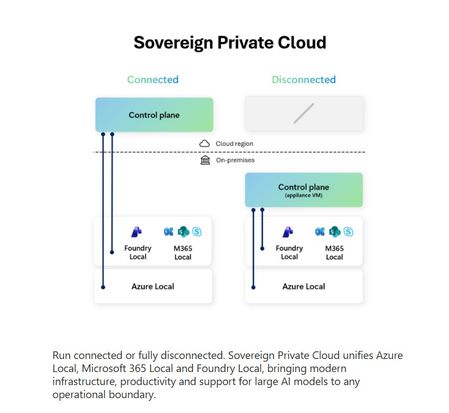
Over the past few years, data sovereignty has evolved from a compliance checkbox to a board-level priority. What began as a discussion around where data is stored has now expanded to who controls it, who operates it and under which jurisdiction it is governed. As we move into 2026, Microsoft Sovereignty is no longer just a roadmap, it is actively shaping how enterprises design cloud and AI architectures, especially across regulated industries. Why Sovereignty Matters More Than Ever Organizations today are navigating a complex landscape: Increasing regulatory mandates (GDPR, NIS2, DORA) Rising geopolitical concerns around cross-border data access Accelerated adoption of AI, copilots, and agentic systems But what’s changing in 2026 is the scale of AI adoption: 1.3B AI agents expected by 2028 82% of organizations plan to integrate AI agents within 1–3 years 90% of developers will use AI-assisted coding tools This fundamentally shifts the sovereignty discussion: It’s no longer about protecting data, it’s about governing AI-driven decisions and automation. Sovereignty in the Age of AI Agents A critical insight emerging from the field: Not all AI workloads can run in public cloud environments. Some AI scenarios require sovereignty by design, especially when: Data must remain within national jurisdiction Operational access must be restricted Systems must continue functioning during disconnection or crisis Examples include: Government AI copilots for citizen services Defense systems requiring air-gapped AI Financial services with strict regulatory oversight Healthcare workloads with sensitive patient data AI strategies must now survive regulation, disruption and disconnection not just scale. Microsoft Sovereignty: A Multi-Layered Approach Microsoft’s approach to sovereignty is not a single feature it’s a comprehensive framework spanning infrastructure, operations, security and AI. At its core, Microsoft Sovereign Cloud introduces three key deployment models: 1. Sovereign Public Cloud Regional data boundaries and in-country processing Built-in sovereign controls at hyperscale AI model choice with localized processing 2. Sovereign Private Cloud (AI-Driven Evolution) This is where sovereignty is evolving the fastest in 2026. Runs on Azure Local + Microsoft 365 Local + Foundry Local Enables continuous operations in hybrid or disconnected environments Supports AI workloads with local inferencing and GPU acceleration This is no longer traditional on-prem it is cloud-grade AI deployed locally. 3. National Partner Clouds Operated by local entities Meets country-specific certifications Bridges global cloud and national regulations Sovereign AI: From Data Control to Full Lifecycle Control The biggest shift in 2026: Sovereignty is no longer just about data it’s about the entire AI lifecycle. Sovereign AI ensures: Data stays local and under customer authority AI systems operate even without connectivity Customers control model selection (proprietary, OSS or custom) This introduces a new dimension: Model Sovereignty + Operational Sovereignty + Infrastructure Sovereignty The Rise of Foundry Local: AI From Cloud to Edge One of the most important innovations enabling this shift is Microsoft Foundry Local. Foundry Local extends AI capabilities across: Cloud Edge devices On-premises environments Fully disconnected deployments This allows organizations to: Run models locally using containers Use Arc-enabled Kubernetes for deployment Maintain consistent governance across environments AI Models Under Sovereign Control Microsoft enables multiple AI model strategies: Models-as-a-Platform (MaaP) → Customer-managed Models-as-a-Service (MaaS) → Microsoft-managed BYO Models → Full flexibility (Open-source or proprietary) This means enterprises can shift from: ❌ Vendor-dependent AI ✅ Sovereign, customer-controlled AI ecosystems Sovereign AI Deployment Patterns Two dominant patterns are emerging: 1. Hybrid Sovereign AI Develop in cloud Deploy to edge or sovereign environments Maintain flexibility 2. Fully Disconnected AI Air-gapped environments No dependency on cloud connectivity Full local processing and inference This is critical for defense, public sector and critical infrastructure. The Reality Check: What Enterprises Must Still Own While Microsoft provides the platform, sovereignty is not “set and forget.” Organizations must still: Design region-first and sovereignty-aware architectures Implement governance across hybrid and disconnected environments Manage model lifecycle and inferencing policies locally Ensure compliance with evolving regulatory frameworks Sovereignty is now an architecture decision not just a cloud feature. My Perspective (Field Insight) From working with regulated customers (BFSI, telecom, public sector), I see three clear patterns: 1. Sovereignty is now directly tied to AI adoption → Customers will not scale GenAI without sovereign guarantees 2. Hybrid + Sovereign AI is becoming the default architecture → Cloud-only strategies are no longer sufficient 3. Control of models and inferencing is the new trust boundary → Trust is shifting from infrastructure to AI execution layers Final Thoughts: Sovereignty as an AI Enabler The narrative around sovereignty is shifting: ❌ Earlier: “Sovereignty restricts innovation” ✅ Now: “Sovereignty enables trusted AI at scale” Microsoft’s Sovereign Cloud strategy reflects this evolution bringing together: Cloud-scale capabilities Local control and resilience AI lifecycle governance The opportunity ahead is clear: Design sovereign-by-default AI architectures that are secure, compliant and built for resilience whether connected, hybrid or fully disconnected.Security Copilot Agents in Defender XDR: where things actually stand
With RSAC 2026 behind us and the E5 inclusion now rolling out between April 20 and June 30, anyone planning SOC workflows or sitting on a capacity budget needs to get a clear picture of what is GA, what is preview, and what was just announced. The marketing pages tend to blur those lines. This is my sober look at the current state, with the operational details that matter for adoption decisions. What is actually shipping right now The Phishing Triage Agent is GA. It only handles user-reported phish through Defender for Office 365 P2, but for most SOCs that is a meaningful chunk of the L1 queue. Verdicts come with a natural-language rationale rather than just a label, which is the part that determines whether analysts will trust it. The agent learns from analyst confirmations and overrides, so the feedback loop matters more than the initial setup. There is a setup detail that is easy to miss: the agent will not classify alerts that have already been suppressed by alert tuning. The built-in rule "Auto-Resolve - Email reported by user as malware or phish" needs to be off, and any custom tuning rules that touch this alert type need review. If you skip this, the agent runs on an empty queue and you wonder why nothing is happening. The Threat Intelligence Briefing Agent is also GA. It produces tenant-tailored intel briefings on a regular cadence. Useful, but lower operational impact than the triage agents. Copilot Chat in Defender went GA with the April 2026 update. Conversational Q&A inside the portal, grounded in your incident and entity data. This is the lowest-risk way to get value out of Security Copilot and probably where most teams should start. Public preview, worth watching The Dynamic Threat Detection Agent is the most technically interesting one. It runs continuously in the Defender backend, correlates across Defender and Sentinel telemetry, generates its own hypotheses, and emits a dynamic alert when the evidence converges. Detection source on the alert is Security Copilot. Each alert includes the structured fields (severity, MITRE techniques, remediation) plus a narrative explaining the reasoning. For EU tenants the residency point is worth confirming with whoever owns data protection in your org: the service runs region-local, so customer data and required telemetry stay inside the designated geographic boundary. During public preview it is enabled by default for eligible customers and is free. At GA, currently targeted for late 2026, it transitions to the SCU consumption model and can be disabled. The Threat Hunting Agent is also in public preview. Natural language to KQL with guided hunting. Lower stakes, but useful for teams without deep KQL expertise on hand. Announced at RSAC, still preview Two agents got the headlines in March: The Security Alert Triage Agent extends the agentic triage approach beyond phishing into identity and cloud alerts. The longer-term direction is consolidating phishing, identity, and cloud triage under a single agent. Rollout is from April 2026, in preview. The Security Analyst Agent is the multi-step investigation agent. Deeper context across Defender and Sentinel, prioritised findings, transparent reasoning trace. Preview since March 26. Both look promising on paper, but Microsoft's history of preview features that take a long time to mature is well-documented. I would not plan production workflows around either of them yet. What you actually get with the E5 inclusion This is the licensing change most people are dealing with right now. Security Copilot has been part of the E5 product terms since January 1, 2026. Tenant rollout is phased between April 20 and June 30, 2026, with a 7-day notification before activation. The numbers: 400 SCUs per month for every 1,000 paid user licenses Capped at 10,000 SCUs per month, which you hit at around 25,000 seats Linear scaling below that, so a 3,000-seat tenant gets 1,200 SCUs per month No rollover, the pool resets monthly What is included: chat, promptbooks, agentic scenarios across Defender, Entra, Intune, Purview, and the standalone portal. Agent Builder and the Graph APIs are in. If you also run Sentinel, the included SCUs apply to Security Copilot scenarios there. What is not included: Sentinel data lake compute and storage. Those still run through Azure on the regular meters. Beyond the included pool you pay 6 USD per SCU pay-as-you-go, with 30 days notice before that mode kicks in. Practical things worth knowing before activation A few details that are easy to miss in the docs: Under System > Settings > Copilot in Defender > Preferences, switch from Auto-generate to Generate on demand. Auto-generate will burn SCUs on incidents nobody is going to look at. Generate on demand gives you direct control. In the Security Copilot portal workspace settings, check the data storage location and the data sharing toggle. Data sharing is on by default, which means Microsoft uses interaction data for product improvement. If your compliance position does not allow that, change it before agents start running. Changing it requires the Capacity Contributor role. Agent runs are not equivalent to the same number of analyst chat prompts. A triage agent processing fifty alerts in one run consumes meaningfully more SCUs than fifty manual prompts on the same data. If you have a high-volume phishing pipeline, model that out before you flip the switch broadly. The usage dashboard in the Security Copilot portal breaks down consumption by day, user, and scenario. Output quality depends on telemetry quality. Flaky connectors, gaps in log sources, or a high baseline of misconfigured alerts will produce verdicts that match. Connector health monitoring (the SentinelHealth table in Advanced Hunting is a sensible starting point) is a precondition. The agents only improve if analysts feed the override loop. If your team treats the verdicts as background noise rather than confirming or correcting them, the feedback signal is lost and calibration stays where it shipped. That is a process problem, not a product problem, but it determines whether any of this is worth the SCUs. A reasonable adoption order A rough sequence that minimises capacity surprises: Copilot Chat in Defender first. Lowest risk, immediate value through natural language Q&A in the investigation context. Phishing Triage Agent on a controlled subset, with a review cadence in place. Check the built-in tuning rules first. Watch the SCU dashboard for the first month before adding anything else. Let the Dynamic Threat Detection Agent run while it is in public preview, since it is default-on and free anyway. Compare its alerts against existing Sentinel detections. Security Alert Triage Agent for identity and cloud once the phishing baseline is stable. Establish a monthly review covering agent decisions, false-positive rate, SCU cost, and MTTD/MTTR trends. Technically, agentic triage is moving past phishing into identity and cloud, and the Dynamic Threat Detection Agent represents a genuine attempt at the false-negative problem rather than just another rule engine. Lizenziell, the E5 inclusion removes the biggest barrier to adoption that previously existed. The risk is enabling everything at once. Agents that nobody reviews are agents that consume capacity without delivering value, and the SCU dashboard is the only thing that will tell you that is happening. One agent, one use case, a 30-day baseline, then the next one. The order matters more than the speed.Designing Outbound Connectivity for "Private Subnets" in Azure
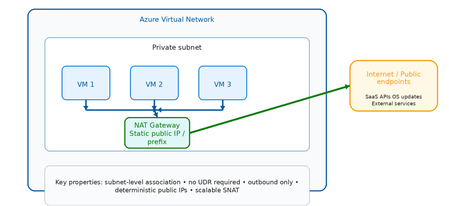
Why Private Subnets Change Everything Historically, Azure virtual machines relied on default outbound internet access, where the platform automatically assigned a dynamic SNAT IP from a shared pool. This was convenient but problematic: ❌ No deterministic outbound IP addresses ❌ No traffic inspection or filtering ❌ No FQDN or URL governance ❌ Difficult to audit for compliance ❌ Susceptible to noisy neighbor SNAT exhaustion With private subnets, outbound access is disabled by default. This shifts the responsibility to the architect — deliberately. The result is an environment where: ✅ Every outbound flow is intentional ✅ Every outbound IP is known and documented ✅ Every egress path can be governed and logged ✅ Compliance evidence is straightforward to produce The question is no longer "does my VM have internet access?" but rather "how exactly does my VM reach the internet, and is that path appropriate for this workload?" The Three Outbound Patterns at a Glance Option Primary Role Inspection Scale Cost Best For NAT Gateway Managed outbound SNAT ❌ None ⭐⭐⭐ High 💲 Low Simple, scalable egress Azure Firewall Secure governed egress ✅ Full L3–L7 ⭐⭐⭐ High 💲💲💲 Higher Security boundaries Load Balancer Legacy SNAT ❌ None ⭐⭐ Limited 💲 Low Legacy / transitional Scenario 1: NAT Gateway What is NAT Gateway? Azure NAT Gateway is a fully managed, zone‑resilient, outbound‑only SNAT service. It attaches at the subnet level and automatically handles all outbound flows from that subnet using one or more static public IP addresses or prefixes. It is purpose‑built for one thing: providing predictable, scalable outbound internet access — without routing complexity or inline devices. Key flow are depicted below: VM → NAT Gateway: Automatic SNAT (no UDR required) NAT Gateway → Internet: Static, deterministic public IP Inbound: NOT supported (outbound only) How it works (step by step) VM initiates an outbound connection (e.g., HTTPS to an API) NAT Gateway intercepts the flow at the subnet boundary Source IP is translated to the NAT Gateway's static public IP The packet is forwarded to the internet Return traffic is automatically tracked and delivered back to the VM No UDRs. No routing tables. No inline devices. It just works. Strengths Massive SNAT scale — no port exhaustion concerns at typical enterprise scale Deterministic outbound IPs — easy to allowlist with external services Zone resilient — survives availability zone failures Subnet scoped — applies to all VMs in the subnet automatically No routing configuration required Limitations ❌ No traffic inspection or filtering ❌ No FQDN or URL policy enforcement ❌ No threat intelligence integration ❌ Cannot restrict which internet destinations are allowed Best Fit Use Cases ✅ Application tiers calling external SaaS APIs ✅ VMs requiring OS updates and patch downloads ✅ CI/CD build agents and pipeline runners ✅ Spoke VNets in hub‑and‑spoke where east‑west goes through firewall, but simple internet egress is acceptable ✅ Dev/test environments Scenario 2: Azure Firewall What is Azure Firewall? Azure Firewall is a cloud‑native, stateful, L3–L7 network security service. When used for outbound egress, it transforms the egress path from a connectivity function into a security enforcement boundary. Unlike NAT Gateway, Azure Firewall inspects every packet, evaluates it against policy, and either allows or denies it based on network rules, application rules, and threat intelligence feeds. KEY Flow are depicted below: VM → UDR: Forces ALL outbound traffic to Firewall Firewall: Evaluates against policy before allowing Firewall → Internet: Only explicitly permitted flows pass All denied flows: Logged and alertable How it works (step by step) VM initiates an outbound connection UDR intercepts the flow and redirects to Azure Firewall's private IP Azure Firewall evaluates the traffic: Network rules (IP/port match) Application rules (FQDN/URL match) Threat intelligence (known malicious IPs/domains) If allowed: traffic is forwarded via Firewall's public IP If denied: traffic is dropped and logged All flows (allowed and denied) are logged to Log Analytics / Sentinel Strengths ✅ Full L3–L7 inspection ✅ FQDN and URL‑based filtering (application rules) ✅ Threat intelligence integration (Microsoft TI feed) ✅ TLS inspection (Premium SKU) ✅ Centralized governance across multiple VNets via Firewall Manager ✅ Rich logging — every allowed and denied flow is recorded ✅ IDPS (Intrusion Detection and Prevention) available in Premium Limitations ❌ Higher cost (hourly + data processing charges) ❌ Requires UDR configuration on each spoke subnet ❌ Adds latency (small but non‑zero) ❌ Requires careful SNAT configuration at scale Best Fit Use Cases ✅ Regulated industries (financial services, healthcare, government) ✅ Any workload where outbound internet is a security boundary ✅ Environments requiring egress allowlisting for compliance ✅ Hub‑and‑spoke architectures with centralized control plane ✅ SOC environments needing outbound flow telemetry Scenario 3: Load Balancer Outbound What is Load Balancer Outbound? Azure Load Balancer outbound rules were historically the primary mechanism for providing SNAT to VMs behind a Standard Load Balancer. While newer patterns (NAT Gateway, Azure Firewall) have largely replaced this approach for new designs, outbound rules remain valid in specific scenarios. Key flows are depicted below: VMs → Load Balancer: Backend pool members get SNAT LB Outbound Rules: Define port allocation per VM ⚠️ Port exhaustion risk at scale ⚠️ No inspection or policy enforcement How it works (step by step) VM in the backend pool initiates an outbound connection Load Balancer applies SNAT using the frontend public IP Ephemeral ports are allocated per VM from a fixed pool Return traffic is tracked and delivered back to the correct VM If port pool is exhausted: connections fail (SNAT exhaustion) Strengths Lower cost than NAT Gateway or Firewall Tightly integrated with existing load‑balanced workloads Familiar operational model for legacy teams Limitations ❌ SNAT port pool is fixed and must be manually managed ❌ Risk of SNAT exhaustion at scale ❌ No traffic inspection ❌ Less flexible than NAT Gateway ❌ Not recommended for new designs Best Fit Use Cases ✅ Existing architectures already built around Azure Load Balancer ✅ Low outbound connection volume workloads ✅ Transitional architectures during modernization to NAT Gateway Decision Framework: Choosing the Right Outbound Pattern Common Pitfalls to Avoid ⚠️ Pitfall 1: Forgetting SNAT scale limits Load Balancer outbound rules allocate a fixed number of ephemeral ports per VM. At scale this exhausts quickly. Use NAT Gateway instead. ⚠️ Pitfall 2: Over‑securing low‑risk workloads Not every workload needs Azure Firewall for outbound. Dev/test and patch traffic are better served by NAT Gateway — simpler, cheaper, faster. ⚠️ Pitfall 3: Mixing outbound models in the same subnet NAT Gateway and Load Balancer outbound rules cannot coexist on the same subnet. NAT Gateway always takes precedence. Plan your subnet boundaries carefully. ⚠️ Pitfall 4: Blocking Azure platform dependencies Many Azure services still use public endpoints (even when Private Link is available). Ensure your outbound policy allows required Azure service tags before enforcing egress controls. ⚠️ Pitfall 5: Relying on platform defaults Default outbound access is retired for new VNets. Do not assume VMs can reach the internet without explicit configuration. Summary and Key Takeaways Scenario Best Choice Why Simple internet egress at scale NAT Gateway Scalable, predictable, no complexity Security boundary for egress Azure Firewall Inspection, FQDN rules, threat intel Legacy load‑balanced workloads Load Balancer Outbound Transitional only Regulated / compliance environments Azure Firewall Audit logs, policy enforcement Dev / test / patch traffic NAT Gateway Low cost, low friction The core principle Private subnets make outbound access intentional. Choose the outbound pattern that matches the risk level of the workload — not the most complex option available. References https://learn.microsoft.com/azure/nat-gateway/nat-overview https://learn.microsoft.com/azure/firewall/overview https://learn.microsoft.com/azure/load-balancer/outbound-rules https://azure.microsoft.com/blog/default-outbound-access-for-vms-in-azure-will-be-retiredSave the date - January 26, 2026 - AMA: Best practices for applying Zero Trust using Intune
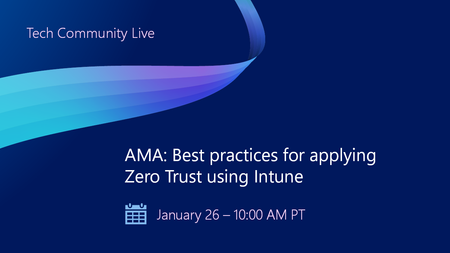
Join us on January 26 at 10:00 AM PT, to Ask Microsoft Anything (AMA) and get the answers you need to implement the right policies, security settings, device configurations, and more. Never trust, always verify. Tune in for tips and insights to help you secure your endpoints using Microsoft Intune as part of your larger Zero Trust strategy. Find out how you can use Intune to protect both access and data on organization-owned devices and personal devices used for work. Go to aka.ms/AMA/IntuneZeroTrust and select "attend" to add this event to your calendar. Have questions? Submit them early by signing in to Tech Community and posting them on the event page!Azure Cloud HSM: Secure, Compliant & Ready for Enterprise Migration
Azure Cloud HSM is Microsoft’s single-tenant, FIPS 140-3 Level 3 validated hardware security module service, designed for organizations that need full administrative control over cryptographic keys in the cloud. It’s ideal for migration scenarios, especially when moving on-premises HSM workloads to Azure with minimal application changes. Onboarding & Availability No Registration or Allowlist Needed: Azure Cloud HSM is accessible to all customers no special onboarding or monetary policy required. Regional Availability: Private Preview: UK West Public Preview (March 2025): East US, West US, West Europe, North Europe, UK West General Availability (June 2025): All public, US Gov, and AGC regions where Azure Managed HSM is available Choosing the Right Azure HSM Solution Azure offers several key management options: Azure Key Vault (Standard/Premium) Azure Managed HSM Azure Payment HSM Azure Cloud HSM Cloud HSM is best for: Migrating existing on-premises HSM workloads to Azure Applications running in Azure VMs or Web Apps that require direct HSM integration Shrink-wrapped software in IaaS models supporting HSM key stores Common Use Cases: ADCS (Active Directory Certificate Services) SSL/TLS offload for Nginx and Apache Document and code signing Java apps needing JCE provider SQL Server TDE (IaaS) via EKM Oracle TDE Deployment Best Practices 1. Resource Group Strategy Deploy the Cloud HSM resource in a dedicated resource group (e.g., CHSM-SERVER-RG). Deploy client resources (VM, VNET, Private DNS Zone, Private Endpoint) in a separate group (e.g., CHSM-CLIENT-RG) 2. Domain Name Reuse Policy Each Cloud HSM requires a unique domain name, constructed from the resource name and a deterministic hash. Four reuse types: Tenant, Subscription, ResourceGroup, and NoReuse choose based on your naming and recovery needs. 3. Step-by-Step Deployment Provision Cloud HSM: Use Azure Portal, PowerShell, or CLI. Provisioning takes ~10 minutes. Register Resource Provider: (Register-AzResourceProvider -ProviderNamespace Microsoft.HardwareSecurityModules) Create VNET & Private DNS Zone: Set up networking in the client resource group. Create Private Endpoint: Connect the HSM to your VNET for secure, private access. Deploy Admin VM: Use a supported OS (Windows Server, Ubuntu, RHEL, CBL Mariner) and download the Azure Cloud HSM SDK from GitHub. Initialize and Configure Edit azcloudhsm_resource.cfg: Set the hostname to the private link FQDN for hsm1 (found in the Private Endpoint DNS config). Initialize Cluster: Use the management utility (azcloudhsm_mgmt_util) to connect to server 0 and complete initialization. Partition Owner Key Management: Generate the PO key securely (preferably offline). Store PO.key on encrypted USB in a physical safe. Sign the partition cert and upload it to the HSM. Promote Roles: Promote Precrypto Officer (PRECO) to Crypto Officer (CO) and set strong password Security, Compliance, and Operations Single-Tenant Isolation: Only your organization has admin access to your HSM cluster. No Microsoft Access: Microsoft cannot access your keys or credentials. FIPS 140-3 Level 3 Compliance: All hardware and firmware are validated and maintained by Microsoft and the HSM vendor. Tamper Protection: Physical and logical tamper events trigger key zeroization. No Free Tier: Billing starts upon provisioning and includes all three HSM nodes in the cluster. No Key Sharing with Azure Services: Cloud HSM is not integrated with other Azure services for key usage. Operational Tips Credential Management: Store PO.key offline; use environment variables or Azure Key Vault for operational credentials. Rotate credentials regularly and document all procedures. Backup & Recovery: Backups are automatic and encrypted; always confirm backup/restore after initialization. Support: All support is through Microsoft open a support request for any issues. Azure Cloud HSM vs. Azure Managed HSM Feature / Aspect Azure Cloud HSM Azure Managed HSM Deployment Model Single-tenant, dedicated HSM cluster (Marvell LiquidSecurity hardware) Multi-tenant, fully managed HSM service FIPS Certification FIPS 140-3 Level 3 FIPS 140-2 Level 3 Administrative Control Full admin control (Partition Owner, Crypto Officer, Crypto User roles) Azure manages HSM lifecycle; customers manage keys and RBAC Key Management Customer-managed keys and partitions; direct HSM access Azure-managed HSM; customer-managed keys via Azure APIs Integration PKCS#11, OpenSSL, JCE, KSP/CNG, direct SDK access Azure REST APIs, Azure CLI, PowerShell, Key Vault SDKs Use Cases Migration from on-prem HSMs, legacy apps, custom PKI, direct cryptographic ops Cloud-native apps, SaaS, PaaS, Azure-integrated workloads Network Access Private VNET only; not accessible by other Azure services Accessible by Azure services (e.g., Storage, SQL, Disk Encryption) Key Usage by Azure Services Not supported (no integration with Azure services) Supported (can be used for disk, storage, SQL encryption, etc.) BYOK/Key Import Supported (with key wrap methods) Supported (with Azure Key Vault import tools) Key Export Supported (if enabled at key creation) Supported (with exportable keys) Billing Hourly fee per cluster (3 HSMs per cluster); always-on Consumption-based (per operation, per key, per hour) Availability High availability via 3-node cluster; automatic failover and backup Geo-redundant, managed by Azure Firmware Management Microsoft manages firmware; customer cannot update Fully managed by Azure Compliance Meets strictest compliance (FIPS 140-3 Level 3, single-tenant isolation) Meets broad compliance (FIPS 140-2 Level 3, multi-tenant isolation) Best For Enterprises migrating on-prem HSM workloads, custom/legacy integration needs Cloud-native workloads, Azure service integration, simplified management When to Choose Each? Azure Cloud HSM is ideal if you: Need full administrative control and single-tenant isolation. Are migrating existing on-premises HSM workloads to Azure. Require direct HSM access for legacy or custom applications. Need to meet the highest compliance standards (FIPS 140-3 Level 3). Azure Managed HSM is best if you: Want a fully managed, cloud-native HSM experience. Need seamless integration with Azure services (Storage, SQL, Disk Encryption, etc.). Prefer simplified key management with Azure RBAC and APIs. Are building new applications or SaaS/PaaS solutions in Azure. Scenario Recommended Solution Migrating on-prem HSM to Azure Azure Cloud HSM Cloud-native app needing Azure service keys Azure Managed HSM Custom PKI or direct cryptographic operations Azure Cloud HSM SaaS/PaaS with Azure integration Azure Managed HSM Highest compliance, single-tenant isolation Azure Cloud HSM Simplified management, multi-tenant Azure Managed HSM Azure Cloud HSM is the go-to solution for organizations migrating HSM-backed workloads to Azure, offering robust security, compliance, and operational flexibility. By following best practices for onboarding, deployment, and credential management, you can ensure a smooth and secure transition to the cloud.Enterprise Strategy for Secure Agentic AI: From Compliance to Implementation
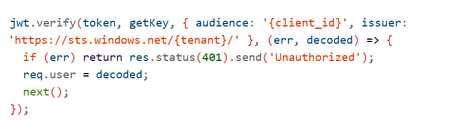
Imagine an AI system that doesn’t just answer questions but takes action querying your databases, updating records, triggering workflows, even processing refunds without human intervention. That’s Agentic AI and it’s here. But with great power comes great responsibility. This autonomy introduces new attack surfaces and regulatory obligations. The Model Context Protocol (MCP) Server the gateway between your AI agent and critical systems becomes your Tier-0 control point. If it fails, the blast radius is enormous. This is the story of how enterprises can secure Agentic AI, stay compliant and implement Zero Trust architectures using Azure AI Foundry. Think of it as a roadmap a journey with three milestones - Milestone 1: Securing the Foundation Our journey starts with understanding the paradigm shift. Traditional AI with RAG (Retrieval-Augmented Generation) is like a librarian: It retrieves pre-indexed data. It summarizes information. It never changes the books or places orders. Security here is simple: protect the index, validate queries, prevent data leaks. But Agentic AI? It’s a staffer with system access. It can: Execute tools and business logic autonomously. Chain operations: read → analyze → write → notify. Modify data and trigger workflows. Bottom line: RAG is a “smart librarian.” Agentic AI is a “staffer with system access.” Treat the security model accordingly. And that means new risks: unauthorized access, privilege escalation, financial impact, data corruption. So what’s the defense? Ten critical security controls your first line of protection: Here’s what a production‑grade, Zero Trust MCP gateway needs. Its intentionally simplified in the demo (e.g., no auth) to highlight where you must harden in production. (https://github.com/davisanc/ai-foundry-mcp-gateway) Authentication Demo: None Prod: Microsoft Entra ID, JWT validation, Managed Identity, automatic credential rotation Authorization & RBAC Demo: None Prod: Tool‑level RBAC via Entra; least privilege; explicit allow‑lists per agent/capability Input Validation Demo: Basic (ext whitelist, 10MB, filename sanitize) Prod: JSON Schema validation, injection guards (SQL/command), business‑rule checks Rate Limiting Demo: None Prod: Multi‑tier (per‑agent, per‑tool, global), adaptive throttling, backoff Audit Logging Demo: Console → App Service logs Prod: Structured logs w/ correlation IDs, compliance metadata, PII redaction Session Management Demo: In‑memory UUID sessions Prod: Encrypted distributed storage (Redis/Cosmos DB), tenant isolation, expirations File Upload Security Demo: Ext whitelist, size limits, memory‑only Prod: 7‑layer defense (validate, MIME, malware scanning via Defender for Storage), encryption at rest, signed URLs Network Security Demo: Public App Service + HTTPS Prod: Private Endpoints, VNet integration, NSGs, Azure Firewall no public exposure Secrets Management Demo: App Service env vars (not in code) Prod: Azure Key Vault + Managed Identity, rotation, access audit Observability & Threat Detection (5‑Layer Stack) Layer 1: Application Insights (requests, dependencies, custom security events) Layer 2: Azure AI Content Safety (harmful content, jailbreaks) Layer 3: Microsoft Defender for AI (prompt injection incl. ASCII smuggling, credential theft, anomalous tool usage) Layer 4: Microsoft Purview for AI (PII/PHI classification, DLP on outputs, lineage, policy) Layer 5: Microsoft Sentinel (SIEM correlation, custom rules, automated response) Note: Azure AI Content Safety is built into Azure AI Foundry for real‑time filtering on both prompts and completions. Picture this as an airport security model: multiple checkpoints, each catching what the previous missed. That’s defense-in-depth. Zero Trust in Practice ~ A Day in the Life of a Prompt Every agent request passes through 8 sequential checkpoints, mapped to MITRE ATLAS tactics/mitigations (e.g., AML.M0011 Input Validation, AML.M0004 Output Filtering, AML.M0015 Adversarial Input Detection). The design goal is defense‑in‑depth: multiple independent controls, different detection signals, and layered failure modes. Checkpoints 1‑7: Enforcement (deny/contain before business systems) Checkpoint 8: Monitoring (detect/respond, hunt, learn, harden) AML.M0009 – Control Access to ML Models AML.M0011 – Validate ML Model Inputs AML.M0000 – Limit ML Model Availability AML.M0014 – ML Artifact Logging AML.M0004 – Output Filtering AML.M0015 – Adversarial Input Detection If one control slips, the others still stand. Resilience is the product of layers. Milestone 2: Navigating Compliance Next stop: regulatory readiness. The EU AI Act is the world’s first comprehensive AI law. If your AI system operates in or impacts the EU market, compliance isn’t optional, it’s mandatory. Agentic AI often falls under high-risk classification. That means: Risk management systems. Technical documentation. Logging and traceability. Transparency and human oversight. Fail to comply? Fines up to €30M or 6% of global turnover. Azure helps you meet these obligations: Entra ID for identity and RBAC. Purview for data classification and DLP. Defender for AI for prompt injection detection. Content Safety for harmful content filtering. Sentinel for SIEM correlation and incident response. And this isn’t just about today. Future regulations are coming US AI Executive Orders, UK AI Roadmap, ISO/IEC 42001 standards. The trend is clear: transparency, explainability, and continuous monitoring will be universal. Milestone 3: Implementation Deep-Dive Now, the hands-on part. How do you build this strategy into reality? Step 1: Entra ID Authentication Register your MCP app in Entra ID. Configure OAuth2 and JWT validation. Enable Managed Identity for downstream resources. Step 2: Apply the 10 Controls RBAC: Tool-level access checks. Validation: JSON schema + injection prevention. Rate Limiting: Express middleware or Azure API Management. Audit Logging: Structured logs with correlation IDs. Session Mgmt: Redis with encryption. File Security: MIME checks + Defender for Storage. Network: Private Endpoints + VNet. Secrets: Azure Key Vault. Observability: App Insights + Defender for AI + Purview + Sentinel. Step 3: Secure CI/CD Pipelines Embed compliance checks in Azure DevOps: Pre-build: Secret scanning. Build: RBAC & validation tests. Deploy: Managed Identity for service connections. Post-deploy: Compliance scans via Azure Policy. Step 4: Build the 5-Layer Observability Stack App Insights → Telemetry. Content Safety → Harmful content detection. Defender for AI → Prompt injection monitoring. Purview → PII/PHI classification and lineage. Sentinel → SIEM correlation and automated response. The Destination: A Secure, Compliant Future By now, you’ve seen the full roadmap: Secure the foundation with Zero Trust and layered controls. Navigate compliance with EU AI Act and prepare for global regulations. Implement the strategy using Azure-native tools and CI/CD best practices. Because in the world of Agentic AI, security isn’t optional, compliance isn’t negotiable, and observability is your lifeline. Resources https://learn.microsoft.com/en-us/azure/ai-foundry/what-is-azure-ai-foundry https://learn.microsoft.com/en-us/azure/defender-for-cloud/ai-threat-protection https://learn.microsoft.com/en-us/purview/ai-microsoft-purview https://atlas.mitre.org/ https://digital-strategy.ec.europa.eu/en/policies/european-approach-artificial-intelligence https://techcommunity.microsoft.com/blog/microsoft-security-blog/microsoft-sentinel-mcp-server---generally-available-with-exciting-new-capabiliti/4470125
Global Administrator MFA recovery not possible
Since Microsoft automatically enforced MFA on administrator role in Azure you can end up in the situation where it is no longer possible to recover your tenant. If your only account on that tenant is with Global Administrator role and you accidentally loose your MFA, the only way is to call Microsoft support. Support on the phone is automated where any question regarding Azure is redirected to visit Azure portal. If your only user cannot login then Azure portal is not accessible.Anomalies with Conditional Access Policy "Terms of Use" Failures
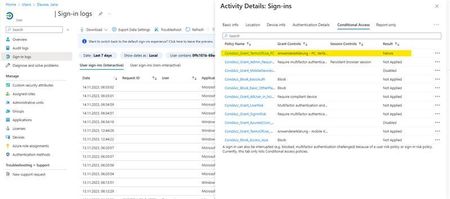
Hello Microsoft Community, I'm reaching out with a bit of a puzzle regarding our "Terms of Use" Conditional Access policy, and I'm eager to tap into the collective wisdom here for some insights. In our Entra ID User Sign-In logs, we've identified intermittent "failure" entries associated with the "Terms of Use" Conditional Access policy. Interestingly, even for users who had previously accepted the "Terms of Use". There appears to be no discernible impact, and they continue their tasks without interruption. This observation became apparent during the troubleshooting of unrelated Surface Hub and Edge Sync issues at some client sites. What adds to the complexity of the situation is that for the same users, both before and after these "failure" entries, the Conditional Access policy is marked as "success". Hence, it doesn't seem to be a straightforward case of the policy erroneously detecting non-acceptance of the "Terms of Use". The mystery lies in understanding why these intermittent "failure" entries occur for users who have already accepted the terms, especially when the policy consistently reports "success" for the same users. Furthermore, the Insights for the "Terms of Use" Conditional Access policy show around 1.48k successes and 1.43k failures in the last 90 days, yet there's no discernible impact on user functionality. Observations: "Failure" entries in Sign-In logs don't seem to disrupt users' day-to-day activities. The ratio of successes to failures is balanced, yet users experience no noticeable problems. The issue complicates troubleshooting efforts but doesn't significantly affect the user experience. I'm turning to the community for guidance on interpreting and resolving this discrepancy between "failure" entries in the Conditional Access policy logs and the seemingly unaffected user experience. Any insights into why these failures occur without user impact would be greatly appreciated. For additional context, I've attached screenshots of a user's Sign-In log entry and the insight chart from the Conditional Access policy. Sign-In log of a user (failure): Sign-In log of same user (success): Current Conditional Access insights: Thank you in advance for your time and assistance. I look forward to any guidance or solutions you can provide. Best regards, Leon Tüpker