azure security
1 Topic
Designing Outbound Connectivity for "Private Subnets" in Azure
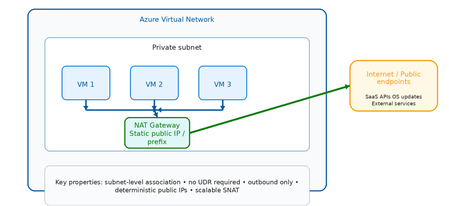
Why Private Subnets Change Everything Historically, Azure virtual machines relied on default outbound internet access, where the platform automatically assigned a dynamic SNAT IP from a shared pool. This was convenient but problematic: ❌ No deterministic outbound IP addresses ❌ No traffic inspection or filtering ❌ No FQDN or URL governance ❌ Difficult to audit for compliance ❌ Susceptible to noisy neighbor SNAT exhaustion With private subnets, outbound access is disabled by default. This shifts the responsibility to the architect — deliberately. The result is an environment where: ✅ Every outbound flow is intentional ✅ Every outbound IP is known and documented ✅ Every egress path can be governed and logged ✅ Compliance evidence is straightforward to produce The question is no longer "does my VM have internet access?" but rather "how exactly does my VM reach the internet, and is that path appropriate for this workload?" The Three Outbound Patterns at a Glance Option Primary Role Inspection Scale Cost Best For NAT Gateway Managed outbound SNAT ❌ None ⭐⭐⭐ High 💲 Low Simple, scalable egress Azure Firewall Secure governed egress ✅ Full L3–L7 ⭐⭐⭐ High 💲💲💲 Higher Security boundaries Load Balancer Legacy SNAT ❌ None ⭐⭐ Limited 💲 Low Legacy / transitional Scenario 1: NAT Gateway What is NAT Gateway? Azure NAT Gateway is a fully managed, zone‑resilient, outbound‑only SNAT service. It attaches at the subnet level and automatically handles all outbound flows from that subnet using one or more static public IP addresses or prefixes. It is purpose‑built for one thing: providing predictable, scalable outbound internet access — without routing complexity or inline devices. Key flow are depicted below: VM → NAT Gateway: Automatic SNAT (no UDR required) NAT Gateway → Internet: Static, deterministic public IP Inbound: NOT supported (outbound only) How it works (step by step) VM initiates an outbound connection (e.g., HTTPS to an API) NAT Gateway intercepts the flow at the subnet boundary Source IP is translated to the NAT Gateway's static public IP The packet is forwarded to the internet Return traffic is automatically tracked and delivered back to the VM No UDRs. No routing tables. No inline devices. It just works. Strengths Massive SNAT scale — no port exhaustion concerns at typical enterprise scale Deterministic outbound IPs — easy to allowlist with external services Zone resilient — survives availability zone failures Subnet scoped — applies to all VMs in the subnet automatically No routing configuration required Limitations ❌ No traffic inspection or filtering ❌ No FQDN or URL policy enforcement ❌ No threat intelligence integration ❌ Cannot restrict which internet destinations are allowed Best Fit Use Cases ✅ Application tiers calling external SaaS APIs ✅ VMs requiring OS updates and patch downloads ✅ CI/CD build agents and pipeline runners ✅ Spoke VNets in hub‑and‑spoke where east‑west goes through firewall, but simple internet egress is acceptable ✅ Dev/test environments Scenario 2: Azure Firewall What is Azure Firewall? Azure Firewall is a cloud‑native, stateful, L3–L7 network security service. When used for outbound egress, it transforms the egress path from a connectivity function into a security enforcement boundary. Unlike NAT Gateway, Azure Firewall inspects every packet, evaluates it against policy, and either allows or denies it based on network rules, application rules, and threat intelligence feeds. KEY Flow are depicted below: VM → UDR: Forces ALL outbound traffic to Firewall Firewall: Evaluates against policy before allowing Firewall → Internet: Only explicitly permitted flows pass All denied flows: Logged and alertable How it works (step by step) VM initiates an outbound connection UDR intercepts the flow and redirects to Azure Firewall's private IP Azure Firewall evaluates the traffic: Network rules (IP/port match) Application rules (FQDN/URL match) Threat intelligence (known malicious IPs/domains) If allowed: traffic is forwarded via Firewall's public IP If denied: traffic is dropped and logged All flows (allowed and denied) are logged to Log Analytics / Sentinel Strengths ✅ Full L3–L7 inspection ✅ FQDN and URL‑based filtering (application rules) ✅ Threat intelligence integration (Microsoft TI feed) ✅ TLS inspection (Premium SKU) ✅ Centralized governance across multiple VNets via Firewall Manager ✅ Rich logging — every allowed and denied flow is recorded ✅ IDPS (Intrusion Detection and Prevention) available in Premium Limitations ❌ Higher cost (hourly + data processing charges) ❌ Requires UDR configuration on each spoke subnet ❌ Adds latency (small but non‑zero) ❌ Requires careful SNAT configuration at scale Best Fit Use Cases ✅ Regulated industries (financial services, healthcare, government) ✅ Any workload where outbound internet is a security boundary ✅ Environments requiring egress allowlisting for compliance ✅ Hub‑and‑spoke architectures with centralized control plane ✅ SOC environments needing outbound flow telemetry Scenario 3: Load Balancer Outbound What is Load Balancer Outbound? Azure Load Balancer outbound rules were historically the primary mechanism for providing SNAT to VMs behind a Standard Load Balancer. While newer patterns (NAT Gateway, Azure Firewall) have largely replaced this approach for new designs, outbound rules remain valid in specific scenarios. Key flows are depicted below: VMs → Load Balancer: Backend pool members get SNAT LB Outbound Rules: Define port allocation per VM ⚠️ Port exhaustion risk at scale ⚠️ No inspection or policy enforcement How it works (step by step) VM in the backend pool initiates an outbound connection Load Balancer applies SNAT using the frontend public IP Ephemeral ports are allocated per VM from a fixed pool Return traffic is tracked and delivered back to the correct VM If port pool is exhausted: connections fail (SNAT exhaustion) Strengths Lower cost than NAT Gateway or Firewall Tightly integrated with existing load‑balanced workloads Familiar operational model for legacy teams Limitations ❌ SNAT port pool is fixed and must be manually managed ❌ Risk of SNAT exhaustion at scale ❌ No traffic inspection ❌ Less flexible than NAT Gateway ❌ Not recommended for new designs Best Fit Use Cases ✅ Existing architectures already built around Azure Load Balancer ✅ Low outbound connection volume workloads ✅ Transitional architectures during modernization to NAT Gateway Decision Framework: Choosing the Right Outbound Pattern Common Pitfalls to Avoid ⚠️ Pitfall 1: Forgetting SNAT scale limits Load Balancer outbound rules allocate a fixed number of ephemeral ports per VM. At scale this exhausts quickly. Use NAT Gateway instead. ⚠️ Pitfall 2: Over‑securing low‑risk workloads Not every workload needs Azure Firewall for outbound. Dev/test and patch traffic are better served by NAT Gateway — simpler, cheaper, faster. ⚠️ Pitfall 3: Mixing outbound models in the same subnet NAT Gateway and Load Balancer outbound rules cannot coexist on the same subnet. NAT Gateway always takes precedence. Plan your subnet boundaries carefully. ⚠️ Pitfall 4: Blocking Azure platform dependencies Many Azure services still use public endpoints (even when Private Link is available). Ensure your outbound policy allows required Azure service tags before enforcing egress controls. ⚠️ Pitfall 5: Relying on platform defaults Default outbound access is retired for new VNets. Do not assume VMs can reach the internet without explicit configuration. Summary and Key Takeaways Scenario Best Choice Why Simple internet egress at scale NAT Gateway Scalable, predictable, no complexity Security boundary for egress Azure Firewall Inspection, FQDN rules, threat intel Legacy load‑balanced workloads Load Balancer Outbound Transitional only Regulated / compliance environments Azure Firewall Audit logs, policy enforcement Dev / test / patch traffic NAT Gateway Low cost, low friction The core principle Private subnets make outbound access intentional. Choose the outbound pattern that matches the risk level of the workload — not the most complex option available. References https://learn.microsoft.com/azure/nat-gateway/nat-overview https://learn.microsoft.com/azure/firewall/overview https://learn.microsoft.com/azure/load-balancer/outbound-rules https://azure.microsoft.com/blog/default-outbound-access-for-vms-in-azure-will-be-retired