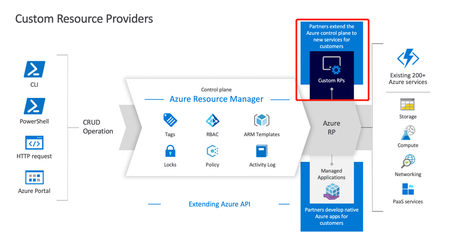
azure resource manager
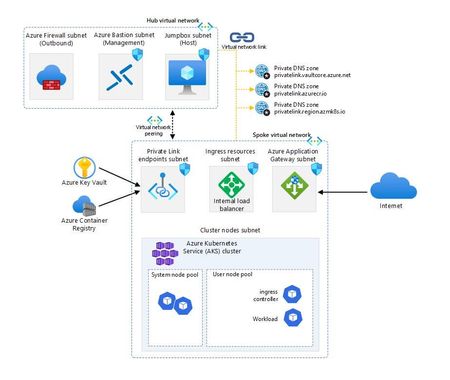
40 TopicsAzure Kubernetes Service Baseline - The Hard Way
Are you ready to tackle Kubernetes on Azure like a pro? Embark on the “AKS Baseline - The Hard Way” and prepare for a journey that’s likely to be a mix of command line, detective work and revelations. This is a serious endeavour that will equip you with deep insights and substantial knowledge. As you navigate through the intricacies of Azure, you’ll not only face challenges but also accumulate a wealth of learning that will sharpen your skills and broaden your understanding of cloud infrastructure. Get set for an enriching experience that’s all about mastering the ins and outs of Azure Kubernetes Service!44KViews8likes6CommentsManaging Security Center at scale using ARM templates and Azure Policy
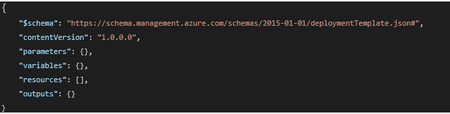
*** Update: This blogpost has been updated with a new ARM template and new Azure Policy definitions which covers the new Security Center bundle pricings. The new ARM template can be found here, the new Azure Policy definitions can be found here *** Recently we have been receiving several customer questions on how to manage Security Center at scale in a continuous integration (CI) and continuous delivery (CD) scenario, better known as CI/CD. How do you make sure that when a new subscription is instantiated, Security Center is configured correctly and is enabled to monitor new and existing resources? How do you manage hundreds of subscriptions within your organizattion? How do you enforce your security policies? This blogpost covers two scenarios: Configure Security Center using an ARM template to support a CI/CD scenario and management at scale Enforce a Security Center configuration within your organization, using Azure Policy Since both ARM templates and Azure Policy talk to the Resource Manager API in Azure, by making a JSON formatted request, you can re-use the deployment section of an ARM template to author an Azure Policy definition. If you are new to ARM templates and are looking for guidance on authoring, go here. In case you want to leverage PowerShell for configuring ASC, go here. The Security Center ARM Template Every ARM template consists of these 7 elements (not all of them have to be used): It’s the “resources” element that we are interested in since the ARM template reference for Security Center hasn’t been documented yet. We are in the process of publishing which makes it easier to find which types and values are allowed and will also provide IntelliSense. I will update this post when that becomes available. In this blogpost I will cover the two most asked questions: How can I make sure that Security Center is configured for the Standard pricing tier, which unlocks all the Security Center features How can I enable auto provisioning, which enables automatic installation of the Microsoft Management Agent (MMA) VM extension for new resources. Please refer to the pricing tier documentation for the difference between the Free and Standard tier. Set the ASC pricing tier in an ARM template The new pricing tier API is fast and efficient to use. We are using the Microsoft.Security/pricings type to set our pricing tier. How does that look in a template? The ARM template can be found here. If you want to deploy this template, please make sure you target the subscription instead of a resource group. This is a common made mistake, since ASC lives at the subscription level, not at the resource group level. A deployment would look like this (using PowerShell): New-AzDeployment -Name myAscDeploy -Location <yourLocation> -TemplateFile ‘<yourTemplateFileAndPathHere>' -Verbose Since you have probably noticed the usage of a parameter, so you can flip it from “Free” to “Standard” or the other way around, you will be prompted for this value. Please note that we are only allowing the two values specified and it is case sensitive. You can verify the deployment in the activity log: Leveraging the ARM template to create an Azure Policy Now that you have a working ARM template, you can use it to create a deployIfNotExists type of Azure policy which allows you to remediate if the policy definition is non-compliant. If you are just starting with Azure Policy, I would recommend to explore our documentation for guidance on different policy definitions. Leveraging the ARM template we just created, you can construct a deployIfNotExists Azure Policy. You first need to create the section that allows you to find the pricingTier field and value (Standard). For this to work, you need to target your Policy at the right scope (subscriptions or higher), then you define the “effect” (deployIfNotExists) and you set the type to Microsoft.Security/pricings, where the field and value lives which we are looking for. If the existenceCondition returns false and you want to remediate it, you need to define a deployment section under the resources section, where you define your target type and properties. You can find the Azure Policy shown above here. Having your ARM Policy defined, you can now create and assign your new Azure Policy. Please note that you need the appropriate permissions to create a managed identity. This ensures that the policy has the appropriate permissions to change the Security Center configuration at the subscription level. It takes around 30 minutes for the policy to take effect as mentioned in the confirmation. Your policy will remain in this state for a while: Then after around 30 minutes, you will notice a non-compliant assignment, as shown below. If you click on the assignment, you can explore which resource is non-compliant. You can click on Create Remediation Task to remediate it. Automatically create a remediation task In case you want to use automation, you can leverage the Policy Insights API to create a remediation task. One of the options you have is to invoke the API using PowerShell. The script below shows an example how to accomplish that. Please note that besides the subscriptionId, you need to pass a remediationName and policyID: You can find the script to create a remediation task here. If you have succesfully executed the script, you should see something similar in your activity log: Your ASC pricing tier should be changed to Standard and after a policy refresh cycle, your compliance state should be updated to compliant. Configure Security Center auto provisioning using a custom workspace The following ARM template enables auto provisioning so that the Microsoft Management Agent VM extension will be deployed automatically to new created virtual machines. You will also configure a custom Log Analytics workspace instead of the default Security Center one. The ARM template for enabling auto provisioning can be found here. Please note that you need to pass specific parameters values for configuring the Log Analytics workspace like workspace name, the resource group of the workspace and the Azure subscriptionID of where the workspace is created. Deployment of the ARM template is straightforward as you have seen before while deploying the pricing tier template and should look like this:Who Created This Azure Resource? Here's How to Find Out
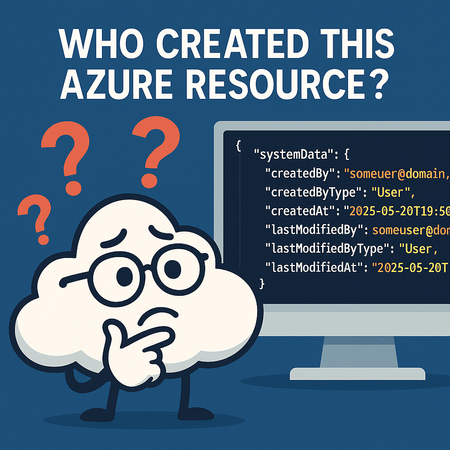
One of the most common questions Azure customers and administrators ask is: “How do I know who created this resource?” If you’ve ever been in charge of managing a large subscription with dozens (or even thousands) of resources, you know how important it is to answer this question quickly. Whether it’s for troubleshooting, governance, or compliance, tracking the origin of a resource can save time and reduce confusion. The good news: Azure makes this information available. You just need to know where to look. Step 1: Open the Resource Overview Navigate to the Overview page of the resource in question. This gives you the usual metadata like resource group, subscription, location, login server, and provisioning state. At first glance, however, you won’t see who created the resource. That information isn’t shown in the overview fields. Step 2: Switch to JSON View On the Overview page, look for the link labeled “JSON View” in the top right corner. Clicking this opens the full resource definition in JSON format. Step 3: Scroll to the systemData Section Within the JSON, scroll until you find the systemData object. This is where Azure tracks metadata about the resource lifecycle. Here’s what you’ll find: "systemData": { "createdBy": "someuser@domain.com", "createdByType": "User", "createdAt": "2025–05–20T19:50:33.1511397Z", "lastModifiedBy": "someuser@domain.com", "lastModifiedByType": "User", "lastModifiedAt": "2025–05–20T19:50:33.1511397Z" } What This Tells You createdBy → The user or service principal that created the resource. createdByType → Whether it was created by a human user, managed identity, or another Azure service. createdAt → The exact timestamp of creation (UTC). lastModifiedBy, lastModifiedByType, and lastModifiedAt → Useful if the resource was updated after creation. This metadata gives you clear visibility into who provisioned the resource and when. Why It Matters Governance — Understand ownership and responsibility. Troubleshooting — Track down configuration changes. Compliance & Auditing — Satisfy requirements for accountability in your cloud environment. By making the systemData object part of your standard investigation checklist, you’ll save yourself the guesswork the next time you’re wondering, “Who created this resource?”3.2KViews4likes7Comments
Microsoft Defender for Cloud Onboarding workbook V2
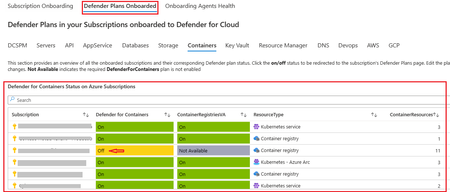
The Defender for Cloud Onboarding Workbook V2 is the latest version of this workbook that was originally published August 2022. You can read more about the purpose of this workbook in this post. What’s New: The Defender Plans Onboarded Tab - displays the subscriptions that are onboarded to a Defender plan, status of the Defender Plan, and the resources deployed in the subscription. You can click on the status of the Defender Plan to On / Off on the subscription. You will be directed to the Defender Plans Blade on your selected Subscription. You can notice the status of each Defender Plan is On/Off, and the Resource quantity column displays the Resources deployed in the subscription. You can edit the status of the selected Defender Plan from here and click on save. Please be noted that Foundational CSPM is by default “On” on all subscriptions. The CSPM Tab - displays the subscriptions that are onboarded to a Defender for Cloud, status of the Defender CSPM Plan on the subscription, and the resources deployed in the subscription. You can click on the status of the Defender Plan to On/Off on the subscription. The Agentless Capabilities covered under Defender CSPM displays the Status is On/Off. “Not Available” indicates the required Defender Plan is not enabled, and hence the capability is not available. You can click on the On/Off status on the subscription to edit the Agentless capability. Edit the Status On/Off, and click “Continue” and “Save” the settings The API Tab - displays the subscriptions that are onboarded to a Defender for Cloud, status of the Defender for APIs Plan on the subscription, and the APIM resources deployed in the subscription. You can click on the status of the Defender Plan to On/Off on the subscription. The APIM resources overview displays the APIM resources deployed in the subscription, and their Public Network Access is Enabled/Disabled, and if the APIM is deployed into a VNET. The Onboard API collections displays if all the API collections in an APIM are onboarded to Defender for APIs. Click on “Not Onboarded” to onboard the API collection. You are directed to the assessment “Azure API Management APIs should be onboarded to Defender for APIs”. Select the API Endpoints under the Unhealthy resources and click on “Fix” The Storage Tab - displays the subscriptions that are onboarded to a Defender for Cloud, status of the Defender for Storage Plan on the subscription, and the Storage Account resources deployed in the subscription. You can click on the status of the Defender Plan to On/Off on the subscription. The Agentless capabilities like Data Sensitivity Discovery, Malware Scanning are only available with the DefenderForStorageV2Plan. “Not Available” indicates that the required plan is not enabled. The Containers Tab - displays the subscriptions that are onboarded to a Defender for Cloud, status of the Defender for Containers Plan on the subscription, and the Container resources deployed in the subscription. You can click on the status of the Defender Plan to On/Off on the subscription. The Agentless capability Container Registries VA is available with both the Defender For Containers Plan and Defender CSPM Plan. “Not Available” indicates that the required plan is not enabled. The Devops Tab - displays the Github Connectors and Azure Devops Connectors onboarded to the subscription The Github repositories that need to be enabled for Code Scanning, Secret scanning, Depandabot scanning are displayed. Click on “Unhealthy” status to enable scanning. You are directed to the relevant Recommendation. Select the Unhealthy resources and assign Owner to remediate the Recommendation. The AWS Tab - displays the the AWS Connectors deployed in the subscription, yhe status of the Defender Plans on the AWS Connector. You can click on the status of the Defender Plan to On/Off on the Connector. AWS Agentless capabilities like "Agentless VM scanning", "Data Sensitivity Discovery" are displayed. You are directed to the AWS Defender plans blade. You can edit the Defender plan on the AWS connector and click on “Configure access” When the Defender Plan settings are edited on the AWS connector, you need to download the cloud formation template and update the AWS environment. This is a required step to reflect your changes on the AWS connector, to the AWS environment. The GCP Tab - displays the the GCP Connectors deployed in the subscription, the status of the Defender Plans on the GCP Connector. You can click on the status of the Defender Plan to On/Off on the Connector. You are directed to the GCP Defender plans blade. You can edit the Defender plan on the GCP connector and click on “Configure access” and “Update” How to Deploy The Defender for Cloud Onboarding Workbook is available in the Microsoft Defender for Cloud GitHub Repo page, under Workbooks and can be accessed directly with its Defender for Cloud Onboarding Workbook V2 The workbook can be deployed quickly in the Azure Commercial and Gov cloud environments by clicking the respective “Deploy to Azure” buttons on the workbook page. Additional Resources To learn more about Microsoft Defender for Cloud, visit: https://aka.ms/ascninja To learn about Microsoft Defender for Cloud workbooks, visit: https://docs.microsoft.com/en-us/azure/security-center/custom-dashboards-azure-workbooks Acknowledgements Many thanks to Yuri Diogenes & Safeena Begum in supporting my initiative and suggesting feedbacks.
From Vibe Coding to Working App: How SRE Agent Completes the Developer Loop
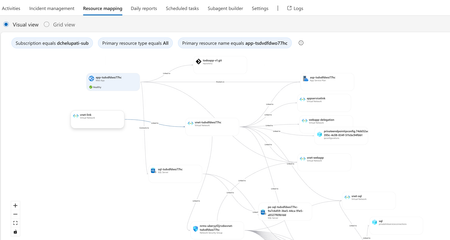
The Most Common Challenge in Modern Cloud Apps There's a category of bugs that drive engineers crazy: multi-layer infrastructure issues. Your app deploys successfully. Every Azure resource shows "Succeeded." But the app fails at runtime with a vague error like Login failed for user ''. Where do you even start? You're checking the Web App, the SQL Server, the VNet, the private endpoint, the DNS zone, the identity configuration... and each one looks fine in isolation. The problem is how they connect and that's invisible in the portal. Networking issues are especially brutal. The error says "Login failed" but the actual causes could be DNS, firewall, identity, or all three. The symptom and the root causes are in completely different resources. Without deep Azure networking knowledge, you're just clicking around hoping something jumps out. Now imagine you vibe coded the infrastructure. You used AI to generate the Bicep, deployed it, and moved on. When it breaks, you're debugging code you didn't write, configuring resources you don't fully understand. This is where I wanted AI to help not just to build, but to debug. Enter SRE Agent + Coding Agent Here's what I used: Layer Tool Purpose Build VS Code Copilot Agent Mode + Claude Opus Generate code, Bicep, deploy Debug Azure SRE Agent Diagnose infrastructure issues and create developer issue with suggested fixes in source code (app code and IaC) Fix GitHub Coding Agent Create PRs with code and IaC fix from Github issue created by SRE Agent Copilot builds. SRE Agent debugs. Coding Agent fixes. What I Built I used VS Code Copilot in Agent Mode with Claude Opus to create a .NET 8 Web App connected to Azure SQL via private endpoint: Private networking (no public exposure) Entra-only authentication Managed identity (no secrets) Deployed with azd up. All green. Then I tested the health endpoint: $ curl https://app-tsdvdfdwo77hc.azurewebsites.net/health/sql {"status":"unhealthy","error":"Login failed for user ''.","errorType":"SqlException"} Deployment succeeded. App failed. One error. How I Fixed It: Step by Step Step 1: Create SRE Agent with Azure Access I created an SRE Agent with read access to my Azure subscription. You can scope it to specific resource groups. The agent builds a knowledge graph of your resources and their dependencies visible in the Resource Mapping view below. Step 2: Connect GitHub to SRE Agent using GitHub MCP server I connected the GitHub MCP server so the agent could read my repository and create issues. Step 3: Create Sub Agent to analyze source code I created a sub-agent for analyzing source code using GitHub mcp tools. this lets SRE Agent understand not just Azure resources, but also the Bicep and source code files that created them. "you are expert in analyzing source code (bicep and app code) from github repos" Step 4: Invoke Sub-Agent to Analyze the Error In the SRE Agent chat, I invoked the sub-agent to diagnose the error I received from my app end point. It correlated the runtime error with the infrastructure configuration Step 5: Watch the SRE Agent Think and Reason SRE Agent analyzed the error by tracing code in Program.cs, Bicep configurations, and Azure resource relationships Web App, SQL Server, VNet, private endpoint, DNS zone, and managed identity. Its reasoning process worked through each layer, eliminating possibilities one by one until it identified the root causes. Step 6: Agent Creates GitHub Issue Based on its analysis, SRE Agent summarized the root causes and suggested fixes in a GitHub issue: Root Causes: Private DNS Zone missing VNet link Managed identity not created as SQL user Suggested Fixes: Add virtualNetworkLinks resource to Bicep Add SQL setup script to create user with db_datareader and db_datawriter roles Step 7: Merge the PR from Coding Agent Assign the Github issue to Coding Agent which then creates a PR with the fixes. I just reviewed the fix. It made sense and I merged it. Redeployed with azd up, ran the SQL script: curl -s https://app-tsdvdfdwo77hc.azurewebsites.net/health/sql | jq . { "status": "healthy", "database": "tododb", "server": "tcp:sql-tsdvdfdwo77hc.database.windows.net,1433", "message": "Successfully connected to SQL Server" } 🎉 From error to fix in minutes without manually debugging a single Azure resource. Why This Matters If you're a developer building and deploying apps to Azure, SRE Agent changes how you work: You don't need to be a networking expert. SRE Agent understands the relationships between Azure resources private endpoints, DNS zones, VNet links, managed identities. It connects dots you didn't know existed. You don't need to guess. Instead of clicking through the portal hoping something looks wrong, the agent systematically eliminates possibilities like a senior engineer would. You don't break your workflow. SRE Agent suggests fixes in your Bicep and source code not portal changes. Everything stays version controlled. Deployed through pipelines. No hot fixes at 2 AM. You close the loop. AI helps you build fast. Now AI helps you debug fast too. Try It Yourself Do you vibe code your app, your infrastructure, or both? How do you debug when things break? Here's a challenge: Vibe code a todo app with a Web App, VNet, private endpoint, and SQL database. "Forget" to link the DNS zone to the VNet. Deploy it. Watch it fail. Then point SRE Agent at it and see how it identifies the root cause, creates a GitHub issue with the fix, and hands it off to Coding Agent for a PR. Share your experience. I'd love to hear how it goes. Learn More Azure SRE Agent documentation Azure SRE Agent blogs Azure SRE Agent community Azure SRE Agent home page Azure SRE Agent pricing620Views3likes0Comments