azure resource manager
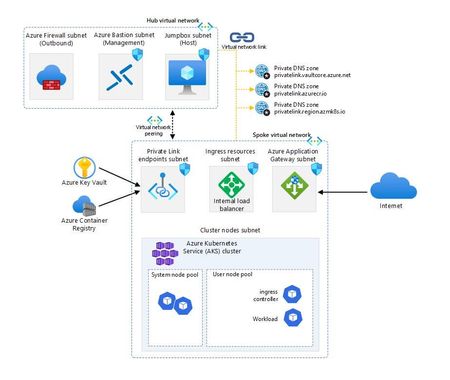
17 TopicsAzure Kubernetes Service Baseline - The Hard Way
Are you ready to tackle Kubernetes on Azure like a pro? Embark on the “AKS Baseline - The Hard Way” and prepare for a journey that’s likely to be a mix of command line, detective work and revelations. This is a serious endeavour that will equip you with deep insights and substantial knowledge. As you navigate through the intricacies of Azure, you’ll not only face challenges but also accumulate a wealth of learning that will sharpen your skills and broaden your understanding of cloud infrastructure. Get set for an enriching experience that’s all about mastering the ins and outs of Azure Kubernetes Service!44KViews8likes6CommentsWho Created This Azure Resource? Here's How to Find Out
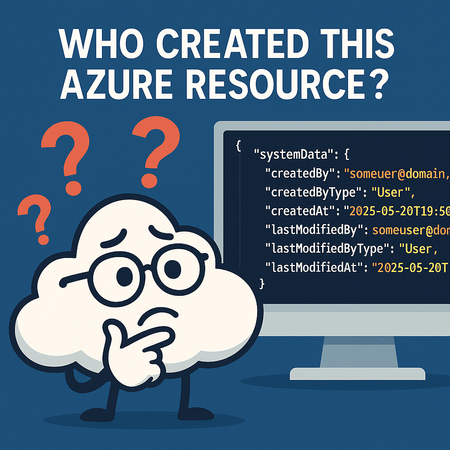
One of the most common questions Azure customers and administrators ask is: “How do I know who created this resource?” If you’ve ever been in charge of managing a large subscription with dozens (or even thousands) of resources, you know how important it is to answer this question quickly. Whether it’s for troubleshooting, governance, or compliance, tracking the origin of a resource can save time and reduce confusion. The good news: Azure makes this information available. You just need to know where to look. Step 1: Open the Resource Overview Navigate to the Overview page of the resource in question. This gives you the usual metadata like resource group, subscription, location, login server, and provisioning state. At first glance, however, you won’t see who created the resource. That information isn’t shown in the overview fields. Step 2: Switch to JSON View On the Overview page, look for the link labeled “JSON View” in the top right corner. Clicking this opens the full resource definition in JSON format. Step 3: Scroll to the systemData Section Within the JSON, scroll until you find the systemData object. This is where Azure tracks metadata about the resource lifecycle. Here’s what you’ll find: "systemData": { "createdBy": "someuser@domain.com", "createdByType": "User", "createdAt": "2025–05–20T19:50:33.1511397Z", "lastModifiedBy": "someuser@domain.com", "lastModifiedByType": "User", "lastModifiedAt": "2025–05–20T19:50:33.1511397Z" } What This Tells You createdBy → The user or service principal that created the resource. createdByType → Whether it was created by a human user, managed identity, or another Azure service. createdAt → The exact timestamp of creation (UTC). lastModifiedBy, lastModifiedByType, and lastModifiedAt → Useful if the resource was updated after creation. This metadata gives you clear visibility into who provisioned the resource and when. Why It Matters Governance — Understand ownership and responsibility. Troubleshooting — Track down configuration changes. Compliance & Auditing — Satisfy requirements for accountability in your cloud environment. By making the systemData object part of your standard investigation checklist, you’ll save yourself the guesswork the next time you’re wondering, “Who created this resource?”6.1KViews4likes7Comments
From Vibe Coding to Working App: How SRE Agent Completes the Developer Loop
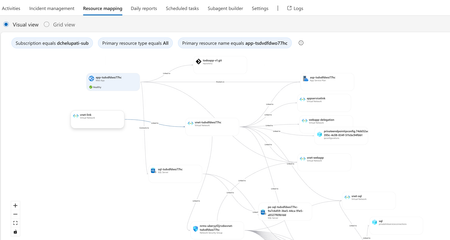
The Most Common Challenge in Modern Cloud Apps There's a category of bugs that drive engineers crazy: multi-layer infrastructure issues. Your app deploys successfully. Every Azure resource shows "Succeeded." But the app fails at runtime with a vague error like Login failed for user ''. Where do you even start? You're checking the Web App, the SQL Server, the VNet, the private endpoint, the DNS zone, the identity configuration... and each one looks fine in isolation. The problem is how they connect and that's invisible in the portal. Networking issues are especially brutal. The error says "Login failed" but the actual causes could be DNS, firewall, identity, or all three. The symptom and the root causes are in completely different resources. Without deep Azure networking knowledge, you're just clicking around hoping something jumps out. Now imagine you vibe coded the infrastructure. You used AI to generate the Bicep, deployed it, and moved on. When it breaks, you're debugging code you didn't write, configuring resources you don't fully understand. This is where I wanted AI to help not just to build, but to debug. Enter SRE Agent + Coding Agent Here's what I used: Layer Tool Purpose Build VS Code Copilot Agent Mode + Claude Opus Generate code, Bicep, deploy Debug Azure SRE Agent Diagnose infrastructure issues and create developer issue with suggested fixes in source code (app code and IaC) Fix GitHub Coding Agent Create PRs with code and IaC fix from Github issue created by SRE Agent Copilot builds. SRE Agent debugs. Coding Agent fixes. What I Built I used VS Code Copilot in Agent Mode with Claude Opus to create a .NET 8 Web App connected to Azure SQL via private endpoint: Private networking (no public exposure) Entra-only authentication Managed identity (no secrets) Deployed with azd up. All green. Then I tested the health endpoint: $ curl https://app-tsdvdfdwo77hc.azurewebsites.net/health/sql {"status":"unhealthy","error":"Login failed for user ''.","errorType":"SqlException"} Deployment succeeded. App failed. One error. How I Fixed It: Step by Step Step 1: Create SRE Agent with Azure Access I created an SRE Agent with read access to my Azure subscription. You can scope it to specific resource groups. The agent builds a knowledge graph of your resources and their dependencies visible in the Resource Mapping view below. Step 2: Connect GitHub to SRE Agent using GitHub MCP server I connected the GitHub MCP server so the agent could read my repository and create issues. Step 3: Create Sub Agent to analyze source code I created a sub-agent for analyzing source code using GitHub mcp tools. this lets SRE Agent understand not just Azure resources, but also the Bicep and source code files that created them. "you are expert in analyzing source code (bicep and app code) from github repos" Step 4: Invoke Sub-Agent to Analyze the Error In the SRE Agent chat, I invoked the sub-agent to diagnose the error I received from my app end point. It correlated the runtime error with the infrastructure configuration Step 5: Watch the SRE Agent Think and Reason SRE Agent analyzed the error by tracing code in Program.cs, Bicep configurations, and Azure resource relationships Web App, SQL Server, VNet, private endpoint, DNS zone, and managed identity. Its reasoning process worked through each layer, eliminating possibilities one by one until it identified the root causes. Step 6: Agent Creates GitHub Issue Based on its analysis, SRE Agent summarized the root causes and suggested fixes in a GitHub issue: Root Causes: Private DNS Zone missing VNet link Managed identity not created as SQL user Suggested Fixes: Add virtualNetworkLinks resource to Bicep Add SQL setup script to create user with db_datareader and db_datawriter roles Step 7: Merge the PR from Coding Agent Assign the Github issue to Coding Agent which then creates a PR with the fixes. I just reviewed the fix. It made sense and I merged it. Redeployed with azd up, ran the SQL script: curl -s https://app-tsdvdfdwo77hc.azurewebsites.net/health/sql | jq . { "status": "healthy", "database": "tododb", "server": "tcp:sql-tsdvdfdwo77hc.database.windows.net,1433", "message": "Successfully connected to SQL Server" } 🎉 From error to fix in minutes without manually debugging a single Azure resource. Why This Matters If you're a developer building and deploying apps to Azure, SRE Agent changes how you work: You don't need to be a networking expert. SRE Agent understands the relationships between Azure resources private endpoints, DNS zones, VNet links, managed identities. It connects dots you didn't know existed. You don't need to guess. Instead of clicking through the portal hoping something looks wrong, the agent systematically eliminates possibilities like a senior engineer would. You don't break your workflow. SRE Agent suggests fixes in your Bicep and source code not portal changes. Everything stays version controlled. Deployed through pipelines. No hot fixes at 2 AM. You close the loop. AI helps you build fast. Now AI helps you debug fast too. Try It Yourself Do you vibe code your app, your infrastructure, or both? How do you debug when things break? Here's a challenge: Vibe code a todo app with a Web App, VNet, private endpoint, and SQL database. "Forget" to link the DNS zone to the VNet. Deploy it. Watch it fail. Then point SRE Agent at it and see how it identifies the root cause, creates a GitHub issue with the fix, and hands it off to Coding Agent for a PR. Share your experience. I'd love to hear how it goes. Learn More Azure SRE Agent documentation Azure SRE Agent blogs Azure SRE Agent community Azure SRE Agent home page Azure SRE Agent pricing1.2KViews3likes0CommentsHow managed identities work on Azure resources
Managed Identities are a great way to eliminate the need to store credentials in the source code, and retrieve token from Azure AD while abstracting the entire process for apps running on Azure resources. Learn how it works and what magic happens on the backend!9KViews3likes0CommentsReimagining AI Ops with Azure SRE Agent: New Automation, Integration, and Extensibility features
Azure SRE Agent offers intelligent and context aware automation for IT operations. Enhanced by customer feedback from our preview, the SRE Agent has evolved into an extensible platform to automate and manage tasks across Azure and other environments. Built on an Agentic DevOps approach - drawing from proven practices in internal Azure operations - the Azure SRE Agent has already saved over 20,000 engineering hours across Microsoft product teams operations, delivering strong ROI for teams seeking sustainable AIOps. An Operations Agent that adapts to your playbooks Azure SRE Agent is an AI powered operations automation platform that empowers SREs, DevOps, IT operations, and support teams to automate tasks such as incident response, customer support, and developer operations from a single, extensible agent. Its value proposition and capabilities have evolved beyond diagnosis and mitigation of Azure issues, to automating operational workflows and seamless integration with the standards and processes used in your organization. SRE Agent is designed to automate operational work and reduce toil, enabling developers and operators to focus on high-value tasks. By streamlining repetitive and complex processes, SRE Agent accelerates innovation and improves reliability across cloud and hybrid environments. In this article, we will look at what’s new and what has changed since the last update. What’s New: Automation, Integration, and Extensibility Azure SRE Agent just got a major upgrade. From no-code automation to seamless integrations and expanded data connectivity, here’s what’s new in this release: No-code Sub-Agent Builder: Rapidly create custom automations without writing code. Flexible, event-driven triggers: Instantly respond to incidents and operational changes. Expanded data connectivity: Unify diagnostics and troubleshooting across more data sources. Custom actions: Integrate with your existing tools and orchestrate end-to-end workflows via MCP. Prebuilt operational scenarios: Accelerate deployment and improve reliability out of the box. Unlike generic agent platforms, Azure SRE Agent comes with deep integrations, prebuilt tools, and frameworks specifically for IT, DevOps, and SRE workflows. This means you can automate complex operational tasks faster and more reliably, tailored to your organization’s needs. Sub-Agent Builder: Custom Automation, No Code Required Empower teams to automate repetitive operational tasks without coding expertise, dramatically reducing manual workload and development cycles. This feature helps address the need for targeted automation, letting teams solve specific operational pain points without relying on one-size-fits-all solutions. Modular Sub-Agents: Easily create custom sub-agents tailored to your team’s needs. Each sub-agent can have its own instructions, triggers, and toolsets, letting you automate everything from outage response to customer email triage. Prebuilt System Tools: Eliminate the inefficiency of creating basic automation from scratch, and choose from a rich library of hundreds of built-in tools for Azure operations, code analysis, deployment management, diagnostics, and more. Custom Logic: Align automation to your unique business processes by defining your automation logic and prompts, teaching the agent to act exactly as your workflow requires. Flexible Triggers: Automate on Your Terms Invoke the agent to respond automatically to mission-critical events, not wait for manual commands. This feature helps speed up incident response and eliminate missed opportunities for efficiency. Multi-Source Triggers: Go beyond chat-based interactions, and trigger the agent to automatically respond to Incident Management and Ticketing systems like PagerDuty and ServiceNow, Observability Alerting systems like Azure Monitor Alerts, or even on a cron-based schedule for proactive monitoring and best-practices checks. Additional trigger sources such as GitHub issues, Azure DevOps pipelines, email, etc. will be added over time. This means automation can start exactly when and where you need it. Event-Driven Operations: Integrate with your CI/CD, monitoring, or support systems to launch automations in response to real-world events - like deployments, incidents, or customer requests. Vital for reducing downtime, it ensures that business-critical actions happen automatically and promptly. Expanded Data Connectivity: Unified Observability and Troubleshooting Integrate data, enabling comprehensive diagnostics and troubleshooting and faster, more informed decision-making by eliminating silos and speeding up issue resolution. Multiple Data Sources: The agent can now read data from Azure Monitor, Log Analytics, and Application Insights based on its Azure role-based access control (RBAC). Additional observability data sources such as Dynatrace, New Relic, Datadog, and more can be added via the Remote Model Context Protocol (MCP) servers for these tools. This gives you a unified view for diagnostics and automation. Knowledge Integration: Rather than manually detailing every instruction in your prompt, you can upload your Troubleshooting Guide (TSG) or Runbook directly, allowing the agent to automatically create an execution plan from the file. You may also connect the agent to resources like SharePoint, Jira, or documentation repositories through Remote MCP servers, enabling it to retrieve needed files on its own. This approach utilizes your organization’s existing knowledge base, streamlining onboarding and enhancing consistency in managing incidents. Azure SRE Agent is also building multi-agent collaboration by integrating with PagerDuty and Neubird, enabling advanced, cross-platform incident management and reliability across diverse environments. Custom Actions: Automate Anything, Anywhere Extend automation beyond Azure and integrate with any tool or workflow, solving the problem of limited automation scope and enabling end-to-end process orchestration. Out-of-the-Box Actions: Instantly automate common tasks like running azcli, kubectl, creating GitHub issues, or updating Azure resources, reducing setup time and operational overhead. Communication Notifications: The SRE Agent now features built-in connectors for Outlook, enabling automated email notifications, and for Microsoft Teams, allowing it to post messages directly to Teams channels for streamlined communication. Bring Your Own Actions: Drop in your own Remote MCP servers to extend the agent’s capabilities to any custom tool or workflow. Future-proof your agentic DevOps by automating proprietary or emerging processes with confidence. Prebuilt Operations Scenarios Address common operational challenges out of the box, saving teams time and effort while improving reliability and customer satisfaction. Incident Response: Minimize business impact and reduce operational risk by automating detection, diagnosis, and mitigation of your workload stack. The agent has built-in runbooks for common issues related to many Azure resource types including Azure Kubernetes Service (AKS), Azure Container Apps (ACA), Azure App Service, Azure Logic Apps, Azure Database for PostgreSQL, Azure CosmosDB, Azure VMs, etc. Support for additional resource types is being added continually, please see product documentation for the latest information. Root Cause Analysis & IaC Drift Detection: Instantly pinpoint incident causes with AI-driven root cause analysis including automated source code scanning via GitHub and Azure DevOps integration. Proactively detect and resolve infrastructure drift by comparing live cloud environments against source-controlled IaC, ensuring configuration consistency and compliance. Handle Complex Investigations: Enable the deep investigation mode that uses a hypothesis-driven method to analyze possible root causes. It collects logs and metrics, tests hypotheses with iterative checks, and documents findings. The process delivers a clear summary and actionable steps to help teams accurately resolve critical issues. Incident Analysis: The integrated dashboard offers a comprehensive overview of all incidents managed by the SRE Agent. It presents essential metrics, including the number of incidents reviewed, assisted, and mitigated by the agent, as well as those awaiting human intervention. Users can leverage aggregated visualizations and AI-generated root cause analyses to gain insights into incident processing, identify trends, enhance response strategies, and detect areas for improvement in incident management. Inbuilt Agent Memory: The new SRE Agent Memory System transforms incident response by institutionalizing the expertise of top SREs - capturing, indexing, and reusing critical knowledge from past incidents, investigations, and user guidance. Benefit from faster, more accurate troubleshooting, as the agent learns from both successes and mistakes, surfacing relevant insights, runbooks, and mitigation strategies exactly when needed. This system leverages advanced retrieval techniques and a domain-aware schema to ensure every on-call engagement is smarter than the last, reducing mean time to resolution (MTTR) and minimizing repeated toil. Automatically gain a continuously improving agent that remembers what works, avoids past pitfalls, and delivers actionable guidance tailored to the environment. GitHub Copilot and Azure DevOps Integration: Automatically triage, respond to, and resolve issues raised in GitHub or Azure DevOps. Integration with modern development platforms such as GitHub Copilot coding agent increases efficiency and ensures that issues are resolved faster, reducing bottlenecks in the development lifecycle. Ready to get started? Azure SRE Agent home page Product overview Pricing Page Pricing Calculator Pricing Blog Demo recordings Deployment samples What’s Next? Give us feedback: Your feedback is critical - You can Thumbs Up / Thumbs Down each interaction or thread, or go to the “Give Feedback” button in the agent to give us in-product feedback - or you can create issues or just share your thoughts in our GitHub repo at https://github.com/microsoft/sre-agent. We’re just getting started. In the coming months, expect even more prebuilt integrations, expanded data sources, and new automation scenarios. We anticipate continuous growth and improvement throughout our agentic AI platforms and services to effectively address customer needs and preferences. Let us know what Ops toil you want to automate next!5.2KViews1like0Comments
FSI Knowledge Mining and Intelligent Document Process Reference Architecture
FSI customers such as insurance companies and banks rely on their vast amounts of data to provide sometimes hundreds of individual products to their customers. From assessing product suitability, underwriting, fraud investigations, and claims handling, many employees and applications depend on accessing this data to do their jobs efficiently. Since the capabilities of GenAI have been realised, we have been helping our customers in this market transform their business with unified systems that simplify access to this data and speed up the processing times of these core tasks, while remaining compliant with the numerous regulations that govern the FSI space. Combining the use of Knowledge Mining with Intelligent Document processing provides a powerful solution to reduce the manual effort and inefficacies of ensuring data integrity and retrieval across the many use cases that most of our customers face daily. What is Knowledge Mining and Intelligent Document Processing? Knowledge Mining is a process that transforms large, unstructured data sets into searchable knowledge stores. Traditional search methods often rely on keyword matching, which can miss the context of the information. In contrast, knowledge mining uses advanced techniques like natural language processing (NLP) to understand the context and meaning behind the data, providing a robust searching mechanism that can look across all these data sources, understand the relationships between the data therefore providing more accurate and relevant results. Intelligent Document Processing (IDP) is a workflow automation technology designed to scan, read, extract, categorise, and organise meaningful information from large streams of data. Its primary function is to extract valuable information from extensive data sets without human input, thereby increasing processing speed and accuracy while reducing costs. By leveraging a combination of Artificial Intelligence (AI), Machine Learning (ML), Optical Character Recognition (OCR), and Natural Language Processing (NLP), IDP handles both structured and unstructured documents. By ensuring that the processed data meets the "gold standard" - structured, complete, and compliant - IDP helps organizations maintain high-quality, reliable, and actionable data. The Power of Knowledge Mining and Intelligent Document Processing as a Unified Solution Knowledge Mining excels at quickly responding to natural language queries, providing valuable insights and making previously unsearchable data accessible. At the same time, IDP ensures that the processed data meets the "gold standard"—structured, complete, and compliant—making it both reliable and actionable. Together, these technologies empower organisations to harness the full potential of their data, driving better decision-making and improved efficiency. __________________________________________________________________ Meet Alex: A Day in the Life of a Fraud Case Worker Responsibilities: Investigate potential fraud cases by manually searching across multiple systems. Read and analyse large volumes of information to filter out relevant data. Ensure compliance with regulatory requirements and maintain data accuracy. Prepare detailed reports on findings and recommendations. Lost in Data: The Struggles of Manual Fraud Investigation Alex receives a new fraud case and starts by manually searching through multiple systems to gather information. This process takes several hours, and Alex has to read through numerous documents and emails to filter out relevant data. The inconsistent data formats and locations make it challenging to ensure accuracy. By the end of the day, Alex is exhausted and has only made limited progress on the case. Effortless Efficiency: Fraud Investigation Transformed with Knowledge Mining and IDP Alex receives a new fraud case and needs to gather all relevant information quickly. Instead of manually searching through multiple systems, Alex inputs the following natural language query into the unified system: "Show me all documents, emails, and notes related to the recent transactions of client X that might indicate fraudulent activity." The system quickly retrieves and presents a comprehensive summary of all relevant documents, emails, and notes, ensuring that the data is structured, complete, and compliant. This allows Alex to focus on analysing the data and making informed decisions, significantly improving the efficiency and accuracy of the investigation. How has Knowledge Mining and IDP transformed Alex's role? Before implementing Knowledge Mining and Intelligent Document Processing, Alex faced a manual process of searching across multiple systems to gather information. This was time-consuming and labour-intensive, often leading to delays in investigations. The overwhelming volume of data from various sources made it difficult to filter out relevant information, and the inconsistent data formats and locations increased the risk of errors. This high workload not only reduced Alex's efficiency but also led to burnout and decreased job satisfaction. However, with the introduction of a unified system powered by Knowledge Mining and IDP, these challenges were significantly mitigated. Automated searches using natural language queries allowed Alex to quickly find relevant information, while IDP ensured that the data processed was structured, complete, and compliant. This unified system provided a comprehensive view of the data, enabling Alex to make more informed decisions and focus on higher-value tasks, ultimately improving productivity and job satisfaction. ____________________________________________________________________ Example Architecture Knowledge Mining Users can interact with the system through a portal on the customer’s front-end of choice. This will serve as the entry point for submitting queries and accessing the knowledge mining service. Front-end options could include web apps, container services or serverless integrations. Azure AI Search provides powerful RAG capabilities. Meanwhile, Azure Open AI provides access to large language models to summarise responses. These services combined will take the user’s query to search the knowledge base and return relevant information which can be augmented as required. Prompt engineering can provide customisation to how the data is returned. You define what the data sources your Azure AI Search will consume. This can be Azure storage services or other data repositories. Data that meets a pre-defined gold standard is queried by Azure AI Search and relevant data is returned to the user. Gold standard data could be based on compliance or business needs. Power BI can be used to create analytical reports based on the data retrieved and processed. This step involves visualising the data in an interactive and user-friendly manner, allowing users to gain insights and make data-driven decisions. Intelligent Document Processing (Optional) Azure Data Factory is a data integration service that allows you to create workflows for data movement and transforming data at scale. This business data can be easily ingested to your Azure data storage solutions using pre-built connectors. This event driven approach ensures that as new data is generated, it can automatically be processed and ready for use in your knowledge mining solution. Data can be transformed using Functions apps and Azure OpenAI. Through prompt engineering, the large language model (LLM) can highlight specific issues in the documents, such as grammatical errors, irrelevant content, or incomplete information. The LLM can then be used to rewrite text to improve clarity and accuracy, add missing information, or reformat content to adhere to guidelines. Transformed data is stored as gold standard data. ____________________________________________________________________ Additional Cloud Considerations Networking VNETs (Virtual Networks) are a fundamental component of cloud infrastructure that enable secure and isolated networking configurations within a cloud environment. They allow different resources, such as virtual machines, databases, and services, to communicate with each other securely. Virtual networks ensure that services such as Azure AI Search, Azure OpenAI, and Power BI, can securely communicate with each other. This is crucial for maintaining the integrity and confidentiality of sensitive financial data. Express Route or VPN are expected to be used when connecting on-premises infrastructure to Azure for several reasons. Your company Azure ExpressRoute provides a private, reliable, and high-speed connection between your data center and Microsoft Azure. It allows you to extend your infrastructure to Azure by providing private access to resources deployed in Azure Virtual Networks and public services like App service, private end points to various other services. This private peering ensures that your traffic never enters the public Internet, enhancing security and performance. ExpressRoute uses Border Gateway Protocol (BGP) for dynamic routing between your on-premises networks and Azure, ensuring efficient and secure data exchange. It also offers built-in redundancy and high availability, making it a robust solution for critical workloads. Azure Front Door is a cloud-based Content Delivery Network (CDN) and application delivery service provided by Microsoft. It offers several key features, including global load balancing, dynamic site acceleration, SSL offloading, and a web application firewall, making it an ideal solution for optimizing and protecting web applications. We are expecting to use Front door in scenarios when the architecture will be expected to be used by users outside the organisation. Azure API Management in this scenario is expected to be used when we look to rollout the solution to larger groups. We look to then integrate much more security, rate limiting, load balancing, etc. Monitoring and Governance Azure Monitor: This service collects and analyses telemetry data from various resources, providing insights into the performance and health of the system. It enables proactive identification and resolution of issues, ensuring the system runs smoothly. Azure Cost Management and Billing: Provides tools for monitoring and controlling costs associated with the solution. It offers insights into spending patterns and resource usage, enabling efficient financial governance. Application Insights: Provides application performance monitoring (APM) designed to help you understand how your applications are performing and to identify issues that may affect their performance and reliability These components together ensure that the Knowledge Mining and Intelligent Document Processing solution is monitored for performance, secured against threats, compliant with regulations, and managed efficiently from a cost perspective. ____________________________________________________________________ Next steps: Identify the data and its sources that will feed into your own Knowledge Mine. Consider if you also need to implement Intelligent Document Processing to ensure data quality. Define your 'gold standards'. These guidelines will determine how your data might be transformed. Consider how to provide access to the data through an application portal, choose the right front-end technology for your use case. Once you have configured Azure AI search to point to the chosen data, consider how you might augment responses using Azure AI LLM models. Useful resources AI Landing Zone reference architecture Azure and Open AI with API Manager Secure connectivity from on premesis to Azure hosted solutions516Views1like0Comments