azure policy
7 Topics
Automate Defender for Cloud settings: FIM, Vulnerability Assessment, and Guest Configuration Agent
I’m working on automating the configuration of Microsoft Defender for Cloud – Server Plans across multiple subscriptions (100+), including any newly deployed subscriptions. The goal is to avoid manual changes and ensure compliance from day one. Current Setup: I’ve used the built-in policy: Configure Microsoft Defender for Servers plan, which successfully enables: Defender for Cloud Plan P2 Endpoint Protection Agentless scanning I attempted to copy this policy and add parameters for Vulnerability Assessment, but the assignment fails with an error. What I’ve Tried: For File Integrity Monitor: Policy name → Configure ChangeTracking Extension for Windows virtual machines For Vulnerability Assessment: Policy name → Configure machines to receive a vulnerability assessment provider Assigning these policies works on my non-prod subscription, but the toggle in Defender for Cloud → Environment Settings remains No. Challenge: How can I ensure these options (File Integrity Monitoring, Vulnerability Assessment, and preferably Guest Configuration Agent) are automatically enabled for: All existing subscriptions Any new subscriptions created in the future Goal: No manual intervention in Defender for Cloud portal Fully automated via Azure Policy or another recommended approach uestions: Is there a way to extend the built-in policy or create a custom initiative that enforces these settings at the subscription level? Are there ARM templates, Bicep modules, Powershell scripts or REST API calls that can toggle these settings programmatically? Any best practices for ensuring compliance across multiple subscriptions? Any help is much appreciated and looking forward to your expertise! Thank you in advance. Best Regards, Pascal Slot305Views1like0Comments
How to programmatically assign security standards on Defender for Cloud
Hi all, i would like to know if there is a way to programmatically (REST API, Terraform,...) activate custom secutity Standards on Defender for Cloud. Basically the step 6 on this guide https://learn.microsoft.com/en-us/azure/defender-for-cloud/update-regulatory-compliance-packages. I didn't found any way to do that. I have a policySet that i would like to activate in an automated way. Any ideas? Thank you in advance!300Views0likes0CommentsNew Blog | Leveraging Defender for Containers to simplify policy management for Kubernetes Clusters
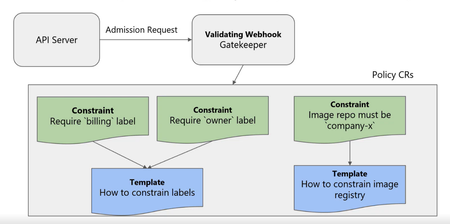
Leveraging Defender for Containers to simplify policy management in your Kubernetes Clusters - Microsoft Community Hub A key part of Kubernetes security includes making sure the cluster is configured to industry and company best practices. This entails controlling what users can do on the cluster and blocking actions that don’t comply with pre-defined best practices. Out of the box, Kubernetes does not provide a mechanism to write and deploy fine grained policies required per your security and compliance mandates. As a result, you will probably leverage something like Gatekeeper along with Open Policy Agent (OPA). Defender for Containers protects your Kubernetes clusters by continuously assessing them to get visibility into misconfigurations and help mitigate identified threats. To get insight into the workload configuration on the cluster, the Azure Policy for Kubernetes is deployed as part of the Defender for Containers plan. The Azure Policy for Kubernetes extends the Gatekeeper v3 admission controller webhook for OPA. Gatekeeper is needed to check if the policy is correct before enforcing it. On Azure Kubernetes Service (AKS), it is deployed as an add-on. For Arc Enabled Kubernetes, which includes on-premises clusters and clusters hosted in Google Cloud or Amazon Web Services, it is deployed as an extension. In this blog, we will go more into detail about how Azure Policy for Kubernetes, uses Gatekeeper with OPA in the Defender for Containers plan.715Views0likes0Commentsassign default initiative not showing
Hi Trying to Creating default initiative, but its not showing under default (after several hours) When Assigning there's this notification: Creating initiative assignment succeeded Creating initiative assignment 'Azure Security Benchmark' in 'sub1' was successful. Please note that the assignment takes around 30 minutes to take effect.748Views0likes0Comments
ASC Security Policies & Compliance Wording
Hi all I have some questions i don't find clear answers in the documentation, so i hope you may share your insights here. First, I don't see how the regulatory compliance impact the secure score? Some of them are in the recommendations, some of them are not. Second, what's actually the difference between the Azure CIS 1.1.0 and the Azure Benchmark? And how they are connected with Azure Policy? Additionally, i though the ASC recommendations are based on Azure Policy, but then i read also that they are based on Benchmarks? 4th thing: Is it possible to e.g. set up one of the policies from ASC Default in that way that it only monitor it for a specific resource group? Let's say I want that one of that ASC default policies regarding VM security (e.g. Disk encryption on VM's) only monitor a specific resource group. How can i handle that? I tried to add custom initiatives with a defined scope for a specific resource but then there are no recommendations. Thank you in advanceSolved16KViews1like13Comments[Solved] Azure Policy to check the networkAcls.ipRules configuration for a Storage Account
Hi all! I'm trying to configure a Policy, that I anticipated shouldn't be to tricky, but for some reason I have a hard time getting it to work... Edit: Started working out of nowhere a few minutes ago... Configuration is as follow "parameters": { "allowedIPAddress": { "type": "Array", "metadata": { "displayName": "Allowed IP Addresses", "description": "The list of allowed IP adresses for this resource." } } }, "policyRule": { "if": { "allOf": [ { "field": "Microsoft.Storage/storageAccounts/networkAcls.ipRules", "exists": "true" }, { "field": "Microsoft.Storage/storageAccounts/networkAcls.ipRules[*].value", "notIn": "[parameters('allowedIPAddress')]" } ] }, "then": { "effect": "deny" } } According to the documentation at https://docs.microsoft.com/en-us/azure/governance/policy/how-to/author-policies-for-arrays this should work, right? Only difference I have from the examples is that I check an array instead. Just to add: I'm having a hard time getting the example code in the documentation to work also, so this might be a person problem Thanks!11KViews0likes2Comments