azure migrate
64 Topics
Cutover Strategy for Azure PaaS Services: A Step-by-Step Guide to Near Zero-Downtime Migrations
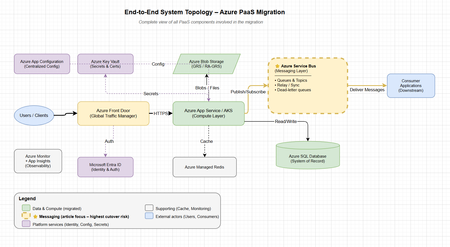
"In most Azure migrations, infrastructure is the easy part. The real risk — and the real engineering challenge — lies in the cutover." Why Cutover Strategy Matters Migrating mission-critical applications to Microsoft Azure — especially PaaS-based systems — requires more than provisioning resources. The real complexity lies in executing a safe, controlled transition of traffic and data while maintaining high availability and disaster recovery (HA/DR) at every stage. In enterprise environments: Applications are deeply interconnected Systems run 24×7 under strict SLAs Downtime is rarely acceptable A poorly executed cutover can lead to: Authentication failures (token/config mismatches) Data inconsistencies (split-brain scenarios) Message loss (queue gaps during switchover) Degraded user experience (latency spikes, partial failures) Goal: Shift traffic — not risk. Choosing the Right Cutover Strategy Strategy Downtime Risk Rollback Complexity Timeline Best For Big Bang High High Hard Low 1–2 days Simple, low-dependency apps Blue-Green Low Medium Easy Medium 1–2 weeks Stateless apps Canary Release Very Low Low Very Easy Medium 2–3 weeks Gradual validation Phased Parallel (Recommended) Helps achieve near zero Low Instant High 3–6 weeks Complex PaaS systems Recommendation: Use Phased Parallel Cutover for enterprise PaaS migrations involving messaging, databases, and multi-team ownership. HA vs DR — Quick Clarity Aspect High Availability (HA) Disaster Recovery (DR) Goal Prevent downtime Recover from failure Scope Same region (zone redundancy) Cross-region (geo-failover) RTO Seconds–minutes Minutes–hours Example Zone-redundant App Service Azure SQL Failover Groups During cutover, you should design for both simultaneously. A cutover without HA/DR is a recipe for a production incident. End-to-End System Topology Before diving into the phased cutover, it's important to understand the full landscape of PaaS components involved in the migration: Layer Azure Service Role Cutover Complexity Traffic Azure Front Door Global routing, weighted traffic split Low (config change) Compute App Service / AKS Application hosting Medium (stateless, replaceable) Messaging Azure Service Bus Async communication, event-driven flows High (message loss risk, ordering, relay) Database Azure SQL / Cosmos DB System of record Medium–High (failover groups) Cache Azure Managed Redis Performance layer (non-authoritative) Low (rebuild on miss) Storage Azure Blob Storage File/object persistence Low–Medium (GRS handles it) Identity Microsoft Entra ID Authentication & authorization Low (shared across environments) Config App Configuration + Key Vault Centralized settings & secrets Low (read-only, dual-read capable) Observability Azure Monitor + App Insights Metrics, tracing, alerting N/A (must be in place before cutover) Phased Parallel Cutover (with HA/DR Built-In) Note: The phase diagrams below focus specifically on Azure Service Bus (messaging) — the most complex cutover component. Messages are transient (an undelivered message is permanently lost), ordering matters, dual-write risks split-brain, and consumers maintain processing state that can't simply be switched. Other PaaS services (SQL, Storage, Redis) have well-established, largely automated cutover mechanisms (failover groups, GRS, cache rebuild) and are covered in the text sections. Phase 1 — Initial Validation (Safe by Design) What Happens Small percentage (5%) of traffic routed to new system via Azure Front Door weighted routing New compute runs in Azure (App Service / AKS) Still depends on old backend (messaging + database) HA/DR Strategy Old system acts as active fallback + DR Maintain full capacity in old environment Validate failback using Azure Front Door origin groups Validate auth parity via Microsoft Entra ID (App Registrations, token issuers) Go/No-Go Criteria to Proceed to Phase 2 Criteria Threshold Error rate on new system < 0.1% for 24 hours Latency (P95) Within 10% of old system Auth success rate Target: full parity with old system Monitoring coverage All key metrics visible in Application Insights Rollback tested Successfully reverted traffic split at least once ✔ Low risk · ✔ Instant rollback Phase 2 — Parallel Run + Replication (Highest Risk Phase) What Happens Old and new systems run in parallel (80/20 split favoring new) Data and messages replicated via stateless relay Both systems serve consumers HA/DR Strategy Relay must be stateless and scalable → Use Azure Functions (Consumption plan with auto-scale) Messaging resilience → Azure Service Bus with: Retries (exponential backoff) Dead-letter queues (for poison messages) Duplicate detection (message deduplication window) Monitor → Azure Monitor + Application Insights tracking: Replication lag Throughput (messages/sec) Relay failures Consumer processing time Risks & Mitigations Risk Mitigation Data inconsistency Single-write model — one system of record at a time Message duplication Idempotent consumers (deduplication by message ID) Relay failure Circuit breaker pattern, dead-letter fallback Split-brain scenarios Clear ownership boundaries per service Go/No-Go Criteria to Proceed to Phase 3 Criteria Threshold Traffic on new system ≥ 80% stable for 48 hours Data sync lag Target: real-time parity (no measurable lag) Message loss rate Target: zero loss (validated via monitoring) Relay error rate < 0.01% DR failover tested At least 1 successful region failover drill ⚠ Highest risk phase — requires continuous observability Phase 3 — Full Cutover (HA/DR Fully Owned by New System) What Happens All traffic routed to new environment Old system moved to standby, then decommissioned after validation DR ownership transfers fully to new system HA Strategy Zone redundancy (App Service, AKS, Service Bus) Autoscaling (CPU/memory-based + custom metrics) Global routing via Azure Front Door with health probes DR Strategy Service DR Mechanism Azure SQL Database Failover groups (auto-failover) Azure Cosmos DB Multi-region writes Azure Storage GRS / RA-GRS (geo-redundant) Azure Service Bus Geo-DR namespace pairing Azure Managed Redis Active geo-replication Old system should be decommissioned only after DR validation passes — run a full region failover drill before removing old infrastructure. Core Principles for PaaS Cutover Cache — Azure Managed Redis Non-authoritative (cache is disposable) Do NOT migrate cached data — let it rebuild Expect and design for cache misses during cutover Pre-warm critical keys if latency-sensitive Messaging — Azure Service Bus Help ensure durability (premium tier, geo-DR pairing) Avoid dual writes (one producer → one queue at a time) Use relay pattern carefully with circuit breakers Dead-letter monitoring is critical and should not be skipped Storage — Azure Storage Dependency-driven migration (move what services need) Treat as shared contract (APIs, blob containers) Use AzCopy or Storage Data Movement library for bulk transfer Databases — Azure SQL Database / Azure Cosmos DB Systems of record — integrity over speed Use online migration (Azure Database Migration Service) for minimal downtime Validate data checksums post-migration Data Consistency Patterns Pattern Risk Use When Single Write (Recommended) Low One system is the authority; others read via replication Event Replication Medium Both systems need near-real-time data; eventual consistency acceptable Dual Write High — Avoid Leads to split-brain; only viable with distributed transactions Common Pitfalls (and How to Avoid Them) Pitfall Prevention Auth failures Pre-validate tokens, verify config parity across environments Hidden dependencies Centralized configuration (Azure App Configuration) Message duplication Idempotency + Service Bus deduplication window Data inconsistency Single-write model with clear ownership Cache issues Pre-warm cache; design for miss tolerance Background jobs Audit all scheduled tasks; redirect to new system explicitly Lack of monitoring Deploy observability BEFORE cutover, not after Observability During Cutover Tools Azure Monitor — Infrastructure metrics, alerts Application Insights — Distributed tracing, dependency maps Azure Log Analytics — Centralized query across all resources Azure Service Bus Explorer — Queue depth, dead-letters Key Metrics to Track Metric Why It Matters Latency (P50, P95, P99) Detect degradation early Error rates (4xx, 5xx) Catch failures before users notice Dependency health Identify cascading failures Queue backlog / depth Messaging throughput bottlenecks Replication lag Data consistency validation Active connections Connection pool exhaustion If you can't observe it, you can't safely cut over. Rollback Strategy Old system remains active and at full capacity throughout Phase 1–2 Quick switch via Azure Front Door origin group weight (route all traffic back to old in seconds) Avoid irreversible writes to new system early in the process Test rollback at least once before entering Phase 2 Document rollback runbook with clear decision criteria Rollback triggers: Error rate > 1% sustained for 5 minutes Latency P95 > 2x baseline Data sync lag > 30 seconds Any message loss detected Tooling & Automation Concern Recommended Tool Infrastructure as Code Bicep / Terraform CI/CD Pipelines Azure DevOps / GitHub Actions Traffic Management Azure Front Door (weighted routing) Configuration Azure App Configuration + Key Vault Secrets Azure Key Vault (managed identity access) Monitoring Azure Monitor + Application Insights Alerting Azure Monitor Action Groups Runbooks Azure Automation / manual decision gates Team Roles & Communication Role Responsibility During Cutover Migration Architect Go/no-go decisions, phase transitions Platform Engineer Infrastructure, Front Door config, DNS App Team Lead Application validation, smoke tests SRE / Ops Monitoring, alerting, incident response DBA Data sync validation, failover group health Stakeholder / PM Communication to business, escalation path Communication plan: Dedicated Teams/Slack channel for cutover window Status updates every 30 minutes during active phases Pre-defined escalation matrix Post-cutover retrospective within 48 hours Final Cutover Readiness Checklist [ ] Traffic tested at ≥ 50% on new system [ ] Stable for 24–48 hours at target load [ ] Data sync lag approaching zero (real-time parity confirmed) [ ] Rollback tested and documented [ ] DR tested (region failover drill passed) [ ] All teams briefed and on-call scheduled [ ] Monitoring dashboards reviewed and alerting active [ ] Auth validated end-to-end (Entra ID, certificates, API keys) [ ] Background jobs redirected and verified [ ] Stakeholder sign-off obtained Final Takeaways Use phased parallel cutover — not big bang Incorporate HA/DR into every phase — not as an afterthought Move compute first, data carefully — messaging is the hardest part Design for rollback — until you've proven the new system at full traffic Validate continuously — observability is your safety net Closing Thought A cutover strategy helps ensure a smooth transition. HA/DR helps you survive when things go wrong during that transition. The most successful Azure migrations treat both as one — not separate concerns. We'd Love to Hear From You What cutover challenges have you encountered in your Azure migrations? Have you used a relay pattern for messaging, or found a different approach that worked? Share your experiences in the comments below — your insights help the community learn faster. Further Reading Azure Service Bus Geo-Disaster Recovery Azure Front Door Traffic Routing Methods Azure SQL Database Failover Groups Azure Monitor Overview Azure App Configuration Best Practices Tags: Azure · Migration · Service Bus · PaaS · High Availability · Disaster Recovery · Cutover Strategy · Zero Downtime · Azure Front Door Disclaimer: This guide is based on field experience from enterprise Azure PaaS migrations. Results depend on your specific architecture, workload, and Azure region availability. Traffic percentages, timelines, and thresholds are illustrative targets — not guarantees. This article does not constitute an SLA; refer to Azure Service Level Agreements for official uptime commitments.Fast cloud migration, measurable ROI: Forrester Total Economic Impact study of Azure VMware Solution
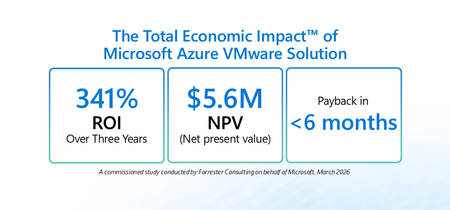
Many organizations are balancing near-term continuity for VMware-based workloads with longer-term cloud modernization goals – all while managing cost, security, and resiliency. Azure VMware Solution (AVS) is built for this moment: a Microsoft-managed service verified by VMware that enables running VMware Cloud Foundation (VCF) workloads (vSphere, NSX-T, vSAN, HCX) on dedicated Azure infrastructure. It gives organizations a practical way to move or extend VMware environments into Azure while maintaining operational consistency and leveraging the skills of existing VMware teams. To help leaders quantify the potential value of this approach, Microsoft commissioned Forrester Consulting to conduct The Total Economic Impact™ (TEI) of Microsoft Azure VMware Solution (March 2026). The study models the financial impact over three years and risk-adjusts results. Access the full study here: aka.ms/AVS-TEI Here’s what the study found and how IT leaders can use it as a framework for decision-making: Topline results from the study Forrester’s risk-adjusted financial analysis for a composite organization 1 found: 341% ROI over three years 2 $5.6M net present value (NPV) 3 <6 months payback 4 These metrics are meaningful on their own, but the bigger story for leadership is where the value comes from: improved operational stability, reduced infrastructure costs driven by data center exit and hardware refresh avoidance, and the ability to redeploy skilled IT resources from maintenance to modernization. The customer journey: why organizations turn to AVS AVS offers a bridge: Lift and shift VMware workloads into Azure without forcing immediate re-platforming then, modernize at a pace aligned to business priorities. In the study, Forrester interviewed decision-makers with experience using AVS. Interviewees described common challenges that led them to invest in AVS, including: Fragmented systems that complicated and slowed operations: Inherited stacks, duplicated tools, and unclear ownership of orphan machines made operations and governance harder. Rising cost and complexity of on-premises operation: Colocation fees, energy and cooling costs, server refresh cycles, and tooling renewals were difficult to justify against cloud economics. Limited capacity and skills to refactor at scale: Teams wanted the cost and agility benefits of the cloud but didn’t have the time or skills to rewrite hundreds (or thousands) of VMs on aggressive timelines. Security and audit pressure: Disparate environments and legacy access models elevated risk and created audit friction. Operational variability and end-user experience: VPN dependencies, inconsistent remote tooling, and endpoint logistics led to slow first-call resolution and downtime risks. Three quantified benefits that drive the business case 1) Reduction in downtime and associated costs by 80% In the study, interviewees reported that moving VMware workloads to AVS improved day-to-day reliability by eliminating fragile on-premises workflows and leveraging Azure’s managed infrastructure. Examples included fewer VPN-related failures, faster issue resolution through centralized tooling, and stronger service-level performance. For leadership teams, this benefit is about more than avoided cost. Better up time protects customer experience, employee productivity, and reduces the operational noise that can slow modernization programs. 2) Reduced infrastructure costs through data center exit, refresh avoidance, and cleanup A second driver is the ability to avoid or eliminate significant portions of data center cost and refresh spend. In the study, interviewees described using AVS to close data centers, avoid upcoming hardware refresh cycles, and reduce ongoing capital and operating costs. Importantly, interviewees also reported that migration waves prompted additional savings through portfolio hygiene by validating each VM, decommissioning redundant systems, and rightsizing oversized workloads. Those actions helped organizations reduce their ongoing compute, storage, and licensing footprint after migration. 3) Redeployment of 50% of IT team members from maintenance to modernization The TEI study quantifies a practical advantage of a managed VMware environment in Azure: fewer hours spent on hardware lifecycle, cluster patching, upgrades, and other routine data center tasks. In practice, many leaders treat this as capacity created rather than budget eliminated: the opportunity to shift experienced engineers toward modernization, automation, cloud governance, proactive incident prevention, and higher-value business initiatives. Unquantified benefits organizations should weigh Beyond the quantified categories, the study also highlights benefits that are strategically important, but not fully quantified in the model: Acceleration of future modernization: With workloads running in Azure via AVS, organizations can integrate platform services across security, identity, data, and analytics and build a runway for new capabilities, including AI-driven scenarios in Azure. Fast, cost-effective migration of legacy workloads: Interviewees described avoiding major consulting or hiring costs that would have been required to refactor complex workloads into cloud-native designs. Improved audit readiness and security posture: Consolidating fragmented environments into governed Azure landing zones can simplify audit preparation and strengthen governance and monitoring. For many leadership teams, these benefits strengthen the business case because they support broader transformation outcomes that extend beyond infrastructure cost alone. Things to consider in your own decision process If you’re building a business case to move workloads to Azure, whether it be lifting and shifting to AVS or replatforming and refactoring to Azure IaaS and managed services, consider mapping your environment across these areas: Data center timelines: Refresh cycles, colocation exit deadlines, and contract constraints. Operating model readiness: How quickly teams can adopt cloud-native services versus preserving VMware operations during transition. Modernization roadmap: Determine which applications are candidates for investment in replatforming, refactoring, replacement, or retirement once in Azure. Next steps Read the full TEI study: aka.ms/AVS-TEI Explore more about AVS: aka.ms/AzureVMwareSolution Get the VMware to Azure VMware Solution Planning Guide: aka.ms/VMwareToAVSguide Learn more about the Azure Copilot migration agent: aka.ms/migrate/AMA Join the AVS Pros group on LinkedIn for the latest updates and news: aka.ms/AVSPros 1 Composite organization: Forrester designed a composite organization based on characteristics of the interviewees’ organizations. 2 Return on Investment (ROI): A project’s expected return in percentage terms. ROI is calculated by dividing net benefits (benefits less costs) by costs. 3 Net present value (NPV): The present or current value of (discounted) future net cash flows given an interest rate (the discount rate). A positive project NPV normally indicates that the investment should be made unless other projects have higher NPVs. 4 Payback: The breakeven point for an investment. This is the point in time at which net benefits (benefits minus costs) equal initial investment or cost.
AWS to Azure Migration — From the Cloud Economics & FinOps Lens
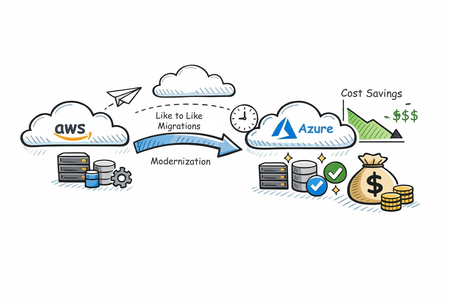
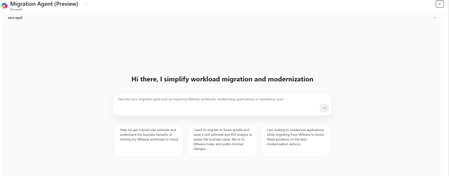
“ROI fails when FinOps joins late.” That single pattern explains why many cloud migrations deliver technical success but financial disappointment. Workloads move. SLAs hold. Teams celebrate go‑live. Then the CFO asks: Where are the savings we modeled? In most cases, FinOps was engaged after architecture decisions were locked, licenses were double‑paid, and governance debt had already accumulated. This article frames AWS‑to‑Azure migration through a FinOps lens—not to chase immediate modernization, but to deliver defensible, incremental cost savings during and after migration, without increasing risk. Azure migration guidance consistently emphasizes a structured, phased approach—discover, migrate like‑for‑like, stabilize, then optimize. From a FinOps perspective, this sequencing is not conservative—it is economically rational: Like‑for‑like preserves performance baselines and business KPIs Cost comparisons remain apples‑to‑apples Optimization levers can be applied surgically, not blindly The real value emerges in the first 90 days after migration, when cost signals stabilize and commitment‑based savings become safe to apply. {TLDR: Cloud migrations miss ROI when FinOps joins late. AWS → Azure migrations deliver real savings when FinOps leads early, migrations stay like‑for‑like, and optimization is applied after costs stabilize. Azure enables this through four levers: AI‑assisted planning (Copilot + Azure Migrate), cheaper non‑prod with Dev/Test pricing, license reuse via Azure Hybrid Benefit, and low‑risk long‑term savings with Reservations—across compute and storage. Result: lower migration risk, controlled spend, and sustainable savings post‑move.} This Article talks about top 4 FinOps Levers in AWS → Azure Migration 1. Azure Copilot Migration Agent + Azure Migrate. Azure Copilot Migration Agent (currently in public preview) is a planning‑focused, AI‑assisted experience built on Azure Migrate. It analyzes inventory, readiness, landing zone requirements, and ROI before execution. You can interact with the Agent using natural language prompts to explore inventory, migration readiness, strategies, ROI considerations, and landing zone requirements. From a FinOps perspective, this directly translates into faster decision cycles and lower planning overhead. By simplifying and compressing activities that traditionally required weeks of manual analysis or external managed services support, organizations can reduce the cost of migration planning, accelerate business case creation, and bring cost and ROI discussions forward—before environments are deployed and financial commitments are made. 2. Azure Dev/Test pricing: Azure Dev/Test pricing provides discounted rates for non‑production workloads for eligible subscriptions, significantly reducing dev and test environment costs (Azure Dev/Test pricing). You can save up to 57 percent for a typical web app dev/test environment running SQL Database and App Service. Unlike other Cloud Providers, this directly reduces environment sprawl costs, which often exceed production waste post‑migration. It also enables wave‑based migration by lowering the cost of parallel environments, allowing teams to migrate deliberately rather than under financial pressure. 3. Azure Hybrid Benefit: Azure Hybrid Benefit allows organizations to reuse existing Windows Server, SQL Server, and supported Linux subscriptions (RHEL and SLES) on Azure, reducing both migration and steady‑state run costs. It enables license portability across Azure services, helping organizations avoid repurchasing software licenses they already own and redirect savings toward innovation and modernization. During migration, Azure Hybrid Benefit is especially impactful because it addresses migration overlap costs. The 180‑day migration allowance for Windows Server and SQL Server allows workloads to run on‑premises and in Azure simultaneously, supporting parallel validation, phased cutovers, and rollback readiness without double‑paying for licenses. For Linux, Azure Hybrid Benefit enables RHEL and SLES workloads to move to Azure without redeployment, ensuring continuity and avoiding downtime. From a FinOps perspective, this reduces one of the most underestimated migration cost drivers, delivering up to 76% savings versus pay‑as‑you‑go pricing for Linux and up to 29% versus leading cloud providers for SQL Server, while keeping migration timelines driven by readiness—not cost pressure. 4. Azure Reservations: Azure Reservations enable organizations to reduce costs by committing to one‑year or three‑year plans for eligible Azure services, receiving a billing discount that is automatically applied to matching resources. Reservations provide discounts of up to 72% compared to pay‑as‑you‑go pricing, do not affect the runtime state of workloads, and can be paid upfront or monthly with no difference in total cost. Importantly, Azure Reservations apply not only to compute and database, but also to storage services like Azure Blob storage, Azure Data Lake Gen2 Storage and Azure Files (for storage capacity) which often represent a significant portion of enterprise cloud spend. In the context of migration, Azure Reservations matter because they allow FinOps teams to optimize baseline costs across both compute and data layers once workloads stabilize. Unlike AWS, where commitment‑based discounts are largely compute‑centric and storage services such as Amazon S3 do not offer reservation‑style pricing, Azure enables long‑term cost optimization for persistent storage footprints that continue to grow post‑migration. Additionally, Azure Reservations offer greater flexibility—customers can modify, exchange, or cancel reservations through a self‑service program, subject to defined limits. This is particularly valuable during wave‑based migrations, where workload shapes evolve over time. From a FinOps perspective, Azure Reservations allow organizations to commit to predictable savings with broader scope and lower risk, covering both infrastructure and data‑heavy workloads common in migration scenarios. Successful migrations are no longer measured by workloads moved, but by cost control maintained and value unlocked. Azure’s FinOps‑aligned migration capabilities allow organizations to reduce risk first, optimize deliberately, and ensure that savings are sustained long after the last workload migrates.
Accelerate Cloud Migration with Wave Planning in Azure Migrate
Introduction Migrating to the cloud is more than a technical upgrade - it's a strategic leap toward agility, scalability, and innovation. Yet, for many organizations, the journey can feel overwhelming, with complex dependencies and business risks threatening to slow progress. Today, we’re excited to announce the public preview of wave planning in Azure Migrate - a new capability designed to make large-scale migrations more manageable and predictable. With wave planning, you can now organize your migration journey into logical, iterative waves, enabling your teams to plan, execute, and track progress with greater speed, confidence, and control. Key Benefits: Accelerate migrations: Quickly identify and prioritize “quick win” workloads and applications by surfacing relevant information from discovery and assessments. Reduced risks: Group systems that work together using application grouping, dependency analysis and tags allowing safer iterative planning. Increased predictability: Visualize migration progress and timelines centrally, enabling continuous feedback and proactive adjustments. Application-centric migrations and modernization: Plan, execute, and track every step at the application level for greater control and business alignment. Wave Planning in Azure Migrate Concepts and Stages Planning Stage During the planning stage, you can organize their applications and workloads into waves and determine the order in which these groups will be migrated. By doing so, you can establish a comprehensive plan that outlines the specific steps, timelines, and resources required for each wave, ensuring a structured and efficient approach to migration and modernization. Key aspects of the wave planning in this stage includes: Group and sequence applications and workloads using tags, dependency analysis, and workload data. Set Azure targets and migration tools based on Azure Migrate assessment recommendations. Outline planning steps, timelines, and create a wave plan for application migration and modernization. Execution Stage Using wave planning you can perform the migration and modernization activities of the application withing the wave, as per the plan and track the progress as workloads are moved, tested, and migrated / modernized in Azure. Key aspects of wave planning at this stage includes: Centrally track migration and modernization activities for all applications and workloads within the wave. You can start migrating servers and databases using Server migration and Azure database Migration Service using in-product integrations. Integrated end-to-end workflows to facilitate server migrations from on-premises environments and various public clouds to Azure Virtual Machines. Monitor and visualize wave timelines in relation to planned migration and modernization dates and implement corrective actions as required based on status updates. In a nutshell, wave planning transforms migration from a one-time event into a continuous journey of improvement. By iterating, learning, and adapting, organizations build institutional knowledge, reduce risk, and unlock the full benefits of cloud adoption. Getting Started Ready to accelerate your migration? Get start today: Learn more about using Azure Migrate – Wave planning. Explore wave planning guidance through the Cloud Adoption Framework. Learn more about Azure Migrate. Checkout application-centric migration in Azure Migrate.Migrate or modernize your applications using Azure Migrate
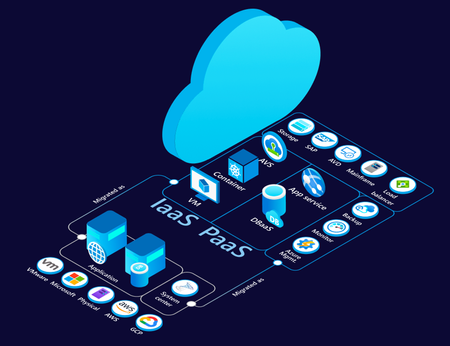
Introduction Moving to cloud is an essential step for enterprises looking to leverage the benefits of security, innovation (AI), scalability, flexibility, and cost-efficiency. To help unlock these benefits migration or modernization to Azure is critical for reasons such as colocation of IT assets. A crucial part of this transformation is understanding the current state of your IT infrastructure, including workloads, applications, and their interdependencies. Cloud migration is most effective when you can decide, plan and execute it holistically focusing on applications rather than focusing on individual servers or workloads in isolation. In our endeavour to both simplify and enrich your cloud adoption journey, we are evolving Application awareness in Azure Migrate that we introduced last year with features summarized below. Overview “The new design of Azure Migrate is much more intuitive, it allows us to group workloads into applications and track them throughout the migration journey. The Business Case Generator is a true game changer, providing insights that are ready for presentation at Leadership meetings. Azure Migrate continues to improve, making the execution of migration programs more seamless, faster, and secure. It has been an invaluable tool for our customers who are in the path of migrating to Azure” - Karthik Balachandran | Architect | EY Azure Migrate delivers a major evolution in cloud migration capabilities with application awareness. Here are key new features and why they matter: Multi-Server Dependency Mapping – Provides a holistic view of application topology, so you understand all server interactions before migrating. This reduces risk by ensuring no server is left behind and dependencies are respected during cloud transition. Software & Security Insights– Offers built-in intelligence on software inventory and vulnerabilities (e.g. highlighting outdated software and missing patches). This helps improve your environment’s security and stability as part of the migration journey, benefiting IT admins and security teams. Application definition & import– Allows you to treat applications as first-class citizens in Azure Migrate (not just tag groupings). You can create and manage app groupings easily, enabling a shift from managing individual workloads to managing whole applications in your migration project. Application migration or modernization RoI – Allows you to identify investments required in respective migration strategies as well as savings that would accrue as application are moved to Azure. Application Assessments– Delivers holistic migration plans per app, including recommended strategies (Rehost, Replatform, Refactor), target Azure services, sizing, cost estimates, and readiness checks. This empowers cloud architects to make informed decisions with an application-level focus. Code insight integration – GitHub Copilot assessment – Enables a developer-driven assessment loop by incorporating GitHub App Modernization Assessment reports. This tightens collaboration with dev teams and can dynamically adjust migration recommendations (e.g., flagging apps that need refactoring). CAST Highlight– Brings code-level analytics at scale into the migration plan. By importing CAST’s code scan results, you can identify technical debt and required code changes upfront, ensuring the recommended cloud approach truly fits the app’s codebase. Wave Planning with 1P Tool Integration– Provides a planning and execution framework to migrate in phases and launch the appropriate migration tools for each component seamlessly. This ensures end-to-end coverage – from migration scheduling to real-time execution – all within Azure Migrate. Capability deep dive Identify your applications using multi-server dependency mapping and subsequently define them One of the first steps in cloud migration planning is identifying application boundaries and dependencies. Azure Migrate’s new multi-server dependency mapping provides a rich visualization of how servers communicate with each other in your environment. This goes beyond the single-server dependency view of the past – now you can visualize an entire datacenter’s topology in one view. When you discover your on-premises environment, Azure Migrate’s agentless dependency analysis automatically begins mapping connections. It even measures connection strength, helping distinguish steady, critical communication from ephemeral connections. You can subsequently define applications, and assign metadata such as Name, type – Custom or Packaged (Commercial off the shelf), Criticality, Complexity (based on the number of dependencies), etc. Additionally, you can export your discovered inventory, assign application names in a spreadsheet, and import it back to quickly create many application grouping. You are free to refine or correct groupings, too. If during analysis you realize a server or workload was grouped incorrectly, simply update the application to add or remove that member (with no need to re-run discovery). Deleting an application grouping will not delete the underlying servers; it just removes the logical app wrapper, so you can reorganize safely as needed. Now, you can plan migrations by application units rather than individual workloads. This leads to more predictable outcomes (since all interdependent pieces move together), and it eliminates guesswork that used to come from manually correlating server relationships. Proactive Software and Security Insights Migration is not just about moving workloads – it’s an opportunity to remediate and improve what you have. The new Software and Security Insights surface critical information about your IT estate early on, so you can address potential issues before migration. Once your inventory is discovered, Azure Migrate now highlights: Software Insights:The portal flags certain software or OS components that might need attention or have cloud-friendly alternatives. For example, it might detect that some VMs run outdated middleware or unsupported OS versions. The tool provides recommendations for replacement or upgrade – e.g. suggesting you Repurchase a legacy product through Azure Marketplace or move to a SaaS solution for that functionality. This helps you plan modernization (repurchasing or upgrading software) as part of the migration project, rather than carrying technical debt to the cloud. Security Insights:Azure Migrate also integrates with security monitoring to detect vulnerabilities and missing updates in your servers. More importantly, it advises how to fix them: e.g. enabling Microsoft Defender for Cloud to address vulnerabilities, and using Azure Update Manager to apply pending updates. In essence, you get a mini security assessment alongside your inventory. These insights empower IT admins and security teams to tackle risks as part of migration planning. Rather than “lift-and-shift and then fix later,” you can remediate issues in parallel with migration, leading to a more secure and optimized environment on Azure. RoI for modernizing applications We are bringing in updates to Azure Migrate Business case to help ascertain the value you stand to gain by modernizing your applications – Custom or Packaged, as well as providing spend analysis across recommended migration strategies – Rehost, Replatform and Refactor. Holistic application assessments covering Infra-Data-Web tiers Application assessment builds on Azure Migrate’s existing server, database and webapp assessments, to give a migration game-plan for an entire application. It analyzes each component and then recommends An overall migration strategyamong Rehost, Replatform and Refactor, for the application under consideration. Migration readiness, and blockers that need to be addressed for respective strategy Target Azure Services and SKUs for workloads comprising the application Monthly cost estimates to run the application on Azure Migration tooling recommendations per workload comprising the application. Instead of piecemeal workload assessments, Cloud architects get a unified view per application – making it much easier to prioritize and plan. For example, you might discover that one application is an easy rehost (quick win), while another would clearly benefit from refactoring to eliminate costly components. Application assessments surface such insights with data, so stakeholders (including application owners and developers) can agree on a path forward with confidence. Ultimately, this leads to high-confidence migration plans and minimizes surprises during execution. Improve analysis with Code-Level Insights from Github Copilot assessment and CAST Most times, whether an application can be easily Replatformed or needs Refactoring depends on the application’s source code. Hence, we are bridging the gap between infrastructure and application development realities and are offering Integration with code analysis tools – GitHub Copilot assessment and CAST Highlight – to incorporate code-level insights into Azure Migrate’s recommendations. Talking about GitHub copilot – it is an indispensable tool for the application development. Developers can identify changes required in the code bases of their applications to make them ready for modernization to PaaS services such as AKS, App Service, etc. The cloud architect running Azure Migrate application assessment can request the application developers to ingest the code change insights from GitHub copilot assessment into Azure Migrate assessment. Once this report is ingested, you’ll see the Azure Migrate assessment refine its recommendations conclusively – such readiness, effort to make the code changes, migration strategy – depending upon whether the code changes are minimal or significant. Similarly, at-scale/ portfolio level code analysis performed using CAST Highlight, a prominent software intelligence platform, can be imported into Azure Migrate to improve the assessment recommendations. In practice, this means Azure Migrate will know if the code has, say, outdated libraries or many hard-coded dependencies that make cloud migration harder. Overall, the integration of code insights leads to more realistic migration plans and smoother hand-offs between cloud infrastructure teams and dev teams. Wave Planning and Integrated Migration Execution After discovering applications, assessing them, and incorporating any code insights, you’re ready to migrate or modernize – but large migrations often happen in phases. That’s where the new Wave Planning feature comes in. Wave planning in Azure Migrate helps you organize and sequence the actual migration execution in waves or batches, plan the migration activities and execute using integrated first party migration tools and track the end-to-end migrations; thereby providing a single place where different users – Cloud architects, developers, application owners, etc. can collaborate and coordinate through the migration journey. If your strategy for an application (or a particular server in the application) is Rehost (lift-and-shift to Azure VMs), Azure Migrate will use its built-in Server Migration capability. You can start the replication of that server to Azure right from the wave plan. If your strategy is Replatform or Refactor and involves migrating data, the wave plan can redirect you to Azure Database Migration Service (DMS). All these integrations mean you can coordinate multi-step migrations from one place. Wave planning is aware of various target strategies and helps orchestrate them, so cloud administrators don’t have to juggle separate tool interfaces for VMs vs. databases vs. web apps. As each part of a wave completes, Azure Migrate updates the wave status for Rehost scenarios and users can manually update the status’ for Refactor or Replatform scenarios where some steps may take out of band. Interested in trying the new feature set and experience? All the above features are available in Azure Migrate now (in preview as of 7 th November, 2025). Just create a new Azure Migrate project and you’ll be greeted with the new interface. From there, you can start defining applications and exploring these capabilities with your own data. About Azure Migrate Azure Migrate is Microsoft’s free platform for migrating and modernizing to Azure. It provides IT resource discovery, assessment, business case analysis, wave planning, migration, and modernization capabilities in a workload agnostic manner. You can run and monitor your migration/ modernization journey from a single, secure portal. Currently, Azure Migrate's application aware experience supports the discovery of following workloads: Windows Server, Linux Server, SQL Server, PostgreSQL, .NET webapp on IIS, and Java on Tomcat running on various platforms including, VMware, Microsoft, Bare-metal, AWS EC2, GCP CE, and Xen. Further, it supports assessments and wave planning for Azure VM, Azure VMware Solution (AVS), Azure SQL Managed Instance, Azure SQL Database, Azure Database for PostgreSQL Flexible Server, App Service Code, App Service Containers, and Azure Kubernetes Service. Last, it supports in-line Lift and Shift migration to Azure VM and Azure Local. Note: MySQL discovery and assessment is available in the classic experience onlyMigrate & Modernize Your VMware Platform Using Azure VMware Solution Gen 2
This video series by Microsoft Global Blackbelts, Carlos Villuendas (CarlosV) and Trevor Davis (tredavis), guides users from configuring prerequisites to deploying, migrating on-premises VMware workloads to Azure VMware Solution, then integrating VMware workloads with Azure Native services for enhanced value. These are the first two videos, much more to come, please check back often. For requests, leave comments in the notes. Enjoy! 1 - Prerequisites 2 - Deployment
Unlock cost savings with utilization-based storage recommendations in Azure Migrate
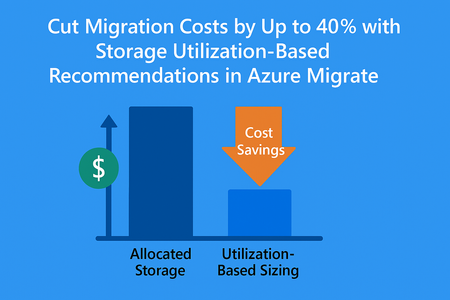
We’re thrilled to announce a game-changing enhancement in Azure Migrate. The storage utilization-based recommendations, a feature designed to help you right-size your storage workloads and maximize savings. By focusing on actual storage usage instead of allocated capacity, you can significantly reduce costs and accelerate their cloud journey. This feature brings a new level of precision to your migration planning and business case. Why This Matters In our analysis across thousands of on-premises environments, we observed a striking trend: nearly 40% of allocated storage is overprovisioned. This means customers are paying for capacity they don’t actually use. Traditional assessments often rely on allocated storage, leading to inflated cost estimates and suboptimal resource planning. What’s New Azure Migrate now honors actual storage utilization rather than allocated capacity when generating: Assessment recommendations for right-sizing your storage workloads. Business case calculations for accurate cost projections. This shift ensures: Lower migration cost projections: Pay for what you use, not what you’ve overprovisioned. Optimized cloud footprint: Reduce unnecessary storage allocation in Azure. Faster ROI: Build a business case that reflects true utilization, accelerating decision-making. Customer Impact By leveraging utilization-based insights, organizations can unlock significant savings and operate with greater efficiency. For example, if 40% of your storage is overprovisioned, this feature could cut your projected Azure storage costs dramatically, freeing up budget for innovation. How to Get Started Deploy an appliance in your on-premises environment. Build the business case or create an Azure Migrate Assessment for your on-premises workloads. Review the utilization-based recommendations in your assessment report or business case. Learn More Visit Azure Migrate documentation for detailed guidance and start optimizing your migration journey today.Empower your migration decisions with negotiated agreements (EA/MCA) in Azure Migrate
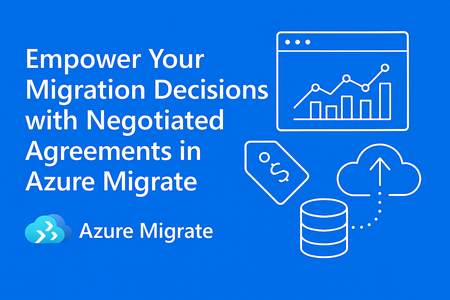
Cost plays the most important part in cloud migration accelerating the decisions. Organizations often hesitate because retail pricing doesn’t reflect their reality. That’s where Microsoft Customer Agreement (MCA) comes in, offering discounts of up to 60% off retail prices, based on your negotiated contract. Now, with Azure Migrate’s support for MCA pricing, you can bring those negotiated rates directly into your assessments. The result? Accurate cost projections, faster decision-making, and a clear path to the cloud. What is MCA? The Microsoft Customer Agreement (MCA) is a modern, flexible purchasing agreement designed to simplify how organizations buy and manage Microsoft services. It replaces older, complex agreements like the Enterprise Agreement (EA) for many customers, offering: Simplified Terms: A single, digital agreement that covers all Microsoft services. Flexible Purchasing: Pay-as-you-go or commit to specific services based on your needs. Negotiated Discounts: Depending on your contract, MCA can offer up to 60% off retail pricing, making Azure more cost-effective. Centralized Billing: Consolidated invoices and transparent cost tracking across subscriptions. With MCA, customers gain predictability, transparency, and control over their cloud spend—critical for planning large-scale migrations. Why MCA Integration in Azure Migrate Matters Previously, Azure Migrate assessments used standard retail pricing, which often didn’t reflect your negotiated terms. This created uncertainty and slowed decision-making. Now, by integrating MCA pricing: No More Guesswork: Assessments reflect your actual negotiated rates. True Cost Visibility: Understand the real financial impact of your migration strategy. Better Planning: Prioritize workloads and optimize budgets with confidence. How It Works? It is very simple to create assessments with negotiated agreement. Just start from the overview click on Create Assessment, add all the required workloads to the assessment scope. Once you move ahead in general settings select Microsoft Customer Agreement (MCA) as Offer/License program and in the Subscription Id field select the appropriate subscription id. After the assessments are created visualize and compare the costs with retail pricing and MCA cost to compare. Key benefits Accuracy: Realistic cost projections based on your MCA. Flexibility: Model multiple migration scenarios with confidence. Speed: Eliminate manual adjustments and accelerate planning. Ready to Get Started? Don’t let cost ambiguity slow down your cloud journey. Start leveraging MCA-powered assessments in Azure Migrate today and move forward with confidence. 👉 Learn more and get started: Assessment Properties - Azure Migrate | Microsoft LearnAzure Migrate: Connected Experiences
Shiva Shastri Sr Product Marketing Manager, Azure Migrate—Product & Ecosystem. Modernization in motion: Evolving at the speed of change. Modernization is the process of transforming legacy IT systems into technologies and architectures that improve agility, scalability, performance and cost-efficiency. It enables businesses to stay competitive by aligning their capabilities with evolving customer and market demands. Modernization is not a one-time event with a finish-line but a continuous journey of evolution. As technology, customer expectations, and competitive landscapes shift, so must the systems and processes that support them. Cloud-native architectures are inherently aligned with modernization while providing access to innovations such as AI. By treating modernization as an ongoing discipline, organizations can stay ahead of disruption, adapt faster to change, and unlock new opportunities. This ability to move faster and smarter is fully realized in Azure — where modernization becomes both a technical upgrade and a strategic advantage. It enables organizations to refocus on core priorities, respond to market shifts in real time, and reduce operational costs. At the heart of this transformation is Azure Migrate — Microsoft’s free, unified platform for cloud migration and modernization. It offers comprehensive capabilities including IT resource discovery, assessment, business case analysis, planning, and execution — all in a workload-agnostic manner. From a single, secure portal, users can manage and monitor the entire journey and cut over to production in Azure with confidence. Today, we’re excited to introduce several impactful Azure Migrate features designed to help you move your on-premises workloads to Azure more efficiently: Accelerated migration and modernization to the cloud. Azure Migrate Agentic method offers an intuitive and insightful approach to cloud transformation. AI assistance assesses on-prem environments, identifies dependencies, and orchestrates workload transitions with minimal manual intervention. By continuously adapting and delegating activities to the appropriate persona, the agents streamline complex migration paths, reduce risk, and accelerate time-to-value. For organizations moving to Azure, the agentic method provides a fast, frictionless route, turning what was once a daunting task into a guided, efficient journey toward modernization. Infrastructure as Code (IaC) plays a pivotal role in cloud migration and modernization by enabling organizations to automate the provisioning and management of infrastructure through code. This approach ensures consistency, scalability, and repeatability across environments, reducing manual errors and accelerating deployment timelines. Azure Migrate now supports IaC, thus simplifying the transition from legacy systems to cloud-native architectures by codifying infrastructure configurations, making it easier to replicate and validate setups. Comprehensive coverage and consistent user experience for your IT estate. No single migration or modernization tool can address the full spectrum of enterprise scenarios and technologies. That’s why Azure Migrate takes a platform-centric approach — delivering a unified, intelligent experience that spans the entire IT estate. By seamlessly interoperating with specialized tools like Database Migration Service (DMS) and GitHub Copilot (GHCP), Azure Migrate empowers organizations to modernize with confidence, flexibility, and speed. Advanced capabilities like 6R analysis — Rehost, Refactor, Rearchitect, Rebuild, Replace, and Retire — empower organizations to tailor modernization strategies to each application, driving smarter, scenario-specific decisions. Support for migration of Arc-enabled resources extends Azure Migrate’s management and governance capabilities to hybrid and multi-cloud environments, ensuring consistency and control regardless of where workloads reside. Additionally, support for Rocky Linux, PostgreSQL, and application awareness empowers teams to assess entire open-source application stacks with dependencies for readiness to migrate to Azure. Secure by design with human in-the-loop. Azure Migrate has recently introduced several security enhancements that reinforce Microsoft's commitment to a "secure by design" and "secure by default" approach. Among the key updates is the friction-free collector, which simplifies secure data collection for migration assessments while minimizing exposure risks. The friction-free discovery in Azure Migrate eliminates the need for deploying discovery appliances for initial assessments. As a result, it accelerates time-to-value, reduces setup complexity, and aligns well with security-conscious environments, making it an efficient and low-risk way to begin cloud migration planning. Azure Migrate supports Private Link and disabling public network access, ensuring that migration traffic remains within secure, private channels. Additionally, the platform enforces data encryption both in transit and at rest, with options for customer-managed keys, and integrates tightly with Azure Key Vault for secure credential and secret management. A security vulnerability report during migration and modernization identifies misconfigurations, outdated components, or exposed services, and the report provides actionable insights that align with Microsoft Defender for Cloud (MDC) threat protection and posture management capabilities. This allows teams to proactively remediate risks and apply MDC’s security controls ensuring the environment is secure from day-1 in Azure. As organizations navigate shifting markets, supply chains, and climate challenges, sustainability has become a strategic imperative. Azure’s carbon optimization capabilities provide clear visibility into potential emission reductions and cost savings, helping IT teams prioritize impactful actions. By unifying planning, execution, and continuity across infrastructure and applications, Azure delivers a consistent modernization experience. Ultimately, cloud-powered innovation enables businesses to drive efficiency, reduce environmental impact, and stay competitive in a rapidly evolving landscape. Learn more Start with a free Azure account if you are new. Sign up for previews of new capabilities and learn more about the workload agnostic method of Azure Migrate. For expert migration help, please try Azure Accelerate. You can also contact your preferred partner or Microsoft field for next steps. Get started in Azure today!