azure migrate
89 TopicsAgentic Migrations and Modernization: How the Azure Migrate Agent Keeps Your Intent Alive End to End
Hello Folks! If you have ever tried to move a few hundred VMs, a pile of databases, and a couple of web apps from on-prem to Azure, you already know the hard part is not the tooling. The hard part is keeping context, intent, and momentum alive across weeks of planning, hand-offs, and decisions. In session MAIS15 at the Microsoft Azure Infra Summit 2026, Ankur Gupta (Senior Product Manager on the Azure Migrate team) walked us through the new Azure Migrate agent, an AI layer that sits on top of Azure Migrate and carries your intent from “I have an idea” all the way to “the landing zone is deployed.” Why IT Pros Should Care Ankur opened with a line that stuck with me. Infrastructure complexity has far outpaced human scale. We have MySQL here, PostgreSQL there, web apps, storage devices, networking gear, multiple dashboards, multiple alerts, and we are all expected to move faster than ever, with fewer mistakes. In short, migrations rarely fail because someone picked the wrong tool. They fail because the system between the stages breaks. Here is why the agentic approach matters for the folks in the trenches: It keeps context across the entire lifecycle, so the intent you set on day one is still the intent at execution. It guides you when you are stuck, instead of leaving you to figure out which of three discovery methods is the right one. It compresses tasks that used to take days of analysis (think side-by-side business cases) into a few hours. It connects IT ops, architects, and developers through a single thread of information, including a clean handoff to GitHub Copilot for code work. It builds on the Azure Migrate portal you already know, so nothing you have learned goes to waste. That last point is important. The portal does not go away. The agent is a layer on top. You can still do everything you do today. What the Azure Migrate Agent Is, technical overview Azure Migrate has always been Microsoft’s hub for discover, assess, and migrate. What Ankur showed at MAIS15 is the next evolution. Azure Migrate is becoming a migration control plane that spans the whole lifecycle (Decide, Plan, Execute), and the Azure Migrate agent is the conversational, guidance-oriented layer that ties it all together. In Ankur’s words, the agent is educational and guidance-oriented. You ask one natural-language question, like “how should I plan moving my VMware workloads to Azure,” and you get the next steps you actually need to take. Behind the scenes, the agent is doing three things very well. It maintains state across the entire lifecycle. Preferences you set early stay with you. It carries context across discovery, plan, and execute. You can jump around, repeat steps, change your mind, and the agent remembers what your goal was. It recommends the right next move based on what it has learned about your intent. This is the heart of the “agentic” part. The agent is not a chatbot grafted onto a portal. It is a stateful workflow runner that remembers you. How It Works, under the hood The session walked through a full VMware-to-Azure scenario, and the flow is worth seeing because it shows how the pieces snap together. The agent supports three discovery methods today: appliance-based discovery, RV Tools, and the new Azure Migrate collector. The collector is the new lightweight option. It ships as a set of PowerShell scripts you run on a machine that can reach your vCenter, it produces a zip file, and you upload that zip to your Azure Migrate project. No appliance to deploy, no inbound network plumbing. Once the inventory lands, the agent reads it. Ankur asked for a summary and got a card showing 207 VMs, 177 SQL databases, one PostgreSQL instance, and some web apps. He then asked for all servers with an out-of-support OS, got a list of around 50, and tagged them right inside the conversation so he could refer back to them later. Next came the business case. Ankur asked the agent to generate one based on a modernize preference. A few minutes later, he had Azure cost, on-prem cost, and projected savings. Then he asked for a second business case for lift and shift, and a side-by-side comparison. The agent ran it, showed that the on-prem cost in the lift-and-shift comparison was higher and that lift-and-shift TCO savings were actually higher in that specific scenario, and gave him the data points he needed to bring the decision to leadership. From there, Ankur moved to application assessment, this time back in the portal. He created an assessment for two apps (Airsonic and Parts Unlimited), let the high-confidence plan run, and got a modernize recommendation with 100% readiness and a target cost of about $580 per month, plus an emissions estimate of 32 kgs of CO2. App Service for the web tier, Azure Database for PostgreSQL for the data tier. Both were flagged “ready with conditions,” with clickable links into why. Then came one of my favorite parts. Ankur connected GitHub for a Copilot Assessment, which adds code-level insights on top of the infrastructure readiness assessment. The system recalculated, and the migration effort estimate sharpened up. Finally, the agent built a wave plan from the assessment, then generated a platform landing zone aligned with Azure best practices. He could ask the agent about chosen defaults, request changes to the deployment mechanism, swap in a third-party firewall, or apply naming conventions. The agent produced a downloadable Infrastructure-as-Code template and handed it to a cloud architect, who refined it in their IDE using GitHub Copilot. That last handoff is the bridge between Azure Migrate’s planning world and the developer world. Real-World Value (use cases, ROI, scenarios) So where does this actually pay off? A few scenarios stood out. Pitching the business case to leadership. Ankur framed the demo around “I need to pitch a migration proposal to the planning committee.” Generating modernize, lift-and-shift, and Azure VMware Solution business cases used to be days of spreadsheet work. With the agent, it is hours. Cleaning up legacy debt. Tagging out-of-support servers in one conversational step lets you plan upgrades without exporting CSVs and slicing them by hand. Mixed estates with web apps and databases. The agent surfaces App Service and Azure Database for PostgreSQL targets, gives SKU recommendations, and flags the warnings worth investigating. Closing the IT-to-developer gap. The GitHub Copilot Assessment and the IaC handoff to the IDE means developers and architects work from the same context. Reducing intent drift on long migrations. Multi-week journeys lose their original intent. The agent remembers. In short, the ROI here is measured in calendar time, not just dollars. And honestly, in fewer late-night calls when something goes sideways because nobody remembered the original decision. Tradeoffs worth flagging: the agentic capabilities are landing in preview, and outputs are advisory. You still need human review, testing, and governance on every recommendation. That is by design. Getting Started (concrete first steps) Here is a practical onramp. Stand up an Azure Migrate project in the Azure portal if you do not already have one. Pick a discovery method that fits your environment. If you cannot deploy an appliance, try the new collector. Download the PowerShell scripts, run them from a host that can reach vCenter, and upload the zip. Bring in the Azure Migrate agent from inside the portal and ask it to summarize your discovered inventory. Generate at least two business cases (modernize and lift-and-shift). Compare them. Run an application assessment on a small, representative set of apps. Connect GitHub and add a Copilot Assessment for code-level insight. Ask the agent to build a wave plan and a platform landing zone template, then push the IaC to your repo for the architects. Start small, build the muscle, and scale out. Resources Azure Migrate documentation (Microsoft Learn) About Azure Migrate, including the Azure Copilot migration agent (Microsoft Learn) GitHub Copilot modernization overview (Microsoft Learn) GitHub Copilot modernization agent overview (Microsoft Learn) GitHub Copilot modernization documentation (Microsoft Learn) Assess and migrate a .NET project with GitHub Copilot modernization (Microsoft Learn) GitHub Copilot modernization overview for .NET (Microsoft Learn) Keep Learning at the Summit Catch the full Microsoft Azure Infra Summit 2026 session playlist here Microsoft Azure Infra Summit 2026 Cheers! Pierre Roman269Views0likes0Comments
Replicate workload from VMWare to Azure using Azure Site Recovery(ASR)
Hello, I am working on a project to replicate worklooad hosted on a VMWare to Azure Site Recovery for disaster recovery purpose. Current Environment: More than 80 VMs hosted on VMWare managed by VMWare Sphere running both Linux and Windows OS.. Databases: Oracle DB, Microsoft SQL and MySQL Requirements: seamless failover and disaster recovery requirements. scalable setup No down-time integrate identity and access mgt. integration with Microsoft Entra ID. RTO < 2 hrs and RPO > 15 minutes Backup: critical database backup every 3 hours App servers: Daily*incremental) and weekly (full) Transaction Logs: every 10 mins backup config. should be Daily Questions I have confirmed ASR supports fail back from Azure- on premise(VMWare specifically). Hence ASR(Azure site recovery) will be used for the project. However, what is the seamless method to replicate the databases(Oracle, Microsoft SQL and MySQL). https://learn.microsoft.com/en-us/azure/site-recovery/vmware-azure-failback What is the best approach to replicate the Application Servers? integrating existing on-premise 3rd party network security tool for firewall etc instead of the azure cloud native security tool. recommendation?? cost optimization techniques/recommendations Best practices for conducting non-destructive DR drills.316Views0likes2Comments
File share migrations simplified with Azure Copilot Migration Agent
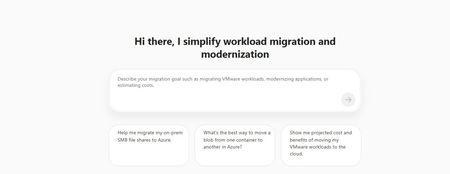
Building on our earlier announcement of discovery and assessment support for SMB and NFS file shares in Azure Migrate, we are extending the experience to support end-to-end file share migrations within the same workflow. With Azure Copilot Migration Agent, customers can move from discovery and assessment to migration through a single guided experience in Azure Migrate. By bringing planning and execution together, the agent helps organizations streamline migration activity, reduce handoffs, and maintain continuity across stages. Overview Since the release of file share discovery and assessment in Azure Migrate earlier this year, customers have indicated that while visibility into their file share estate improved, the transition to execution remained fragmented. In many cases, teams still had to work across separate workflows for inventory, readiness planning, and migration, increasing operational friction and the risk of losing context between stages. Azure Copilot Migration Agent helps address this gap by bringing discovery, assessment, planning, and execution into a single guided journey. Azure Migrate provides visibility and recommendations, while Azure Storage Mover supports execution in a connected, agentic experience. The result is a more consistent migration path that reduces complexity, preserves context, and helps teams move file shares to Azure with greater operational confidence. Customer Value This update streamlines the migration journey by connecting each stage of the process and reducing operational overhead. Natural language guidance helps teams start and manage migration activities much faster, often in hours or days instead of weeks. The experience supports the following scenarios: End-to-end discovery, assessment, and migration for on-premises Windows and Linux file shares (SMB) to Azure Files. Discovery and assessment for on-premises Windows and Linux file shares (NFS). Data transfers from one Azure Blob container to another container. Design principles The experience preserves continuity across inventory, readiness insights, and execution planning, enables direct movement of validated shares when heavyweight orchestration is unnecessary, maintains approval and sequencing controls, and supports the file and object movement patterns commonly required in production environments. Getting Started with Storage Migration in Azure Copilot Migration Agent (ACMA) Launch Azure Migrate: Sign-in to the Azure portal, open Azure Migrate. From the Getting Started page, open Azure Copilot Migration Agent, then select or create an Azure Migrate project. Describe the migration in natural language. The agent detects storage migration intent and assists with storage migration planning and routes execution requests seamlessly. Examples scenarios and prompts Migration of on-premises Windows Server data over SMB to Azure Files 2. Prompt: Help me transfer data from one Azure blob container to another blob container Call to action Storage integrated capability is launching in Limited Preview at Microsoft Build. Sign up for the Preview here. For questions, contact storagemigrationcopilotagent@microsoft.com. Learn More File share discovery and assessment in Azure Migrate Azure Copilot Migration Agent Azure Storage Mover695Views2likes0Comments
Simplify On-prem File share Migration to Azure: Discover & assess suitability using Azure Migrate
UPDATE as of 20th May 2026: We are happy to announce that this capability is now GA worldwide. Migrating on‑premises file servers to the cloud is a complex infrastructure transformation—not just a data move. Many organizations lack the visibility needed to decide whether to rehost or modernize file shares spread across Windows and Linux servers. Azure Migrate now extends its discovery and assessment capabilities to SMB and NFS file shares, enabling a data‑driven approach to modernizing on‑premises file workloads with Azure Files, or alternatively rehosting to deployment within an Azure VM. We are pleased to introduce the public preview of Azure Migrate’s new comprehensive discovery and assessment of on-premises SMB and NFS file shares for migration to Azure Files. This enhancement simplifies the migration process by integrating discovery and evaluation tools for SMB and NFS shares across both Windows and Linux platforms. Users can efficiently identify file shares, analyze their compatibility, and compare cost benefits for transitioning to Azure Files, all within an intuitive and streamlined interface. Why does this matter File shares remain a foundational service for most workloads - supporting applications, analytics, user home directories, and shared content. Planning such a vast amount of data for migration can be slow, manual, and fragmented. This new Azure Migrate capability is designed to help with: Reduce migration planning from months to weeks through automated discovery and assessment of SMB and NFS file shares. Perform holistic migration planning of your data and storage alongside servers, applications and data bases from within Azure Migrate experience. Modernize confidently to Azure Files with tailored SKU recommendations, readiness assessments, and comprehensive cost insights, enabling you to build a clear business case by comparing ongoing on-premises and Azure Files costs. What’s available in public preview Discover and view details of all on-premises SMB, NFS shares hosted on Windows and Linux servers Group, tag, filter shares by Production, non-production, project, business group for better planning. Create and review assessment for each share, its target Azure Files SKU based on region, redundancy, pricing options and media type. Generate a business case for selected group of shares running on Azure Files against on-premises cost. How do you get this feature? Install the latest Azure Migrate appliance, or enable the auto update feature for the appliance will receive this new capability. All existing SMB, NFS file shares will be reported in the Azure Migrate portal along with their Windows and Linux hosts. You do not need to perform any additional steps to discover the shares. End-to-end experience The experience is fully integrated into Azure Migrate and follows a familiar, guided workflow as below. 1. Discover on‑premises file servers and file shares You can start by creating an Azure Migrate project in the Azure portal and enabling discovery using the Azure Migrate appliance. The appliance can be deployed in connected or disconnected mode and runs on VMware, Hyper‑V, or physical servers. Once deployed, the appliance automatically discovers file servers and the file shares they host, including: Operating system (Windows or Linux) File share protocol (SMB or NFS) Associated volumes Estimated capacity Basic performance metrics such as IOPS and throughput (when performance collection is enabled) Discovered file shares appear directly in Azure Migrate inventory views, where they are surfaced as inventory items under respective Windows or Linux systems. This makes it easy to filter, tag, and review all shares at scale. 2. Build a business case The next step is to create a business case. This offers a clear comparison of on-premises costs versus Azure, highlights long-term savings and operational benefits, and justifies modernizing to Azure Files rather than rehosting file servers on virtual machines. This allows IT leaders to make data-driven decisions confidently. 3. Create and review an Azure Files assessment Once you have finalised your business case and decided to move to Azure Files, you can initiate an Azure Files assessment right from the Azure Migrate platform. The assessments are adaptable, allowing you to focus solely on file shares, include their parent servers, or even expand to scenarios that cover VMs, databases, and file shares—reflecting real-world planning needs. Each assessment reviews readiness and provides recommendations based on inventory and performance metrics gathered. Furthermore, you can tailor assessment settings, including selecting a target Azure region, pricing and savings preferences, media type, redundancy options, and choosing either performance-based or as-is sizing. The assessment offers a detailed overview of migration readiness and economic factors, supporting well-informed decisions for subsequent actions. Key insights include: Readiness states for each file share (Ready, Ready with conditions, or Not ready) Recommended Azure Files SKU based on performance and suitability. For example, Azure Files provisioned v2 premium SSD for a NFS 4.1 share as target. Monthly cost estimates for the recommended SKU. On‑premises vs Azure TCO comparison, helping customers understand long‑term cost implications Azure Migrate also identifies potential warnings and provides necessary remediation guidance. For example, when a redundancy type is not available in an Azure region, it is flagged as ready with conditions and recommend choosing an alternative redundancy type and fallback to next available option. Prepare for migration with appropriate tools Once you are ready to migrate, Azure Migrate also highlights recommended migration tools as part of the assessment. Azure Storage Mover is the default recommended path for file share migrations—providing a first party, managed service to move data efficiently to Azure Files. To learn more about Microsoft’s recommendations to unstructured data migration using other tools, please visit: https://aka.ms/migratemydata. Learn more about creation of assessment and review assessment to get started with understanding your on-premises file shares estate today. Write to us at migratemydata@microsoft.com for any questions or feedback - we look forward to hearing from you!812Views1like0Comments
Cutover Strategy for Azure PaaS Services: A Step-by-Step Guide to Near Zero-Downtime Migrations
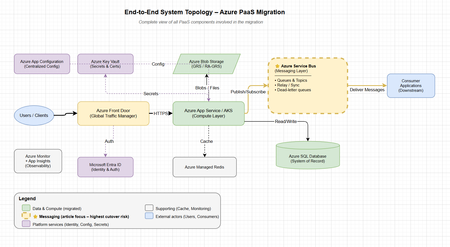
"In most Azure migrations, infrastructure is the easy part. The real risk — and the real engineering challenge — lies in the cutover." Why Cutover Strategy Matters Migrating mission-critical applications to Microsoft Azure — especially PaaS-based systems — requires more than provisioning resources. The real complexity lies in executing a safe, controlled transition of traffic and data while maintaining high availability and disaster recovery (HA/DR) at every stage. In enterprise environments: Applications are deeply interconnected Systems run 24×7 under strict SLAs Downtime is rarely acceptable A poorly executed cutover can lead to: Authentication failures (token/config mismatches) Data inconsistencies (split-brain scenarios) Message loss (queue gaps during switchover) Degraded user experience (latency spikes, partial failures) Goal: Shift traffic — not risk. Choosing the Right Cutover Strategy Strategy Downtime Risk Rollback Complexity Timeline Best For Big Bang High High Hard Low 1–2 days Simple, low-dependency apps Blue-Green Low Medium Easy Medium 1–2 weeks Stateless apps Canary Release Very Low Low Very Easy Medium 2–3 weeks Gradual validation Phased Parallel (Recommended) Helps achieve near zero Low Instant High 3–6 weeks Complex PaaS systems Recommendation: Use Phased Parallel Cutover for enterprise PaaS migrations involving messaging, databases, and multi-team ownership. HA vs DR — Quick Clarity Aspect High Availability (HA) Disaster Recovery (DR) Goal Prevent downtime Recover from failure Scope Same region (zone redundancy) Cross-region (geo-failover) RTO Seconds–minutes Minutes–hours Example Zone-redundant App Service Azure SQL Failover Groups During cutover, you should design for both simultaneously. A cutover without HA/DR is a recipe for a production incident. End-to-End System Topology Before diving into the phased cutover, it's important to understand the full landscape of PaaS components involved in the migration: Layer Azure Service Role Cutover Complexity Traffic Azure Front Door Global routing, weighted traffic split Low (config change) Compute App Service / AKS Application hosting Medium (stateless, replaceable) Messaging Azure Service Bus Async communication, event-driven flows High (message loss risk, ordering, relay) Database Azure SQL / Cosmos DB System of record Medium–High (failover groups) Cache Azure Managed Redis Performance layer (non-authoritative) Low (rebuild on miss) Storage Azure Blob Storage File/object persistence Low–Medium (GRS handles it) Identity Microsoft Entra ID Authentication & authorization Low (shared across environments) Config App Configuration + Key Vault Centralized settings & secrets Low (read-only, dual-read capable) Observability Azure Monitor + App Insights Metrics, tracing, alerting N/A (must be in place before cutover) Phased Parallel Cutover (with HA/DR Built-In) Note: The phase diagrams below focus specifically on Azure Service Bus (messaging) — the most complex cutover component. Messages are transient (an undelivered message is permanently lost), ordering matters, dual-write risks split-brain, and consumers maintain processing state that can't simply be switched. Other PaaS services (SQL, Storage, Redis) have well-established, largely automated cutover mechanisms (failover groups, GRS, cache rebuild) and are covered in the text sections. Phase 1 — Initial Validation (Safe by Design) What Happens Small percentage (5%) of traffic routed to new system via Azure Front Door weighted routing New compute runs in Azure (App Service / AKS) Still depends on old backend (messaging + database) HA/DR Strategy Old system acts as active fallback + DR Maintain full capacity in old environment Validate failback using Azure Front Door origin groups Validate auth parity via Microsoft Entra ID (App Registrations, token issuers) Go/No-Go Criteria to Proceed to Phase 2 Criteria Threshold Error rate on new system < 0.1% for 24 hours Latency (P95) Within 10% of old system Auth success rate Target: full parity with old system Monitoring coverage All key metrics visible in Application Insights Rollback tested Successfully reverted traffic split at least once ✔ Low risk · ✔ Instant rollback Phase 2 — Parallel Run + Replication (Highest Risk Phase) What Happens Old and new systems run in parallel (80/20 split favoring new) Data and messages replicated via stateless relay Both systems serve consumers HA/DR Strategy Relay must be stateless and scalable → Use Azure Functions (Consumption plan with auto-scale) Messaging resilience → Azure Service Bus with: Retries (exponential backoff) Dead-letter queues (for poison messages) Duplicate detection (message deduplication window) Monitor → Azure Monitor + Application Insights tracking: Replication lag Throughput (messages/sec) Relay failures Consumer processing time Risks & Mitigations Risk Mitigation Data inconsistency Single-write model — one system of record at a time Message duplication Idempotent consumers (deduplication by message ID) Relay failure Circuit breaker pattern, dead-letter fallback Split-brain scenarios Clear ownership boundaries per service Go/No-Go Criteria to Proceed to Phase 3 Criteria Threshold Traffic on new system ≥ 80% stable for 48 hours Data sync lag Target: real-time parity (no measurable lag) Message loss rate Target: zero loss (validated via monitoring) Relay error rate < 0.01% DR failover tested At least 1 successful region failover drill ⚠ Highest risk phase — requires continuous observability Phase 3 — Full Cutover (HA/DR Fully Owned by New System) What Happens All traffic routed to new environment Old system moved to standby, then decommissioned after validation DR ownership transfers fully to new system HA Strategy Zone redundancy (App Service, AKS, Service Bus) Autoscaling (CPU/memory-based + custom metrics) Global routing via Azure Front Door with health probes DR Strategy Service DR Mechanism Azure SQL Database Failover groups (auto-failover) Azure Cosmos DB Multi-region writes Azure Storage GRS / RA-GRS (geo-redundant) Azure Service Bus Geo-DR namespace pairing Azure Managed Redis Active geo-replication Old system should be decommissioned only after DR validation passes — run a full region failover drill before removing old infrastructure. Core Principles for PaaS Cutover Cache — Azure Managed Redis Non-authoritative (cache is disposable) Do NOT migrate cached data — let it rebuild Expect and design for cache misses during cutover Pre-warm critical keys if latency-sensitive Messaging — Azure Service Bus Help ensure durability (premium tier, geo-DR pairing) Avoid dual writes (one producer → one queue at a time) Use relay pattern carefully with circuit breakers Dead-letter monitoring is critical and should not be skipped Storage — Azure Storage Dependency-driven migration (move what services need) Treat as shared contract (APIs, blob containers) Use AzCopy or Storage Data Movement library for bulk transfer Databases — Azure SQL Database / Azure Cosmos DB Systems of record — integrity over speed Use online migration (Azure Database Migration Service) for minimal downtime Validate data checksums post-migration Data Consistency Patterns Pattern Risk Use When Single Write (Recommended) Low One system is the authority; others read via replication Event Replication Medium Both systems need near-real-time data; eventual consistency acceptable Dual Write High — Avoid Leads to split-brain; only viable with distributed transactions Common Pitfalls (and How to Avoid Them) Pitfall Prevention Auth failures Pre-validate tokens, verify config parity across environments Hidden dependencies Centralized configuration (Azure App Configuration) Message duplication Idempotency + Service Bus deduplication window Data inconsistency Single-write model with clear ownership Cache issues Pre-warm cache; design for miss tolerance Background jobs Audit all scheduled tasks; redirect to new system explicitly Lack of monitoring Deploy observability BEFORE cutover, not after Observability During Cutover Tools Azure Monitor — Infrastructure metrics, alerts Application Insights — Distributed tracing, dependency maps Azure Log Analytics — Centralized query across all resources Azure Service Bus Explorer — Queue depth, dead-letters Key Metrics to Track Metric Why It Matters Latency (P50, P95, P99) Detect degradation early Error rates (4xx, 5xx) Catch failures before users notice Dependency health Identify cascading failures Queue backlog / depth Messaging throughput bottlenecks Replication lag Data consistency validation Active connections Connection pool exhaustion If you can't observe it, you can't safely cut over. Rollback Strategy Old system remains active and at full capacity throughout Phase 1–2 Quick switch via Azure Front Door origin group weight (route all traffic back to old in seconds) Avoid irreversible writes to new system early in the process Test rollback at least once before entering Phase 2 Document rollback runbook with clear decision criteria Rollback triggers: Error rate > 1% sustained for 5 minutes Latency P95 > 2x baseline Data sync lag > 30 seconds Any message loss detected Tooling & Automation Concern Recommended Tool Infrastructure as Code Bicep / Terraform CI/CD Pipelines Azure DevOps / GitHub Actions Traffic Management Azure Front Door (weighted routing) Configuration Azure App Configuration + Key Vault Secrets Azure Key Vault (managed identity access) Monitoring Azure Monitor + Application Insights Alerting Azure Monitor Action Groups Runbooks Azure Automation / manual decision gates Team Roles & Communication Role Responsibility During Cutover Migration Architect Go/no-go decisions, phase transitions Platform Engineer Infrastructure, Front Door config, DNS App Team Lead Application validation, smoke tests SRE / Ops Monitoring, alerting, incident response DBA Data sync validation, failover group health Stakeholder / PM Communication to business, escalation path Communication plan: Dedicated Teams/Slack channel for cutover window Status updates every 30 minutes during active phases Pre-defined escalation matrix Post-cutover retrospective within 48 hours Final Cutover Readiness Checklist [ ] Traffic tested at ≥ 50% on new system [ ] Stable for 24–48 hours at target load [ ] Data sync lag approaching zero (real-time parity confirmed) [ ] Rollback tested and documented [ ] DR tested (region failover drill passed) [ ] All teams briefed and on-call scheduled [ ] Monitoring dashboards reviewed and alerting active [ ] Auth validated end-to-end (Entra ID, certificates, API keys) [ ] Background jobs redirected and verified [ ] Stakeholder sign-off obtained Final Takeaways Use phased parallel cutover — not big bang Incorporate HA/DR into every phase — not as an afterthought Move compute first, data carefully — messaging is the hardest part Design for rollback — until you've proven the new system at full traffic Validate continuously — observability is your safety net Closing Thought A cutover strategy helps ensure a smooth transition. HA/DR helps you survive when things go wrong during that transition. The most successful Azure migrations treat both as one — not separate concerns. We'd Love to Hear From You What cutover challenges have you encountered in your Azure migrations? Have you used a relay pattern for messaging, or found a different approach that worked? Share your experiences in the comments below — your insights help the community learn faster. Further Reading Azure Service Bus Geo-Disaster Recovery Azure Front Door Traffic Routing Methods Azure SQL Database Failover Groups Azure Monitor Overview Azure App Configuration Best Practices Tags: Azure · Migration · Service Bus · PaaS · High Availability · Disaster Recovery · Cutover Strategy · Zero Downtime · Azure Front Door Disclaimer: This guide is based on field experience from enterprise Azure PaaS migrations. Results depend on your specific architecture, workload, and Azure region availability. Traffic percentages, timelines, and thresholds are illustrative targets — not guarantees. This article does not constitute an SLA; refer to Azure Service Level Agreements for official uptime commitments.AHEAD helps us launch the Strategic Azure Storage Services Partner Program
AHEAD becomes the first Azure Storage Strategic Channel Partner by demonstrating their expertise in helping customers select the ideal Azure Storage, or Azure Storage ISV, Service to offer the ideal price / performance solution for their application and helping customers to migrate to Azure quickly and safely.682Views0likes0CommentsFast cloud migration, measurable ROI: Forrester Total Economic Impact study of Azure VMware Solution
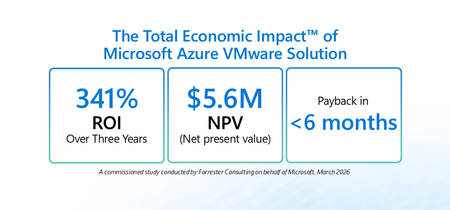
Many organizations are balancing near-term continuity for VMware-based workloads with longer-term cloud modernization goals – all while managing cost, security, and resiliency. Azure VMware Solution (AVS) is built for this moment: a Microsoft-managed service verified by VMware that enables running VMware Cloud Foundation (VCF) workloads (vSphere, NSX-T, vSAN, HCX) on dedicated Azure infrastructure. It gives organizations a practical way to move or extend VMware environments into Azure while maintaining operational consistency and leveraging the skills of existing VMware teams. To help leaders quantify the potential value of this approach, Microsoft commissioned Forrester Consulting to conduct The Total Economic Impact™ (TEI) of Microsoft Azure VMware Solution (March 2026). The study models the financial impact over three years and risk-adjusts results. Access the full study here: aka.ms/AVS-TEI Here’s what the study found and how IT leaders can use it as a framework for decision-making: Topline results from the study Forrester’s risk-adjusted financial analysis for a composite organization 1 found: 341% ROI over three years 2 $5.6M net present value (NPV) 3 <6 months payback 4 These metrics are meaningful on their own, but the bigger story for leadership is where the value comes from: improved operational stability, reduced infrastructure costs driven by data center exit and hardware refresh avoidance, and the ability to redeploy skilled IT resources from maintenance to modernization. The customer journey: why organizations turn to AVS AVS offers a bridge: Lift and shift VMware workloads into Azure without forcing immediate re-platforming then, modernize at a pace aligned to business priorities. In the study, Forrester interviewed decision-makers with experience using AVS. Interviewees described common challenges that led them to invest in AVS, including: Fragmented systems that complicated and slowed operations: Inherited stacks, duplicated tools, and unclear ownership of orphan machines made operations and governance harder. Rising cost and complexity of on-premises operation: Colocation fees, energy and cooling costs, server refresh cycles, and tooling renewals were difficult to justify against cloud economics. Limited capacity and skills to refactor at scale: Teams wanted the cost and agility benefits of the cloud but didn’t have the time or skills to rewrite hundreds (or thousands) of VMs on aggressive timelines. Security and audit pressure: Disparate environments and legacy access models elevated risk and created audit friction. Operational variability and end-user experience: VPN dependencies, inconsistent remote tooling, and endpoint logistics led to slow first-call resolution and downtime risks. Three quantified benefits that drive the business case 1) Reduction in downtime and associated costs by 80% In the study, interviewees reported that moving VMware workloads to AVS improved day-to-day reliability by eliminating fragile on-premises workflows and leveraging Azure’s managed infrastructure. Examples included fewer VPN-related failures, faster issue resolution through centralized tooling, and stronger service-level performance. For leadership teams, this benefit is about more than avoided cost. Better up time protects customer experience, employee productivity, and reduces the operational noise that can slow modernization programs. 2) Reduced infrastructure costs through data center exit, refresh avoidance, and cleanup A second driver is the ability to avoid or eliminate significant portions of data center cost and refresh spend. In the study, interviewees described using AVS to close data centers, avoid upcoming hardware refresh cycles, and reduce ongoing capital and operating costs. Importantly, interviewees also reported that migration waves prompted additional savings through portfolio hygiene by validating each VM, decommissioning redundant systems, and rightsizing oversized workloads. Those actions helped organizations reduce their ongoing compute, storage, and licensing footprint after migration. 3) Redeployment of 50% of IT team members from maintenance to modernization The TEI study quantifies a practical advantage of a managed VMware environment in Azure: fewer hours spent on hardware lifecycle, cluster patching, upgrades, and other routine data center tasks. In practice, many leaders treat this as capacity created rather than budget eliminated: the opportunity to shift experienced engineers toward modernization, automation, cloud governance, proactive incident prevention, and higher-value business initiatives. Unquantified benefits organizations should weigh Beyond the quantified categories, the study also highlights benefits that are strategically important, but not fully quantified in the model: Acceleration of future modernization: With workloads running in Azure via AVS, organizations can integrate platform services across security, identity, data, and analytics and build a runway for new capabilities, including AI-driven scenarios in Azure. Fast, cost-effective migration of legacy workloads: Interviewees described avoiding major consulting or hiring costs that would have been required to refactor complex workloads into cloud-native designs. Improved audit readiness and security posture: Consolidating fragmented environments into governed Azure landing zones can simplify audit preparation and strengthen governance and monitoring. For many leadership teams, these benefits strengthen the business case because they support broader transformation outcomes that extend beyond infrastructure cost alone. Things to consider in your own decision process If you’re building a business case to move workloads to Azure, whether it be lifting and shifting to AVS or replatforming and refactoring to Azure IaaS and managed services, consider mapping your environment across these areas: Data center timelines: Refresh cycles, colocation exit deadlines, and contract constraints. Operating model readiness: How quickly teams can adopt cloud-native services versus preserving VMware operations during transition. Modernization roadmap: Determine which applications are candidates for investment in replatforming, refactoring, replacement, or retirement once in Azure. Next steps Read the full TEI study: aka.ms/AVS-TEI Explore more about AVS: aka.ms/AzureVMwareSolution Get the VMware to Azure VMware Solution Planning Guide: aka.ms/VMwareToAVSguide Learn more about the Azure Copilot migration agent: aka.ms/migrate/AMA Join the AVS Pros group on LinkedIn for the latest updates and news: aka.ms/AVSPros 1 Composite organization: Forrester designed a composite organization based on characteristics of the interviewees’ organizations. 2 Return on Investment (ROI): A project’s expected return in percentage terms. ROI is calculated by dividing net benefits (benefits less costs) by costs. 3 Net present value (NPV): The present or current value of (discounted) future net cash flows given an interest rate (the discount rate). A positive project NPV normally indicates that the investment should be made unless other projects have higher NPVs. 4 Payback: The breakeven point for an investment. This is the point in time at which net benefits (benefits minus costs) equal initial investment or cost.Customer Offerings: Azure Local - Implementation, Migration, and Management
Hi everyone! Brandon here, back once again to talk to you about a couple of new offerings that have just been released to assist our Unified customers with their on-premises virtualization needs! I continue to have the privilege of leading a great program and team helping customers to migrate from VMware to more cost-effective and/or modern solutions. These new offerings are <drum roll>: Hyper-V - Implementation, Migration, and Management Azure Local - Implementation, Migration, and Management NOTE: These offerings do not provide hands on keyboard support, do not create custom documentation for customers, and cannot provide direct support for any 3 rd party products that may be used in the process of migrations. Many customers are reassessing their virtualization strategies and are actively exploring alternatives to VMware that align with long‑term hybrid cloud goals. Azure Local offers a purpose‑built platform that combines proven Windows Server–based virtualization with Azure services and management tooling, enabling customers to modernize on‑premises infrastructure while maintaining tight integration with Azure management, security, and governance capabilities. Whether driven by changing licensing models, cost optimization, or the need for deeper hybrid cloud integration, a successful transition requires more than a technology shift—it requires a structured, outcome‑focused approach. While we are providing these new offerings to customers, you do also have the option of more extended engagements as well that are broader in scope and more tailored to the end goals while we work side by side with you. If you are a Unified customer and looking to move off of VMware to Azure Local, or you just need help with your on-premises Microsoft virtualization technologies in general, have your account manager (CSAM) reach out to me! Planning to go at it alone?? Virtually (no pun intended) every environment reviewed by my team (and that is a LOT) that was set up prior to our review will have configuration issues, at times warranting extensive efforts to correct. Problem 1: There are some potentially significant differences between the way VMware and Azure Local are architected from the start, especially in areas of networking and storage, where mimicking methods used in the VMware world can actually lead to performance degradation in your target Azure Local environment. Problem 2: Your management method must also change. Additionally, if you are converting/migrating to Azure Local, the available methods need to be determined, the terminology and functional differences identified and learned…there can be a lot to unpack in this area. Problem 3: Perhaps the most obvious is that this may be a new platform for your team, and its important for them to gain experience through guided actions and knowledge transfer on the fly for those questions they really have, which is exactly what we aim to provide in guiding implementations and migrations! A Structured Engagement Model Successful Azure Local implementations are built around a guided engagement model rather than a one‑size‑fits‑all checklist. Each engagement is tailored to the customer environment, acknowledging that differences in scale, workloads, hardware, and operational maturity directly influence the migration approach. The framework emphasizes collaboration, clarity of expectations, and incremental progress instead of disruptive “lift‑and‑shift” execution. Whether we are talking about migration from another virtualization platform, or simply trying to reduce costs by implementing a new virtualization infrastructure, we’re here to help! Key Phases of an Azure Local Implementation and/or Migration Most Azure Local implementation and migration engagements progress through a common set of phases: Engagement scoping and technical discovery to understand goals and current state (this is the conversation I, or one of the TZ Leads in the VMware Migration Program have with customers) Planning and design aligned to business and operational outcomes, with a limited scope Deployment and configuration validation to ensure platform readiness Security and migration testing to reduce risk and confirm workload compatibility Feature enablement, including Azure Arc, to extend governance and management While these phases provide structure, the sequence and depth of each stage are adapted based on the customer environment and objectives. Key Outcomes for Customers Organizations that engage in Azure Local implementation or migration efforts commonly achieve: Deeper familiarity with Microsoft virtualization technologies Successful deployment of PoC, pilot, or production environments Validated test migrations of virtual machines Identification and resolution of technical blockers Increased confidence in operational readiness These engagements are advisory and collaborative in nature, prioritizing customer enablement and success. Knowledge Transfer and Operational Readiness A central focus of the Azure Local engagements is ensuring that IT teams are prepared to operate the platform long after deployment completes. Knowledge transfer is embedded throughout the engagement through working sessions and direct participation in implementation activities. This approach helps organizations move confidently into steady‑state operations without relying on long‑term external support. As I mentioned above, if you do feel you will need longer term support, we have your back on that front as well. Looking Beyond Migration An Azure Local migration is often the first step in a broader transformation journey. Many organizations use this transition to enable hybrid management, strengthen security posture, and prepare for future application or cloud modernization initiatives. When approached strategically, Azure Local becomes a platform for long‑term innovation and a step to modernizing your infrastructure, not just a replacement hypervisor. Conclusion Moving from VMware to Azure Local is not simply a technical migration—it is an opportunity to modernize how infrastructure is managed and governed. With structured planning, guided execution, and a focus on operational readiness, organizations can transition with confidence to a virtualization platform built for today’s hybrid cloud realities and tomorrow’s growth. Thanks for reading, and maybe we’ll talk soon!Unlocking AI-Ready Unstructured Data at Scale with Komprise and Azure
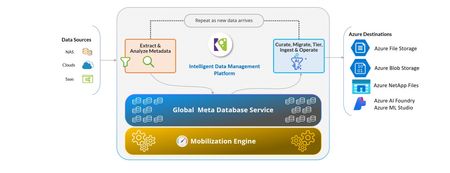
Why Move Unstructured Data to Azure On-premises storage environments are often over-provisioned to accommodate future growth, driving costs and operational complexity. Azure’s cloud-based storage platform enables organizations to right-size their environments through elastic scaling and Microsoft’s global economies of scale. This flexibility is especially critical for regulated industries managing sensitive data at massive scale. Azure also delivers enterprise-grade security capabilities, including immutability and object locking, which protect data against ransomware and malicious deletion. By moving unstructured data to Azure, organizations gain not only cost efficiency, but also a more resilient and secure data foundation. A strong example of this approach is the Florida Department of Environmental Protection. With support from Komprise and funding through Microsoft’s Azure Migrate program, the department successfully migrated large volumes of data to Azure, enabling the phase-out of on-premises data centers while maintaining access to data for analysis across regions. This demonstrates how organizations can modernize data infrastructure without disrupting business operations. Hybrid Cloud and Intelligent Tiering Most enterprises operate in hybrid environments, balancing on-premises systems with cloud storage. Komprise and Microsoft address this reality by enabling intelligent tiering of unstructured data across environments. Using Azure Blob Storage, organizations can transparently move cold and infrequently accessed data to lower-cost cloud tiers while keeping frequently accessed data close to applications and users. This approach reduces pressure on expensive on-premises storage infrastructure without sacrificing accessibility. For example, a major healthcare organization achieved approximately $2.5 million in storage cost savings by tiering cold data to Azure while maintaining seamless access for clinicians and applications. AI Depends on Data Curation AI's efficacy is reliant on data quality. The need for high-quality and curated data cannot be enough emphasized so AI can generate meaningful and accurate results. In partnership with Komprise, organizations can efficiently cleanse and enhance their data by identifying and eliminating redundancies. By curating data before AI processes, organizations have achieved impressive accuracy improvements—as demonstrated by a financial services firm that increased their AI output accuracy by 135%. Making Data AI-Ready on Azure Azure provides a powerful execution platform for AI and Komprise enhances this by bringing structure to unstructured data through its data classification, metadata extraction capabilities and with search, curation and intelligent ingestion via its data workflow and governance capabilities. These ensure only high-quality, relevant and compliant data feeds AI workflows. This approach enables smoother integration with AI services and applications such as Microsoft Foundry and Copilot, while preserving flexibility. By treating data readiness as a foundational step, organizations can accelerate time to value from AI while reducing risk. Security, Governance, and Responsible AI As cyber threats and regulatory requirements continue to intensify, security and governance are no longer optional. Organizations must manage data flows carefully, maintain auditability, and protect sensitive information—especially when using data for AI. Azure’s built-in security capabilities, including immutability, versioning, and backup, provide a strong foundation for protecting unstructured data. Komprise complements these capabilities by automating data governance policies, enforcing compliance, and helping organizations maintain visibility and control across hybrid environments. Together, they enable organizations to use data safely and responsibly, supporting both regulatory compliance and responsible AI practices. Conclusion As AI adoption accelerates, success increasingly depends on data readiness rather than algorithms alone. Clean, well-governed, and properly placed data is the foundation for meaningful AI outcomes. By combining Azure’s scalable and secure cloud platform with Komprise’s intelligent data management, organizations can reduce costs, strengthen security, and unlock real value from unstructured data at scale. To learn more, watch the Microsoft–Komprise fireside chat, where we discuss customer examples, architectural best practices, and proven approaches for managing unstructured data across hybrid environments. We also invite you to explore our joint Azure and Komprise solutions to see how you can move from data sprawl to AI value while maintaining control, security, and flexibility. In a recent fireside chat now available on YouTube, Azure Storage VP Aung Oo joined Komprise COO Krishna Subramanian to explore how Azure and Komprise are empowering customers to mobilize, curate, and optimize unstructured data to make it AI-ready. To leverage the Storage Migration Program with Komprise to migrate your data to Azure find more information at Microsoft Marketplace. To take advantage of the full Komprise suite including automated tiering and smart workflows – additional details are available here.594Views1like0Comments
AWS to Azure Migration — From the Cloud Economics & FinOps Lens
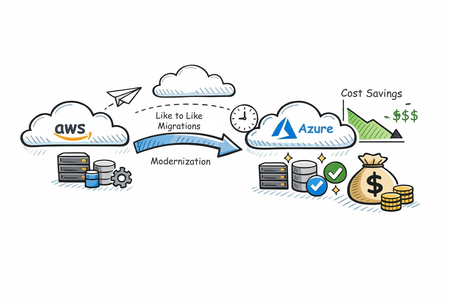
“ROI fails when FinOps joins late.” That single pattern explains why many cloud migrations deliver technical success but financial disappointment. Workloads move. SLAs hold. Teams celebrate go‑live. Then the CFO asks: Where are the savings we modeled? In most cases, FinOps was engaged after architecture decisions were locked, licenses were double‑paid, and governance debt had already accumulated. This article frames AWS‑to‑Azure migration through a FinOps lens—not to chase immediate modernization, but to deliver defensible, incremental cost savings during and after migration, without increasing risk. Azure migration guidance consistently emphasizes a structured, phased approach—discover, migrate like‑for‑like, stabilize, then optimize. From a FinOps perspective, this sequencing is not conservative—it is economically rational: Like‑for‑like preserves performance baselines and business KPIs Cost comparisons remain apples‑to‑apples Optimization levers can be applied surgically, not blindly The real value emerges in the first 90 days after migration, when cost signals stabilize and commitment‑based savings become safe to apply. {TLDR: Cloud migrations miss ROI when FinOps joins late. AWS → Azure migrations deliver real savings when FinOps leads early, migrations stay like‑for‑like, and optimization is applied after costs stabilize. Azure enables this through four levers: AI‑assisted planning (Copilot + Azure Migrate), cheaper non‑prod with Dev/Test pricing, license reuse via Azure Hybrid Benefit, and low‑risk long‑term savings with Reservations—across compute and storage. Result: lower migration risk, controlled spend, and sustainable savings post‑move.} This Article talks about top 4 FinOps Levers in AWS → Azure Migration 1. Azure Copilot Migration Agent + Azure Migrate. Azure Copilot Migration Agent (currently in public preview) is a planning‑focused, AI‑assisted experience built on Azure Migrate. It analyzes inventory, readiness, landing zone requirements, and ROI before execution. You can interact with the Agent using natural language prompts to explore inventory, migration readiness, strategies, ROI considerations, and landing zone requirements. From a FinOps perspective, this directly translates into faster decision cycles and lower planning overhead. By simplifying and compressing activities that traditionally required weeks of manual analysis or external managed services support, organizations can reduce the cost of migration planning, accelerate business case creation, and bring cost and ROI discussions forward—before environments are deployed and financial commitments are made. 2. Azure Dev/Test pricing: Azure Dev/Test pricing provides discounted rates for non‑production workloads for eligible subscriptions, significantly reducing dev and test environment costs (Azure Dev/Test pricing). You can save up to 57 percent for a typical web app dev/test environment running SQL Database and App Service. Unlike other Cloud Providers, this directly reduces environment sprawl costs, which often exceed production waste post‑migration. It also enables wave‑based migration by lowering the cost of parallel environments, allowing teams to migrate deliberately rather than under financial pressure. 3. Azure Hybrid Benefit: Azure Hybrid Benefit allows organizations to reuse existing Windows Server, SQL Server, and supported Linux subscriptions (RHEL and SLES) on Azure, reducing both migration and steady‑state run costs. It enables license portability across Azure services, helping organizations avoid repurchasing software licenses they already own and redirect savings toward innovation and modernization. During migration, Azure Hybrid Benefit is especially impactful because it addresses migration overlap costs. The 180‑day migration allowance for Windows Server and SQL Server allows workloads to run on‑premises and in Azure simultaneously, supporting parallel validation, phased cutovers, and rollback readiness without double‑paying for licenses. For Linux, Azure Hybrid Benefit enables RHEL and SLES workloads to move to Azure without redeployment, ensuring continuity and avoiding downtime. From a FinOps perspective, this reduces one of the most underestimated migration cost drivers, delivering up to 76% savings versus pay‑as‑you‑go pricing for Linux and up to 29% versus leading cloud providers for SQL Server, while keeping migration timelines driven by readiness—not cost pressure. 4. Azure Reservations: Azure Reservations enable organizations to reduce costs by committing to one‑year or three‑year plans for eligible Azure services, receiving a billing discount that is automatically applied to matching resources. Reservations provide discounts of up to 72% compared to pay‑as‑you‑go pricing, do not affect the runtime state of workloads, and can be paid upfront or monthly with no difference in total cost. Importantly, Azure Reservations apply not only to compute and database, but also to storage services like Azure Blob storage, Azure Data Lake Gen2 Storage and Azure Files (for storage capacity) which often represent a significant portion of enterprise cloud spend. In the context of migration, Azure Reservations matter because they allow FinOps teams to optimize baseline costs across both compute and data layers once workloads stabilize. Unlike AWS, where commitment‑based discounts are largely compute‑centric and storage services such as Amazon S3 do not offer reservation‑style pricing, Azure enables long‑term cost optimization for persistent storage footprints that continue to grow post‑migration. Additionally, Azure Reservations offer greater flexibility—customers can modify, exchange, or cancel reservations through a self‑service program, subject to defined limits. This is particularly valuable during wave‑based migrations, where workload shapes evolve over time. From a FinOps perspective, Azure Reservations allow organizations to commit to predictable savings with broader scope and lower risk, covering both infrastructure and data‑heavy workloads common in migration scenarios. Successful migrations are no longer measured by workloads moved, but by cost control maintained and value unlocked. Azure’s FinOps‑aligned migration capabilities allow organizations to reduce risk first, optimize deliberately, and ensure that savings are sustained long after the last workload migrates.