azure managed redis
22 Topics
Azure Managed Redis is now generally available: enterprise-grade performance and flexibility
We are excited to announce the general availability of Azure Managed Redis, a fully-managed, first-party service built in partnership with Redis. Designed to meet the needs of modern, cloud-native and AI-powered applications, Azure Managed Redis is now ready for production workloads globally, offering improved performance, flexible deployment options, and cost-efficient scalability. Azure Managed Redis serves as both an in-memory key-value datastore for caching and an integrated vector datastore for AI applications, making it a powerful foundation for real-time intelligence. Now available in over 50 Azure regions, Azure Managed Redis enables developers to build fast, intelligent apps backed by one of the world’s most trusted real-time data stores —seamlessly integrated into the Azure ecosystem. Availability SLA only applies to caches that are using replication 2 Up to 40% more cost-effective than the current Azure Cache for Redis offering A high-performance, enterprise-grade Redis service Azure Managed Redis delivers up to 15x higher performance compared to Azure Cache for Redis, at a significantly lower price point, making it the most cost-effective managed Redis option available on Azure today. With multi-region Active-Active geo-replication, customers can achieve sub-millisecond latency for users around the globe, all while maintaining a 99.999% SLA. Designed as a production-grade platform, Azure Managed Redis supports the latest Redis 7.4 features and will soon support to-be-launched Redis 8. The Redis 7.4 release also introduces new non-cluster deployment mode and flexible memory and compute scaling (both in preview), as well as native vector search—enabling Redis to serve as both a high-speed cache and a core component of AI and analytics workloads. What’s new in general availability? Azure Managed Redis is built for scale, performance, and adaptability—giving customers full control over their architecture with added flexibility and pricing efficiency. Key enhancements now available at GA include: Improved performance at a lower cost: Achieve up to 15x throughput compared to previous Redis offerings on Azure. Global availability: Now supported in over 50 Azure regions across all continents. Flexible scaling (in preview): Independently scale memory and performance to match dynamic workloads and reduce unnecessary cost. Enhanced Azure Portal experience: A revamped interface optimized for quick experimentation, faster provisioning, and streamlined create-and-manage workflows Expanded cluster modes: OSS Clustering – High performance with low latency and app-aware topology changes. Enterprise Clustering – Simpler app integration with a non-clustered interface and support for advanced modules like RediSearch. No Cluster (in preview) – Ideal for OSS Redis compatibility and straightforward migrations. Built for modern AI and real-time workloads As organizations adopt intelligent applications built with generative AI, retrieval-augmented generation (RAG), and autonomous agents, Redis is playing a critical role as a vector-capable, real-time data platform. With Azure Managed Redis, developers can: Power advanced scenarios with built-in vector search, secondary indexing, semantic caching, and agent memory. Take advantage of multi-model data structures, including JSON, time series, geospatial, and probabilistic types. Integrate seamlessly with Azure OpenAI Service, Azure Kubernetes Service, and Azure Functions for end-to-end GenAI pipelines. In addition, developers benefit from rich ecosystem tools like the Redis Insight GUI, Redis Copilot AI assistant, and optimized client libraries for .NET, Python, Java, Go, and Node.js. Enterprise-ready reliability and compliance Azure Managed Redis is designed for mission-critical workloads, offering enterprise-grade reliability, scale, and security from day one. Up to 99.999% availability with multi-region Active-Active geo-replicated deployments. Sub-millisecond latency through in-memory data storage Support for FedRAMP, HIPAA, PCI DSS, ISO 27001, and other compliance standards. Fully integrated identity, access, and monitoring features within Azure. Organizations can easily migrate from any tier of Azure Cache for Redis and immediately benefit from the latest Redis innovations, previously only available in Enterprise and Enterprise Flash tiers. Flexible tiers for every workload Azure Managed Redis is available in four service tiers tailored to fit your performance, memory, and cost needs: Tier* Description Memory Optimized High memory-to-vCPU (1:8) ratio, ideal for dev/test and memory-intensive workloads. Balanced Standard memory-to-vCPU (1:4) for general-purpose caching and app acceleration. Compute Optimized Low memory-to-vCPU (1:2) for high-throughput, compute-bound scenarios. Flash Optimized (in preview) Tiered architecture combining RAM and NVMe for large, cost-effective caches. With independent scaling (in preview), you can fine-tune performance and memory allocation based on workload needs, improving efficiency for both caching and AI applications. *General Availability only applicable for SKU’s up to 120GB, with SKUs larger than 120GB in-preview Get started Azure Managed Redis general availability will begin rolling out over the following days. Start building with the power of Redis and the flexibility of Azure—whether you’re accelerating a web app, deploying a real-time leaderboard, or building memory for your GenAI agents. If you are attending Microsoft Build (virtually or in person) check out our session: Get faster AI agent responses and low app latency with Azure Managed Redis. For those attending in person, stop by the Azure Managed Redis booth for demos and to speak with an expert. To get started with Azure Managed Redis today, head to our product page for more information or contact your Microsoft sales representative. Resources Azure Managed Redis product page Azure Managed Redis pricing page Create an Azure Managed Redis instance Explore the documentation Featured MS Build 2025 sessions & resources Get faster AI agent responses and low app latency with Azure Managed Redis Build observable, production-ready, distributed apps on App Service3.9KViews1like0CommentsData Migration with RIOT-X for Azure Managed Redis
By: Roy de Milde, Global Black Belt and App Innovation Specialist, Microsoft and George von Bülow, Senior Solution Architect, Redis Introduction Customers are increasingly seeking efficient ways to migrate their current cache systems to Azure Managed Redis. This growing demand has led to the development of innovative tools and applications to facilitate the migration process. Azure Managed Redis offers numerous benefits, including enhanced performance, scalability, and security features. By migrating to Azure Managed Redis, customers can take advantage of its fully managed service, which reduces the operational burden and allows them to focus on their core business activities. Additionally, Azure Managed Redis provides seamless integration with other Azure services, enabling customers to build more robust and scalable applications. The migration process can be complex, but with the right tools and guidance, customers can achieve a smooth transition and unlock the full potential of Azure Managed Redis. We are writing this blog to give more insights around this and help customers understand the benefits and process of migrating to Azure Managed Redis with RIOT-X RIOT-X Explanation RIOT-X is a tool created by the field engineers at Redis. RIOT-X, which stands for Redis Input/Output Tools, is a command-line utility designed to help users seamlessly transfer data in and out of Redis. It supports various sources and targets, including files (CSV, JSON, XML), data generators, relational databases, and Redis itself through snapshot and live replication. The introduction of RIOT-X addresses the challenges faced by customers during migration, offering a streamlined and reliable solution. By leveraging RIOT-X, customers can ensure a smooth transition to Azure Managed Redis, benefiting from enhanced performance, scalability, and security features provided by Azure. Migration RIOT-X can be used for various migration scenarios, depending on the connectivity between the source and target Redis databases, and requirements for application availability. Snapshot Migration In the simplest case, data is directly replicated from the source (which can be any flavor or version of Redis) to Azure Managed Redis during a scheduled downtime period. After replication, the applications that are using Redis are reconfigured to connect to Azure Managed Redis. The corresponding RIOT-X command is: riotx replicate redis://source redis://target Live Migration If the application is mission critical and cannot afford any downtime, then a live migration comes into play. This is like the snapshot scenario, but RIOT-X continuously updates the database in Azure Managed Redis with changes applied to the source database. The modified command uses the --mode live argument: riotx replicate --mode live redis://source redis://target Applications can now be updated with blue-green deployments or similar techniques, where read and write components are changed independently. The source Redis database continues to run until the application migration has been completed. Export/Import Migration For cases where there is no direct network connection between the source database and Azure Managed Redis, RIOT-X allows exporting data in a standard format, such as JSON or CSV. The data file is then transferred to a location accessible by Azure Managed Redis and imported with RIOT-X. These are the corresponding commands: riotx file-export --uri redis://source --type=json export.json riotx file-import --uri redis://target --type=json export.json Technical Setup RIOT-X can be run on Windows, macOS and Linux. Windows scoop bucket add redis https://github.com/redis/scoop.git scoop install riotx MacOS brew install redis/tap/riotx Linux Download the pre-compiled binary from RIOT-X releases and unzip. unzip riotx-standalone-0.6.2-*.zip You can also run RIOT-X as a Docker container: docker run riotx/riotx [OPTIONS] [COMMAND] RIOT-X supports the standard authentication methods for Redis. If you are using Entra Id authentication with Azure Managed Redis, you must enable access keys for the duration of the migration. Support for Entra Id has been added as a feature request for RIOT-X. Architecture RIOT-X is essentially an ETL tool where data is extracted from the source system, transformed, and loaded into the target system. RIOT-X is a standalone system and does not need to be co-located with a Redis server. Connection to Redis source and target databases is achieved through the Redis serialization protocol (RESP), with support for both RESP2 and RESP3. Replication between a Redis source and target works as follows: Identify source keys to be replicated Read data associated with each key Write each key to the target If the source and target databases use different Redis versions (which is the case for Azure Cache for Redis at version 6.2 and Azure Managed Redis at version 7.4), then data structure replication must be enabled with the --struct argument: riotx replicate --struct redis://source redis://target Getting started with Azure Managed Redis We are excited to offer the public preview of Azure Managed Redis, built to drive innovation and prepare your applications for AI. If you are attending Microsoft Build 2025, please join us at this session and stop by the Azure Managed Redis booth for demos and to speak with an expert. To get started with Azure Managed Redis today, please check out our product page for more information or contact our sales team. Resources Azure Managed Redis product page Azure Managed Redis pricing page Azure Cache for Redis product page2.7KViews3likes1CommentSupercharging AI Agents with Memory on Azure Managed Redis
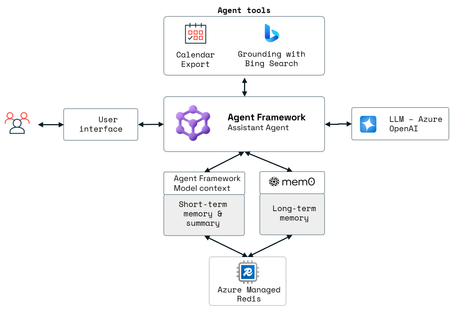
Co-authored by Purna Mehta, AMR Product Manager, Redis, Inc. and Han Xing Choong, Software Engineer, Redis, Inc. AI agents are quickly evolving from simple chatbots to sophisticated, context-aware systems that reason, orchestrate tools, and learn over time. Memory is at the heart of that transformation. Azure Managed Redis - Microsoft’s first-party service based on Redis Enterprise, can make agent memory management both seamless and production-ready in the Azure ecosystem. Memory capability enables AI agents to retain the context of interactions with users and systems. By continuously capturing preferences, operational patterns, and unique requirements, agents develop a comprehensive understanding over time. With the addition of vector store capabilities, Azure Managed Redis allows AI agents to efficiently store, index, and search high-dimensional data like embeddings, supporting advanced semantic search for more accurate, real-time responses. This is where Azure Managed Redis can help accelerate building agentic AI apps using Microsoft Agent Framework. What is Microsoft Agent Framework Microsoft Agent Framework is an open-source SDK and runtime designed to let developers build, deploy, and manage sophisticated multi-agent systems with ease. It unifies the enterprise-ready foundations of Semantic Kernel with the innovative orchestration of Autogen. Understanding agent memory architecture An agent’s usefulness depends on how and what it remembers. A typical agentic memory architecture contains two key components: Working short-term memory A play-by-play of the current interaction, so the agent can track ongoing conversation history and state without asking you to repeat yourself. Microsoft Agent Framework can help manage this short-term or working memory tied to a user’s session. In the Agent Framework SDK, it is implemented as Thread with an associated ChatMessageStore that can be offloaded to Redis. Durable long-term Memory Preferences, behavioral patterns, durable facts and interests pieced together from many interactions so the agent can learn and adapt over time. Long-term memory is typically shared across sessions. Within Microsoft Agent Framework SDK, long-term memory is provided through ContextProviders. Azure Managed Redis can be integrated directly as the context provider to maximize performance, control and advanced features. One of the popular context providers is powered by Mem0. Mem0 handles intelligent memory extraction, deduplication, and contextual grounding while recording these memories in Azure Managed Redis. Memory in action - travel agent example To show this in action, we have created a sample agent – an AI travel concierge – which provides time-aware information to generate trip itineraries personalized based on preferences. To achieve this goal, it relies on LLM, external tools, and manages user-specific context with a dual-memory layer. This layered memory design means a conversation isn’t a single exchange – it’s a long-running interaction. Agents can draw on past facts and preferences to shape current responses, creating continuity and building toward complex outcomes over time. Below is the agent architecture from the Travel Agent Sample application on GitHub built with Microsoft Agent Framework. How Azure Managed Redis fits this architecture When building an agent using Microsoft Agent Framework and Azure Managed Redis – these are some of the key attributes for production-grade internet scale applications on Azure: Latest innovation: Azure Managed Redis is a first-party service, building on Redis Enterprise capabilities. Azure Managed Redis brings multiple data types, fast vector similarity search and semantic caching (that helps you save tokens), full JSON support, high throughput, and low latency out of the box. Reliability and SLAs: Azure Managed Redis offers high availability up to 99.999%. Offers active-active geo-replication and persistent storage, so memory doesn’t disappear between sessions, and agents can scale globally. Enterprise ready: As a first-party product, Azure Managed Redis integrates with Azure Entra ID for authentication, Azure networking, and security – like Private Endpoints, TLS and encryption at rest - that are available and manageable through Azure Managed Redis in Azure portal. Azure Managed Redis brings the performance, simplicity, and scalability of Redis Enterprise directly into the Azure ecosystem, making it easier to build intelligent, stateful agents. With seamless integration into your Azure environment, you can rely on fully managed Redis to power agent memory, and context management. Azure Managed Redis also delivers sub-millisecond lookups that enable real-time agent interactions or intelligent systems that need near real-time responses like recommendation systems, text to speech or speech to speech agents. Next steps - Explore the Travel Agent Sample application on GitHub - Check the Azure Managed Redis Documentation - Deep dive into Microsoft Agent Framework1.9KViews0likes0CommentsAzure Managed Redis & Azure Cosmos DB with cache‑aside: a practical guide
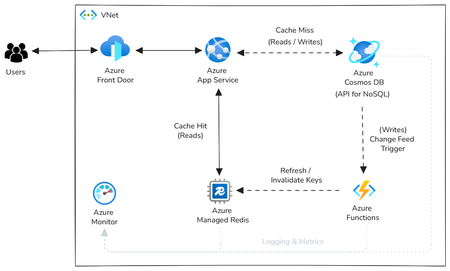
Co-authored by James Codella - Principal Product Manager, Azure Cosmos DB, Microsoft; Andrew Liu - Principal Group Product Manager, Azure Cosmos DB, Microsoft; Philip Laussermair – Azure Managed Redis Solution Architect, Redis Inc. Using Azure Managed Redis alongside Azure Cosmos DB is a powerful way to reduce operational costs in read-heavy applications. While Azure Cosmos DB delivers low-latency point reads, an SLA-backed 10ms at the 99th percentile of requests, each read consumes Request Units (RUs), which directly impact your billing. For workloads with frequent access to the same data, caching those reads in Azure Managed Redis can dramatically reduce RU consumption and smooth out cost spikes. This cache-aside pattern allows applications to serve hot data from memory while preserving Azure Cosmos DB as the system of record. By shifting repeated reads to Azure Managed Redis, developers can optimize for cost efficiency without sacrificing consistency, durability, or global availability. What each service does: Azure Managed Redis is Microsoft’s first‑party, fully managed service built on Redis Enterprise. Azure Cosmos DB offers higher durable multi-region writes, high availability SLAs, and in-region single-digit millisecond latency for point operations. Co-locating app compute, Azure Managed Redis, and Azure Cosmos DB in the same region minimizes round-trips; adding Azure Managed Redis on top of Azure Cosmos DB reduces RU consumption from repeat reads and smooths tail latency spikes during peak load. Both Azure Managed Redis and Azure Cosmos DB offer great support for queries (including vector search) over JSON data to work well together fast efficient AI apps. This pairing doesn’t require a rewrite. You can adopt a cache‑aside strategy in your data‑access layer: look in Redis first; on a miss, read from Azure Cosmos DB and populate Redis with a TTL; on writes, update Azure Cosmos DB and invalidate or refresh the corresponding cache key. Use Azure Cosmos DB ETags in cache keys to make invalidation deterministic, and use the Azure Cosmos DB Change Feed to trigger precise cache refreshes when data changes. The Cache‑Aside (Lazy Loading) Pattern Read path: GET key from Azure Managed Redis. If found, return. If not, issue a point read to Azure Cosmos DB, then SET/JSON.SET the value in Azure Managed Redis with a TTL and return the payload to the caller. Write path: Persist to Azure Cosmos DB as the source of truth. Invalidate or refresh the related Redis key (for example, delete product:{id}:v{etag} or write the new version). If you subscribe to the Change Feed, an Azure Function can perform this invalidation asynchronously to keep caches hot under write bursts. Code Example (.NET): using System; using System.Collections.Generic; using System.Threading.Tasks; using Microsoft.Azure.Documents; using Microsoft.Extensions.Logging; using StackExchange.Redis; using Microsoft.Azure.StackExchangeRedis; using Azure.Identity; public static class CosmosDbChangeFeedFunction { private static RedisConnection _redisConnection; static CosmosDbChangeFeedFunction() { // Initialize Redis connection using Entra ID (Azure AD) authentication var redisHostName = Environment.GetEnvironmentVariable("RedisHostName"); // e.g., mycache.redis.cache.windows.net var credential = new DefaultAzureCredential(); var configurationOptions = ConfigurationOptions.Parse($"{redisHostName}:10000"); _redisConnection = RedisConnection.ConnectAsync(configurationOptions.ConfigureForAzureWithTokenCredentialAsync(credential)).GetAwaiter().GetResult(); } [FunctionName("CosmosDbChangeFeedFunction")] public static async Task Run( [CosmosDBTrigger( databaseName: "my-database", containerName: "my-container", ConnectionStringSetting = "CosmosDBConnection", LeaseContainerName = "leases")] IReadOnlyList<Document> input, ILogger log) { var cache = _redisConnection.GetDatabase(); if (input != null && input.Count > 0) { foreach (var doc in input) { string id = doc.GetPropertyValue<string>("id"); string etag = doc.GetPropertyValue<string>("_etag"); string cacheKey = $"item:{id}:v{etag}"; string json = doc.ToString(); await cache.StringSetAsync(cacheKey, json, TimeSpan.FromMinutes(10)); log.LogInformation($"🔄 Refreshed cache for key: {cacheKey}"); } } } } Why it works: The database handles correctness and global replication; the cache handles locality and frequency. You reduce repeated reads (and RU costs) and lower p99 by serving hot keys from memory close to the compute. TTLs give you explicit control over staleness; negative caching and stale‑while‑revalidate are easy extensions when appropriate. Design Choices That Matter TTLs: Choose TTLs that reflect business tolerance for staleness. Use jitter (±N%) to avoid thundering herds when many keys expire simultaneously. Keying and versioning: Include an ETag or version in the key, e.g., product:{id}:v{etag}. When the record changes, the ETag changes, naturally busting the old key. Cache stampede control: For hot keys that miss, use a short single‑flight lock so that one request refreshes the value while others wait briefly or serve stale data. Serialization: For portability, utilize compact JSON (RedisJSON if you want field‑level reads/writes). Keep values small to preserve cache efficiency. Failure semantics: Treat Azure Managed Redis as an optimization. If the cache is unavailable, the app should continue by reading from Azure Cosmos DB. Favor idempotent writes and retry‑safe operations. Why Azure Managed Redis & Azure Cosmos DB Work Well in Practice Local speed, global reach: Azure Cosmos DB targets a single-digit millisecond p99 for in-region point operations. Placing Azure Managed Redis in the same region enables sub-millisecond memory reads for repeated access patterns, providing optimal performance for high-frequency data access. The result is a shorter, more predictable critical path. Active‑active at both layers: Azure Cosmos DB supports multi‑region writes, so each region can accept traffic locally. Azure Managed Redis supports active geo‑replication across up to five instances, using conflict-free replicated data types (CRDT) to converge cache state. That yields region‑local cache hits with eventual consistency at the cache tier and strong guarantees at the database tier. Reference Architecture Regional deployment Ingress: Clients reach the app via Azure Front Door (or similar) and land on Azure App Service in a VNet. Read path: The app queries Azure Managed Redis first. On a miss, it performs a point read/write against Azure Cosmos DB (API for NoSQL) and updates Redis with a TTL. Write path: Writes go to Azure Cosmos DB. The Change Feed triggers an Azure Function that invalidates or refreshes related Redis keys. Observability: Use Azure Monitor for logs and metrics. Monitor cache hit ratio, gets/sets, evictions, and geo‑replication health on the Azure Managed Redis side; RU/s, throttles, and p99 latency on the Azure Cosmos DB side. Operations and SRE Considerations Co‑location: Keep compute, Azure Managed Redis, and the Azure Cosmos DB write/read region together to avoid unnecessary RTTs. Capacity planning: Size Azure Managed Redis memory for working‑set coverage and headroom for failover. Validate eviction policies (volatile‑TTL vs all‑keys) against workload behavior. Back‑pressure: Watch RU throttling on Azure Cosmos DB and evictions on Azure Managed Redis. High evictions or a low hit ratio indicate a working-set mismatch or TTLs that are too short. Testing: Load‑test with realistic key distributions and measure p50/p95/p99 on both cache hits and misses. Chaos‑test cache outages to verify graceful degradation. Security: Use managed identities for data plane access where supported; apply App Service access restrictions and VNet integration as appropriate; audit with Azure Monitor logs. Putting It All Together Adopt cache‑aside in one region, measure hit ratio and RU savings, then add Change Feed–based invalidation to keep hot keys fresh under write load. When you need global scale, enable Azure Cosmos DB multi-region writes and Azure Managed Redis active geo-replication so that every region serves users locally. You end up with fast read paths, clear consistency boundaries, and a deployment model that scales without surprises. Next steps Review Azure Managed Redis documentation - https://learn.microsoft.com/azure/redis/ , Learn more about Cache Aside pattern in the Azure Architecture Center - https://learn.microsoft.com/azure/architecture/patterns/cache-aside Start with a sample app - https://github.com/AzureManagedRedis/1.8KViews0likes0CommentsIntroducing the PublicNetworkAccess property to Azure Managed Redis
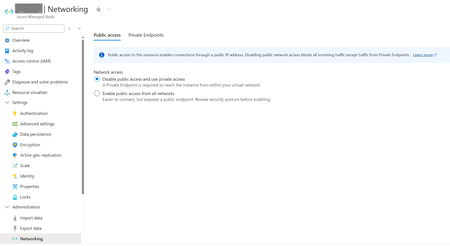
We want to enable users of Azure Managed Redis to disable public traffic without a private endpoint or allow both public and private access simultaneously. In certain enterprise environments, Redis and networking responsibilities are handled by distinct teams. The Data Operations team may securely provision Azure Managed Redis instances with PublicNetworkAccess set to Disabled, subsequently establishing connections to private links overseen by the Networking Operations team. By introducing a dedicated control for PublicNetworkAccess, it provides the flexibility of being no longer necessary to configure a Private Endpoint concurrently with Azure Managed Redis at the time of creation. With the new PublicNetworkAccess property, you can now restrict public IP traffic independently of Private Links to Virtual Networks. The following network configurations are now supported: • Public traffic without Private Links • Public traffic with Private Links • Private traffic without Private Links • Private traffic with Private Links API changes The PublicNetworkAccess property is introduced in Microsoft.Cache redisEnterprise 2025-07-01. This is a security-related breaking change. We will deprecate older API versions before 2025-07-01 in October 2026. After October 2026: • You can only set PublicNetworkAccess property using API versions 2025-07-01 or later • You can no longer send API calls with older versions prior to 2025-07-01 • Your older caches provisioned with the older versions of the APIs will continue to work, but additional operations on it will require calls to be made with API versions 2025-07-01 or later Changing an Existing Azure Managed Redis Cache to Use PublicNetworkAccess property Use the Azure portal to add PublicNetworkAccess config to your existing Azure Managed Redis cache. Steps to Change PublicNetworkAccess Property 1. Open your cache in the Azure Portal. 2. From the resource menu, select Networking. 3. In the portal, set the PublicNetworkAccess property here. Note: This is an irreversible operation—once set, you cannot revert to the unset state. 4. In the Public access pane, select Enable or Disable and save. 5. NOTE: your existing Private Endpoints will remain unaffected Figure 1: Set PublicNetworkAccess in existing Azure Managed Redis by selecting ‘Disable’ or ‘Enable’ public access Best practices Having PublicNetworkAccess controlled separately by a setting provides more flexibility for a team to reuse existing Private Endpoints to enhance the end-to-end management experience. To improve Azure Managed Redis security, disable PublicNetworkAccess and use a Virtual Network with Private Endpoint and Private Links. Virtual Networks provide network controls and extra protection, while Private Links enable one-way communication for greater isolation. This ensures other resources in the Virtual Network stay secure even if Redis is compromised.1.6KViews0likes2CommentsAzure Managed Redis at Ignite 2025: pre-day, session, and booth
Microsoft Ignite 2025 is almost here! Many practitioners are surprised by the powerful new capabilities in Azure Managed Redis—and now is your chance to see them in action. Whether you are modernizing applications, accelerating AI workloads, or building next-generation agent architectures, Azure Managed Redis is your key to speed and scale. Don’t miss the chance to connect with experts from Microsoft and Redis at our pre-day workshop and general session at Ignite and learn how to: Unlock high-performance caching for demanding workloads Build a powerful memory layer for agentic applications Leverage vector storage for Retrieval-Augmented Generation (RAG) Optimize LLM costs with semantic caching All in one fully-managed service—Azure Managed Redis. Connect with Azure Managed Redis team at Ignite 2025 1. Ignite pre-day workshop: Build Internet-Scale AI Apps with Azure Managed Redis — Caching to Agents (in-person only) When: Ignite pre-day on Monday, November 17, 2025, 1pm-5pm PT Where: Moscone Center, San Francisco Registration: Add this optional in-person workshop in the Ignite registration → Building AI applications and agents at internet scale requires more than speed — it demands unified memory, context, and scalability. You’ll see live demos and learn how to build and scale intelligent applications using Azure Managed Redis for caching and modern AI workloads, architect your applications for performance, reliability, and scale with geo-replication, and migrate to Azure Managed Redis. Seats are limited, please sign up today. 2. Breakout Session: Smarter AI Agents with Azure Managed Redis - BRK129 (in-person and online) View session details on the Ignite website and save to your event favorites Azure Managed Redis with Azure AI Foundry and Microsoft Agent Framework let developers build adaptive, context-aware AI systems. Redis handles real-time collaboration, persistent learning, and semantic routing, while the Agent Framework supports advanced reasoning and planning. Integrated short- and long-term memory lets agents access relevant data directly, simplifying development and operations. Azure Managed Redis supports MCP for control and data plane tasks, enabling easy management and scaling of workloads and knowledge stores. Join us to discover how to build scalable, multi-agent systems backed by the performance, reliability, and unified memory of Redis on Azure. 3. Visit the Azure Managed Redis booth in the Expo Hall Have questions? Looking to talk architecture, migration, and supercharging your AI apps? Visit us in the Expert Meetup Zone to connect with the Microsoft and Redis product teams, engineers, and architects behind Azure Managed Redis. Prepare for Ignite Learn more about Microsoft Ignite Explore the Azure Managed Redis documentation. Try the hands-on workshop for Azure Managed Redis.900Views0likes0CommentsBuilding faster AI agents with Azure Managed Redis and .NET Aspire
AI is evolving fast—and so are the tools to build intelligent, responsive applications. In our recent Microsoft Reactor session, Catherine Wang (Principal Product Manager at Microsoft) and Roberto Perez (Microsoft MVP and Senior Global Solutions Architect at Redis) shared how Azure Managed Redis helps you create Retrieval-Augmented Generation (RAG) AI agents with exceptional speed and consistency. Why RAG agents? RAG applications combine the power of large language models (LLMs) with your own data to answer questions accurately. For example, a customer support chatbot can deliver precise, pre-approved answers instead of inventing them on the fly. This ensures consistency, reduces risk, and improves customer experience. Where Azure Managed Redis fits with agentic scenarios In this project, Azure Managed Redis is used as a high-performance, in-memory vector database to support Agentic Retrieval-Augmented Generation (RAG), enabling fast similarity searches over embeddings to retrieve and ground the LLM with the most relevant known answers. Beyond this, Azure Managed Redis is a versatile platform that supports a range of AI-native use cases, including: Semantic Cache – Cache and reuse previous LLM responses based on semantic similarity to reduce latency and improve reliability. LLM Memory – Persist recent interactions and context to maintain coherent, multi-turn conversations. Agentic Memory – Store long-term agent knowledge, actions, and plans to enable more intelligent and autonomous behavior over time. Feature Store – Serve real-time features to machine learning models during inference for personalization and decision-making. These capabilities make Azure Managed Redis a foundational building block for building fast, stateful, and intelligent AI applications. Demo highlights In the session, the team demonstrates how to: Deploy a RAG AI agent using .NET Aspire and Azure Container Apps. Secure your Redis instance with Azure Entra ID, removing the need for connection strings. Use Semantic Kernel to orchestrate agents and retrieve knowledge base content via vector search. Monitor and debug microservices with built-in observability tools. Finally, we walk through code examples in C# and Python, demonstrating how you can integrate Redis search, vector similarity, and prompt orchestration into your own apps. Get Started Ready to explore? ✅ Watch the full session replay: Building a RAG AI Agent Using Azure Redis ✅ Try the sample code: Azure Managed Redis RAG AI Sample899Views0likes0CommentsWhat’s new in Azure Managed Redis: Ignite 2025 feature announcements
Azure Managed Redis continues to power the world’s most demanding, low-latency workloads—from caching and session management to powering the next generation of AI agents. At Microsoft Ignite 2025, we’re excited to announce several new capabilities designed to make Azure Managed Redis even more scalable, manageable, and AI-ready. Bigger, faster, stronger: new enterprise-scale SKUs (generally available) We are expanding our capacity portfolio with the general availability of Memory Optimized 150 and 250, Balanced 150 and 250, Compute Optimized 150 and 250 SKUs/, bringing higher throughput, lower latency, and greater memory capacity for your most demanding workloads. Whether you’re running global gaming platforms, AI-powered personalization engines, or enterprise-scale caching tiers, these new SKUs offer the performance headroom to scale with confidence. Redis as a knowledge base for AI Agents Azure Managed Redis is now available as part of the Azure AI Foundry MCP tools catalog, allowing customers to use Redis as a knowledge store or memory store for AI agents. This integration makes it simple to connect Redis to Foundry-based agents, enabling semantic searching, long term and short term memory, and faster reasoning for multi-agent applications—all running on trusted Azure infrastructure. Scheduled Maintenance (public preview) You can now configure maintenance windows for their Azure Managed Redis instances, giving you greater control and predictability for planned service updates. This capability helps align maintenance with your own operational schedules—minimizing disruption and providing flexibility for mission-critical applications. Terraform Provider for Azure Managed Redis We’re making infrastructure automation even easier with a dedicated Terraform provider for Azure Managed Redis. This new provider enables you to declaratively create, manage, and configure AMR resources through code, improving consistency and streamlining CI/CD pipelines across environments. Reserved Instances: now in 30+ Regions Azure Managed Redis now supports Reserved Instances in over 30 regions, with more coming soon. Reserved pricing provides predictable costs and savings for long-term workloads.. Go to Azure Portal | Reservations | Add and search for ‘Azure Cache for Redis’. Azure Managed Redis SKUs like Balanced, Computer Optimized, Memory Optimized, and Flash Optimized, would show up as sub SKUs in the category. Reserved Instance is available for 35% discount with 1 year purchase and 55% discount with 3 year purchase. Learn More & Get Started Azure Managed Redis is redefining what’s possible for caching, data persistence, and agentic AI workloads. Explore the latest demos, architecture examples, and tutorials from Ignite: Learn more about Azure Managed Redis Try Azure Managed Redis samples on GitHub Watch the Azure Managed Redis session at Ignite on-demand (BRK129) Explore Redis as a memory store for Microsoft Agent Framework Introducing the PublicNetworkAccess property to Azure Managed Redis | Microsoft Community Hub Ready to build Internet-scale AI apps with Azure Managed Redis? Start today at aka.ms/hol-amr.799Views0likes0CommentsGet started with Azure Managed Redis today: a step-by-step guide to deployment
At Microsoft Build 2025, we announced the general availability of Azure Managed Redis, a fully-managed, first-party service built in partnership with Redis. Ready for production workloads globally, Azure Managed Redis marks a major milestone for developers looking to build high-performance, real-time applications with the speed and reliability of Redis, fully managed on Azure. Call to action: get started with Azure Managed Redis in the Azure Portal. Key updates: Up to 15x performance improvements over Azure Cache for Redis 99.999% availability with multi-region Active‑Active replication Support for Redis 7.4 (with Redis 8 coming soon) New modules including RedisJSON, vector search, bloom filters, and time-series Flexible SKUs that let you scale memory and compute independently Navigate the new Azure Managed Redis in the Azure Portal Azure Managed Redis also comes with an updated Azure Portal experience which simplifies how you create, configure, and manage your Redis instances. Whether experimenting or deploying to production, the portal gives you full control with a few clicks. Step-by-step guide to deploying in the Azure Portal Want to see Azure Managed Redis in action? This quick walkthrough video shows how to set up Azure Managed Redis inside the Azure Portal: 👉 Watch on YouTube In this tutorial, you’ll learn how to: How to configure your Active-Active instance for high availability and low latency Setting up geo-replication across regions for 99.999% availability SLA Key tips and best practices to get started quickly No code required — just the Azure Portal and a few minutes of your time! Azure Managed Redis is perfect for cloud architects, developers, and IT pros looking to build resilient, globally available Redis-backed applications on Azure. Whether you're building AI-powered applications, speeding up your web services, or just getting started with Redis, now’s the time to explore what Azure Managed Redis can do. To learn more, head to our product page for more information or contact your Microsoft sales representative. To get started, provision Azure Managed Redis in the Azure Portal today. Resources Azure Managed Redis product page Azure Managed Redis pricing page Create an Azure Managed Redis instance Watch the Microsoft Build 2025 session on AMR Explore the documentation799Views0likes0Comments
Azure Cache for Redis to Azure Managed Redis: A Practical Guide with AI-Assisted Migration Planning
Author: Purna Mehta, Product Manager, Redis Inc and Shruti Pathak, Product Manager, Microsoft Today we’re introducing two capabilities for migrating from Azure Cache for Redis (ACR) to Azure Managed Redis (AMR): an AI-assisted planning skill and a native migration workflow in the Azure portal. Used together, these tools provide a structured path from initial assessment to a fully cleaned-up Azure Managed Redis deployment. This post walks through each phase of the migration, what to expect at each step, and how the agent and portal work together to reduce complexity and risk. Why Migrate to Azure Managed Redis? Azure Managed Redis is Microsoft’s next-generation managed Redis offering for enterprise workloads on Azure. It delivers higher throughput and lower latency than Azure Cache for Redis, along with flexible SKU tiers, enhanced clustering, active geo-replication, and advanced persistence options. Azure Managed Redis supports Redis-based AI workloads on Azure, including integrations for vector search and intelligent caching. If you’re building AI-powered applications on Azure, Azure Managed Redis is the recommended platform for Redis-based scenarios. We recognize that migrating a production cache requires care. That is why we built an end-to-end experience that begins with AI-assisted planning and ends with a guided portal migration. There is also a practical reason to start planning now: Azure Cache for Redis is being retired, and Azure Managed Redis is the path forward for Redis workloads on Azure. Migrating early gives you time to validate dependencies, update configurations, and make the transition on your own schedule instead of under deadline pressure. Just as importantly, the Azure Cache for Redis hostname will eventually expire, so cleaning up references to the old hostname is an important part of completing the migration cleanly. For details, see the retirement announcement and this blog post. The rest of this post outlines the planning and execution phases for migrating from Azure Cache for Redis to Azure Managed Redis with the Redis migration tooling. Phase 1: Migration Planning Before touching any infrastructure, you need a clear view of what you are migrating, what the target should look like, and which risks to address. The new Azure Cache for Redis migration agent skill helps with that. You can also refer to the migration documentation here. The migration agent skill can be added to any AI agent and invoked from AI-powered chat assistants such as GitHub Copilot and Claude. With read access to your Azure subscription, the skill can inspect your existing Azure Cache for Redis instances and help you: - Compare and contrast Azure Cache for Redis and Azure Managed Redis - Guide through selecting the appropriate Azure Managed Redis SKUs - Help convert IaC templates - Help with planning and execution of migration along with troubleshooting common issues You interact with it conversationally, asking questions and refining the plan iteratively until you are confident in the approach. In a typical planning session, the skill analyzes your source cache configuration in detail, including SKU and tier, memory size, eviction policy, persistence settings, clustering topology, TLS configuration, and any geo-replication setup. It then maps those properties to available Azure Managed Redis tiers and recommends the most appropriate target configuration for your workload. The skill can also fetch real-time cache usage metrics and recommend SKU optimizations. Beyond the SKU recommendation, the skill identifies potential compatibility issues and configuration gaps you need to address before migrating. This might include client library version requirements, changes to supported Redis commands, differences in eviction policy behavior between tiers, or networking considerations if your cache is deployed in a VNet. Surfacing these issues early, before you have provisioned anything, gives you time to address them without pressure. The skill can also help you choose a migration strategy. If downtime tolerance is low, it walks you through online migration options and what to expect during cutover. If your workload can tolerate a maintenance window, it can outline a simpler offline path. You can also ask follow-up questions about cost, rollback, or how to validate the new instance before switching traffic. At the end of the planning session, ask the agent for a structured migration checklist. It should summarize the recommended target configuration, pre-migration action items, and the step-by-step plan for Phases 2 and 3. This gives your team a shared reference for execution. Note: The AI-assisted migration planner is intended to support planning, not replace expert judgment. For highly critical workloads, we recommend working closely with a Solutions Architect or migration specialist to validate your plan before proceeding. Phase 2: Provision the Target Azure Managed Redis Cache With a clear migration plan from Phase 1, you are ready to create your Azure Managed Redis target instance. This step is straightforward, but one constraint matters: the target AMR cache must be in the same subscription and region as the source ACR cache. This is a requirement of the portal migration workflow in Phase 3, which links the two instances together to perform the migration. In the Azure portal, create a new Azure Managed Redis resource in the same subscription and region as your source cache. Apply the tier and SKU recommended in Phase 1, whether that is Balanced for general-purpose workloads, Memory Optimized for memory-intensive scenarios, or Compute Optimized for throughput-heavy applications. Configure the instance as outlined in your migration checklist, including Redis Users for Entra ID authentication, private endpoints, eviction policy, persistence, clustering, and TLS. The migration agent skill can also help update your IaC templates by converting them from Azure Cache for Redis to Azure Managed Redis. Once the instance is provisioned and running, note the resource name. You will select it by name when you start migration in Phase 3. At this point the AMR instance is empty, which lets you validate the configuration, test connectivity from your application environment, and confirm everything looks correct before migration. Note: Redis Migration tooling works by switching the DNS endpoint from your source Azure Cache for Redis instance to the target Azure Managed Redis instance. No data is transferred as part of this process. Phase 3: Initiate Migration from the Azure Portal Note: Before using the Redis migration tooling, please review the limitations of the tooling and other migration options. To use the Redis Migration tooling, navigate to your source Azure Cache for Redis instance in the Azure Portal and select Migrate in the command bar. Choose a target Azure Managed Redis instance from the dropdown, which lists only AMR instances in the same subscription and region as your source cache. Review the migration summary comparing source and target configurations. An automated compatibility check surfaces warnings or errors with guidance for resolving them. You can acknowledge warnings to proceed, but errors must be addressed first. We strongly recommend running the migration during a maintenance window or low-traffic period. Your resource state will update to “Migrating” while the migration is in process. After migration completes, the Azure Cache for Redis hostname redirects requests to the Azure Managed Redis instance, allowing applications to continue using the existing source connection string temporarily. Note: Keep your source ACR cache running and do not delete it. If you encounter problems after the migration, you can initiate a rollback to the original ACR cache and resume normal operation while you investigate. The source cache remains available and unchanged throughout the migration process. Once you are confident the new instance is stable and performing as expected, you can retry Phase 3 and then proceed to Phase 4 to clean up the source cache. Phase 4: Ensure success and delete old Azure Cache for Redis instance After migration, monitor application health to confirm everything is working as expected. If issues arise, you can roll back the migration. Once you have verified success, you can delete the source Azure Cache for Redis instance. The Azure Cache for Redis instance is now decoupled from its hostname and can be deleted safely. The hostname will continue to point to the new Azure Managed Redis instance. Phase 5: Update applications to use the Azure Managed Redis hostname After you confirm the migrated Azure Managed Redis instance is running as expected, update your applications to use the Azure Managed Redis connection string instead of the old Azure Cache for Redis connection string. This step is required because the old Azure Cache for Redis hostname will be purged automatically. Because traffic is already flowing to the migrated instance, this update should have minimal impact. It is easy to postpone this step, but doing it promptly keeps your subscription clean, avoids unnecessary cost, and removes ambiguity about which cache instance is active. The main cleanup task is purging the source Azure Cache for Redis hostname. Before you do, confirm that no applications or services still reference the old connection string, including Key Vault secrets, environment variables, monitoring dashboards, and background jobs. Take a few minutes to search broadly, since any missed reference will fail after the old hostname is purged. Once all references have been updated, use the ‘unlink’ API to purge the source Azure Cache for Redis hostname. If the Azure Cache for Redis instance has associated resources such as private endpoints, or diagnostic settings, review whether they should be removed or reconfigured for the new AMR instance. Finally, update any internal documentation, runbooks, and architecture diagrams that still reference the old cache. At that point, the migration is complete. Getting Started Both the migration planning agent skill and the portal migration workflow are available today. Here is how to get started: The migration agent skill is available here and includes setup instructions. To provision your Azure Managed Redis target, find instructions here. To start migration, go to your source Azure Cache for Redis cache in the Azure portal and select "Migrate to Azure Managed Redis" from the command bar. More details about the migration tooling are available here. We recommend starting every migration with a session with the planning agent, even when the migration seems straightforward. It consistently surfaces configuration details and compatibility issues that are easy to miss and can cause problems later. A few minutes of planning up front is well worth the time. Reach us at AzureManagedRedis@microsoft.com or through your account team with questions, suggestions, or stories from your migration journey.700Views2likes0Comments