azure log analytics
401 TopicsWelcome to the new Azure Log Analytics community!
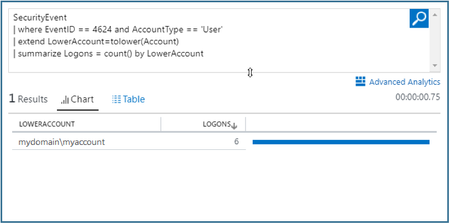
Azure Log Analytics has been enhanced substantially and now offers an improved search and analytics experience. This includes interactive query language and an advanced analytics portal, both powered by a highly scalable and powerful data store. The query language is super rich, offering flexible search functions as well as advanced machine learning constructs. To support these new capabilities and provide you with the best querying experience, the advanced analytics portal supports multi-line editing of queries, many visualizations, and advanced diagnostics. To ramp-up quickly, we suggest you review the documentation, where you can find: Getting started tutorials Useful cheat sheets Plenty of examples The complete language reference Test drive the query language in the free demo environment and get started now! Have a question, comment, or request? Post it right here. The Azure Log Analytics TeamSolved4.5KViews11likes4CommentsFYI - Log Search editor is becoming multi-line
With the new query language available in Log Search, we notice user queries develop and no longer fit into just one line. To accommodate longer queries we decided to make log search a multi-line editing area: so a few things have changed: Run - to run the query, click the Search icon or use the keyboard shortcut Shift+Enter. Enter no longer runs the query, as it's now a valid character you can use as part of a query, to add lines and make it more readable. Resize - the editing area start off with 5 lines. You can drag the bottom border to adjust the text area size to your needs. Intellisense - as you type, Intellisense suggestions appear beneath the editing area. To reach the suggestions area, click Tab. If the cursor is on the last row of your query, the ↓ key will also take you there. Once you've found the best suggestion, click Enter to accept it and continue editing. Note - If you're also using the Advanced Analytics portal, you might be used to separate queries by adding new lines or marking only parts of the text to be run. Log search does not support that behavior - here your entire text is considered a single query, that is always run in its entirety. We hope you'll find it as cool as we do. Let us know what you think and how we can further improve your experience. - Noa Kuperberg8KViews5likes6Comments
Adding "prefer" returns zero results
Hello, Based on this method: https://dev.loganalytics.io/reference/post-query I'm adding a query param, "prefer", with value of "maxoutputcolumns=3000", but really, any value set on this query param caused the same behavior (even the value in the example) - a search query performed without the "prefer" http query has results, when the same search query is with the "prefer" http query no results. Please assist614Views3likes0CommentsAzure Log Analytics workspace upgrades are in progress
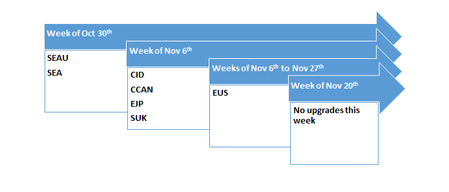
If you’re currently using Azure Log Analytics to monitor your environments for availability and performance, we’re rolling out new enhancements and changes for Log Analytics that you should be aware of. Including the new and improved query language, so that you can take appropriate action, if necessary. To take advantage of these enhancements, you’ll need to upgrade your workspaces. The upgrade is currently available in these regions: WCUS, SEAU, SEA, WEU, EJP, SUK, CID and CCAN. The upgrade process converts all saved searches, alerts, and views to the new query language. About 50 percent of all Azure Log Analytics workspaces have been upgraded by now, and thousands of customers are enjoying the simple yet powerful query language. Read about it in the Azure blog.1.7KViews3likes0CommentsLog Analytics / Sentinel - Dictionary of Solutions, Schemas and Variables
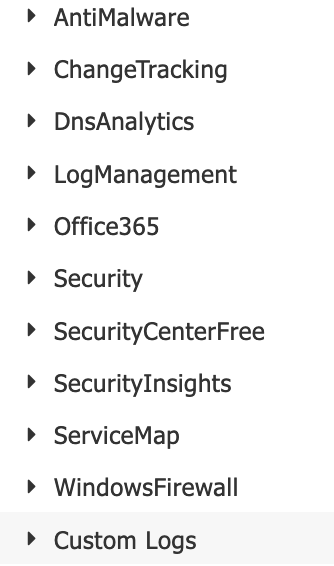
Hi Team, does anyone know of a good centralised repository (like a dictionary) of Azure Solutions mapped to their Log Schemas, and a definition of the fields within each? For example, if you take a look at the following LA workspace logs: We'd like the full list of potentially available sources, with a mapping to which component provides / feeds into each one of these logs, and a clear explanation of the fields within each of these. Thanks1.9KViews2likes4Comments
Are you getting the most out of your Azure Log Analytics Workspace (LAW) investment?
Using a LAW is a great way to consolidate various types of data (performance, events, security, etc.) and signals from multiple sources. That's the easy part - mining this data for actionable insights is often the real challenge. One way we did this was by surfacing events related to disks across our physical server estate. We were already sending event data to our LAW; it was just a matter of parsing it with KQL and adding to a Power Bi dashboard for additional visibility. The snippet from the Power Bi dashboard shows when the alert was first triggered and when the disk was eventually replaced. Here's the KQL query we came up with. let start_time=ago(30d); let end_time=now(); Event | where TimeGenerated > start_time and TimeGenerated < end_time | where EventLog contains 'System' | where Source contains 'Storage Agents' | where RenderedDescription contains 'Drive Array Physical Drive Status Change' | parse kind=relaxed RenderedDescription with * 'Drive Array Physical Drive Status Change. The ' Drive ' with serial number ""' Serial '"", has a new status of ' Status '. (Drive status values:'* | project Computer, Drive, Serial, Status, TimeGenerated, EventLevelName You can of course set up alerting with Alerts for Azure Monitor. I hope this example helps you get more value from your LAW.952Views2likes5Comments
How to send data of Microsoft Teams to Azure Log Analytics?
How to send data of Microsoft Teams to Azure Log Analytics? How to integrate, connect Microsoft Teams to Azure Log Analytics? Have tried using O365 management Solution and also tried writing queries in log search to fetch reports of Microsoft Teams from Azure Log Analytics. But unable to fetch it. And O365 management Solution targets only on Activities related to Azure AD, Exchange, Sharepoint & Operations. But not an Azure Teams. Please advice Thanks & Regards, Balasubramanian.MurugesanSolved5.4KViews2likes4Comments