azure log analytics
410 TopicsUsage stats for Log Analytics?
Is there a way to view usage statistics for Log Analytics? Specifically, is there a way to view "when/what/who" queries have been executed in Log Analytics? I'd like to be able to generate some usage reports so that we can make sure that the service is being properly utilized by our users.982Views0likes1Comment
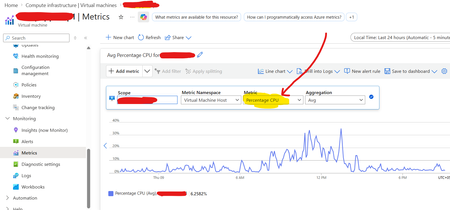
Azure VMs host (platform) metrics (not guest metrics) to the log analytics workspace ?
Hi Team, Can some one help me how to send Azure VMs host (platform) metrics (not guest metrics) to the log analytics workspace ? Earlier some years ago I used to do it, by clicking on “Diagnostic Settings”, but now if I go to “Diagnostic Settings” tab its asking me to enable guest level monitoring (guest level metrics I don’t want) and pointing to a Storage Account. I don’t see the option to send the these metrics to Log analytics workspace. I have around 500 azure VMs whose host (platform) metrics (not guest metrics) I want to send it to the log analytics workspace.450Views0likes3Comments
Are you getting the most out of your Azure Log Analytics Workspace (LAW) investment?
Using a LAW is a great way to consolidate various types of data (performance, events, security, etc.) and signals from multiple sources. That's the easy part - mining this data for actionable insights is often the real challenge. One way we did this was by surfacing events related to disks across our physical server estate. We were already sending event data to our LAW; it was just a matter of parsing it with KQL and adding to a Power Bi dashboard for additional visibility. The snippet from the Power Bi dashboard shows when the alert was first triggered and when the disk was eventually replaced. Here's the KQL query we came up with. let start_time=ago(30d); let end_time=now(); Event | where TimeGenerated > start_time and TimeGenerated < end_time | where EventLog contains 'System' | where Source contains 'Storage Agents' | where RenderedDescription contains 'Drive Array Physical Drive Status Change' | parse kind=relaxed RenderedDescription with * 'Drive Array Physical Drive Status Change. The ' Drive ' with serial number ""' Serial '"", has a new status of ' Status '. (Drive status values:'* | project Computer, Drive, Serial, Status, TimeGenerated, EventLevelName You can of course set up alerting with Alerts for Azure Monitor. I hope this example helps you get more value from your LAW.870Views2likes5Comments
Azure Alert ITSM Servicenow Connector Payload not appearing in ticket description
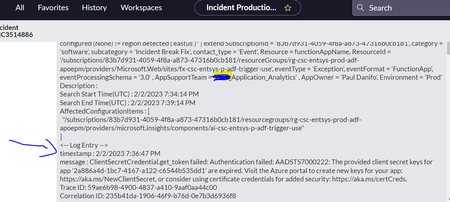
Hello, Trying to create ServiceNow tickets based on alerts from Azure alert rule in "Log Analytics Workspace" for Machine learning Job failures with ITSM connector based action group. In this process, in ServiceNow tickets are getting generated but issue is with Payload i.e., payload passed is not appearing in ticket description under the section <-- Log Entry --> as shown in screenshot below. I have gone through the documentation but I couldn't find exact reference in addressing this issue. It would be great if you can provide any suggestions / exact references in the documentation. Please let me know for any additional inputs. Thanks & Regards, Siva Kumar926Views0likes3CommentsAzure Diagnostic data cannot be processed by Azure Stream Analytics due to InputDeserializerError
Planning to steam Azure resource(frontdoor) diagnostic logs to stream to Azure Stream Analytics. However, having troubles on this one as data specifically from AzureDiagnostics failed to get deserialized as input for Stream Analytics job. Error: Error while deserializing input message Id: Partition: [0], Offset: [3663944], SequenceNumber: [285]. Hit following error: Column name: ErrorInfo is already being used. Please ensure that column names are unique (case insensitive) and do not differ only by whitespaces. It's caused by a duplicating column, errorInfo and ErrorInfo on AzureDiagnostic Table, which I am unsure what distinguishes them apart when observing its values. Have any thoughts or solution in mind on how we could simplify or transform these Diagnostic log to possibly remove this duplicating column prior to getting ingested to the Stream Analytics job? Have initially thought of the following solutions, but they aren't so straight-forward and probably costs more and would like to hear other's thoughts as well. 1. Transformation using DCR. I beleive this is ideal for sending Diagnostic Logs to Log Analytics workspace. but this would mean diagnostic logs have to pass through the workspace and then get exported to Stream Analytics which to achieve, may require to add in more components in between the data pipeline. 2. Logic App. Saw somewhere where a scheduled Logic App(probably run by schedule) is used to export data using a query (KQL) from Log analytics workspace then get sent to a storage. Has to modify the destination to an event hub instead perhaps. yet again, to many layers just to pass on the data to ASA. Any other solution you can suggest to refining the incoming data to ASA while minimizing the utilization of compute resources?977Views0likes1Comment
Logic Flow name in Azure Log Analytics
dependencies | where type == "Ajax" | where success == "False" | where name has "logicflows" | project timestamp, name, resultCode, duration, type, target, data, operation_Name, appName | order by timestamp desc This KQL query in Azure Application Insights> Azure Log Analytics is used to get errors for logicflows. It returns the data but, I cannot see the logicflow name or ID anywhere. Is there any way to fetch logicflow ID? The azure app insight is registered for a power app, where we are using automate flows to call apis. We need the flow's name in analytics. I tried looking the database, there is no field for logic flow's name or ID. Though when seen in user>sessions, it shows name in requestHeaders.684Views0likes1Comment
Dependency Agent Alternatives
Hello. The retirement notice for the Azure Dependency Agent (https://learn.microsoft.com/en-us/azure/azure-monitor/vm/vminsights-maps-retirement) recommends selecting an Azure Marketplace product as a replacement but is not specific about what product(s) offer similar functionality. Would appreciate more specific guidance and experiences from the wider community. Thanks.521Views0likes1Comment
Recent Logic Apps Failures with Defender ATP Steps – "TimeGenerated" No Longer Recognized
Hi everyone, I’ve recently encountered an issue with Logic Apps failing on Defender ATP steps. Requests containing the TimeGenerated parameter no longer work—the column seems to be unrecognized. My code hasn’t changed at all, and the same queries run successfully in Defender 365’s Advanced Hunting. For example, this basic KQL query: DeviceLogonEvents | where TimeGenerated >= ago(30d) | where LogonType != "Local" | where DeviceName !contains ".fr" | where DeviceName !contains "shared-" | where DeviceName !contains "gdc-" | where DeviceName !contains "mon-" | distinct DeviceName Now throws the error: Failed to resolve column or scalar expression named 'TimeGenerated'. Fix semantic errors in your query. Removing TimeGenerated makes the query work again, but this isn’t a viable solution. Notably, the identical query still functions in Defender 365’s Advanced Hunting UI. This issue started affecting a Logic App that runs weekly—it worked on May 11th but failed on May 18th. Questions: Has there been a recent schema change or deprecation of TimeGenerated in Defender ATP's KQL for Logic Apps? Is there an alternative column or syntax we should use now? Are others experiencing this? Any insights or workarounds would be greatly appreciated!807Views1like3CommentsNeed assistance on KQL query for pulling AKS Pod logs
I am trying to pull historical pod logs using below kql query. Looks like joining the tables; containerlog and KubePodInventory didn't go well as i see lot of duplicates in the output. ContainerLog //| project TimeGenerated, ContainerID, LogEntry | join kind= inner ( KubePodInventory | where ServiceName == "<<servicename>>" ) on ContainerID | project TimeGenerated, Namespace, ContainerID, ServiceName, LogEntrySource, LogEntry, Name1 | sort by TimeGenerated asc Can someone suggest a better query?660Views0likes4Comments