azure hardware infrastructure
29 Topics
Unleashing GitHub Copilot for Infrastructure as Code
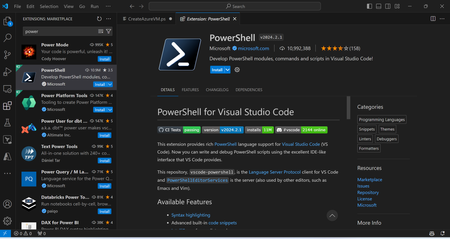
Introduction In the world of managing infrastructure, things are always changing. People really want solutions that work, can handle big tasks, and won't let them down. Now, as more companies switch to using cloud-based systems and start using Infrastructure as Code (IaC), the job of folks who handle infrastructure is getting even more important. They're facing new problems in setting up and keeping everything running smoothly. The Challenges faced by Infrastructure Professionals Complexity of IaC: Managing infrastructure through code introduces a layer of complexity. Infrastructure professionals often grapple with the intricate syntax and structure required by tools like Terraform and PowerShell. This complexity can lead to errors, delays, and increased cognitive load. Consistency Across Environments: Achieving consistency across multiple environments—development, testing, and production—poses a significant challenge. Maintaining uniformity in configurations is crucial for ensuring the reliability and stability of the deployed infrastructure. Learning Curve: The learning curve associated with IaC tools and languages can be steep for those new to the domain. As teams grow and diversify, onboarding members with varying levels of expertise becomes a hurdle. Time-Consuming Development Cycles: Crafting infrastructure code manually is a time-consuming process. Infrastructure professionals often find themselves reinventing the wheel, writing boilerplate code, and handling repetitive tasks that could be automated. Unleashing GitHub Copilot for Infrastructure as Code In response to these challenges, Leveraging GitHub Copilot to generate infra code specifically for infrastructure professionals is helping to revolutionize the way infrastructure is written, addressing the pain points experienced by professionals in the field. The Significance of GH Copilot for Infra Code Generation with accuracy: Copilot harnesses the power of machine learning to interpret the intent behind prompts and swiftly generate precise infrastructure code. It understands the context of infrastructure tasks, allowing professionals to express their requirements in natural language and receive corresponding code suggestions. Streamlining the IaC Development Process: By automating the generation of infrastructure code, Copilot significantly streamlines the IaC development process. Infrastructure professionals can now focus on higher-level design decisions and business logic rather than wrestling with syntax intricacies. Consistency Across Environments and Projects: GH Copilot ensures consistency across environments by generating standardized code snippets. Whether deploying resources in a development, testing, or production environment, GH Copilot helps maintain uniformity in configurations. Accelerating Onboarding and Learning: For new team members and those less familiar with IaC, GH Copilot serves as an invaluable learning service. It provides real-time examples and best practices, fostering a collaborative environment where knowledge is shared seamlessly. Efficiency and Time Savings: The efficiency gains brought about by GH Copilot are substantial. Infrastructure professionals can witness a dramatic reduction in development cycles, allowing for faster iteration and deployment of infrastructure changes. Copilot in Action Prerequisites 1.Install visual studio code latest version - https://code.visualstudio.com/download Have a GitHub Copilot license with a personal free trial or your company/enterprise GitHub account, install the Copilot extension, and sign in from Visual Studio Code. https://docs.github.com/en/copilot/quickstart Install the PowerShell extension for VS Code, as we are going to use PowerShell for our IaC sample. Below is the PowerShell code generated using VS Code & GitHub Copilot. It demonstrates how to create a simple Azure VM. We're employing a straightforward prompt with #, with the underlying code automatically generated within the VS Code editor. Another example to create azure vm with vm scale set with minimum and maximum number of instance count. Prompt used with # in below example. The PowerShell script generated above can be executed either from the local system or from the Azure Portal Cloud Shell. Similarly, we can create Terraform and devops code using this Infra Copilot. Conclusion In summary, GH Copilot is a big deal in the world of infrastructure as code. It helps professionals overcome challenges and brings about a more efficient and collaborative way of working. As we finish talking about GH Copilot's abilities, the examples we've looked at have shown how it works, what technologies it uses, and how it can be used in real life. This guide aims to give infrastructure professionals the info they need to improve how they do infrastructure as code.32KViews9likes9CommentsAnnouncing Cobalt 200: Azure’s next cloud-native CPU
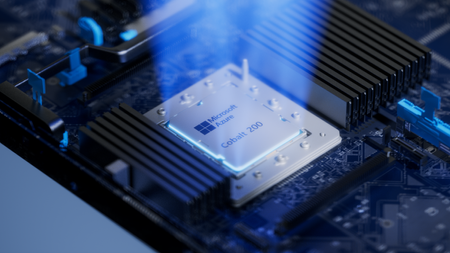
By Selim Bilgin, Corporate Vice President, Silicon Engineering, and Pat Stemen, Vice President, Azure Cobalt Today, we’re thrilled to announce Azure Cobalt 200, our next-generation Arm-based CPU designed for cloud-native workloads. Cobalt 200 is a milestone in our continued approach to optimize every layer of the cloud stack from silicon to software. Our design goals were to deliver full compatibility for workloads using our existing Azure Cobalt CPUs, deliver up to 50% performance improvement over Cobalt 100, and integrate with the latest Microsoft security, networking and storage technologies. Like its predecessor, Cobalt 200 is optimized for common customer workloads and delivers unique capabilities for our own Microsoft cloud products. Our first production Cobalt 200 servers are now live in our datacenters, with wider rollout and customer availability coming in 2026. Azure Cobalt 200 SoC and platform Building on Cobalt 100: Leading Price-Performance Our Azure Cobalt journey began with Cobalt 100, our first custom-built processor for cloud-native workloads. Cobalt 100 VMs have been Generally Available (GA) since October of 2024 and availability has expanded rapidly to 32 Azure datacenter regions around the world. In just one year, we have been blown away with the pace that customers have adopted the new platform, and migrated their most critical workloads to Cobalt 100 for the performance, efficiency, and price-performance benefits. Cloud analytics leaders like Databricks and Snowflake are adopting Cobalt 100 to optimize their cloud footprint. The compute performance and energy-efficiency balance of Cobalt 100-based virtual machines and containers has proven ideal for large-scale data processing workloads. Microsoft’s own cloud services have also rapidly adopted Azure Cobalt for similar benefits. Microsoft Teams achieved up to 45% better performance using Cobalt 100 than their previous compute platform. This increased performance means less servers needed for the same task, for instance Microsoft Teams media processing uses 35% fewer compute cores with Cobalt 100. Designing Compute Infrastructure for Real Workloads With this solid foundation, we set out to design a worthy successor – Cobalt 200. We faced a key challenge: traditional compute benchmarks do not represent the diversity of our customer workloads. Our telemetry from the wide range of workloads running in Azure (small microservices to globally available SaaS products) did not match common hardware performance benchmarks. Existing benchmarks tend to skew toward CPU core-focused compute patterns, leaving gaps in how real-world cloud applications behave at scale when using network and storage resources. Optimizing Azure Cobalt for customer workloads requires us to expand beyond these CPU core benchmarks to truly understand and model the diversity of customer workloads in Azure. As a result, we created a portfolio of benchmarks drawn directly from the usage patterns we see in Azure, including databases, web servers, storage caches, network transactions, and data analytics. Each of our benchmark workloads includes multiple variants for performance evaluation based on the ways our customers may use the underlying database, storage, or web serving technology. In total, we built and refined over 140 individual benchmark variants as part of our internal evaluation suite. With the help of our software teams, we created a complete digital twin simulation from the silicon up: beginning with the CPU core microarchitecture, fabric, and memory IP blocks in Cobalt 200, all the way through the server design and rack topology. Then, we used AI, statistical modelling and the power of Azure to model the performance and power consumption of the 140 benchmarks against 2,800 combinations of SoC and system design parameters: core count, cache size, memory speed, server topology, SoC power, and rack configuration. This resulted in the evaluation of over 350,000 configuration candidates of the Cobalt 200 system as part of our design process. This extensive modelling and simulation helped us to quickly iterate to find the optimal design point for Cobalt 200, delivering over 50% increased performance compared to Cobalt 100, all while continuing to deliver our most power-efficient platform in Azure. Cobalt 200: Delivering Performance and Efficiency At the heart of every Cobalt 200 server is the most advanced compute silicon in Azure: the Cobalt 200 System-on-Chip (SoC). The Cobalt 200 SoC is built around the Arm Neoverse Compute Subsystems V3 (CSS V3), the latest performance-optimized core and fabric from Arm. Each Cobalt 200 SoC includes 132 active cores with 3MB of L2 cache per-core and 192MB of L3 system cache to deliver exceptional performance for customer workloads. Power efficiency is just as important as raw performance. Energy consumption represents a significant portion of the lifetime operating cost of a cloud server. One of the unique innovations in our Azure Cobalt CPUs is individual per-core Dynamic Voltage and Frequency Scaling (DVFS). In Cobalt 200 this allows each of the 132 cores to run at a different performance level, delivering optimal power consumption no matter the workload. We are also taking advantage of the latest TSMC 3nm process, further improving power efficiency. Security is top-of-mind for all of our customers and a key part of the unique innovation in Cobalt 200. We designed and built a custom memory controller for Cobalt 200, so that memory encryption is on by default with negligible performance impact. Cobalt 200 also implements Arm’s Confidential Compute Architecture (CCA), which supports hardware-based isolation of VM memory from the hypervisor and host OS. When designing Cobalt 200, our benchmark workloads and design simulations revealed an interesting trend: several universal compute patterns emerged – compression, decompression, and encryption. Over 30% of cloud workloads had significant use of one of these common operations. Optimizing for these common operations required a different approach than just cache sizing and CPU core selection. We designed custom compression and cryptography accelerators – dedicated blocks of silicon on each Cobalt 200 SoC – solely for the purpose of accelerating these operations without sacrificing CPU cycles. These accelerators help reduce workload CPU consumption and overall costs. For example, by offloading compression and encryption tasks to the Cobalt 200 accelerator, Azure SQL is able to reduce use of critical compute resources, prioritizing them for customer workloads. Leading Infrastructure Innovation with Cobalt 200 Azure Cobalt is more than just an SoC, and we are constantly optimizing and accelerating every layer in the infrastructure. The latest Azure Boost capabilities are built into the new Cobalt 200 system, which significantly improves networking and remote storage performance. Azure Boost delivers increased network bandwidth and offloads remote storage and networking tasks to custom hardware, improving overall workload performance and reducing latency. Cobalt 200 systems also embed the Azure Integrated HSM (Hardware Security Module), providing customers with top-tier cryptographic key protection within Azure’s infrastructure, ensuring sensitive data stays secure. The Azure Integrated HSM works with Azure Key Vault for simplified management of encryption keys, offering high availability and scalability as well as meeting FIPS 140-3 Level 3 compliance. An Azure Cobalt 200 server in a validation lab Looking Forward to 2026 We are excited about the innovation and advanced technology in Cobalt 200 and look forward to seeing how our customers create breakthrough products and services. We’re busy racking and stacking Cobalt 200 servers around the world and look forward to sharing more as we get closer to wider availability next year. Check out Microsoft Ignite opening keynote Read more on what's new in Azure at Ignite Learn more about Microsoft's global infrastructure25KViews11likes0CommentsAnnouncing Microsoft Azure Network Adapter (MANA) support for Existing VM SKUs
As a leader in cloud infrastructure, Microsoft ensures that Azure’s IaaS customers always have access to the latest hardware. Our goal is to consistently deliver technology to support business critical workloads with world class efficiency, reliability, and security. Customers benefit from cutting-edge performance enhancements and features, helping them to future proof their workloads while maintaining business continuity. Azure will be a deploying new hardware generation to support capacity demands for existing VM Size Families. The hardware is optimized for these VM sizes, utilizing Intel’s Emerald Rapid CPU, native NVMe SSD support for higher storage bandwidth and lower latency, and Microsoft Azure Network Adapter (MANA). Deployment timelines will be communicated via Service Health Advisory updates. The intent is to provide the benefits of new server hardware to customers of existing VM SKUs as they work towards migrating to newer SKUs. The deployments will be based on capacity needs and won’t be restricted by region. Once the hardware is available in a region, VMs can be deployed to it as needed. Workloads on operating systems which fully support MANA will benefit from sub-second Network Interface Card (NIC) firmware upgrades, higher throughput, lower latency, increased Security and Azure Boost-enabled data path accelerations. If your workload doesn't support MANA today, you'll still be able to access Azure’s network on MANA enabled SKUs, but performance will be comparable to previous generation (non-MANA) hardware. Check out the Azure Boost Overview and the Microsoft Azure Network Adapter (MANA) overview for more detailed information and OS compatibility. To determine whether your VMs are impacted and what actions (if any) you should take, start with MANA support for existing VM SKUs. This article provides additional information about which VM Sizes are eligible to be deployed on the new MANA-enabled hardware, what actions (if any) you should take, and how to determine if the workload has been deployed on MANA-enabled hardware.20KViews10likes8Comments
Deep dive into the Maia 200 architecture
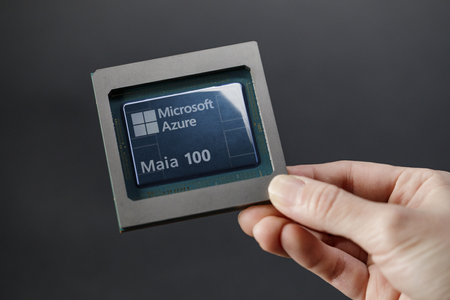
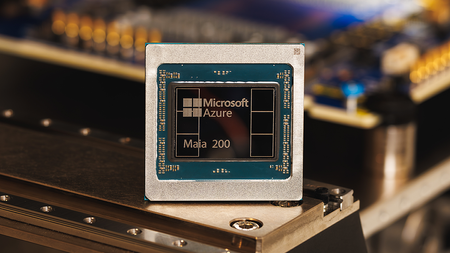
Maia 200 is a breakthrough inference architecture engineered to dramatically shift the economics of large-scale token generation. As Microsoft’s first silicon and system platform optimized specifically for AI inference, Maia 200 is built for modern reasoning and large language models, delivering the most efficient performance per dollar of any inference system deployed in Azure and represents the highest performance chip of any custom cloud accelerator today. AI inference is increasingly defined by an efficient frontier, a curve that measures how much real-world capability and accuracy can be delivered at a given level of cost, latency, and energy. Different applications sit at different points on that frontier: interactive copilots prioritize low-latency responsiveness, batch-scale summarization and search emphasize throughput at a given cost, and advanced reasoning workloads demand sustained performance under long-context and multi-step execution. As enterprises deploy AI across these diverse scenarios, the infrastructure requirements are no longer one-size-fits-all; they require a portfolio approach that delivers the highest-performance, lowest-cost infrastructure at scale. Maia 200 reflects a core principle of AI at scale: innovation across software, silicon, systems, and datacenters is what enables us to deliver 30% better performance per dollar than the latest generation hardware in our fleet today. As agentic applications expand in capability and adoption, this integrated approach makes infrastructure efficiency a foundational advantage. Maia 200 Purpose‑Built for Price-Performance Inference Leadership To meet these demands, Maia 200 introduces a new system and silicon architecture purpose built to maximize inference efficiency. Guided by a deep understanding of AI workloads and supported by an advanced pre-silicon environment and enabling hardware/software codesign, Maia 200 incorporates a set of deliberate architectural choices that deliver industry leading tokens per dollar and per watt. Notable architecture innovations include: Optimized narrow precision datapaths, on the latest TSMC N3 process technology enabling 10.1 PetaOPS FP4, positioning Maia 200 among the highest FP4perdollar accelerator available in any cloud. A reimagined memory subsystem combining 272 MB of ondie SRAM with 216 GB HBM3e delivering 7 TB/s of HBM bandwidth capacity to service dataintensive operations while minimizing off-chip traffic, reducing HBM bandwidth demand and improving overall energy efficiency. An efficient datamovement fabric, centered around a multilevel Direct Memory Access (DMA) subsystem and a hierarchical NetworkonChip (NoC), ensuring predictable, scalable performance for heterogeneous and memorybound AI workloads. A highly performant and reliable, Ethernet scaleup interconnect, featuring an integrated on-die NIC with 2.8 TB/s (bi-directional) of bandwidth, advanced transportprotocol enabling a 2 tier scale up network and topology optimizations to deliver highbandwidth, lowlatency communication across a cluster of 6,144 accelerators. A closer look at Maia 200 reveals the architectural advancements and system‑level innovations purpose‑built for inference that enable its industry‑leading efficiency. Maia 200 Architecture Overview Maia accelerators are organized around a hierarchical micro-architecture. At the foundation of this hierarchy is the tile, the smallest autonomous unit of compute and local storage. Each tile integrates two complementary execution engines: a Tile Tensor Unit (TTU) for high-throughput matrix multiply and convolution, and a Tile Vector Processor (TVP) as a highly programmable SIMD engine. These engines are fed by multi-banked Tile SRAM (TSRAM) and a tile-level DMA subsystem that is responsible for moving data into and out of that SRAM without stalling the compute pipeline. A lightweight Tile Control Processor (TCP) runs the low-level code emitted by the software stack and orchestrates TTU and DMA work issuance, while hardware semaphores provide fine-grained synchronization between data movement and compute. Multiple tiles compose into a cluster, which introduces a second tier of shared locality and coordinated movement. Each cluster contains a large multi-banked Cluster SRAM (CSRAM) accessible across the tiles in that cluster, along with a dedicated cluster DMA subsystem that stages traffic between CSRAM and co-packaged High Bandwidth Memory (HBM). A dedicated cluster core provides the control and synchronization needed to coordinate multi-tile execution, and the full SoC is built by instantiating multiple clusters. Because building at scale requires not just peak performance but manufacturability, the architecture also incorporates redundancy schemes for both tiles and SRAM to improve yield while preserving the hierarchical programming and execution model. Maia accelerators feature a highly optimized data movement infrastructure, centered around its Direct Memory Access (DMA) subsystem coupled with a hierarchical Network-on-Chip (NoC). The DMA engines are architected for multichannel, high-bandwidth transfer and support 1D/2D/3D strided movement, enabling common ML tensor layouts to be moved efficiently between on-chip SRAM, HBM, and external interfaces while overlapping data movement with compute. Meanwhile, the NoC provides scalable, low-latency communication across clusters and memory subsystems and supports both unicast and multicast transfers—an important capability for distributing tensor blocks and coordinating parallel execution. To further improve effective memory efficiency, Maia supports multiple narrow-precision data types as storage formats in both HBM and SRAM and employs hardware-based data casting to convert storage types to compute types at line rate so that movement and execution remain tightly coupled. For communication beyond the chip, Maia 200 integrates a high‑performance NIC and an Ethernet‑based scale‑up interconnect using an optimized AI Transport Layer (ATL) protocol to deliver scalable, low‑latency communication across nodes. The on‑die NIC provides 1.4 TB/s unidirectional (2.8 TB/s bidirectional) I/O bandwidth, eliminating the power and cost overhead of external NICs while enabling efficient scaling to 6,144 accelerators within a two‑tier scale‑up domain. ATL operates end‑to‑end over standard Ethernet, supporting a commodity, multi‑vendor switching ecosystem, while layering on innovations such as packet spraying, multipath routing, and congestion‑resistant flow control built directly into the transport layer to maximize throughput and stability. Optimized Tensor Core for Narrow Precision Data Types As AI models continue to grow in size and complexity, achieving cost‑effective inference increasingly depends on exploiting narrow‑precision arithmetic and reducing memory footprints to improve performance and efficiency. Industry results consistently show that formats such as FP4 can maintain robust model accuracy for inference while significantly reducing computational and memory requirements. Maia 200 is architected from the ground up for narrow‑precision execution. Its Tile Tensor Unit (TTU) is optimized for matrix multiplication in FP8, FP6, and FP4, and supports mixed‑precision modes such as FP8 activations multiplied by FP4 weights to maximize throughput without compromising accuracy. Complementing this, the Tile Vector Processor (TVP) delivers FP8 compute alongside BF16, FP16, and FP32, providing flexibility for layers or operators that benefit from higher precision. An integrated reshaper up‑converts low‑precision formats at line rate prior to computation, ensuring seamless dataflow without introducing bottlenecks. Notably, FP4 throughput on Maia 200 is 2× that of FP8, and 8× that of BF16, enabling substantial gains in tokens‑per‑second and performance‑per‑watt for inference‑centric workloads. A Reimagined Memory Subsystem A defining feature of Maia 200’s architecture is its advanced memory hierarchy, engineered to optimize data movement and sustain high utilization across diverse inference workloads. Maia 200 integrates 272 MB of on‑die SRAM partitioned into multi‑tier Cluster‑level SRAM (CSRAM) and Tile‑level SRAM (TSRAM). This substantial on‑die memory resource enables a wide range of low‑latency, bandwidth‑efficient data‑management strategies. Both CSRAM and TSRAM are fully software‑managed, allowing developers—or the compiler/runtime—to deterministically place and pin data for precise control of locality and movement. For example, a primary use case for CSRAM is pinning critical working sets within cluster‑local memory. Keeping frequently accessed data resident on‑chip provides predictable low‑latency access, reduces dependence on higher‑latency memory tiers, and improves deterministic execution. More broadly, the on‑die SRAM hierarchy allows programmers to buffer, stage, and pin data in ways that significantly optimize dataflow patterns across kernel types. Examples include: GEMM kernels can retain intermediate matrix tiles in TSRAM, boosting arithmetic intensity by eliminating round‑trips to HBM or even CSRAM. Attention kernels can pin Q/O tensors, K/V tensors, and partial Q·K products as much as possible in TSRAM, minimizing data‑movement overhead throughout the attention pipeline. Collective‑communication kernels can buffer full payloads in CSRAM while accumulation proceeds in TSRAM, reducing pressure on HBM and preventing bandwidth collapse during multi‑node operations. Cross‑kernel pipelines benefit from CSRAM as a transient buffer between stages, enabling tightly coupled, high‑throughput kernel chaining with fewer stalls particularly valuable for workloads with high kernel density or complex operator fusion. Together, these capabilities allow Maia 200 to maintain high compute efficiency and deterministic performance, even as model architectures and sequence lengths grow increasingly demanding. An Efficient Data‑Movement Fabric: Specialized DMA Engines and a Custom On‑Chip Interconnect Sustained inference utilization on Maia 200 depends on the ability to move data predictably and efficiently among compute tiles, on‑die SRAM, HBM, and I/O. Because inference performance is often bounded by data movement rather than peak FLOPs, the interconnect must support high‑throughput tensor transfers (broadcast, gather, reduce, scatter) while also ensuring low‑latency delivery of synchronization and control signals. Maia 200 addresses this challenge with a custom Network‑on‑Chip (NOC) designed explicitly for inference‑centric dataflow. At the chip level, the NOC forms a mesh network spanning all clusters, tiles, memory controllers, and I/O units. It is segmented into multiple logical planes—or virtual fabrics—including a high‑bandwidth data plane for large tensor transfers and a dedicated control plane for interrupts, synchronization, and small messages. This separation ensures that latency‑critical control traffic is never blocked behind bulk data transfers, a key requirement when hundreds of tiles, DMA engines, and controllers operate concurrently. Maia 200’s on‑chip fabric introduces several inference‑oriented innovations: Efficient HBM‑to‑cluster broadcast: Hierarchical data movement allows tensors to be fetched once from HBM and fanned out to multiple CSRAM, avoiding redundant HBM reads and improving energy efficiency. Localized high‑bandwidth cluster traffic: High-bandwidth cluster‑local fabrics keep the hottest data movement within the cluster, enabling common inference patterns—such as intra‑layer reductions, scratchpad exchanges, and small collectives—to complete within the cluster without repeatedly traversing global links. Tile‑to‑tile SRAM access: Within a cluster, the fabric allows Tile DMAs and vector units to directly read and write peer tile SRAMs, enabling efficient broadcasts, reductions, and shared‑state updates without engaging HBM and CSRAM. Quality‑of‑Service for critical traffic: QoS mechanisms in both the fabric and memory controllers prioritize urgent, low‑latency messages such as synchronization signals or small inference outputs ensuring they are not delayed by bulk tensor transfers. Fail‑safe management plane: By isolating control and telemetry traffic from the data path, Maia 200 maintains a reliable, always‑available management channel—essential for recovery, coordination, and monitoring in large‑scale inference deployments. Complementing the NOC, Maia 200 implements a hierarchy of specialized DMA engines tailored for AI dataflow. Tile DMAs handle fine‑grained transfers between TSRAM and CSRAM; Cluster DMAs shuttle data between CSRAM and HBM or across clusters; and Network DMAs manage send/receive paths for off‑chip links. This layered DMA architecture enables concurrent, overlapped transfers across memory tiers and across nodes, ensuring compute tiles remain well‑fed under diverse workload conditions. Together, the custom NOC and multi‑tier DMA hierarchy form a data‑movement subsystem purpose‑built for inference—high‑bandwidth for tensors, low‑latency for control, localized when possible, prioritized when necessary, and efficiently coordinated across the entire chip. This architecture is fundamental to Maia 200’s ability to sustain high utilization across varied and increasingly complex AI workloads. A Highly Performant and Reliable 2 Tier ScaleUp Interconnect with An Innovative AI Transport Layer Maia 200 incorporates an integrated NIC and a high-performance Ethernet based scaleup interconnect built around Microsoft’s AI Transport Layer (ATL) protocol to enable scalable, low latency chip-to-chip communication across 6,144 Maia accelerators arranged in a two-tier topology. Scale‑up networking was approached as a full‑stack solution, architecting the interconnect as a set of well-defined layers co-optimized end-to-end for performance-per-dollar. The design emphasizes predictable latency, full bandwidth utilization, and software defined flexibility, while leveraging the robustness and multivendor support of the commodity Ethernet switch ecosystem. A foundational innovation in Maia 200’s interconnect is the on-die integrated NIC and its close coupling with both the ATL protocol engine and the Network DMA. This custom, inhouse network controller is engineered for very low power and area, enabling features such as packet spraying, multipath routing, and congestionresistant flow control directly in the transport layer to maximize throughput and stability. Together, these elements enable a two-tier scaleup fabric optimized for largescale inference workloads, providing tightly coupled communication both within and across racks. Many accelerator systems rely on allswitched scaleup fabrics, where even local tensorparallel traffic must traverse external switches. This approach forces most collective operations onto shared switch paths, adding hop latency and power and requiring significant port and cabling overprovisioning to sustain worstcase alltoall patterns. Maia 200 avoids these inefficiencies through the Fully Connected Quad (FCQ): groups of four accelerators connected via switchless, direct links. This intranode topology delivers significantly faster tensorparallel communication without relying on an external switch and provides a superior Perf/$ and Perf/W balance for both compute and collective I/O. Beyond the FCQ domain, the switched tier extends connectivity to 6,144 accelerators, enabling very large inference models to be sharded across nodes while preserving communication efficiency—without depending on external NICs and scaleout network. This architecture offers three major benefits: Bandwidth optimizations and reduced overhead High intensity tensor parallel traffic, KV updates, and partial activations remain localized within FCQ groups, while switches handle lighter weight cross domain collectives. Multirack inference at scale without trainingclass cost The design avoids the power, complexity, and fleetcost burden of scaleout network while still enabling hyperscale inference topologies under practical power envelopes. Workloadaligned network behavior Modern inference workloads require moderate synchronization—not the extreme alltoall pressure of training. The twotier architecture meets these needs without overengineering the fabric, while still delivering high throughput and low latency for production inference deployments. The result is a scaleup network that is highperformance, reliable, and right sized achieving the bandwidth, latency, and efficiency targets essential for largescale inference while remaining cost and powerefficient for hyperscale deployment. At the top of the scaleup hardware stack is the collective communication layer, which forms the interface between deeplearning frameworks (e.g., PyTorch, TensorFlow) and the underlying hardware. Maia 200 uses the Microsoft Collective Communication Library (MCCL), whose algorithms are codesigned with Maia’s hardware to deliver optimal scaleup performance for specific workload shapes. Key areas of innovation in MCCL include: Compute–I/O overlap to hide synchronization overhead and minimize pipeline bubbles. Hierarchical collectives reducing network traffic, lowering latency, and minimizing incast. Dynamic algorithmic selection tuned to tensor sizes and communication patterns. I/O latency hiding through pipelined and predictive scheduling. Together, the interconnect hardware and MCCL software deliver a tightly integrated, inferenceoptimized scaleup platform capable of supporting the next generation of largescale, lowlatency AI deployments. Maia 200 System: Azure‑Integrated, Cloud‑Native by Design The Maia 200 system is engineered as a fully Azure‑native platform, tightly integrated into the same cloud infrastructure that powers Microsoft’s largest AI and GPU fleets. At the hardware layer, Maia 200 is co‑designed with Azure’s third‑party GPU systems, adhering to a standardized rack, power, and mechanical architecture that simplifies deployment, improves serviceability, and allows heterogeneous accelerators to coexist within the same datacenter footprint. This alignment enables Azure to operate Maia 200 at hyperscale without requiring bespoke infrastructure or specialized site configurations. Thermal design is equally modular. Maia 200 supports deployments in both air and liquid cooled datacenters, including a second‑generation liquid‑cooling sidecar designed for high‑density racks and thermally constrained environments. This ensures broad deployability and fungibility across both legacy air-cooled and next‑generation liquid cooled datacenters while maintaining consistent performance under sustained workloads. Operationally, Maia 200 integrates with Azure’s native control plane, inheriting the same lifecycle, availability, and reliability guarantees as other Azure compute services. Firmware rollouts, fault detection and health monitoring are all performed through impactless, fleet‑wide management workflows, minimizing disruption and ensuring consistent service levels. This tight control‑plane integration also enables automated node bring‑up, safe in‑place upgrades, and coordinated multi‑rack maintenance—capabilities essential for large‑scale inference deployments. Maia 200 will be part of our heterogenous AI infrastructure supporting multiple models, including the latest GPT-5.2 models from OpenAI, to power AI workloads in Microsoft Foundry and Microsoft 365 Copilot. It will be fully integrated into Azure allowing models and workloads to be scheduled, partitioned, and monitored using the same tooling that supports Azure’s GPU fleets. This ensures portability across hardware types and allows service operators to optimize for perf/$, latency, or capacity without rewriting orchestration logic. Together, these system‑level capabilities make Maia 200 not just an highly efficient inference accelerator, but a cloud‑native compute building block, integrated seamlessly into Azure’s global AI infrastructure and optimized for reliable, large‑scale, multi‑tenant operation. Maia 200 Software Stack and Developer Toolchain: A Cloud‑Native Platform for High‑Performance Inference The Maia 200 software stack brings together a fully Azure‑integrated inference platform and a modern, developer‑oriented SDK built to deliver performance at scale. It is designed so cloud developers can adopt Maia seamlessly, leveraging familiar tooling while accessing low‑level control when needed for peak efficiency. For developers, the Maia SDK provides a comprehensive toolchain for building, optimizing, and deploying both open source and proprietary models on Maia hardware. Workflows begin naturally with PyTorch, and developers can choose the level of abstraction required: use the Maia Triton compiler for rapid kernel generation, rely on highly optimized kernel libraries tuned for Maia’s tile‑ and cluster‑based architecture, or target Microsoft’s Nested Parallel Language (NPL) for explicit control of data movement, SRAM placement, and parallel execution to reach near–peak utilization. The SDK includes a full simulator, compiler pipeline, profiler, debugger, and a robust quantization and validation suite, enabling teams to prototype models before silicon availability, diagnose performance bottlenecks with fine granularity, and tune kernels for optimal execution across the Maia stack. Together, the Maia inference stack and SDK form a unified platform that accelerates model bring‑up, simplifies performance optimization, and makes high‑performance inference a first‑class, cloud‑native development experience. In conclusion, with Maia 200, we demonstrate that leadership in AI infrastructure comes from unified system and workload optimizations across the entire stack — AI models, software toolchain and orchestration, custom silicon, networking, rack‑scale architecture, and datacenter infrastructure. Maia 200 embodies this principle, delivering 30% better performance per dollar than the latest generation hardware in our fleet today with an architecture that is purpose‑built for efficiency at scale. It represents a decisive step in advancing the world’s most capable, efficient, and scalable cloud platform, and forms the foundation for Microsoft’s AI future.17KViews5likes2CommentsMt Diablo - Disaggregated Power Fueling the Next Wave of AI Platforms
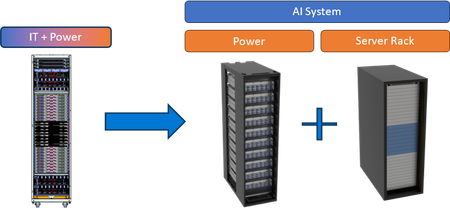
AI platforms have quickly shifted the industry from rack powers near 20 kilowatts to a hundred kilowatts and beyond in just the span of a few years. To enable the largest accelerator pod size within a physical rack domain, and enable scalability between platforms, we are moving to a disaggregated power rack architecture. Our disaggregated power rack is known as Mt Diablo and comes in both 48 Volt and 400 Volt flavors. This shift enables us to leverage more of the server rack for AI accelerators and at the same time gives us the flexibility to scale the power to meet the needs of today’s platforms and the platforms of the future. This forward thinking strategy enables us to move faster and foster collaboration to power the world’s most complex AI systems.16KViews2likes5Comments