azure event grid
13 TopicsMaking ACR Data Transfer Visible: The Storage Activity Platform Behind GetBlob Metrics
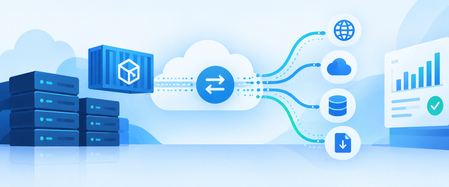
Learn More Use Grafana dashboards in Azure Container Registry - Use Grafana dashboards in Azure Container Registry - Azure Container Registry | Microsoft Learn Monitor Azure Container Registry - Monitor Azure Container Registry - Azure Container Registry | Microsoft Learn Introduction Azure Container Registry (ACR) can now show customers something it never could before: how much data leaves their registry, and which operations caused it. A new customer-facing Data Transfer metric in Azure Monitor breaks egress down by API Name, GetManifest, GetBlob, GeoReplication, and ImportSource so customers can finally attribute and plan for traffic that used to be invisible. The hard part of that metric is GetBlob. Blob and layer downloads, the bulk of pull traffic, are redirected to Azure Storage, so the registry serving path never sees those bytes. Making that redirected egress observable, fresh, and attributable is what required real engineering investment. To close that gap we built a Storage Activity Platform: a reusable, scalable ingestion foundation that turns raw storage activity into fresh, attributable telemetry in minutes instead of days. The Data Transfer metric GetBlob registry path is the first customer-facing capability it unlocks. What Customers Can Now See: The Data Transfer Metric For the first time, ACR exposes a customer-facing Data Transfer metric in Azure Monitor. It measures egress, the bytes actually transferred out of a registry, in bytes, captured per operation. What makes it useful is the ApiName dimension, which attributes every byte to the operation that generated it. The operations visible today include: GetManifest - manifest retrieval. GetBlob - blob and layer downloads (the bulk of pull traffic). GeoReplication - data transferred during geo-replication sync across regions as well as geo-replication initial sync. ImportSource - traffic pulled from a source registry during import. Because egress is split this way, customers can finally answer questions they never could before, for example "How much of my egress is geo-replication sync versus pulls?" The metric is: Dimensioned by Region and ApiName, consistent with the Transaction metric. Inclusive of service-initiated egress such as geo-replication sync, not just customer pulls. Reported on a PT1M time grain, aligned with Azure Storage metrics. Why customers care: Egress can be significant and hard to predict, especially for geo-replicated registries with large initial syncs. Attributing it by operation is the foundation for cost planning, capacity planning, and faster troubleshooting. The Engineering Challenge: GetBlob Is Invisible to the Registry Most of these operations are straightforward to measure: the registry serves them directly, so it can emit the metric as it does the work. GetBlob is the exception, and it is the hard one. When a client pulls an image, the registry does not stream the blob and layer bytes itself. It redirects the client to Azure Storage, which serves the download directly. That redirect is great for performance and scale, but it means the registry never observes the transferred bytes. The single largest component of egress is invisible to the very service that would normally report it. Before: a client pull is redirected from ACR to Azure Storage, so the transferred bytes are invisible to the registry; after: storage activity flows through the Storage Activity Platform into the Data Transfer metric in Azure Monitor That is the observability gap. To turn GetBlob into a customer-facing metric, we needed those redirected bytes to be: Observable - captured from where the transfer actually happens (Azure Storage), not the registry serving path. Fresh - available in minutes, not days, so the metric reflects current behavior. Attributable - tied back to the right registry, region, and operation. None of that existed. Closing this gap is what motivated the Storage Activity Platform built by the Azure Container Registry team. The Freshness Problem Even where storage activity was available, it was too slow to build on. Our previous storage log ingestion pipeline could not keep up. In several regions, telemetry arrived in days rather than minutes. By the time data reached our analytics platform it was frequently no longer actionable, which made troubleshooting harder and, just as importantly, blocked entire classes of customer-facing metrics that simply cannot exist on stale data, GetBlob egress among them. Why customers care: Fresh, trustworthy storage telemetry is the prerequisite for faster troubleshooting, better planning, and every new customer-facing metric that depends on it. Why It Was Hard ACR operates globally at significant scale, serving a large and continuously growing volume of registry traffic. Rebuilding the telemetry ingestion foundation under that load, without affecting the core service, was the central challenge. Finding the real bottleneck. We knew telemetry was slow, but not where the delay came from, log generation, delivery, ingestion, processing, aggregation, or persistence. Without that answer, any fix would be a guess. Sustaining production-scale volume continuously. The platform had to keep up with the highest-volume regions all the time, not just in a benchmark. Producing trustworthy data. For egress to become a customer-facing metric, the underlying data had to be accurate and correctly attributable per operation. The Engineering Story: A Platform, Not a Pipeline Design principles Rather than patching the old pipeline, we rebuilt ingestion around a small set of principles: Decouple ingestion from analytics. Getting storage activity in quickly should not be entangled with how any single downstream scenario consumes it. This separation is what lets new metrics attach later without touching ingestion. Instrument every stage independently. We built visibility into the pipeline itself, measuring latency at each stage separately, so we could locate the real bottleneck instead of guessing. Design for reuse from day one. The target was a scalable ingestion platform, not a bespoke path for one metric. New telemetry should inherit the infrastructure, not rebuild it. Scale and reliability without core-service impact. Ingestion had to sustain production volume continuously and independently of the registry's serving path. Measuring what matters We instrument the platform across a few conceptual signals: The surprise. We expected the consumer to be the scaling challenge. The data showed the opposite: once events are available, the platform processes them almost immediately, even under production load. The overwhelming majority of remaining latency lives upstream, in log delivery, which redirected our optimization focus to where it will actually help. The outcome is telemetry that now arrives in minutes instead of days in many regions, and more durably, a foundation the next capability can build on. High-Level Architecture The platform is one path among several into Azure Monitor. The registry still emits most metrics directly as it serves requests. The storage activity platform runs alongside that direct path, specialized for the redirected-download (GetBlob) egress the registry cannot see for itself. It is an addition to the metric pipeline, not a replacement for it. Why customers care: A reusable ingestion platform means new metrics - starting with the previously-invisible redirected-download egress - can be onboarded faster, with far less engineering overhead, so observability keeps improving over time. The Payoff: GetBlob Data Transfer Is Now Visible The clearest proof that this was a platform investment, not just a latency fix, is what it closed: the GetBlob observability gap. The redirected blob and layer downloads that make up the bulk of egress, and that the registry never sees, are now populated entirely from the storage activity platform and surfaced through the Data Transfer metric in Azure Monitor. For the first time, customers can see that egress, attributed by ApiName. Critically, exposing that redirected-download egress required no new ingestion infrastructure of its own. It attached to the storage activity platform we had already built, which is exactly the point: the platform did the hard part once, and the metric inherited it. The Customer Experience Both the freshness improvement and the new metric surface through tools customers already use, no new workflow to learn. Fresher telemetry flows into the analytics and dashboards teams already rely on, so what they see reflects what is happening now rather than days ago. The Data Transfer metric appears in Azure Monitor alongside existing registry metrics, and can be charted, alerted, and forecast like any other Azure Monitor metric, split by Region and ApiName. Why customers care: Egress attribution leads directly to better cost and capacity planning and faster troubleshooting, and it is only the first of many capabilities the platform can now serve. Engineering Lessons Learned Instrument the pipeline before optimizing it. Measuring each stage independently turned a guessing game into a targeted fix and revealed the bottleneck was not where we assumed. Invest in the platform, not the feature. Building ingestion as a reusable foundation meant the first customer-facing metric attached in a fraction of the time it would have otherwise taken. Outcomes & What's Next What changes for customers is the bottom line: Egress is no longer invisible. Customers can see how much data leaves their registry and attribute it by operation, including the redirected GetBlob downloads that were never observable before. What they see reflects now, not days ago. Telemetry that arrives in minutes instead of days means troubleshooting, cost planning, and capacity planning act on current reality. The platform matters because of what it lets customers observe next. Because new metrics can now be onboarded on top of this foundation, the Data Transfer metric is a beginning, not an endpoint, richer analytics and additional customer-facing metrics follow, each one deepening the visibility customers have into their own registries. Learn More Use Grafana dashboards in Azure Container Registry - Use Grafana dashboards in Azure Container Registry - Azure Container Registry | Microsoft Learn Monitor Azure Container Registry - Monitor Azure Container Registry - Azure Container Registry | Microsoft Learn66Views0likes0Comments
Performance Tuning and Scaling Optimization for Large-Scale Azure Workloads
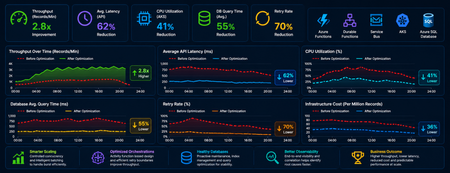
Summary As cloud-native systems scale, performance challenges rarely stem from a single bottleneck. Instead, they emerge from the interaction between compute, orchestration, and data layers under load. This article captures a practical optimization journey of a high-volume Azure-based workload and highlights how controlled scaling, improved orchestration design, and proactive database maintenance can significantly outperform brute-force scaling. Introduction Distributed systems are often designed with the assumption that scaling out will solve performance issues. However, for orchestration-heavy and database-intensive workloads, this approach can introduce more problems than it solves. In this scenario, the system processed millions of transactional records through Azure Functions, Durable Functions, messaging pipelines, APIs, and SQL databases. As the workload grew, the platform began experiencing: CPU and memory spikes Slower SQL queries Service Bus throttling Increased retries and execution delays What stood out was that these issues were not due to insufficient resources, but due to inefficient execution patterns at scale. The optimization effort therefore focused on controlling how the system scaled and executed, rather than simply increasing capacity. Understanding Workload Behavior A critical early step was identifying the nature of the workload—specifically, whether it was CPU-heavy or data-heavy. Rethinking Scaling: More Is Not Always Better One of the most important lessons was that scaling out aggressively can degrade performance. As more function instances processed messages in parallel: Database calls increased sharply API traffic surged Lock contention intensified Retry rates increased This created a cascading effect where retries amplified load, further slowing down the system. To address this, scaling was intentionally controlled using: Concurrency limits on function execution Batch-based processing instead of full parallel fan-out Small delays to smooth traffic spikes Chunking of large datasets into manageable units This shift from maximum parallelism to controlled throughput significantly improved system stability. Compute Optimization: CPU and Memory After stabilizing scaling behavior, the next step was optimizing compute usage. CPU Optimization CPU spikes were largely caused by excessive parallel execution and orchestration overhead. Improvements included: Breaking large workloads into smaller units Reducing unnecessary fan-outs of processes Limiting concurrent executions This resulted in more predictable CPU usage and improved execution consistency. Memory Optimization Memory pressure was primarily driven by large payloads and batch processing. Optimizations focused on: Processing data in smaller chunks Avoiding large in-memory payloads and memory leaks Reducing orchestration state size These changes improved system reliability and reduced execution failures under load. Scaling Approaches: Practical Trade-Offs Both vertical and horizontal scaling were used, but with careful consideration. Scale Up (Vertical Scaling) Quick to implement No architectural changes required Useful for immediate stabilization However, it had cost and scalability limits. Scale Out (Horizontal Scaling) Better suited for long-term scalability Enables workload distribution But without control, it can: Increase database contention Amplify retries Introduce instability Key Insight The most effective approach was not choosing one over the other but combining both with strict control over concurrency and execution patterns. Durable Functions: Orchestration Optimization Durable Functions were central to the system, making orchestration design a key factor in performance. Challenges Observed The initial design relied heavily on nested sub-orchestrators, which introduced: High orchestration overhead Increased replay and persistence operations Slower execution at scale Key Improvements Refactoring unnecessary sub-orchestrators into Activity Functions simplified execution and improved throughput. The benefits included: Reduced orchestration latency Faster execution cycles Lower infrastructure cost Note: However, sub-orchestrators remain the right choice when the design requires composing multiple dependent steps, managing scoped retry/error logic, or isolating orchestration history. The decision should be driven by the complexity and reuse requirements of each workflow segment and not applied as a blanket rule. Improved Retry Strategy Retry behavior was also optimized by redefining execution boundaries. Previously: One activity processed multiple records A single failure triggered a retry of the entire batch After optimization: One activity handled one logical unit of work This enabled: Granular retries Better failure isolation Reduced duplicate processing Database Hygiene: A Critical Foundation The database emerged as a major bottleneck due to fragmentation and stale statistics caused by continuous high-volume operations. Issues Identified Fragmented indexes Inefficient query plans Increased query execution time Optimization Approach A proactive maintenance strategy was implemented using scheduled jobs to: Update statistics regularly Rebuild indexes Maintain query performance consistency Controlled Database Load For heavy long-running workloads in multi-tenant architecture, execution of DB intensive process was intentionally run in singleton fashion at a tenant level to reduce contention. This approach: Prevented concurrent heavy operations Improved overall system stability Delivered more predictable throughput Observability: Finding the Real Problem A major challenge during optimization was distinguishing between symptoms and root causes. For example: Slow APIs were often caused by database contention High retries were triggered by upstream throttling Orchestration delays originated from downstream dependencies To address this, end-to-end observability was established using: Application-level tracing Load testing correlations Cross-service telemetry analysis This enabled accurate root cause identification and prevented misdirected optimization efforts. Key Takeaways Some key principles emerged from this optimization journey: Scaling more does not always mean performing better Controlled parallelism is more effective than unrestricted concurrency Orchestration design directly impacts system performance Database maintenance must be proactive Retry strategies should align with logical units of work Observability is essential for correct diagnosis Conclusion Performance tuning in distributed systems is less about adding resources and more about using them efficiently. By focusing on controlled scaling, simplifying orchestration, maintaining database health, and improving observability, the system achieved higher throughput, lower cost, and significantly improved stability. These lessons are broadly applicable to any Azure-based system handling large-scale, orchestration-heavy workloads and can help teams design more predictable and resilient architectures.855Views5likes0Comments
From Vibe Coding to Working App: How SRE Agent Completes the Developer Loop
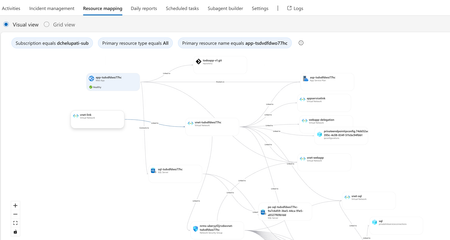
The Most Common Challenge in Modern Cloud Apps There's a category of bugs that drive engineers crazy: multi-layer infrastructure issues. Your app deploys successfully. Every Azure resource shows "Succeeded." But the app fails at runtime with a vague error like Login failed for user ''. Where do you even start? You're checking the Web App, the SQL Server, the VNet, the private endpoint, the DNS zone, the identity configuration... and each one looks fine in isolation. The problem is how they connect and that's invisible in the portal. Networking issues are especially brutal. The error says "Login failed" but the actual causes could be DNS, firewall, identity, or all three. The symptom and the root causes are in completely different resources. Without deep Azure networking knowledge, you're just clicking around hoping something jumps out. Now imagine you vibe coded the infrastructure. You used AI to generate the Bicep, deployed it, and moved on. When it breaks, you're debugging code you didn't write, configuring resources you don't fully understand. This is where I wanted AI to help not just to build, but to debug. Enter SRE Agent + Coding Agent Here's what I used: Layer Tool Purpose Build VS Code Copilot Agent Mode + Claude Opus Generate code, Bicep, deploy Debug Azure SRE Agent Diagnose infrastructure issues and create developer issue with suggested fixes in source code (app code and IaC) Fix GitHub Coding Agent Create PRs with code and IaC fix from Github issue created by SRE Agent Copilot builds. SRE Agent debugs. Coding Agent fixes. What I Built I used VS Code Copilot in Agent Mode with Claude Opus to create a .NET 8 Web App connected to Azure SQL via private endpoint: Private networking (no public exposure) Entra-only authentication Managed identity (no secrets) Deployed with azd up. All green. Then I tested the health endpoint: $ curl https://app-tsdvdfdwo77hc.azurewebsites.net/health/sql {"status":"unhealthy","error":"Login failed for user ''.","errorType":"SqlException"} Deployment succeeded. App failed. One error. How I Fixed It: Step by Step Step 1: Create SRE Agent with Azure Access I created an SRE Agent with read access to my Azure subscription. You can scope it to specific resource groups. The agent builds a knowledge graph of your resources and their dependencies visible in the Resource Mapping view below. Step 2: Connect GitHub to SRE Agent using GitHub MCP server I connected the GitHub MCP server so the agent could read my repository and create issues. Step 3: Create Sub Agent to analyze source code I created a sub-agent for analyzing source code using GitHub mcp tools. this lets SRE Agent understand not just Azure resources, but also the Bicep and source code files that created them. "you are expert in analyzing source code (bicep and app code) from github repos" Step 4: Invoke Sub-Agent to Analyze the Error In the SRE Agent chat, I invoked the sub-agent to diagnose the error I received from my app end point. It correlated the runtime error with the infrastructure configuration Step 5: Watch the SRE Agent Think and Reason SRE Agent analyzed the error by tracing code in Program.cs, Bicep configurations, and Azure resource relationships Web App, SQL Server, VNet, private endpoint, DNS zone, and managed identity. Its reasoning process worked through each layer, eliminating possibilities one by one until it identified the root causes. Step 6: Agent Creates GitHub Issue Based on its analysis, SRE Agent summarized the root causes and suggested fixes in a GitHub issue: Root Causes: Private DNS Zone missing VNet link Managed identity not created as SQL user Suggested Fixes: Add virtualNetworkLinks resource to Bicep Add SQL setup script to create user with db_datareader and db_datawriter roles Step 7: Merge the PR from Coding Agent Assign the Github issue to Coding Agent which then creates a PR with the fixes. I just reviewed the fix. It made sense and I merged it. Redeployed with azd up, ran the SQL script: curl -s https://app-tsdvdfdwo77hc.azurewebsites.net/health/sql | jq . { "status": "healthy", "database": "tododb", "server": "tcp:sql-tsdvdfdwo77hc.database.windows.net,1433", "message": "Successfully connected to SQL Server" } 🎉 From error to fix in minutes without manually debugging a single Azure resource. Why This Matters If you're a developer building and deploying apps to Azure, SRE Agent changes how you work: You don't need to be a networking expert. SRE Agent understands the relationships between Azure resources private endpoints, DNS zones, VNet links, managed identities. It connects dots you didn't know existed. You don't need to guess. Instead of clicking through the portal hoping something looks wrong, the agent systematically eliminates possibilities like a senior engineer would. You don't break your workflow. SRE Agent suggests fixes in your Bicep and source code not portal changes. Everything stays version controlled. Deployed through pipelines. No hot fixes at 2 AM. You close the loop. AI helps you build fast. Now AI helps you debug fast too. Try It Yourself Do you vibe code your app, your infrastructure, or both? How do you debug when things break? Here's a challenge: Vibe code a todo app with a Web App, VNet, private endpoint, and SQL database. "Forget" to link the DNS zone to the VNet. Deploy it. Watch it fail. Then point SRE Agent at it and see how it identifies the root cause, creates a GitHub issue with the fix, and hands it off to Coding Agent for a PR. Share your experience. I'd love to hear how it goes. Learn More Azure SRE Agent documentation Azure SRE Agent blogs Azure SRE Agent community Azure SRE Agent home page Azure SRE Agent pricing1.3KViews3likes0CommentsReimagining App Modernization for the Era of AI
This blog highlights the key announcements and innovations from Microsoft Build 2025. It focuses on how AI is transforming the software development lifecycle, particularly in app modernization. Key topics include the use of GitHub Copilot for accelerating development and modernization, the introduction of Azure SRE agent for managing production systems, and the launch of the App Modernization Guidance to help organizations modernize their applications with AI-first design. The blog emphasizes the strategic approach to modernization, aiming to reduce complexity, improve agility, and deliver measurable business outcomes5.2KViews2likes0CommentsBoost Your Development with Azure Tools for Visual Studio Code
As the cloud becomes essential for modern software development, integrating cloud solutions into your development process can significantly boost productivity. Microsoft Azure offers a comprehensive suite of services and tools to help developers create, deploy, and manage cloud applications. Using Azure extensions for Visual Studio Code is one of the simplest ways to utilize Azure’s features. This blog post will discuss using the Azure Tools extension pack for Visual Studio Code and the best extensions for various development roles.3.1KViews2likes0Comments
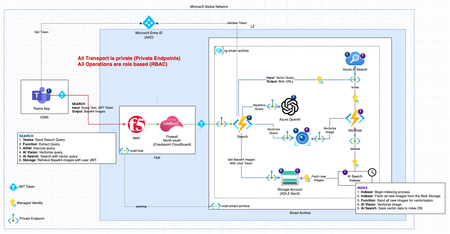
Vector Image Search using Azure OpenAI & AI Search: A Technical Guide
Discover how AI is transforming image retrieval with our comprehensive guide on combining Azure OpenAI and Azure AI Search. Learn to set up, deploy, and utilize these powerful tools to enhance your applications, from e-commerce to digital asset management. Dive into the core functionalities of the search and vectorize methods in the function_app.py Python file, and see how Azure’s AI services can revolutionize your image search capabilities.8.5KViews3likes0Comments