azure event grid
19 Topics
Azure AI Gateway is now generally available: Ship faster, stay in control
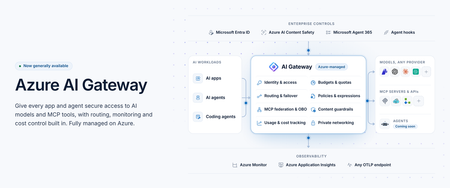
Today at Microsoft Ignite 2026, we're announcing the general availability of Azure AI Gateway, a fully managed Azure service that lets you set up a single, controlled path from your AI applications and agents to models and tools across providers. Developers build with the models and tools they choose, and platform teams manage access, enforce policies, control costs, and monitor usage from one place, without operating gateway infrastructure. Azure AI Gateway, previously in public preview as the AI Gateway tier of Azure API Management, is now a standalone product optimized for governing access to AI models and tools, with a roadmap focused entirely on AI. You can use it by itself with any app or agent, or together with Microsoft Foundry, where you build and run agents, and Microsoft Agent 365, where you manage them. Azure AI Gateway is available today in 17 Azure regions. To make it easy to get started, it offers a freemium, per-use pricing model with 10,000 free requests per gateway each month. Paid billing begins January 1, 2027. See the Regions and pricing section below for details. Why enterprise AI needs a unified governance layer Enterprise AI has moved beyond one app calling one model. Organizations use models from several providers, build agents that act through enterprise tools, and scale AI across teams. When each app manages its own credentials, routing, safety, and usage limits, governance becomes fragmented. Developers struggle to find approved models and tools, and platform teams can't see who is using what, what it costs, or which policies apply. Azure AI Gateway lets you move those controls out of individual apps and into one place, where they apply consistently to every app and agent you connect. How Azure AI Gateway works Apps and agents you connect call the gateway instead of calling each model or tool directly. On every request, the gateway authenticates the caller with Microsoft Entra ID or a gateway access key, enforces access rules and your policies, routes the request to the right model or tool, and records telemetry. Figure 1. Azure AI Gateway sits between callers and backends, governing every request that passes through it. What you can do with Azure AI Gateway Build with models and tools across providers Any model, one name: Use models from Microsoft Foundry, Azure OpenAI, OpenAI, Anthropic, Amazon Bedrock, Google Vertex AI, or any OpenAI-compatible endpoint. Apps call each model by an alias you define, so you can switch models without changing app code. Routing and failover: Route by priority, weight, or custom conditions, with configurable failover, or let Model Router (preview) choose by cost or quality. Consolidated tools: Federate MCP servers and turn OpenAPI specs, connectors, and API Management APIs into MCP tools. Multiple MCP spec versions are supported, including the latest (July 2026). The APIs you know: Call models through an OpenAI-compatible API or the Anthropic Messages API and connect agents to tools from any MCP client. Govern and observe AI interactions Access with Entra ID: Built-in roles control who can use models and tools. Provider keys and tool credentials never reach app code. Safety on every prompt: Screen prompts and responses with Azure AI Content Safety. Only approved tools: Curate and block tools at the gateway, or through Microsoft Agent 365 policies. Protection from poisoned tools (preview): Through the Microsoft Agent 365 integration, Microsoft Defender and Microsoft Purview inspect tool calls and results and block threats before an agent acts. Delegated identity: With on-behalf-of (OBO) authentication, tools act with the signed-in user’s own permissions. Every call on record: Record the caller, target, tokens, and outcome of each model and tool call, trace each call to its agent, and export the data over OpenTelemetry to Application Insights, Datadog, Splunk, Grafana Cloud, or any OTLP endpoint. Private by design: Private Link (preview) for inbound calls, VNet integration (preview) for private backends, IP filtering, and managed identity. Control AI spend as adoption scales See who spends what: Track tokens and estimated cost by user, team, app, agent, provider. Enforced budgets: Cost limits stop new requests once estimated spend reaches a budget. Fair sharing: Token and request limits keep one caller from crowding out the rest. Discover, build, and operate in your existing workflow Coding agent plugin: Developers find approved models and tools and connect their apps from their coding agent. Portal, CLI, Bicep, and REST API: Configure in the portal or with the CLI, then deploy the same setup as code from your CI/CD pipelines with Bicep or the REST API. See Azure AI Gateway in action From connecting models and MCP tools to securing access, controlling costs, and monitoring AI traffic, this demo shows how Azure AI Gateway helps you run AI applications with confidence. Extend AI governance across your Microsoft ecosystem Already using Microsoft Foundry, Microsoft Agent 365, or Azure API Management? Azure AI Gateway works with all three. Microsoft Foundry: Foundry has governance built in for its resources and projects. When AI spreads across teams, Foundry resources, subscriptions, and other providers, the gateway adds a shared layer on top. In a hub-and-spoke model, the gateway is the hub: a central platform team sets the rules once, and developers keep building in their Foundry projects, the spokes, using approved models and tools without managing credentials. Projects can share one deployment, including PTU, and fail over to another Foundry resource or provider. Foundry prompt agents can use gateway models through a model connection (preview), without code changes. Microsoft Agent 365: Agent 365 discovers the gateway’s MCP servers and lets you set tool policies. The gateway enforces those policies, alongside its own, on every tool call, with added threat protection (preview) from Defender and Purview. Regions and pricing Azure AI Gateway is available today in 17 Azure regions: East US, East US 2, East US 2 EUAP, West US, West US 2, Central US, North Central US, South Central US, Canada East, West Europe, North Europe, UK South, France Central, Sweden Central, Australia East, Japan East, and Southeast Asia. Azure AI Gateway offers a freemium, per-use pricing model with 10,000 free requests per gateway each month. Paid billing begins January 1, 2027. Monthly gateway requests Service fee Additional request charges Up to 10,000 Free None More than 10,000, up to 10 million $500 per month, per gateway, billed hourly None (includes 10 million requests) More than 10 million $500 per month, per gateway, billed hourly $20 per additional million requests, billed in increments of 10,000 requests Prices are in US dollars and may vary by region. Exact regional prices will be available when billing begins. Get started with Azure AI Gateway Create a gateway at ai.gateway.azure.com. It’s ready in about a minute and free to start. Then: Connect an existing model and give it an alias. Expose the MCP tools your agents need. Give your team access with an AI Gateway role. Set a cost limit. Point your app or agent at the gateway. Or start from your coding agent. Install the Azure AI Gateway plugin, and it finds approved models and tools and connects your app for you. Explore the documentation and quickstarts at ai.gateway.azure.com/docs.9KViews3likes2Comments
From Form to Action: A Governed, Event-Driven AI Intake Pipeline with Azure Integration Services
A production-minded reference architecture using Azure Integration Services and Microsoft Foundry to turn document-heavy intake into governed, traceable work. TL;DR: Calling a model is one step in AI-powered intake. Production readiness depends on everything around the model: authenticated entry, controlled model consumption, durable asynchronous processing, explicit failure handling, and one correlation ID carried from the gateway to the final event. This post walks through a permit-intake reference architecture on Azure Integration Services and a companion repository you can run offline, without an Azure subscription. The Problem: Intake is where AI Prototypes Stall Many teams have built an AI prototype that reads a scanned form, extracts the key fields, and returns clean, structured data. That prototype proves the model can do the job. Taking it to production raises a different set of questions: Who is allowed to call this, and how many times per minute? What happens when the model returns a 429 or the CRM is down for maintenance? Which team consumed those tokens? Can you show me everything that happened to application #00417? Who is notified when a record is created, and what breaks when we add another subscriber? None of those questions is about the model, yet each one can decide whether the solution ships. The underlying customer problem is broader than “How do we read a form?” It’s “How do we accept responsibility for a submission, process it reliably across slow or unavailable dependencies, and give applicants and operators a trustworthy status?” That framing moves the design from a single AI call to a governed system of connected services. In this post, I use a fictional county’s building-permit intake as the running example. A resident submits a permit packet, and the county needs to validate it, extract the key fields, score it against intake policy, record it in a case system, and notify the right people, with a complete audit trail. The same shape appears in insurance first notice of loss, benefits enrollment, supplier onboarding, and claims intake. The repository keeps the domain in schemas and configuration: replace the schemas and labels, and keep the boundaries. My thesis is simple: the hard part of production AI intake is connecting the services around the model reliably and under governance, not calling the model. The model is one component of the system. It isn’t the system. Scope note: This is a production-minded reference architecture, not a production-ready template. The people, permit data, identifiers, and URLs in this post are synthetic, and the screenshots and trace rows show only that synthetic data. The repository favors demonstration clarity: public endpoints, simple SKUs, and simulated fallbacks. Architecture at a Glance Figure 1. The governed, event-driven permit-intake flow. One correlation ID follows the permit from the gateway to the published event. The design separates the acceptance path from the processing path. API Management owns the caller-facing contract and hands the work to a queue. Slow or failure-prone work happens after that hand-off. The flow reads left to right: Portal → API Management → Logic App → Service Bus → Function → Case system → Event Grid → Subscribers │ Document Intelligence + Foundry model (through the AI gateway) Responsibility Service Why this service Governed front door and AI gateway Azure API Management One policy boundary for business APIs and model APIs Low-code validation, enrichment, and routing Azure Logic Apps Business-visible run history; easy to change routing rules Durable hand-off and back-pressure Azure Service Bus Retries, duplicate detection, and dead-lettering Processing worker Azure Functions Scales with queue depth; runs the shared orchestrator Field extraction Azure Document Intelligence Layout and key-value extraction from the packet Policy-oriented scoring Azure OpenAI in Microsoft Foundry Models Rubric-based completeness and consistency review Fan-out to downstream consumers Azure Event Grid Decoupled subscribers via CloudEvents One correlation ID across the flow Application Insights End-to-end transactions plus one KQL join Discovery and reuse Azure API Center A catalog of the Permits and model APIs The case-system box is deliberately not a CRM product. The repository’s crm.py is an adapter: an in-memory stub by default, or an HTTP call to whatever CRM_BASE points at. Swap in Dynamics 365 or your records system without changing the orchestration contract. Let’s walk through the design decisions that matter most. API Management is more than a Proxy API Management is often introduced as a proxy. In this architecture, it’s the governance boundary, and it governs two surfaces. Figure 2. One gateway governs both the business API and the model API. Surface 1: The Permits API The Entra-protected variant of the inbound policy (permits-api.policy.xml, abridged) authenticates, throttles, and stamps a correlation ID before any backend code runs: <inbound> <base /> <validate-azure-ad-token tenant-id="{{tenant-id}}" failed-validation-httpcode="401"> <audiences><audience>api://ais-demo-permits</audience></audiences> </validate-azure-ad-token> <rate-limit-by-key calls="60" renewal-period="60" counter-key="@(context.Subscription?.Key ?? context.Request.IpAddress)" /> <set-variable name="correlationId" value="@(context.Request.Headers.GetValueOrDefault("X-Correlation-Id", Guid.NewGuid().ToString()))" /> <set-header name="X-Correlation-Id" exists-action="override"> <value>@((string)context.Variables["correlationId"])</value> </set-header> <set-backend-service backend-id="permit-intake-logicapp" /> </inbound> Three lines of intent are worth calling out: validate-azure-ad-token rejects missing, invalid, or expired Microsoft Entra tokens with a 401 at the edge, so unauthenticated requests are rejected before they reach the backend. It knows the Entra issuers and signing keys for your tenant, so there’s no OpenID configuration URL to maintain. rate-limit-by-key gives each consumer its own budget and returns 429 with Retry-After when it’s exceeded. The correlation ID is created here (or accepted from a trusted caller) and echoed back on the 202 Accepted response. That single value is how you’ll find this permit later. The deployed demo authenticates callers with API Management subscription keys and applies the same rate limit and correlation ID. To adopt the Entra variant, register an app for the api://ais-demo-permits audience, register a backend for the Logic App trigger, and then swap the policy. Surface 2: The Model API (The AI Gateway) The Function doesn’t call the model endpoint directly. It calls the Azure OpenAI v1 API through API Management, where a second policy applies (abridged): <inbound> <base /> <llm-content-safety backend-id="content-safety-backend" shield-prompt="true"> <categories output-type="EightSeverityLevels"> <category name="Hate" threshold="4" /> <category name="SelfHarm" threshold="4" /> <category name="Sexual" threshold="4" /> <category name="Violence" threshold="4" /> </categories> </llm-content-safety> <llm-token-limit counter-key="@(context.Subscription?.Id ?? "anonymous")" tokens-per-minute="20000" token-quota="2000000" token-quota-period="Monthly" estimate-prompt-tokens="false" /> <llm-emit-token-metric namespace="ais-demo-ai-gateway"> <dimension name="Subscription" value="@(context.Subscription?.Name ?? "unknown")" /> <dimension name="Department" value="@(context.Request.Headers.GetValueOrDefault("x-dept", "unknown"))" /> </llm-emit-token-metric> <set-header name="api-key" exists-action="delete" /> <authentication-managed-identity resource="https://cognitiveservices.azure.com" /> <set-backend-service backend-id="foundry-models-backend" /> </inbound> In order, that policy: llm-content-safety sends the prompt to Azure AI Content Safety, with Prompt Shields for injection attempts, and returns 403 for prompts that exceed the configured thresholds, before they reach the model. llm-token-limit gives each consumer a tokens-per-minute budget (429) and a monthly token quota (403). llm-emit-token-metric publishes token usage to Application Insights with a department dimension for showback or chargeback. Managed identity authenticates the gateway to the model. The caller’s API Management subscription key is stripped, and local (key) auth is disabled on the Foundry resource, so the Function doesn’t hold a model key, which helps reduce the risk of key leakage. The backend also has a circuit breaker that trips after three 429 or 5xx responses within a minute, pauses calls for a minute (or for the Retry-After period the model returns), and then resumes. The repository includes sample KQL for token monitoring and chargeback views. The key point: conventional APIs and AI endpoints share one governed boundary. Your security team reviews one set of policies, and your platform team gets one place to see who is calling what. Discovery: Azure API Center API Management governs runtime traffic; Azure API Center is where people find the APIs. The repository links API Center to API Management, so the Permits APIs and the model API are cataloged with their definitions, lifecycle stage, and environment. Before a team builds another intake API or model proxy, they search the catalog and still call API Management at runtime. API Center isn’t on the request path. Why the Flow is Asynchronous The Permits API returns 202 Accepted with a correlation ID. It doesn’t wait for extraction, scoring, or the case system. That’s deliberate: document analysis, model calls, record writes, and notifications all have different latency and failure behavior, and holding the caller’s request open couples the caller to each of them. Governance boundary: 202 means the platform durably accepted responsibility for the permit. It doesn’t mean extraction succeeded, a model approved anything, or a record was committed. The repository enforces that literally. On the direct route (POST /permits), API Management writes to Service Bus and checks the answer before it says yes: <send-request mode="new" response-variable-name="sbresponse" timeout="20" ignore-error="true"> <!-- POST to https://{namespace}.servicebus.windows.net/permits-in/messages with managed identity --> </send-request> <choose> <when condition="@(context.Variables.GetValueOrDefault<IResponse>("sbresponse") == null || context.Variables.GetValueOrDefault<IResponse>("sbresponse").StatusCode != 201)"> <return-response> <set-status code="503" reason="Service Unavailable" /> <!-- plus Retry-After --> </return-response> </when> </choose> <!-- only now: return 202 Accepted with X-Correlation-Id --> If Service Bus doesn’t confirm the write (an error status, a timeout, or no connection), the caller gets 503 with Retry-After, not a 202 for work that wasn’t queued. Logic Apps: Validate, Enrich, Route The Logic App workflow checks the payload, attaches the correlation ID, and hands the message to Service Bus with its own managed identity. If required fields are missing, it returns 400 immediately. Here’s the send step: "Send_to_Service_Bus": { "type": "Http", "inputs": { "method": "POST", "uri": "https://@{parameters('serviceBusNamespace')}.servicebus.windows.net/@{parameters('permitsQueue')}/messages", "headers": { "BrokerProperties": "@{string(outputs('Broker_properties'))}" }, "body": "@outputs('Enrich_message')", "authentication": { "type": "ManagedServiceIdentity", "audience": "https://servicebus.azure.net" } } } A preceding Broker_properties step sets MessageId to the parcel number and CorrelationId to the request’s correlation ID. Bicep loads this same workflow JSON when it deploys the Logic App, so each deployment applies the workflow definition from the repository. Business analysts can read the run history in the Azure portal. If the county adds a new permit type or a routing rule, that change happens in the workflow, not in Python. Design choice: The template deploys both routes. POST /permits-orchestrated goes through this Logic App. POST /permits uses a direct-enqueue policy that writes straight to Service Bus with the API Management managed identity; it’s the portal’s default and the route the trace below uses. Use the direct route when you don’t need low-code enrichment. Keep the Logic App when business users own the routing rules. Service Bus: The Durable Hand-off The permits-in queue is configured in Bicep with: maxDeliveryCount: 5, a message is delivered up to five times (the first attempt plus four retries) before it’s moved to the dead-letter subqueue. requiresDuplicateDetection: true with a 10-minute window, resubmitting the same messageId (the parcel number) doesn’t create a second message. See duplicate detection. deadLetteringOnMessageExpiration: true, expired messages are kept for inspection instead of being dropped. Functions: One Orchestrator, Many Hosts A Service Bus–triggered Function (Python 3.14 on Flex Consumption) reads the correlation ID from the message properties and runs a framework-agnostic orchestrator. A message without a permit type raises an error, so Service Bus retries it and then moves it to the dead-letter queue. The orchestrator does four things in order: extract → score → record → publish. def process_permit(permit: dict, correlation_id: str) -> ProcessResult: extracted = document_intelligence.extract_fields(permit) # Document Intelligence compliance = ai_gateway.score_compliance(extracted) # model via the API Management AI gateway status = "IntakeReview" if compliance.score >= settings.compliance_threshold else "NeedsAttention" permit_id = crm.create_permit_record(extracted, compliance, correlation_id, status) event_grid.publish_permit_created(PermitEvent(permitId=permit_id, complianceScore=compliance.score, correlationId=correlation_id)) ... Notice what the model doesn’t do: it doesn’t approve or deny anything. The score (0–100, against a rubric for completeness, consistency, and policy fit) only decides which human review state the permit lands in, IntakeReview or NeedsAttention, and that state is written to the case record. The call uses the Responses API on gpt-5.4-mini with structured output: the response must match a JSON schema (score, missing, flags), so downstream code receives a consistent, schema-validated shape. There’s no dated api-version to maintain: client = OpenAI( base_url=f"{apim_base}/openai/v1/", api_key=subscription_key, default_headers={"api-key": subscription_key, "x-dept": "permitting"}, ) review = client.responses.parse( model="gpt-5.4-mini", instructions=RUBRIC, input=fields_json, text_format=Review, reasoning={"effort": "low"}, store=False, ).output_parsed The caller authenticates to API Management, not to the model: the api-key header carries the caller’s API Management subscription key (the template renames this API’s subscription-key header to api-key). The OpenAI client requires api_key and also sends it as a bearer token, but the gateway replaces that header with its own managed-identity token before calling the model. For production, swap the subscription key for a Microsoft Entra token (api_key=token_provider) and validate it at the gateway. The same process_permit function is hosted by the Function, by a FastAPI service for the portal, and by the Python SDK walkthrough. That keeps the demo, the tests, and the deployed worker running the same code. Event Grid: Fan-out without Coupling After the CRM write, the Function publishes a PermitCreated CloudEvent. Two subscribers react independently: an analytics/audit queue and, when you supply a webhook URL, a resident notification webhook. Each subscription makes up to 30 delivery attempts over 24 hours. Adding a third subscriber, such as a GIS update or an inspector scheduling system, is a new subscription. It’s not a change to the permit flow. Commands and Events are Different Things Service Bus carries a command: “process this permit.” Event Grid carries a fact: “this permit was created,” published only after the record write succeeds. Keeping them separate makes retries, ownership, and subscriber behavior easier to reason about, a poison message can be retried and dead-lettered without a PermitCreated event going out for work that didn’t finish. Four rules follow: Message identity: a stable message ID (the parcel number) and the correlation ID as a message property. In the repository. Idempotency: a redelivered message must confirm earlier work, not create a duplicate record. Production work. Dead-letter ownership: someone watches the queue, reads the reason codes, and is authorized to replay. Operational. Status: callers need a status resource (accepted, processing, needs review, completed, failed) that doesn’t expose document contents. Production works the repository returns only the correlation ID. How Failures are Handled and What Still Needs Work A production-minded design makes failure behavior explicit before the happy path is trusted. The table separates what the repository does today from what still belongs on the production path: Failure What happens in the repository Still needed for production Caller has no valid token 401 at API Management (Entra policy variant); no backend call Entra validation on every public API Caller exceeds its rate limit 429 with Retry-After Per-consumer products and quotas Payload missing required fields Orchestrated route: 400 from the Logic App, passed back by API Management. Direct route: accepted, then dead-lettered by the Function if type is missing The same validation on the direct route Queue unavailable Direct route: 503 with Retry-After. Orchestrated route: the Logic App run fails and returns an error. Neither returns 202 An alert on enqueue failures Malformed message on the queue Delivered up to five times, then dead-lettered (MaxDeliveryCountExceeded) A named owner and a replay procedure Prompt blocked by content safety, or monthly token quota spent 403 from the gateway; Service Bus redelivers the message, then dead-letters it Route to NeedsAttention with a reason instead of dead-lettering Model unavailable (429 or 5xx from the gateway or model) The OpenAI client retries twice, then Service Bus redelivers the message and finally dead-letters it. The backend circuit breaker pauses calls to the model while it’s tripped Route to NeedsAttention with the reason model_unavailable, keeping the deterministic validation results Case system unavailable The Function fails before publishing; the message is redelivered An idempotency key on the record write Event Grid unavailable after the record write The Function fails; a retry can repeat the record write A transactional outbox for the event A notification subscriber is down Event Grid retries that subscriber only (30 attempts over 24 hours) — Two rows deserve a closer look. Model unavailable: today, a model failure retries and then dead-letters the permit. A better design keeps the deterministic validation results, routes the permit to NeedsAttention with a reason such as model_unavailable, and never treats a missing score as approval. Case system unavailable: the record write is the commit point for PermitCreated, so the event must never go out before it. Idempotency keys plus an outbox let a committed record and its event be reconciled. A prototype doesn’t need these safeguards; a production service does. AI is Optional and Bounded The non-AI capabilities like durable acceptance, extraction, deterministic validation, the case record, and events are useful with generative AI turned off. The model’s score is advisory: it prioritizes review and surfaces gaps. It must never quietly become the approval decision. Extraction output is evidence to validate, not ground truth. Deterministic rules own required fields, allowed values, and hard policy constraints. In the repository, the Logic App rejects a packet without name or type, and the Function dead-letters a message without type. The model doesn’t enforce either rule. The model’s output is schema-constrained (score, missing, flags) and labeled advisory. Low scores, conflicting evidence, and model failures route to people. Logs carry identifiers and stage outcomes, not document bodies. Before any real workload, evaluate the scorer in Microsoft Foundry with synthetic or properly governed labeled data. The scorer is a direct model call through API Management, not a Foundry agent, so use dataset-based evaluators and graders, and keep an authorized person in the loop for consequential decisions. Trace One Permit End to End Governance is only useful if you can prove what happened. Here’s one synthetic permit created through the demo environment. Submit. The client posts the permit to API Management: { "name": "[Applicant Name]", "type": "Building", "parcel": "AIS-TT-102242", "applicantEmail": "[Applicant Email]" } Govern and accept durably. On the direct /permits route, API Management applies its policies, stamps a correlation ID, writes the message to permits-in, and only after Service Bus answers 201, returns 202 Accepted with X-Correlation-Id: xxxxxxxx-xxxx-xxxx-xxxx-xxxxxxxx. Process. The Function picks up the message and extracts the fields. This run had no document attached, so it used the repository’s synthetic extraction fallback; attach a document URL to exercise Document Intelligence. Score, behind content safety. The Function calls the model through the AI gateway. Content Safety and Prompt Shields screen the prompt first; then gpt-5.4-mini returns a score of 22 and lists missing applicant contact details and a project description. Status: NeedsAttention, which is the expected result for a packet missing those details. (Simulated mode scores the same packet 100.) Record and publish. The case-system adapter creates P-E6980B0C, and the Function publishes PermitCreated; Event Grid delivers it to the analytics queue. Reconstruct. One query returns the whole journey. The portal shows the same journey to a business audience: Figure 3. The portal’s processing result and hop-by-hop trace. This screenshot is from simulated mode, so all values are synthetic and the applicant is shown as a placeholder. In Application Insights the journey is two operations. The intake operation is the API Management request and its Service Bus write. The processing operation is one end-to-end transaction: the Function, its call back through the AI gateway, the Content Safety checks, the model call, and the Event Grid publish. The Service Bus hop doesn’t carry W3C trace context, so the correlation ID is the join key, API Management logs it as a header, and the Function’s log lines name it. This query finds the operations that mention it: let cid = '<correlation-id>'; let hits = union AppRequests, AppDependencies, AppTraces, AppExceptions | where OperationId == cid or Message has cid or tostring(Properties) has cid; let ops = hits | where isnotempty(OperationId) and OperationId != '00000000000000000000000000000000' | distinct OperationId; union (union AppRequests, AppDependencies, AppExceptions | where OperationId in (ops)), (hits | where Type == 'AppTraces') | project TimeGenerated, Type, Name = coalesce(Name, Message, OuterMessage), ResultCode, DurationMs, AppRoleName | order by TimeGenerated asc For the permit above, it returned: Operation Hop Component Result Duration (ms) Intake POST /permits API Management 202 1,471 Intake POST /permits-in/messages Service Bus enqueue 201 177 Processing ServiceBusProcessor.ProcessMessage Azure Functions — 5,875 Processing POST /openai/v1/responses AI gateway (called by the Function) 200 4,542 Processing POST /contentsafety/text:analyze Content Safety 200 777 Processing POST /contentsafety/text:shieldPrompt Prompt Shields 200 235 Processing POST /openai/v1/responses Foundry model (gpt-5.4-mini) 200 2,705 Processing POST /api/events Event Grid publish 200 83 Durations come from one run in a demo environment, including cold starts. They aren’t performance figures. Figure 4. The processing operation for the same permit in Application Insights. The durations match the table above. Resource names and tenant identifiers are redacted. When a caseworker asks, “What happened to application #00417?”, the answer can come from one query instead of separate log searches across teams. Run it Locally, then Deploy it The repository is designed so you can understand the architecture before you spend anything on Azure. 1. Offline Simulation (no Azure Subscription) uv sync --extra dev # Python 3.14 cp .env.example .env # SIMULATED_MODE=true by default uv run ais-demo # runs steps B1–B8 end to end In simulated mode, each adapter (Service Bus, Document Intelligence, the model, CRM, Event Grid, Azure Monitor) is replaced by an in-memory stand-in with the same interface. The walkthrough submits a permit, enqueues it, extracts and scores it, writes the record, publishes the event, dead-letters a deliberately malformed message, and prints the correlated trace. The test suite (uv run pytest) covers the same paths. To see the business view, start the API and portal together: ./scripts/setup.sh ./scripts/app.sh start # API on :8000, portal on :5173 (Node.js 24 LTS) 2. Same Interface, Azure-backed Adapters Each adapter module checks one setting: if settings.simulated_mode or not settings.servicebus_fqdn: return _consume_simulated(handler) return _consume_live(handler, settings) # azure-servicebus + DefaultAzureCredential Set SIMULATED_MODE=false, provide the endpoints, and the same orchestrator talks to real services. Live adapters authenticate with DefaultAzureCredential, so the deployed Function uses its managed identity for Service Bus, Document Intelligence, Event Grid, and Azure Monitor. Both Python hosts export OpenTelemetry to Application Insights, and the Function’s log lines name the correlation ID. 3. Deploy with Bicep and Clean up az group create -n rg-ais-demo -l eastus2 az deployment group what-if -g rg-ais-demo \ --template-file infra/main.bicep --parameters infra/main.bicepparam az deployment group create -g rg-ais-demo \ --template-file infra/main.bicep --parameters infra/main.bicepparam # or: azd provision --preview && azd provision One deployment creates and wires the whole stack: Service Bus and Event Grid (with the analytics subscription, plus the notification webhook subscription when you pass notificationWebhookUrl), Document Intelligence, a Microsoft Foundry resource with the gpt-5.4-mini deployment, the Logic App workflow, a Flex Consumption Function App on Python 3.14, API Management with all three APIs (/permits, /permits-orchestrated, and /openai) and their policies, API Center, and the managed-identity role assignments it needs. Local (key) auth is disabled on Service Bus, Event Grid, Document Intelligence, and the Foundry resource. The template defaults to the BasicV2 tier of API Management; the sample main.bicepparam sets the classic Developer tier to match the existing demo environment, so change apimSku for a new environment. For a faster inner loop, pass deployApim=false. After provisioning, publish the Function code; the deployment guide has the details, and a GitHub Actions workflow runs the same what-if and provision steps with OpenID Connect. When you’re done: az group delete -n rg-ais-demo --yes --no-wait The repository also includes a demo track that tells the same story two ways: an Azure portal click-through for business stakeholders (steps A1–A15) and a Python SDK walkthrough for engineers (steps B1–B8). Production Boundaries: What this Reference doesn’t Do This repository is a production-minded reference architecture: it anticipates production concerns while staying candid about what it doesn’t prove. A production path starts from your organization’s requirements and platform standards. Here’s the gap: Area In the repository Before production Networking Public endpoints Private endpoints, virtual network integration, and a WAF in front of internal API Management (reference architecture) Identity Managed identity to Service Bus, Event Grid, Document Intelligence, and the Foundry resource, with local auth disabled; API Management subscription keys for callers (an Entra token policy is provided) Microsoft Entra token validation on every public API; the Function’s API Management subscription key in Key Vault or replaced by Entra auth AI safety Content Safety and Prompt Shields at the gateway; structured output; advisory-only scoring Tuned thresholds and blocklists, response-side checks, and offline and continuous evaluation gated in CI Data retention In-memory or simulated CRM A real system of record with retention, residency, and deletion policies agreed with records owners Consistency Retries, duplicate detection, and dead-lettering Idempotency keys and an outbox for the record write and event publish Caller status The correlation ID A status resource (accepted, processing, needs review, completed, failed) Access control One demo subscription Per-consumer products, least-privilege RBAC, and separated duties for operators and reviewers Operational ownership Demo scripts Dashboards, alerts on dead-letter depth and token budgets, runbooks, and named owners for every queue Human review Score routes to a review state Documented reviewer workflow, override capture, and periodic sampling of AI-assisted decisions Figure 5. The same services in a network-isolated API Management landing zone. The repository’s production path maps each of these items to the Azure Well-Architected Framework pillars. It also sketches how the AI gateway grows into a multi-region front door with backend pools, circuit breakers, and semantic caching, without changing the governance policies you already have. Map the Article to the Repository Article Repository location Shared pipeline src/ais_demo/orchestrator.py Governed intake (direct, orchestrated, Entra variant) apim/policies/permits-api*.xml AI gateway apim/policies/aoai-api.policy.xml Logic App workflow integration/logicapp/permit-intake-workflow.json Durable command and dead-lettering src/ais_demo/integrations/service_bus.py Extraction src/ais_demo/integrations/document_intelligence.py Advisory scoring src/ais_demo/integrations/ai_gateway.py Case-system adapter src/ais_demo/integrations/crm.py Events src/ais_demo/integrations/event_grid.py Trace join src/ais_demo/integrations/monitor.py Infrastructure infra/main.bicep and infra/modules/ Runbooks docs/deployment-guide.md and docs/demo-track.md Production path docs/production-path.md Key Takeaways Put the model behind the same gateway as your APIs. Content safety, token limits, usage metrics, and managed identity help turn model access into something you can govern and attribute. Accept fast, process durably and mean it. Return 202 only after the queue confirms the message. That helps shield residents from downstream outages and gives operators a dead-letter queue to inspect instead of a lost request. Keep AI advisory. Let the model route work to people. Don’t let it make the decision. Create one correlation ID at the edge and carry it through each hop. It’s one of the simplest audit trails you can build. Decouple what happens next. Event Grid lets new consumers subscribe without touching the intake flow. What to do Next Agree on the acceptance contract: exactly when 202 is returned and how callers check status. Run the simulated portal and Python walkthroughs with one synthetic correlation ID. Test the failure paths: queue unavailable, poison message, model unavailable, case system unavailable, and a trace gap. Add idempotent record writes and an outbox for event publication. Evaluate the advisory model separately from deterministic rules and human approval. Complete an architecture, privacy, security, and Well-Architected review for your subscription before using real data. Try It Repository: github.com/honestypugh2/ais-demo. Start with uv run ais-demo, no Azure subscription required. Adapt it: Change the schemas in src/ais_demo/schemas/permit.py, update USE_CASE_PROFILE and the samples in data/, and keep the topology. Go deeper: AI gateway capabilities in API Management · Service Bus dead-letter queues · Event-driven architecture style · Investigate transactions in Application Insights Related reading: Grounding Copilot Studio Agents with Azure AI Search and Foundry IQ Models will change. The work around them is what moves intake from form to action: a governed front door, durable hand-offs, advisory scoring, and one correlation ID from submission to the final event. Clone the repository, run it offline, and adapt the schemas to your own intake process. Comments and questions are welcome below. The sample code in this post and the companion repository is provided "as is" under the MIT license for demonstration purposes. It uses synthetic data only and isn't intended for production use without additional security, reliability, and compliance review. Nothing in this post is legal, compliance, security, or deployment assurance, and it doesn't represent a customer implementation. The county and applicant in this example are fictional. Check product availability, quotas, model access, and regional capabilities for your own subscription.689Views0likes0CommentsBuild governed asynchronous APIs with Azure API Management and Azure Service Bus
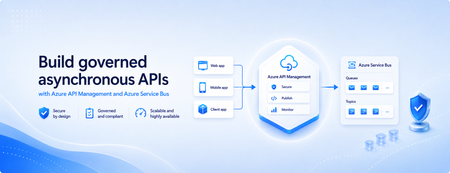
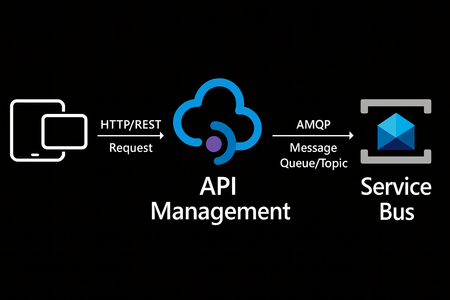
Many applications use Azure Service Bus to decouple services, handle traffic spikes, and process workloads asynchronously. However, securely exposing messaging capabilities to applications, partners, and internal teams can require custom middleware or messaging-specific client implementations. Today, we’re announcing the general availability of native Azure Service Bus integration in Azure API Management. With the send-service-bus-message policy, developers can publish messages directly from an Azure API Management gateway to an Azure Service Bus queue or topic. This provides a secure and governed HTTP interface for Service Bus workloads—without requiring teams to build and operate a separate adapter service. Connect APIs directly to Azure Service Bus Azure API Management can act as the governed entry point for applications that submit work to Azure Service Bus. A client sends a standard HTTP request to API Management. The gateway can authenticate and authorize the caller, validate or transform the request, and apply policies such as rate limits and quotas before publishing the message to a Service Bus queue or topic. Once the message is accepted, API Management can immediately respond to the caller while downstream services process the message asynchronously. Alternatively, message publication can be added to an existing API flow while the request continues to its primary backend. This integration brings together API governance in Azure API Management and reliable asynchronous messaging in Azure Service Bus—without adding another intermediary service. Greater control over Service Bus messages As part of general availability, we’re introducing additional controls for building production messaging workflows. 1. Control how messages are processed Developers can configure the following Service Bus message properties directly in the policy: Message IDs to correlate messages and support duplicate-detection or idempotent processing patterns. Session IDs to group related messages for ordered or stateful processing. Time-to-live to prevent messages from being processed after they are no longer relevant. These values can be generated dynamically using API Management policy expressions, allowing them to reflect request IDs, customer identifiers, transactions, or other application context. 2. Capture the send result The response-variable-name attribute captures information about the Service Bus send operation in an API Management context variable. Subsequent policies can use the result to add correlation information to an API response, emit telemetry, record an operational event, or apply conditional logic when a message cannot be sent. 3. Choose how failures affect the API Different messaging scenarios require different failure behavior. When publishing the message is the primary purpose of an API, a send failure can stop policy execution and invoke the API Management error-handling path. When publishing is secondary—such as sending an audit event or initiating optional downstream processing—the ignore-error option can allow the primary API request to continue. Information about the send operation remains available through the response variable for logging or subsequent policy logic. 4. Secure access with managed identity API Management authenticates to Azure Service Bus using a Microsoft Entra managed identity. Customers can use the system-assigned identity of the API Management service or specify a user-assigned managed identity. The selected identity is granted the Azure Service Bus Data Sender role for the appropriate namespace, queue, or topic. This removes the need to store Service Bus connection strings or shared access keys in API policies and makes it easier to apply least-privilege access using Azure role-based access control. Send a message with an API Management policy The following example sends the incoming request body to an orders queue. It assigns a message ID and expiration time, captures the result of the send operation, and treats successful publication as a required part of the API request. <send-service-bus-message queue-name="orders" namespace="contoso-messaging.servicebus.windows.net" message-id="@(context.RequestId.ToString())" time-to-live="00:10:00" response-variable-name="serviceBusResult" ignore-error="false"> <payload> @(context.Request.Body.As<string>(preserveContent: true)) </payload> </send-service-bus-message> A session ID can also be added when related messages need to be grouped for ordered or stateful processing. For a fully asynchronous API, the policy can be followed by return-response so that API Management acknowledges the request immediately after sending the message. For an existing API, the request can continue to its configured backend after the message is published. Common integration scenarios Create asynchronous APIs: Accept an order, document, or processing request through an HTTP API, publish it to a queue, and return immediately while downstream services complete the work. Govern partner integrations: Provide partners with a managed API contract instead of exposing the underlying Service Bus namespace. API Management can authenticate callers, validate requests, and apply quotas before publishing messages. Publish business events: Publish events to a Service Bus topic so multiple subscriptions and downstream services can process them independently. Handle bursts of incoming traffic: Use Service Bus to buffer messages when incoming API traffic temporarily exceeds the rate at which downstream services can process requests. Add events to existing API operations: Publish audit, notification, analytics, or workflow events while allowing the primary API request to continue to its configured backend. Preserve workflow affinity: Use Service Bus sessions to group related messages for ordered or stateful processing based on a customer, transaction, order, or workflow identifier. Get started To send messages from Azure API Management to Azure Service Bus: Create or select an Azure Service Bus queue or topic. Enable a system-assigned or user-assigned managed identity on the API Management service. Assign the identity the Azure Service Bus Data Sender role. Add the send-service-bus-message policy to an API operation. Configure the message payload, processing properties, output variable, and failure behavior. With native Azure Service Bus integration, Azure API Management provides a secure and governed way to connect HTTP APIs with asynchronous messaging workloads—without requiring additional middleware. Learn more Send Service Bus message policy reference Send messages to Azure Service Bus from Azure API Management Azure API Management June 2026 release notes Azure Service Bus documentation1.1KViews0likes0CommentsIntroducing native Service Bus message publishing from Azure API Management (Preview)
We’re excited to announce a preview capability in Azure API Management (APIM) — you can now send messages directly to Azure Service Bus from your APIs using a built-in policy. This enhancement, currently in public preview, simplifies how you connect your API layer with event-driven and asynchronous systems, helping you build more scalable, resilient, and loosely coupled architectures across your enterprise. Why this matters? Modern applications increasingly rely on asynchronous communication and event-driven designs. With this new integration: Any API hosted in API Management can publish to Service Bus — no SDKs, custom code, or middleware required. Partners, clients, and IoT devices can send data through standard HTTP calls, even if they don’t support AMQP natively. You stay in full control with authentication, throttling, and logging managed centrally in API Management. Your systems scale more smoothly by decoupling front-end requests from backend processing. How it works The new send-service-bus-message policy allows API Management to forward payloads from API calls directly into Service Bus queues or topics. High-level flow A client sends a standard HTTP request to your API endpoint in API Management. The policy executes and sends the payload as a message to Service Bus. Downstream consumers such as Logic Apps, Azure Functions, or microservices process those messages asynchronously. All configurations happen in API Management — no code changes or new infrastructure are required. Getting started You can try it out in minutes: Set up a Service Bus namespace and create a queue or topic. Enable a managed identity (system-assigned or user-assigned) on your API Management instance. Grant the identity the “Service Bus data sender” role in Azure RBAC, scoped to your queue/ topic. Add the policy to your API operation: <send-service-bus-message queue-name="orders"> <payload>@(context.Request.Body.As<string>())</payload> </send-service-bus-message> Once saved, each API call publishes its payload to the Service Bus queue or topic. 📖 Learn more. Common use cases This capability makes it easy to integrate your APIs into event-driven workflows: Order processing – Queue incoming orders for fulfillment or billing. Event notifications – Trigger internal workflows across multiple applications. Telemetry ingestion – Forward IoT or mobile app data to Service Bus for analytics. Partner integrations – Offer REST-based endpoints for external systems while maintaining policy-based control. Each of these scenarios benefits from simplified integration, centralized governance, and improved reliability. Secure and governed by design The integration uses managed identities for secure communication between API Management and Service Bus — no secrets required. You can further apply enterprise-grade controls: Enforce rate limits, quotas, and authorization through APIM policies. Gain API-level logging and tracing for each message sent. Use Service Bus metrics to monitor downstream processing. Together, these tools help you maintain a consistent security posture across your APIs and messaging layer. Build modern, event-driven architectures With this feature, API Management can serve as a bridge to your event-driven backbone. Start small by queuing a single API’s workload, or extend to enterprise-wide event distribution using topics and subscriptions. You’ll reduce architectural complexity while enabling more flexible, scalable, and decoupled application patterns. Learn more: Get the full walkthrough and examples in the documentation 👉 here5.7KViews4likes10CommentsLogic Apps Aviators Newsletter - July 25
In this issue: Ace Aviator of the Month News from our product group News from our community Ace Aviator of the Month July’s Ace Aviator: Şahin Özdemir What's your role and title? What are your responsibilities? I currently work for Rubicon Cloud Advisor, a Dutch company specialized in digital transformations, cloud adoption and AI implementation. At Rubicon I fulfil the role of Application and Integration architect, while also being a Professional Scrum Trainer at Scrum.org. Even though this sounds like two completely different roles, in practice both go closely hand in hand. I firmly believe that good architecture, a strong development process, and application of best practices are key pillars for delivering high-quality solutions to my clients. Therefore, both roles come in handy in my day-to-day job (combined with my strong background in software development).\ I work closely with companies and their teams in making their journey to Azure - especially Azure Integration Services - successful. Most of the time this journey starts with a business need or challenge, and I work with my clients to get a deeper understanding of their needs. This results in further analysis, capturing requirements, defining architecture, solution design, setting the stage for development (ALM) and being involved in quality assurance. At the same time, I think it’s important to stay relevant from a technical perspective. That’s why I also like being involved with implementing the solution. This way, I hear the technical struggles teams face and I can help them to find the right solution. Can you give us some insights into your day-to-day activities and what a typical day in your role looks like? Not a single day is the same, although there are some recurring activities. Specific parts of my day (or sprint) are dedicated to Scrum-related activities - whether it's participating in the daily scrum, having sprint reviews with stakeholders, planning the next sprint, or refining the backlog with the team or just aligning with the PO or stakeholders. I’m frequently involved in cross-organizational meetings focused on projects at scale. I contribute from the perspective of architecture, technical expertise, and integration strategy. In my role as a solution architect, I'm engaged in designing and implementing a critical integration platform for my client. This platform connects and exchanges data between many internal departments and external vendors - an effort that requires frequent alignment and collaboration. I’m always looking for opportunities to expand our Hybrid Integration Platform itself. Exploring how Azure resources may add value to our platform and working closely with the team to realize such improvements to the platform’s capabilities is something I enjoy. Outside of the regular meetings, I often focus on designing new integrations. Having working sessions with stakeholders to understand what they want. Based on these discussions, I assess the technical and architectural aspects of the solution. Every integration that lands on the platform is measured against both architectural and development principles and guidelines. I contribute to reviewing the solutions that have been developed. Ensuring that each integration is high-quality, consistent, easy to understand, and maintainable. I support the platform team with, and whenever possible. And if time permits, I develop parts of the solution myself – I see this as a great way to stay relevant from a technological perspective. All the spare time I have, I spend on writing technical articles that may help others. What motivates and inspires you to be an active member of the Aviators/Microsoft community? Because I enjoy helping others. Every day I work with a team of smart professionals on integration solutions and custom code within the Azure platform. Along the way, we regularly encounter challenges, limitations, or issues. In those moments, it's incredibly helpful to find solutions online or to have a community that can think along with you. Over the past few years, there have been many occasions where I just couldn’t find a solution online for a technical problem with Logic Apps. In these cases, we either came up with a creative solution ourselves or received support from Microsoft. When the integration community faces a similar challenge, it’s pretty much wasteful to tackle the same hurdles again. By documenting an approach or solution, others may be saving their invaluable time looking for a solution. Looking back, what advice do you wish you had been given earlier that you'd now share with those looking to get into STEM/technology? It is ok that you don’t know everything. Just start doing, experiment, stay curious, challenge yourself, don’t be afraid to ask questions, fail, learn and keep going! What has helped you grow professionally? I have spent a fair amount of my career at a big consulting firm. I started off as a software engineer all the way up to senior manager and architect. A long journey like that gives great and well-dosed opportunities and learning experiences to focus on your technical (in-depth) skillset first, continued by working on you soft skills like consulting, guiding and leading teams, solutioning and architecture. If I had not followed this path at that company, I would not be the person I am now professionally. Be ok with the fact that growth doesn’t happen overnight -no shortcuts, no magic pills. It's like a good red wine that needs time to mature. So do many challenging projects, become all-round and then choose a specialization, ask for constructive feedback, fail many times and take your time to reflect and learn. And don’t forget to have a strong work ethic and ongoing curiosity to learn new things. In the end I found that - from a technological perspective-, quality attributes (the “-illities”), enterprise application integration and scrum made my heart skip a beat. So my advice is to always pursue what brings you joy! If you had a magic wand that could create a feature in Logic Apps, what would it be and why? Overall, I must say that I’m happy with the current state of Logic Apps. Nevertheless, if I had a magic wand: I would like to see that the service plans for Logic App standard would be in line with Function Apps. The plans for Function apps have way better tiers from both memory, cores and pricing perspective. And being able to scale out and in based on specific metrics is more flexible than Logic App Standard currently offers. Having more CPU/memory available in the plans would also improve the overall performance of Logic Apps in general, even though performance optimizations of many actions would also be more than welcome. What I currently really miss in the HTTP connector (and possibly others) is the ability to have better control over the request timeouts. Even though the setting is there, it is capped to 4 minutes max. In practice, we need to deliver data to external APIs that work synchronously and take more time to complete. Giving better control on these timeouts would make the usability of workflows even better! Even though some nice additions to the initialization of variables have been made recently, I would like to see the ability to initialize variables at any point in the workflow. E.g. the foreach loop can be executed in parallel, and therefore the current global variables are not thread-safe, which leads to unexpected behavior. News from our product group Logic Apps Live June 2025 Missed Logic Apps Live in June? You can watch it here. We focused on the Logic Apps big announcements from Integrate 2025. There are a lot of great things to check! Feedback Opportunity: SRE Agent + Logic Apps Discover the new Applications feature in Azure API Management, enabling OAuth-based access to APIs and products. Streamline secure API access with built-in OAuth 2.0 application-based authorization. Configure SQL Storage for Standard Logic Apps Azure Logic Apps traditionally rely on Azure Storage to manage workflow states and runtime data. However, with the introduction of SQL as a storage provider (currently in preview), developers now have a compelling alternative that offers greater control, flexibility, and integration with existing SQL infrastructure. This post explores the benefits, configuration steps, and considerations for using SQL storage with Standard Logic Apps. Announcing General Availability: Azure Logic Apps Standard Automated Test Framework We’re excited to announce the General Availability (GA) of the Azure Logic Apps Standard Automated Test Framework—a major step forward in enabling developers to build, test, and maintain enterprise-grade workflows with confidence and agility. Announcing General Availability: Azure Logic Apps Standard Custom Code with .NET 8 We’re excited to announce the General Availability (GA) of Custom Code support in Azure Logic Apps Standard with .NET 8. This release marks a significant step forward in enabling developers to build more powerful, flexible, and maintainable integration workflows using familiar .NET tools and practices. With this capability, developers can now embed custom .NET 8 code directly within their Logic Apps Standard workflows. This unlocks advanced logic scenarios, promotes code reuse, and allows seamless integration with existing .NET libraries and services—making it easier than ever to build enterprise-grade solutions on Azure. Business Process Tracking Reaches General Availability Business Process Tracking provides key insights to business stakeholders from your Logic Apps (Standard) implementation in an efficient and timely manner. Today, we are pleased to announce the General Availability of this capability, allowing customers to leverage in their production workloads. Announcement: General Availability of Logic Apps Hybrid Deployment Model We’re excited to announce the Public Preview of two major integrations that bring the power of Azure Logic Apps to AI Agents in Foundry – Logic Apps as Tools and AI Agent Service Connector. Learn more on our announcement post! Announcing Public Preview: Organizational Templates in Azure Logic Apps We’re excited to announce the Public Preview of Organizational Templates in Azure Logic Apps— empowering teams to author, share, and reuse automation patterns across their organization. With this release, we’re also rolling out a brand-new UI experience to easily create templates directly from your workflows—no manual packaging required! OpenTelemetry in Azure Logic Apps (Standard and Hybrid) OpenTelemetry provides a unified, vendor-agnostic framework for collecting telemetry data—logs, metrics, and traces—across different services and infrastructure layers. It simplifies monitoring and makes it easier to integrate with a variety of observability backends such as Azure Monitor, Grafana Tempo, Jaeger, and others. For Logic Apps—especially when deployed in hybrid or on-premises scenarios—OpenTelemetry is a powerful addition that elevates diagnostic capabilities beyond the default Application Insights telemetry. Logic App Standard - When High Memory / CPU usage strikes and what to do Monitoring your applications is essential, as it ensures that you know what's happening and you are not caught by surprise when something happens. One possible event is the performance of your application starting to decrease and processing becomes slower than usual. This may happen due to various reasons, and in this blog post, we will be discussing the High Memory and CPU usage and why it affects your Logic App. We will also observe some possibilities that we've seen that have been deemed as the root cause for some customers. Introducing Agent in a Day Agent in a Day represents a fantastic opportunity for customers to participate in hackathon-style contests where attendees learn how to build agents and then can apply them to their unique business use cases. For Partners, Agent in a Day represents a great way to engage your customers by building agents with them and uncovering new use cases. Introducing Confluent Kafka Connector (Public Preview) We are pleased to announce the introduction of the Confluent Kafka Connector in Logic Apps (Standard) which allows you to both send and receive messages between Logic Apps and Confluent Kafka. Confluent Kafka is a distributed streaming platform for building real-time data pipelines and streaming applications. It is used across many industries including financial services, Omnichannel retail, autonomous cars, fraud detection services, microservices and IoT deployments. Our current connector offering supports both triggers (receive) and sending (publish) within Logic Apps. News from our community Logic App Standard: Throw exceptions like a pro! Post by Şahin Özdemir Learn how to throw exceptions in Logic App Standard using a simple Compose action—no code needed, just clever workflow design. Azure Logic Apps: are you handling large blobs? Keep memory usage under control. Post by Stefano Demiliani Struggling with large blob files in Logic Apps? Learn how to keep memory usage under control and avoid out-of-memory errors with smart workflow design and a few performance-boosting tricks De SOAPing Services SOAP to REST using Azure API Management Video by Stephen W Thomas Struggling with legacy SOAP integrations from BizTalk to Azure? Check out this video on simplifying SOAP-to-REST conversions using Azure API Management and learn how easily you can manage SOAP envelopes and streamline your Logic Apps integrations! Integrating Entra ID and AI Agent workflows in Azure Logic Apps Post by Brian Veldman Discover how to build AI-powered workflows in Azure Logic Apps that interact with Entra ID, automate tasks, and adapt dynamically using agentic tools and OpenAI models. Advanced KQL Queries for Logic Apps in Application Insights: A Practical Guide Post by Dieter Gobeyn Boost Logic App performance with advanced KQL queries in Application Insights—spot bottlenecks, analyze slow actions, and optimize workflows without upgrading your hosting plan. How to Build an AI Agent with Azure Logic Apps Post by Cameron McKay Learn how to build your first AI Agent in Azure Logic Apps using Agent Loop—connect to OpenAI, design smart prompts, and automate tasks like weather reporting with low-code workflows. You Can Now Initialize All Your Variables In One Single Action Post by Luis Rigueira You can now initialize multiple variables in Logic Apps with a single action—making your workflows cleaner, faster, and easier to manage. It is a Friday Fact, brought to you by Luis Rigueira! Integration Insights Podcast: The Future of Integration Video by Sagar Sharma and Jochen Toelen In this two-part episode of the Integration Insights podcast, Sagar, Joechen and Kent dive into how integration is evolving in a cloud-first world. From BizTalk migrations to hybrid deployments with Azure Arc, they share practical insights and best practices to future-proof your integration strategy. A must-listen! You can watch part 2 here. Event Grid vs Service Bus vs Event Hubs vs Storage Queues: Choosing the Right Messaging Backbone in Azure Post by Prashant Singh Confused by Azure’s messaging options? This guide breaks down Event Grid, Service Bus, Event Hubs, and Storage Queues—helping you choose the right tool for real-time events, telemetry, enterprise workflows, or lightweight tasks. IntelliSense in Logic Apps Just Got Smarter – Matching Brackets in the Expression Editor! Post by Sandro Pereira Logic Apps just got a lot friendlier—bracket matching in the expression editor now highlights pairs as you type, making it easier to write and debug complex expressions.A Friday Fact from Sandro Pereira. How to Build Resilient Integrations for Mission-Critical Systems Post by Lilan Sameera Learn how to build resilient integrations for mission-critical systems using Logic Apps, Service Bus, and Event Hub—ensuring reliable data delivery, smart retries, and clean outputs even under pressure.815Views2likes0CommentsGet Ready for Azure Integration Services at Microsoft Ignite 2024
Microsoft Ignite 2024 is just around the corner, and we’re excited to share how Azure Integration Services is taking center stage this year! Whether you're attending in person in Chicago or virtually from anywhere in the world, this is your chance to dive deep into the latest innovations in enterprise integration, AI-powered automation, API governance, and much more. Mark your calendars for these must-see sessions: Breakout sessions Modernize Enterprise Integration with Azure Integration Services Date: Thursday, November 21, 2024 Time: 12:30 PM - 1:15 PM Pacific Standard Time Session Code: BRK150 Speakers: Divya Swarnkar, Kent Weare In today’s rapidly evolving digital world, modernizing enterprise integration is critical to maintaining a competitive edge. This session will explore how Azure Integration Services can streamline and automate your processes, ensuring business continuity while driving transformation. We’ll cover how hybrid deployment models seamlessly connect on-premises systems with the cloud and demonstrate how to transition from legacy platforms like BizTalk to Azure Integration Services—all while preserving your existing investments. Now that you have a solid foundation, we’ll showcase how Azure Logic Apps can integrate AI into your workflows, reshape every business process, and reinvent customer experiences. If you’re looking to modernize your enterprise integration, unlock new opportunities, and stay ahead without disrupting your business operations, this session is for you. Effective API Governance in the Era of AI with Azure API Management Date: Wednesday, November 20, 2024 Time: 3:00 PM - 3:45 PM Pacific Standard Time Session Code: BRK143 Speakers: Mike Budzynski, Julia Kasper As APIs continue to drive innovation, effective governance becomes more important—especially when it comes to managing the complexity of AI-driven workloads. In this session, we’ll dive into how Azure API Management can help you implement a robust API governance model that ensures security, compliance, and scalability for AI and other critical APIs. Learn how to leverage Azure’s powerful tools like Azure API Management, Azure Policy, and Microsoft Defender for Cloud to accelerate API development, enhance reliability, and stay ahead of evolving security requirements—all without slowing down innovation. Demo GenAI Gateway Capabilities in Azure API Management Date: Wednesday, November 20, 2024 Time: 9:00 AM - 9:15 AM Pacific Standard Time Session Code: THR509 Speakers: Nima Kamoosi, Fernando Mejia GenAI apps are pushing the boundaries of what’s possible with APIs. This quick but impactful demo will show you how GenAI gateway capabilities in Azure API Management can help overcome scalability, security, and monitoring challenges in GenAI app development. We’ll demonstrate how you can configure Azure API Management to authenticate and authorize LLM (Large Language Model) endpoints, enforce token consumption limits, monitor usage, and implement load balancing—all within the familiar environment of Azure. Don’t miss this opportunity to see how these capabilities can streamline your GenAI app development. In-Person Expert Meetup at Microsoft Hub Want to dive even deeper into the world of Azure Integration Services? Join us at the Expert Meetup stations in the Microsoft Hub at Ignite for in-person demos and to ask questions directly to the product experts and team members. This is a great opportunity to engage with the people behind the solutions and get tailored advice on your integration challenges. Don’t Miss Out! Microsoft Ignite 2024 offers a unique chance to gain firsthand insights into the latest trends and solutions shaping the future of enterprise integration and API management. Register today to secure your spot and take advantage of these exciting sessions, demos, and expert meetups.653Views0likes0CommentsAzure Integration Services Quarterly Highlights and Insights 2024'Q2
Welcome to the second installment of our quarterly blog series featuring the latest updates and highlights from Azure Integration Services. Over the past few months, we've witnessed several exciting developments, from new product releases to insightful customer stories, all showcasing the continued innovation and impact of Azure Integration Services in driving digital transformation.2.8KViews0likes0CommentsAzure Innovation Forum: Unleash the Power of a Modern Integration Platform
In their drive to deliver innovative connected experiences, businesses have seen a sharp rise in the number of applications they manage. Effectively integrating these applications that stretch across on-premises and multi-cloud environments is a challenge. Achieving seamless integration is not only crucial for efficient operations, but it's also a key strategy to outpace competitors in the market. We are excited to announce, "Unleash the Power of a Modern Integration Platform", the latest in the Microsoft Azure Innovation Forum webinar series, scheduled for October 5, 2023, at 2:00 PM GMT. In this 90-minute, interactive session, you will hear from analysts, product leaders, and our customers on how Azure Integration Services accelerates innovation, boosts productivity, and promotes a competitive advantage. Reserve your place today.4.5KViews2likes2Comments