azure disks
34 TopicsAHEAD helps us launch the Strategic Azure Storage Services Partner Program
AHEAD becomes the first Azure Storage Strategic Channel Partner by demonstrating their expertise in helping customers select the ideal Azure Storage, or Azure Storage ISV, Service to offer the ideal price / performance solution for their application and helping customers to migrate to Azure quickly and safely.789Views0likes0Comments
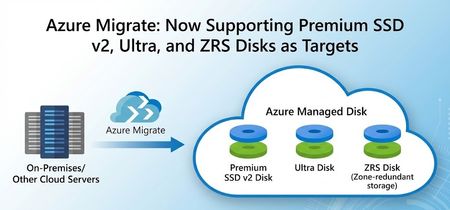
Azure Migrate: Now Supporting Premium SSD V2, Ultra and ZRS Disks as Targets
We are excited to announce that we have added assessment and migration support for Premium SSD v2,Ultra Disk and ZRS Disks as storage options in Azure Migrate, with Premium SSD v2 and ZRS Disks now Generally Available and Ultra Disk in Public Preview. This further enhances the assessment and migration experience Azure Migrate offers and allows you to bring your mission critical workloads to these key Azure Storage offerings seamlessly. What’s New Additional Assessment targets: Premium SSD v2 and Ultra Disks As part of the migration journey to the cloud, Azure Migrate makes recommendations on what cloud resources to move your workloads to. Post successful discovery of on-prem workloads, Azure Migrate utilizes multiple parameters like size, IOPS, and throughput to make target recommendations in Azure. Instead of just static sizing, assessments can map actual performance demand to Azure VM and disk SKUs, optimizing performance, resiliency, and total cost of ownership to give you a tailored recommendation that fits your cloud migration journey. With today’s announcement, we are adding more supported disks to Azure Migrate, providing you with improved guidance to ensure that you land on the resources in Azure that align with your goals. If you are looking to migrate your demanding on-premises applications and workloads to Azure, you will benefit from these advanced disk options, which come with greater flexibility and enhanced performance. For example, Premium SSD v2 disks decouple capacity from performance, allowing you to dial IOPS and throughput precisely to your workload’s needs. For high-end scenarios, Ultra Disks offer the highest performance among Azure managed disks, while ZRS disks provide zonally redundant storage to further protect your data. With these included in Azure Migrate’s assessment engine, you end up with a right‑sized, data‑driven target configuration that aligns Azure storage choices with how workloads actually run. Below is a snippet of how the assessment recommendations appear in Azure Migrate for Premium V2 SSD disks. Customers can get details on the disk type, provisioned IOPS, throughput, cost, and seamlessly migrate using the assessment to the recommended target. Migrating to Premium SSD v2 and Ultra Disks in Azure Migrate When Premium SSD v2 or Ultra disks are identified as the optimal targets based on workload characteristics during the assessment phase, they can be auto-populated seamlessly into the migration process. This workflow accelerates the lift-and-shift of on-prem disks to Azure’s high performance managed disks. Below is a snippet from the replication step during migration: Assessing and Migrating to ZRS Disks in Azure Migrate Azure Migrate also has enhanced resiliency by supporting migration to ZRS Disks during Migration. Zone-Redundant Storage (ZRS) for Azure Disks synchronously replicates data across three physically separate availability zones within a region - each with independent power, cooling, and networking - enhancing Disk availability and resiliency. While creating Assessments in Azure Migrate, you can configure a range of target preferences, including the newly introduced option to enable zone-redundant storage (ZRS). You can opt-in to enable ZRS Disk recommendations by editing the Server (Machine) default settings in the Advanced settings blade. Since the preview announcement for these capabilities, recommendations for Ultra, Premium v2 and ZRS Disks have led to petabytes of data being successfully migrated into Azure. Below is a quote from our Premium v2 (Pv2) customer that was provided during the preview: "Through this preview, we have Pv2 disks recommendations in place of Pv1, which is beneficial for our estate during migration in terms of both cost and performance. We are now awaiting General Availability " – Yogesh Patil, Cloud Enterprise Architect, Tata Consultancy Services (TCS) With these added capabilities, Azure Migrate and Azure disk storage are more ready than ever for migrating your most demanding and mission-critical workloads. Learn more about Azure Migrate and for expert migration help, please try Azure Accelerate. You can also contact your preferred partner or Microsoft field for next steps. Get started in Azure today!728Views1like1Comment
Pure Storage Cloud, Azure Native evolves at Microsoft Ignite!
In September, we were pleased to announce the General Availability of Pure Storage Cloud, Azure Native. A co-developed Azure Native Integration enabling more customers to migrate to Azure easily and benefit from Pure’s industry-leading storage platform – now supporting more customer workloads!598Views0likes0CommentsPublic Preview of Azure Native Dell PowerScale
Dell and Microsoft are extending their partnership by bringing Dell's flagship unstructured data product, OneFS, to Azure as a new fully managed offering – now in Public Preview. Dell PowerScale for Microsoft Azure packs all the well-known benefits from OneFS in an Azure Native ISV service. This is a result of a co-development effort to create an easy-to-deploy and easy-to-manage filesystem-as-a-service. Power of choice Microsoft customers can now choose between two flavors of Dell PowerScale. One is the existing customer managed version, and the other is the newly released Dell managed PowerScale for Microsoft Azure. Both solutions allow customers to run OneFS in Azure, an enterprise-grade software-defined solution that integrates scale-out PowerScale and Microsoft's public cloud platform. PowerScale offers an end-to-end data solution for many AI, HPC and enterprise use cases with keeping simplicity top of mind. Both solutions offer efficiency, performance, resiliency, multi-petabyte scalability and feature set expected from an enterprise storage solution like PowerScale to Azure. You can replicate your data estate between on-premises and Azure-based deployments and optimize your hybrid data estate with data reduction through compression, deduplication and file tiering to scalable, cost-effective Azure Blob Storage with Cloud Pools. Rich Azure ecosystems for AI and Analytics services, cloud-based disaster recovery, or application bursting are now easily accessible for existing and new PowerScale customers. The only difference is the way you deploy and manage your storage solution. In a customer managed Dell PowerScale for Azure solution, customers deploy and manage the entire software and infrastructure stack. All the compute, networking and storage resources are in a customer’s tenant. If this is the preferred option, you can start with the deployment guide and provision a standalone PowerScale cluster now. However, if you are looking for a fully managed solution, Dell PowerScale for Microsoft Azure is the right choice. As a managed service, Dell implements and manages the underlying infrastructure stack, and is responsible for support activities, including platform upgrades and maintenance tasks. What is Dell PowerScale for Microsoft Azure, An Azure Native ISV Service Dell PowerScale for Microsoft Azure is a fully managed service, implemented as an Azure Native ISV service (LINK). It is deployed and managed through the Azure Portal and transactable through Azure Marketplace. This allows all Microsoft customers to use their existing Azure commitments and contracts to easily pay for and use this new offering. Unlike existing customer managed Dell PowerScale for Azure, this implementation runs in a Dell managed environment. The responsibility for service deployment and maintenance belongs to Dell while the customers consume the service in a cloud-native manner. The same ease-of-use typically tied to SaaS services, now applies to a traditional, enterprise grade storage system, like PowerScale. Customers can simply deploy the resource with the familiar Azure portal experience and start consuming a new petabyte scale OneFS cluster. As an Azure Native ISV service, Dell PowerScale for Microsoft Azure allows customers to manage their solution with a well-known Azure user interface. Customers can choose between Azure Portal, Azure CLI, or PowerShell. “Two industry leaders, one powerful solution raising the bar for enterprise cloud storage. Dell PowerScale for Microsoft Azure offers seamless scalability up to 8.4PB in a single namespace, versatile multi-protocol support, robust security, and is fully managed by Dell. This integration simplifies hybrid cloud operations while maintaining consistent high performance for data-intensive workloads like AI/ML, and EDA, helping you stay ahead to unlock your next breakthrough." Travis Vigil, SVP, Infrastructure Storage Group, Product Management at Dell Technologies. Dell PowerScale for Microsoft Azure provides up to 8.4PB in a single namespace and is available in 9 Azure regions. Supported regions: US East US South Central US West 2 West Europe North Europe UK South Germany West Central Australia East Southeast Asia How to take the next step Azure Marketplace Listing Request a Dell Reference Number for Public Preview Dell Documentation1KViews1like0Comments
Take Data Management to the next level with Silk Software-Defined Azure Storage
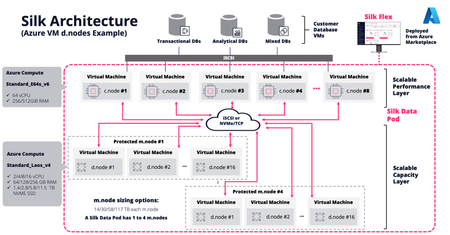
Note: This article is co-authored by our partner Silk. In today’s data-driven world, every enterprise is under pressure to make smarter decisions faster. Whether you're running production databases, training machine learning models, running advanced analytics, or building customer-facing applications, your data needs to be more agile, secure, and readily accessible than ever before. That’s where Silk’s software-defined cloud storage platform on Microsoft Azure comes into play — bringing performance, resiliency, and intelligence to data management across the cloud. With the recent addition of Silk Echo, you can now supercharge your Copy Data Management (CDM) strategy to ensure your data isn’t just protected, it’s available instantly for any purpose — a true strategic asset. Transforming Azure IaaS with Silk's Platform Microsoft Azure offers a rich ecosystem of services to support every stage of your cloud journey, and when paired with Silk, customers gain a game-changing storage and data-services layer purpose-built for performance-intensive workloads. Silk’s software-defined storage platform runs on Azure infrastructure as a high-performance data layer between Azure compute and native storage. It works by orchestrating redundant sets of resources, as close to the DB compute as possible. Aggregating and accelerating the native capabilities of Azure, enabling databases to reach the maximum physical limits of the underlying hardware. Silk makes use of the excellent L-series of storage optimized VMs and NVME media, ensuring the data is always quickly available and able to withstand multiple failures using erasure coding. Silk is designed to address common challenges customers face when migrating relational databases — such as SQL Server, Oracle, and DB2 — to the cloud: Performance Bottlenecks: On-prem workloads often rely on ultra-low latency, high-throughput storage systems with features that are difficult to replicate in the cloud. Data Copy Sprawl: Multiple non-production environments (dev, test, QA, analytics) mean many redundant data copies, leading to storage inefficiencies. Operational Overhead: Managing snapshots, backups, and refreshes across environments consumes time and resources. Silk changes the game with: Extreme performance in the Azure cloud. Up to 34GB/s of throughput from a single VM. The combination of Silk and Azure provide a unique cost/performance balance, through the combination of a very low latency software defined cloud storage platform and sharing of Azure resources. Inline data deduplication and compression for optimized resource utilization. Autonomous, fully integrated, non-disruptive, zero cost snapshots and clones for effortless environment refreshes. Multi-zone resilience and no single point of failure. This makes it easier than ever to lift and shift critical applications to Azure, with the confidence of consistent performance, uptime, and flexibility. Elevating CDM with Silk Echo for AI While Silk’s core platform solves performance and efficiency challenges, Silk Echo for AI introduces an intelligent, AI-powered layer that revolutionizes how organizations manage and leverage their data across the enterprise. At its core, Silk Echo for AI offers next generation Copy Data Management capabilities that empower IT teams to accelerate digital initiatives, reduce costs, and maximize the value of every data copy. Key Benefits of Silk Echo for AI Smarter Data Copying and Cloning Silk Echo leverages AI to understand data access patterns and recommends the optimal strategy for creating and managing data copies. Instead of manually managing snapshots, you can automate the entire workflow — ensuring the right data is in the right place at the right time. Instant, Space-Efficient Clones Using Silk’s advanced snapshot and cloning engine, Echo creates fully functional clones in seconds, consuming minimal additional storage resources. Teams can spin up dev/test environments instantly, accelerating release cycles and experimentation. Cross-Environment Data Consistency Echo ensures consistency across copies — whether you're cloning for testing, backup, or analytics — and with AI-driven monitoring, it can detect drift between environments and recommend synchronizations. Policy-Based Lifecycle Management Define policies for how long data copies should live, when to refresh them, and who has access. Echo automates the enforcement of these policies, reducing human error and ensuring compliance. Optimized Resource Consumption Silk Echo minimizes redundant data storage through smart deduplication, compression, and AI-driven provisioning — resulting in cost savings of 50% or more across large-scale environments. Enablement for AI/ML Workflows For data science teams, Silk Echo provides curated, up-to-date data clones without impacting production environments — essential for model training, experimentation, and validation. Real-World Use Case: Streamlining Dev/Test and AI Pipelines Consider Sentara Health, a healthcare provider migrating their EHR and SQL Server workloads to Azure. Before Silk, environment refreshes were time-consuming, often taking days or even weeks. With Silk Echo for AI, the same tasks will be completed in minutes. Now, development teams have self-service access to fresh clones of production data — enabling faster iteration and better testing outcomes. Meanwhile, their data science team leverages Echo’s snapshot automation to feed AI models with real-time, production-grade data clones without risking downtime or data corruption. All of this runs seamlessly on Azure, with Silk ensuring high performance and resilience at every step. Joint Value of Silk and Microsoft Together, Silk and Microsoft are unlocking a new level of agility and intelligence for enterprise data management: Data-as-a-Service: Give every team — DevOps, DataOps, AI/ML — access to the data they need, when they need it. Free snapshots democratize data so up-to-date copies can be made quickly for any team member who can benefit from it. AI-Ready Database Infrastructure: Your infrastructure evolves from a reactive model which is addressing problems as they arise (i.e. triggering responses on alerts), to a predictive model that utilizes AI/ML to forecast issues and mitigate them before they occur by learning patterns of behavior. Silk enables real-time AI inferencing, for business-critical agents that require access to up-to-date operational data. Reduced Costs, Improved ROI: Storage optimization, reduced manual overhead, and faster time to value — backed by Azure’s scalability and Silk’s performance. Accelerated Cloud Migrations: Achieve the enhanced scalability and flexibility of a cloud migration for your Tier 1 databases without refactoring. Get Started Ready to take your data management strategy to the next level? Explore how Silk’s software-defined storage and Silk Echo for AI can accelerate your transformation on Microsoft Azure. Whether you're modernizing legacy systems, building AI-driven applications, or simply trying to get more value from your cloud investments, Silk and Microsoft are here to help. By embracing the power of Silk’s software-defined storage and Silk Echo, organizations can finally make their data in the cloud work smarter, not harder. Contact Alliances@silk.us for a deeper dive on Silk!724Views2likes0CommentsAzure Native Pure Storage Cloud brings the best of Pure and Azure to our customers
Pure Storage Cloud is the result of a tightly coupled integration effort between the Pure and Azure teams that brings Pure’s industry-leading advanced data services to our customers. Built on rock solid Azure infrastructure, Pure makes Azure even better!583Views0likes0Comments