azure disks
37 Topics
Azure Elastic SAN Next Generation public preview: Mission-critical performance & cloud-native scale
Mission-critical applications such as SAP HANA, Epic, and core transactional databases demand consistently high performance and predictable low latency. Cloud-native platforms running stateful applications, vector databases, and fast-growing fleets of AI agent environments need persistent storage that can scale across thousands of volumes. Meeting these growing storage demands without overprovisioning resources or adding operational complexity is a common challenge that organizations face today. To address this challenge, we are announcing the public preview of Azure Elastic SAN Next Generation, bringing together the performance mission-critical applications demand, the scale cloud-native workloads need, and the cost efficiency enabled by Elastic SAN’s storage consolidation model and dynamic performance sharing. Elastic SAN Next Generation expands the workloads that can benefit from Elastic SAN—whether you’re migrating an on-premises SAN estate, modernizing enterprise applications, or building cloud-native applications. At a glance Mission-critical performance. Up to 400,000 IOPS and 10,000 MB/s per volume, with low sub-millisecond latency and noisy-neighbor protection for Business Critical volume groups. Cloud-native scale. Up to 1 PiB of capacity, 4 million IOPS, 160 GB/s of throughput, and 20,000 volumes per SAN. Cost efficiency. Thin provisioning, autoscale, thin cloning (coming soon), and independent scaling of capacity and performance, built on the consolidation economics of Elastic SAN. Data protection and recovery. Instant snapshots with automatic hardening, complemented by application-consistent backups through Commvault and Druva. Elastic SAN Next Generation builds on the Elastic SAN foundation customers already know: a familiar SAN, volume-group, and volume hierarchy; enterprise-grade security, data protection and resiliency; and shared storage infrastructure that lowers storage TCO and simplifies storage management. Mission-critical performance for your most demanding applications For I/O-intensive enterprise applications, storage performance directly affects how quickly transactions complete and how predictably applications respond under load. Consolidation is valuable only when the storage platform can meet those requirements. The new Business Critical tier delivers up to 5× the IOPS and nearly 8× the throughput per volume compared with today’s General Purpose iSCSI volumes, alongside low sub-millisecond latency. Quality of Service (QoS) provides noisy-neighbor protection at the Business Critical volume-group level, protecting configured IOPS and throughput allocations from contention elsewhere on the SAN. For customers migrating an on-premises SAN estate, moving data is only part of the challenge—the destination must also meet the different service levels their applications depend on. Business Critical and General Purpose bring that familiar tiered-storage approach to Azure, with higher performance and noisy-neighbor protection extending Elastic SAN to more demanding applications. This helps customers map workloads across their SAN estate to appropriate storage tiers and plan storage migrations at the SAN level—helping accelerate SAN migrations to Azure during datacenter exits and hardware refreshes. These applications also benefit from the economics of a shared SAN. Customers can reserve performance for critical workloads while sharing available performance across volumes and provisioning capacity to match their needs—helping improve utilization and reduce overprovisioning. For the representative workload configuration evaluated, Elastic SAN Next Generation offers approximately 43% lower monthly storage costs than competing cloud provider. See “Consolidation economics in practice” below for more details. Scale persistent storage for cloud-native and AI workloads Growing SaaS database fleets, distributed vector databases, and persistent agent stores and workspaces can create demand for thousands of volumes. Across these workloads, customers need storage that keeps pace while remaining simple to provision, organize, and manage. Elastic SAN Next Generation supports up to 20,000 volumes per SAN at preview, with higher limits on the roadmap. For database fleets and agent platforms using persistent block storage on Azure, this provides room to expand through a familiar SAN management model. Volumes remain organized into groups, with network and security policies applied centrally rather than configured volume by volume—bringing scale and management simplicity together as application estates grow. Shared performance helps improve utilization as activity varies across databases and agent environments, while thin provisioning and autoscale help align capacity provisioning with growth. Thin cloning (coming soon) will provide space-efficient, instantly mountable volume copies for agent workspaces that start from a common baseline—helping teams expand these environments without making a full data copy for each one. More workloads. Greater control. Better storage economics. Across these workloads, Elastic SAN Next Generation helps customers match performance and connectivity to their applications, provision resources efficiently as demand grows, and protect data with appropriate recovery options. Choose the performance and connectivity that fit your workloads Assign a QoS tier to each volume group: Business Critical offers reserved IOPS and throughput for noisy-neighbor protection and can draw on available shared performance beyond its reservation. General Purpose uses dynamically shared performance without reservations. The new Direct Attach option combines a familiar disk-attachment workflow for supported Azure virtual machines, with SAN-level provisioning and volume group management. Customers don’t need to configure guest-side iSCSI sessions. iSCSI remains available to provide low-cost external storage for bare-metal environments, including Azure VMware Solution (AVS) and Nutanix, and for any workload that needs high volume density per host. Take agent sandboxes as an example. If each agent gets its own isolated volume, a single VM can need 100+ volumes. iSCSI handles that scale and still delivers the raw performance of block storage. QoS tier Connectivity Performance model Max IOPS per volume Max throughput per volume Example workload profiles Business Critical Direct Attach Volume-group performance reservations with noisy-neighbor protection; low sub-millisecond latency 400,000 10,000 MB/s Transaction-heavy databases and demanding enterprise applications General Purpose Direct Attach Shared performance; sub-millisecond latency 80,000 2,000 MB/s Vector databases, open-source databases, persistent application stores General Purpose iSCSI Shared performance 80,000 1,280 MB/s Azure VMware Solution, Nutanix, and other iSCSI-preferred environments Per-volume performance depends on volume capacity, any reservations on the Volume Group and the performance provisioned at the SAN level. Lower storage TCO as your workloads grow Performance sharing improves utilization. Flexible provisioning complements it by helping customers keep capacity and performance spending aligned with what their applications need: Thin provisioning: give applications room to grow without buying all that capacity upfront. The aggregate logical capacity assigned to volumes can be up to 5× the SAN’s provisioned capacity. Capacity charges remain based on the SAN capacity provisioned—not the full logical capacity assigned to volumes. Autoscale: reduce manual capacity management. Automatically grow SAN capacity based on utilization thresholds you define, helping accommodate growth without repeatedly resizing capacity yourself. Independent provisioning: buy capacity and performance according to your needs. Provision capacity, IOPS, and throughput independently at the SAN level, rather than purchasing additional capacity solely to obtain more performance. Thin cloning (coming soon): create new copies without duplicating all the data upfront.Create space-efficient, instantly mountable copies of Business Critical volumes for development, testing, and agent workspaces that start from a common baseline. Consolidation economics in practice Consider a workload portfolio of mission-critical databases, cloud-native workloads and their application servers, requiring 150 TiB of logical volume capacity to accommodate 60 TiB of current data and projected near-term growth. Thin provisioning allows customers to present the full logical capacity to their VMs, while initially provisioning and paying for 66 TiB of SAN capacity: 60 TiB for current data and 6 TiB of headroom with autoscaling enabled. The model also assumes workload peaks do not fully coincide: their combined peak requires 400,000 IOPS & 12.8 GBps, compared with 600,000 IOPS & 19.2 GBps when provisioning each workload independently for its peak. Resources and cost Elastic SAN Next Generation Other Cloud Provider Total logical volume capacity 150 TiB 150 TiB Current data usage 60 TiB 60 TiB Provisioned capacity 66 TiB 150 TiB Provisioned IOPS 400,000 600,000 Provisioned throughput (MBps) 12,800 19,200 Modeled monthly storage cost $25,764.05 $45,536.30 At this initial utilization, the modeled monthly storage cost is approximately 43% lower with Elastic SAN Next Generation. The savings reflect capacity provisioned for current data (including headroom), included baseline performance of 2000 IOPS & 64 MBps per provisioned TiB, and dynamic performance sharing across workloads whose peaks do not fully coincide. As data usage grows, autoscale increases provisioned SAN capacity up to the configured maximum of 150 TiB, with capacity charges increasing accordingly. Enhanced Data Protection and Recovery As more applications rely on shared storage, recovery becomes an essential part of the storage strategy. Elastic SAN Next Generation combines native snapshots with partner-enabled backup and recovery, supporting both rapid volume recovery and application-aware protection. Instant snapshots with automatic hardening. Incremental, crash-consistent snapshots provide instant access and instant restore for five hours after creation. In parallel, each snapshot is automatically hardened to lower-cost storage. Once hardened, its lifecycle is independent of the source volume, preserving a recovery point even if that volume is deleted. Hardened snapshots support standard restores, with an option for faster restores. Application-consistent backups through leading partners. Leading third-party backup partners such as Commvault and Druva build on Elastic SAN snapshots to provide enterprise-grade protection, including application-consistent backups, advanced backup policies and retention management, and recovery workflows ranging from cross-region disaster recovery to granular file and folder restore. Integration with Veeam is on the roadmap - Capabilities and supported scenarios vary by integration. Get started with the public preview Azure Elastic SAN Next Generation is now in public preview with locally redundant storage (LRS) in France Central and Southeast Asia. UK South, East US and West US 2 are coming soon. Start with a representative workload and evaluate the tier, connectivity, and provisioning model that fit your environment. Review the documentation for supported VM configurations, connectivity options, and preview limitations before you begin. Sign up for the preview: aka.ms/esannextgenpreviewsignup Explore the documentation: aka.ms/esannextgendocs Whether you’re modernizing the applications that run your business or building the platforms that come next, Azure Elastic SAN Next Generation expands your storage choices—with performance matched to your workloads, room to grow, and a familiar model for keeping storage efficient and manageable. Mission-critical performance. Cloud-native scale. The consolidation economics of Elastic SAN. We can’t wait to see what you build.385Views0likes0CommentsSurviving the Storage Apocalypse with Everpure Cloud Azure Native
Unless you have spent the last two years in a cave without Internet access or television, you know firsthand how impactful AI has been on every aspect of our industry and society in general. One of the impacts that has gained traction in Industry articles, blogs, and newsletters is the impact that AI Infrastructure buildout is having on storage media pricing and availability. I felt this personally when purchasing a laptop over the summer for my youngest son, an engineering major. Again, as I attempted to buy a hot spare for my home NAS (when RAID alone will not do - once an IT Pro, always an IT Pro). I spent 2x what I expected to on that laptop and decided to forego the 4x more expensive hot spare. I do have yet another kid in college after all. 😉 My personal experiences and recent conversations with customers and channel partners, like AHEAD, inspired me to think about how Azure Storage and our robust ecosystem of partners can help customers during what industry experts believe will be a prolonged event. Whether you are facing long delays in delivery of a new on-premises array or drive shelves to expand an existing one, or are receiving “good for the next 14 days” quotes that are 4x to 10x higher than they were last year – we have the means to help. Azure Storage has capacity available worldwide, simple tooling to migrate data, and an outstanding partner ecosystem ready to meet every storage need. I’ve always been a believer in “end-to-end” real-world solutions rather than visionary “marketecture.” This series of blog posts includes content co-authored with our partners Everpure, Qumulo, and Rubrik. We will not only cover the technical benefits of migrating on-premises data and applications to Azure – but HOW to do so, including right-sizing to achieve optimal price/performance when replacing legacy block, file, and data protection platforms via a FREE assessment. Yesterday at Ignite, we shared how you can request an assessment of your NAS, SAN, and data protection appliances here and quickly find out if you qualify. For example, you must be a current Azure customer to qualify. -Karl The constraint no one planned for Across the industry, demand for high-performance SSD capacity is accelerating faster than supply. In 2026 alone, 1TB drives jumped from $60 to $200+, with lead times sometimes exceeding 16 weeks. What was once an abundant resource is quickly becoming a strategic constraint. If you are an IT decision maker weighing your next array expansion or refresh, you are feeling the pressure: AI, analytics, and mission-critical workloads are all competing for the same finite pool of storage resources. Storage platform expansion and refresh quotes expire in days. The hostorcial answer, buy more of the same, keeps getting more expensive. As we outlined in the first posts in this series, the question is shifting from “how much storage can we buy?” to “what are our alternatives or how much more can we get from the storage we already have?” What is driving the Storage media crunch The AI infrastructure buildout is creating a demand for storage media that is unprecedented in our industry. AI workloads are also fundamentally different from what enterprise storage was originally designed to support and place high demand on compute and storage infrastructure. Meanwhile, traditional application growth and their performance expectations have not changed. If anything, they have increased. The result is a perfect storm: Massive data growth from AI pipelines, analytics, and operational systems Faster access requirements for databases, AI training, fine-tuning, and inference and less tolerance for latency in nearly every application Higher infrastructure demands that pull more compute, network, and storage into every project Finite high-performance storage supply that cannot scale as quickly as demand The hidden inefficiency problem Buying more storage is only half of the story. Most environments are carrying capacity they never use: Data duplication, overprovisioning, and snapshot sprawl consume premium flash that holds no unique data Hybrid fragmentation across on-premises and cloud storage reduces visibility and control An estimated 15–20% of IT spend is lost to this inefficiency The challenge is not just “how do we get more performant storage?” It is also “how do we modernize and optimize our entire storage environment to absorb this shift?” From capacity to operational and resource efficiency Leading organizations are now treating efficiency as a first-class design principle. They are reducing redundant data and storage footprint, increasing effective capacity without provisioning more storage, aligning performance tiers with actual workload needs, and designing systems that minimize unnecessary duplication. The payoff is unlocking stranded capacity and avoiding linear cost scaling. They are also looking for ways to achieve this that include a modern hybrid data management solution to gain portability across on-premises and Cloud infrastructures. This allows them to place or relocate deployments based on where infrastructure resources are available to support growth of both incumbent and new innovative applications. How data reduction changes the equation When applied effectively, data reduction does not just save space. It changes the economics of storage. Organizations can store more data, delay or avoid additional capacity purchases, improve workload density and utilization, and reduce the overall cost per effective terabyte. In hybrid environments that use Azure, this becomes particularly powerful. Instead of treating storage as a linear cost tied directly to raw capacity, you can begin to think in terms of effective capacity: what you actually store and use. Mars, Incorporated offers a real-world example. Using Everpure Cloud as part of its hybrid cloud transformation with Microsoft and Everpure, Mars achieved 18:1 data reduction, nine times its expected compression ratio, and is on track to reduce cloud storage costs by up to 50%, freeing resources to invest in initiatives such as AI. Everpure Cloud Azure Native: enterprise block storage, built into Azure Everpure Cloud Azure Native is a fully managed block storage service jointly developed by Everpure and Microsoft. It lets you provision, manage, and attach enterprise-grade block volumes directly to Azure Virtual Machines or Azure VMware Solution (AVS) using the Azure portal, ARM templates, Bicep, and Terraform, with billing through Azure that leverages your existing Azure monetary commitment. It builds on the industry leading Purity operating environment that powers the Everpure platform, but with no storage infrastructure for you to deploy, size, or manage. Key capabilities include: Pay for data written, not capacity reserved. Always-on inline deduplication, compression, and thin provisioning drive up to 40% lower storage TCO compared to alternative storage solutions. Independent scaling of storage and compute. Grow capacity and tune performance without resizing a VM or changing its SKU. For AVS, this separates storage growth from compute scaling and can reduce cloud storage costs by up to 40%. A native Azure experience. The service lives in your subscription and inside your own virtual network. Storage traffic stays private, with no public endpoint and no egress charges, and Microsoft Entra ID single sign-on simplifies access. Built-in protection. Always-on encryption, space-efficient snapshots and clones, and immutable snapshots support rapid recovery and dev/test use cases. Fast, simple deployment. An Azure VM extension automates iSCSI and multipath setup on supported Windows and Linux hosts, so teams can be up and running in minutes rather than scripting host configuration by hand. Operational flexibility. Instant volume resizing, shareable volumes, and adjustable performance let storage keep pace as workloads evolve. For customers already running Everpure on-premises, it also extends a consistent data plane and management experience across the data center and Azure, which simplifies operations and reduces the fragmentation that erodes visibility and control. Support is led by Everpure and backed by Microsoft. By integrating these capabilities, organizations can increase effective SSD capacity within Azure, eliminate unnecessary storage consumption, lower spend on premium storage tiers, and minimize dependency on constrained SSD supply. Optimize first, then innovate The next phase of innovation and growth will not be defined by how much infrastructure organizations can provision, but by how intelligently they use it. SSD capacity will remain a critical resource, and the real differentiator will be how efficiently it is used and how flexible they can be to adapt to changing resource availability. By pairing Everpure Cloud with Microsoft Azure, you can optimize your existing footprint before expanding, rather than paying more for the same hardware on someone else’s timeline in a constrained market. You also gain the ability to deploy and move applications to meet available resources wherever they can be found across your hybrid cloud. How does Everpure Cloud compare with traditional on-premises block storage? The table below summarizes the differences between a legacy SAN refresh and Everpure Cloud Azure Native. Capability Legacy on-premises Block Everpure Cloud Azure Native Cost model Pay for provisioned capacity plus hardware refresh and maintenance cycles Pay for data written; inline deduplication, compression, and thin provisioning drive up to 40% lower storage TCO Procurement and lead time Hardware quotes with short validity windows and long delivery cycles Provisioned on demand from Azure, with no hardware to order or install Scaling Capacity and performance typically scale together; overprovision to avoid the next purchase Scale storage independently from compute; instant volume resizing without application interruption Operations Dedicated array administration, host configuration, and firmware upkeep Fully managed service; Azure portal, ARM, Bicep, and Terraform; VM extension automates iSCSI and multipath setup Data protection Snapshots and replication vary by platform and consume premium capacity Always-on encryption, space-efficient snapshots and clones, and immutable snapshots Hybrid consistency Separate tools and visibility on-premises versus cloud Consistent data management across data center and Azure for Everpure customers Network and security Dedicated SAN fabric to design and maintain Deployed in your own virtual network; private traffic, no public endpoint, no egress charges Support and billing Separate vendor contracts and invoicing Everpure-led support backed by Microsoft; billing through Azure How do you get started? For a limited time, you can take advantage of a FREE assessment of your current SAN from Wool Data and use the results to scope your migration to Everpure Cloud on Azure using Cirrus Data Cloud to migrate your data. Fill out this form to find out if you qualify. Have questions about Everpure? Reach out to cloudsales@everpuredata.com . Learn more about Everpure Cloud Azure Native for Azure VMs and the Everpure Cloud Azure Native overview on Microsoft Learn. With Everpure Cloud, you become AI ready with a modernized storage infrastructure built to not only survive, but thrive, in a resource constrained world. By Dan Kogan, Everpure and Karl Rautenstrauch, Microsoft Azure129Views1like0Comments
Understanding the Standard HDD I/O unit size update and what it means for your workloads
As Azure continues to evolve to support modern workload patterns, we are refining how transactions are measured for Standard HDD Managed Disks. This update helps align billing more closely with actual I/O behavior while maintaining predictable cost controls for customers. In this post, we’ll walk through what’s changing, how transaction billing is calculated, and what this may mean for your workloads. With this update, the number of billable transactions for Standard HDD disk sizes will be measured using 16 KiB I/O units. I/O operations ≤ 16 KiB count as one billable transaction I/O operations > 16 KiB are counted as multiple billable transactions Example A 64 KiB read/write on an S4 disk = 4 billable transactions A 4 KiB read/write on an S4 disk = 1 billable transaction This update provides more consistent alignment between workload behavior and transaction billing. For latest information on regional availability, please refer to the Standard HDD Managed Disks documentation. Built-in transaction caps to help manage costs To maintain predictable cost boundaries, Azure will implement hourly caps on billable transactions for the Standard HDD disk sizes with an I/O unit size. If a disk exceeds its hourly cap, additional transactions in that hour are not billed. The transaction caps are listed below and on the Azure Disks Pricing Page. Disk Size Disk GiB Hourly Billable Transaction Cap S4 32 GiB 450,000 S6 64 GiB 858,000 S10 128 GiB 1,600,000 S15 256 GiB 3,000,000 S20 512 GiB 5,700,000 S30 1 TiB 10,100,000 S40 2 TiB 14,200,000 S50 4 TiB 26,800,000 S60 8 TiB 51,000,000 S70 16 TiB 93,000,000 S80 32 TiB 110,000,000 These caps help provide cost predictability, particularly for bursty workloads. Understanding potential cost impact Workloads with larger I/O sizes and sustained IOPS may see changes in the number of billed transactions on their invoice. Workloads with small or infrequent I/O operations may see little to no impact. To better understand potential impact, estimate your workload's average I/O size by dividing Read/Write Bytes/sec by Read/Write Operations/sec, using Azure Monitor metrics available in the Azure Portal or through the Azure Monitor REST API. Determining your workload’s cost The following table lists three different examples to illustrate how transaction billing* compares for different IO load intensities on an S4 Standard HDD disk vs. an E4 Standard SSD disk. Assume the disks are in Central US region. Workload Average Billable Transactions / hour on Standard HDD Billable Transactions / hour on Standard SSD Total Cost on Standard HDD Total Cost on Standard SSD Low 4 KiB workload, 10 IOPS 36,000 (10 billable transactions * 60 seconds * 60 minutes) 36,000 (10 billable transactions * 60 seconds * 60 minutes) $2.85/mo (36,000 * 730 hours * $0.0005 / 10,000 transactions) = $1.31 Transaction cost $1.31 + $1.54 capacity/mo cost = $2.85/mo $7.66/mo (36,000 * 730 hours * $0.002 / 10,000 transactions) = $5.26 Transaction cost $5.26 + $2.40 capacity/mo cost = $7.66/mo Medium 32 KiB workload, 20 IOPS 144,000 (40 billable transactions with the IO Unit Size * 60 * 60) 86,800 (after Standard SSD transaction cap) $6.80/mo $15.08/mo High 64 KiB workload, 40 IOPS 450,000 (after Standard HDD transaction cap) 86,800 (after Standard SSD transaction cap) $17.97/mo $15.08/mo *Any operation against the storage is counted as a transaction, including reads, writes, and deletes. Host caching being enabled might affect the number of transactions against the storage that are counted. Choosing the right disk for your workload Running workloads on SSD-based disk types may also unlock higher availability, higher reliability, more consistent performance, and lower latency. For OS disks running on Standard HDD, consider migrating to Standard SSD or Premium SSD Managed Disks. Standard HDD OS disks will be retired in September 2028. For non-OS disk workloads, consider high performance and flexible provisioning benefits of Premium SSD v2 Managed Disks, or benefits of Standard SSD or Premium SSD Managed Disks. Learn more here about the different disk types and their benefits. To learn more about switching your disk types, view our documentation page. To learn more about the billing changes, view the Pricing Page and documentation for Standard HDD Managed Disks.4.8KViews0likes0CommentsAHEAD helps us launch the Strategic Azure Storage Services Partner Program
AHEAD becomes the first Azure Storage Strategic Channel Partner by demonstrating their expertise in helping customers select the ideal Azure Storage, or Azure Storage ISV, Service to offer the ideal price / performance solution for their application and helping customers to migrate to Azure quickly and safely.916Views0likes0Comments
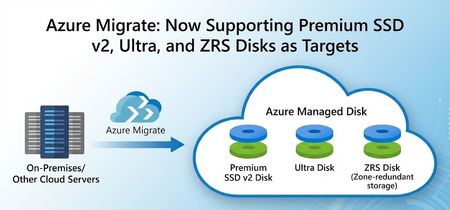
Azure Migrate: Now Supporting Premium SSD V2, Ultra and ZRS Disks as Targets
We are excited to announce that we have added assessment and migration support for Premium SSD v2,Ultra Disk and ZRS Disks as storage options in Azure Migrate, with Premium SSD v2 and ZRS Disks now Generally Available and Ultra Disk in Public Preview. This further enhances the assessment and migration experience Azure Migrate offers and allows you to bring your mission critical workloads to these key Azure Storage offerings seamlessly. What’s New Additional Assessment targets: Premium SSD v2 and Ultra Disks As part of the migration journey to the cloud, Azure Migrate makes recommendations on what cloud resources to move your workloads to. Post successful discovery of on-prem workloads, Azure Migrate utilizes multiple parameters like size, IOPS, and throughput to make target recommendations in Azure. Instead of just static sizing, assessments can map actual performance demand to Azure VM and disk SKUs, optimizing performance, resiliency, and total cost of ownership to give you a tailored recommendation that fits your cloud migration journey. With today’s announcement, we are adding more supported disks to Azure Migrate, providing you with improved guidance to ensure that you land on the resources in Azure that align with your goals. If you are looking to migrate your demanding on-premises applications and workloads to Azure, you will benefit from these advanced disk options, which come with greater flexibility and enhanced performance. For example, Premium SSD v2 disks decouple capacity from performance, allowing you to dial IOPS and throughput precisely to your workload’s needs. For high-end scenarios, Ultra Disks offer the highest performance among Azure managed disks, while ZRS disks provide zonally redundant storage to further protect your data. With these included in Azure Migrate’s assessment engine, you end up with a right‑sized, data‑driven target configuration that aligns Azure storage choices with how workloads actually run. Below is a snippet of how the assessment recommendations appear in Azure Migrate for Premium V2 SSD disks. Customers can get details on the disk type, provisioned IOPS, throughput, cost, and seamlessly migrate using the assessment to the recommended target. Migrating to Premium SSD v2 and Ultra Disks in Azure Migrate When Premium SSD v2 or Ultra disks are identified as the optimal targets based on workload characteristics during the assessment phase, they can be auto-populated seamlessly into the migration process. This workflow accelerates the lift-and-shift of on-prem disks to Azure’s high performance managed disks. Below is a snippet from the replication step during migration: Assessing and Migrating to ZRS Disks in Azure Migrate Azure Migrate also has enhanced resiliency by supporting migration to ZRS Disks during Migration. Zone-Redundant Storage (ZRS) for Azure Disks synchronously replicates data across three physically separate availability zones within a region - each with independent power, cooling, and networking - enhancing Disk availability and resiliency. While creating Assessments in Azure Migrate, you can configure a range of target preferences, including the newly introduced option to enable zone-redundant storage (ZRS). You can opt-in to enable ZRS Disk recommendations by editing the Server (Machine) default settings in the Advanced settings blade. Since the preview announcement for these capabilities, recommendations for Ultra, Premium v2 and ZRS Disks have led to petabytes of data being successfully migrated into Azure. Below is a quote from our Premium v2 (Pv2) customer that was provided during the preview: "Through this preview, we have Pv2 disks recommendations in place of Pv1, which is beneficial for our estate during migration in terms of both cost and performance. We are now awaiting General Availability " – Yogesh Patil, Cloud Enterprise Architect, Tata Consultancy Services (TCS) With these added capabilities, Azure Migrate and Azure disk storage are more ready than ever for migrating your most demanding and mission-critical workloads. Learn more about Azure Migrate and for expert migration help, please try Azure Accelerate. You can also contact your preferred partner or Microsoft field for next steps. Get started in Azure today!829Views1like1Comment
Pure Storage Cloud, Azure Native evolves at Microsoft Ignite!
In September, we were pleased to announce the General Availability of Pure Storage Cloud, Azure Native. A co-developed Azure Native Integration enabling more customers to migrate to Azure easily and benefit from Pure’s industry-leading storage platform – now supporting more customer workloads!640Views0likes0CommentsPublic Preview of Azure Native Dell PowerScale
Dell and Microsoft are extending their partnership by bringing Dell's flagship unstructured data product, OneFS, to Azure as a new fully managed offering – now in Public Preview. Dell PowerScale for Microsoft Azure packs all the well-known benefits from OneFS in an Azure Native ISV service. This is a result of a co-development effort to create an easy-to-deploy and easy-to-manage filesystem-as-a-service. Power of choice Microsoft customers can now choose between two flavors of Dell PowerScale. One is the existing customer managed version, and the other is the newly released Dell managed PowerScale for Microsoft Azure. Both solutions allow customers to run OneFS in Azure, an enterprise-grade software-defined solution that integrates scale-out PowerScale and Microsoft's public cloud platform. PowerScale offers an end-to-end data solution for many AI, HPC and enterprise use cases with keeping simplicity top of mind. Both solutions offer efficiency, performance, resiliency, multi-petabyte scalability and feature set expected from an enterprise storage solution like PowerScale to Azure. You can replicate your data estate between on-premises and Azure-based deployments and optimize your hybrid data estate with data reduction through compression, deduplication and file tiering to scalable, cost-effective Azure Blob Storage with Cloud Pools. Rich Azure ecosystems for AI and Analytics services, cloud-based disaster recovery, or application bursting are now easily accessible for existing and new PowerScale customers. The only difference is the way you deploy and manage your storage solution. In a customer managed Dell PowerScale for Azure solution, customers deploy and manage the entire software and infrastructure stack. All the compute, networking and storage resources are in a customer’s tenant. If this is the preferred option, you can start with the deployment guide and provision a standalone PowerScale cluster now. However, if you are looking for a fully managed solution, Dell PowerScale for Microsoft Azure is the right choice. As a managed service, Dell implements and manages the underlying infrastructure stack, and is responsible for support activities, including platform upgrades and maintenance tasks. What is Dell PowerScale for Microsoft Azure, An Azure Native ISV Service Dell PowerScale for Microsoft Azure is a fully managed service, implemented as an Azure Native ISV service (LINK). It is deployed and managed through the Azure Portal and transactable through Azure Marketplace. This allows all Microsoft customers to use their existing Azure commitments and contracts to easily pay for and use this new offering. Unlike existing customer managed Dell PowerScale for Azure, this implementation runs in a Dell managed environment. The responsibility for service deployment and maintenance belongs to Dell while the customers consume the service in a cloud-native manner. The same ease-of-use typically tied to SaaS services, now applies to a traditional, enterprise grade storage system, like PowerScale. Customers can simply deploy the resource with the familiar Azure portal experience and start consuming a new petabyte scale OneFS cluster. As an Azure Native ISV service, Dell PowerScale for Microsoft Azure allows customers to manage their solution with a well-known Azure user interface. Customers can choose between Azure Portal, Azure CLI, or PowerShell. “Two industry leaders, one powerful solution raising the bar for enterprise cloud storage. Dell PowerScale for Microsoft Azure offers seamless scalability up to 8.4PB in a single namespace, versatile multi-protocol support, robust security, and is fully managed by Dell. This integration simplifies hybrid cloud operations while maintaining consistent high performance for data-intensive workloads like AI/ML, and EDA, helping you stay ahead to unlock your next breakthrough." Travis Vigil, SVP, Infrastructure Storage Group, Product Management at Dell Technologies. Dell PowerScale for Microsoft Azure provides up to 8.4PB in a single namespace and is available in 9 Azure regions. Supported regions: US East US South Central US West 2 West Europe North Europe UK South Germany West Central Australia East Southeast Asia How to take the next step Azure Marketplace Listing Request a Dell Reference Number for Public Preview Dell Documentation1KViews1like0Comments
Take Data Management to the next level with Silk Software-Defined Azure Storage
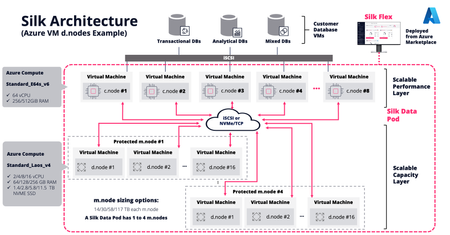
Note: This article is co-authored by our partner Silk. In today’s data-driven world, every enterprise is under pressure to make smarter decisions faster. Whether you're running production databases, training machine learning models, running advanced analytics, or building customer-facing applications, your data needs to be more agile, secure, and readily accessible than ever before. That’s where Silk’s software-defined cloud storage platform on Microsoft Azure comes into play — bringing performance, resiliency, and intelligence to data management across the cloud. With the recent addition of Silk Echo, you can now supercharge your Copy Data Management (CDM) strategy to ensure your data isn’t just protected, it’s available instantly for any purpose — a true strategic asset. Transforming Azure IaaS with Silk's Platform Microsoft Azure offers a rich ecosystem of services to support every stage of your cloud journey, and when paired with Silk, customers gain a game-changing storage and data-services layer purpose-built for performance-intensive workloads. Silk’s software-defined storage platform runs on Azure infrastructure as a high-performance data layer between Azure compute and native storage. It works by orchestrating redundant sets of resources, as close to the DB compute as possible. Aggregating and accelerating the native capabilities of Azure, enabling databases to reach the maximum physical limits of the underlying hardware. Silk makes use of the excellent L-series of storage optimized VMs and NVME media, ensuring the data is always quickly available and able to withstand multiple failures using erasure coding. Silk is designed to address common challenges customers face when migrating relational databases — such as SQL Server, Oracle, and DB2 — to the cloud: Performance Bottlenecks: On-prem workloads often rely on ultra-low latency, high-throughput storage systems with features that are difficult to replicate in the cloud. Data Copy Sprawl: Multiple non-production environments (dev, test, QA, analytics) mean many redundant data copies, leading to storage inefficiencies. Operational Overhead: Managing snapshots, backups, and refreshes across environments consumes time and resources. Silk changes the game with: Extreme performance in the Azure cloud. Up to 34GB/s of throughput from a single VM. The combination of Silk and Azure provide a unique cost/performance balance, through the combination of a very low latency software defined cloud storage platform and sharing of Azure resources. Inline data deduplication and compression for optimized resource utilization. Autonomous, fully integrated, non-disruptive, zero cost snapshots and clones for effortless environment refreshes. Multi-zone resilience and no single point of failure. This makes it easier than ever to lift and shift critical applications to Azure, with the confidence of consistent performance, uptime, and flexibility. Elevating CDM with Silk Echo for AI While Silk’s core platform solves performance and efficiency challenges, Silk Echo for AI introduces an intelligent, AI-powered layer that revolutionizes how organizations manage and leverage their data across the enterprise. At its core, Silk Echo for AI offers next generation Copy Data Management capabilities that empower IT teams to accelerate digital initiatives, reduce costs, and maximize the value of every data copy. Key Benefits of Silk Echo for AI Smarter Data Copying and Cloning Silk Echo leverages AI to understand data access patterns and recommends the optimal strategy for creating and managing data copies. Instead of manually managing snapshots, you can automate the entire workflow — ensuring the right data is in the right place at the right time. Instant, Space-Efficient Clones Using Silk’s advanced snapshot and cloning engine, Echo creates fully functional clones in seconds, consuming minimal additional storage resources. Teams can spin up dev/test environments instantly, accelerating release cycles and experimentation. Cross-Environment Data Consistency Echo ensures consistency across copies — whether you're cloning for testing, backup, or analytics — and with AI-driven monitoring, it can detect drift between environments and recommend synchronizations. Policy-Based Lifecycle Management Define policies for how long data copies should live, when to refresh them, and who has access. Echo automates the enforcement of these policies, reducing human error and ensuring compliance. Optimized Resource Consumption Silk Echo minimizes redundant data storage through smart deduplication, compression, and AI-driven provisioning — resulting in cost savings of 50% or more across large-scale environments. Enablement for AI/ML Workflows For data science teams, Silk Echo provides curated, up-to-date data clones without impacting production environments — essential for model training, experimentation, and validation. Real-World Use Case: Streamlining Dev/Test and AI Pipelines Consider Sentara Health, a healthcare provider migrating their EHR and SQL Server workloads to Azure. Before Silk, environment refreshes were time-consuming, often taking days or even weeks. With Silk Echo for AI, the same tasks will be completed in minutes. Now, development teams have self-service access to fresh clones of production data — enabling faster iteration and better testing outcomes. Meanwhile, their data science team leverages Echo’s snapshot automation to feed AI models with real-time, production-grade data clones without risking downtime or data corruption. All of this runs seamlessly on Azure, with Silk ensuring high performance and resilience at every step. Joint Value of Silk and Microsoft Together, Silk and Microsoft are unlocking a new level of agility and intelligence for enterprise data management: Data-as-a-Service: Give every team — DevOps, DataOps, AI/ML — access to the data they need, when they need it. Free snapshots democratize data so up-to-date copies can be made quickly for any team member who can benefit from it. AI-Ready Database Infrastructure: Your infrastructure evolves from a reactive model which is addressing problems as they arise (i.e. triggering responses on alerts), to a predictive model that utilizes AI/ML to forecast issues and mitigate them before they occur by learning patterns of behavior. Silk enables real-time AI inferencing, for business-critical agents that require access to up-to-date operational data. Reduced Costs, Improved ROI: Storage optimization, reduced manual overhead, and faster time to value — backed by Azure’s scalability and Silk’s performance. Accelerated Cloud Migrations: Achieve the enhanced scalability and flexibility of a cloud migration for your Tier 1 databases without refactoring. Get Started Ready to take your data management strategy to the next level? Explore how Silk’s software-defined storage and Silk Echo for AI can accelerate your transformation on Microsoft Azure. Whether you're modernizing legacy systems, building AI-driven applications, or simply trying to get more value from your cloud investments, Silk and Microsoft are here to help. By embracing the power of Silk’s software-defined storage and Silk Echo, organizations can finally make their data in the cloud work smarter, not harder. Contact Alliances@silk.us for a deeper dive on Silk!769Views2likes0CommentsAzure Native Pure Storage Cloud brings the best of Pure and Azure to our customers
Pure Storage Cloud is the result of a tightly coupled integration effort between the Pure and Azure teams that brings Pure’s industry-leading advanced data services to our customers. Built on rock solid Azure infrastructure, Pure makes Azure even better!630Views0likes0Comments