azure deployment environments
25 Topics
Building HyDE powered RAG chatbots using Microsoft Azure AI Models & Dataloop
Explore how Microsoft Azure AI Models and Dataloop simplify the creation of HyDE-powered RAG chatbots. Dataloop’s platform offers drag-and-drop tools and pre-built workflows, while Azure provides powerful AI models like PHI-3-MINI. This integration enables developers to build next-gen chatbots with superior accuracy and context-specific responses.4.1KViews0likes0CommentsEnhancing Data Security and Digital Trust in the Cloud using Azure Services.
Enhancing Data Security and Digital Trust in the Cloud by Implementing Client-Side Encryption (CSE) using Azure Apps, Azure Storage and Azure Key Vault. Think of Client-Side Encryption (CSE) as a strategy that has proven to be most effective in augmenting data security and modern precursor to traditional approaches. CSE can provide superior protection for your data, particularly if an authentication and authorization account is compromised.Using Azure API Management with Azure Front Door for Global, Multi‑Region Architectures
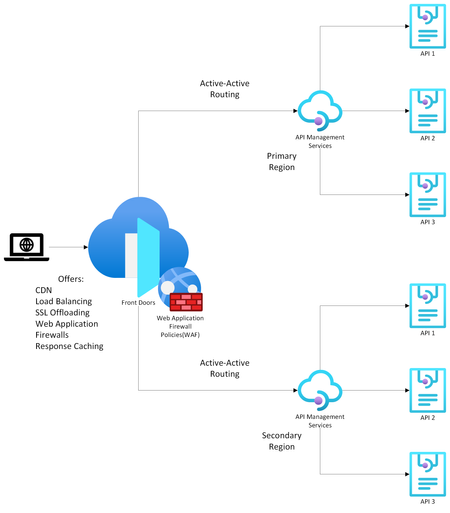
Modern API‑driven applications demand global reach, high availability, and predictable latency. Azure provides two complementary services that help achieve this: Azure API Management (APIM) as the API gateway and Azure Front Door (AFD) as the global entry point and load balancer. Going over the available documentation available, my team and I found this article on how to front a single-region APIM with an Azure Front Door , but we wanted to extend this to a multi-region APIM as well. That led us to design the solution detailed in this article which explains how to configure multi‑regional, active‑active APIM behind Azure Front Door using Custom origins and regional gateway endpoints. (I have also covered topics like why organizations commonly pair APIM with Front Door, when to use internal vs. external APIM modes, etc. but main topic first! Scroll down to the bottom for more info). Configuring Multi‑Regional APIM with Azure Front Door WHAT TO KNOW: If using APIM Premium with multi‑region gateways, each region exposes its own regional gateway endpoint, formatted as: https://<service-name>-<region>-01.regional.azure-api.net Examples: https://mydemo-apim-westeurope-01.regional.azure-api.net https://mydemo-apim-eastus-01.regional.azure-api.net where 'mydemo' is the name of the APIM instance. You will use these regional endpoints and configure them as a separate origin in Azure Front Door—using the Custom origin type. Solution Architecture Azure Front Door Configuration Steps 1. Create an Origin Group Inside your Front Door profile, define a group (Settings -> Origin Groups - > Add -> Add an origin) that will contain all APIM regional gateways. See images below: 2. Add Each APIM Region as a Custom Origin Use the Custom origin type: Origin type: Custom Host name: Use the APIM regional endpoint Example: mydemo-apim-westeurope-01.regional.azure-api.net Origin host header: Same as the host name. Enable certificate subject name validation (Recommended when private link or TLS integrity is required.) Priority: Lower value = higher priority (for failover). Weight: Controls how traffic is distributed across equally prioritized origins. Status: Enable origin. And repeat the same steps for additional APIM regions giving them priority and weightage as you feel appropriate. How to Know Which Region is being Invoked To test this setup, create 2 Virtual Machines (VMs) in Azure - one for each region. For this guide, we chose to create the VMs in West Europe and East US. Open up a Command Prompt from the VM and do a curl on the sample Echo API that comes with every new APIM deployment: Example: curl -v "afd-blah.b01.azurefd.net/echo/resource?param1=sample" Your results should show the region being hit as shown below: How AFD Routes Traffic Across Multiple APIM Regions AFD evaluates origins in this order: Available instances — the Health Probe removes unhealthy origins Priority — selects highest‑priority available origins Latency — optionally selects lowest‑latency pool Weight — round‑robin distribution across selected origins Example When origins are configured as below: West Europe (priority 1, weight 1000) East US (priority 1, weight 500) Central US (priority 2, weight 1000) AFD will: Use West Europe + East US in a 1000:500 ratio. Only use Central US if both West Europe & East US become unavailable. For more information on this nice algorithm, see here: Traffic routing methods to origin - Azure Front Door | Microsoft Learn More Info (as promised) Why Use Azure API Management? Azure API Management is a fully managed service providing: 1. Centralized API Gateway Enforces policies such as authentication, rate limiting, transformations, and caching. Acts as a single façade for backend services, enabling modernization without breaking existing clients. 2. Security & Governance Integrates with Azure AD, OAuth2, and mTLS (mutual TLS). Provides threat protection and schema validation. 3. Developer Ecosystem Developer portal, API documentation, testing console, versioning, and releases. 4. Multi‑Region Gateways (Premium Tier) Allows deployment of additional regional gateways for active‑active, low‑latency global experiences. APIM Deployment Modes: Internal vs. External External Mode The APIM gateway is reachable publicly over the internet. Common when: Exposing APIs to partners, mobile apps, or public clients. You can easily front this with an Azure Front Door for reasons listed in the next section. Internal Mode APIM gateway is deployed inside a VNet, accessible only privately. Used when: APIs must stay private to an enterprise network. Only internal consumers/VPN/VNet peered systems need access. To make your APIM publicly accessible, you need to front it with both an Application Gateway and an Azure Front Door because: Azure Front Door (AFD) cannot directly reach an internal‑mode APIM because AFD requires a publicly routable origin. Application Gateway is a Layer‑7 reverse proxy that can expose a public frontend while still reaching internal private backends (like APIM gateway). [Ref] But Why Put Azure Front Door in Front of API Management? Azure Front Door provides capabilities that APIM alone does not offer: 1. Global Load Balancing As discussed above. 2. Edge Security Web Application Firewall, TLS termination at the edge, DDoS absorption. Reduces load on API gateways. 3. Faster Global Performance Anycast network and global POPs reduce round‑trip latency before requests hit APIM. A POP (Point of Presence) is an Azure Front Door edge location—a physical site in Microsoft’s global network where incoming user traffic first lands. Azure Front Door uses numerous global and local POPs strategically placed close to end‑users (both enterprise and consumer) to improve performance. Anycast is a networking protocol Azure Front Door uses to improve global connectivity. Ref: Traffic acceleration - Azure Front Door | Microsoft Learn 4. Unified Global Endpoint A single public endpoint (e.g., https://api.contoso.com) that intelligently distributes traffic across multiple APIM regions. With all of the above features, it is best to pair API Management with a Front Door, especially when dealing with multi-region architectures. Credits: Junee Singh, Senior Solution Engineer at Microsoft Isiah Hudson, Senior Solution Engineer at Microsoft1.6KViews2likes0CommentsBuilding real-world AI automation with Foundry Local and the Microsoft Agent Framework
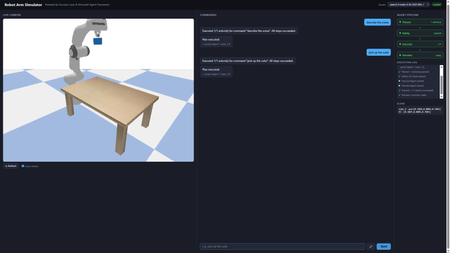
A hands-on guide to building real-world AI automation with Foundry Local, the Microsoft Agent Framework, and PyBullet. No cloud subscription, no API keys, no internet required. Why Developers Should Care About Offline AI Imagine telling a robot arm to "pick up the cube" and watching it execute the command in a physics simulator, all powered by a language model running on your laptop. No API calls leave your machine. No token costs accumulate. No internet connection is needed. That is what this project delivers, and every piece of it is open source and ready for you to fork, extend, and experiment with. Most AI demos today lean on cloud endpoints. That works for prototypes, but it introduces latency, ongoing costs, and data privacy concerns. For robotics and industrial automation, those trade-offs are unacceptable. You need inference that runs where the hardware is: on the factory floor, in the lab, or on your development machine. Foundry Local gives you an OpenAI-compatible endpoint running entirely on-device. Pair it with a multi-agent orchestration framework and a physics engine, and you have a complete pipeline that translates natural language into validated, safe robot actions. This post walks through how we built it, why the architecture works, and how you can start experimenting with your own offline AI simulators today. Architecture The system uses four specialised agents orchestrated by the Microsoft Agent Framework: Agent What It Does Speed PlannerAgent Sends user command to Foundry Local LLM → JSON action plan 4–45 s SafetyAgent Validates against workspace bounds + schema < 1 ms ExecutorAgent Dispatches actions to PyBullet (IK, gripper) < 2 s NarratorAgent Template summary (LLM opt-in via env var) < 1 ms User (text / voice) │ ▼ ┌──────────────┐ │ Orchestrator │ └──────┬───────┘ │ ┌────┴────┐ ▼ ▼ Planner Narrator │ ▼ Safety │ ▼ Executor │ ▼ PyBullet Setting Up Foundry Local from foundry_local import FoundryLocalManager import openai manager = FoundryLocalManager("qwen2.5-coder-0.5b") client = openai.OpenAI( base_url=manager.endpoint, api_key=manager.api_key, ) resp = client.chat.completions.create( model=manager.get_model_info("qwen2.5-coder-0.5b").id, messages=[{"role": "user", "content": "pick up the cube"}], max_tokens=128, stream=True, ) from foundry_local import FoundryLocalManager import openai manager = FoundryLocalManager("qwen2.5-coder-0.5b") client = openai.OpenAI( base_url=manager.endpoint, api_key=manager.api_key, ) resp = client.chat.completions.create( model=manager.get_model_info("qwen2.5-coder-0.5b").id, messages=[{"role": "user", "content": "pick up the cube"}], max_tokens=128, stream=True, ) The SDK auto-selects the best hardware backend (CUDA GPU → QNN NPU → CPU). No configuration needed. How the LLM Drives the Simulator Understanding the interaction between the language model and the physics simulator is central to the project. The two never communicate directly. Instead, a structured JSON contract forms the bridge between natural language and physical motion. From Words to JSON When a user says “pick up the cube”, the PlannerAgent sends the command to the Foundry Local LLM alongside a compact system prompt. The prompt lists every permitted tool and shows the expected JSON format. The LLM responds with a structured plan: { "type": "plan", "actions": [ {"tool": "describe_scene", "args": {}}, {"tool": "pick", "args": {"object": "cube_1"}} ] } The planner parses this response, validates it against the action schema, and retries once if the JSON is malformed. This constrained output format is what makes small models (0.5B parameters) viable: the response space is narrow enough that even a compact model can produce correct JSON reliably. From JSON to Motion Once the SafetyAgent approves the plan, the ExecutorAgent maps each action to concrete PyBullet calls: move_ee(target_xyz) : The target position in Cartesian coordinates is passed to PyBullet's inverse kinematics solver, which computes the seven joint angles needed to place the end-effector at that position. The robot then interpolates smoothly from its current joint state to the target, stepping the physics simulation at each increment. pick(object) : This triggers a multi-step grasp sequence. The controller looks up the object's position in the scene, moves the end-effector above the object, descends to grasp height, closes the gripper fingers with a configurable force, and lifts. At every step, PyBullet resolves contact forces and friction so that the object behaves realistically. place(target_xyz) : The reverse of a pick. The robot carries the grasped object to the target coordinates and opens the gripper, allowing the physics engine to drop the object naturally. describe_scene() : Rather than moving the robot, this action queries the simulation state and returns the position, orientation, and name of every object on the table, along with the current end-effector pose. The Abstraction Boundary The critical design choice is that the LLM knows nothing about joint angles, inverse kinematics, or physics. It operates purely at the level of high-level tool calls ( pick , move_ee ). The ActionExecutor translates those tool calls into the low-level API that PyBullet provides. This separation means the LLM prompt stays simple, the safety layer can validate plans without understanding kinematics, and the executor can be swapped out without retraining or re-prompting the model. Voice Input Pipeline Voice commands follow three stages: Browser capture: MediaRecorder captures audio, client-side resamples to 16 kHz mono WAV Server transcription: Foundry Local Whisper (ONNX, cached after first load) with automatic 30 s chunking Command execution: transcribed text goes through the same Planner → Safety → Executor pipeline The mic button (🎤) only appears when a Whisper model is cached or loaded. Whisper models are filtered out of the LLM dropdown. Web UI in Action Pick command Describe command Move command Reset command Performance: Model Choice Matters Model Params Inference Pipeline Total qwen2.5-coder-0.5b 0.5 B ~4 s ~5 s phi-4-mini 3.6 B ~35 s ~36 s qwen2.5-coder-7b 7 B ~45 s ~46 s For interactive robot control, qwen2.5-coder-0.5b is the clear winner: valid JSON for a 7-tool schema in under 5 seconds. The Simulator in Action Here is the Panda robot arm performing a pick-and-place sequence in PyBullet. Each frame is rendered by the simulator's built-in camera and streamed to the web UI in real time. Overview Reaching Above the cube Gripper detail Front interaction Side layout Get Running in Five Minutes You do not need a GPU, a cloud account, or any prior robotics experience. The entire stack runs on a standard development machine. # 1. Install Foundry Local winget install Microsoft.FoundryLocal # Windows brew install foundrylocal # macOS # 2. Download models (one-time, cached locally) foundry model run qwen2.5-coder-0.5b # Chat brain (~4 s inference) foundry model run whisper-base # Voice input (194 MB) # 3. Clone and set up the project git clone https://github.com/leestott/robot-simulator-foundrylocal cd robot-simulator-foundrylocal .\setup.ps1 # or ./setup.sh on macOS/Linux # 4. Launch the web UI python -m src.app --web --no-gui # → http://localhost:8080 Once the server starts, open your browser and try these commands in the chat box: "pick up the cube": the robot grasps the blue cube and lifts it "describe the scene": returns every object's name and position "move to 0.3 0.2 0.5": sends the end-effector to specific coordinates "reset": returns the arm to its neutral pose If you have a microphone connected, hold the mic button and speak your command instead of typing. Voice input uses a local Whisper model, so your audio never leaves the machine. Experiment and Build Your Own The project is deliberately simple so that you can modify it quickly. Here are some ideas to get started. Add a new robot action The robot currently understands seven tools. Adding an eighth takes four steps: Define the schema in TOOL_SCHEMAS ( src/brain/action_schema.py ). Write a _do_<tool> handler in src/executor/action_executor.py . Register it in ActionExecutor._dispatch . Add a test in tests/test_executor.py . For example, you could add a rotate_ee tool that spins the end-effector to a given roll/pitch/yaw without changing position. Add a new agent Every agent follows the same pattern: an async run(context) method that reads from and writes to a shared dictionary. Create a new file in src/agents/ , register it in orchestrator.py , and the pipeline will call it in sequence. Ideas for new agents: VisionAgent: analyse a camera frame to detect objects and update the scene state before planning. CostEstimatorAgent: predict how many simulation steps an action plan will take and warn the user if it is expensive. ExplanationAgent: generate a step-by-step natural language walkthrough of the plan before execution, allowing the user to approve or reject it. Swap the LLM python -m src.app --web --model phi-4-mini Or use the model dropdown in the web UI; no restart is needed. Try different models and compare accuracy against inference speed. Smaller models are faster but may produce malformed JSON more often. Larger models are more accurate but slower. The retry logic in the planner compensates for occasional failures, so even a small model works well in practice. Swap the simulator PyBullet is one option, but the architecture does not depend on it. You could replace the simulation layer with: MuJoCo: a high-fidelity physics engine popular in reinforcement learning research. Isaac Sim: NVIDIA's GPU-accelerated robotics simulator with photorealistic rendering. Gazebo: the standard ROS simulator, useful if you plan to move to real hardware through ROS 2. The only requirement is that your replacement implements the same interface as PandaRobot and GraspController . Build something completely different The pattern at the heart of this project (LLM produces structured JSON, safety layer validates, executor dispatches to a domain-specific engine) is not limited to robotics. You could apply the same architecture to: Home automation: "turn off the kitchen lights and set the thermostat to 19 degrees" translated into MQTT or Zigbee commands. Game AI: natural language control of characters in a game engine, with the safety agent preventing invalid moves. CAD automation: voice-driven 3D modelling where the LLM generates geometry commands for OpenSCAD or FreeCAD. Lab instrumentation: controlling scientific equipment (pumps, stages, spectrometers) via natural language, with the safety agent enforcing hardware limits. From Simulator to Real Robot One of the most common questions about projects like this is whether it could control a real robot. The answer is yes, and the architecture is designed to make that transition straightforward. What Stays the Same The entire upper half of the pipeline is hardware-agnostic: The LLM planner generates the same JSON action plans regardless of whether the target is simulated or physical. It has no knowledge of the underlying hardware. The safety agent validates workspace bounds and tool schemas. For a real robot, you would tighten the bounds to match the physical workspace and add checks for obstacle clearance using sensor data. The orchestrator coordinates agents in the same sequence. No changes are needed. The narrator reports what happened. It works with any result data the executor returns. What Changes The only component that must be replaced is the executor layer, specifically the PandaRobot class and the GraspController . In simulation, these call PyBullet's inverse kinematics solver and step the physics engine. On a real robot, they would instead call the hardware driver. For a Franka Emika Panda (the same robot modelled in the simulation), the replacement options include: libfranka: Franka's C++ real-time control library, which accepts joint position or torque commands at 1 kHz. ROS 2 with MoveIt: A robotics middleware stack that provides motion planning, collision avoidance, and hardware abstraction. The move_ee action would become a MoveIt goal, and the framework would handle trajectory planning and execution. Franka ROS 2 driver: Combines libfranka with ROS 2 for a drop-in replacement of the simulation controller. The ActionExecutor._dispatch method maps tool names to handler functions. Replacing _do_move_ee , _do_pick , and _do_place with calls to a real robot driver is the only code change required. Key Considerations for Real Hardware Safety: A simulated robot cannot cause physical harm; a real robot can. The safety agent would need to incorporate real-time collision checking against sensor data (point clouds from depth cameras, for example) rather than relying solely on static workspace bounds. Perception: In simulation, object positions are known exactly. On a real robot, you would need a perception system (cameras with object detection or fiducial markers) to locate objects before grasping. Calibration: The simulated robot's coordinate frame matches the URDF model perfectly. A real robot requires hand-eye calibration to align camera coordinates with the robot's base frame. Latency: Real actuators have physical response times. The executor would need to wait for motion completion signals from the hardware rather than stepping a simulation loop. Gripper feedback: In PyBullet, grasp success is determined by contact forces. A real gripper would provide force or torque feedback to confirm whether an object has been securely grasped. The Simulation as a Development Tool This is precisely why simulation-first development is valuable. You can iterate on the LLM prompts, agent logic, and command pipeline without risk to hardware. Once the pipeline reliably produces correct action plans in simulation, moving to a real robot is a matter of swapping the lowest layer of the stack. Key Takeaways for Developers On-device AI is production-ready. Foundry Local serves models through a standard OpenAI-compatible API. If your code already uses the OpenAI SDK, switching to local inference is a one-line change to base_url . Small models are surprisingly capable. A 0.5B parameter model produces valid JSON action plans in under 5 seconds. For constrained output schemas, you do not need a 70B model. Multi-agent pipelines are more reliable than monolithic prompts. Splitting planning, validation, execution, and narration across four agents makes each one simpler to test, debug, and replace. Simulation is the safest way to iterate. You can refine LLM prompts, agent logic, and tool schemas without risking real hardware. When the pipeline is reliable, swapping the executor for a real robot driver is the only change needed. The pattern generalises beyond robotics. Structured JSON output from an LLM, validated by a safety layer, dispatched to a domain-specific engine: that pattern works for home automation, game AI, CAD, lab equipment, and any other domain where you need safe, structured control. You can start building today. The entire project runs on a standard laptop with no GPU, no cloud account, and no API keys. Clone the repository, run the setup script, and you will have a working voice-controlled robot simulator in under five minutes. Ready to start building? Clone the repository, try the commands, and then start experimenting. Fork it, add your own agents, swap in a different simulator, or apply the pattern to an entirely different domain. The best way to learn how local AI can solve real-world problems is to build something yourself. Source code: github.com/leestott/robot-simulator-foundrylocal Built with Foundry Local, Microsoft Agent Framework, PyBullet, and FastAPI.Building and Operating a Microsoft Foundry Hosted Agent with GitOps and GitHub Tasks
The Gap Between Prototype and Production Most AI engineering teams can build a working agent in a day. The hard part is not building it; the hard part is operating it. Prompts drift. Tool configurations change without review. Deployments happen from someone's laptop. There is no audit trail, no rollback plan, and no consistent way to promote a change from a development environment to production. GitOps closes that gap. By treating your agent definition, configuration, and infrastructure as version-controlled source code, you get the same delivery discipline that software engineering teams have applied to application code for years. Every change is reviewed, every deployment is automated, and every environment state is traceable to a specific commit. This post shows you how to apply GitOps principles to a Microsoft Foundry Hosted Agent using GitHub as the source of truth and GitHub Tasks and Actions as the automation layer. The result is a repeatable, governed, production-ready delivery model for AI agents. What Is a Microsoft Foundry Hosted Agent? Microsoft Foundry is Microsoft's platform for building, deploying, and operating AI applications and agents. A Hosted Agent is an agent runtime managed by the Foundry platform rather than self-hosted by your team. You supply the agent logic, configuration, and tools; Foundry handles the runtime lifecycle, scaling, and managed infrastructure. In practical terms, a Foundry Hosted Agent is a containerised agent application. You package your agent code, prompt definitions, tool bindings, and environment configuration into a container image. Foundry deploys and manages that container within a Foundry project, connected to models, tools, and observability infrastructure that the platform provides. Teams choose Hosted Agents over self-hosting because: The platform manages runtime infrastructure, patching, and scaling Integration with Azure AI models, managed identity, and observability is built in You can focus engineering effort on agent logic rather than cluster management Foundry projects provide environment and resource isolation without requiring you to provision and manage separate Azure resources for each environment Hosted Agents are a good fit when your team wants strong operational support with minimal platform overhead, when you need clear separation between environments, and when your agents depend on Azure AI capabilities such as Azure OpenAI Service, Azure AI Search, or Model Context Protocol integrations. Why GitOps Matters Specifically for AI Agents GitOps is straightforward for stateless web services: the code changes, the pipeline runs, the container is deployed. AI agents are more complex because there are multiple distinct artefacts that all affect agent behaviour: System prompts and instruction files Tool definitions and external integrations Model selection and configuration (temperature, max tokens, safety settings) Model Context Protocol (MCP) server definitions Orchestration logic and agent workflow code Safety and policy settings Infrastructure and deployment configuration Any one of these can change the behaviour of your agent in ways that are difficult to detect without structured review. A prompt change that looks harmless can alter tone, scope, or factual grounding. A tool configuration change can expose data to unintended callers. A model upgrade can shift response quality unpredictably. Git gives you a single place to version, review, and approve all of these artefacts together. Pull requests give you a structured review gate. Workflow automation gives you validation before anything reaches a deployed environment. Tags and releases give you deployment markers you can roll back to. The discipline of GitOps turns what is often an ad-hoc AI delivery process into a repeatable engineering practice. Reference Architecture The following diagram shows a practical reference architecture for delivering a Microsoft Foundry Hosted Agent through a GitOps model using GitHub. +---------------------------+ | GitHub Repository | | /src /agents /tools | | /prompts /infra | | /.github/workflows | +---------------------------+ | | Pull Request / Push to main v +---------------------------+ | GitHub Actions | | 1. Validate agent config | | 2. Lint and scan code | | 3. Run unit tests | | 4. Build container image | | 5. Push to registry | +---------------------------+ | | Image tag (SHA or semver) v +---------------------------+ | Azure Container Registry | | myregistry.azurecr.io | | my-agent:<sha> | +---------------------------+ | +------+------+ | | v v +----------+ +----------+ | Foundry | | Foundry | | Dev | | Test | | Project | | Project | +----------+ +----------+ | Approval gate (GitHub env) | v +----------+ | Foundry | | Prod | | Project | +----------+ | v +---------------------------+ | Observability | | Azure Monitor / App | | Insights / Foundry Logs | +---------------------------+ Key design decisions in this architecture: The GitHub repository is the single source of truth for all agent artefacts No human deploys directly to any Foundry project; all changes flow through automation Environment promotion requires a GitHub environment approval, creating a governance gate The container image is built once and promoted across environments; the image is not rebuilt per environment Secrets are stored in Azure Key Vault and accessed by the Foundry agent at runtime via managed identity Figure: GitOps delivery pipeline stages from commit to production Repository Structure A well-structured repository separates agent logic from infrastructure and tooling from prompts. The following structure works well in practice: my-foundry-agent/ ├── .github/ │ ├── workflows/ │ │ ├── validate.yml # Runs on every PR │ │ ├── build-deploy.yml # Runs on merge to main │ │ └── rollback.yml # Manual trigger workflow │ └── CODEOWNERS # Review assignments by path ├── src/ │ ├── agents/ │ │ ├── agent.py # Agent entry point and orchestration │ │ └── agent_config.json # Agent metadata and settings │ ├── tools/ │ │ ├── search_tool.py # Tool implementations │ │ └── data_tool.py │ └── prompts/ │ ├── system.txt # System prompt (versioned as plain text) │ └── instructions.txt # Supplementary instructions ├── tests/ │ ├── unit/ # Unit tests for tools and logic │ ├── integration/ # Integration tests against a running agent │ └── smoke/ # Post-deployment smoke tests ├── infra/ │ ├── main.bicep # Foundry project and resource definitions │ └── environments/ │ ├── dev.parameters.json │ ├── test.parameters.json │ └── prod.parameters.json ├── scripts/ │ ├── validate_agent.py # Config validation script │ └── smoke_test.py # Smoke test runner ├── Dockerfile # Container image definition └── docs/ └── architecture.md # Architecture and runbook documentation What belongs where and why: /src/prompts - System prompts as plain text files. Versioning prompts as files means every change goes through a pull request with a diff review, just as code does. /src/agents - Agent orchestration logic and configuration. Keeps the entry point and agent metadata co-located. /src/tools - Tool implementations separated from agent logic. Tool logic changes independently and should be reviewable in isolation. /infra - Infrastructure as code with per-environment parameter files. Environment-specific values live here, never in source files. /tests - Three layers of testing: unit tests for tools, integration tests for the full agent, and smoke tests that run against a deployed environment. /.github/workflows - All automation defined as code. There should be no manual deployment steps that live outside this directory. GitHub Tasks Across the Delivery Lifecycle GitHub Tasks and Issues provide the work tracking layer on top of the GitOps delivery model. Used well, they connect the intention behind a change to its implementation and deployment history. Practical patterns for using GitHub Tasks with agent delivery: Prompt change task - Open an issue to describe why the system prompt is changing. The pull request that changes system.txt closes that issue, creating a permanent link between the rationale and the diff. Tool integration task - When adding a new MCP server or external tool integration, create a task that captures the design decision, security review outcome, and test evidence before the pull request is merged. Model upgrade task - When upgrading the underlying model version, create a task that includes evaluation results and comparison data. The task becomes part of your change audit trail. Rollback task - If a deployment causes quality regressions, create a task to track the rollback, root cause investigation, and corrective action. Automation can open this task automatically when a deployment fails health checks. Dependency on approval - GitHub Tasks can be linked to environment approvals in GitHub Actions. A task in a specific milestone or project column can gate a promotion workflow. The key insight is that GitHub Tasks are not just work management; they are part of your audit trail. A regulatory or security reviewer can follow the chain from a production deployment back through workflow runs, pull request reviews, and the original task that described the intent of the change. End-to-End GitOps Flow The following walk-through describes a realistic developer experience for changing an agent prompt and promoting it to production. A developer opens a GitHub Issue describing the prompt change required and the expected behaviour improvement. The developer creates a feature branch, edits src/prompts/system.txt , and updates any related unit tests. A pull request is opened. The validate workflow runs immediately, checking prompt length, configuration schema, and lint rules. Unit tests run against the changed files. A code reviewer approves the pull request. The CODEOWNERS file ensures that prompt changes require review from the AI engineering team, not just any contributor. On merge to main, the build workflow runs: the container image is built with the new prompt baked in, tagged with the commit SHA, and pushed to Azure Container Registry. The deployment workflow deploys the new image to the Foundry Dev project automatically. Integration and smoke tests run against the deployed dev agent. If tests pass, the workflow pauses at the Test environment gate and requests approval from a named reviewer. After approval, the same image is deployed to Foundry Test. Smoke tests run again. A second approval gate controls promotion to Foundry Prod. If at any point a health check or smoke test fails, the rollback workflow redeploys the previous image tag from the registry. The image tag of the last known-good deployment is stored as a GitHub environment variable. This flow means that no human ever deploys directly to any environment. Every environment state is traceable to a specific commit, image tag, and workflow run. Security and Governance AI agents often have access to sensitive data and external systems. Security and governance cannot be an afterthought. Identity and Access Use managed identity for the Foundry Hosted Agent to access Azure resources. Avoid service principal secrets where Microsoft Entra Workload Identity or managed identity is available. Apply the principle of least privilege: the agent identity should have read access to data sources and limited write access only where the use case requires it. Tool integrations that require API keys or external credentials should retrieve them from Azure Key Vault at runtime, never from environment variables baked into the image. Secrets and Configuration Store secrets in Azure Key Vault. Reference them in your Foundry project configuration using Key Vault references. Store GitHub Actions secrets using repository or environment-scoped secrets. Never echo secrets in workflow logs. Separate environment configuration (endpoints, resource names, capacity settings) from agent logic. Use the /infra/environments/ parameter files for this. Auditability and Review Enforce pull request reviews for all changes to /src/prompts , /src/agents , and /infra via CODEOWNERS. Require status checks to pass before merging. Blocked merges prevent untested changes reaching production. GitHub's workflow run history gives you a complete deployment audit trail. You can answer "what was deployed to prod on Tuesday and who approved it" in seconds. For regulated environments, consider branch protection rules that require signed commits. Safe Rollout Use canary or blue-green patterns where Foundry supports them for high-traffic agents. Always keep the previous image tag available in the registry. Do not delete images on deployment. Document and test your rollback procedure before you need it in production. Observability and Operational Readiness A deployed agent that you cannot observe is an agent you cannot operate. Build observability in from the start. What to Monitor Deployment health - Track whether each Foundry deployment succeeded and the agent is responding. Wire deployment outcomes back to GitHub workflow run status. Model and tool errors - Log tool call failures, model timeout errors, and safety filter activations. Aggregate these in Azure Monitor or Application Insights. Latency - Track end-to-end response latency per agent version. A latency increase after a model or prompt change is an early signal of a quality regression. Token consumption - Monitor token usage per request and per session. Unexpected increases can indicate prompt injection or runaway orchestration loops. Traceability - Log which agent version handled each request. Correlation between the image tag and request traces is essential for debugging production issues. Debugging and Alerting Use structured logging with a consistent schema. Include fields for agent version, session ID, tool called, and outcome. Set up alerts for error rate thresholds and latency percentiles. Alert before users notice the problem. For failed agent runs, ensure logs capture the full conversation context (within your data retention policy) so that developers can reproduce and diagnose the failure. Microsoft Foundry Toolboxes One of the most important additions to the Foundry platform is Toolboxes, currently in Public Preview. If you have ever seen an agent codebase where three different agents each wire the same search tool with their own credentials and slightly different configurations, you already understand the problem Toolboxes solve. A Toolbox is a named, versioned bundle of tools managed centrally in Microsoft Foundry. You define the tools once, configure authentication and access centrally, and publish a single MCP-compatible endpoint. Any agent in any runtime consumes that endpoint without per-tool wiring, custom SDK integration, or duplicated credential management. Figure: Before and after Foundry Toolboxes. Each agent previously managed its own tool connections. With Toolboxes, agents connect to one governed endpoint. The Four Pillars Discover (coming soon) - Find approved tools without browsing long catalogues. Reduces duplication by surfacing what already exists before developers build something new. Build (available today) - Select tools into a named toolbox. Supported types include built-in tools (Web Search, Code Interpreter, File Search, Azure AI Search), MCP servers, Agent-to-Agent (A2A) endpoints, and OpenAPI-defined services. Consume (available today) - A single MCP-compatible endpoint exposes every tool in the toolbox to any agent runtime. Agents that can speak MCP can use a Foundry Toolbox without any Foundry-specific SDK dependency. Govern (coming soon) - Centralised authentication and observability applied to every tool call flowing through the toolbox. Security and platform teams get consistent controls without asking developers to bolt governance onto every agent individually. Toolboxes and GitOps: A Natural Fit Toolboxes are particularly well-suited to a GitOps delivery model because the toolbox definition is a discrete, versioned artefact. Instead of credentials and tool configuration scattered across agent codebases, the toolbox becomes its own managed entity with its own version history. The key design property is that the toolbox endpoint URL is stable. When you promote a new toolbox version to be the default, agents consuming the endpoint pick up the update without any code changes. This means you can update tool configuration, add a new MCP server, or rotate credentials in the toolbox without redeploying every agent that uses it. Figure: Toolbox versioning in a GitOps model. Commits trigger CI validation and deployment of new toolbox versions. The stable endpoint URL allows agents to consume updates without redeployment. Adding a Toolbox to Your Repository In your GitOps repository, toolbox definitions belong in /src/tools/toolbox_config.py or as a declarative configuration file checked into version control. The following example creates a toolbox that combines web search, Azure AI Search over internal documentation, and a GitHub MCP server: # src/tools/toolbox_config.py # Run this via CI to create or update a toolbox version in Foundry. from azure.identity import DefaultAzureCredential from azure.ai.projects import AIProjectClient import os client = AIProjectClient( endpoint=os.environ["FOUNDRY_PROJECT_ENDPOINT"], credential=DefaultAzureCredential() ) toolbox_version = client.beta.toolboxes.create_toolbox_version( toolbox_name="customer-feedback-toolbox", description="Tools for triaging customer feedback: search, docs, and GitHub.", tools=[ { "type": "web_search", "description": "Search approved public documentation sites.", "custom_search_configuration": { "project_connection_id": os.environ["BING_CONNECTION_NAME"], "instance_name": os.environ["BING_INSTANCE_NAME"] } }, { "type": "azure_ai_search", "name": "product-manuals-search", "description": "Search internal product documentation.", "azure_ai_search": { "indexes": [ { "index_name": os.environ["SEARCH_INDEX_NAME"], "project_connection_id": os.environ["SEARCH_CONNECTION_ID"] } ] } }, { "type": "mcp", "server_label": "github", "server_url": "https://api.githubcopilot.com/mcp", "project_connection_id": os.environ["GITHUB_CONNECTION_ID"] } ], ) print(f"Toolbox version created: {toolbox_version.version}") print(f"MCP endpoint: {toolbox_version.mcp_endpoint}") To promote a toolbox version to be the default (the endpoint agents use without specifying a version), add this to your deployment workflow: # Promote toolbox version to default after validation toolbox = client.beta.toolboxes.update( toolbox_name="customer-feedback-toolbox", default_version=toolbox_version.version, ) print(f"Default version is now: {toolbox.default_version}") The stable endpoint for agents consuming this toolbox is: https://<your-project>.services.ai.azure.com/api/projects/<project>/toolbox/customer-feedback-toolbox/mcp?api-version=v1 Attaching the Toolbox to Your Hosted Agent In your agent code, connect to the toolbox via a single MCP tool definition. The agent gains access to every tool in the toolbox without knowing their individual configurations: # src/agents/agent.py (relevant excerpt) from agent_framework import MCPStreamableHTTPTool import httpx, os toolbox_endpoint = os.environ["FOUNDRY_TOOLBOX_ENDPOINT"] http_client = httpx.AsyncClient( auth=_ToolboxAuth(token_provider), # Microsoft Entra bearer token timeout=120.0, ) mcp_tool = MCPStreamableHTTPTool( name="toolbox", url=toolbox_endpoint, http_client=http_client, load_prompts=False, ) # Agent now has access to web search, AI Search, and GitHub MCP # through one tool definition and one authenticated connection. GitOps Workflow Extension for Toolboxes Add a dedicated job to your build-deploy workflow to create and promote toolbox versions as part of the same CI/CD pipeline: deploy-toolbox: name: Deploy Toolbox Version needs: validate runs-on: ubuntu-latest environment: dev permissions: id-token: write contents: read steps: - uses: actions/checkout@v4 - name: Azure login (OIDC) uses: azure/login@v3 with: client-id: ${{ secrets.AZURE_CLIENT_ID_DEV }} tenant-id: ${{ secrets.AZURE_TENANT_ID }} subscription-id: ${{ secrets.AZURE_SUBSCRIPTION_ID }} - name: Create toolbox version in Foundry env: FOUNDRY_PROJECT_ENDPOINT: ${{ vars.FOUNDRY_PROJECT_ENDPOINT_DEV }} BING_CONNECTION_NAME: ${{ vars.BING_CONNECTION_NAME }} BING_INSTANCE_NAME: ${{ vars.BING_INSTANCE_NAME }} SEARCH_INDEX_NAME: ${{ vars.SEARCH_INDEX_NAME }} SEARCH_CONNECTION_ID: ${{ vars.SEARCH_CONNECTION_ID }} GITHUB_CONNECTION_ID: ${{ vars.GITHUB_CONNECTION_ID }} run: python src/tools/toolbox_config.py Key points to note: Toolbox configuration is Python code in source control, reviewed through pull requests like any other change Connection IDs and index names are environment variables from GitHub Actions variables, not hardcoded in the script The same script runs for dev, test, and prod with different environment variable bindings Toolbox version promotion is a separate step from agent deployment, so you can update tools independently of the agent container Because the toolbox endpoint is stable, rolling back a toolbox version does not require rolling back the agent image Common Pitfalls Teams adopting this pattern commonly make the following mistakes. Identifying them early saves significant operational pain later. Treating prompts as unmanaged text. If your system prompt lives in a portal text box rather than a versioned file, you have no history, no review process, and no rollback capability. Move prompts into source control on day one. Deploying manually from the portal. Even one manual deployment breaks the GitOps contract. Your repository no longer reflects the true state of the environment. Automate everything and remove portal deployment permissions from individuals. Mixing environment configuration into source files. Hardcoded endpoint URLs or model deployment names in agent_config.json mean your dev and prod configurations diverge at the source level. Use parameter files and environment variables resolved at deployment time. Poor separation between agent logic and tool logic. When agents and tools are tightly coupled in a single file, a tool change requires a full agent review and redeployment. Keep them separate so they can evolve independently. Not versioning your Toolbox definition. Defining a Foundry Toolbox interactively through the portal gives you no audit trail and no rollback path. The toolbox configuration script belongs in source control alongside your agent code. Skipping evaluation before promotion. Deploying a prompt change without running a structured evaluation against a representative test set is how regressions reach production. Build evaluation into the pull request workflow, not just the deployment workflow. No rollback plan. If your first rollback is unplanned and urgent, it will be slow and stressful. Test your rollback procedure in a non-production environment and document the steps. Ignoring token and cost signals. AI workloads have variable cost profiles. A change that doubles average token consumption per request may be functionally correct but economically unsustainable. Monitor consumption as a first-class signal. Example GitHub Actions Workflow The following workflow runs on pull request validation and on merge to main. It covers the core delivery lifecycle: validate, build, deploy to dev, and smoke test. # .github/workflows/build-deploy.yml name: Build and Deploy Foundry Hosted Agent on: push: branches: - main pull_request: branches: - main env: REGISTRY: myregistry.azurecr.io IMAGE_NAME: my-foundry-agent jobs: validate: name: Validate Agent Configuration runs-on: ubuntu-latest steps: - uses: actions/checkout@v4 - name: Set up Python uses: actions/setup-python@v5 with: python-version: "3.12" - name: Install dependencies run: pip install -r requirements.txt - name: Validate agent config schema run: python scripts/validate_agent.py - name: Run unit tests run: pytest tests/unit/ -v - name: Lint code run: ruff check src/ build: name: Build and Push Container Image needs: validate runs-on: ubuntu-latest if: github.ref == 'refs/heads/main' permissions: id-token: write contents: read outputs: image_tag: ${{ steps.meta.outputs.version }} steps: - uses: actions/checkout@v4 - name: Azure login (OIDC) uses: azure/login@v3 with: client-id: ${{ secrets.AZURE_CLIENT_ID }} tenant-id: ${{ secrets.AZURE_TENANT_ID }} subscription-id: ${{ secrets.AZURE_SUBSCRIPTION_ID }} - name: Log in to Azure Container Registry run: az acr login --name ${{ env.REGISTRY }} - name: Extract metadata id: meta uses: docker/metadata-action@v5 with: images: ${{ env.REGISTRY }}/${{ env.IMAGE_NAME }} tags: | type=sha,format=short - name: Build and push image uses: docker/build-push-action@v7 with: context: . push: true tags: ${{ steps.meta.outputs.tags }} deploy-dev: name: Deploy to Foundry Dev needs: build runs-on: ubuntu-latest environment: dev permissions: id-token: write contents: read steps: - uses: actions/checkout@v4 - name: Azure login (OIDC) uses: azure/login@v3 with: client-id: ${{ secrets.AZURE_CLIENT_ID_DEV }} tenant-id: ${{ secrets.AZURE_TENANT_ID }} subscription-id: ${{ secrets.AZURE_SUBSCRIPTION_ID }} - name: Deploy agent to Foundry Dev project run: | az ai foundry agent deploy \ --project ${{ vars.FOUNDRY_PROJECT_DEV }} \ --image ${{ env.REGISTRY }}/${{ env.IMAGE_NAME }}:${{ needs.build.outputs.image_tag }} \ --environment dev - name: Run smoke tests against dev run: pytest tests/smoke/ -v --base-url ${{ vars.AGENT_URL_DEV }} deploy-test: name: Deploy to Foundry Test needs: deploy-dev runs-on: ubuntu-latest environment: test permissions: id-token: write contents: read steps: - uses: actions/checkout@v4 - name: Azure login (OIDC) uses: azure/login@v3 with: client-id: ${{ secrets.AZURE_CLIENT_ID_TEST }} tenant-id: ${{ secrets.AZURE_TENANT_ID }} subscription-id: ${{ secrets.AZURE_SUBSCRIPTION_ID }} - name: Deploy agent to Foundry Test project run: | az ai foundry agent deploy \ --project ${{ vars.FOUNDRY_PROJECT_TEST }} \ --image ${{ env.REGISTRY }}/${{ env.IMAGE_NAME }}:${{ needs.build.outputs.image_tag }} \ --environment test - name: Run smoke tests against test run: pytest tests/smoke/ -v --base-url ${{ vars.AGENT_URL_TEST }} Key decisions in this workflow: Validation runs on every pull request, not just on merge. Fast feedback catches problems before review. The container image is built once and the image tag is passed forward to deployment jobs. The same artefact is promoted across environments. Authentication uses OIDC federated credentials via azure/login@v3 with id-token: write permissions. No long-lived secrets are stored in GitHub for Azure authentication. The environment: test directive in the deploy-test job triggers a GitHub environment approval gate. A named reviewer must approve before the job runs. Smoke tests run after every deployment. A failed smoke test prevents further promotion. Best Practices Checklist Use this checklist when adopting the GitOps pattern for a Microsoft Foundry Hosted Agent: All agent artefacts, including prompts, tool definitions, model configuration, and Toolbox configuration scripts, are committed to source control No manual deployments to any environment; all changes flow through GitHub Actions workflows Pull request reviews are enforced for all changes to agent logic, prompts, and infrastructure via CODEOWNERS Unit tests cover tool logic; integration tests cover end-to-end agent behaviour; smoke tests cover deployed environments Container images are built once per commit and promoted across environments; images are not rebuilt per environment Environment configuration (endpoints, resource names) lives in parameter files, never in source code Secrets are stored in Azure Key Vault and accessed via managed identity at runtime GitHub environment approval gates control promotion from dev to test to prod Foundry Toolboxes are used to centralise tool definitions, credentials, and access governance across all agents; the toolbox configuration script is version-controlled and deployed through CI/CD Toolbox versions are promoted via the update default_version API step in the deployment workflow, not manually through the portal Latency, error rate, and token consumption are monitored with alerting thresholds The rollback procedure is documented, automated, and has been tested in a non-production environment GitHub Issues are used to record the intent behind significant changes and link to the pull requests that implement them Branch protection rules prevent direct pushes to main and require status checks to pass before merge The previous image tag is retained in the registry and stored as a GitHub environment variable for rollback Conclusion A Microsoft Foundry Hosted Agent is not something you deploy once and forget. Prompts evolve, tools change, models are upgraded, and policy requirements shift. Every one of those changes has the potential to alter agent behaviour in ways that affect users, costs, and compliance posture. GitOps, implemented through GitHub and GitHub Tasks, gives you the operational discipline to manage that complexity. Source control for all artefacts. Pull request review for every change. Automated validation, build, and deployment. Environment promotion gates. A complete audit trail from task to production. These are not bureaucratic overhead; they are the foundation of reliable, trustworthy AI agent operations. The teams that operate AI agents well are the ones that treat them like production software from the start. The investment in pipeline, structure, and governance pays back every time a change goes smoothly, every time a rollback takes minutes rather than hours, and every time a security or compliance reviewer can answer their question from a pull request history rather than a support ticket. Build the discipline in early. Your future self, and your production environment, will benefit from it. References Microsoft Foundry documentation Microsoft Foundry Agent Service documentation Microsoft Foundry Toolboxes documentation Introducing Toolboxes in Foundry (Microsoft Developer Blog) GitHub Actions documentation GitHub Projects and Tasks documentation Azure Container Registry documentation Azure Key Vault documentation Microsoft Entra Managed Identities documentation OpenGitOps PrinciplesHosted Containers and AI Agent Solutions
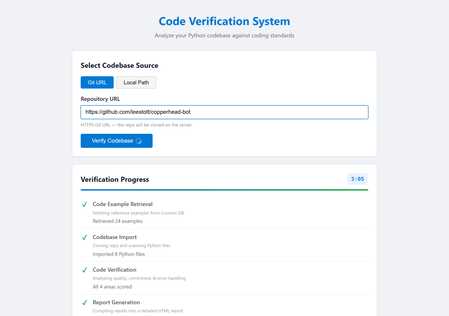
If you have built a proof-of-concept AI agent on your laptop and wondered how to turn it into something other people can actually use, you are not alone. The gap between a working prototype and a production-ready service is where most agent projects stall. Hosted containers close that gap faster than any other approach available today. This post walks through why containers and managed hosting platforms like Azure Container Apps are an ideal fit for multi-agent AI systems, what practical benefits they unlock, and how you can get started with minimal friction. The problem with "it works on my machine" Most AI agent projects begin the same way: a Python script, an API key, and a local terminal. That workflow is perfect for experimentation, but it creates a handful of problems the moment you try to share your work. First, your colleagues need the same Python version, the same dependencies, and the same environment variables. Second, long-running agent pipelines tie up your machine and compete with everything else you are doing. Third, there is no reliable URL anyone can visit to use the system, which means every demo involves a screen share or a recorded video. Containers solve all three problems in one step. A single Dockerfile captures the runtime, the dependencies, and the startup command. Once the image builds, it runs identically on any machine, any cloud, or any colleague's laptop. Why containers suit AI agents particularly well AI agents have characteristics that make them a better fit for containers than many traditional web applications. Long, unpredictable execution times A typical web request completes in milliseconds. An agent pipeline that retrieves context from a database, imports a codebase, runs four verification agents in sequence, and generates a report can take two to five minutes. Managed container platforms handle long-running requests gracefully, with configurable timeouts and automatic keep-alive, whereas many serverless platforms impose strict execution limits that agent workloads quickly exceed. Heavy, specialised dependencies Agent applications often depend on large packages: machine learning libraries, language model SDKs, database drivers, and Git tooling. A container image bundles all of these once at build time. There is no cold-start dependency resolution and no version conflict with other projects on the same server. Stateless by design Most agent pipelines are stateless. They receive a request, execute a sequence of steps, and return a result. This maps perfectly to the container model, where each instance handles requests independently and the platform can scale the number of instances up or down based on demand. Reproducible environments When an agent misbehaves in production, you need to reproduce the issue locally. With containers, the production environment and the local environment are the same image. There is no "works on my machine" ambiguity. A real example: multi-agent code verification To make this concrete, consider a system called Opustest, an open-source project that uses the Microsoft Agent Framework with Azure OpenAI to analyse Python codebases automatically. The system runs AI agents in a pipeline: A Code Example Retrieval Agent queries Azure Cosmos DB for curated examples of good and bad Python code, providing the quality standards for the review. A Codebase Import Agent reads all Python files from a Git repository cloned on the server. Four Verification Agents each score a different dimension of code quality (coding standards, functional correctness, known error handling, and unknown error handling) on a scale of 0 to 5. A Report Generation Agent compiles all scores and errors into an HTML report with fix prompts that can be exported and fed directly into a coding assistant. The entire pipeline is orchestrated by a FastAPI backend that streams progress updates to the browser via Server-Sent Events. Users paste a Git URL, watch each stage light up in real time, and receive a detailed report at the end. The app in action Landing page: the default Git URL mode, ready for a repository link. Local Path mode: toggling to analyse a codebase from a local directory. Repository URL entered: a GitHub repository ready for verification. Stage 1: the Code Example Retrieval Agent fetching standards from Cosmos DB. Stage 3: the four Verification Agents scoring the codebase. Stage 4: the Report Generation Agent compiling the final report. Verification complete: all stages finished with a success banner. Report detail: scores and the errors table with fix prompts. The Dockerfile The container definition for this system is remarkably simple: FROM python:3.12-slim RUN apt-get update && apt-get install -y --no-install-recommends git \ && rm -rf /var/lib/apt/lists/* WORKDIR /app COPY requirements.txt . RUN pip install --no-cache-dir -r requirements.txt COPY backend/ backend/ COPY frontend/ frontend/ RUN adduser --disabled-password --gecos "" appuser USER appuser EXPOSE 8000 CMD ["uvicorn", "backend.app:app", "--host", "0.0.0.0", "--port", "8000"] Twenty lines. That is all it takes to package a six-agent AI system with a web frontend, a FastAPI backend, Git support, and all Python dependencies into a portable, production-ready image. Notice the security detail: the container runs as a non-root user. This is a best practice that many tutorials skip, but it matters when you are deploying to a shared platform. From image to production in one command With the Azure Developer CLI ( azd ), deploying this container to Azure Container Apps takes a single command: azd up Behind the scenes, azd reads an azure.yaml file that declares the project structure, provisions the infrastructure defined in Bicep templates (a Container Apps environment, an Azure Container Registry, and a Cosmos DB account), builds the Docker image, pushes it to the registry, deploys it to the container app, and even seeds the database with sample data via a post-provision hook. The result is a publicly accessible URL serving the full agent system, with automatic HTTPS, built-in scaling, and zero infrastructure to manage manually. Microsoft Hosted Agents vs Azure Container Apps: choosing the right home Microsoft offers two distinct approaches for running AI agent workloads in the cloud. Understanding the difference is important when deciding how to host your solution. Microsoft Foundry Hosted Agent Service (Microsoft Foundry) Microsoft Foundry provides a fully managed agent hosting service. You define your agent's behaviour declaratively, upload it to the platform, and Foundry handles execution, scaling, and lifecycle management. This is an excellent choice when your agents fit within the platform's conventions: single-purpose agents that respond to prompts, use built-in tool integrations, and do not require custom server-side logic or a bespoke frontend. Key characteristics of hosted agents in Foundry: Fully managed execution. You do not provision or maintain any infrastructure. The platform runs your agent and handles scaling automatically. Declarative configuration. Agents are defined through configuration and prompt templates rather than custom application code. Built-in tool ecosystem. Foundry provides pre-built connections to Azure services, knowledge stores, and evaluation tooling. Opinionated runtime. The platform controls the execution environment, request handling, and networking. Azure Container Apps Azure Container Apps is a managed container hosting platform. You package your entire application (agents, backend, frontend, and all dependencies) into a Docker image and deploy it. The platform handles scaling, HTTPS, and infrastructure, but you retain full control over what runs inside the container. Key characteristics of Container Apps: Full application control. You own the runtime, the web framework, the agent orchestration logic, and the frontend. Custom networking. You can serve a web UI, expose REST APIs, stream Server-Sent Events, or run WebSocket connections. Arbitrary dependencies. Your container can include any system package, any Python library, and any tooling (like Git for cloning repositories). Portable. The same Docker image runs locally, in CI, and in production without modification. Why Opustest uses Container Apps Opustest requires capabilities that go beyond what a managed agent hosting platform provides: Requirement Hosted Agents (Foundry) Container Apps Custom web UI with real-time progress Not supported natively Full control via FastAPI and SSE Multi-agent orchestration pipeline Platform-managed, limited customisation Custom orchestrator with arbitrary logic Git repository cloning on the server Not available Install Git in the container image Server-Sent Events streaming Not supported Full HTTP control Custom HTML report generation Limited to platform outputs Generate and serve any content Export button for Copilot prompts Not available Custom frontend with JavaScript RAG retrieval from Cosmos DB Possible via built-in connectors Direct SDK access with full query control The core reason is straightforward: Opustest is not just a set of agents. It is a complete web application that happens to use agents as its processing engine. It needs a custom frontend, real-time streaming, server-side Git operations, and full control over how the agent pipeline executes. Container Apps provides all of this while still offering managed infrastructure, automatic scaling, and zero server maintenance. When to choose which Choose Microsoft Hosted Agents when your use case is primarily conversational or prompt-driven, when you want the fastest path to a working agent with minimal code, and when the built-in tool ecosystem covers your integration needs. Choose Azure Container Apps when you need a custom frontend, custom orchestration logic, real-time streaming, server-side processing beyond prompt-response patterns, or when your agent system is part of a larger application with its own web server and API surface. Both approaches use the same underlying AI models via Azure OpenAI. The difference is in how much control you need over the surrounding application. Five practical benefits of hosted containers for agents 1. Consistent deployments across environments Whether you are running the container locally with docker run , in a CI pipeline, or on Azure Container Apps, the behaviour is identical. Configuration differences are handled through environment variables, not code changes. This eliminates an entire category of "it works locally but breaks in production" bugs. 2. Scaling without re-architecture Azure Container Apps can scale from zero instances (paying nothing when idle) to multiple instances under load. Because agent pipelines are stateless, each request is routed to whichever instance is available. You do not need to redesign your application to handle concurrency; the platform does it for you. 3. Isolation between services If your agent system grows to include multiple services (perhaps a separate service for document processing or a background worker for batch analysis), each service gets its own container. They can be deployed, scaled, and updated independently. A bug in one service does not bring down the others. 4. Built-in observability Managed container platforms provide logging, metrics, and health checks out of the box. When an agent pipeline fails after three minutes of execution, you can inspect the container logs to see exactly which stage failed and why, without adding custom logging infrastructure. 5. Infrastructure as code The entire deployment can be defined in code. Bicep templates, Terraform configurations, or Pulumi programmes describe every resource. This means deployments are repeatable, reviewable, and version-controlled alongside your application code. No clicking through portals, no undocumented manual steps. Common concerns addressed "Containers add complexity" For a single-file script, this is a fair point. But the moment your agent system has more than one dependency, a Dockerfile is simpler to maintain than a set of installation instructions. It is also self-documenting: anyone reading the Dockerfile knows exactly what the system needs to run. "Serverless is simpler" Serverless functions are excellent for short, event-driven tasks. But agent pipelines that run for minutes, require persistent connections (like SSE streaming), and depend on large packages are a poor fit for most serverless platforms. Containers give you the operational simplicity of managed hosting without the execution constraints. "I do not want to learn Docker" A basic Dockerfile for a Python application is fewer than ten lines. The core concepts are straightforward: start from a base image, install dependencies, copy your code, and specify the startup command. The learning investment is small relative to the deployment problems it solves. "What about cost?" Azure Container Apps supports scale-to-zero, meaning you pay nothing when the application is idle. For development and demonstration purposes, this makes hosted containers extremely cost-effective. You only pay for the compute time your agents actually use. Getting started: a practical checklist If you are ready to containerise your own agent solution, here is a step-by-step approach. Step 1: Write a Dockerfile. Start from an official Python base image. Install system-level dependencies (like Git, if your agents clone repositories), then your Python packages, then your application code. Run as a non-root user. Step 2: Test locally. Build and run the image on your machine: docker build -t my-agent-app . docker run -p 8000:8000 --env-file .env my-agent-app If it works locally, it will work in the cloud. Step 3: Define your infrastructure. Use Bicep, Terraform, or the Azure Developer CLI to declare the resources you need: a container app, a container registry, and any backing services (databases, key vaults, AI endpoints). Step 4: Deploy. Push your image to the registry and deploy to the container platform. With azd , this is a single command. With CI/CD, it is a pipeline that runs on every push to your main branch. Step 5: Iterate. Change your agent code, rebuild the image, and redeploy. The cycle is fast because Docker layer caching means only changed layers are rebuilt. The broader picture The AI agent ecosystem is maturing rapidly. Frameworks like Microsoft Agent Framework, LangChain, Semantic Kernel, and AutoGen make it straightforward to build sophisticated multi-agent systems. But building is only half the challenge. The other half is running these systems reliably, securely, and at scale. Hosted containers offer the best balance of flexibility and operational simplicity for agent workloads. They do not impose the execution limits of serverless platforms. They do not require the operational overhead of managing virtual machines. They give you a portable, reproducible unit of deployment that works the same everywhere. If you have an agent prototype sitting on your laptop, the path to making it available to your team, your organisation, or the world is shorter than you think. Write a Dockerfile, define your infrastructure, run azd up , and share the URL. Your agents deserve a proper home. Hosted containers are that home. Resources Azure Container Apps documentation Microsoft Foundry Hosted Agents Azure Developer CLI (azd) Microsoft Agent Framework Docker getting started guide Opustest: AI-powered code verification (source code)Infrastructure as Code for AI: Building and Deploying Microsoft Hosted Agents with Terraform
AI agents are no longer experimental. Teams are shipping production-grade agents that retrieve information, call APIs, reason over documents, and orchestrate multi-step workflows at scale. Microsoft Foundry's Hosted Agents service gives you a fully managed runtime for those agents, built on top of the Microsoft Foundry Agent Service, with Microsoft handling the infrastructure, scaling, and runtime lifecycle. The challenge is that provisioning this infrastructure by hand or clicking through the portal, running one-off CLI commands, or relying on undocumented shell scripts, simply does not scale. It introduces configuration drift, makes reproducing environments painful, and creates real governance risk as teams grow. This post walks through how to provision and manage the Azure infrastructure required to run Microsoft Hosted Agents using Terraform. You will leave with working configuration, a clear understanding of the resource model, and practical guidance on where Terraform can take you all the way and where you will need to supplement with the Azure CLI or the Microsoft Foundry Agent Service SDK. What Are Microsoft Hosted Agents? Microsoft Hosted Agents are AI agents deployed and managed within Microsoft Foundry. Microsoft Foundry is Microsoft's unified platform for building, evaluating, and deploying AI applications and agents. It provides: A managed compute runtime — Microsoft provisions and scales the infrastructure so you do not manage VMs or containers. An agent execution environment — agents are defined with instructions, tools (code interpreter, Bing grounding, Azure AI Search, function calling), and a backing model endpoint. Deep Azure integration — identity via Microsoft Entra ID, secrets via Azure Key Vault, storage via Azure Blob, tracing via Azure Monitor and Application Insights. A project-scoped model — each Microsoft Foundry project encapsulates an agent's resources, connections, and deployments within a logical boundary. The "Hosted" distinction matters. You are not running agent code on your own Kubernetes cluster or App Service. Microsoft manages the runtime. Your responsibility is to provision the surrounding infrastructure correctly: the Microsoft Foundry resource, the project, the model deployment, the identity configuration, and the monitoring resources that back it all. That boundary — the infrastructure you own — is exactly what Terraform manages well. Why Terraform for Hosted Agent Deployments? Infrastructure as Code (IaC) is not a new idea, but its importance grows as AI deployments become more complex. Here is why Terraform is a strong choice for Microsoft Foundry deployments specifically: Repeatability: A Terraform configuration produces the same infrastructure every time. Staging mirrors production. Disaster recovery is a terraform apply away. Governance: Infrastructure definitions live in version control alongside application code. Changes are reviewable, auditable, and reversible. This satisfies most enterprise change-management requirements. Scale: Spinning up per-customer or per-team agent environments using Terraform workspaces or module instantiation is far more manageable than manual provisioning. State management: Terraform tracks the actual state of your Azure resources. It detects drift and reconciles it declaratively. Ecosystem: The AzureRM provider is mature, actively maintained by HashiCorp and Microsoft, and covers the majority of Azure services including the Microsoft Foundry resources. Architecture Overview Before writing any Terraform, it helps to understand the resource hierarchy in Microsoft Foundry and how each layer maps to an Azure resource type. The Foundry Resource Hierarchy Microsoft Foundry uses a two-level hierarchy: 1. Foundry Account ( azurerm_cognitive_account , kind: AIServices ) — The top-level AI Services resource. It provides the model endpoint, manages agent execution, and acts as the logical boundary for all projects beneath it. You must set project_management_enabled = true and provide a custom_subdomain_name to enable project creation. In ARM terms this is a Microsoft.CognitiveServices/accounts resource. 2. Foundry Project ( azurerm_cognitive_account_project ) — A child resource scoped within the Foundry Account. Each project has its own agents, model deployments, connections, and data assets. In production, you typically have one project per application, product team, or environment. Figure 1: The Microsoft Foundry resource hierarchy. A single Foundry Account (Cognitive Services, kind AIServices) acts as the top-level container, with Projects scoped beneath it — one per application, team, or environment. Supporting Resources The following Azure resources make up a complete Hosted Agents deployment: Microsoft Foundry Account (AI Services): A single azurerm_cognitive_account of kind AIServices serves as both the Foundry Account and the model endpoint host. Model deployments (e.g. gpt-4.1 ) are provisioned via azurerm_cognitive_deployment within this account. Log Analytics Workspace + Application Insights: Provides observability for agent traces, request logs, and metrics. User-Assigned Managed Identity: Grants the Foundry Account and Projects access to Azure resources without stored credentials. Role Assignments (RBAC): Wires the managed identity to the Foundry Account with least-privilege Cognitive Services permissions. Figure 2: Supporting infrastructure map. The managed identity holds least-privilege RBAC grants to the Microsoft Foundry Account (AI Services) — enabling model access and project management — all within the same resource group. Reference Architecture (Described) A production-ready layout separates concerns across two resource groups: one for shared infrastructure (networking, monitoring) and one for the Microsoft Foundry Account and its projects. The Foundry resource group houses the azurerm_cognitive_account (kind: AIServices) resource and the azurerm_cognitive_account_project instances. The shared resource group holds Log Analytics and Application Insights. A user-assigned managed identity spans both, holding RBAC grants to each backing service. For a dev/test environment you can collapse both into a single resource group. For production, the separation makes cost attribution, access control, and lifecycle management cleaner. Prerequisites Accounts and Permissions An active Azure subscription with the Owner or Contributor + User Access Administrator roles at the subscription or resource group level (role assignments require elevated permission). Foundry access enabled in your subscription. In some tenants you may need to accept terms or request quota for Azure OpenAI. Azure OpenAI quota for the model you intend to deploy (e.g. gpt-4.1 ). Request this via the Azure portal under Quotas in Azure OpenAI Studio. Local Tools Terraform CLI ≥ 1.9 — Install guide Azure CLI ≥ 2.60 — Install guide A code editor (VS Code with the HashiCorp Terraform extension and the Azure Terraform extension is a strong combination). Authentication For local development, authenticate via the Azure CLI. The AzureRM Terraform provider picks this up automatically: az login az account set --subscription "<your-subscription-id>" For CI/CD pipelines, use a service principal with AZURE_CLIENT_ID , AZURE_CLIENT_SECRET , AZURE_TENANT_ID , and AZURE_SUBSCRIPTION_ID environment variables, or — preferably — a workload identity federation (federated credentials) to avoid storing long-lived secrets. GitHub Actions supports OIDC-based workload identity natively. Terraform Fundamentals for Hosted Agents Provider Configuration The hashicorp/azurerm provider is your primary dependency. The new Microsoft Foundry resources ( azurerm_cognitive_account with kind = "AIServices" and azurerm_cognitive_account_project ) require version 4.x of the provider. Pin your version to avoid unexpected breaking changes: terraform { required_version = ">= 1.9" required_providers { azurerm = { source = "hashicorp/azurerm" version = "~> 4.0" } } } provider "azurerm" { features { key_vault { purge_soft_delete_on_destroy = false } resource_group { prevent_deletion_if_contains_resources = true } } subscription_id = var.subscription_id } The features block is required even when empty. The Key Vault setting prevents accidental secret loss during terraform destroy . The resource group setting adds an extra safety net in production. State Management Never use local state for shared or production environments. Store state in Azure Blob Storage with state locking via Azure Blob lease: terraform { backend "azurerm" { resource_group_name = "rg-terraform-state" storage_account_name = "sttfstate<unique>" container_name = "tfstate" key = "ai-agents/prod.tfstate" } } Create the state storage account and container before running terraform init . A bootstrap script or a separate Terraform workspace dedicated to state management are both valid approaches. Known Limitations and Workarounds Terraform coverage of Foundry is improving rapidly but is not yet complete. You should be aware of the following gaps as of mid-2025: Agent definitions are not in Terraform: The actual agent (its system prompt, instructions, tool configuration, and model binding) is created via the Azure AI Agent Service SDK or the Foundry portal, not via Terraform. Terraform provisions the infrastructure; your application code or a post-provisioning script creates the agent. Connections: Some connection types within a Foundry Project (e.g. Azure AI Search, custom connections) may require the Azure CLI or the Foundry SDK. Verify coverage in the AzureRM provider docs before assuming Terraform handles them. Model deployments: azurerm_cognitive_deployment covers OpenAI model deployments and is well-supported. Use this to deploy your model before referencing it from the agent. Private networking: If you need private endpoints for your Foundry Account, additional VNet, subnet, and DNS zone resources are required. This post focuses on the public networking path; private networking is a follow-on topic. Step-by-Step Implementation The following sections build up a complete Terraform configuration. The recommended project structure is a flat module layout for a single environment, with a separate modules/ai-foundry/ directory when you need to reuse the pattern across environments. ai-agents-infra/ ├── main.tf ├── variables.tf ├── outputs.tf ├── versions.tf └── terraform.tfvars 1. Variables Define variables first. Parameterising from the start avoids hard-coded values that create technical debt when you replicate the configuration for staging or production: # variables.tf variable "subscription_id" { type = string description = "Azure subscription ID." } variable "location" { type = string default = "eastus" description = "Azure region for all resources." } variable "environment" { type = string default = "dev" description = "Environment label (dev, staging, prod)." } variable "project_name" { type = string description = "Short name for the project. Used in resource naming." } variable "openai_model_name" { type = string default = "gpt-4.1" description = "Azure OpenAI model to deploy for the agent." } variable "openai_model_version" { type = string default = "2025-04-14" description = "Model version to deploy." } variable "openai_sku_capacity" { type = number default = 10 description = "Tokens-per-minute capacity (in thousands) for the deployment." } 2. Resource Group and Core Infrastructure A single resource group keeps things simple for dev. In production, consider splitting as described in the architecture section above. # main.tf — Resource group and naming locals locals { name_prefix = "${var.project_name}-${var.environment}" tags = { environment = var.environment project = var.project_name managed_by = "terraform" } } resource "azurerm_resource_group" "main" { name = "rg-${local.name_prefix}" location = var.location tags = local.tags } 3. Supporting Services Provision Log Analytics and Application Insights for agent observability and diagnostics. Unlike the legacy Hub-based architecture, the azurerm_cognitive_account (kind AIServices ) does not require a dedicated Storage Account or Key Vault as provisioning dependencies. # main.tf — Monitoring infrastructure data "azurerm_client_config" "current" {} # Log Analytics Workspace (required by Application Insights) resource "azurerm_log_analytics_workspace" "main" { name = "law-${local.name_prefix}" resource_group_name = azurerm_resource_group.main.name location = azurerm_resource_group.main.location sku = "PerGB2018" retention_in_days = 30 tags = local.tags } # Application Insights for agent observability resource "azurerm_application_insights" "main" { name = "appi-${local.name_prefix}" resource_group_name = azurerm_resource_group.main.name location = azurerm_resource_group.main.location workspace_id = azurerm_log_analytics_workspace.main.id application_type = "web" tags = local.tags } 4. User-Assigned Managed Identity A managed identity allows the Foundry Account and its projects to authenticate to Azure services without stored credentials. This is a security best practice and is required for several Microsoft Foundry features. # main.tf — Managed identity for the Microsoft Foundry Account resource "azurerm_user_assigned_identity" "foundry" { name = "id-${local.name_prefix}-foundry" resource_group_name = azurerm_resource_group.main.name location = azurerm_resource_group.main.location tags = local.tags } 5. Microsoft Foundry Account and Model Deployment In the current Microsoft Foundry architecture, a single azurerm_cognitive_account of kind AIServices serves as both the Foundry Account and the model endpoint host. Set project_management_enabled = true and provide a globally unique custom_subdomain_name to enable Foundry Project creation beneath it. # main.tf — Microsoft Foundry Account (AI Services) resource "azurerm_cognitive_account" "foundry" { name = "aisa-${local.name_prefix}" resource_group_name = azurerm_resource_group.main.name location = azurerm_resource_group.main.location kind = "AIServices" sku_name = "S0" project_management_enabled = true custom_subdomain_name = "${replace(local.name_prefix, "-", "")}foundry" tags = local.tags identity { type = "UserAssigned" identity_ids = [azurerm_user_assigned_identity.foundry.id] } } # Deploy the model within the Foundry Account resource "azurerm_cognitive_deployment" "agent_model" { name = var.openai_model_name cognitive_account_id = azurerm_cognitive_account.foundry.id model { format = "OpenAI" name = var.openai_model_name version = var.openai_model_version } sku { name = "Standard" capacity = var.openai_sku_capacity } } Note on quota: The capacity value is in thousands of tokens per minute. A value of 10 means 10,000 TPM. If terraform apply fails with a quota error, reduce this value or request a quota increase via the Azure portal. Note on custom_subdomain_name : This must be globally unique across all Azure AI Services accounts. If provisioning fails with a conflict error, adjust the suffix (e.g. append a random string using the random_string resource). 6. Foundry Project Create a Foundry Project beneath the Foundry Account provisioned in Step 5. Each project scopes its own agents, model connections, and data assets. Use one project per application or team. # main.tf — Microsoft Foundry Project resource "azurerm_cognitive_account_project" "agent_project" { name = "proj-${local.name_prefix}-agents" cognitive_account_id = azurerm_cognitive_account.foundry.id location = azurerm_resource_group.main.location display_name = "Agent Project - ${var.project_name}" description = "Hosted agents project for ${var.project_name}" identity { type = "UserAssigned" identity_ids = [azurerm_user_assigned_identity.foundry.id] } tags = local.tags } 7. RBAC Role Assignments Grant the managed identity the permissions it needs. This is the area most commonly misconfigured in manual deployments. Terraform makes it explicit and auditable. # main.tf — RBAC assignments # AI Services: Foundry identity needs Cognitive Services OpenAI User to call model endpoints resource "azurerm_role_assignment" "foundry_openai" { scope = azurerm_cognitive_account.foundry.id role_definition_name = "Cognitive Services OpenAI User" principal_id = azurerm_user_assigned_identity.foundry.principal_id } # AI Services: Foundry identity needs Cognitive Services Contributor to manage projects resource "azurerm_role_assignment" "foundry_contributor" { scope = azurerm_cognitive_account.foundry.id role_definition_name = "Cognitive Services Contributor" principal_id = azurerm_user_assigned_identity.foundry.principal_id } # Optional: grant your own principal the Azure AI Developer role on the Foundry Account # so you can create and manage agents from your local machine or CI pipeline resource "azurerm_role_assignment" "developer_account" { scope = azurerm_cognitive_account.foundry.id role_definition_name = "Azure AI Developer" principal_id = data.azurerm_client_config.current.object_id } 8. Outputs Export the values your application and post-provisioning scripts will need: # outputs.tf output "resource_group_name" { value = azurerm_resource_group.main.name } output "foundry_account_id" { value = azurerm_cognitive_account.foundry.id } output "ai_foundry_project_id" { value = azurerm_cognitive_account_project.agent_project.id } output "foundry_endpoint" { value = azurerm_cognitive_account.foundry.endpoint } output "openai_deployment_name" { value = azurerm_cognitive_deployment.agent_model.name } output "managed_identity_client_id" { value = azurerm_user_assigned_identity.foundry.client_id } 10. Example terraform.tfvars # terraform.tfvars — do NOT commit this file if it contains sensitive values subscription_id = "xxxxxxxx-xxxx-xxxx-xxxx-xxxxxxxxxxxx" location = "eastus" environment = "dev" project_name = "contoso-agents" openai_model_name = "gpt-4.1" openai_model_version = "2025-04-14" openai_sku_capacity = 10 Figure 3: Terraform deployment workflow. State is stored in an Azure Blob Storage backend, enabling team collaboration and preventing concurrent apply conflicts. Deploying and Validating the Agent Infrastructure Running the Deployment # 1. Initialise — downloads provider plugins and configures the backend terraform init # 2. Validate syntax and configuration terraform validate # 3. Preview what will be created (review carefully before applying) terraform plan -out=tfplan # 4. Apply the plan terraform apply tfplan A full initial apply typically takes 8–15 minutes. The Foundry Account (AI Services) provisioning is the longest step. The model deployment may also take a few minutes to reach a ready state — Terraform handles this with implicit dependency ordering, but you may see brief retries in the output. Verifying the Deployment After apply completes, verify each resource is in a healthy state: # Confirm the resource group and its resources exist az resource list --resource-group "rg-contoso-agents-dev" --output table # Check the Foundry Account (AI Services) is in a Succeeded state az cognitiveservices account show \ --name "aisacontosoagentsdevfoundry" \ --resource-group "rg-contoso-agents-dev" \ --query "properties.provisioningState" # Confirm the model deployment is ready az cognitiveservices account deployment show \ --resource-group "rg-contoso-agents-dev" \ --name "aisacontosoagentsdevfoundry" \ --deployment-name "gpt-4.1" \ --query "properties.provisioningState" Navigate to the Microsoft Foundry portal and confirm your Foundry Account and Project appear. At this point you can create an agent manually in the portal to validate that the model endpoint is reachable and the identity chain works correctly before automating agent creation. Common Deployment Issues Quota exceeded on model deployment: Reduce openai_sku_capacity or request a quota increase in the Azure portal under Azure OpenAI → Quotas. Resource name conflicts: The custom_subdomain_name on the Foundry Account must be globally unique. Use the random_string Terraform resource to append a unique suffix if needed. Role assignment propagation delay: RBAC changes can take 1–2 minutes to propagate. If the Foundry Account cannot access resources immediately after apply, wait a moment and retry. project_management_enabled not set: If azurerm_cognitive_account_project fails with an error about project management, ensure project_management_enabled = true and custom_subdomain_name are set on the parent azurerm_cognitive_account . azurerm_cognitive_account_project not found: Ensure your AzureRM provider version is ~> 4.0 or later. Run terraform init -upgrade if you previously initialised with an older version. Creating an Agent After Infrastructure Provisioning Terraform has provisioned the platform. Now you need to create the agent itself. This is done via the Azure AI Agents SDK (available for Python, C#, JavaScript, and Java) or the Foundry portal. The following Python snippet demonstrates creating a basic agent programmatically after Terraform apply. It uses the outputs from Terraform directly: import os from azure.ai.projects import AIProjectClient from azure.identity import DefaultAzureCredential # These values come from Terraform outputs project_connection_string = os.environ["AI_PROJECT_CONNECTION_STRING"] model_deployment = os.environ["OPENAI_DEPLOYMENT_NAME"] client = AIProjectClient.from_connection_string( credential=DefaultAzureCredential(), conn_str=project_connection_string, ) # Create the hosted agent agent = client.agents.create_agent( model=model_deployment, name="customer-support-agent", instructions=( "You are a helpful customer support assistant. " "Answer questions accurately and concisely. " "If you are unsure, say so rather than guessing." ), ) print(f"Agent created: {agent.id}") Figure 5: Agent runtime architecture. The Foundry Project hosts the Agent Service, which routes requests to the GPT-4.1 model endpoint and optionally invokes tool integrations (Code Interpreter, File Search, Azure Functions, or custom tools). The project connection string is available from the Foundry portal (Project → Overview → Project connection string) or can be constructed from Terraform outputs. Refer to the Azure AI Agents quickstart for the full SDK setup. Operational Considerations Lifecycle Management Terraform's declarative model means updates are incremental by default. To update the OpenAI model version, change openai_model_version in your .tfvars file and run terraform plan to confirm the change before applying. Terraform will delete and recreate the cognitive deployment in-place — be aware this causes brief downtime for the model endpoint. To destroy a complete environment: terraform destroy The prevent_deletion_if_contains_resources feature on the resource group will block destruction if any untracked resources exist, which is a useful safety net in production. Handling Configuration Drift Drift occurs when Azure resources are modified outside of Terraform (portal changes, CLI scripts, other automation). Detect drift with: terraform plan -refresh-only This reports the difference between the Terraform state and the actual resource state without making changes. Schedule this as a drift-detection job in CI to catch out-of-band changes early. Environment Isolation Use Terraform workspaces or separate state files per environment: # Create and switch to a staging workspace terraform workspace new staging terraform workspace select staging terraform apply -var-file="environments/staging.tfvars" Alternatively, use a directory-per-environment layout ( environments/dev/ , environments/prod/ ) with a shared module in modules/ai-foundry/ . The directory layout is more explicit and easier to navigate in a team setting. Cost Control Set a low openai_sku_capacity in dev (e.g. 1 = 1,000 TPM) to limit accidental spend. Tag all resources with environment and project tags (the locals.tags block handles this) to enable cost attribution in Azure Cost Management. Use the Azure Pricing Calculator to estimate monthly costs before deploying to production. The Azure AI Services account (model token usage), Log Analytics, and Application Insights are the primary cost drivers. Consider destroying dev environments overnight using a scheduled CI job that runs terraform destroy and terraform apply on a schedule. CI/CD Integration Automating Terraform via GitHub Actions is straightforward. The following workflow runs plan on pull requests and apply on merge to the main branch: # .github/workflows/terraform.yml name: Terraform Deploy on: push: branches: [main] pull_request: branches: [main] permissions: id-token: write # Required for OIDC workload identity federation contents: read pull-requests: write env: ARM_CLIENT_ID: ${{ secrets.AZURE_CLIENT_ID }} ARM_TENANT_ID: ${{ secrets.AZURE_TENANT_ID }} ARM_SUBSCRIPTION_ID: ${{ secrets.AZURE_SUBSCRIPTION_ID }} ARM_USE_OIDC: "true" jobs: terraform: runs-on: ubuntu-latest environment: ${{ github.ref == 'refs/heads/main' && 'production' || 'staging' }} steps: - uses: actions/checkout@v4 - uses: hashicorp/setup-terraform@v3 with: terraform_version: "~1.9" - name: Terraform Init run: terraform init - name: Terraform Plan run: terraform plan -out=tfplan -var-file="environments/dev.tfvars" - name: Terraform Apply if: github.ref == 'refs/heads/main' run: terraform apply -auto-approve tfplan Figure 4: CI/CD pipeline using GitHub Actions with OIDC workload identity federation. No long-lived secrets are stored — the runner exchanges a JWT for a short-lived Azure token before each Terraform run. Use OIDC workload identity federation to avoid storing long-lived service principal secrets in GitHub. This is the recommended authentication method for GitHub Actions deployments to Azure. Best Practices Modular Terraform Design Once you have a working flat configuration, extract the Foundry resources into a reusable module. A module boundary around the Hub, Project, OpenAI account, and RBAC assignments lets you stamp out new agent environments with a single module call and a new .tfvars file. # environments/staging/main.tf module "agent_platform" { source = "../../modules/ai-foundry" project_name = "contoso-agents" environment = "staging" location = "eastus" subscription_id = var.subscription_id openai_model_name = "gpt-4.1" openai_model_version = "2025-04-14" openai_sku_capacity = 30 } Parameterisation and Environment Configs Never hard-code subscription IDs, tenant IDs, or region names in main.tf . Keep environment-specific values in environments/<env>.tfvars files and commit them to source control (they are config, not secrets). Store actual secrets (service principal credentials, API keys for third-party connections) in Azure Key Vault or GitHub Secrets — not in .tfvars files. Versioning Models and Agent Configurations Treat your openai_model_version and agent instructions as versioned artefacts. When Microsoft releases a new model version, create a pull request that updates the variable value, runs a plan, and documents the expected change. This creates a clear history of when model versions changed and who approved the change. Logging and Monitoring Enable diagnostic settings on the Azure OpenAI account to route request logs and metrics to your Log Analytics workspace. Use Application Insights to capture agent traces from the Azure AI Agents SDK (it integrates with OpenTelemetry). Set up Azure Monitor alerts on OpenAI account errors (4xx/5xx rates) and Log Analytics ingestion failures. Responsible AI Considerations Enable Azure OpenAI content filtering on your deployment. Terraform supports this via the content_filter block in azurerm_cognitive_deployment where the policy allows. Define a clear system prompt that sets agent behaviour boundaries and instructs the agent to decline harmful requests. Log and review agent conversations during early deployment. Microsoft Foundry includes evaluation tools for assessing agent response quality and safety. Apply least-privilege RBAC throughout — the role assignments in this post follow that principle. Conclusion and Next Steps You now have a complete, repeatable Terraform configuration for provisioning the Azure infrastructure required to run Microsoft Hosted Agents via Microsoft Foundry. The key takeaways: Terraform manages the infrastructure layer effectively — the Foundry Account, Project, model deployment, identity, and RBAC. Agent definitions themselves are provisioned via the Azure AI Agents SDK or the Foundry portal as a post-Terraform step. State management, parameterisation, and modular design are non-negotiable for team environments. OIDC-based workload identity is the right authentication model for CI/CD pipelines. Drift detection, environment isolation, and cost tagging are operational necessities, not optional extras. Where to Go Next Add Azure AI Search: Extend the Foundry Project with an Azure AI Search connection and enable the Search tool on your agent for Retrieval-Augmented Generation (RAG). Private networking: Add private endpoints for the Foundry Hub and OpenAI account to lock down ingress to your VNet. Multi-region deployment: Instantiate the Terraform module twice with different regions and use Azure Traffic Manager or Front Door to route requests. GitOps for agents: Store agent definitions (system prompts, tool configurations) as YAML or JSON in your repository and use a CI pipeline to apply them via the Azure AI Agents SDK on every merge, creating a fully declarative agent deployment pipeline. Evaluation pipelines: Use Microsoft Foundry's built-in evaluation capabilities to run automated quality and safety assessments on every new model version or prompt change. References What is Microsoft Foundry? — Microsoft Learn Azure AI Agent Service overview — Microsoft Learn Azure AI Agents quickstart — Microsoft Learn azurerm_cognitive_account — Terraform Registry azurerm_cognitive_account_project — Terraform Registry azurerm_cognitive_deployment — Terraform Registry AzureRM backend — Terraform documentation OIDC workload identity federation with GitHub Actions — Microsoft Learn Azure OpenAI content filtering — Microsoft Learn Install Terraform — HashiCorp Microsoft Foundry portalStrategic Solutions for Seamless Integration of Third-Party SaaS
Modern systems must be modular and interoperable by design. Integration is no longer a feature, it’s a requirement. Developers are expected to build architectures that connect easily with third-party platforms, but too often, core systems are designed in isolation. This disconnect creates friction for downstream teams and slows delivery. At Microsoft, SaaS platforms like SAP SuccessFactors and Eightfold support Talent Acquisition by handling functions such as requisition tracking, application workflows, and interview coordination. These tools help reduce costs and free up engineering focus for high-priority areas like Azure and AI. The real challenge is integrating them with internal systems such as Demand Planning, Offer Management, and Employee Central. This blog post outlines a strategy centered around two foundational components: an Integration and Orchestration Layer, and a Messaging Platform. Together, these enable real-time communication, consistent data models, and scalable integration. While Talent Acquisition is the use case here, the architectural patterns apply broadly across domains. Whether you're embedding AI pipelines, managing edge deployments, or building platform services, thoughtful integration needs to be built into the foundation, not bolted on later.Six Coding Agents, One Production System: A Field Guide to AgenticOps with AKS-Lab-GitHubCopilot
The shift: from "AI helps me code" to "AI authors my repo" For two years we've been talking about GitHub Copilot as an inline pair programmer — a clever autocomplete that lives in your editor. That framing is officially out of date. The new reality is agentic delivery: a team of named, scoped AI agents owns slices of your repository, each with its own tools, skills, and refusal rules. They produce pull requests. They run tests. They roll deployments. And when one finishes its turn, it hands off to the next. The microsoft/AKS-Lab-GitHubCopilot's five labs you ship ZavaShop — a multi-agent retail supply-chain control plane running on AKS + Azure Container Apps — and along the way you internalize an operating model you can carry to any project. Everything in the repo (specs, agents, MCP servers, tests, Bicep, Helm, GitHub Actions) is authored by six GitHub Copilot Custom Coding Agents working from your IDE, plus the remote GitHub Copilot Coding Agent that closes the PR loop on GitHub. This is what AgenticOps looks like in practice. Two layers of agents — don't confuse them The first cognitive hurdle in this lab is keeping two very different agent populations straight: Layer What it is When it lives Examples Application agents The product you ship — the runtime ZavaShop fleet that solves a business problem Production (AKS + ACA) InventoryAgent, SupplierAgent, LogisticsAgent, PricingAgent, OrchestratorAgent Coding agents The dev-time team that writes the application agents Your IDE + GitHub requirements-analyst, mcp-builder, agent-builder, orchestrator-architect, test-author, deploy-engineer Both are built with the Microsoft Agent Framework (MAF). Both use the GitHub Copilot SDK as their model provider. But they exist at different layers of the development lifecycle, and the entire lab is structured around that distinction. If you only remember one thing from this post: the coding agents are how you build the application agents. That is the whole AgenticOps loop, compressed into one sentence. GitHub Copilot Coding Agent vs. Custom Coding Agents There are two flavors of "coding agent" in the GitHub Copilot ecosystem, and this lab uses both. 1. The remote GitHub Copilot Coding Agent This is the GitHub-side, asynchronous, PR-driven agent. You assign it an issue, it spins up a sandboxed environment, writes the code, runs the tests, and opens a PR for human review. You don't watch it work — you review what it produces. In ZavaShop, Lab 04 (Testing) explicitly uses this agent: you take a failing eval scenario, file it as an issue, assign it to Copilot, and the agent comes back with a PR. Your job is the human bar, not the keystrokes. Important governance choice from AGENTS.md: the remote Coding Agent is allowed to open PRs against src/ and tests/ only — never against infra/ without human review. That single rule is a textbook example of agent-aware policy. 2. The local Custom Coding Agents These are scoped, in-IDE specialist agents you select <agent name> in Copilot Chat. They live as *.agent.md files inside .github/agents/ and are discovered by VS Code on reload. Each one owns exactly one slice of the repository. Six of them ship in this lab: Phase Agent Owns Refusal rule Requirements requirements-analyst specs/*.md Refuses to write code MCP tools mcp-builder src/mcp_servers/* One server per turn Specialist agents agent-builder src/agents/<specialist>/* One specialist per turn Orchestration orchestrator-architect src/agents/orchestrator/*, src/shared/*, docker-compose.yml Owns wiring, not business logic Tests test-author tests/** Never edits src/ Deploy deploy-engineer infra/**, .github/workflows/** Won't touch application code The pattern that matters here isn't just "we made some custom agents." It's that every agent declares what it owns and what it refuses to do. That refusal envelope is what makes the system safe to delegate to. Without it, you'd just have a noisier autocomplete. Three workflow prompts in .github/prompts/ chain the agents together so you don't have to remember the sequence: /feature-from-issue — issue → spec → code → tests → PR → deploy /spec-to-code — drive an existing spec through code + tests /ship-it — quality gate → build → push → ACR/ACA/AKS rollout → smoke + evals This is the closest thing I've seen to a programmable software development lifecycle. Where AgenticOps fits in DevOps gave us repeatable infrastructure. MLOps gave us repeatable model lifecycles. AgenticOps is what you need when the thing you're operating is itself a fleet of autonomous agents — both at build time and at runtime. The lab makes the four pillars of AgenticOps concrete: Specs as the contract. /requirements-analyst produces specs/<slug>.md files with goals, contracts, and eval scenarios. Nothing else in the repo is built until that spec exists. Specs are the source of truth that human reviewers actually read. Skills as living documentation. .github/skills/<skill>/SKILL.md files hold shared, agent-agnostic knowledge — Python conventions, Kubernetes patterns, MAF idioms. Every coding agent declares which skills it must consult before writing code. This is how you stop drift: knowledge lives in one place and is pulled in on demand. Evals as the quality gate. The repo runs a four-layer test pyramid plus five golden eval scenarios (S1–S5). uv run poe check runs locally and in GitHub Actions. Copilot-authored PRs must pass the same bar a human does — no exceptions. Observability tied to agent identity. Every agent emits agent.name, agent.run_id, and agent.span_id through structlog. When something misbehaves in production, you can trace the line from "this evaluation failed" all the way back to "this version of this agent, on this run, called this tool with these arguments." These four pillars aren't ZavaShop-specific. They're the contract for any AgenticOps system: scoped ownership, contracts as code, evals as gates, identity in every span. Walking through the workshop: which agent does what, when The five labs are five chapters of one story — ZavaShop going from an empty Azure subscription to a live retail control plane. Each lab activates a different subset of coding agents. Lab 01 — Environment Setup (no coding agents yet) You provision the platform: AKS cluster, ACA environment, Azure Container Registry, Key Vault, and the Workload Identity that every agent will wear. Then you install the six Custom Coding Agents into your IDE. Think of this as hiring the development team and giving them their badges. Lab 02 — Agent Creation (four agents in play) This is where it clicks. You start by requirements-analyst in Copilot Chat to produce the spec for each ZavaShop application agent. Then mcp-builder is invoked four times to scaffold the four MCP servers — one per domain (inventory DB, supplier API, shipping API, pricing API). Then agent-builder runs four more times to build the typed ChatAgent specialists. Finally orchestrator-architect wires them together with a MAF Workflow. What's stunning about this lab is the handoff discipline. Every coding agent ends its turn with a line naming the next agent to invoke. You're not orchestrating the work — the agents are. Lab 03 — Multi-Agent Orchestration & Config (two agents) The orchestrator stops being a one-shot LLM call and becomes a deterministic Workflow. Secrets move from .env to Key Vault. The whole fleet boots locally with Docker Compose. This is orchestrator-architect's star turn — wiring A2A endpoints, MCP tool registration, Key Vault hydration, OpenTelemetry. Specs come from requirements-analyst; the rest is orchestration. Lab 04 — Testing (both coding agent flavors) /test-author writes the four-layer pyramid (unit, MCP contract, integration, eval). Then you switch gears: take a failing eval scenario, file it as a GitHub issue, and assign it to the remote GitHub Copilot Coding Agent. The agent works asynchronously, opens a PR, and uv run poe check decides whether it passes. This is the lab where the local-vs-remote distinction stops being abstract and starts being operational. Lab 05 — Deployment & Run (deployment specialist) /deploy-engineer writes the Helm chart for the AKS orchestrator and the Bicep modules for the ACA specialists. The /ship-it workflow prompt then runs the full pipeline: quality gate → ACR build → ACA deploy → AKS rollout → smoke tests → evals. GitHub Actions OIDC re-runs the same pipeline on every main push. Notice the pattern across all five labs: at no point does a human write production code from scratch. Humans set goals, review specs, approve PRs, and run quality gates. The keystrokes belong to agents. How Coding Agents transform the DevOps pipeline Take a step back from the lab and ask: what actually changes in your DevOps flow when you adopt this model? The atomic unit of work shifts. In classic DevOps the unit is the commit. In AgenticOps the unit is the spec. A spec drives one or more agents; agents produce commits; commits trigger CI; CI gates promotion. The commit becomes a derived artifact, not the starting point. Code review changes shape. You're no longer reviewing "did this human understand the codebase?" — you're reviewing "did this agent follow its refusal rules, consult its skills, and produce something that passes the evals?" Reviewers spend less time on style and more time on intent. The diff is often less interesting than the spec it came from. Governance becomes structural, not procedural. Instead of writing a wiki page that says "don't touch infra without review," you encode that rule in AGENTS.md and refuse to let the agent's tool set include infra paths. Policy becomes part of the agent definition, not a checklist humans hopefully remember. The CI pipeline expands. Beyond build/test/deploy, you now have an eval stage that asks "does the system still behave correctly on the golden scenarios?" — and a Copilot-authored PR has to pass the same eval stage as a human-authored one. The pipeline is the great equalizer. Onboarding compresses. A new engineer doesn't need to read 50 wiki pages to be productive. They read AGENTS.md, select the relevant agent walks them through. Institutional knowledge lives in .agent.md and SKILL.md files instead of senior engineers' heads. The net effect is a pipeline that's faster, more uniform, and easier to audit. Faster because agents parallelize what humans serialize. More uniform because every change goes through the same six-agent template. Easier to audit because every artifact has a named author and a refusal rule it had to respect. What to take away The AKS-Lab-GitHubCopilot workshop teaches three things at once. The surface lesson is "how to build a multi-agent retail system on AKS." The middle lesson is "how to use GitHub Copilot Custom Agents and the remote Coding Agent." The deepest lesson — and the one I'd argue matters most — is how to design a development process where AI agents are first-class citizens with bounded responsibilities, not free-form copilots. If you take the model and walk away from the lab, three patterns are worth keeping: Scope before capability. Don't give an agent every tool; give it the smallest surface that makes it useful. Specs are the API between humans and agents. Invest in requirements-analyst-style flows even if the rest of your stack isn't there yet. Evals are non-negotiable. The moment an agent can open a PR, you need a quality gate that doesn't care who the author is. Clone the repo microsoft/AKS-Lab-GitHubCopilot , hit Developer: Reload Window, select agents in Copilot Chat, and watch six teammates show up. That's the future of the DevOps pipeline — and it's already shipping. Resources microsoft/AKS-Lab-GitHubCopilot — The repository this post is built on. Best practices for using Copilot to work on tasks — Governance patterns for delegating issues to Copilot. GitHub Copilot SDK (Python) — The provider used by every agent in this lab.799Views0likes0CommentsKickstart projects with azd Templates
Navigating today’s software development challenges requires streamlined tools and frameworks. The Azure Developer CLI (azd) simplifies provisioning and deployment on Azure with its intuitive, developer-focused commands. Beyond mere automation, azd templates provide reusable blueprints for proof-of-concept projects, complete configurations for managed systems, and robust Infrastructure as Code assets. By accelerating application development and eliminating redundant setup, azd enables developers to focus on innovation. Embrace azd to enhance productivity and adapt to the evolving development landscape effortlessly.