azure deployment environments
23 TopicsElevate Your AI Expertise with Microsoft Azure: Learn Live Series for Developers
Unlock the power of Azure AI and master the art of creating advanced AI agents. Starting from April 15th, embark on a comprehensive learning journey designed specifically for professional developers like you. This series will guide you through the official Microsoft Learn Plan, focused on the latest agentic AI technologies and innovations. Generative AI has evolved to become an essential tool for crafting intelligent applications, and AI agents are leading the charge. Here's your opportunity to deepen your expertise in building powerful, scalable agent-based solutions using the Azure AI Foundry, Azure AI Agent Service, and the Semantic Kernel Framework. Why Attend? This Learn Live series will provide you with: In-depth Knowledge: Understand when to use AI agents, how they function, and the best practices for building them on Azure. Hands-On Experience: Gain practical skills to develop, deploy, and extend AI agents with Azure AI Agent Service and Semantic Kernel SDK. Expert Insights: Learn directly from Microsoft’s AI professionals, ensuring you're at the cutting edge of agentic AI technologies. Session Highlights Plan and Prepare AI Solutions | April 15th Explore foundational principles for creating secure and responsible AI solutions. Prepare your development environment for seamless integration with Azure AI services. Fundamentals of AI Agents | April 22nd Discover the transformative role of language models and generative AI in enabling intelligent applications. Understand Microsoft Copilot and effective prompting techniques for agent development. Azure AI Agent Service: Build and Integrate | April 29th Dive into the key features of Azure AI Agent Service. Build agents and learn how to integrate them into your applications for enhanced functionality. Extend with Custom Tools | May 6th Enhance your agents’ capabilities with custom tools, tailored to meet unique application requirements. Develop an AI agent with Semantic Kernel | May 8th Use Semantic Kernel to connect to an Azure AI Foundry project Create Azure AI Agent Service agents using the Semantic Kernel SDK Integrate plugin functions with your AI agent Orchestrate Multi-Agent Solutions with Semantic Kernel | May 13th Utilize the Semantic Kernel SDK to create collaborative multi-agent systems. Develop and integrate custom plugin functions for versatile AI solutions. What You’ll Achieve By the end of this series, you'll: Build AI agents using cutting-edge Azure technologies. Integrate custom tools to extend agent capabilities. Develop multi-agent solutions with advanced orchestration. How to Join Don't miss out on this opportunity to level up your development skills and lead the next wave of AI-driven applications. Register now and set yourself apart as a developer equipped to harness the full potential of Azure AI. 🔗 Register for the Learn Live Series 🗓️ Format: Livestream | Language: English | Topic: Core AI Development Take the leap and transform how you develop intelligent applications with Microsoft Azure AI. Does this revision align with your vision for the blog? Let me know if there's anything else you'd like to refine or add!If You're Building AI on Azure, ECS 2026 is Where You Need to Be
Let me be direct: there's a lot of noise in the conference calendar. Generic cloud events. Vendor showcases dressed up as technical content. Sessions that look great on paper but leave you with nothing you can actually ship on Monday. ECS 2026 isn't that. As someone who will be on stage at Cologne this May, I can tell you the European Collaboration Summit combined with the European AI & Cloud Summit and European Biz Apps Summit is one of the few events I've seen where engineers leave with real, production-applicable knowledge. Three days. Three summits. 3,000+ attendees. One of the largest Microsoft-focused events in Europe, and it keeps getting better. If you're building AI systems on Azure, designing cloud-native architectures, or trying to figure out how to take your AI experiments to production — this is where the conversation is happening. What ECS 2026 Actually Is ECS 2026 runs May 5–7 at Confex in Cologne, Germany. It brings together three co-located summits under one roof: European Collaboration Summit — Microsoft 365, Teams, Copilot, and governance European AI & Cloud Summit — Azure architecture, AI agents, cloud security, responsible AI European BizApps Summit — Power Platform, Microsoft Fabric, Dynamics For Azure engineers and AI developers, the European AI & Cloud Summit is your primary destination. But don't ignore the overlap, some of the most interesting AI conversations happen at the intersection of collaboration tooling and cloud infrastructure. The scale matters here: 3,000+ attendees, 100+ sessions, multiple deep-dive tracks, and a speaker lineup that includes Microsoft executives, Regional Directors, and MVPs who have built, broken, and rebuilt production systems. The Azure + AI Track - What's Actually On the Agenda The AI & Cloud Summit agenda is built around real technical depth. Not "intro to AI" content, actual architecture decisions, patterns that work, and lessons from things that didn't. Here's what you can expect: AI Agents and Agentic Systems This is where the energy is right now, and ECS is leaning in. Expect sessions covering how to design agent workflows, chain reasoning steps, handle memory and state, and integrate with Azure AI services. Marco Casalaina, VP of Products for Azure AI at Microsoft, is speaking if you want to understand the direction of the Azure AI platform from the people building it, this is a direct line. Azure Architecture at Scale Cloud-native patterns, microservices, containers, and the architectural decisions that determine whether your system holds up under real load. These sessions go beyond theory you'll hear from engineers who've shipped these designs at enterprise scale. Observability, DevOps, and Production AI Getting AI to production is harder than the demos suggest. Sessions here cover monitoring AI systems, integrating LLMs into CI/CD pipelines, and building the operational practices that keep AI in production reliable and governable. Cloud Security and Compliance Security isn't optional when you're putting AI in front of users or connecting it to enterprise data. Tracks cover identity, access patterns, responsible AI governance, and how to design systems that satisfy compliance requirements without becoming unmaintainable. Pre-Conference Deep Dives One underrated part of ECS: the pre-conference workshops. These are extended, hands-on sessions typically 3–6 hours that let you go deep on a single topic with an expert. Think of them as intensive short courses where you can actually work through the material, not just watch slides. If you're newer to a particular area of Azure AI, or you want to build fluency in a specific pattern before the main conference sessions, these are worth the early travel. The Speaker Quality Is Different Here The ECS speaker roster includes Microsoft executives, Microsoft MVPs, and Regional Directors, people who have real accountability for the products and patterns they're presenting. You'll hear from over 20 Microsoft speakers: Marco Casalaina — VP of Products, Azure AI at Microsoft Adam Harmetz — VP of Product at Microsoft, Enterprise Agent And dozens of MVPs and Regional Directors who are in the field every day, solving the same problems you are. These aren't keynote-only speakers — they're in the session rooms, at the hallway track, available for real conversations. The Hallway Track Is Not a Cliché I know "networking" sounds like a corporate afterthought. At ECS it genuinely isn't. When you put 3,000 practitioners, engineers, architects, DevOps leads, security specialists in one venue for three days, the conversations between sessions are often more valuable than the sessions themselves. You get candid answers to "how are you actually handling X in production?" that you won't find in documentation. The European Microsoft community is tight-knit and collaborative. ECS is where that community concentrates. Why This Matters Right Now We're in a period where AI development is moving fast but the engineering discipline around it is still maturing. Most teams are figuring out: How to move from AI prototype to production system How to instrument and observe AI behaviour reliably How to design agent systems that don't become unmaintainable How to satisfy security and compliance requirements in AI-integrated architectures ECS 2026 is one of the few places where you can get direct answers to these questions from people who've solved them — not theoretically, but in production, on Azure, in the last 12 months. If you go, you'll come back with practical patterns you can apply immediately. That's the bar I hold events to. ECS consistently clears it. Register and Explore the Agenda Register for ECS 2026: ecs.events Explore the AI & Cloud Summit agenda: cloudsummit.eu/en/agenda Dates: May 5–7, 2026 | Location: Confex, Cologne, Germany Early registration is worth it the pre-conference workshops fill up. And if you're coming, find me, I'll be the one talking too much about AI agents and Azure deployments. See you in Cologne.Using Azure API Management with Azure Front Door for Global, Multi‑Region Architectures
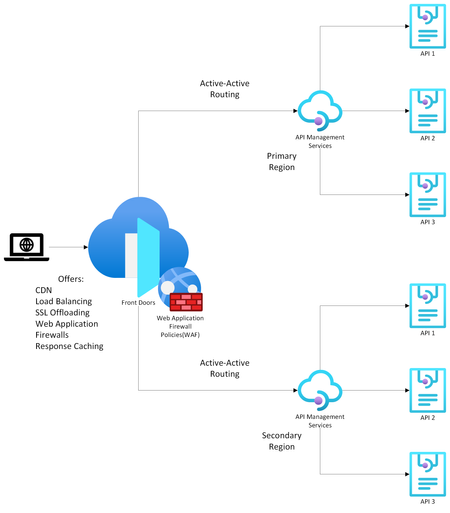
Modern API‑driven applications demand global reach, high availability, and predictable latency. Azure provides two complementary services that help achieve this: Azure API Management (APIM) as the API gateway and Azure Front Door (AFD) as the global entry point and load balancer. Going over the available documentation available, my team and I found this article on how to front a single-region APIM with an Azure Front Door , but we wanted to extend this to a multi-region APIM as well. That led us to design the solution detailed in this article which explains how to configure multi‑regional, active‑active APIM behind Azure Front Door using Custom origins and regional gateway endpoints. (I have also covered topics like why organizations commonly pair APIM with Front Door, when to use internal vs. external APIM modes, etc. but main topic first! Scroll down to the bottom for more info). Configuring Multi‑Regional APIM with Azure Front Door WHAT TO KNOW: If using APIM Premium with multi‑region gateways, each region exposes its own regional gateway endpoint, formatted as: https://<service-name>-<region>-01.regional.azure-api.net Examples: https://mydemo-apim-westeurope-01.regional.azure-api.net https://mydemo-apim-eastus-01.regional.azure-api.net where 'mydemo' is the name of the APIM instance. You will use these regional endpoints and configure them as a separate origin in Azure Front Door—using the Custom origin type. Solution Architecture Azure Front Door Configuration Steps 1. Create an Origin Group Inside your Front Door profile, define a group (Settings -> Origin Groups - > Add -> Add an origin) that will contain all APIM regional gateways. See images below: 2. Add Each APIM Region as a Custom Origin Use the Custom origin type: Origin type: Custom Host name: Use the APIM regional endpoint Example: mydemo-apim-westeurope-01.regional.azure-api.net Origin host header: Same as the host name. Enable certificate subject name validation (Recommended when private link or TLS integrity is required.) Priority: Lower value = higher priority (for failover). Weight: Controls how traffic is distributed across equally prioritized origins. Status: Enable origin. And repeat the same steps for additional APIM regions giving them priority and weightage as you feel appropriate. How to Know Which Region is being Invoked To test this setup, create 2 Virtual Machines (VMs) in Azure - one for each region. For this guide, we chose to create the VMs in West Europe and East US. Open up a Command Prompt from the VM and do a curl on the sample Echo API that comes with every new APIM deployment: Example: curl -v "afd-blah.b01.azurefd.net/echo/resource?param1=sample" Your results should show the region being hit as shown below: How AFD Routes Traffic Across Multiple APIM Regions AFD evaluates origins in this order: Available instances — the Health Probe removes unhealthy origins Priority — selects highest‑priority available origins Latency — optionally selects lowest‑latency pool Weight — round‑robin distribution across selected origins Example When origins are configured as below: West Europe (priority 1, weight 1000) East US (priority 1, weight 500) Central US (priority 2, weight 1000) AFD will: Use West Europe + East US in a 1000:500 ratio. Only use Central US if both West Europe & East US become unavailable. For more information on this nice algorithm, see here: Traffic routing methods to origin - Azure Front Door | Microsoft Learn More Info (as promised) Why Use Azure API Management? Azure API Management is a fully managed service providing: 1. Centralized API Gateway Enforces policies such as authentication, rate limiting, transformations, and caching. Acts as a single façade for backend services, enabling modernization without breaking existing clients. 2. Security & Governance Integrates with Azure AD, OAuth2, and mTLS (mutual TLS). Provides threat protection and schema validation. 3. Developer Ecosystem Developer portal, API documentation, testing console, versioning, and releases. 4. Multi‑Region Gateways (Premium Tier) Allows deployment of additional regional gateways for active‑active, low‑latency global experiences. APIM Deployment Modes: Internal vs. External External Mode The APIM gateway is reachable publicly over the internet. Common when: Exposing APIs to partners, mobile apps, or public clients. You can easily front this with an Azure Front Door for reasons listed in the next section. Internal Mode APIM gateway is deployed inside a VNet, accessible only privately. Used when: APIs must stay private to an enterprise network. Only internal consumers/VPN/VNet peered systems need access. To make your APIM publicly accessible, you need to front it with both an Application Gateway and an Azure Front Door because: Azure Front Door (AFD) cannot directly reach an internal‑mode APIM because AFD requires a publicly routable origin. Application Gateway is a Layer‑7 reverse proxy that can expose a public frontend while still reaching internal private backends (like APIM gateway). [Ref] But Why Put Azure Front Door in Front of API Management? Azure Front Door provides capabilities that APIM alone does not offer: 1. Global Load Balancing As discussed above. 2. Edge Security Web Application Firewall, TLS termination at the edge, DDoS absorption. Reduces load on API gateways. 3. Faster Global Performance Anycast network and global POPs reduce round‑trip latency before requests hit APIM. A POP (Point of Presence) is an Azure Front Door edge location—a physical site in Microsoft’s global network where incoming user traffic first lands. Azure Front Door uses numerous global and local POPs strategically placed close to end‑users (both enterprise and consumer) to improve performance. Anycast is a networking protocol Azure Front Door uses to improve global connectivity. Ref: Traffic acceleration - Azure Front Door | Microsoft Learn 4. Unified Global Endpoint A single public endpoint (e.g., https://api.contoso.com) that intelligently distributes traffic across multiple APIM regions. With all of the above features, it is best to pair API Management with a Front Door, especially when dealing with multi-region architectures. Credits: Junee Singh, Senior Solution Engineer at Microsoft Isiah Hudson, Senior Solution Engineer at Microsoft1.5KViews2likes0CommentsKickstart projects with azd Templates
Navigating today’s software development challenges requires streamlined tools and frameworks. The Azure Developer CLI (azd) simplifies provisioning and deployment on Azure with its intuitive, developer-focused commands. Beyond mere automation, azd templates provide reusable blueprints for proof-of-concept projects, complete configurations for managed systems, and robust Infrastructure as Code assets. By accelerating application development and eliminating redundant setup, azd enables developers to focus on innovation. Embrace azd to enhance productivity and adapt to the evolving development landscape effortlessly.AZD for Beginners: A Practical Introduction to Azure Developer CLI
If you are learning how to get an application from your machine into Azure without stitching together every deployment step by hand, Azure Developer CLI, usually shortened to azd , is one of the most useful tools to understand early. It gives developers a workflow-focused command line for provisioning infrastructure, deploying application code, wiring environment settings, and working with templates that reflect real cloud architectures rather than toy examples. This matters because many beginners hit the same wall when they first approach Azure. They can build a web app locally, but once deployment enters the picture they have to think about resource groups, hosting plans, databases, secrets, monitoring, configuration, and repeatability all at once. azd reduces that operational overhead by giving you a consistent developer workflow. Instead of manually creating each resource and then trying to remember how everything fits together, you start with a template or an azd -compatible project and let the tool guide the path from local development to a running Azure environment. If you are new to the tool, the AZD for Beginners learning resources are a strong place to start. The repository is structured as a guided course rather than a loose collection of notes. It covers the foundations, AI-first deployment scenarios, configuration and authentication, infrastructure as code, troubleshooting, and production patterns. In other words, it does not just tell you which commands exist. It shows you how to think about shipping modern Azure applications with them. What Is Azure Developer CLI? The Azure Developer CLI documentation on Microsoft Learn, azd is an open-source tool designed to accelerate the path from a local development environment to Azure. That description is important because it explains what the tool is trying to optimise. azd is not mainly about managing one isolated Azure resource at a time. It is about helping developers work with complete applications. The simplest way to think about it is this. Azure CLI, az , is broad and resource-focused. It gives you precise control over Azure services. Azure Developer CLI, azd , is application-focused. It helps you take a solution made up of code, infrastructure definitions, and environment configuration and push that solution into Azure in a repeatable way. Those tools are not competitors. They solve different problems and often work well together. For a beginner, the value of azd comes from four practical benefits: It gives you a consistent workflow built around commands such as azd init , azd auth login , azd up , azd show , and azd down . It uses templates so you do not need to design every deployment structure from scratch on day one. It encourages infrastructure as code through files such as azure.yaml and the infra folder. It helps you move from a one-off deployment towards a repeatable development workflow that is easier to understand, change, and clean up. Why Should You Care About azd A lot of cloud frustration comes from context switching. You start by trying to deploy an app, but you quickly end up learning five or six Azure services, authentication flows, naming rules, environment variables, and deployment conventions all at once. That is not a good way to build confidence. azd helps by giving a workflow that feels closer to software delivery than raw infrastructure management. You still learn real Azure concepts, but you do so through an application lens. You initialise a project, authenticate, provision what is required, deploy the app, inspect the result, and tear it down when you are done. That sequence is easier to retain because it mirrors the way developers already think about shipping software. This is also why the AZD for Beginners resource is useful. It does not assume every reader is already comfortable with Azure. It starts with foundation topics and then expands into more advanced paths, including AI deployment scenarios that use the same core azd workflow. That progression makes it especially suitable for students, self-taught developers, workshop attendees, and engineers who know how to code but want a clearer path into Azure deployment. What You Learn from AZD for Beginners The AZD for Beginners course is structured as a learning journey rather than a single quickstart. That matters because azd is not just a command list. It is a deployment workflow with conventions, patterns, and trade-offs. The course helps readers build that mental model gradually. At a high level, the material covers: Foundational topics such as what azd is, how to install it, and how the basic deployment loop works. Template-based development, including how to start from an existing architecture rather than building everything yourself. Environment configuration and authentication practices, including the role of environment variables and secure access patterns. Infrastructure as code concepts using the standard azd project structure. Troubleshooting, validation, and pre-deployment thinking, which are often ignored in beginner content even though they matter in real projects. Modern AI and multi-service application scenarios, showing that azd is not limited to basic web applications. One of the strongest aspects of the course is that it does not stop at the first successful deployment. It also covers how to reason about configuration, resource planning, debugging, and production readiness. That gives learners a more realistic picture of what Azure development work actually looks like. The Core azd Workflow The official overview on Microsoft Learn and the get started guide both reinforce a simple but important idea: most beginners should first understand the standard workflow before worrying about advanced customisation. That workflow usually looks like this: Install azd . Authenticate with Azure. Initialise a project from a template or in an existing repository. Run azd up to provision and deploy. Inspect the deployed application. Remove the resources when finished. Here is a minimal example using an existing template: # Install azd on Windows winget install microsoft.azd # Check that the installation worked azd version # Sign in to your Azure account azd auth login # Start a project from a template azd init --template todo-nodejs-mongo # Provision Azure resources and deploy the app azd up # Show output values such as the deployed URL azd show # Clean up everything when you are done learning azd down --force --purge This sequence is important because it teaches beginners the full lifecycle, not only deployment. A lot of people remember azd up and forget the cleanup step. That leads to wasted resources and avoidable cost. The azd down --force --purge step is part of the discipline, not an optional extra. Installing azd and Verifying Your Setup The official install azd guide on Microsoft Learn provides platform-specific instructions. Because this repository targets developer learning, it is worth showing the common install paths clearly. # Windows winget install microsoft.azd # macOS brew tap azure/azd && brew install azd # Linux curl -fsSL https://aka.ms/install-azd.sh | bash After installation, verify the tool is available: azd version That sounds obvious, but it is worth doing immediately. Many beginner problems come from assuming the install completed correctly, only to discover a path issue or outdated version later. Verifying early saves time. The Microsoft Learn installation page also notes that azd installs supporting tools such as GitHub CLI and Bicep CLI within the tool's own scope. For a beginner, that is helpful because it removes some of the setup friction you might otherwise need to handle manually. What Happens When You Run azd up ? One of the most important questions is what azd up is actually doing. The short answer is that it combines provisioning and deployment into one workflow. The longer answer is where the learning value sits. When you run azd up , the tool looks at the project configuration, reads the infrastructure definition, determines which Azure resources need to exist, provisions them if necessary, and then deploys the application code to those resources. In many templates, it also works with environment settings and output values so that the project becomes reproducible rather than ad hoc. That matters because it teaches a more modern cloud habit. Instead of building infrastructure manually in the portal and then hoping you can remember how you did it, you define the deployment shape in source-controlled files. Even at beginner level, that is the right habit to learn. Understanding the Shape of an azd Project The Azure Developer CLI templates overview explains the standard project structure used by azd . If you understand this structure early, templates become much less mysterious. A typical azd project contains: azure.yaml to describe the project and map services to infrastructure targets. An infra folder containing Bicep or Terraform files for infrastructure as code. A src folder, or equivalent source folders, containing the application code that will be deployed. A local .azure folder to store environment-specific settings for the project. Here is a minimal example of what an azure.yaml file can look like in a simple app: name: beginner-web-app metadata: template: beginner-web-app services: web: project: ./src/web host: appservice This file is small, but it carries an important idea. azd needs a clear mapping between your application code and the Azure service that will host it. Once you see that, the tool becomes easier to reason about. You are not invoking magic. You are describing an application and its hosting model in a standard way. Start from a Template, Then Learn the Architecture Beginners often assume that using a template is somehow less serious than building something from scratch. In practice, it is usually the right place to begin. The official docs for templates and the Awesome AZD gallery both encourage developers to start from an existing architecture when it matches their goals. That is a sound learning strategy for two reasons. First, it lets you experience a working deployment quickly, which builds confidence. Second, it gives you a concrete project to inspect. You can look at azure.yaml , explore the infra folder, inspect the app source, and understand how the pieces connect. That teaches more than reading a command reference in isolation. The AZD for Beginners material also leans into this approach. It includes chapter guidance, templates, workshops, examples, and structured progression so that readers move from successful execution into understanding. That is much more useful than a single command demo. A practical beginner workflow looks like this: # Pick a known template azd init --template todo-nodejs-mongo # Review the files that were created or cloned # - azure.yaml # - infra/ # - src/ # Deploy it azd up # Open the deployed app details azd show Once that works, do not immediately jump to a different template. Spend time understanding what was deployed and why. Where AZD for Beginners Fits In The official docs are excellent for accurate command guidance and conceptual documentation. The AZD for Beginners repository adds something different: a curated learning path. It helps beginners answer questions such as these: Which chapter should I start with if I know Azure a little but not azd ? How do I move from a first deployment into understanding configuration and authentication? What changes when the application becomes an AI application rather than a simple web app? How do I troubleshoot failures instead of copying commands blindly? The repository also points learners towards workshops, examples, a command cheat sheet, FAQ material, and chapter-based exercises. That makes it particularly useful in teaching contexts. A lecturer or workshop facilitator can use it as a course backbone, while an individual learner can work through it as a self-study track. For developers interested in AI, the resource is especially timely because it shows how the same azd workflow can be used for AI-first solutions, including scenarios connected to Microsoft Foundry services and multi-agent architectures. The important beginner lesson is that the workflow stays recognisable even as the application becomes more advanced. Common Beginner Mistakes and How to Avoid Them A good introduction should not only explain the happy path. It should also point out the places where beginners usually get stuck. Skipping authentication checks. If azd auth login has not completed properly, later commands will fail in ways that are harder to interpret. Not verifying the installation. Run azd version immediately after install so you know the tool is available. Treating templates as black boxes. Always inspect azure.yaml and the infra folder so you understand what the project intends to provision. Forgetting cleanup. Learning environments cost money if you leave them running. Use azd down --force --purge when you are finished experimenting. Trying to customise too early. First get a known template working exactly as designed. Then change one thing at a time. If you do hit problems, the official troubleshooting documentation and the troubleshooting sections inside AZD for Beginners are the right next step. That is a much better habit than searching randomly for partial command snippets. How I Would Approach AZD as a New Learner If I were introducing azd to a student or a developer who is comfortable with code but new to Azure delivery, I would keep the learning path tight. Read the official What is Azure Developer CLI? overview so the purpose is clear. Install the tool using the Microsoft Learn install guide. Work through the opening sections of AZD for Beginners. Deploy one template with azd init and azd up . Inspect azure.yaml and the infrastructure files before making any changes. Run azd down --force --purge so the lifecycle becomes a habit. Only then move on to AI templates, configuration changes, or custom project conversion. That sequence keeps the cognitive load manageable. It gives you one successful deployment, one architecture to inspect, and one repeatable workflow to internalise before adding more complexity. Why azd Is Worth Learning Now azd matters because it reflects how modern Azure application delivery is actually done: repeatable infrastructure, source-controlled configuration, environment-aware workflows, and application-level thinking rather than isolated portal clicks. It is useful for straightforward web applications, but it becomes even more valuable as systems gain more services, more configuration, and more deployment complexity. That is also why the AZD for Beginners resource is worth recommending. It gives new learners a structured route into the tool instead of leaving them to piece together disconnected docs, samples, and videos on their own. Used alongside the official Microsoft Learn documentation, it gives you both accuracy and progression. Key Takeaways azd is an application-focused Azure deployment tool, not just another general-purpose CLI. The core beginner workflow is simple: install, authenticate, initialise, deploy, inspect, and clean up. Templates are not a shortcut to avoid learning. They are a practical way to learn architecture through working examples. AZD for Beginners is valuable because it turns the tool into a structured learning path. The official Microsoft Learn documentation for Azure Developer CLI should remain your grounding source for commands and platform guidance. Next Steps If you want to keep going, start with these resources: AZD for Beginners for the structured course, examples, and workshop materials. Azure Developer CLI documentation on Microsoft Learn for official command, workflow, and reference guidance. Install azd if you have not set up the tool yet. Deploy an azd template for the first full quickstart. Azure Developer CLI templates overview if you want to understand the project structure and template model. Awesome AZD if you want to browse starter architectures. If you are teaching others, this is also a good sequence for a workshop: start with the official overview, deploy one template, inspect the project structure, and then use AZD for Beginners as the path for deeper learning. That gives learners both an early win and a solid conceptual foundation.Building real-world AI automation with Foundry Local and the Microsoft Agent Framework
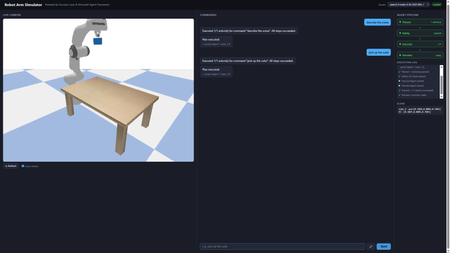
A hands-on guide to building real-world AI automation with Foundry Local, the Microsoft Agent Framework, and PyBullet. No cloud subscription, no API keys, no internet required. Why Developers Should Care About Offline AI Imagine telling a robot arm to "pick up the cube" and watching it execute the command in a physics simulator, all powered by a language model running on your laptop. No API calls leave your machine. No token costs accumulate. No internet connection is needed. That is what this project delivers, and every piece of it is open source and ready for you to fork, extend, and experiment with. Most AI demos today lean on cloud endpoints. That works for prototypes, but it introduces latency, ongoing costs, and data privacy concerns. For robotics and industrial automation, those trade-offs are unacceptable. You need inference that runs where the hardware is: on the factory floor, in the lab, or on your development machine. Foundry Local gives you an OpenAI-compatible endpoint running entirely on-device. Pair it with a multi-agent orchestration framework and a physics engine, and you have a complete pipeline that translates natural language into validated, safe robot actions. This post walks through how we built it, why the architecture works, and how you can start experimenting with your own offline AI simulators today. Architecture The system uses four specialised agents orchestrated by the Microsoft Agent Framework: Agent What It Does Speed PlannerAgent Sends user command to Foundry Local LLM → JSON action plan 4–45 s SafetyAgent Validates against workspace bounds + schema < 1 ms ExecutorAgent Dispatches actions to PyBullet (IK, gripper) < 2 s NarratorAgent Template summary (LLM opt-in via env var) < 1 ms User (text / voice) │ ▼ ┌──────────────┐ │ Orchestrator │ └──────┬───────┘ │ ┌────┴────┐ ▼ ▼ Planner Narrator │ ▼ Safety │ ▼ Executor │ ▼ PyBullet Setting Up Foundry Local from foundry_local import FoundryLocalManager import openai manager = FoundryLocalManager("qwen2.5-coder-0.5b") client = openai.OpenAI( base_url=manager.endpoint, api_key=manager.api_key, ) resp = client.chat.completions.create( model=manager.get_model_info("qwen2.5-coder-0.5b").id, messages=[{"role": "user", "content": "pick up the cube"}], max_tokens=128, stream=True, ) from foundry_local import FoundryLocalManager import openai manager = FoundryLocalManager("qwen2.5-coder-0.5b") client = openai.OpenAI( base_url=manager.endpoint, api_key=manager.api_key, ) resp = client.chat.completions.create( model=manager.get_model_info("qwen2.5-coder-0.5b").id, messages=[{"role": "user", "content": "pick up the cube"}], max_tokens=128, stream=True, ) The SDK auto-selects the best hardware backend (CUDA GPU → QNN NPU → CPU). No configuration needed. How the LLM Drives the Simulator Understanding the interaction between the language model and the physics simulator is central to the project. The two never communicate directly. Instead, a structured JSON contract forms the bridge between natural language and physical motion. From Words to JSON When a user says “pick up the cube”, the PlannerAgent sends the command to the Foundry Local LLM alongside a compact system prompt. The prompt lists every permitted tool and shows the expected JSON format. The LLM responds with a structured plan: { "type": "plan", "actions": [ {"tool": "describe_scene", "args": {}}, {"tool": "pick", "args": {"object": "cube_1"}} ] } The planner parses this response, validates it against the action schema, and retries once if the JSON is malformed. This constrained output format is what makes small models (0.5B parameters) viable: the response space is narrow enough that even a compact model can produce correct JSON reliably. From JSON to Motion Once the SafetyAgent approves the plan, the ExecutorAgent maps each action to concrete PyBullet calls: move_ee(target_xyz) : The target position in Cartesian coordinates is passed to PyBullet's inverse kinematics solver, which computes the seven joint angles needed to place the end-effector at that position. The robot then interpolates smoothly from its current joint state to the target, stepping the physics simulation at each increment. pick(object) : This triggers a multi-step grasp sequence. The controller looks up the object's position in the scene, moves the end-effector above the object, descends to grasp height, closes the gripper fingers with a configurable force, and lifts. At every step, PyBullet resolves contact forces and friction so that the object behaves realistically. place(target_xyz) : The reverse of a pick. The robot carries the grasped object to the target coordinates and opens the gripper, allowing the physics engine to drop the object naturally. describe_scene() : Rather than moving the robot, this action queries the simulation state and returns the position, orientation, and name of every object on the table, along with the current end-effector pose. The Abstraction Boundary The critical design choice is that the LLM knows nothing about joint angles, inverse kinematics, or physics. It operates purely at the level of high-level tool calls ( pick , move_ee ). The ActionExecutor translates those tool calls into the low-level API that PyBullet provides. This separation means the LLM prompt stays simple, the safety layer can validate plans without understanding kinematics, and the executor can be swapped out without retraining or re-prompting the model. Voice Input Pipeline Voice commands follow three stages: Browser capture: MediaRecorder captures audio, client-side resamples to 16 kHz mono WAV Server transcription: Foundry Local Whisper (ONNX, cached after first load) with automatic 30 s chunking Command execution: transcribed text goes through the same Planner → Safety → Executor pipeline The mic button (🎤) only appears when a Whisper model is cached or loaded. Whisper models are filtered out of the LLM dropdown. Web UI in Action Pick command Describe command Move command Reset command Performance: Model Choice Matters Model Params Inference Pipeline Total qwen2.5-coder-0.5b 0.5 B ~4 s ~5 s phi-4-mini 3.6 B ~35 s ~36 s qwen2.5-coder-7b 7 B ~45 s ~46 s For interactive robot control, qwen2.5-coder-0.5b is the clear winner: valid JSON for a 7-tool schema in under 5 seconds. The Simulator in Action Here is the Panda robot arm performing a pick-and-place sequence in PyBullet. Each frame is rendered by the simulator's built-in camera and streamed to the web UI in real time. Overview Reaching Above the cube Gripper detail Front interaction Side layout Get Running in Five Minutes You do not need a GPU, a cloud account, or any prior robotics experience. The entire stack runs on a standard development machine. # 1. Install Foundry Local winget install Microsoft.FoundryLocal # Windows brew install foundrylocal # macOS # 2. Download models (one-time, cached locally) foundry model run qwen2.5-coder-0.5b # Chat brain (~4 s inference) foundry model run whisper-base # Voice input (194 MB) # 3. Clone and set up the project git clone https://github.com/leestott/robot-simulator-foundrylocal cd robot-simulator-foundrylocal .\setup.ps1 # or ./setup.sh on macOS/Linux # 4. Launch the web UI python -m src.app --web --no-gui # → http://localhost:8080 Once the server starts, open your browser and try these commands in the chat box: "pick up the cube": the robot grasps the blue cube and lifts it "describe the scene": returns every object's name and position "move to 0.3 0.2 0.5": sends the end-effector to specific coordinates "reset": returns the arm to its neutral pose If you have a microphone connected, hold the mic button and speak your command instead of typing. Voice input uses a local Whisper model, so your audio never leaves the machine. Experiment and Build Your Own The project is deliberately simple so that you can modify it quickly. Here are some ideas to get started. Add a new robot action The robot currently understands seven tools. Adding an eighth takes four steps: Define the schema in TOOL_SCHEMAS ( src/brain/action_schema.py ). Write a _do_<tool> handler in src/executor/action_executor.py . Register it in ActionExecutor._dispatch . Add a test in tests/test_executor.py . For example, you could add a rotate_ee tool that spins the end-effector to a given roll/pitch/yaw without changing position. Add a new agent Every agent follows the same pattern: an async run(context) method that reads from and writes to a shared dictionary. Create a new file in src/agents/ , register it in orchestrator.py , and the pipeline will call it in sequence. Ideas for new agents: VisionAgent: analyse a camera frame to detect objects and update the scene state before planning. CostEstimatorAgent: predict how many simulation steps an action plan will take and warn the user if it is expensive. ExplanationAgent: generate a step-by-step natural language walkthrough of the plan before execution, allowing the user to approve or reject it. Swap the LLM python -m src.app --web --model phi-4-mini Or use the model dropdown in the web UI; no restart is needed. Try different models and compare accuracy against inference speed. Smaller models are faster but may produce malformed JSON more often. Larger models are more accurate but slower. The retry logic in the planner compensates for occasional failures, so even a small model works well in practice. Swap the simulator PyBullet is one option, but the architecture does not depend on it. You could replace the simulation layer with: MuJoCo: a high-fidelity physics engine popular in reinforcement learning research. Isaac Sim: NVIDIA's GPU-accelerated robotics simulator with photorealistic rendering. Gazebo: the standard ROS simulator, useful if you plan to move to real hardware through ROS 2. The only requirement is that your replacement implements the same interface as PandaRobot and GraspController . Build something completely different The pattern at the heart of this project (LLM produces structured JSON, safety layer validates, executor dispatches to a domain-specific engine) is not limited to robotics. You could apply the same architecture to: Home automation: "turn off the kitchen lights and set the thermostat to 19 degrees" translated into MQTT or Zigbee commands. Game AI: natural language control of characters in a game engine, with the safety agent preventing invalid moves. CAD automation: voice-driven 3D modelling where the LLM generates geometry commands for OpenSCAD or FreeCAD. Lab instrumentation: controlling scientific equipment (pumps, stages, spectrometers) via natural language, with the safety agent enforcing hardware limits. From Simulator to Real Robot One of the most common questions about projects like this is whether it could control a real robot. The answer is yes, and the architecture is designed to make that transition straightforward. What Stays the Same The entire upper half of the pipeline is hardware-agnostic: The LLM planner generates the same JSON action plans regardless of whether the target is simulated or physical. It has no knowledge of the underlying hardware. The safety agent validates workspace bounds and tool schemas. For a real robot, you would tighten the bounds to match the physical workspace and add checks for obstacle clearance using sensor data. The orchestrator coordinates agents in the same sequence. No changes are needed. The narrator reports what happened. It works with any result data the executor returns. What Changes The only component that must be replaced is the executor layer, specifically the PandaRobot class and the GraspController . In simulation, these call PyBullet's inverse kinematics solver and step the physics engine. On a real robot, they would instead call the hardware driver. For a Franka Emika Panda (the same robot modelled in the simulation), the replacement options include: libfranka: Franka's C++ real-time control library, which accepts joint position or torque commands at 1 kHz. ROS 2 with MoveIt: A robotics middleware stack that provides motion planning, collision avoidance, and hardware abstraction. The move_ee action would become a MoveIt goal, and the framework would handle trajectory planning and execution. Franka ROS 2 driver: Combines libfranka with ROS 2 for a drop-in replacement of the simulation controller. The ActionExecutor._dispatch method maps tool names to handler functions. Replacing _do_move_ee , _do_pick , and _do_place with calls to a real robot driver is the only code change required. Key Considerations for Real Hardware Safety: A simulated robot cannot cause physical harm; a real robot can. The safety agent would need to incorporate real-time collision checking against sensor data (point clouds from depth cameras, for example) rather than relying solely on static workspace bounds. Perception: In simulation, object positions are known exactly. On a real robot, you would need a perception system (cameras with object detection or fiducial markers) to locate objects before grasping. Calibration: The simulated robot's coordinate frame matches the URDF model perfectly. A real robot requires hand-eye calibration to align camera coordinates with the robot's base frame. Latency: Real actuators have physical response times. The executor would need to wait for motion completion signals from the hardware rather than stepping a simulation loop. Gripper feedback: In PyBullet, grasp success is determined by contact forces. A real gripper would provide force or torque feedback to confirm whether an object has been securely grasped. The Simulation as a Development Tool This is precisely why simulation-first development is valuable. You can iterate on the LLM prompts, agent logic, and command pipeline without risk to hardware. Once the pipeline reliably produces correct action plans in simulation, moving to a real robot is a matter of swapping the lowest layer of the stack. Key Takeaways for Developers On-device AI is production-ready. Foundry Local serves models through a standard OpenAI-compatible API. If your code already uses the OpenAI SDK, switching to local inference is a one-line change to base_url . Small models are surprisingly capable. A 0.5B parameter model produces valid JSON action plans in under 5 seconds. For constrained output schemas, you do not need a 70B model. Multi-agent pipelines are more reliable than monolithic prompts. Splitting planning, validation, execution, and narration across four agents makes each one simpler to test, debug, and replace. Simulation is the safest way to iterate. You can refine LLM prompts, agent logic, and tool schemas without risking real hardware. When the pipeline is reliable, swapping the executor for a real robot driver is the only change needed. The pattern generalises beyond robotics. Structured JSON output from an LLM, validated by a safety layer, dispatched to a domain-specific engine: that pattern works for home automation, game AI, CAD, lab equipment, and any other domain where you need safe, structured control. You can start building today. The entire project runs on a standard laptop with no GPU, no cloud account, and no API keys. Clone the repository, run the setup script, and you will have a working voice-controlled robot simulator in under five minutes. Ready to start building? Clone the repository, try the commands, and then start experimenting. Fork it, add your own agents, swap in a different simulator, or apply the pattern to an entirely different domain. The best way to learn how local AI can solve real-world problems is to build something yourself. Source code: github.com/leestott/robot-simulator-foundrylocal Built with Foundry Local, Microsoft Agent Framework, PyBullet, and FastAPI.Strategic Solutions for Seamless Integration of Third-Party SaaS
Modern systems must be modular and interoperable by design. Integration is no longer a feature, it’s a requirement. Developers are expected to build architectures that connect easily with third-party platforms, but too often, core systems are designed in isolation. This disconnect creates friction for downstream teams and slows delivery. At Microsoft, SaaS platforms like SAP SuccessFactors and Eightfold support Talent Acquisition by handling functions such as requisition tracking, application workflows, and interview coordination. These tools help reduce costs and free up engineering focus for high-priority areas like Azure and AI. The real challenge is integrating them with internal systems such as Demand Planning, Offer Management, and Employee Central. This blog post outlines a strategy centered around two foundational components: an Integration and Orchestration Layer, and a Messaging Platform. Together, these enable real-time communication, consistent data models, and scalable integration. While Talent Acquisition is the use case here, the architectural patterns apply broadly across domains. Whether you're embedding AI pipelines, managing edge deployments, or building platform services, thoughtful integration needs to be built into the foundation, not bolted on later.