azure databricks
7 TopicsHow to Secure Azure Databricks without Public Exposure using WAF + Private Endpoints
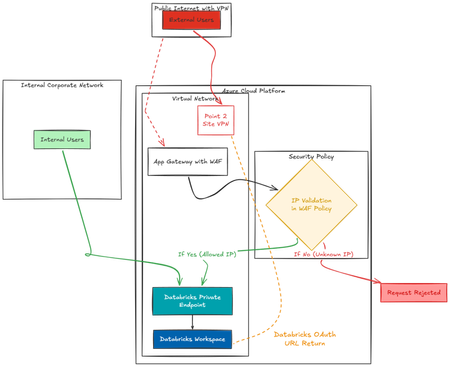
This blog outlines a Zero Trust–aligned architecture for securing Azure Databricks using Application Gateway (WAF) and Private Endpoints within a Hub-Spoke network model. Enables a true Zero Trust model, ensuring: No direct exposure of Databricks Full traffic inspection Compliance-ready secure access for both internal and external users Integration of Azure P2S to cater the Databricks OAuth URL.2.8KViews1like2Comments
Designing a Medallion Framework — A Decision Guide
Everyone draws the same picture: Bronze → Silver → Gold. Three boxes, three arrows. Done. What that picture hides is the dozen design decisions you have to make inside each box — and the ones you make at the boundaries between them. Get those right and onboarding the 200th table feels like onboarding the 2nd. Get them wrong and you’ll be rewriting the framework in 18 months. This post is a generic walkthrough of how to think about a medallion framework on Databricks (or any other platform): what each layer should own, where the responsibilities blur, and a few opinionated patterns I’ve found worth defending The classic template - Bronze → Silver → Gold. Three layers, broadly: Press enter or click to view image in full size This template is intentionally vague — and that’s the point. The same three labels can describe a framework for a 10-table marketing pipeline and a 2,000-table enterprise lakehouse. The differences are in how you tweak the template to match your project. This post walks through the questions that drive those tweaks. There isn’t a single right answer for any of them — only the answer that fits your project’s requirements. How to read this guide For each architectural choice, I’ll frame it as: The question — the requirement you need to clarify The options — the realistic ways to answer it When each option fits — what kind of project picks which option Use this to make your tradeoffs explicit. Document the answers in your design doc. They’ll inform a hundred downstream decisions. Question 1 — Do you need a Staging layer? A Staging (stg_*) layer is a transient zone that holds just the current run’s data before it lands in Bronze. Options: No staging. Source → Bronze directly. Staging as a transient table per object, overwritten every run. Staging as a checkpointed zone (e.g., Auto Loader checkpoints + raw files in a landing path). When to pick which: The decision usually comes down to failure isolation and incremental capture clarity. If both are non-issues, you can skip it. Question 2 — How “raw” should Bronze be? This is the single biggest tweak point in the medallion architecture. The textbook says “Bronze = raw bytes.” Real projects often deviate. Options: A. Strictly raw. Source schema preserved exactly. All columns as STRING. No casting, no trimming. B. Lightly cleaned. Strong typing, whitespace trimmed, null normalization (“”, “N/A” → NULL), audit columns added. Schema stable. C. Cleansed + minor enrichment. Above plus reference data lookups, basic standardization (e.g., country codes), key normalization. When to pick which: A useful rule of thumb: the more sources and consumers you have, the cleaner Bronze should be. The cost of not cleaning compounds with every notebook downstream. If you choose B or C, you’ve shifted some traditional Silver responsibilities into Bronze. That’s fine — just be explicit about it so Silver’s contract changes accordingly. Question 3 — What does Silver actually own? Silver is the most overloaded layer in any medallion framework. Decide upfront which of these responsibilities Silver owns vs. defers to other layers: How to decide what Silver owns: If Silver is the only layer business users query, give it more — including light history and aggregations. (Common in smaller projects.) If you have a strong Gold layer with multiple marts, keep Silver narrow: business entities only, current state. If you have multiple consuming teams with different needs, push everything consumer-specific to Gold and keep Silver as the shared canonical model. The clearest signal that Silver is overloaded: you have one Silver table per source table. Silver should be organized by business entity, not by source. If they line up 1:1, you’ve effectively built “Bronze with cleaning” and skipped Silver’s real value. Question 4 — Is Gold one zone or several? The default picture shows Gold as one box. In real projects it often splits. Options: Single Gold zone. Marts and history live together. Gold-Reporting + Gold-History. Reporting marts (denormalized, aggregated, fast) separated from historized snapshots (SCD2, point-in-time, append-mostly). Gold per consumer. Separate zones per business unit, dashboard family, or external API. The cost of splitting Gold is some duplication and more pipelines. The benefit is independent SLAs — your dashboard refresh isn’t held hostage by your audit history rebuild. Question 5 — Load patterns: FullLoad vs DeltaLoad vs CDC Per source table, decide the load pattern. This decision drives staging design, watermark management, and merge logic. It’s normal to mix patterns inside the same framework. The metadata-driven approach below makes this trivial — load pattern is just a column in your config table. Question 6 — How metadata-driven should the framework be? Options: Code-per-table. One notebook per ingestion. Simple, easy to reason about, scales poorly. Hybrid. Generic ingestion notebooks for common patterns, custom notebooks for exceptions. Fully metadata-driven. Generic notebooks for every layer, behavior driven entirely by metadata tables. When to pick which: A fully metadata-driven framework has higher upfront cost but flattens the per-table cost dramatically. The break-even point is usually around 30–50 tables. Question 7 — Orchestration shape How do you fan out work across tables? Options: Sequential. One table at a time. Simple, slow. Parallel pool. ThreadPoolExecutor or Databricks Workflows fan-out. Tables run concurrently, no inter-table dependencies. DAG. Dependency-aware execution. Required when tables depend on each other. Per-layer guidance: The decision driver is whether tables in that layer depend on each other. If they don’t, don’t pay the DAG complexity tax. Question 8 — Failure handling and retries Options to decide on: Retry scope. Per statement, per child notebook, per master run, none. Retry counts. Per layer? Per table? Per environment? Backoff. Fixed, linear, exponential. Failure semantics. Fail-fast (stop on first failure) or best-effort (continue and report at the end). When to pick which: A good default for most projects: process-level retry (master retries the failed child), exponential backoff, per-layer max retry count, fail-fast within a child. Question 9 — Observability: how much do you log? Decide what every run captures: Execution status, start/end timestamps, duration Row counts per activity (source read, staging write, target write) MERGE metrics (inserted, updated, deleted) Watermark used and watermark captured Retry attempts Error message (truncated) Options for storage: Logs in source-side metadata DB (e.g., Azure SQL). Easy to query with SQL, integrates with monitoring tools. Logs in a Delta table in the lakehouse. Native to Databricks, queryable with Spark. Logs in both. Source-side for ops dashboards, Delta for analytics on the pipeline itself. When to pick which: Whatever you pick, make count validation a first-class output. The moment counts mismatch, you want to know — not three reports later. Question 10 — Schema evolution policy The cheapest decision to defer and the most painful one to retrofit. Decide which changes are allowed automatically: Where to enforce: At Bronze ingestion — fail loudly if source schema changes in a disallowed way At Silver — handle by transformation; new Bronze columns don’t auto-flow to Silver At Gold — strict contracts; consumers depend on the shape The contract changes per layer reflects the audience. Bronze is forgiving (data engineers see issues); Gold is strict (consumers can’t tolerate surprises). Question 11 — Idempotency and replay Can you re-run yesterday’s load and get the same result? Options: Idempotent by run_id. Re-running the same run_id is a no-op or produces identical output. Idempotent by data. Re-running with the same source data produces identical output (regardless of run_id). Non-idempotent. Replays may produce different results (e.g., timestamps based on current_timestamp()). Recommendation: aim for data-idempotent in every layer. Concretely: Staging: overwrite-per-run → idempotent by construction. Bronze: keyed MERGE → idempotent. Silver: pure transformation of Bronze inputs → idempotent. Gold: pure transformation of Silver inputs → idempotent. If you can’t replay a layer cleanly, that’s a design bug worth fixing early. Question 12 — Environment topology How many environments? How do they differ? Common patterns: Dev / Test/ Stage / Prod, separate workspaces and data. Per-developer dev, shared Test/Stage, isolated Prod. What changes between environments (drive these from config): Source connection strings Target storage paths / catalog names Retry counts (often higher in prod) Parallelism (often lower in dev to save cost) Logging verbosity Data masking rules Keep code identical across environments. Differences live in environment-scoped config (dev.yml, test.yml, stage.yml, prod.yml) loaded at runtime. Putting it together — three example shapes The same framework, three different projects, three different shapes: Shape A — Small marketing analytics project 15 tables, single source, weekly batch No staging — source is reliable, volumes small Bronze: lightly cleaned — analysts query it directly Silver: full ownership including light history and aggregations (no separate Gold needed) Gold: optional, only for the executive dashboard Code-per-table, sequential orchestration, fail-fast, minimal logging Shape B — Mid-size enterprise data platform 80 tables, 5 source systems, daily batch with some hourly Staging as transient table for Delta Loads Bronze: lightly cleaned + audit columns Silver: business entities (Customer, Policy, Claim), DAG orchestration Gold: split into Reporting + History zones Hybrid metadata-driven (generic ingestion, custom transforms), per-layer retry, structured count logs Shape C — Large multi-tenant Lakehouse 500+ tables, 20+ source systems, mixed batch/streaming Staging zone with file-level checkpoints (Auto Loader) Bronze: strictly raw + a parallel Bronze-Curated layer for cleansed views Silver: shared canonical model, narrow scope Gold: per-consumer zones with independent SLAs Fully metadata-driven, DAG everywhere, multi-store logging, strict schema contracts Notice none of these are “wrong.” They’re calibrated to the project. A short checklist for your own framework Before writing code, write down your answers to: Do we need a Staging layer? Why? How clean is Bronze? What’s allowed and what’s not? What does Silver own? Where does it stop? Is Gold one zone or multiple? How are they divided? Which load patterns do we support? Per table or universal? How metadata-driven? Where do exceptions live? What’s the orchestration shape per layer? What’s our retry and failure policy per layer? What does every run log? Where? What’s our schema evolution policy per layer? Are all layer's data-idempotent? What changes per environment, and what stays the same? If you have an answer for each, you have a framework design. If you skip any, you have a framework that will surprise you in production. Closing thought The medallion architecture isn’t a prescription — it’s a vocabulary. Bronze, Silver, Gold give you words to describe responsibilities. The actual responsibilities are yours to assign, based on what your project actually needs. Tweak deliberately. Document your tweaks. And revisit them when the project’s requirements change — because they will.934Views1like0CommentsHow Azure NetApp Files Object REST API powers Azure and ISV Data and AI services – on YOUR data
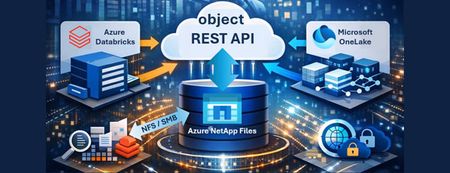
This article introduces the Azure NetApp Files Object REST API, a transformative solution for enterprises seeking seamless, real-time integration between their data and Azure's advanced analytics and AI services. By enabling direct, secure access to enterprise data—without costly transfers or duplication—the Object REST API accelerates innovation, streamlines workflows, and enhances operational efficiency. With S3-compatible object storage support, it empowers organizations to make faster, data-driven decisions while maintaining compliance and data security. Discover how this new capability unlocks business potential and drives a new era of productivity in the cloud.1.6KViews0likes0CommentsSecuring A Multi-Agent AI Solution Focused on User Context & the Complexities of On-Behalf-Of.
How we built an enterprise-grade multi-agent system that preserves user identity across AI agents and Databricks Introduction When building AI-powered applications for the enterprise, a common challenge emerges: how do you maintain user identity and access controls when an AI agent queries backend services on behalf of a user? In many implementations, AI agents authenticate to backend systems using a shared service account or with PAT (Personal Access Token) tokens, effectively bypassing row-level security (RLS), column masking, and other data governance policies that organizations carefully configure. This creates a security gap where users can potentially access data they shouldn’t see, simply by asking an AI agent. In this post, I’ll walk through how we solved this challenge for a current enterprise customer by implementing Microsoft Entra ID On-Behalf-Of (OBO) secure flow in a custom multi-agent LangGraph solution, enabling our Databricks Genie agent to query data and the data agent designed to modify or update delta tables, to do so as the authenticated user, while preserving all RBAC policies. The Architecture Our system is built on several key components: Chainlit: Python-based web interface for LLM-driven conversational applications, integrated with OAuth 2.0–based authentication. Customizing the framework to satisfy customer UI requirements eliminated the need to develop and maintain a bespoke React front end. It fulfilled the majority of requirements while reducing maintenance overhead. Azure App Service - Managed hosting with built-in authentication support and autoscaling LangGraph: Opensource Multi-agent orchestration framework. Azure Databricks Genie: Natural language to SQL agent. Azure Cosmos DB: Long-term memory and checkpoint storage. Microsoft Entra ID: Identity provider with OBO support. This shows: Genie: Read-only natural language queries, per-user OBO Task Agent: Handles sensitive operations (SQL modifications, etc.) with HITL approval + OBO Memory: Shared agent, no per-user auth needed The Problem with Chainlit OAuth Provider Chainlit was integrated with Microsoft Entra ID for OAuth authentication; however, the default implementation assumes Microsoft Graph scopes, requiring extension to support custom resource scopes. This means: The access token you receive is scoped for Microsoft Graph API You can’t use it for OBO flow to downstream services like Databricks The token’s audience is graph.microsoft.com, not your application For OBO to work, you need an access token where: The audience is your application’s client ID The scope includes your custom API permission (e.g., api://{client_id}/access_as_user) Solution: Custom Entra ID OBO Provider We created a custom OAuth provider that replaces Chainlit’s built-in one. Key insight: By requesting api://{client_id}/access_as_user as the scope, the returned access token has the correct audience for OBO exchange. Since we can’t call Graph API with this token (wrong audience), we extract user information from the ID token claims instead. The OBO Token Exchange Once we have the user’s access token (with correct audience), we exchange it for a Databricks-scoped token using MSAL. The resulting token: Has audience = Databricks resource ID Contains the user’s identity (UPN, OID) Can be used with Databricks SDK/API Respects all Unity Catalog permissions configured for that user Per-User Agent Creation A critical design decision: never cache user-specific agents globally. Each user needs their own Genie agent instance. Using the OBO Token with Databricks Genie The key integration point is passing the OBO-acquired token to the Databricks SDK’s WorkspaceClient as indicated in the above screenshot, which the Genie agent uses internally for all API calls as shown in the following image. Initialize Genie Agent with User’s Access Token: Wire It Into LangGraph: The user_access_token flows from Chainlit’s OAuth callback → session config → LangGraph config → agent creation, ensuring every Genie query runs with the authenticated user’s permissions. Human-in-the-Loop for Destructive SQL Operations While Databricks Genie handles natural language queries (read-only), our system also supports custom SQL execution for data modifications. Since these operations can DELETE or UPDATE data, we implement human-in-the-loop approval using LangGraph’s interrupt feature. The OBO token ensures that even when executing user-authored SQL, the query runs with the user’s permissions: they can only modify data they’re authorized to change. The destructive operation detector uses LLM-based intent analysis Entra ID App Registration Requirements Your Entra ID app registration needs: API Permissions: Azure Databricks → user_impersonation (admin consent required) Expose an API: Scope access_as_user on URI api://{client-id} Redirect URI: {your-app-url}/auth/oauth/azure-ad/callback Lessons Learned Token audience matters: OBO fails if your initial token has the wrong audience Don’t cache user-specific clients: breaks user isolation ID tokens contain user info: use claims when you can’t call Graph API HITL for destructive ops: even with RBAC, require explicit user confirmation Conclusion By implementing Entra ID OBO flow in our multi-agent system, we achieved: User identity preservation across AI agents RBAC enforcement at the Databricks/Unity Catalog level Audit trail showing actual user making queries Zero-trust architecture: the AI agent never has more access than the user Human-in-the-loop for destructive SQL operations This approach enables any organization building AI systems that supports OAuth 2.0 to participate in an on‑behalf‑of (OBO) flow. More importantly, it establishes a critical layer of AI governance for enterprise‑grade, custom multi‑agent solutions, aligning with Microsoft’s Secure Future Initiative (SFI) and Zero Trust principles. As organizations accelerate toward multi‑agent AI architectures and broader AI transformation, centralized services that standardize identity, authorization, and user delegation become foundational. Capabilities such as Microsoft Entra Agent ID and Azure AI Foundry are emerging precisely to address this need - enabling secure, scalable, and user‑context–aware agent interactions. In the next post, I’ll shift the lens from architecture to outcomes - examining what this foundation means from a CXO perspective, and why identity‑first AI governance is quickly becoming a board‑level concern.1.7KViews2likes0CommentsUnlocking Advanced Data Analytics & AI with Azure NetApp Files object REST API
Azure NetApp Files object REST API enables object access to enterprise file data stored on Azure NetApp Files, without copying, moving, or restructuring that data. This capability allows analytics and AI platforms that expect object storage to work directly against existing NFS based datasets, while preserving Azure NetApp Files’ performance, security, and governance characteristics.1.3KViews0likes0CommentsHow Great Engineers Make Architectural Decisions — ADRs, Trade-offs, and an ATAM-Lite Checklist
Why Decision-Making Matters Without a shared framework, context fades and teams' re-debate old choices. ADRs solve that by recording the why behind design decisions — what problem we solved, what options we considered, and what trade-offs we accepted. A good ADR: Lives next to the code in your repo. Explains reasoning in plain language. Survives personnel changes and version history. Think of it as your team’s engineering memory. The Five Pillars of Trade-offs At Microsoft, we frame every major design discussion using the Azure Well-Architected pillars: Reliability – Will the system recover gracefully from failures? Performance Efficiency – Can it meet latency and throughput targets? Cost Optimization – Are we using resources efficiently? Security – Are we minimizing blast radius and exposure? Operational Excellence – Can we deploy, monitor, and fix quickly? No decision optimizes all five. Great engineers make conscious trade-offs — and document them. A Practical Decision Flow Step What to Do Output 1. Frame It Clarify the problem, constraints, and quality goals (SLOs, cost caps). Problem statement 2. List Options Identify 2-4 realistic approaches. Options list 3. Score Trade-offs Use a Decision Matrix to rate options (1–5) against pillars. Table of scores 4. ATAM-Lite Review List scenarios, identify sensitivity points (small changes with big impact) and risks. Risk notes 5. Record It as an ADR Capture everything in one markdown doc beside the code. ADR file Example: Adding a Read-Through Cache Decision: Add a Redis cache in front of Cosmos DB to reduce read latency. Context: Average P95 latency from DB is 80 ms; target is < 15 ms. Options: A) Query DB directly B) Add read-through cache using Redis Trade-offs Performance: + Massive improvement in read speed. Cost: + Fewer RU/s on Cosmos DB. Reliability: − Risk of stale data if cache invalidation fails. Operational: + Added complexity for monitoring and TTLs. Templates You Can Re-use ADR Template # ADR-001: Add Read-through Cache in Front of Cosmos DB Status: Accepted Date: 2025-10-21 Context: High read latency; P95 = 80ms, target <15ms Options: A) Direct DB reads B) Redis cache for hot keys ✅ Decision: Adopt Redis cache for performance and cost optimization. Consequences: - Improved read latency and reduced RU/s cost - Risk of data staleness during cache invalidation - Added operational complexity Links: PR#3421, Design Doc #204, Azure Monitor dashboard Decision Matrix Example Pillar Weight Option A Option B Notes Reliability 5 3 4 Redis clustering handles failover Performance 4 2 5 In-memory reads Cost 3 4 5 Reduced RU/s Security 4 4 4 Same auth posture Operational Excellence 3 4 3 More moving parts Weighted total = Σ(weight × score) → best overall score wins. Team Guidelines Create a /docs/adr folder in each repo. One ADR per significant change; supersede old ones instead of editing history. Link ADRs in design reviews and PRs. Revisit when constraints change (incidents, new SLOs, cost shifts). Publish insights as follow-up blogs to grow shared knowledge. Why It Works This practice connects the theory of trade-offs with Microsoft’s engineering culture of reliability and transparency. It improves onboarding, enables faster design reviews, and builds a traceable record of engineering evolution. Join the Conversation Have you tried ADRs or other decision frameworks in your projects? Share your experience in the comments or link to your own public templates — let’s make architectural reasoning part of our shared language.1.4KViews1like0Comments