azure databricks
18 TopicsThe Gap Between Applications and Analytics, and "How Lakebase Solves It"
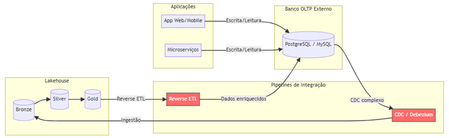
The Problem Nobody Likes to Admit. Imagine this scenario: your data team has built a flawless lakehouse. Ingest pipelines, bronze/silver/gold tiers, gleaming dashboards. Everything is working perfectly. Until someone asks: "And the production app? Where does it store the transactional data?" That's where the headache begins. You need a separate OLTP database (Postgres, MySQL, DynamoDB...), CDC pipelines to bring data into the lakehouse, reverse ETL to return enriched data to the app, and an infrastructure team to keep it all running. The result? Data silos, synchronization latency, operational complexity, and ever-increasing costs. Traditional Architecture (and Its Pain Points) Here's how most companies operate today: Pain points in this architecture: Multiple tools and suppliers for managing Significant latency between writing on OLTP and availability on Lakehouse. Fragmented governance — Unity Catalog doesn't see the external bank. High operational costs associated with synchronization pipelines. What is Lakebase? Lakebase is a fully managed Postgres database natively integrated with the Databricks Data Intelligence Platform. It is designed to bridge the gap between transactional (OLTP) and analytical (OLAP) workloads, unifying everything into a single ecosystem . In simple terms: it's like having a high-performance Postgres server living inside your lakehouse , with unified governance via Unity Catalog, native bidirectional synchronization, and modern capabilities such as autoscaling, scale-to-zero, and database branching. The New Architecture with Lakebase: What changes? Zero external database infrastructure Native bidirectional synchronization (no Debezium, no Airflow, no pain) Unified governance through the Unity Catalog A single control plane for OLTP + OLAP The Architectural Innovations of Lakebase Lakebase is not "just another managed Postgres." It brings modern data engineering concepts to the transactional world. 1. Separation of Compute and Storage Unlike traditional data banks where CPU and disk are coupled, Lakebase completely separates computing resources from storage. This means you scale each independently, paying only for what you use. 2. Copy-on-Write Storage The storage system uses a copy-on-write approach. In practice, when you create a branch of the database, there is no data duplication —only the changes are stored separately. This makes operations like branching and restoring virtually instantaneous. 3. Autoscaling and Scale-to-Zero The compute system automatically adjusts its capacity based on demand. During periods of inactivity, the database scales to zero , eliminating costs. When a request arrives, it "wakes up" in seconds. Database Branching: Git for Your Data This is probably the most innovative feature. Just as developers create branches in Git to work on isolated features, Lakebase allows you to create branches for the entire database . Powerful use cases: Development : each developer has their own branch of the database, without interfering with production. Migration testing : test schema changes in an isolated branch before applying them to production. Instant Restore : Restore the database to any point in time (configurable window from 0 to 30 days) by creating a branch from that point. Two-Way Synchronization: The End of Reverse ETL One of the biggest advantages is the native synchronization between Lakehouse and Lakebase: Synced Tables (Lakehouse → Lakebase) Unity Catalog tables are automatically synchronized to Lakebase, allowing applications to query rich analytical data with low latency. Supports Snapshot, Triggered, and Continuous modes. Lakehouse Sync (Lakebase → Lakehouse) Transactional data from Lakebase is continuously replicated to Delta tables in the Unity Catalog using Change Data Capture (CDC). The destination tables follow the SCD Type 2 standard , maintaining a complete history of changes. This completely eliminates the need for: External CDC tools (Debezium, Fivetran) Reverse ETL pipelines (Census, Hightouch) Custom synchronization jobs in Airflow/Prefect Three Strategic Use Cases Feature Serving for Real-Time ML Lakebase functions as an online store for Databricks' Feature Store. Features computed in the lakehouse are synchronized via Synced Tables to Lakebase, from where ML models query them with millisecond latency. State of AI Agents AI agents need to persist state between requests — conversation context, action history, workflow data. Lakebase provides a native transactional database to store this state with ACID consistency. Transactional Data for Applications Databricks Apps (or any external application) can use Lakebase as their primary database. The integration is native: simply add the Lakebase project as a resource in your app. Additionally, the Data API offers a PostgREST-compatible REST interface for direct HTTP access. Comparison: Before and After Availability Lakebase Autoscaling is available in the following AWS regions: us-east-1, us-east-2,us-west-2 ca-central-1, sa-east-1 eu-central-1, eu-west-1,eu-west-2 ap-south-1, ap-southeast-1,ap-southeast-2 The presence in sa-east-1 is particularly relevant for us in the Brazilian community, ensuring low latency for applications hosted in Brazil. Conclusion Lakebase represents a paradigm shift: instead of treating OLTP and OLAP as separate worlds that need complex "bridges," it unifies them into a single platform. For Brazilian data teams, this means: Fewer tools to manage and integrate. Fewer pipelines that silently break down at 3 a.m. More time focused on generating value with data. Real governance across the entire data lifecycle — from transactional writing to the executive dashboard. Lakehouse finally has its native transactional database. And it speaks Postgres. This post was inspired by concepts from the official Databricks documentation. For more technical details, please refer to the Lakebase documentation . Wiliam Rosa Data Engineer | Machine Learning Engineer linkedin.com/in/wiliamrosa Blog: https://wiliamrosa.github.io500Views1like3Comments
Workspace failure
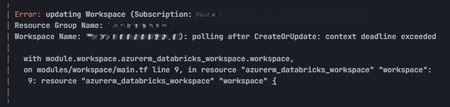
Hi Community, I had my Databricks workspace up and running and it was managed through terraform, and encryption was enabled through cmk, there were some updation in the code, so I put terraform plan, one of the key changes(replace) it showed me was "azurerm_role_assignment.storage_identity_kv_access module.workspace.azurerm_role_assignment.storage_identity_kv_access" the terraform run was running for 30 min, and the workspace was in deployment for long time and then ultimately got failed. Again, as all the changes were not done, I reapplied, and I got this error "Performing CreateOrUpdate: unexpected status 400 (400 Bad Request ) With error: InvalidEncryptionConfiguration: Configure encryption for workspace at creation is not allowed, configure encryption once workspace is created and key vault access policies are added" Again, I applied and everything and terraform run succeeded but I can see in azure portal that workspace is in failed state, but if I go to Databricks account I can see Databricks as running and if I go to workspace, I am able to start clusters and execute some queries. I am not able to launch the workspace using azure portal, not sure there will be other issues due to this. Could anyone help me to resolve this issue. Let me know if you need anything further to investigate the issue.204Views0likes3CommentsNot Every AI Decision Needs a Chat: Running a Pure Decision Model Straight from SQL
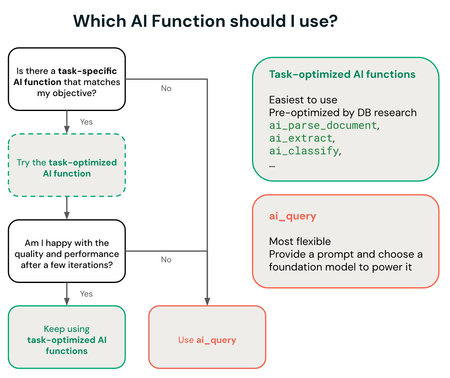
Anyone who has ever pointed a large language model at a bulk classification job, ticket triage, content moderation, queue routing, knows the discomfort: you're paying for a model that can write poetry just to choose between "urgent" and "not urgent". A general reasoning model is great when the question is open-ended, but when the right answer already sits among a handful of known options, it turns into expensive, slow overkill. A newer class of model attacks exactly that problem: instead of generating free text, it takes a discrete set of options and returns a calibrated decision, complete with a probability per option, at a fraction of the cost and latency of a chat model. And the detail that matters to anyone working with data: you can query this kind of model directly from SQL, against tables already governed by Unity Catalog, without writing a single line of agent orchestration code. What changes when the model only needs to decide, not converse A decision model isn't a smaller version of an LLM, it's a different category built for a different purpose. It doesn't hold conversation state, doesn't generate a natural-language explanation by default, and isn't trying to be useful for just any question. It solves a narrow problem: given a fixed set of possible labels, which one is most likely for this input, and with how much confidence. That matters because most real-world classification work in production, moderation, routing, triage, risk scoring, is already fundamentally this kind of closed decision. Running a general reasoning model for that kind of task is like hiring a senior consultant to stamp a form: it works, but the cost per decision stops making sense at scale. ai_query: the bridge between the model and data that already lives in Unity Catalog Azure Databricks exposes "ai_query", a general-purpose AI Function that queries any supported model directly from SQL or Python, no separate inference pipeline required. What sets it apart from task-specific AI Functions ("ai_classify", "ai_summarize", and similar) is control: "ai_query" lets you choose the model, the prompt, and the parameters manually, exactly what you need to point at a custom decision model hosted on your own Model Serving endpoint. Two requirements worth checking before you try this: "ai_query" doesn't run on Classic SQL warehouses, it needs Serverless; and the minimum Databricks Runtime is 15.4 LTS, with 18.2 or above recommended for the best performance. Hands-on: querying a custom decision model A custom decision model, in the Jev family, typically doesn't expose a standard chat-completions interface, it's served as a regular Model Serving endpoint, and the "ai_query" call uses the custom-model syntax, with explicit "endpoint", "request", and "returnType": SELECT ticket_id, description, ai_query( endpoint => "support-triage-decision", request => named_struct( "text", description, "channel", source_channel, "customer_plan", plan ), returnType => "STRUCT<category: STRING, urgency: STRING, confidence: DOUBLE>" ) AS decision FROM support.open_tickets WHERE status = 'new'; The structured return ("category", "urgency", "confidence") is already shaped to become a table column, no free-text parsing or regex needed to pull a field out of a chat response. It's the same pattern the official documentation uses for a traditional ML model (their example is a spam classifier), just swapping the endpoint for the decision model. My take: the win here isn't just cost per call, it's architectural. Putting the decision inside SQL itself means the result is born as a column in a governed table, right where Unity Catalog's lineage, access permission, and change history already apply. Compared to a separate agent pipeline that writes back to the lakehouse afterward, that's one less failure surface. Three ways to host the model, three levels of operational effort "ai_query" accepts three categories of model, and the choice between them changes how much infrastructure someone ends up maintaining: Platform-hosted model ("system.ai.*"), like the Claude, Llama, and Qwen families already offered as a service. Nothing to provision, it scales on its own, and it's the recommended option for anyone who just needs batch inference without customizing model weights. Provisioned-throughput model, for anyone who has already fine-tuned a foundation model or needs reserved capacity. Here the Model Serving endpoint has to be created and sized manually, but "ai_query" still handles the parallelization and retries of the batch query, it doesn't use the endpoint's own capacity for that. Custom or external model, the category a decision model like Jev falls into: a traditional ML model, trained outside the foundation-model ecosystem, or hosted outside Azure Databricks via an external model endpoint. It's the option with the most control, and also the one that demands the most infrastructure decisions on your own, creating and maintaining the serving endpoint is on whoever operates it. For anyone deciding where to invest platform effort, that list already works as a priority order: start with what the platform hosts for free, and only move to the custom option once the specific task justifies the extra work of operating the endpoint. Unity Gateway governance, with a real caveat A call to "ai_query" against a hosted model ("system.ai.*") is automatically routed through Unity Gateway, but only a subset of gateway functionality applies to that route: usage tracking and budget integration (including hard spend caps) work normally, but guardrails via service policy, inference tables, tracing tables, rate limits, and fallback between providers don't apply to a call routed through "ai_query". It's easy to assume that's "already included" and find out otherwise in production. What this doesn't solve on its own "ai_query" solves how the call gets there, not the quality of the decision. A custom decision model still depends on training curation and evaluation against ground truth, the documentation itself recommends using Agent Evaluation to measure batch accuracy before trusting the result in production. And unlike the platform's natively hosted "system.ai" models, a fine-tuned or fully custom model still requires provisioning and maintaining the Model Serving endpoint yourself, without the automatic autoscaling that natively hosted models get for free. Bottom line Not every AI problem is a conversation problem. When the output is a decision within a closed set of options, a decision model queried via "ai_query" tends to cost less, respond faster, and integrate better with data that already lives in Unity Catalog than standing up one more conversational agent to do the same triage. In practice: the question worth asking before writing the next classification prompt is simple, is this a decision among known options, or is it genuinely an open-ended question? The answer completely changes which kind of model is worth paying for. References Databricks Blog, "Running open-Jev in SQL on Databricks": https://www.databricks.com/blog/running-open-jev-sql-databricks Microsoft Learn, "Use ai_query - Azure Databricks": https://learn.microsoft.com/en-us/azure/databricks/large-language-models/ai-query Microsoft Learn, "Structured outputs on Azure Databricks": https://learn.microsoft.com/en-us/azure/databricks/machine-learning/model-serving/structured-outputs Databricks Docs, "ai_query function": https://docs.databricks.com/aws/en/sql/language-manual/functions/ai_query200Views0likes0CommentsSystem Table Retention Is Now Your Choice, Not a Fixed Number
Long-term auditing based on system tables has always faced the same challenge: sometimes, the data simply wasn't available for as long as organizations needed it. Azure Databricks has introduced, in Beta, configurable retention for supported system tables, giving account administrators greater control over how long historical system data is retained. Instead of relying only on the platform's default retention period, administrators can now configure retention from 30 to 3,650 days — up to approximately 10 years. This is particularly relevant for organizations using system tables for FinOps, auditing, governance, security investigations, usage analysis, and long-term operational analytics. Official documentation: https://learn.microsoft.com/en-us/azure/databricks/admin/system-tables/ What changes with configurable retention? When configurable retention is enabled, supported system tables can use an account-level retention configuration. The main characteristics are: Retention can be configured from 30 to 3,650 days. The configuration is managed at the Databricks account level. An account administrator is required to manage the setting. The configuration applies only to system tables that support configurable retention. During the Beta period, configurable retention is available without additional retention storage charges. When the feature is enabled, supported system tables receive 395 days of retention by default. This gives organizations considerably more flexibility when designing long-term governance and observability strategies around system tables. Configuring retention using the API In addition to managing retention through the Databricks Account Console, account administrators can configure it programmatically using the Databricks Account Settings API. The setting responsible for system table retention is called: st_retention Administrators can then change the retention period using a PATCH request. For example, the following configuration sets the retention period to 400 days: curl --request PATCH \ --header "Content-Type: application/json" \ --header "Authorization: Bearer $token" \ --data '{ "integer_val": { "value": 400 }, "name": "st_retention" }' \ "<account-console-url>/api/2.1/accounts/<account-id>/settings/st_retention" This is particularly useful for organizations that manage their Databricks environments using automation and Infrastructure as Code practices, since retention policies can become part of a broader governance process. Official documentation: https://learn.microsoft.com/en-us/azure/databricks/admin/system-tables/ Increasing and decreasing retention behave differently Azure Databricks also includes an important protection mechanism when changing retention settings. When administrators increase the retention period, the new configuration takes effect immediately. However, when administrators decrease the retention period, Azure Databricks provides a seven-day grace period before applying the reduction. This provides an opportunity to correct an accidental configuration change before historical data is permanently removed. For example: Current retention: 1,000 days New retention: 365 days Grace period: 7 days During this grace period, an administrator can reconsider or correct the configuration before the shorter retention policy takes effect. Records that exceed the configured retention period are generally removed within approximately one week after becoming eligible for deletion. Increasing retention does not restore deleted data There is another important behavior to understand. Increasing the retention period does not restore historical records that have already expired or been removed. For example, imagine that an organization previously retained system table information for 365 days. Later, the administrator changes the configuration to: 3,650 days This does not cause Azure Databricks to recreate or backfill data from previous years. The new retention period applies to data that is still available and to data generated going forward. Therefore, organizations that require long-term auditing should define their retention strategy before historical information becomes unavailable. Not every system table supports configurable retention Configurable retention does not currently apply to every system table. According to the current documentation, tables in the following schemas are excluded: system.data_classification system.data_quality_monitoring These system tables continue to follow their own retention policies. Because this capability is currently in Beta, supported tables and behavior may evolve as the feature moves toward General Availability. Always check the latest documentation before defining production retention policies: https://learn.microsoft.com/en-us/azure/databricks/admin/system-tables/ What about cost? During the Beta period, configurable system table retention is available without additional retention storage charges. However, Databricks states that when the feature becomes Generally Available (GA), data retained beyond 395 days will be subject to storage charges. This turns retention into more than just a technical configuration. It becomes a FinOps and governance decision. For example, configuring: Retention = 3,650 days means maintaining approximately 10 years of system table history. That could be extremely valuable for regulatory auditing, historical usage analysis, security investigations, or long-term FinOps analysis. But organizations should evaluate whether that historical depth provides enough business value to justify the associated storage cost once the capability becomes generally available. Why does this matter? System tables provide operational information about the Databricks environment and can support use cases such as: Cost and usage analysis FinOps dashboards Audit analysis Security investigations Governance monitoring Query history analysis Compute monitoring Marketplace activity Data sharing activity Operational observability For many organizations, 395 days may be enough. For others — especially organizations operating in highly regulated environments — retaining several years of historical information can be an important compliance requirement. The possibility of configuring up to 3,650 days allows the retention strategy to better reflect the organization's actual governance requirements. A governance decision, not just a configuration The most interesting aspect of this feature is that system table retention is becoming an explicit architectural decision. Instead of simply accepting a predefined retention period, Data Platform teams can ask: How much history do we actually need? Which system tables are important for auditing? What are our regulatory requirements? How much historical data is useful for FinOps? What will be the storage impact? Who should be allowed to change the retention policy? These questions move system table retention from a platform limitation into the organization's Data Governance and FinOps strategy. A reasonable approach is to define retention according to the purpose of the data rather than automatically selecting the maximum available value. Final thoughts Configurable system table retention may look like a relatively small platform feature, but it solves a very practical problem. Teams often build dashboards, audit processes, FinOps reports, and operational analytics on top of system tables only to discover later that the historical information they need is no longer available. With configurable retention, Azure Databricks provides organizations with much more control over this lifecycle. The possibility of retaining system table information for anywhere between 30 days and 3,650 days makes it possible to align historical availability with business, regulatory, security, and operational requirements. At the same time, the maximum value should not automatically become the default. Retention is now a choice — and that choice should be part of your Data Governance strategy. References Azure Databricks — System tables: https://learn.microsoft.com/en-us/azure/databricks/admin/system-tables/ Azure Databricks documentation: https://learn.microsoft.com/en-us/azure/databricks/ Databricks System Tables documentation: https://docs.databricks.com/aws/en/admin/system-tables Databricks September 2026 product release notes: https://docs.databricks.com/aws/en/release-notes/product/2026/september199Views0likes0CommentsDetecting corrupted data in under 1ms: what changes when Spark stops waiting for the micro-batch
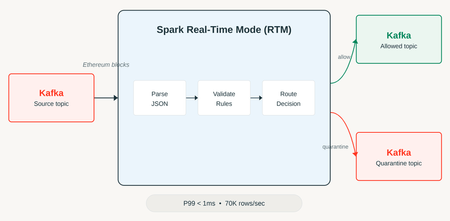
Streaming anomaly detection almost always runs into the same wall: the micro-batch. Traditional Structured Streaming processes data in one-to-two-second windows, which is fast enough for most use cases, but terrible when the very act of waiting for the batch to close is already too late. Fraud, sensitive payload validation, corrupted data entering a critical pipeline, these scenarios can't tolerate even a second of structural delay. Apache Spark's Real-time mode exists to attack exactly that gap, and Databricks published an experiment that uses a concrete use case to prove the point: analyzing Ethereum transactions in real time. For Azure Databricks practitioners, this experiment is particularly relevant because it explores improvements at the Apache Spark execution layer that could benefit real-time data engineering workloads. More broadly, it points toward lower-latency streaming scenarios while preserving the Spark ecosystem already familiar to teams building batch and streaming pipelines on Azure Databricks. What structurally changes in Real-time mode Unlike the micro-batch trigger, Real-time mode processes data as it arrives, without waiting for a window to close. That's possible through three combined architectural changes: a continuous flow of data between stages (instead of materializing an intermediate result on every batch), scheduling all stages of the query simultaneously (instead of scheduling stage by stage), and an in-memory streaming shuffle between stages, eliminating the cost of writing and reading shuffle files on every round. In practice, this brings Spark Structured Streaming closer to a continuous processing model, something historically associated with engines like Flink, but within the same runtime that already runs the rest of your organization's batch and streaming pipeline. The experiment: Ethereum transactions as a stress test The Databricks team built a pipeline that ingests blocks and transactions from the Ethereum network and classifies each event as ALLOW or QUARANTINE, based on two checks: Protocol invariant validation: a block where gas_used is greater than gas_limit is logically impossible under the Ethereum protocol's own rules, so it becomes an automatic signal of corrupted or malformed data. Payload hygiene: the block's extra_data field is scanned for patterns that shouldn't be there, such as a fragment of PII, a JWT token, or an AWS access key leaked by accident. The cluster used was Databricks Runtime 16.4 LTS, four i3.xlarge workers, a dedicated (single-user) cluster, with Photon deliberately disabled to isolate the effect of Real-time mode itself. The numbers behind the promise Sustained input rate of approximately 65,592 rows per second. Sustained processing rate of approximately 69,713 rows per second (the engine was able to absorb the input without building up backlog). More than 23.2 million messages processed over the course of the experiment. P95 latency under 0.5 millisecond. P99 latency of 1 millisecond. For context: a traditional 1-2 second micro-batch represents a three-order-of-magnitude difference in detection latency. If the goal is to stop a suspicious transaction before it propagates, that difference isn't cosmetic. Hands-on: a skeleton for real-time classification The "classify and route" pattern described in the experiment can be reproduced on any structured event schema. Here's a simplified example using transformWithState, the operator that gives you access to custom stateful logic inside Structured Streaming: from pyspark.sql.streaming import StatefulProcessor, StatefulProcessorHandle from pyspark.sql.types import StructType, StructField, StringType, LongType class BlockValidator(StatefulProcessor): def init(self, handle: StatefulProcessorHandle): self.handle = handle def handleInputRows(self, key, rows, timer_values): for row in rows: status = "ALLOW" if row["gas_used"] > row["gas_limit"]: status = "QUARANTINE" elif self._contains_sensitive_pattern(row["extra_data"]): status = "QUARANTINE" yield {"block_id": row["block_id"], "status": status} def _contains_sensitive_pattern(self, payload: str) -> bool: markers = ["AKIA", "eyJhbGciOi", "-----BEGIN"] return any(m in (payload or "") for m in markers) query = ( spark.readStream.table("bronze.eth_blocks") .groupBy("block_id") .transformWithState( statefulProcessor=BlockValidator(), outputStructType=StructType([ StructField("block_id", LongType()), StructField("status", StringType()), ]), ) .writeStream .trigger(availableNow=False) # real-time trigger is configured at the cluster/runtime level .toTable("silver.eth_blocks_classified") ) Worth reinforcing: enabling Real-time mode itself depends on runtime- and cluster-level configuration, it's not just a matter of swapping the trigger in the API, so the official reference documentation should be consulted before running this in production. In practice: I'd test this kind of pipeline under real load spikes, not just a constant rate, before blindly trusting the p99 number. Real Ethereum network traffic has much more irregular transaction bursts than a synthetic constant-throughput test, and it's under bursts that any low-latency system tends to reveal its real queueing behavior. Why Ethereum was a smart benchmark choice It's worth pausing for a moment on why Ethereum was chosen as the test scenario, because it isn't obvious at first glance. Ethereum transactions have two properties that make them an honest stress test for an anomaly detection system: first, the volume is public and replicable, anyone can audit the dataset used, which reduces the chance of an artificially favorable benchmark. Second, and more important, the protocol's invariant rules (like gas_used never being allowed to exceed gas_limit) are known and deterministically verifiable, so there's no ambiguity about what counts as a real anomaly versus a false positive. That removes a confounding variable common in anomaly-detection benchmarks, where the very definition of "anomaly" is already subjective. Applied to a corporate scenario, the equivalent would be having clear, auditable business rules (credit limit, expected value range, field format) before trying to apply this kind of real-time classification; without that, the technical pipeline works fine, but classification quality collapses. What this doesn't solve Real-time mode drastically reduces processing latency, but it doesn't replace the need for a good response strategy for suspicious data. Classifying something as QUARANTINE in one millisecond is pointless if the human or automated process that handles that alert still takes minutes or hours to act. It's also important to note the documented limitations of transformWithState in real-time mode: transformWithStateInPandas isn't supported in this mode, and state management (timers, TTL) has its own rules that differ from the traditional micro-batch mode, which requires extra care when migrating an existing pipeline. Wrapping up The Ethereum experiment works as a proof of concept for something broader: once Spark Structured Streaming itself can operate in the millisecond range, scenarios that used to require leaving the Spark ecosystem (fraud, critical validation, immediate operational alerting) start to fit inside the same runtime that already processes the rest of your data pipeline. It's worth testing, but with a realistic expectation of what still depends on human decision-making and response after detection. References Ultra-fast anomaly detection using Apache Spark Real-Time Mode (https://www.databricks.com/blog/ultra-fast-anomaly-detection-using-apache-spark-real-time-mode) (official Databricks blog) Apache Spark Structured Streaming Real-Time Mode: concepts (https://docs.databricks.com/aws/en/structured-streaming/real-time/concepts) (official documentation) Real-time mode concepts (https://learn.microsoft.com/en-us/azure/databricks/structured-streaming/real-time/concepts) (Microsoft Learn) Stateful applications with transformWithState (https://docs.databricks.com/aws/en/stateful-applications/) (official documentation) Build a custom stateful application with transformWithState (https://learn.microsoft.com/en-us/azure/databricks/stateful-applications/) (Microsoft Learn)199Views0likes0CommentsAzure Databricks Cost Governance: Budgets, Tags, and Alerts Before the Invoice Arrives
Cost visibility on Azure Databricks does not have to wait for the monthly invoice, and for Azure customers specifically, the attribution trail can run straight into Azure Cost Management, not just Databricks system tables. On October 7, 2026, Databricks published a practical guide on setting budgets and alerts for cloud data warehouse costs. The original post is written in general, cross-cloud terms. This article walks through the same problem from the Azure Databricks side specifically, using the account console, the REST API, and the system tables as they actually behave on Azure today, including two capabilities that go further than what the original post describes: per-user Unity Gateway budgets with usage blocking, and serverless usage policies whose tags propagate directly into Azure's own cost analysis tools. [INSERT IMAGE HERE using the editor's own Insert Image button, not pasted markup. Upload a screenshot of the Azure Databricks account console Budgets tab (Usage > Budgets), or if the editor accepts an external URL, use a relevant Microsoft Learn budgets screenshot. Suggested alt text: "Azure Databricks account console showing the Budgets tab with monthly threshold and burn-rate chart".] 1. Why the bill always arrives as a surprise The pattern repeats across data teams on any cloud: usage is not attributed to a team or a query, no team owns a budget number, the overspend only surfaces a billing cycle later, and manual spreadsheet review does not scale past a handful of warehouses. None of this is a tooling gap specific to Databricks, it is what happens when cost tracking is bolted on after the fact instead of built into how compute gets created in the first place. Azure Databricks addresses this with four layers that build on each other: tag-based attribution, the system.billing.usage table as the source of truth, budgets scoped to workspaces or tags in the account console, and alerts that run on a schedule instead of waiting for a human to check a dashboard. 2. Attribution: tags, and the Azure-native alternative to tagging by hand The baseline mechanism is the same one most clouds use: key-value tags on a SQL warehouse, set at creation or edit time, that later show up in the custom_tags column of the billing system table. Tagging a warehouse through the REST API curl -X POST "https://${DATABRICKS_HOST}/api/2.0/sql/warehouses" \ -H "Authorization: Bearer ${DATABRICKS_TOKEN}" \ -H "Content-Type: application/json" \ -d '{ "name": "finance-analytics", "cluster_size": "Small", "warehouse_type": "PRO", "tags": { "custom_tags": [ { "key": "team", "value": "finance" }, { "key": "cost-center", "value": "1234" } ] } }' Two details matter when you actually run this. The warehouse tagging limit is under 45 tags per warehouse, and if a custom tag key collides with one of Databricks' own default tags (Vendor, ClusterId, SqlEndpointId, Creator), the custom one gets an x_ prefix during propagation rather than overwriting the default. Plan tag key names with that collision rule in mind. Query tags: tagging at the session or statement level (Public Preview) Warehouse tags attribute an entire warehouse to a team, but a shared warehouse serving multiple teams needs finer granularity than that. Query tags (Public Preview) solve this by letting you tag individual sessions or individual statements, independent of which warehouse they run on. From the SQL editor, a notebook, or a dashboard, set tags for the rest of the session with the SET QUERY_TAGS statement: -- Tag every subsequent query in this session SET QUERY_TAGS['team'] = 'marketing', QUERY_TAGS['cost_center'] = '701'; -- Inspect what's currently set SET QUERY_TAGS; -- Clear a tag when the session changes purpose SET QUERY_TAGS['cost_center'] = UNSET; Session-level tags apply to every statement that follows until changed. Statement-level tags are a separate, narrower mechanism: pass a query_tags array in the request body of the Statement Execution API, and only that one statement carries the tag, with the session reverting to its own tags afterward: curl -X POST "https://${DATABRICKS_HOST}/api/2.0/sql/statements" \ -H "Authorization: Bearer ${DATABRICKS_TOKEN}" \ -H "Content-Type: application/json" \ -d '{ "warehouse_id": "abc123", "statement": "SELECT * FROM samples.nyctaxi.trips LIMIT 10", "query_tags": [ { "key": "team", "value": "engineering" }, { "key": "env", "value": "prod" } ] }' Tags land in the query_tags column of system.query.history, which needs its own access grant from an account admin if you do not already have it. Query it directly to see spend by query rather than by whole warehouse: SELECT statement_id, query_tags, executed_by, start_time FROM system.query.history WHERE MAP_CONTAINS_KEY(query_tags, 'team') AND query_tags['team'] = 'marketing' ORDER BY start_time DESC LIMIT 100 The limits are tight enough to plan around: 20 user-specified tags per query, 10 KB of tags per session, 128 characters per key or value, and tag keys cannot contain commas, colons, hyphens, slashes, equals signs, or periods. A key starting with @@ is reserved, that is the prefix dbt and Power BI use for their own automatically applied tags (@@dbt_model_name, @@powerbi_report_id, and similar). Set a tag using a session configuration parameter instead of SQL and an invalid key gets silently dropped with a tag_invalid: true sentinel; set it through SET QUERY_TAGS and an invalid key fails the statement outright at execution time, which is the behavior worth relying on if you want bad tags to be loud rather than quiet. The Azure-specific upgrade: serverless usage policies Tagging every warehouse by hand does not scale, and nothing stops a team from forgetting it on the one warehouse that ends up costing the most. For serverless compute specifically, Azure Databricks has a more structural answer: serverless usage policies (Public Preview). A policy bundles a set of tags and gets assigned to users; any serverless notebook, job, pipeline, serving endpoint, or app that user creates inherits the policy's tags automatically, with no manual tagging step per resource. The detail that matters most for an Azure-focused reader: serverless usage policy tags propagate directly into the billing records emitted to Azure Cost Analysis, not only into Databricks' own system.billing.usage table. That means the same tag you use to scope a Databricks budget is also what your FinOps team sees inside the Azure portal's own cost views, without a separate mapping step. Known limitations worth planning around: existing notebooks, jobs, and pipelines do not retroactively pick up a policy, you have to assign it manually to each existing asset; classic (non-serverless) compute is not covered at all; and a pipeline triggered by a job does not inherit the job's policy, the pipeline needs its own. 3. The source of truth: system.billing.usage Every budget, every alert, and every dashboard ultimately reads from one Unity Catalog system table: system.billing.usage. Records typically land within 12 hours. The schema includes, among other columns, custom_tags (a map, populated by both manual warehouse tags and serverless usage policy tags), usage_metadata.warehouse_id, usage_quantity (in the unit given by usage_unit, typically DBU), and record_type, which can be ORIGINAL, RETRACTION, or RESTATEMENT when Databricks issues a billing correction. Note that query tags from the previous section live in system.query.history, not here, custom_tags on this table only reflects warehouse-level and policy-level tags. The two tables are separate for this reason, use system.query.history for query-level cost investigation and this table for warehouse and account-level aggregation. That last detail is not cosmetic. A naive SUM(usage_quantity) without accounting for retractions can overcount. The pattern that handles it correctly: SELECT usage_metadata.job_id, usage_start_time, usage_end_time, SUM(usage_quantity) AS usage_quantity FROM system.billing.usage GROUP BY ALL HAVING usage_quantity != 0 Aggregating before filtering lets the retraction record cancel out the original it corrects, so a corrected job's usage does not get double-counted. Applied to the attribution problem directly, two queries worth keeping in a cost dashboard: -- SQL warehouse spend by team, last 30 days SELECT custom_tags['team'] AS team, usage_metadata.warehouse_id, SUM(usage_quantity) AS dbus_consumed FROM system.billing.usage WHERE billing_origin_product = 'SQL' AND usage_date >= current_date() - INTERVAL 30 DAYS GROUP BY ALL ORDER BY dbus_consumed DESC -- Unattributed SQL usage: the attribution gap, should trend to zero SELECT usage_date, SUM(usage_quantity) AS unattributed_dbus FROM system.billing.usage WHERE billing_origin_product = 'SQL' AND (custom_tags['team'] IS NULL OR custom_tags['team'] = '') GROUP BY usage_date ORDER BY usage_date DESC For a dollar figure rather than a DBU count, join against the system.billing.list_prices system table on sku_name and the price's effective date range. I am not reproducing that join here because I have not verified its exact column names against the current schema, and getting a pricing join subtly wrong is worse than not showing it. Check the list prices system table reference on Microsoft Learn (learn.microsoft.com/en-us/azure/databricks/admin/system-tables/pricing) before writing that query yourself. 4. Budgets in the account console: more than a threshold and an email Budgets live in the Azure Databricks account console (accounts.azuredatabricks.net), under Usage > Budgets. A budget can scope to specific workspaces, to custom tags, or to both, and if you leave both empty it tracks your entire account. What the Azure documentation describes goes further than a single alert value: Up to four monthly thresholds per budget, each with its own email recipient list. Up to 1,000 budgets per account. Budgets scoped to Unity Gateway (the routing layer in front of Pay-Per-Token foundation model inference, batch ai_query, and external model provider usage) support a per-user spend threshold, on top of the shared thresholds. Cross a per-user threshold and that specific user's requests can optionally be blocked, with the option to grant named users or groups a higher override limit. Budget visibility and editing is governed by a dedicated permission role, not just account admin status, so a team lead can see their own budget without account-wide access. The important caveat, stated plainly in the documentation: budgets are a monitoring mechanism, not a hard spending cap, except specifically for Unity Gateway and Genie budgets, where the optional "Block usage" setting does enforce a stop. Even there, enforcement is approximate, based on a near-real-time cost estimate, so a user can be blocked slightly before or after the literal threshold. For standard SQL and compute budgets, nothing stops the spend, the budget's job is to get a human's attention fast. A layered pattern, adapted for Azure, that tends to hold up in practice: a BI Serving + Production budget at $8,000/month scoped to UseCase:BIServing and Env:Prod, alerting the platform team; an Analytics Ad-Hoc budget at $3,000/month scoped to UseCase:AdHoc, alerting the analytics manager; a Marketing Analytics budget at $2,500/month scoped to Team:Marketing, alerting the marketing data lead; and an account-wide safety net at $25,000/month with no tag scope, alerting the CTO and FinOps. Team-level budgets for accountability, plus one account-wide budget as the net that catches whatever slips past every tag filter. The values above are illustrative, size them against your own baseline. 5. Alerts that run before the threshold, not after Databricks SQL alerts run a query on a schedule and evaluate a condition against the result, independent of whether anyone opens a dashboard. On Azure Databricks, the current alert engine resolves to one of three states: OK, TRIGGERED, or ERROR, a simplification from the legacy alert system's extra UNKNOWN state. A daily threshold alert, scheduled once a day, built on the team-attribution query above: SELECT custom_tags['team'] AS team, SUM(usage_quantity) AS dbus_today FROM system.billing.usage WHERE billing_origin_product = 'SQL' AND usage_date = current_date() GROUP BY ALL HAVING dbus_today > 500 -- adjust to your own per-team daily baseline A threshold alert only catches a problem on the day it happens. A pacing alert catches it earlier, by projecting month-end spend from the days elapsed so far: WITH month_to_date AS ( SELECT SUM(usage_quantity) AS mtd_dbus, DAY(current_date()) AS days_elapsed, DAY(LAST_DAY(current_date())) AS days_in_month FROM system.billing.usage WHERE billing_origin_product = 'SQL' AND usage_date >= DATE_TRUNC('MONTH', current_date()) ) SELECT mtd_dbus, mtd_dbus / days_elapsed * days_in_month AS projected_month_end_dbus FROM month_to_date HAVING projected_month_end_dbus > 15000 -- adjust to your monthly DBU budget Schedule the pacing alert every four hours and route it to Slack or email through the alert's notification settings, the same pattern the original Databricks post recommends. Running it more often than that mostly adds noise, since system.billing.usage itself only refreshes every few hours. One cost that neither alert catches on its own: materialized view refreshes bill as serverless pipeline usage, under billing_origin_product = 'DLT', not as warehouse usage. If your team only watches SQL spend, a materialized view refreshed far more often than its source data actually changes can run invisibly. Align refresh frequency to real data freshness, and include DLT in your cost queries, not only SQL. 6. Where this still needs a human None of the above replaces judgment on the two levers that move cost the most: warehouse type and warehouse size. Azure Databricks documentation still points to SQL Serverless as the default starting point for most workloads, since it starts in seconds, scales to zero between queries, and bills only for execution time, and to predictive optimization (learn.microsoft.com/en-us/azure/databricks/optimizations/predictive-optimization), enabled by default on accounts created after November 11, 2024, to keep OPTIMIZE, VACUUM, and clustering key maintenance running automatically on managed Unity Catalog tables, instead of a scheduled job someone has to remember to run. Auto-stop is worth checking explicitly rather than trusting the default: Pro and Classic warehouses default to 45 minutes of idle time before stopping, serverless defaults to 10 minutes, and serverless can be brought down to as low as 1 minute through the API, below what the UI exposes. For a warehouse that serves a handful of scheduled queries a day, 45 idle minutes can be the single biggest line item. 7. My perspective on this The feature set here is more capable on Azure specifically than the general cross-cloud framing suggests, and the detail that stands out to me is the Azure Cost Analysis propagation for serverless usage policy tags. That is not a Databricks convenience feature, it closes the exact gap that usually breaks cost governance in a real organization: the Databricks admin owns one view of spend, the cloud FinOps team owns another, and reconciling the two by hand is where attribution efforts actually die. If the same tag shows up in both without a manual export step, that reconciliation work goes away. I would start with serverless usage policies before hand-tagging every warehouse, specifically because the policy approach survives a new team member forgetting to tag something, while manual tagging does not. The known limitation that existing assets do not retroactively inherit a new policy is real friction, budget time for a one-time pass over your current notebooks, jobs, and pipelines when you adopt this, it will not happen automatically. And treat every budget as a monitoring signal, not a spending cap, with the explicit exception of Unity Gateway and Genie budgets where blocking is actually available. Assuming the wrong one of those two behaviors for a given budget is how a team ends up either silently overspending or unexpectedly blocked mid-production. Conclusion Cost governance on Azure Databricks is not a single feature, it is tags feeding a system table, a system table feeding budgets and alerts, and budgets feeding back into how the next warehouse gets created. The Azure-specific pieces, Unity Gateway per-user budgets with blocking and serverless usage policy tags flowing into Azure Cost Analysis, are worth adopting even if you came from the general cross-cloud version of this guide expecting less. Official references Databricks Blog, "Set Budgets and Alerts for Cloud Data Warehouse Costs" (www.databricks.com/blog/set-budgets-and-alerts-cloud-data-warehouse-costs) Microsoft Learn, "Create and monitor budgets - Azure Databricks" (learn.microsoft.com/en-us/azure/databricks/admin/account-settings/budgets) Microsoft Learn, "Attribute usage with serverless usage policies - Azure Databricks" (learn.microsoft.com/en-us/azure/databricks/admin/usage/budget-policies) Microsoft Learn, "Billable usage system table reference - Azure Databricks" (learn.microsoft.com/en-us/azure/databricks/admin/system-tables/billing) Microsoft Learn, "Databricks SQL alerts - Azure Databricks" (learn.microsoft.com/en-us/azure/databricks/sql/user/alerts/) Microsoft Learn, "Use tags to attribute and track usage - Azure Databricks" (learn.microsoft.com/en-us/azure/databricks/admin/account-settings/usage-detail-tags) Microsoft Learn, "Query tags - Azure Databricks" (learn.microsoft.com/en-us/azure/databricks/sql/user/queries/query-tags) Microsoft Learn, "Governance Hub - Azure Databricks" (learn.microsoft.com/en-us/azure/databricks/admin/governance-hub/)100Views0likes0CommentsA New Model Costs 60 Percent More by Default: Isolating the Financial Risk of Testing Frontier AI
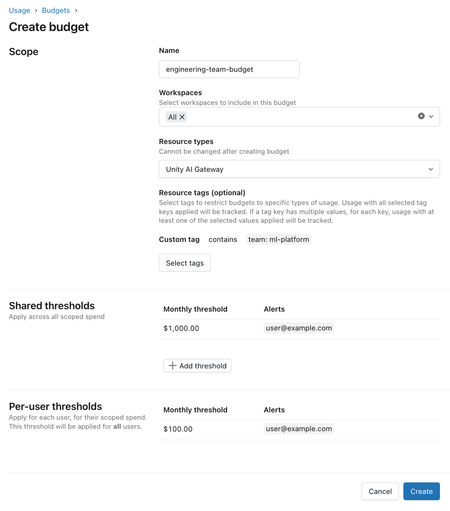
Every AI model launch comes with the same marketing promise, "frontier model", and the same question with no obvious answer behind it: genuinely better, or just more expensive with better talking points? The most common response is binary, lock down access until someone validates it calmly, which slows everyone down, or open it up to the whole team to test, which has already proven expensive in practice. When one pilot ran open access to a new model with no spend control, the average developer spent 60% more than before, with no quality gain proven at that point. Databricks documented the internal process that resolved this dilemma, not by choosing between fast and safe, but by splitting the two into phases with isolated financial responsibility: experimental access on launch day for more than 12,000 employees, with cost risk contained before the quality evaluation even finishes. The problem neither open nor locked-down access solves Locking down access until full validation sounds prudent, but it pushes the decision to a committee with no real urgency to respond quickly, and in the meantime the team loses the actual advantage of testing a new model early. Opening it up with no control solves the speed problem, but overshoots on the financial side, because nobody yet knows whether that specific model delivers a quality gain proportional to the higher cost that usually comes with a new launch. The blind spot common to both extremes is treating "granting access" and "controlling spend" as the same decision, when in practice they're two problems on different timelines, access can be immediate, cost control needs to last until the real evaluation is done. Phase 1: immediate experimental access via Unity Gateway The new model enters Unity Gateway, the company's central AI governance hub, and the configuration rolls out to more than 12,000 employees via the Unity Gateway CLI, installed on laptops through mobile device management. In the interface, the model shows up flagged as "Experimental", a simple visual signal that already tells the user this isn't a validated choice yet, without hiding the option or breaking the workflow for anyone who'd rather stick with the model they already know. Phase 2: isolating financial risk with layered budgets The part that avoids repeating the earlier pilot's problem is the layered budget design, with four tiers per user: an overall monthly cap, a daily safety limit against accidental overspend, adjustable via Slack when needed, a slice reserved for a premium model two to three times more expensive, only for tasks that actually justify it, and a separate slice exclusively for the new experimental model. The key point is that the newly launched model only draws from the experimental slice, isolating the financial risk from the rest of the person's budget. The official Unity Gateway documentation details how this budget is actually configured: a budget is scoped by workspace and resource type, accepts an optional resource tag to restrict it to a specific team, and supports up to four shared limits and twenty per-user limits, each able to trigger an email alert, usage blocking, or both. Usage blocking is applied approximately, based on a near-real-time estimate, so a burst of usage can exceed the configured limit before the block actually kicks in on the next call. My take: the detail that stands out most here isn't the number of budget tiers, it's the documentation being upfront about the imprecision of the blocking mechanism itself. An "approximate" block looks like a weakness at first glance, but it's exactly the kind of limitation no team notices until they trust the number too much and get surprised by a bill slightly above the configured cap. It's worth treating this kind of budget as a safety net against gross overspend, not as a mathematical guarantee of an absolute ceiling. Hands-on: creating a Unity Gateway budget for the experimental group A budget for the team that's going to test the experimental model, with both a shared and an individual limit, and both alert and block actions configured: databricks account budgets create --json '{ "budget_configuration": { "display_name": "experimental-model-platform-team", "filter": { "workspace_id": ["all"], "tags": {"team": ["ml-platform"]} }, "resource_types": ["UNITY_AI_GATEWAY"], "alert_configurations": [ { "scope": "SHARED", "monthly_threshold_usd": 1000, "alert_emails": ["email address removed for privacy reasons"], "action": "ALERT" }, { "scope": "PER_USER", "monthly_threshold_usd": 100, "alert_emails": ["email address removed for privacy reasons"], "action": "BLOCK_USAGE" } ] } }' The practical point of this design is that the shared limit works as an early alarm for the whole team, while the per-user block is the safety net that keeps a single person from burning through the entire group's budget alone, without requiring manual review of every request. Phase 3: three signals decide promotion or discard within days The decision to keep the new model as the default or drop it combines three signals, none sufficient on its own. The first is controlled benchmarking, internal tests covering both offline evaluation, like document reasoning and in-workspace search, and side-by-side comparison on a real task, like generating a pull request. The second is qualitative feedback from power users, collected via Slack and surveys, on how the model behaves in practice compared to the previous one. The third is cost tracking via OpenTelemetry, with all Unity Gateway traffic logged in a unified trace format, normalized per session and stratified by usage pattern, so early adopters with a different usage profile than the average user don't get compared apples-to-oranges. Combining the three signals, two models tested in this cycle confirmed a real per-session cost gain over their predecessor, a 29% drop in one case and 48% in the other, enough to promote them from experimental access to standard availability within three days. What this architecture doesn't solve on its own None of this replaces already having a mature internal evaluation suite capable of consistently running offline tests and real-task side-by-side comparisons, without that the three signals become two, formal benchmarking drops out, and the decision ends up leaning on subjective opinion more than it should. Normalizing cost by usage pattern is also a modeling choice, not an objective fact, if early adopters have a systematically different usage profile than the rest of the company, the per-session cost comparison carries a bias that needs reviewing, not just blind acceptance. And the budget block being approximate by design means this architecture protects against gross overspend, not against a small, recurring overshoot that never trips the configured alert. Is this design worth adopting? The real gain here isn't releasing a new model faster by itself, it's managing to do that without repeating the uncontrolled pilot's mistake, where access speed and financial accountability ended up decoupled from each other. For a company that already tests new models frequently, splitting budget into tiers and tying promotion to a combined signal, not an isolated benchmark, is a replicable architecture even outside the Databricks ecosystem. What actually requires real investment before you can copy that three-day result is the part the documentation takes for granted, already having a mature internal benchmark and cost-tracking infrastructure in place before the next frontier model shows up. References Databricks Blog, "How Databricks rolls out frontier models to 12,000 employees on Day 1": https://www.databricks.com/blog/how-databricks-rolls-out-frontier-models-14000-employees-day-1 Microsoft Learn, "Manage budgets for Unity Gateway - Azure Databricks": https://learn.microsoft.com/en-us/azure/databricks/ai-gateway/budgets Databricks Docs, "Manage budgets for Unity AI Gateway": https://docs.databricks.com/aws/en/ai-gateway/budgets100Views0likes0CommentsAn Azure Databricks data agent that never gets re-evaluated is a production model with no monitoring
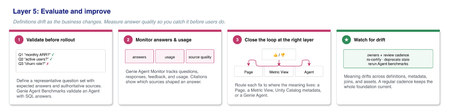
Every ML team has learned, usually the hard way, that a model left unevaluated after deployment will silently degrade: the data distribution shifts, the original assumption stops holding, and nobody notices until the wrong output has already done damage. What's strange is that the same discipline rarely shows up when the "model" in production is a conversational data agent. The team validates the Genie Agent with a handful of demo questions, approves it, ships it, and from that point on its accuracy becomes an article of faith instead of a tracked metric. Genie Ontology, the layered architecture Azure Databricks documented to give business context to data agents, has a final layer that exists precisely to close this gap: continuous evaluation and improvement, backed by a concrete mechanism called Genie Agent Benchmarks. It's worth understanding how it works, because it's the piece most likely to get skipped when a deadline is tight, and the most expensive one to be missing once the agent is already in production, quietly getting things wrong. The mechanism: two ways to measure "correct," depending on the question type A Genie Agent can hold up to 500 benchmark questions, each one running as an isolated conversation, with no thread context carried over, exactly as if a new user were asking for the first time. There are two evaluation modes, and the choice between them depends on the type of question: Chat mode: compares the SQL the agent generated (or its result) against a "ground truth" answer supplied by whoever wrote the benchmark. The rule is objective: identical SQL is "Good," an identical result set in a different sort order is also "Good," a number that matches to 4 significant digits also counts. An empty result, an extra column, or a diverging single-cell value is "Bad." The comparison covers up to 5,000 rows, so any question whose plausible result exceeds that needs an explicit ORDER BY on both sides to avoid a false negative caused by truncation. Agent mode: used when the response isn't a simple tabular result to compare, but a multi-step, text-based reasoning report instead. Here an LLM judge grades the response against an optional "evaluation note" that whoever wrote the benchmark provided, describing what the correct answer needs to contain. The mode is chosen at run time, not when the question is registered, so the same question set can be re-evaluated either way depending on the kind of response the agent is currently producing. My take: the detail I find most sensible about this design is that Chat mode rewards legitimate variation (different sort order, numeric precision) without rewarding structural error (an extra column, an empty result). A naive benchmark that demands byte-for-byte equality generates too much noise, flags a correct answer as wrong just because the agent sorted differently, and teams end up distrusting and ignoring their own benchmark over time. Calibrating the bar to separate "cosmetic difference" from "actual error" is what makes a team trust the number enough to act when it drops. Hands-on: registering benchmarks with phrasing variation A best practice the documentation calls out explicitly, and one that's easy to skip when benchmarks get registered in a hurry: the same business question rarely reaches the agent phrased the same way twice. A real user asks "what was last quarter's revenue" and "how much did we bill in Q3" about the same underlying data, and an agent that gets one phrasing right and the other wrong isn't actually reliable, even if a naive benchmark with only one phrasing reports 100% accuracy. The registration flow, done directly from the Benchmarks tab of the Genie Agent: Question 1: "What was total revenue for the last closed quarter?" Question 2: "How much did we bill in Q3?" Question 3: "Last quarter's revenue, what was it?" SQL Answer (same for all 3): SELECT SUM(order_amount) AS total_revenue FROM sales.orders WHERE fiscal_quarter = ( SELECT MAX(fiscal_quarter) FROM sales.orders WHERE closed_date IS NOT NULL ) The official recommendation is two to four phrasing variations per real business question. Running this set after any change to a Metric View or to an underlying term definition quickly shows whether the change broke one specific phrasing without breaking the others, a signal that would normally go unnoticed until a real user runs into it. The loop that closes itself: from benchmark back to agent context The real payoff isn't the isolated accuracy number, it's what happens after a benchmark run. Reviewing question by question doesn't scale, so the recommended flow uses Genie Code itself to analyze the entire run at once: it reviews what was expected, what the agent actually generated, and the agent's current context, then proposes instruction or context adjustments for each gap found, for whoever manages the agent to accept or reject individually. That same "batch review via Genie Code" pattern also applies to real usage, not just formal benchmarking: the agent's Monitor tab brings a weekly digest of message volume, active users, and positive/negative feedback rate, and the "Analyze Agent Usage" button launches Genie Code to comb through six months of real messages looking for recurring topics and repeated problems, with citations linking straight back to the original conversation. In practice, this means the signal for "where the agent is getting it wrong" comes from two complementary sources: the controlled benchmark, designed to cover what the team already knows matters, and real usage, which reveals what nobody thought to test. What this doesn't solve User feedback alone doesn't change agent behavior automatically, the documentation is explicit about this: someone with manage permission needs to review the feedback and decide whether it becomes a context adjustment or not, so a benchmark without periodic human review is still a mechanism gathering dust. Chat mode also depends entirely on the quality of the registered ground-truth SQL, a question with no SQL Answer falls into mandatory manual review, and a wrong ground-truth SQL silently teaches the agent to be wrong the "right" way. And the detailed result of an individual evaluation run stays visible for only one week, so anyone wanting to track an accuracy trend over months needs to export or log the number somewhere external, the tool doesn't keep long-term history on its own. Is it worth investing in this from day one? Registering benchmarks before the agent even reaches production can feel like redundant work when the initial demo already convinced everyone, but it's actually the opposite: the benchmark only earns its value later, when the Metric View changes, when a business term gets redefined, when the agent gains a new data source. Without an already-registered set of questions with known-correct answers, each of those changes demands manual validation from scratch. With it, the same question asked last time reruns in seconds, and the answer to "did this break anything" becomes a number instead of a guess. References Azure Databricks Blog (Databricks), "Operationalizing Genie Ontology in Your Data Stack": https://www.databricks.com/blog/operationalizing-genie-ontology-your-data-stack Microsoft Learn, "Test and monitor a Genie Agent - Azure Databricks": https://learn.microsoft.com/en-us/azure/databricks/genie-agents/monitor100Views0likes0CommentsGenie's answer in Slack now ships with the actual chart, not just text
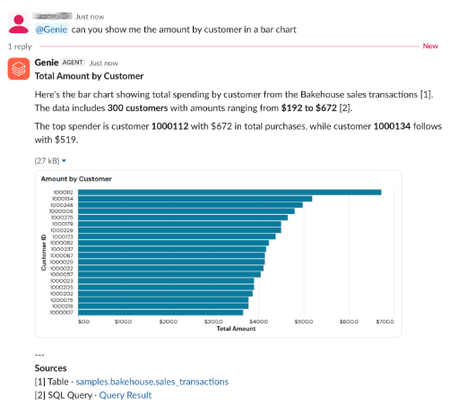
Asking Genie a question in Slack and getting a text-only table where a chart should be always left the answer half finished. Azure Databricks now renders Genie's visualizations directly as images inside the Slack conversation, in public preview. Before this, whenever Genie's answer included a chart, the visual content was limited to whatever could be represented as plain text inside the thread. Now the chart actually shows up as an image alongside the answer, complete with a View in Genie button that opens the full conversation in Azure Databricks for more context. Anyone who had already installed the Genie app for Slack before this release needs to reinstall the app to enable the new behavior. The specific reason is a permission gap: rendering a chart as an attached image requires the files:write Slack permission, which the app didn't originally request, so the existing installation simply can't attach image files until it's reinstalled and re-authorized. One detail worth knowing before you go looking for a missing chart: visualizations never show up when message visibility is set to private, since a private reply is only visible to the person who asked. So if a chart seems to be missing, check the visibility setting before assuming the reinstall didn't work. Technical points: Genie's chart output now renders as an image in the Slack thread, not just as text The feature is in public preview A previous installation of the Genie app for Slack needs to be redone specifically to grant the files:write permission Visualizations are suppressed entirely when message visibility is set to private, regardless of install state For teams that want to track how much of this traffic is coming through Slack in the first place, Azure Databricks logs every Genie request with its origin in the audit system table. This query pulls Slack-originated requests from the last five days: SELECT event_time, user_identity.email AS user_email, request_params.conversation_id AS conversation_id FROM system.access.audit WHERE service_name = 'genieChat' AND action_name = 'createGenieChatResponse' AND request_params.source = 'slack' AND event_date >= date_add(current_date(), -5) ORDER BY event_time DESC My take: it's a small adjustment, but it fixes a real friction point for anyone who uses Genie through Slack as their main channel for querying data, instead of opening the workspace every time they need to check a number. The thing to watch is operational, not technical: since the change requires manually reinstalling the app for a permission it never had, teams that don't follow release notes closely will keep getting chart-less answers until someone notices, and the audit log query above is a decent way to check who's actually using the Slack integration before you go chasing that reinstall. Source: https://learn.microsoft.com/en-us/azure/databricks/genie-one/genie-slack100Views0likes0CommentsCross-Engine ABAC on Azure Databricks: Governing External Spark Reads
Unity Catalog's row filters, column masks, and ABAC policies have always assumed the query comes from inside Azure Databricks. Cross-engine ABAC removes that assumption, and it does it by routing the external engine's read through a Databricks-managed enforcement layer rather than by trusting the external engine to respect the policy on its own. On October 1, 2026, cross-engine attribute-based access controls (ABAC) reached general availability on Azure Databricks. I covered the headline in a shorter post already. This article goes a layer deeper: the exact requirements, the Spark configuration for both Delta and Iceberg, the one concurrency caveat worth testing before you trust this in production, and how to watch what it costs. [INSERT IMAGE HERE using the editor's own Insert Image button, not pasted markup. Upload a screenshot of the Unity Catalog metastore Details tab with the "External data access" toggle visible, or a diagram showing an external Spark client, the Azure Databricks serverless enforcement layer, and the underlying Delta/Iceberg table. Suggested alt text: "External Spark client querying a Unity Catalog managed table through the Azure Databricks serverless ABAC enforcement layer".] 1. Why ABAC used to stop at the Databricks engine door Every previous expansion of Unity Catalog's ABAC surface, metastore-wide policies, identity attributes from Microsoft Entra ID, context attributes that distinguish an agent from a person, explicit DENY, policies on views, shared one assumption: the engine reading the data is Azure Databricks itself. That assumption holds for most workspaces, but it breaks down the moment a genuinely multi-engine estate has an external Apache Spark job, a Flink pipeline, or a BI tool reading the same Unity Catalog managed table directly. Before cross-engine ABAC, the only way to protect that external read was to duplicate the policy logic inside the external engine itself, or to accept that the external path saw unfiltered data. Neither option scales once the policy changes on one side and someone forgets to mirror it on the other. 2. The mechanism: a serverless layer sits between the external engine and the table Cross-engine ABAC does not ask the external engine to evaluate the policy. Instead, when an external engine queries a table with an ABAC policy, a row filter, or a column mask attached, Azure Databricks routes the read through a specialized serverless compute layer. That layer evaluates the policy, filters and masks the data server-side, and only then returns the sanitized result to the external engine. The external engine never sees the unfiltered rows, and it does not need to know the policy exists. This is deliberately narrow in scope today: the only supported external engine is Apache Spark, reading either Delta tables through the Unity REST API or Iceberg tables through the Unity Catalog Iceberg REST endpoint. 3. Turning it on: metastore access, grants, and catalog commits Four things have to be true before an external Spark job can read a single filtered row. Enable external data access on the metastore This is disabled by default, on purpose, to prevent unauthorized external access. A metastore admin has to turn it on explicitly, and the option only appears for sufficiently privileged users: In a workspace attached to the metastore, open Catalog. Click the gear icon at the top of the Catalog pane and select Metastore. On the Details tab, enable External data access. Grant EXTERNAL USE SCHEMA explicitly This privilege is intentionally excluded from ALL PRIVILEGES, and a schema owner does not have it by default, both specifically to prevent accidental data exfiltration through an external path nobody was watching. Only the parent catalog owner can grant it, and it must always be granted explicitly: GRANT EXTERNAL USE SCHEMA ON SCHEMA catalog_name.schema_name TO `email address removed for privacy reasons` The querying principal also needs the ordinary SELECT on the table, USE CATALOG on its parent catalog, and USE SCHEMA on its parent schema, exactly as it would for an internal read. If the workload creates external tables rather than only reading managed ones, it additionally needs CREATE TABLE on the schema and both CREATE EXTERNAL TABLE and EXTERNAL USE LOCATION on the target external location, and EXTERNAL USE LOCATION carries the same explicit-grant-only rule as EXTERNAL USE SCHEMA: GRANT EXTERNAL USE LOCATION ON EXTERNAL LOCATION external_location_name TO `email address removed for privacy reasons` Enable catalog commits on the table Fine-grained enforcement for external reads only works against a managed table with catalog commits enabled, which requires Databricks Runtime 16.4 or above for a brand-new table, or Databricks Runtime 18.0 or above to turn it on for a table that already exists. Creating a new table with catalog commits enabled from the start: CREATE TABLE catalog_name.schema_name.table_name (id INT, name STRING) USING delta TBLPROPERTIES ('delta.feature.catalogManaged' = 'supported'); Upgrading a table that already exists: ALTER TABLE catalog_name.schema_name.table_name SET TBLPROPERTIES ('delta.feature.catalogManaged' = 'supported'); Only after this step can you attach an ABAC policy, a row filter, or a column mask to the table and expect an external Spark read to respect it. 4. Connecting Apache Spark: Delta and Iceberg take different configuration The two paths share the same authorization model but need different Spark packages and session configuration, so keep them separate rather than guessing at a hybrid. Delta tables, via the Unity REST API This path needs Delta-Spark 4.1 or above and Unity Catalog Spark connector 0.4 or above. Using OAuth machine-to-machine authentication, which handles credential and token renewal automatically and is the right choice for a long-running job: "spark.sql.extensions": "io.delta.sql.DeltaSparkSessionExtension", "spark.sql.catalog.spark_catalog": "org.apache.spark.sql.delta.catalog.DeltaCatalog", "spark.sql.catalog.uc_catalog": "io.unitycatalog.spark.UCSingleCatalog", "spark.sql.catalog.uc_catalog.uri": "https://adb-1234567890123456.12.azuredatabricks.net", "spark.sql.catalog.uc_catalog.auth.type": "oauth", "spark.sql.catalog.uc_catalog.auth.oauth.uri": "https://adb-1234567890123456.12.azuredatabricks.net/oidc/v1/token", "spark.sql.catalog.uc_catalog.auth.oauth.clientId": "<oauth-client-id>", "spark.sql.catalog.uc_catalog.auth.oauth.clientSecret": "<oauth-client-secret>", "spark.sql.catalog.uc_catalog.ServerSidePlanning.enabled": "true", "spark.sql.defaultCatalog": "uc_catalog", "spark.jars.packages": "io.delta:delta-spark_2.13:4.1.0,io.delta:delta-iceberg_2.13:4.1.0,io.unitycatalog:unitycatalog-spark_2.13:0.4.0,org.apache.hadoop:hadoop-azure:3.4.2" Setting ServerSidePlanning.enabled to true is not optional decoration, it is the specific switch that routes the read through the enforcement layer instead of letting Spark plan the scan on its own. Miss that one line and the external job will read the table, just without any of the row filters or column masks applied. Iceberg tables, via the Unity Catalog Iceberg REST endpoint This path needs Iceberg-Spark 1.11 or above and Apache Spark 4.0 or above: "spark.sql.extensions": "org.apache.iceberg.spark.extensions.IcebergSparkSessionExtensions", "spark.sql.catalog.uc_catalog": "org.apache.iceberg.spark.SparkCatalog", "spark.sql.catalog.uc_catalog.type": "rest", "spark.sql.catalog.uc_catalog.uri": "https://adb-1234567890123456.12.azuredatabricks.net/api/2.1/unity-catalog/iceberg-rest/", "spark.sql.catalog.uc_catalog.credential": "<oauth-client-id>:<oauth-client-secret>", "spark.sql.catalog.uc_catalog.oauth2-server-uri": "https://adb-1234567890123456.12.azuredatabricks.net/oidc/v1/token", "spark.sql.catalog.uc_catalog.warehouse": "uc_catalog", "spark.sql.catalog.uc_catalog.cache-enabled": "false", "spark.sql.defaultCatalog": "uc_catalog" Once either configuration is in place, the query itself is ordinary Spark SQL, the enforcement is invisible from the client side: SELECT * FROM uc_catalog.schema_name.table_name; 5. What actually gets enforced, and where the hard edges are ABAC policies, standalone row filters, and column masks are all enforced on the external read, dynamically, the same way they would be for a query running inside Azure Databricks. That is the entire value proposition. But the current scope has real edges, not just minor rough patches: Only reads are supported from an external engine under fine-grained access control. To write, the writing principal must be exempted from the ABAC policy entirely, there is no write-path enforcement yet. Dynamic views are not supported. Projecting a VARIANT column is not supported. Filtering on a BINARY column is not supported. A column-masking function whose return type differs from the original column's type is not supported. Large aggregations can see real performance degradation, since every row still passes through the serverless enforcement layer before it reaches the external engine. And one warning from the documentation is worth repeating verbatim rather than paraphrasing away its force: concurrent writes during query planning can cause the same table to be read from different table snapshots within a single self-join or multi-scan query, which can produce incorrect results. If your external workload runs a self-join or anything that scans the same table more than once inside one query, and the table sees concurrent writes, test that specific pattern under write load before trusting its output in production. This is not a theoretical edge case, it is a named, documented failure mode. 6. Watching what it costs The enforcement layer is serverless compute, and Azure Databricks charges for it under its own billing line, separate from ordinary warehouse or job compute. Anyone with access to the billing system table can see exactly how much a given user's external reads are costing, broken down by SKU and by the identity that ran the query: SELECT usage_date, sku_name, identity_metadata.run_as, SUM(usage_quantity) AS dbus_consumed_by_cross_engine_abac FROM system.billing.usage WHERE usage_date BETWEEN '2026-06-01' AND '2026-07-01' AND billing_origin_product = 'EXTERNAL_COMPATIBILITY' GROUP BY 1, 2, 3 ORDER BY 1; If an external Spark job reading a heavily policy-protected table runs more often than its consumers actually need fresh data, that EXTERNAL_COMPATIBILITY line is where the cost of that habit shows up first, not in the external engine's own compute bill. 7. My perspective on this Every ABAC expansion I have covered before this one assumed the reader was inside the platform. This is the first one that assumes the opposite, and the caution in the scope reflects that: read-only, one external engine, a documented snapshot-consistency warning stated plainly rather than buried. That restraint is the right call for a first general-availability release of a capability whose entire failure mode is "the external engine saw data it should not have seen." The detail I would not skip past is ServerSidePlanning.enabled. It is one line in a long configuration block, easy to leave out by copying an older Delta-Spark config that predates this feature, and leaving it out does not produce an error, it produces an unfiltered read that looks identical to a correctly filtered one until someone notices the wrong person saw the wrong row. Treat that flag as a required field, not an optional tuning parameter, and verify it is present in code review for any external Spark job that touches a governed table. I would also budget real test time for the concurrency warning before this goes anywhere near a production pipeline that both writes to and externally reads from the same table. A silent correctness bug that only appears under concurrent writes during self-joins is exactly the kind of failure that passes every test run in a quiet environment and then shows up the first time two jobs actually overlap in production. Conclusion Cross-engine ABAC does not ask external Spark to respect your governance policy, it makes respecting that policy the external engine's only option, by interposing a serverless enforcement layer it cannot see around. The setup cost is real: a metastore-level toggle only an admin can flip, an explicit grant that intentionally does not come bundled with broader privileges, and a table property that most existing managed tables do not have yet. For a genuinely multi-engine estate, that cost is still far lower than the alternative, which was duplicating policy logic in every external engine and hoping nobody let the two copies drift apart. Official references Microsoft Learn, "Cross-engine attribute-based access controls (ABAC) - Azure Databricks" (learn.microsoft.com/en-us/azure/databricks/external-access/cross-engine-abac) Microsoft Learn, "Access Databricks tables from Delta clients - Azure Databricks" (learn.microsoft.com/en-us/azure/databricks/external-access/unity-rest) Microsoft Learn, "Enable external data access to Unity Catalog - Azure Databricks" (learn.microsoft.com/en-us/azure/databricks/external-access/admin) Microsoft Learn, "Catalog commits - Azure Databricks" (learn.microsoft.com/en-us/azure/databricks/tables/features/catalog-commits) Microsoft Learn, "Row filters and column masks - Azure Databricks" (learn.microsoft.com/en-us/azure/databricks/data-governance/unity-catalog/filters-and-masks/) Microsoft Learn, "Authorize service principal access to Azure Databricks with OAuth" (learn.microsoft.com/en-us/azure/databricks/dev-tools/auth/oauth-m2m)99Views0likes0Comments