azure data integration
42 Topics
Microsoft Integration Runtime Download 5.68.9705.1
There is a new Runtime version, 5.68.9705, released today, however it looks like the release notes are protected and can not be opened once downloaded: https://www.microsoft.com/en-gb/download/details.aspx?id=39717&msockid=3edfc848eac467411552dd76ebf56680473Views0likes4Comments
ADF unable to ingest partitioned Delta data from Azure Synapse Link (Dataverse/FnO)
We are ingesting Dynamics 365 Finance & Operations (FnO) data into ADLS Gen2 using Azure Synapse Link for Dataverse, and then attempting to load that data into Azure SQL Database using Azure Data Factory (ADF). This is part of a migration effort as Export to Data Lake is being deprecated. Source Details Source: ADLS Gen2 Data generated by: Azure Synapse Link for Dataverse (FnO) Format on lake: Delta / Parquet Partitioned folder structure (e.g. PartitionId=xxxx) Destination: Azure SQL Database Issue Observed in ADF When configuring ADF pipelines: Using ADLS Gen2 dataset with: Delta / Parquet Recursive folder traversal Wildcard paths We encounter: No data returned in Data Preview Or runtime error such as: “No partitions information found in metadata file” Despite this: The data is present in ADLS The same data can be successfully queried using Synapse serverless SQL Key Question for ADF / Synapse Engineers What is the recommended and supported ADF ingestion pattern for: Partitioned Delta/Parquet data produced by Azure Synapse Link for Dataverse Specifically: Should ADF: Read Delta tables directly, or Use Synapse serverless SQL external tables/views as an intermediate layer? Is there a reference architecture for: Synapse Link → ADLS → ADF → Azure SQL Are there ADF limitations when consuming Synapse Link–generated Delta tables? Many customers are now forced to migrate due to Export to Data Lake deprecation, but current ADF documentation does not clearly explain how to replace existing ingestion pipelines when using Synapse Link for FnO. Any guidance, patterns, or official documentation would be greatly appreciated.370Views0likes1Comment
Web activity failure due to Invoking endpoint failed with HttpStatusCode - 403 -- help?
Hi, I have an Azure Data Factory (ADF) instance that I am using to create a Pipeline to ingest external (cloud based) 3rd party data into my Azure SQL Server database. I am a novice with ADF and have only used it to ingest some external SQL data into my SQL database - it did work. The external source I'm attempting to extract from uses an OAuth 2.0 API and an API is something I've not used before. Using Postman (never used this software before this attempt), I have passed the external source's base_url, client_id, and client_secret, and in return successfully received an access token. This tells me that the base_url, client_id, and client_secret values I passed are correct and accepted by the target source/application. Feeling encourage to implement the same values into ADF, I first created a Linked Service which with a successful test connection returned - see below. This Linked Service uses the same values as the Postman entry which granted an access token. I then created a Pipeline with a Web activity object within it. The General and User Properties don't have any configuration, only the Settings tab does which shown below. Again, the URL, Client ID and Client Secret configured here are the same as those used in Postman (and the Linked Service). I execute the Web object and it returns with a failure - see below. The error states the endpoint refused the request (for an access token). Is this accurate as I was able to receive an access token via Postman when using the same credentials? I don't understand why via Postman I can received an access token but via ADF it errors. I'm wondering if I've completed the ADF parts incorrectly, or if there is more needed just to received an access token, or if it's something else? Are you able to advise what's taking place here? Thanks.445Views0likes1Comment
ADF connection issue with Cassandra
Hi, I am trying to connect a cassandra DB hosted in azure cosmos db. I created the linked service but getting below error on test connection. Already checked the cassandra DB and its public network access is set to all networks. Google suggested enabling SSL but there is no such option in linked service. Please help. Failed to connect to the connector. Error code: 'Unknown', message: 'Failed to connect to Cassandra server due to, ErrorCode: InternalError' Failed to connect to the connector. Error code: 'InternalError', message: 'Failed to connect to Cassandra server due to, ErrorCode: InternalError' Failed to connect to Cassandra server due to, ErrorCode: InternalError All hosts tried for query failed (tried 51.107.58.67:10350: SocketException 'A request to send or receive data was disallowed because the socket is not connected and (when sending on a datagram socket using a sendto call) no address was supplied')396Views1like1CommentGetting an Oauth2 API access token using client_id and client_secret - help
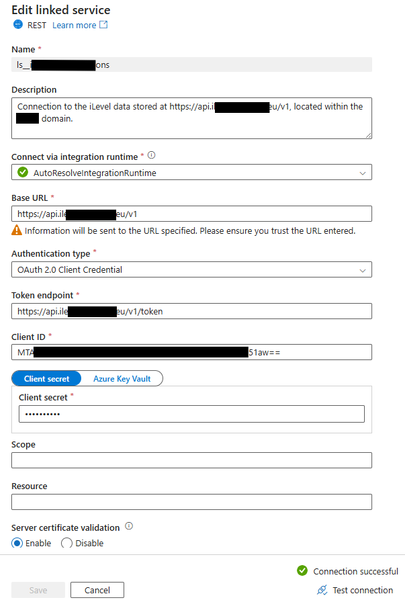
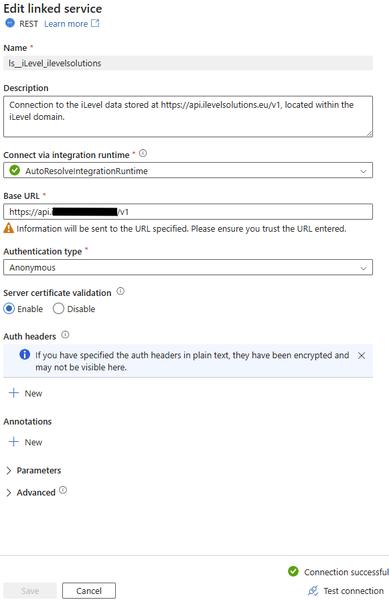
Hi, I'm attempting to integrate external data into our SQL Server. The third-party data is from a solution called iLevel. They use token based Oauth2 APIs for access. The integration tool is ADF Pipelines. I'm not a data engineer but it has fallen upon me to complete this exercise. What I've attempted so far is failing and I don't know why. I would like your help on this. I'll explain what I've configured so far in the order I configured it. 1) To generate a client_id and client_secret, I logged on to the iLevel solution itself and generated the same for my account (call me 'Joe' account) and the Team account (call it 'Data team' account). I've recorded the client_id and client_secret for both users/accounts in notepad for reference. 2) I logged in Azure Data Factory using my 'Joe Admin' admin account (this is the account I need to log in with for any ADF development). 3) I created a Linked Service with the following configuration. Note how the Test connection was successful. I guess this means our ADF instance can connect to iLevel's Base URL. 4) I then created a dataset for iLevel. I configured this based on an online example I was following which I can't get working, so this configuration may be incorrect. 5) I then created a Pipeline which contains a 'Web' activity and a 'Set variable' activity. The Pipeline has a variable as shown below. The 'Web' activity has the following configuration: URL = is iLevel's token URL (it is different from the Base URL used in the Linked Service). Body = I've blocked out the client_id and client_secret (I'm using the client_id and client_secret generated for the 'Data team' account - remember I'm logged into ADF using the 'Joe Admin' account - not sure if this makes a difference) but have placed red brackets around where the start and end of each values is. I'm wrapping the values in any single or double quotes - not sure if I'm meant to. I'm not sure if I have configured the Body correctly. The ilevel documentation states to use an Authorization header, Content-Type header and Body - it states to the following is needed to obtain an access token, but it doesn't state exactly how to submit the information (i.e. how to format it). Notice how, in my configuration, I haven't used an Authorization header - this partly because an online example I've followed doesn't use one. If iLevel state to use one then I think I should but I don't know how to format it - any ideas? The 'Set variable' activity has the following activity. The idea is the access token is retrieved from the 'Web' activity and placed in the 'Set variable' "iLevel access token" variable. At this point I validate all and it comes back with no errors found. I then Debug it to see if it does indeed work but it returns an error stating the request contains an invalid client_id or client_secret. The client_id and client_secret values used are the exact same I generated from within the iLevel solution just a few hours ago. Is anyone able to point out to me why this isn't working? Have I populated all that I need to (as mentioned, iLevel say to use an Authorization header which I haven't but I don't know how to format it if I were to use one)? What can I do to get this working? I'm just trying to get the access token at the moment. I've not even attempted to extract the iLevel data and can't until I get a working token. iLevel's token have a 1 hour time-to-live so the Pipeline needs to generate a new token each time it's executed. You help will be most appreciated. Thanks.495Views1like0Comments
How to Flatten Nested Time-Series JSON from API into Azure SQL using ADF Mapping Data Flow?
How to Flatten Nested Time-Series JSON from API into Azure SQL using ADF Mapping Data Flow? Hi Community, I'm trying to extract and load data from API returning the following JSON format into an Azure SQL table using Azure Data Factory. { "2023-07-30": [], "2023-07-31": [], "2023-08-01": [ { "breakdown": "email", "contacts": 2, "customers": 2 } ], "2023-08-02": [], "2023-08-03": [ { "breakdown": "direct", "contacts": 5, "customers": 1 }, { "breakdown": "referral", "contacts": 3, "customers": 0 } ], "2023-08-04": [], "2023-09-01": [ { "breakdown": "direct", "contacts": 76, "customers": 40 } ], "2023-09-02": [], "2023-09-03": [] } Goal: I want to flatten this nested structure and load it into Azure SQL like this: Expand table ReportDate Breakdown Contacts Customers 2023-07-30 (no row) (no row) (no row) 2023-07-31 (no row) (no row) (no row) 2023-08-01 email 2 2 2023-08-02 (no row) (no row) (no row) 2023-08-03 direct 5 1 2023-08-03 referral 3 0 2023-08-04 (no row) (no row) (no row) 2023-09-01 direct 76 40 2023-09-02 (no row) (no row) (no row) 2023-09-03 (no row) (no row) (no row)338Views0likes1CommentADF dataflow data Preview Error
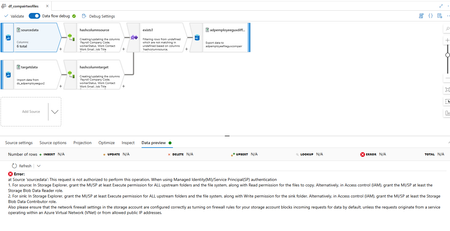
hi All, I have data flow as seen below. all linked service and data set working fine and i can see the data preview but wheb i use the same linked service and dateset in the dataflow It throw error as shown below i am useing managed private endpoint to coonect the blob starga it is owrking for all pipe line. the ADF and the MI has staorgae account contributor role assigned. Error: at Source 'sourcedata': This request is not authorized to perform this operation. When using Managed Identity(MI)/Service Principal(SP) authentication 1. For source: In Storage Explorer, grant the MI/SP at least Execute permission for ALL upstream folders and the file system, along with Read permission for the files to copy. Alternatively, in Access control (IAM), grant the MI/SP at least the Storage Blob Data Reader role. 2. For sink: In Storage Explorer, grant the MI/SP at least Execute permission for ALL upstream folders and the file system, along with Write permission for the sink folder. Alternatively, in Access control (IAM), grant the MI/SP at least the Storage Blob Data Contributor role. Also please ensure that the network firewall settings in the storage account are configured correctly as turning on firewall rules for your storage account blocks incoming requests for data by default, unless the requests originate from a service operating within an Azure Virtual Network (VNet) or from allowed public IP addresses. Any kind of help is highly appreciated503Views0likes1CommentHow to Configure Authentication for Web Activity Triggering ADF Pipelines via Azure REST API
Hello, I am working on integrating Azure Data Factory (ADF) with external systems using Web Activities. I am specifically using a Web Activity to trigger ADF pipelines via the Azure REST API, as described in the official documentation here: https://learn.microsoft.com/en-us/rest/api/datafactory/pipelines/create-run?view=rest-datafactory-2018-06-01 I can configure the request method and URL in the Web Activity, but I am unsure about the supported and recommended methods for authentication. Could someone please clarify: What are the possible ways to configure authentication in Web Activities when calling Azure REST APIs (such as for creating a pipeline run)? Is it possible to use Managed Identity (System-assigned or User-assigned) directly within the Web Activity? If not, what are the alternatives (e.g., service principal with token acquisition)? Are there any best practices or security considerations when configuring authentication for this use case? Thanks in advance for your help!135Views0likes0CommentsWhat Synapse Serverless SQL pool authentication type for ADF Linked Service?
Hi, I'm relatively new to Azure Data Factory and require your guidance on how to successfully create/test a Linked Service to the Azure Synapse Analytics Serverless SQL pool. In the past, I've successfully created a Linked Service to a third-party (outside our domain) on-premises SQL Server through creating a self-hosted integration runtime on their box and then creating a Linked Service to use that. The Server Name, Database Name, Windows authentication, my username and password all configured by the third-party is what I entered into the Linked Service configuration boxes. All successfully tested. This third-party data was extracted and imported, via ADF Pipelines, into an Azure SQL Server database within our domain. Now I need to extract data from our own (hosted in our domain) Azure Synapse Analytics Serverless SQL pool database. My attempt is this, and it fails: 1) I create a 'Azure Synapse Analytics' Data Store Linked Service. 2) I select the 'AutoResolveIntegrationRuntime' as the runtime to use - I'm thinking this is correct as the Synapse source is within our domain (we're fully MS cloud based). 3) I select 'Enter manually' under the 'Account selection method'. 4) I've got the Azure Synapse Analytics Serverless SQL endpoint - which I place into the 'Fully qualified domain name' field. 5) I entered the data SQL Database name found under the 'SQL database' node/section present on the Data >> Workspace screen in Synapse. 6) I choose 'System-assigned managed identity' as the Authentication type - this is a guess and I was hoping it would recognised my username/account that I am building the Linked Service with, as that account also can query Synapse too and so has Synapse access. 7) I check the 'Trust server certification' box. All else is default. When I click test connection, it fails with the following message: "Cannot connect to SQL Database. Please contact SQL server team for further support. Server: 'xxxxxxxxxxxx-ondemand.sql.azuresynapse.net', Database: 'Synapse_Dynamics_data', User: ''. Check the linked service configuration is correct, and make sure the SQL Database firewall allows the integration runtime to access. Login failed for user '<token-identified principal>'." I've reached out to our I.T. (who are novices with Synapse, ADF, etc.. even though they did install them in our domain) and they don't know how to help me. I'm hoping you can help. 1) Is choosing the 'Azure Synapse Analytics' the correct Data Store to chose when looking extract data from an Azure Synapse Serverless SQL pool SQL database? 2) Is using the AutoResolveIntegrationRuntime correct if Synapse is held within our domain? I've previously confirmed this runtime works (and still does) as when importing the third-party data I had to use that runtime to load the data to our Azure SQL Server database. 3) Have I populated the correct values for the 'Fully qualified domain name' and 'Database name' fields by entering the Azure Synapse Analytics Serverless SQL endpoint and subsequent SQL Database name, respectively? 4) Is choosing 'System-assigned managed identity' as the Authentication type correct? I'm guessing this could be the issue. I selected this as when loading the mentioned third-party data into the Azure SQL Server database, within our domain, this was the authentication type that was used (and works) and so I'm assuming it somehow recognises the user logged in and, through the magic of cloud authentication, says this user has the correct privileges (as I should have the correct privileges so say I.T.) so allow the Linked Service to work. Any guidance you can provide me will be much appreciated. Thanks.290Views0likes0Comments