azure cost management
13 Topics
I built an open-source tool for running ARG governance checks on a schedule and tracking findings
Most of the Azure governance work I have done over the last ten years ended the same way. Someone writes a sharp Resource Graph query, it finds something real, it gets pasted into a chat, and then it lives in that person's terminal history until they move on. The failure that costs more is quieter. A check that stops running does not turn red. It stays green, and the estate keeps drifting behind a number that nobody has any reason to distrust. Disclosure before I name anything: I built the tool below and I maintain it. RuleBeat runs the governance checks your team writes for Azure on a schedule, tracks every finding over time, and never holds write access. A check is a rule you author against Azure Resource Graph or Microsoft Graph, in a visual builder or as raw KQL. It ships 158 checks out of the box, 15 built-in rules plus the 143-rule APRL pack. Findings keep their lifecycle across scans, so they move through new, active and fixed and reopen on their own, and a suppression needs a reason and can carry an expiry date. The trade-offs, so nobody has to discover them after installing: - Read-only, permanently. It never holds write credentials and never creates its own service principal. You create the credential, so you can see in Azure RBAC exactly what it was granted. The cost is real: there is no one-click fix. Remediation stays your action under your own identity. - Self-hosted, one container, SQLite inside. Nothing about your tenant leaves your deployment and there is no telemetry. The cost is that you run it. Demo mode runs the real UI over a generated database with no Azure credential, if you would rather look before wiring anything up. - Honest numbers. A rule that has never run, or whose last run failed, is reported as unknown rather than passing. The posture number is uglier for it, and that is the point. On where this does and does not belong next to the native stack: Azure Policy is for enforcing a standard, and it does that better than anything I would write. Defender for Cloud covers its own scope well. If your assignments are enforcing, your Workbook answers the question you actually ask, and one person owns the whole loop, you do not need this. Where I kept running out of road was the organization-specific check that no built-in standard covers, and the question of who owns a flagged row once more than one person has to care about it. It is open source under Apache-2.0 and free, and it is v0.2, early on purpose. I build it with AI assistance from Claude, which the public commit history shows in the co-author trailers, and every change is human-reviewed and gated by the test suite in CI before it ships. Repo: https://github.com/rulebeat/rulebeat Docs: https://docs.rulebeat.com The question I would rather ask than answer: for those of you running recurring governance checks today, what do you do with a finding that is accepted on purpose? Every version of this I have seen was a tag, a wiki page, or a spreadsheet, and all three drift away from the query that produced them. I would like to know what has actually held up for you.
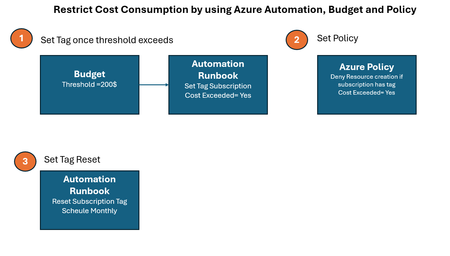
Restrict Cost Consumption by using Azure Automation, Budget and Policy
Video See the demo video by using below link Demonstration Video Automation Runbook Logic Logic which set tag value once threshold exceeds # Authenticate using Managed Identity (recommended for Automation Accounts) Connect-AzAccount -Identity # Define Subscription ID and Reset Tag $subscriptionId = (Get-AzContext).Subscription.Id $tags = @{ "cost exceeded" = "yes" } # Resetting the tag value # Update the tag Update-AzTag -ResourceId "/subscriptions/$subscriptionId" -Tag $tags -Operation Merge Write-Output "Tag 'cost exceeded' reset to 'yes' for subscription $subscriptionId" Logic which reset tag value every month # Authenticate using Managed Identity (recommended for Automation Accounts) Connect-AzAccount -Identity # Define Subscription ID and Reset Tag $subscriptionId = (Get-AzContext).Subscription.Id $tags = @{ "cost exceeded" = "no" } # Resetting the tag value # Update the tag Update-AzTag -ResourceId "/subscriptions/$subscriptionId" -Tag $tags -Operation Merge Write-Output "Tag 'cost exceeded' reset to 'no' for subscription $subscriptionId" Azure Policy Logic { "properties": { "displayName": "budget", "policyType": "Custom", "mode": "All", "metadata": { "version": "1.0.0", "createdBy": "f6bb4303-e52d-4cba-9790-01f0798164b7", "createdOn": "2025-03-13T05:08:05.8483517Z", "updatedBy": "f6bb4303-e52d-4cba-9790-01f0798164b7", "updatedOn": "2025-03-13T06:32:35.1740944Z" }, "version": "1.0.0", "parameters": {}, "policyRule": { "if": { "allOf": [ { "field": "type", "notEquals": "Microsoft.Resources/subscriptions" }, { "value": "[subscription().tags['cost exceeded']]", "equals": "yes" } ] }, "then": { "effect": "Deny" } }, "versions": [ "1.0.0" ] }, }
Microsoft's inconsistent implementation of tagging in Azure
We revamped our Azure resource tagging strategy several years ago and rely on them heavily for #Governance and #FinOps. We not only enforce #tags via #AzurePolicy, we also enforce tag values based on a set of permissible values for each tag. Even with that in place we experience some drift due to exclusions required in the policy definition or exemptions in the policy assignments. I won't get into why this flexibility is needed here, that's a whole separate discussion. Establishing a sound tag hygiene process becomes a vital component of your overall governance and FinOps strategies. One method we employ for tag hygiene is to surface the non-compliant resources in a #PowerBi report using an #AzureResourceGraph (ARG) query. Yes, you can do this in the Compliance section of Azure Policy as well however it lacks ease of use. For example, flipping back and forth between policies, filtering by subscriptions, surfacing other linked metadata is a cumbersome experience in the Azure Policy blade. Now onto my frustrations with how Microsoft has implemented tagging across Azure. 1. Inconsistent application of Tag case-sensitivity across tools - In Azure Policy and in the Azure portal, tag names are case-insensitive whereas tag values are case-sensitive. - In Azure Resource Graph Explorer, both tag names and tag values are case-sensitive. - Why is there inconsistency with case-sensitivity of tag names? 2. Inconsistent Tag validation across Resource Types - When deploying a Storage Account, Azure validates my tag policy before I am able to hit the create button (before it's submitted to ARM) whereas when deploying a resource like a Public IP Address, that validation only occurs after you hit the create button. This likely happens with other resource types as well. By the way, my tagging policy specifies "Indexed" for mode, so in effect it should apply to any and all resources that support tagging in Azure. - Why is does the evaluation of the tag policy differ based on the resource being deployed? 3. Inconsistent Tag UX across Resource Types - When deploying a Storage Account, the tags input is a drop-down list. However, when deploying an Azure Virtual Machine, the tags input is a textbox. Although the latter makes use of predictive text, it's still clearly a different experience. This inconsistency is found across multiple Azure resources. - Why is the tag UX different between resource types? I realize some of this is addressed or is less of a concern when using IaC but that may not be for everyone, or work in all scenarios. It would be great if Microsoft could standardize their implementation of tagging resources uniformly across the entire Azure estate. In my opinion I don't think that's a huge ask.2.2KViews4likes0CommentsAzure Advisor aggregate score for 2+ subscriptions - how is it calculated?
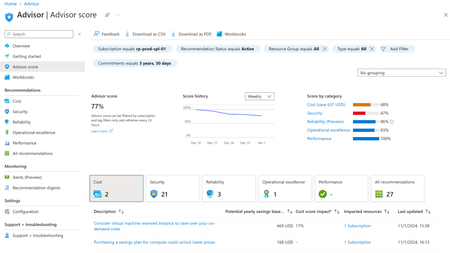
Dear all, I would like to understand how Azure Advisor calculates aggregations for the 5 pillars, for multiple subscriptions. In the example below we have values for Azure Advisor subscription 1 – (Cost = 68, Security = 47, Reliability = 86, Operational Excellence = 83, Performance = 100) And subsequently values for Azure Advisor subscription 2 - (Cost = 35, Security = 69, Reliability = 91, Operational Excellence = 79, Performance = 100) When selecting both subscriptions, we obtain the aggregate values – Naively I might have expected that the aggregate advisor scores could be the arithmetic average between the two, but that is not the case. Any help is much appreciated! ❤️ Thank you very much in advance, Best Regards, Eva464Views0likes1CommentNewly created resource and tag unavailable in Budget filter list due to cost being under $0.01
We have a Shopify app running on Azure, and it creates resources automatically when a merchant installs our app on their Shopify store. This allows us to know costs associated with a merchant's app usage by who installs our app. Our goal is to use PowerShell functions to create these merchant resources and the associated cost monitoring and alerts yet, Azure's budget logic does not show filter tags for resources whose costs are less than $0.01. This essentially means a human will need to monitor such resource costs until they are over $0.01 before creating any budgets and alerts for said resource. Computers are meant to reduce human effort, and MS Azure developers have inadvertently created the scenario for this use case to require human monitoring vs their system. Microsoft Azure developers, please remove this $0.01 threshold, so budget filters can show newly created resources and tags to create budgets automatically using PowerShell. Thanks, John734Views1like0CommentsMicrosoft Monitoring Agent being reinstalled by Automanage
As MMA (Microsoft Monitoring Agent) will be retired on August 2024 I decided to go AMA (Azure Monitoring Agent) right away, even though it is known some of its functionalities still on preview. So I uninstalled MMA via script below (with a foreach targeting all my machines), I also assigned Azure policies to not have MMA installed on my environment and all the policies for self-configuring AMA (DCRs, Workspaces, etc). $app = Get-WmiObject -ClassName Win32_Product | Where-Object { $.name -eq "Microsoft Monitoring Agent" } $app.Uninstall() Problem is my machines were reinstalling MMA out of the blue. So I went all the way down to hunt the culprit of doing that: GPO, SCCM, Scripts, you name it. I finally found out Azure Automanage was the one reinstalling MMA so I had to disable it from my environment. Are any of you aware of this issue? Most important: is there a way to have Automanage working without reinstalling MMA? In my case Automanage helps a lot as I don't need to apply lots and lots of settings manually but as it is reinstalling MMA I cannot enable it. senagangbe alexandredebargis
Common Cost Management Errors
Error message 400. Many feature-specific errors that use the 400 error code Mitigation - https://learn.microsoft.com/en-us/rest/api/consumption/#getting-list-of-billing-periods https://learn.microsoft.com/en-us/rest/api/cost-management Error message 401. For an Enterprise Agreement, confirm that the view charges options (Account Owner or Department Administrator) have been enabled. Mitigation - https://learn.microsoft.com/en-us/azure/cost-management-billing/costs/cost-management-error-codes#AuthorizationFailed Error message 404. Mitigation - https://learn.microsoft.com/en-us/azure/cost-management-billing/costs/cost-management-error-codes#NotFound Error message 500. Internal error. Wait an hour and try again. Mitigation - https://learn.microsoft.com/en-us/azure/cost-management-billing/costs/cost-management-error-codes#GatewayTimeout Error message 503. Mitigation - https://learn.microsoft.com/en-us/azure/cost-management-billing/costs/cost-management-error-codes#create-a-support-request https://learn.microsoft.com/en-us/azure/cost-management-billing/costs/cost-management-error-codes#GatewayTimeout937Views0likes0CommentsIs it possible to deny the access to Cost Management?
Hi, I try to deny the access to Cost Management for a user. I don't want to block the access to the Azure Portal. I don't want to remove the current role of this specific user. I found that this could be achieved using Azure Blueprint. But I can't see where to apply the deny permission. Does anyone can help? Thanks. 🙂4.3KViews0likes3Comments
Amortized costs in Azure Budgets
Currently Azure budgets can only evaluate actual spend, there is no option to evaluate amortized cost. This results in inaccurate representation of spend when RI's are in play. Does anyone know if this is on the roadmap to be released in Budgets any time soon? In Cost Analysis you can already switch between actual and amortized view but nothing similar in budget configurations yet. Thanks you!4.2KViews6likes5Comments
We have built an open-source multi-cloud governance CLI
Dear community, To make governance and management in the cloud easier, we've been working on a CLI that allows you to govern your cloud accounts across Azure and AWS & GCP. We would love to learn more about what you would be looking for when governing your clouds altogether. For now, we've focused on the following points: Viewing cloud accounts across all clouds, including tags. Viewing costs across all clouds Viewing IAM resources per cloud account (including inherited rights) Analyzing tagging density across all clouds (e.g. answering "Which subscriptions are missing the CostCenter tag?") We would love to learn more about what you would be looking for in such a free tool, and what problems and challenges you work on when governing your (multiple) clouds. I hope it is okay to share its GitHub link, which you can find https://github.com/meshcloud/collie-cli. Thank you, and looking forward to your replies! (P.S. If you're interested, I would be willing to help you use it in a 1:1 session. The tool directly integrates with your `az` CLI)1.1KViews0likes0Comments