azure arc
32 TopicsResource Guide: Making Physical AI Practical for Real‑World Industrial Operations
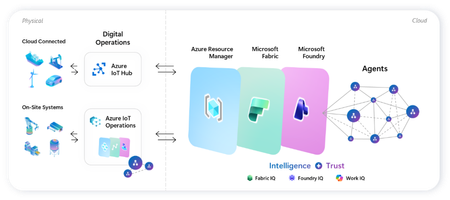
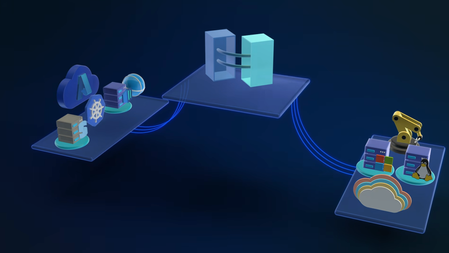
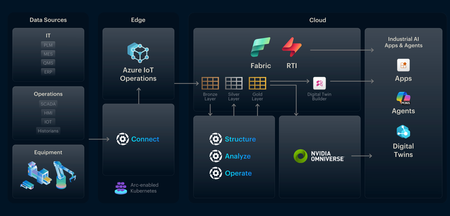
Microsoft's adaptive cloud approach brings cloud, edge, data, and AI together to help organizations turn operational technology (OT) data into intelligent action, without requiring everything to live in the cloud. At the center of this approach are key technologies that connect physical operations to cloud-scale data, analytics, and AI: Key Purpose Offering Direct-to-cloud device management + telemetry ingestion Azure IoT Hub Industrial connectivity + edge data plane Azure IoT Operations Unified analytics + real-time intelligence Microsoft Fabric On-device AI inferencing runtime Microsoft Foundry Industry recognition Microsoft named a Leader in the 2026 Gartner® Magic Quadrant™ for Global Industrial AIoT Platforms Read the announcement See it all come together Before diving into each component, watch this end-to-end demo showing how Azure IoT Operations, Azure IoT Hub, Microsoft Fabric, and Foundry Local work as one stack across the edge-to-cloud lifecycle - Making industrial AI practical for real-world operations with adaptive cloud. How these components work together Azure IoT Operations and Azure IoT Hub collect real-time data from operational assets and send semantically-ready, modeled data to Microsoft Fabric, where it's contextualized with enterprise data for downstream analytics. Microsoft Foundry extends to the edge through Foundry Local, so the same tooling used to deploy and manage AI models in the cloud applies to edge use cases. All of it integrates into Azure Resource Manager, bringing OT devices, assets, and edge AI models into the same management and security paradigm as every other Azure-managed resource. This blog walks through where to get started with each product capability: 1. Manage Cloud-Connected Devices and Telemetry with Azure IoT Hub Azure IoT Hub is a fully managed cloud service that enables secure bidirectional communication, device-to-cloud telemetry ingestion, cloud-to-device command execution, per-device authentication, remote management and more. Telemetry from IoT Hub can also be routed downstream into analytics platforms like Microsoft Fabric for visualization or AI modeling. Recommended Usage: Devices that utilize IoT Hub are distributed, stand-alone devices with fixed-functions. These devices typically do not require cloud-managed containerized workloads or cloud-managed proximal industrial protocol connectivity. Examples of appropriate device-to-cloud IoT Hub endpoint devices include water monitoring stations, vehicle telematics, distributed fluid level sensors, etc. Resources Current in-market services overview: IoT Hub: What is Azure IoT Hub? - Azure IoT Hub DPS: Overview of Azure IoT Hub Device Provisioning Service - Azure IoT Hub Device Provisioning Service ADU: Introduction to Device Update for Azure IoT Hub Building scalable solutions with Azure IoT platform: Best practices for large-scale IoT deployments - Azure IoT Hub Device Provisioning Service Scale Out an Azure IoT Hub-based Solution to Support Millions of Devices - Azure Architecture Center Azure IoT Hub scaling Try out our preview of new IoT Hub capabilities (integration with Azure Device Registry and Certificate Management) Learn more about these capabilities on our blog post: Azure IoT Hub + Azure Device Registry (Preview Refresh): Device Trust and Management at Fleet Scale… Integration with Azure Device Registry (preview): Integration with Azure Device Registry (preview) - Azure IoT Hub Microsoft-backed X.509 certificate management (preview): What is Microsoft-backed X.509 Certificate Management (Preview)? - Azure IoT Hub How to start with the preview: Deploy IoT Hub with ADR integration and certificate management (Preview) - Azure IoT Hub 2. Connect Industrial Assets with Azure IoT Operations Azure IoT Operations provides a unified data plane for the edge that runs on Azure Arc–enabled Kubernetes clusters and supports open industrial standards. It allows organizations to connect and capture equipment telemetry, normalize OT data locally, route hot-path signals to real-time analytics, securely manage layered industrial networks, and more. Edge‑processed data can then be sent upstream to Microsoft Fabric for AI‑driven analysis. Recommended Usage: Azure IoT Operations is intended to be the data plane for an adaptive cloud deployment extending the management, data, and AI capabilities of the Microsoft cloud to an on-prem device. This device binds to these cloud planes providing a platform for local data processing and intermittent connectivity. The target for these devices range from a small-gateway-style PC to a full data center. Azure IoT Operations endpoints enable cloud-managed containerized workloads and cloud-managed proximal industrial protocol connectivity. Examples of appropriate adaptive cloud and Azure IoT Operations endpoints include, on-robot computers, industrial machine controllers, retail store sensor/vision processing, and top-of-factory site infrastructure for line of business applications. Resources Azure IoT Operations Overview Azure IoT Operations Documentation Hub Releases · Azure/azure-iot-operations Quickstart: explore-iot-operations/quickstart at main · Azure-Samples/explore-iot-operations Latest release update: Open-source framework for scaling robotics from simulation to production on Azure + NVIDIA: microsoft/physical-ai-toolchain Demo video showcasing this in action: Making industrial AI practical for real-world operations with adaptive cloud How we built the demo: explore-iot-operations/quickstart at main · Azure-Samples/explore-iot-operations Edge-AI: microsoft/edge-ai: Production-ready Infrastructure as Code, applications, pluggable components, and… Latest Announcements & Blogs Making Physical AI Practical for Real-World Industrial Operations: Part 1 | Microsoft Community Hub Making Physical AI Practical for Real-World Industrial Operations: Part 2 | Microsoft Community Hub Introducing small form factor infrastructure: embed intelligence into physical systems Unlock Industrial Intelligence | Microsoft Hannover Messe 2026 From pilots to production: How Microsoft and partners are accelerating intelligent operations Partner Solutions How Mesh Systems Builds on Azure IoT Hub and Azure IoT Operations to Accelerate Industrial AI | Microsoft Community Hub Unlocking the Human Telemetry Layer for Safer Industrial Operations | Microsoft Community Hub Unlocking Smart Manufacturing: Siemens Industrial Edge Meets Azure IoT Operations Solving the Data Challenge for Manufacturers with Sight Machine & Azure IoT Operations | Microsoft Community Hub Microsoft and Rockwell Automation: Transforming Industrial AI Together | Microsoft Community Hub 3. Advanced Analytics with Microsoft Fabric Microsoft Fabric delivers a unified, end‑to‑end analytics platform that transforms streaming OT telemetry into real‑time insights and live dashboards. Fabric Operations Agents monitor industrial signals to recommend targeted actions, while Fabric IQ provides a shared semantic foundation that enables AI agents to reason over enterprise data with business context. Together, Fabric turns live industrial data into AI‑powered operational intelligence. Resources Get Started with Microsoft Fabric Learning Path Fabric Real-Time Intelligence documentation - Microsoft Fabric | Microsoft Learn Create and Configure Operations Agents - Microsoft Fabric | Microsoft Learn Fabric IQ documentation - Microsoft Fabric | Microsoft Learn 4.Run AI Models On‑Device with Foundry Local Foundry Local extends on‑device AI to Arc‑enabled Kubernetes edge clusters, providing a Microsoft‑validated inferencing layer for running AI models in industrial, disconnected or sovereign environments. Resources Foundry Local on Azure Local Documentation Participate in Foundry Local on Azure Local preview form Foundry Local on Azure Local: HELM deployment Demo Customer Stories Chevron: Chevron plans facilities of the future with Azure IoT Operations Husqvarna: Husqvarna Group Boosts Operational Efficiency with Azure Adaptive Cloud Ecopetrol: Azure IoT Operations and Azure IoT for energy help Ecopetrol optimize energy distribution while lowering operational costs P&G: Procter & Gamble cuts model deployment time up to 90% with Azure IoT Operations Toyota: Toyota Industries innovates its paint shop processes with Azure industrial AI and Azure IoT Hub1.4KViews3likes0CommentsMicrosoft Industrial AI Partner Guide: Choosing the Right Data Expertise for Every Stage
As organizations scale Industrial AI, the challenge shifts from technology selection to deciding who should lead which part of the journey -- and when. Which partners should establish secure connectivity? Who enables production grade, AI ready industrial data? When do systems integrators step in to scale globally? This Partner Guide helps customers navigate these decisions with clarity and confidence: Identify which partners align to their current digital transformation and Industrial AI scenarios leveraging Azure IoT and Azure IoT Operations Confidently combine partners over time as they evolve from connectivity to intelligence to autonomous operations This guide focuses on the Industrial AI data plane – the partners and capabilities that extract, contextualize, and operationalize industrial data so it can reliably power AI at scale. It does not attempt to catalog or prescribe end‑to‑end Industrial AI applications or cloud‑hosted AI solutions. Instead, it helps customers understand how industrial partners create the trusted, contextualized data foundation upon which AI solutions can be built. Common Customer Journey Steps 1. Modernize Connectivity & Edge Foundations The industrial transformation journey starts with securely accessing operational data without touching deterministic control loops. Customers connect automation systems to a scalable, standards-based data foundation that modernizes operations while preserving safety, uptime and control. Outcomes customers realize Standardized OT data access across plants and sites Faster onboarding of legacy and new assets Clear OT–IT boundaries that protect safety and uptime Partner strengths at this stage Industrial hardware and edge infrastructure providers Protocol translation and OT connectivity Automation and edge platforms aligned with Azure IoT Operations 2. Accelerate Insights with Industrial AI With a consistent edge-to-cloud data plane in place, customers move beyond dashboards to repeatable, production-grade Industrial AI use cases. Customers rely on expert partners to turn standardized operational data into AI‑ready signals that can be consumed by analytics and AI solutions at scale across assets, lines, and sites. Outcomes customers realize Improved Operational efficiency and performance Adaptive facilities and production quality intelligence Energy, safety, and defect detection at scale Partner strengths at this stage Industrial data services that contextualize and standardize OT signals for AI consumption Domain-specific acceleration for common Industrial AI scenarios Data pipelines integrated with Azure IoT Operations and Microsoft Fabric 3. Prepare for Autonomous Operations As organizations advance toward closed‑loop optimization, the focus shifts to safe, scalable autonomy. Customers depend on partners to align data, infrastructure, and operational interfaces, while ensuring ongoing monitoring, governance, and lifecycle management across the full operational estate. Outcomes customers realize Proven reference architectures deployed across plants AI‑ready data foundations that adapt as operations scale Coordinated interaction between OT systems, AI models, and cloud intelligence Partner strengths at this stage Industrial automation leadership and control system expertise Edge infrastructure optimized and ready for Industrial AI scale Systems integrators enabling end‑to‑end implementation and repeatability Data Intelligence Plane of Industrial AI - Partner Matrix This matrix highlights which partners have the deepest expertise in accessing, contextualizing, and operationalizing industrial data so it can reliably power AI at scale. The matrix is not a catalog of end‑to‑end Industrial AI applications; it shows how specialized partners contribute data, infrastructure, and integration capabilities on a shared Azure foundation as organizations progress from connectivity to insight to autonomous operations. How to use this matrix: Start with your scenario → identify primary partner types → layer complementary partners as you scale. Partner Type Adaptive Cloud Primary Solution Example Scenarios Geography Advantech Industrial Hardware, Industrial Connectivity LoRaWAN gateway integration + Azure IoT Operations Industrial edge platforms with built in connectivity, industrial compute, LoRaWAN, sensor networks Global Accenture GSI Industrial AI, Digital Transformation, Modernization OEE, predictive maintenance, real-time defect detection, optimize supply chains, intelligent automation and robotics, energy efficiency Global Avanade GSI Factory Agents and Analytics based on Manufacturing Data Solutions Yield / Quality optimization, OEE, Agentic Root Cause Analysis and process optimization; Unified ISA-95 Manufacturing Data estate on MS Fabric Global Belden Industrial Connectivity, Networking, Security Belden Horizon Data Operations (BHDO) + LioN-X with Azure IoT Operations OT-IT convergence, network orchestration and monitoring, ruggedized ethernet and switching, industrial WiFi, multi-vendor protocol connectivity, OT security, OPC UA Global Capgemini GSI The new AI imperative in manufacturing OEE, maintenance, defect detection, energy, robotics Global DXC GSI Intelligent Boost AI and IoT Analytics Platform 5G Industrial Connectivity, Defect detection, OEE, safety, energy monitoring Global Innominds SI Intelligent Connected Edge Platform Predictive maintenance, AI on edge, asset tracking North America, EMEA Litmus Automation Industrial Connectivity, Industrial Data Ops Litmus Edge + Azure IoT Operations Edge Data, Smart manufacturing, IIoT deployments at scale Global, North America Mesh Systems GSI & ISV Azure IoT & Azure IoT Operations implementation services and solutions (including Azure IoT Operations-aligned connector patterns) Device connectivity and management, data platforms, visualization, AI agents, and security North America, EMEA Nortal GSI Data-driven Industry Solutions IT/OT Connectivity, Unified Namespace, Digital Twins, Optimization, Edge, Industrial Data, Real‑Time Analytics & AI EMEA, North America & LATAM NVIDIA Technology Partner Accelerated AI Infrastructure; Open libraries, models, frameworks, and blueprints for AI development and deployment. Cross industry digitalization and AI development and deployment: Generative AI, Agentic AI, Physical AI, Robotics Global Oracle ISV Oracle Fusion Cloud SCM + Azure IoT Operations Real-time manufacturing Intelligence, AI powered insights, and automated production workflows Global Rockwell Automation Industrial Automation FactoryTalk Optix + Azure IoT Operations Factory modernization, visualization, edge orchestration, DataOps with connectivity context at scale, AI ops and services, physical equipment, MES Global Schneider Electric Industrial Automation Industrial Edge Physical equipment, Device modernization, energy, grid Global Siemens Industrial Automation & Software Industrial Edge + Azure IoT Operations reference architecture Industrial edge infrastructure at scale, OT/IT convergence, DataOps, Industrial AI suite, virtualized automation. Global Sight Machine ISV Integrated Industrial AI Stack Industrial AI, bottling, process optimization Global Softing Industrial Industrial Connectivity edgeConnector + Azure IoT Operations OT connectivity, multi-vendor PLC- and machine data integration, OPC UA information model deployment EMEA, Global TCS GSI Sensor to cloud intelligence Operations optimization, healthcare digital twin experiences, supply chain monitoring Global This Ecosystem Model enables Industrial AI solutions to scale through clear roles, respected boundaries and composable systems: Control systems continue to be driven by automation leaders Safety‑critical, deterministic control stays with industrial automation partners who manage real‑time operations and plant safety. Customers modernize analytics and AI while preserving uptime, reliability, and operational integrity. Data, AI, and analytics scale independently A consistent edge to cloud data plane supports cloud scale analytics and AI, accelerating insight delivery without entangling control systems or slowing operational change. This separation allows customers and software providers to build AI solutions on top of a stable, industrial‑grade data foundation without redefining control system responsibilities. Specialized partners align solutions across the estate Partners contribute focused expertise across connectivity, analytics, security, and operations, assembling solutions that reduce integration risk, shorten deployment cycles, and speed time to value across the operational estate. From vision to production Industrial AI at scale depends on turning operational data into trusted, contextualized intelligence safely, repeatably, and across the enterprise. This guide shows how industrial partners, aligned on a shared Azure foundation, create the data plane that enables AI solutions to succeed in production. When data is ready, intelligence scales. Call to action: Use this guide to identify the partners and capabilities that best align to your current Industrial AI needs and take the next step toward production‑ready outcomes on Azure.2.1KViews4likes0CommentsScaling Industrial AI at the Edge with Helin and Azure IoT
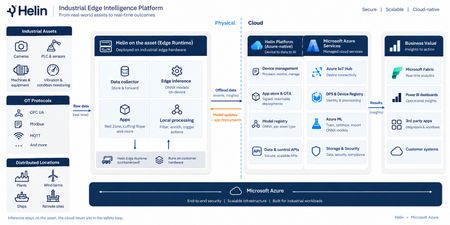
Remote industrial sites generate operational data continuously, but the ability to act on that data in near real time can be challenging. Bandwidth is often limited; connectivity is inconsistent, and the analysis needed to turn raw signals into insight typically depends on cloud connection. When worker safety is on the line, that gap matters even more, since a person entering a hazardous zone has to be detected and flagged on site independent of a cloud connection. Meeting those conditions calls for a secure, repeatable foundation, one that trains models in the cloud, runs inference locally, governs distributed edge devices, and turns the right signals into insight. Helin Data built that foundation: an edge-to-cloud platform that combines local inference, industrial data collection, and fleet observability on Azure. RedZone, Helin's vision AI application for hazardous-zone monitoring, is the first proof point of this platform. It uses the CCTV cameras already installed on a rig to detect when a person enters a defined danger zone around active equipment, triggering a local alert through an on-site interface and status lights, and logging the event for later safety and operational analysis. Because inference runs at the edge, RedZone can detect and alert without waiting on a connection to the cloud, while Azure handles centralized management, analysis, and model lifecycle activities. What sets this solution apart Designed for constrained environments – Inference runs directly on the edge box, so RedZone keeps detecting and alerting even through network outages, with no dependence on the cloud at runtime. Only priority events and metadata detected by RedZone sync to Azure, which keeps bandwidth use low on a constrained connection such as satellite connectivity used at some offshore sites. Secure, scalable fleet governance – Devices onboard automatically through Device Provisioning Service (DPS) with per-device X.509 certificates. Every device is listed in Azure Device Registry (in preview) and projected as native ARM resources, so updates and configuration changes can be targeted, governed, and audited using standard Azure tooling. Helin adds multi-level security, including public key infrastructure (PKI), data encryption, and industry-trusted authentication, protecting data as it moves from the rig to the cloud. Helin's observability layer spans device health, firmware updates, application status, and the data pipeline, so organizations can promptly identify and investigate potential issues across the edge-to-cloud pipeline. A closed edge-to-cloud AI loop – Models are trained and versioned in Azure Machine Learning, then deployed to the edge for local inference. Detections stream back into Microsoft Fabric, where the data can inform model evaluation and future model versions, closing the loop between the field and the cloud. A reusable application foundation – RedZone runs on the same platform and loop that can be adapted for additional customer scenarios. A different hazard, a different zone, or a different operational question can become its own application. Delivering a governed device fleet Azure IoT Hub and DPS provide secure device connectivity, messaging, and automated provisioning. The Azure IoT Hub integration with Azure Device Registry, currently in public preview, represents devices as Azure resources, providing a foundation for Azure-native fleet inventory and governance. Together, these services help Helin onboard, connect, and manage distributed edge deployments. Azure Device Registry (public preview with Azure IoT Hub): Provides the management plane, representing each device as an Azure Resource Manager resource so it can be governed with the same patterns used for other Azure resources including role-based access control, resource groups, tags, and resource-level management, with namespaces acting as the organizational and security boundary. Azure Device Registry integration with Azure IoT Hub and Microsoft-backed X.509 certificate management is in public preview and is not recommended for production workloads. Azure IoT Hub and DPS: Deliver secure onboarding and bidirectional messaging between the devices and the cloud. Helin Data Edge Inference and Data Collector: Runs vision AI inference at the edge and connects into the industrial control systems already on site, so each detection carries operational context. Industrial data is collected, contextualized, buffered, and filtered locally before important signals are sent to Azure. Microsoft Fabric: Ingests telemetry and turns it into an operational model for analysis and reporting, giving organizations clearer insight into their operations. Customer Impact This solution is already proven in a demanding industrial environment. When Helin Data implemented RedZone on Noble’s Maersk Discoverer rig, RedZone detected a person entering a hazardous zone and raised an alert in roughly 150 milliseconds. Processing the detection locally is particularly important offshore, where limited connectivity makes a cloud-dependent response impractical. Helin’s broader edge platform is already supporting Noble across its operations. The offshore drilling contractor, which operates a fleet of more than 40 rigs, uses Helin’s Remote CCTV Manager to provide authorized personnel with live video from more than 20 rigs. Reduced resolution streams sync to Noble’s secure Azure environment for viewing while full resolution recordings stay at the rig to reduce bandwidth use. Together, these examples demonstrate the broader platform pattern: process high-volume data locally, transmit the signals that matter, and centrally manage applications deployed across a distributed industrial fleet. Closing RedZone shows what becomes possible when Azure IoT Hub is used as more than a device-connectivity service. Combined with secure provisioning, Azure-native device governance, edge inference, model lifecycle management, and Microsoft Fabric, it becomes part of a repeatable platform for building and operating industrial AI applications at scale. For customers, the value extends beyond a single safety scenario. The same foundation can support new applications across worker safety, operational visibility, process improvement, and other industrial use cases, without rebuilding the underlying device and data infrastructure each time. Helin brings the industrial application expertise; Azure provides the scalable foundation on which those applications can be deployed, governed, and continuously improved. Take the next step Read the customer case study, Improving safety across a fleet of drilling rigs Learn more about RedZone in Seeing the Human Layer: Helin Brings Edge Vision AI to Industrial Operations on Azure. Explore Helin’s Intelligent Edge Application Platform is now available in Azure Marketplace Resources Deploy Azure IoT Hub with Device Registry integration and certificate management (preview) Azure IoT Hub Documentation Product documentation | Helin Documentation631Views0likes1CommentHow Mesh Systems Builds on Azure IoT Hub and Azure IoT Operations to Accelerate Industrial AI
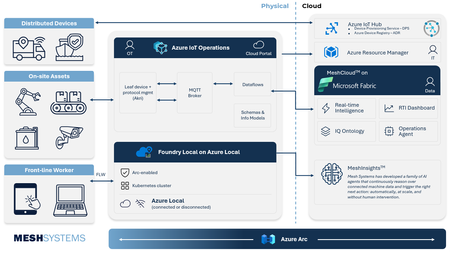
Manufacturers generate vast amounts of operational data, yet its complexity and fragmentation across historians, Operational Technology (OT) systems, and cloud platforms can slow AI adoption at scale. As organizations invest in AI to enhance productivity, quality, and decision making, the ability to connect and contextualize operational data becomes critical. Azure IoT Hub, Azure IoT Operations, and Mesh address this challenge together, spanning the full path from device connectivity to actionable AI-powered insights. Mesh brings deep Azure IoT platform experience and a practical path to industrial AI, with MeshCloud built on Azure IoT Hub, an open-source .NET Akri framework for Azure IoT Operations, and MeshInsights delivering generative AI-powered operational intelligence. This expertise is backed by a long history with Azure; Mesh launched its first IoT solution on Azure in private preview in 2009 and remained an early adopter of every major Azure IoT service since. Together, Azure IoT Hub, Azure IoT Operations, and Mesh give manufacturers a streamlined way to unify operational data and apply AI where it matters most. Unlocking legacy data with Mesh's Akri Connector Industrial organizations often struggle to modernize operations because critical operational data sits isolated inside historians and legacy Operational Technology (OT) systems. Many manufacturers are also wary of integrations that create new dependencies and limit future flexibility. Azure IoT Operations addresses this through an open architecture built around Akri, connecting industrial data sources while preserving interoperability across hardware and software environments. Mesh built on this foundation with its Akri Historian Connector, bringing historian and legacy operational data into Azure IoT Operations through prebuilt connectivity rather than source-by-source integration work. The result is faster access to operational data ready for analytics, AI, and industrial automation. The key features of this connector include: Restart-safe data continuity: Manufacturers can trust that operational data keeps flowing even through outages or restarts, with no data loss and no time spent recovering or reprocessing data. Secure, flexible authentication: Modern and legacy industrial systems connect under one security model, meeting enterprise-grade authentication standards without restructuring existing infrastructure. A foundation other connectors can be built on: The underlying framework handles the heavy lifting, so teams only need to build what's unique to each new OT data source. This means faster time to value for every new data source. Built in alignment with Azure IoT Operations roadmap: The connector stays up to date automatically, as new Azure IoT Operations features become available. This means manufacturers have access to the latest capabilities as the platform evolves. Together, Mesh and Azure IoT Operations give organizations a production-ready path from the shop floor into Azure IoT Operations and onward to Microsoft Fabric. Delivering Scalable Connected Products with Azure IoT Hub and MeshCloud MeshCloud helps manufacturers move from connected product pilots to fleet scale deployments faster by providing a platform build on Azure IoT Hub and other Azure native services. Azure IoT Hub provides per-device identity, support for MQTT, AMQP, and HTTPS, and built-in capabilities like device twins, direct methods, and rules-based message routing. Azure Device Provisioning Service (DPS) extends this foundation with zero-touch, just-in-time onboarding using X.509, TPM, or symmetric key attestation. Mesh operates as one cohesive engineering practice across the full connected product lifecycle, delivering hardware, firmware, wireless, edge, and cloud integration natively for Azure IoT Hub and Azure IoT Operations. That end-to-end scope is what MeshCloud, their Azure-native connected product platform, brings together. MeshCloud embeds Azure IoT Hub and DPS into an Azure-native connected product platform, giving organizations a faster path to connected product delivery without sacrificing control, scale, or solution ownership. The platform comes together across four layers: Edge to cloud: Connected devices, from MCU controllers to tablets and phones, register and authenticate through DPS and connect securely to IoT Hub, giving organizations a direct, secure line from shop floor to enterprise systems. Messaging and command: Event Hubs and Container Apps move telemetry and commands between devices and the cloud, with asset and ontology data exposed for digital twin management and device control. IT and operations: Azure Monitor, OpenTelemetry, Microsoft Entra, and Application Gateway bring platform observability, identity management, and secure ingress together, equipping IT and operations teams with a unified way to manage and secure the environment. Analytics and visualization: Telemetry flows into Azure Data Explorer and Microsoft Fabric for processing and storage, with Grafana, Power BI, and a Device Health UI giving teams fleet-wide visibility. This architecture enables organizations to move from pilot projects to fleet-scale deployments using Azure-native services, while maintaining interoperability across devices, connectivity protocols, and analytics platforms. For manufacturers, this means less time integrating infrastructure and more time delivering operational insights, connected services, and AI-powered workflows. Advancing Industrial Intelligence with MeshInsights As organizations connect more assets and operational systems, the next challenge becomes turning information into consistent actions and decisions. Microsoft Azure provides the cloud, data, and AI foundation for intelligent operational workflows, while giving organizations control over their data and business processes. Mesh extends this foundation through MeshInsights. MeshInsights is Mesh's AI agent offering for connected-product manufacturers. Mesh works with organizations to define a specific operational decision worth automating, such as classifying an alert or determining the right service response, and builds an evaluation standard from real telemetry, service history, and expert-validated examples. AI agents are then developed and measured against that standard, acting automatically on high-confidence cases and routing the rest to the organization's own experts. This extends connected systems beyond monitoring and reporting into trusted, auditable operational decisions. By combining Azure IoT platform services with MeshInsights, Mesh helps organizations move from connected infrastructure to autonomous, AI-driven action without changing where their data lives or who owns the architecture. Why This Matters Industrial transformation increasingly depends on strong collaboration between hyperscale cloud platforms and ecosystem partners who bring operational expertise, deployment acceleration, and industry-specific engineering capabilities. Mesh Systems demonstrates how partners can build differentiated value on top of Azure IoT platform services while helping organizations accelerate deployment timelines, standardize industrial data architectures, and operationalize AI across connected environments. Organizations are already putting this value to work in everyday operations. BUNN's cloud-connected coffee machines now give technicians a head start before every service call. As Kurt Powell, Executive Vice President at BUNN, put it: "With this solution, we know exactly which component to fix before we get there." WLS Lighting Systems has turned that same visibility into measurable savings at scale. Built on MeshCloud and Azure IoT, WLS's netLiNK gives property owners remote monitoring and control over individual light fixtures. Kevin Fletcher, President National Accounts at WLS, shared that the company has saved customers a little over $50 million in electrical costs since bringing netLiNK to market. Together, Azure IoT Hub, Azure IoT Operations, and Mesh Systems help manufacturers reduce integration complexity and operationalize industrial data, creating a foundation for AI driven operations spanning plant, edge, and cloud. The result: manufacturers spend less time on integration and more time improving productivity, resiliency, and decision making across their operations. Learn More Explore Mesh Systems solutions on Azure Marketplace: https://marketplace.microsoft.com/en-us/product/saas/mesh-systems.cloud?tab=Overview Read customer success stories: https://meshsystems.com/case-study-eaton-1/ Learn more about Azure IoT Operations: https://azure.microsoft.com/products/iot-operations/612Views1like0CommentsUnlocking the Human Telemetry Layer for Safer Industrial Operations
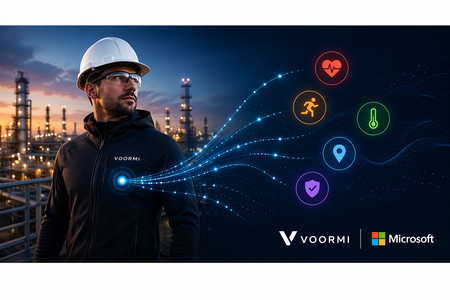
What if we could track human health & safety conditions as precisely as we do with machines, and take immediate actions to protect our greatest asset, our people? Many industrial organizations still lack visibility into real-time human conditions, even as worker safety and operational risk remain major investment priorities. One of the most important operational signals has largely remained outside the industrial data estate: the human telemetry. VOORMI and Microsoft have joined forces to fill this gap in understanding real human conditions. Through the Mij™ platform, VOORMI brings human telemetry into Azure IoT, enabling enterprises to integrate worker conditions such as heat stress and fatigue into the same operational architecture already used for machines and industrial systems. VOORMI, SWNR’s performance apparel brand, is among the first to bring this technology into garments designed for real industrial field conditions. This integration brings their proprietary wearable technology directly into high-impact worker safety and field operations scenarios. The partnership helps establish a new telemetry layer for industrial operations, allowing human, machine, and environmental signals to converge and drive safer operations, real-time awareness, and adaptive AI workflows. Bringing the Human Signal into Industrial AI with Azure Industrial organizations increasingly recognize that many safety, productivity, and operational challenges occur at the intersection of people and machines. Workers operate in high-heat environments, hazardous conditions, remote sites, and physically demanding field scenarios where situational awareness matters in real time. Historically, worker telemetry has remained fragmented across proprietary wearable platforms and disconnected safety systems, creating governance and operational challenges for enterprise IT and OT teams. Mij™ is designed differently, integrating directly into customer-controlled Azure environments through Azure IoT Operations running at the edge or Azure IoT Hub in the cloud rather than introducing another isolated platform. Running intelligence at the edge enables virtual safety agents and operational workflows to execute closer to the worker, supporting low-latency responses, local interaction with OT systems, and operational resilience even in disconnected or bandwidth-constrained environments. This gives enterprises flexibility to support real-time worker safety responses at the edge while also enabling long-term analytics, reporting, and operational intelligence through Microsoft Fabric. Telemetry from garment-integrated sensors flows through edge gateways into Azure services including Azure IoT Operations, Azure Data Explorer, Azure Managed Grafana, and Microsoft Fabric. The result is a unified operational environment where worker telemetry can live beside machine, site, and environmental data under the customer’s existing identity, security, governance, and analytics model. The vision is simple and transformative: make human telemetry a trusted, first-class industrial data source. Azure Digital Operations as the Intelligence Layer The reference architecture demonstrates how Azure IoT Operations can serve as a scalable operational intelligence layer for worker safety and connected operations scenarios across manufacturing, energy, and field environments. Mij™-enabled garments broadcast Bluetooth Low Energy (BLE) telemetry that can be processed locally through edge gateways and routed into Azure IoT Operations using MQTT and dataflows. Data is then operationalized through Azure Data Explorer and visualized using Azure Managed Grafana dashboards for field operations, worker safety, fleet health, gateway monitoring, and operational readiness scenarios. Telemetry can also be made available to Foundry Local-hosted GenAI agents to support real-time, context aware safety guidance, such as prompting workers operating in high-heat conditions to hydrate or seek cooler environments. While Mij™-enabled garments are the initial implementation, the edge device-to-cloud architecture creates a broader onboarding point for additional wearable, sensor, and field telemetry scenarios over time. This allows enterprises to bring more human and operational signals into a unified Azure-native operational environment. The architecture also supports flexible ingestion patterns for environments where dedicated edge gateways are not practical. Using Microsoft Entra External ID, Azure Container Apps, and Azure IoT Hub, telemetry can securely flow into Azure services without exposing operational infrastructure credentials to client devices. This pattern aligns with the broader Azure adaptive cloud approach: enabling customers to run distributed edge-native services on Arc-enabled Kubernetes infrastructure while maintaining centralized security, governance, and analytics capabilities across the enterprise. Depending on customer architecture preferences, telemetry can be processed through Azure IoT Operations at the edge or ingested directly through Azure IoT Hub for cloud-first analytics and downstream processing in services such as Microsoft Fabric. Edge processing also enables real-time sensor fusion across worker telemetry, ambient environmental conditions, machine parameters, and site-level operational signals, supporting faster safety interventions and more context-aware operational decisions. This gives enterprises flexibility in how they balance edge processing, operational responsiveness, governance and privacy requirements. Enabling the Next Generation of Industrial Workflows The long-term opportunity extends well beyond visualization dashboards. As worker telemetry becomes part of the operational fabric, enterprises can begin building more adaptive and intelligent workflows across worker safety, field readiness, incident response, compliance, environmental monitoring, and industrial AI systems. Human telemetry can provide critical real-time context that complements machine and environmental signals enabling more responsive operations and eventually more autonomous decision-support experiences. By bringing human telemetry into enterprise AI and analytics workflows, organizations can build more adaptive operational systems that improve worker safety, situational awareness, and real-time decision making at scale. This partnership reflects a broader industry shift: industrial transformation is no longer only about connected machines. It is about connected operations where people, equipment, environments, and AI systems participate in a shared operational intelligence layer. With SWNR’s Mij™platform and Azure IoT Operations, Microsoft and VOORMI are helping unlock that future. Learn more: Mij™ product page: https://swnrtechnologies.com/pages/mij Learn more about Azure IoT Operations: Documentation & Getting Started See what’s new with Azure IoT Hub: Preview Documentation To get started with a pilot, contact: pilots@swnrtechnologies.com629Views1like0CommentsAzure Arc | On-prem + Multi-cloud Management
In this video, we explore how Azure Arc simplifies hybrid and multi-cloud operations by providing a single, consistent control plane for managing your entire infrastructure across Linux and Windows, on-prem, in Azure, or in any cloud. Once connected, you can patch Windows and Linux together with Azure Update Manager, enforce CIS benchmarks and Azure Security Baselines through Azure Policy, and pull consistent inventory, tags, and RBAC across your whole estate. Auto-recover unbootable Windows Server 2025 machines with Quick Machine Recovery, audit and configure WinRE using built-in Azure Policy. Run your virtual machines as Azure Virtual Desktop session hosts on Nutanix, VMware, Hyper-V, or using physical Windows hardware. Satya Vel, Azure Arc Principal Group PDM Manager, shares how to make Azure your operational standard for every workload, anywhere it runs. Learn more about Azure Arc at https://aka.ms/AzureArcServer, or join the community at https://aka.ms/ArcServerForumSignup Organize, filter, & manage inventory at scale. Centralize visibility into servers, VMs, and Kubernetes clusters across on‑prem, AWS, GCP, and Azure from a single control plane. Check out Azure Arc. Policy-as-code, everywhere your servers run. Azure Arc extends Azure Policy to on-prem, AWS, and GCP resources — pre-built CIS and security baselines included. Try it. AVD, off-Azure. Azure Virtual Desktop for hybrid environments turns any Azure Arc-enabled Windows VM or physical server into a session host. Get started. QUICK LINKS: 00:00 — Azure Arc in hybrid environments 00:46 — Transitioning to Azure Arc 02:35 — Unified management 03:43 — How to bring in servers and containers 04:48 — Inventory management 05:30 — Patching 06:48 — Auto-manage future updates 08:25 — One-time update 09:32 — Configuration in a hybrid environment 11:05 — Auditing Windows machines 11:34 — Microsoft Defender for Cloud 13:06 — Desktop virtualization 13:51 — Wrap up Link References For more information go to https://aka.ms/AzureArc Unfamiliar with Microsoft Mechanics? As Microsoft’s official video series for IT, you can watch and share valuable content and demos of current and upcoming tech from the people who build it at Microsoft. Subscribe to our YouTube: https://www.youtube.com/c/MicrosoftMechanicsSeries Talk with other IT Pros, join us on the Microsoft Tech Community: https://techcommunity.microsoft.com/t5/microsoft-mechanics-blog/bg-p/MicrosoftMechanicsBlog Watch or listen from anywhere, subscribe to our podcast: https://microsoftmechanics.libsyn.com/podcast Keep getting this insider knowledge, join us on social: Follow us on Twitter: https://twitter.com/MSFTMechanics Share knowledge on LinkedIn: https://www.linkedin.com/company/microsoft-mechanics/ Enjoy us on Instagram: https://www.instagram.com/msftmechanics/ Loosen up with us on TikTok: https://www.tiktok.com/@msftmechanics Video Transcript: - If you’re managing servers and containers today, you’re probably operating across on-prem multiple clouds and using different tools for each. Azure Arc changes that by providing a single way to manage servers, Kubernetes, and containers across Linux and Windows, on-prem, in any cloud, and at the edge. Since launching in 2019, Azure Arc has gained strong momentum, enabling consistent patching, configuration, compliance, and advanced resilience features like remote recovery even for machines that cannot boot and more. And to explore how Azure Arc works in real hybrid environments, I’m joined by our resident management expert, Satya Vel. Welcome. - Hi, Jeremy. It’s great to be on the show. It’s been a while. - Yeah, it has been a while. Thanks for joining us today. And why don’t we jump right into this? So if I’m coming from maybe a traditional server management background using things like Ansible, VMware vSphere, maybe System Center, what does it take then to transition to Azure Arc, and why would I do it and is it worth the effort? - That’s a fair question. Those are all proven powerful tools. That said, it’s challenging moving between multiple tools to manage what you have. What we are seeing today is more of a people and process change. Most enterprises are now hybrid by default, on-prem, multi-cloud, multiple operating systems managed by a central operations team. And what those teams want most is consistency. Azure extends its management capabilities to servers and Kubernetes clusters wherever they run using Azure Arc. That’s where the value of cloud native innovation shows up, beyond basic monitoring of servers and clusters, like the health and status of each resource. With Azure Arc, you can collect richer operational and security data and query it at a massive scale. All these are now actionable insights. You can use them to improve your security posture to close vulnerabilities faster. They’ll let you more easily fix compliance drift to realign resources with your policies and maintain day-to-day operations. This includes modern patching, all applied across your multi-cloud and hybrid estate. And finally, Azure Arc centralizes governance by bringing consistent tags for grouping along with unified identity and access management using RBAC for connected resources. That way everything is controlled the same way regardless of where it runs from a single control plane without duplication or drift. So to answer your earlier question, it is totally worth it, and Azure Arc is really the glue that brings it all together. - Okay, so why don’t we make this real for everyone watching? Can you show us the unified management experience and what that looks like with Azure Arc? - Sure thing, and that’s the best part. In fact here I’m managing my on-prem and multi-cloud environment using Azure services enabled by Azure Arc. Notice I have everything from a Windows server to Kubernetes clusters running on AWS, different Linux distros. There’s even a Windows client Desktop VM and more. All right here. And I can drill into any of these items to see its specs as well as what’s configured. I can take a look at whether it’s compliant with my configuration policies. For example, this test resource has a few non-compliant policies that I might want to take a look into. And the great thing is everything is in one spot. I don’t need to move between consoles to see everything. Once these resources are enrolled, everything is automated and rule-based. I can look for servers and workloads as they are provisioned or updated, and monitor them 24/7. Then based on the configuration status it finds, it can take actions and get items into a compliant state. - Okay, so we’re going to get to what the management experiences look like in a minute, but let’s go back a step. So what happens if I’ve got infrastructure and I want to bring that into Azure Arc? What does that experience look? - This process is super straightforward and simple. Let me show you. You can bring servers and containers running in any cloud on-premises and on any hypervisor under management with Azure Arc. To onboard resources to Azure Arc, we have a few different methods. The any environment option is the most flexible, where you can use scripts for Linux and Windows, or an installer. This is a lightweight agent that you can install on your Linux and Windows servers. You can use your preferred deployment method to run the scripts on your servers and clusters, like this one for Linux, which downloads the agent, installs it and connects it to Azure Arc. And if you have existing tools like Ansible Automation Controller, formerly known as Ansible Tower, we have published a playbook that makes it super simple to onboard your machines. And this playbook is published in the Ansible Galaxy, which is the official community hub. - Okay, so now we’ve got everything in. Now moving into the next thing that people manage a lot every day, inventory. So how does Azure Arc change that? - So I briefly showed the different locations and platforms that could run under Azure Arc. But there’s more to it. All my servers and clusters are in one view. It spans on-prem as I search for Azure Local, then I’ll filter for AWS as well as GCP services. And I can see Azure VMs plus my on-prem servers listed together with a consistent tagging and status information. I define everything based on their location and platforms in Azure, so it’s super easy to see where everything is running, and there’s less chance that any infrastructure falls through the cracks. - Beyond inventory management, something else that we do every day is patch management. So can Azure ARC handle patch management for servers and infrastructure outside of Azure? - Absolutely. This is an area where Azure Arc can help a lot. Today, patching often means different tools for different environments: WSUS or SCCM for Windows, scripts for Linux, or separate crowd portals. And with Azure Arc, this all happens consistently from one place. You can see Azure Update Manager, which I have opened here. Each server has an update status indicating if it’s got pending updates or not. Azure Update Manager continuously assesses the update compliance of your managed servers on a schedule. And you can manually trigger assessments by selecting resources and hitting check for updates. Now, you can see I have both Linux and Windows machines missing updates, and even though these are different OS types, I can update them together with just a few clicks if I want. But before I do that, notice this on-prem Windows Server 2016 machine that needs to be updated. Here, a benefit of managing your Windows and SQL Server infrastructure on Azure is that the service offers extended security updates so you can run them longer in support without disruption to business critical applications. Let’s get back to updating these machines. The nice thing is that you only have to set the right policy and logic one time to manage updates automatically in the future. To save a little time, I’ll select every machine. From here, I can schedule updates for these resources where first I’ll fill in the basics for my subscription and resource group. Then the instance details like the configuration name and the region. The maintenance scope using the guest option lets me target my resources. Then under schedule, I can select the start date as well as the time, how many hours and minutes I want the maintenance window to be, the frequency of repeats in hours, days, weeks, or months. Then in the resources tab, if I want to add more servers, I can group everything I want in the same maintenance schedule. Likewise, you’d use this grouping for staggered rollouts. Importantly, using dynamic scopes, I can also make sure that any new resources are targeted as they come online based on defined filters like the resource groups they’re in, the resource types, locations, operating systems or tags. In updates, I can target the type of updates I want, for example, only critical and security updates. Finally, I can add pre and post events to run before and after the update, like redirecting an app to an informational page saying that the resource is being serviced and when it’ll be back online. Of course, I can tag this as well. And then I just need to review and click create. - And the favorite thing I just saw there was the dynamic scoping that you can apply as a set it and forget it setting basically. So what happens though, if I’ve got an update that’s really critical that I need to push out immediately, can I do that? - Not a problem. You can do that as well. For that, you’ll select one or more resources and choose one time updates so that it gets applied immediately. I just need to confirm the machines, then choose the update type or any exclusions that I want to define. I’ll keep everything in scope here. Then in properties I can determine the reboot behavior I want and maximum maintenance window time in minutes. From there, I can review and install. That will push the update to my selected servers, whether they are in the cloud or on-premise, so it’s one place to get resources into update compliance. And in case you want to stagger updates over a longer period of time for large patch management jobs, you can orchestrate updates using groups. - So the main thing is here you control the timing, like only patching during off hours and approvals and you get to decide which updates to apply, so it’s super flexible. Now, software updates are one type of configuration management, but what other types of configurations can you manage here? - Configuration management in hybrid environments is complex. You traditionally use group policy, desired state configuration or scripts for Windows, and then separate tools like Ansible, remote scripting or manual commands of SSH for Linux. All this can be done centrally from Azure Arc. It extends Azure policy to any resource. And you can use Microsoft provided built-in policy baselines covering common security requirements. For example, the security baseline contains best practices and controls that we’ve defined for cloud services running on Linux and Windows. And above that, you can also see CIS Benchmark policy, which is an internationally recognized standard spanning OS platforms used to protect against cyber attacks. I’ll apply this baseline, then I’ll choose the Red Hat Enterprise Linux 9 Benchmark. And searching across 300 CIS Benchmark policies, I’ll look for passwords. And there are 24 policies defined. And then for Firewall, you can see four more. And these are just a few examples that are pre-configured. So once you assign these to your resources, Azure continuously monitors each machine for compliance. So you can use policy as code across your entire state with Azure policy controls that automatically stay current as standards like CIS evolve. We also recently added the ability to audit and enable WinRE through Azure Arc, improving recoverability even for machines that can’t boot. As you can see, there are a couple of new policies for auditing machines that do not have WinRE enabled and configuring WinRE on Windows machine. With quick machine recovery on Windows Server 2025, that also means for broader issues with known fixes, we’ll automatically recover machines that are not bootable. - And that’s really a great resiliency option. But what about security, compliance, and configurations and assessments? Can we do something there? - For that, you can use Microsoft Defender for Cloud. This lets you standardize security agents and settings across machines and containers wherever they run. In the Defender portal, you can see that the same way Azure Resources spanned Azure, AWS, GCP, and other environments, those same resources are visible here too. Defender continuously assesses connected resources for security posture. This includes what I showed before in the Security Baseline and CIS Benchmark. It detects threats in real time with associated security alerts and how they are trending. You get a complete breakdown by compute with your virtual machines and their associated risks. And the same is true for your connected containers running in Kubernetes. If I move over to cloud assets here you can see all the virtual machines, Kubernetes clusters that we saw in Azure Arc. And clicking into any of these, like this Ubuntu VM will show me all of its details. Scrolling down, I get a view of its risk factors. And below that, you’ll see that this one has 82 risk-based recommendations to improve its security. - And one of the big upsides of Microsoft Defender is that shared visibility, so everything logs to the same place. So if you think about assumed breach, it means that you won’t have any blind spots then as attackers are moving laterally through your environment. So that means security teams, they see what you see. So why don’t we move on though to desktop virtualization. What can Azure Arc do to help me there? - Sure, Azure Arc unlocks the ability to run Azure Virtual Desktop, or AVD, for short, outside of Azure so it can run on your own infrastructure, either via Azure Local or something new we recently announced: Azure Virtual Desktop for hybrid environments. This means any existing on-prem server can be configured as a AVD session host as long as it’s attached to Azure Arc. The management is in the VM layer using a management extension. It’s flexible, and Nutanix AHV, VMware vSphere, Hyper-V, or physical Windows Server can work. So with Azure Arc, you have full control over the entire infrastructure’s lifecycle from inventory, configuration management and policy enforcement all from one place. And the good news is that if you own Software Assurance, you can access services enabled by Azure Arc as part of your license for inventory, configuration, and update management. - That was a great tour and update of Azure Arc. So thanks for joining us today, Satya. And if you want to learn more about Azure Arc and try it out for yourself, just go to aka.ms/AzureArc for more information. Or as an admin search for Arc, A-R-C, in the Azure Portal to get started. And keep watching Microsoft Mechanics for the latest updates. We’ll see you again soon.587Views1like0CommentsAdvancing Firmware Security: Fleet Visibility and New Capabilities in Firmware Analysis
When we announced general availability of firmware analysis enabled by Azure Arc last October, our goal was clear: help organizations gain deep visibility into the security of the firmware that powers their IoT, OT, and network devices. Since then, adoption has continued to grow as customers use firmware analysis to uncover vulnerabilities, inventory software components, and secure their software supply chain. Leading into the Hannover Messe (HMI) 2026 conference, we’re excited to share the next wave of firmware analysis capabilities, delivering enhancements that help customers connect firmware risk to real-world fleet impact, prioritize vulnerabilities more effectively, scale to larger and more complex firmware images, and expand security analysis for UEFI-based platforms. These updates are driven directly by customer feedback and by the rapidly evolving threat landscape facing embedded and edge devices. Connecting Firmware Risk to Your Deployed Fleet with Azure Device Registry (Preview) Securing connected devices doesn’t stop at identifying vulnerabilities in firmware—it requires understanding where those vulnerabilities exist in your deployed fleet and which devices are affected. We’re excited to announce a new preview integration between firmware analysis enabled by Azure Arc and Azure Device Registry, bringing fleet-level visibility of IoT and OT devices directly into the firmware analysis experience. This helps customers quickly understand how many devices and assets are running a given firmware image, and which ones may be exposed to known security issues. From firmware insights to fleet impact Firmware analysis helps customers uncover security risks hidden deep inside the firmware running IoT, OT, and network devices—risks such as known CVEs, outdated open-source components, weak cryptography, and insecure configurations. Until now, these insights were primarily scoped to the firmware image itself. With this new preview integration, firmware analysis now connects directly to Azure Device Registry, allowing customers to: See how many devices from IoT Hub integration with ADR (preview) and assets from Azure IoT Operations are associated with a specific analyzed firmware image Understand the real-world blast radius of vulnerabilities discovered in firmware Quickly identify which devices may require patching, mitigation, or isolation This preview bridges an important gap between security analysis and operational decision-making. What’s included in this preview With this release, we’re introducing new fleet-level context directly into the firmware analysis experience: A new Devices + Assets count column in the firmware analysis workspace showing how many Azure Device Registry devices and assets are running each analyzed firmware image A click-through experience that lets users view the list of affected devices and assets in Azure Device Registry Visibility spanning both: Devices connected via IoT Hub Assets managed through Azure IoT Operations This information is derived by correlating firmware metadata with device and asset inventory in Azure Device Registry, giving customers immediate insight into deployment exposure. Key use cases Identify vulnerable devices at scale: When critical CVEs are discovered in a firmware image, customers can immediately see how many deployed devices are impacted—without manually correlating spreadsheets, tools, or inventories. Prioritize remediation actions: With fleet visibility, teams can decide whether to patch devices, temporarily isolate affected devices from the network, or disable devices that pose unacceptable risk. Bridge security and operations teams: Security teams gain clear insight into where vulnerabilities exist, while operations teams can quickly act on specific devices and assets—all within the Azure portal. This integration is especially valuable in environments where downtime, safety, or regulatory compliance matter—such as manufacturing, energy, telecommunications, and critical infrastructure. Prioritizing Vulnerabilities with Enhanced CVE Metadata (Preview) The number of publicly disclosed vulnerabilities continues to rise year over year, making it increasingly difficult for security teams to determine which CVEs truly require urgent action. Simply knowing that a vulnerability exists is no longer enough—teams need context to prioritize remediation efforts. With this release, firmware analysis now provides richer metadata for each discovered CVE, helping customers focus on vulnerabilities that pose the greatest real-world risk. New CVE metadata includes: CISA Known Exploited Vulnerabilities (KEV) status – Indicates whether a CVE is listed in the CISA KEV catalog, signaling that the vulnerability is actively exploited in the wild. EPSS score (Exploit Prediction Scoring System) – A data-driven probability score that estimates the likelihood of a vulnerability being exploited in the next 30 days, complementing traditional severity metrics by focusing on exploitation likelihood rather than impact alone. Additional vulnerability context, including CVSS vectors and base scores, CWE classifications, and expanded metadata to support filtering and analysis. Together, these enhancements make it easier to triage findings, align remediation with risk, and communicate priorities across security, engineering, and product teams. Faster Performance for Large and Complex Firmware Images As firmware analysis adoption has grown, we’ve seen customers analyze increasingly large and complex firmware images—particularly in domains like networking equipment, where a single image can generate thousands of findings. To support these scenarios, we’ve made architectural enhancements to the service that significantly improve performance when working with large result sets. Key improvements include: Up to 90% reduction in load times of analysis results, especially for firmware images producing 10,000+ findings More responsive filtering and exploration of results These changes ensure that firmware analysis remains fast and usable at scale, even for complex network and infrastructure firmware images. Expanding UEFI Firmware Analysis (Preview) Modern devices increasingly rely on UEFI firmware as a foundational security boundary. In this release, we’re expanding our UEFI analysis capabilities to provide deeper visibility into UEFI executables and components. New UEFI-focused capabilities include: Detection of OpenSSL libraries and related CVEs within UEFI firmware Binary hardening analysis for UEFI executables, including detection of proper configuration of Data Execution Prevention (DEP) memory protection Continued support for discovering cryptographic material in UEFI images, including embedded certificates and keys This preview allows customers to evaluate the new capabilities, provide feedback, and help shape future enhancements in this area. Note: UEFI SBOM and binary analysis features are currently in preview and intended for evaluation and feedback. Bulk Export of Analysis Results for Supply Chain Collaboration We also recently released a highly requested feature that makes it easier to share firmware analysis results with partners and suppliers. Customers can now: Bulk download analysis results across one or more firmware images Export results as CSV files packaged into a ZIP archive This capability simplifies workflows such as sharing findings with device manufacturers or firmware suppliers, integrating results into downstream analysis or reporting pipelines, and supporting software supply chain security and compliance processes. Looking Ahead We’re excited about the progress we’ve made with this release and what it means for customers securing IoT, OT, and network devices. From connecting firmware risk to fleet-level impact with Azure Device Registry, to richer vulnerability prioritization, improved scalability, and deeper UEFI analysis—these enhancements reinforce firmware analysis as a critical tool for addressing some of the most challenging blind spots in modern infrastructure security. Firmware security is foundational to trustworthy systems—especially as edge devices continue to play a central role in industrial operations, networking, and data collection. If you’re already using firmware analysis and Azure Device Registry, the ADR integration preview will appear directly within the firmware analysis experience as it rolls out. We look forward to your feedback as we continue building secure, observable, and manageable digital operations with Azure. As always, we value your feedback, so please let us know what you think.479Views0likes0CommentsAzure IoT Operations 2603 is now available: Powering the next era of Physical AI
Industrial AI is entering a new phase. For years, AI innovation has largely lived in dashboards, analytics, and digital decision support. Today, that intelligence is moving into the real world, onto factory floors, oil fields, and production lines, where AI systems don’t just analyze data, but sense, reason, and act in physical environments. This shift is increasingly described as Physical AI: intelligence that operates reliably where safety, latency, and real‑world constraints matter most. With the Azure IoT Operations 2603 (v1.3.38) release, Microsoft is delivering one of its most significant updates to date, strengthening the platform foundation required to build, deploy, and operate Physical AI systems at industrial scale. Why Physical AI needs a new kind of platform Physical AI systems are fundamentally different from digital‑only AI. They require: Real‑time, low‑latency decision‑making at the edge Tight integration across devices, assets, and OT systems End‑to‑end observability, health, and lifecycle management Secure cloud‑to‑edge control planes with governance built in Industry leaders and researchers increasingly agree that success in Physical AI depends less on isolated models, and more on software platforms that orchestrate data, assets, actions, and AI workloads across the physical world. Azure IoT Operations was built for exactly this challenge. What’s new in Azure IoT Operations 2603 The 2603 release delivers major advancements across data pipelines, connectivity, reliability, and operational control, enabling customers to move faster from experimentation to production‑grade Physical AI. Cloud‑to‑edge management actions Cloud‑to‑edge management actions enable teams to securely execute control and configuration operations on on‑premises assets, such as invoking methods, writing values, or adjusting settings, using Azure Resource Manager and Event Grid–based MQTT messaging. This capability extends the Azure control plane beyond the cloud, allowing intent, policy, and actions to be delivered reliably to physical systems while remaining decoupled from protocol and device specifics. For Physical AI, this closes the loop between perception and action: insights and decisions derived from models can be translated into governed, auditable changes in the physical world, even when assets operate in distributed or intermittently connected environments. Built‑in RBAC, managed identity, and activity logs ensure every action is authorized, traceable, and compliant, preserving safety, accountability, and human oversight as intelligence increasingly moves from observation to autonomous execution at the edge. No‑code dataflow graphs Azure IoT Operations makes it easier to build real‑time data pipelines at the edge without writing custom code. No‑code data flow graphs let teams design visual processing pipelines using built‑in transforms, with improved reliability, validation, and observability. Visual Editor – Build multi-stage data processing systems in the Operations Experience canvas. Drag and connect sources, transforms, and destinations visually. Configure map rules, filter conditions, and window durations inline. Deploy directly from the browser or define in Bicep/YAML for GitOps. Composable Transforms, Any Order – Chain map, filter, branch, concatenate, and window transforms in any sequence. Branch splits messages down parallel paths based on conditions. Concatenate merges them back. Route messages to different MQTT topics based on content. No fixed pipeline shape. Expressions, Enrichment, and Aggregation – Unit conversions, math, string operations, regex, conditionals, and last-known-value lookups, all built into the expression language. Enrich messages with external data from a state store. Aggregate high-frequency sensor data over tumbling time windows to compute averages, min/max, and counts. Open and Extensible – Connect to MQTT, Kafka, and OpenTelemetry (OTel) endpoints with built-in security through Azure Key Vault and managed identities. Need logic beyond what no-code covers? Drop a custom Wasm module (even embed and run ONNX AI ML models) into the middle of any graph alongside built-in transforms. You're never locked into declarative configuration. Together, these capabilities allow teams to move from raw telemetry to actionable signals directly at the edge without custom code or fragile glue logic. Expanded, production‑ready connectivity The MQTT connector enables customers to onboard MQTT devices as assets and route data to downstream workloads using familiar MQTT topics, with the flexibility to support unified namespace (UNS) patterns when desired. By leveraging MQTT’s lightweight publish/subscribe model, teams can simplify connectivity and share data across consumers without tight coupling between producers and applications. This is especially important for Physical AI, where intelligent systems must continuously sense state changes in the physical world and react quickly based on a consistent, authoritative operational context rather than fragmented data pipelines. Alongside MQTT, Azure IoT Operations continues to deliver broad, industrial‑grade connectivity across OPC UA, ONVIF, Media, REST/HTTP, and other connectors, with improved asset discovery, payload transformation, and lifecycle stability, providing the dependable connectivity layer Physical AI systems rely on to understand and respond to real‑world conditions. Unified health and observability Physical AI systems must be trustworthy. Azure IoT Operations 2603 introduces unified health status reporting across brokers, dataflows, assets, connectors, and endpoints, using consistent states and surfaced through both Kubernetes and Azure Resource Manager. This enables operators to see—not guess—when systems are ready to act in the physical world. Optional OPC UA connector deployment Azure IoT Operations 2603 introduces optional OPC UA connector deployment, reinforcing a design goal to keep deployments as streamlined as possible for scenarios that don’t require OPC UA from day one. The OPC UA connector is a discrete, native component of Azure IoT Operations that can be included during initial instance creation or added later as needs evolve, allowing teams to avoid unnecessary footprint and complexity in MQTT‑only or non‑OPC deployments. This reflects the broader architectural principle behind Azure IoT Operations: a platform built for composability and decomposability, where capabilities are assembled based on scenario requirements rather than assumed defaults, supporting faster onboarding, lower resource consumption, and cleaner production rollouts without limiting future expansion. Broker reliability and platform hardening The 2603 release significantly improves broker reliability through graceful upgrades, idempotent replication, persistence correctness, and backpressure isolation—capabilities essential for always‑on Physical AI systems operating in production environments. Physical AI in action: What customers are achieving today Azure IoT Operations is already powering real‑world Physical AI across industries, helping customers move beyond pilots to repeatable, scalable execution. Procter & Gamble Consumer goods leader P&G continually looks for ways to drive manufacturing efficiency and improve overall equipment effectiveness—a KPI encompassing availability, performance, and quality that’s tracked in P&G facilities around the world. P&G deployed Azure IoT Operations, enabled by Azure Arc, to capture real-time data from equipment at the edge, analyze it in the cloud, and deploy predictive models that enhance manufacturing efficiency and reduce unplanned downtime. Using Azure IoT Operations and Azure Arc, P&G is extrapolating insights and correlating them across plants to improve efficiency, reduce loss, and continue to drive global manufacturing technology forward. More info. Husqvarna Husqvarna Group faced increasing pressure to modernize its fragmented global infrastructure, gain real-time operational insights, and improve efficiency across its supply chain to stay competitive in a rapidly evolving digital and manufacturing landscape. Husqvarna Group implemented a suite of Microsoft Azure solutions—including Azure Arc, Azure IoT Operations, and Azure OpenAI—to unify cloud and on-premises systems, enable real-time data insights, and drive innovation across global manufacturing operations. With Azure, Husqvarna Group achieved 98% faster data deployment and 50% lower infrastructure imaging costs, while improving productivity, reducing downtime, and enabling real-time insights across a growing network of smart, connected factories. More info. Chevron With its Facilities and Operations of the Future initiative, Chevron is reimagining the monitoring of its physical operations to support remote and autonomous operations through enhanced capabilities and real-time access to data. Chevron adopted Microsoft Azure IoT Operations, enabled by Azure Arc, to manage and analyze data locally at remote facilities at the edge, while still maintaining a centralized, cloud-based management plane. Real-time insights enhance worker safety while lowering operational costs, empowering staff to focus on complex, higher-value tasks rather than routine inspections. More info. A platform purpose‑built for Physical AI Across manufacturing, energy, and infrastructure, the message is clear: the next wave of AI value will be created where digital intelligence meets the physical world. Azure IoT Operations 2603 strengthens Microsoft’s commitment to that future—providing the secure, observable, cloud‑connected edge platform required to build Physical AI systems that are not only intelligent, but dependable. Get started To explore the full Azure IoT Operations 2603 release, review the public documentation and release notes, and start building Physical AI solutions that operate and scale confidently in the real world.1.1KViews3likes0CommentsBridging the Digital and Physical Worlds with Azure IoT Hub and Azure IoT Operations
Operational excellence starts with people. Empowering those people with the most up to date insights and recommendations requires bridging the gap between the physical and digital worlds to generate the best possible outcomes for real time decision making. Creating this bridge transforms data into insights, insights into intelligent actions, and actions into real-world results. Digital Operations, integrated with AI insights, help make this possible by combining data from connected assets across a variety of physical locations and deployment topologies, and transforming that data into insights and decisions that scale using AI and Analytics. At Microsoft Ignite, we’re extending this vision with new Azure IoT Hub and Azure IoT Operations capabilities to manage connected assets at scale, unify digital operations, and realize AI-enabled outcomes across your enterprise. Connected Operations in Action Azure IoT Hub and Azure IoT Operations form the backbone of connected operations, where every asset, sensor, and system contributes to a continuous loop of intelligence by moving data to Microsoft Fabric for real-time analytics, and for use with AI agents. This pattern applies to nearly every sector of the economy. In manufacturing, these capabilities allow production engineers to predict and avoid equipment failures by analyzing vibration and temperature data at the edge before costly downtime occurs. In energy and utilities, distributed sensors can provide data to control points that help balance load, optimize grid efficiency, and ensure safe operations even in remote areas. In transportation and logistics, connected fleets use edge AI models to detect safety risks in real time, while cloud-based analytics optimize routing and fuel efficiency across entire regions. Across industries, this edge-to-cloud collaboration enables the ability for intelligent systems to sense, reason, and act in the physical world with speed, safety, and precision. From Data to Intelligent Action Organizations today must capture and act on data from both geographically dispersed and tightly collocated assets. That data needs to be processed close to where it’s generated, at the edge, to enable real-time decision-making, reduce latency, and enhance security. At the same time, the cloud remains vital for contextualizing operational data with enterprise systems, training AI models, and managing a consistent identity and security framework across all assets. AI models trained in the cloud can then be deployed back to the edge, where they act on events in real time. Operators can work with AI agents to reason over this data whether it’s structured or unstructured, organized in silos, or contained in free-text fields, to provide results to a mixed team of human and AI operational assets. We have a portfolio of products uniquely designed to make this continuum, from edge to cloud, more intelligent, secure, and repeatable. Together with our partners, we help bridge Operational Technology (OT) with Information Technology (IT) to deliver better business outcomes. New at Ignite: Accelerating Digital Operations We’re excited to share our latest set of investments at Ignite across our portfolio of services. A few key announcements: Azure IoT Hub New Features (Preview): Simplifying Secure Connectivity at Scale Azure IoT Hub empowers organizations to securely and reliably manage connected assets across the globe, providing real-time visibility and control over diverse operations. With proven scalability, broad device support, and robust management tools, IoT Hub delivers a unified platform for developing and operating IoT solutions. As customers evolve, Azure IoT Hub continues to advance, deepening its integration with the Azure ecosystem and enabling AI-driven, connected operations for the next generation of applications. The next generation of Azure IoT Hub investments makes it easier and more secure than ever to connect and manage distributed assets. At Ignite, we’re previewing: New certificate management capabilities that simplify device onboarding and lifecycle management. Integration with Azure Device Registry (ADR) that brings all devices into a common control plane, enabling unified identity, security, and policy management. ADR enhancements that make it easier to register, classify, and monitor assets, paving the way for consistent governance and operational insight across millions of devices. This deeper Azure integration with ADR standardizes operations, simplifies oversight of edge portfolios including IoT devices, and brings the full power of Azure’s management ecosystem to IoT and Digital Operations workloads. Azure IoT Operations New Features (GA): The Foundation for AI in the Physical World Azure IoT Operations is more than an edge-to-cloud data plane, it’s the foundation for achieving AI in the physical world, enabling intelligent operational systems that can perceive, reason, and act to drive new operational efficiencies. Built on Arc-enabled Kubernetes, Azure IoT Operations unifies operational and business data across distributed environments, eliminating silos and providing a repeatable, scalable foundation for autonomous, adaptive operations. By extending familiar Azure management concepts to physical sites, Azure IoT Operations creates an AI-ready infrastructure that supports autonomous, adaptive operations at scale. Our latest GA release of Azure IoT Operations introduced major enhancements: Wasm-powered data graphs deliver fast, modular analytics helping businesses make near real-time decisions at the edge. Expanded connectors now include OPC UA, ONVIF, REST/HTTP, Server-Sent Events (SSE), and direct MQTT for richer industrial and IT integrations. OpenTelemetry (OTel) endpoint support enables seamless telemetry pipelines and observability. Asset health monitoring to provide unprecedented visibility and control. These capabilities help bridge Information Technology, Operational Technology, and data domains, empowering customers to discover, collect, process, and send data using open standards while laying the groundwork for self-optimizing environments where AI agents and human supervisors collaborate seamlessly. Integration with Fabric IQ and Digital Twin Builder To fully unlock the value of connected data, organizations need to contextualize it, linking operational signals to business meaning. Fabric IQ, a new offering announced at Ignite, and Digital Twin Builder in Fabric make this possible, transforming raw telemetry into AI-ready context. This integration allows companies to model complex systems, run simulations, and create intelligent feedback loops across manufacturing, logistics, and energy environments. Edge AI: Real-Time Intelligence in the Physical World Azure’s AI capabilities for edge environments bring intelligence closer to where it matters most. And, because these services are Arc-enabled, organizations can develop, manage and scale AI workloads across diverse environments using consistent tooling. Today, we are announcing updates to two of our key services that enable AI at the edge: Live Video Analysis features (Public Preview) in Azure AI Video Indexer enabled by Arc: delivers real-time agentic video intelligence to improve safety, quality, and operations. Edge RAG (Retrieval Augmented Generation) Public Preview Refresh enables local generative AI reasoning with contextual awareness - empowering AI agents to act within industrial constraints securely and efficiently. These innovations accelerate time to insight and help organizations deploy AI where milliseconds matter. Partner Innovation: Scaling Real Business Value Last year, we showcased the breadth of Azure IoT Operations’ industrial ecosystem. This year, we’re celebrating how partners are integrating, co-innovating, and scaling real customer outcomes. Our partners are packaging repeatable, scalable solutions that connect operational data to enterprise systems—enabling AI-driven insights and automation across sites, regions, and industries. At this year’s Ignite, we’re highlighting some great new partner innovations: NVIDIA is working with Microsoft to enable factory digital twins using the OpenUSD standard Siemens is enabling adaptive production through AI- and digital-twin-powered solutions supported by the integration of Siemens Industrial Edge with Azure IoT Operations Litmus Edge integrates with Azure IoT Operations via the Akri framework to automatically discover industrial devices, enable secure data flows, and support Arc-enabled deployment. Rockwell Automation is streamlining edge-to-cloud integration with its FactoryTalk Optix platform by delivering contextualized, AI-ready data seamlessly within Microsoft Azure IoT Operations architectures. Sight Machine is driving advanced analytics for quality and efficiency across multi-site operations. Through initiatives like Akri, Co-Innovate, and Co-Sell Readiness, our ecosystem is developing managed applications, packaged solutions, and marketplace offerings that accelerate deployment and unlock new revenue streams. These collaborations show how Azure IoT Operations is not just a platform, but a growth engine for industrial transformation. The Path Forward With these advancements, we’re helping organizations bring AI to the physical world by turning data into intelligence and intelligence into action. Customers like Chevron and Husqvarna are scaling beyond initial pilots, expanding their deployments from single-site to multi-site rollouts, unlocking new use cases from predictive maintenance to worker safety, and proving how adaptive cloud architectures deliver measurable impact across global operations. By connecting assets, empowering partners, and delivering open, scalable platform solutions, Microsoft is helping industries achieve resilient, adaptive operations that drive measurable business value. The digital and physical worlds are coming together with solutions that are secure, observable, AI-ready, and built to scale from a single site to global operations. Together, we’re creating a smarter, more connected future. Learn More Learn more about Azure IoT Hub and Azure IoT Operations here: Azure IoT – Internet of Things Platform | Microsoft Azure Learn more about new IoT Hub public preview features here: Azure IoT Hub documentation Discover Partner Solutions: Learn how Litmus and Sight Machine are advancing industrial analytics and integration with Azure IoT Operations. Explore Rockwell Automation and Siemens for more on adaptive cloud architectures and shop floor intelligence. Going to Ignite? If you’re at Ignite this week, you can learn more about how Microsoft enables Industrial Transformation at the following sessions: The New Industrial Frontier Reshaping Digital Operations with AI from Cloud and Edge Or come visit us on the show floor at the Azure Arc Expert Meet Up Focus Area in the Cloud and AI Platforms neighborhood3.4KViews1like0CommentsSolving the Data Challenge for Manufacturers with Sight Machine & Azure IoT Operations
Delivering Industrial AI: From Data to Results As manufacturers accelerate their digital transformation, the ability to unify and leverage operational data is the difference between incremental improvement and competitive advantage. Today, we’re launching a joint solution with Sight Machine, purpose-built to solve the OT data challenge and deliver the full Industrial AI stack in weeks, not months: Sight Machine and Microsoft Integrated Industrial AI Stack on Azure This offering is proven in the field, already driving measurable productivity gains for customers in automotive, food, and other sectors with rapid POC cycles and commercial-scale deployments. By integrating Sight Machine’s industrial AI platform with Azure IoT Operations and Microsoft Fabric, we standardize and contextualize machine data at scale, enabling analytics, automation, and actionable insights across the enterprise. What Sets This Solution Apart Fast Deployment: Get the full Industrial AI stack up and running in weeks, not months. End-to-End Integration: Sight Machine’s industrial AI platform works seamlessly with Azure IoT Operations and Microsoft Fabric, standardizing OT data for enterprise-wide use. Real Results: Customers in automotive, food, and other industries are already seeing measurable productivity gains and faster decision cycles. Scalable & Secure: Built on Azure’s adaptive cloud and zero-trust security, with SI partners ready to support commercial scale. Delivering a unified Industrial AI stack Today marks a pivotal moment for manufacturers: the launch of a fully integrated Industrial AI solution, jointly delivered by Microsoft and Sight Machine. This offering brings together the entire Industrial AI stack spanning cloud, edge, and on-premises, enabling organizations to unlock transformative business value. The integrated solution enables customers to transform data into business value by seamlessly contextualizing and moving data from the Edge using Sight Machine and Azure IoT Operations to Microsoft Fabric. Within Microsoft Fabric, the data can be further contextualized and enriched to support AI agents and can be extended to visualize 3D digital twins using NVIDIA Omniverse. The integrated solution has following key components: Azure IoT Operations Streams secure, real-time telemetry from industrial assets to the cloud, enabling visibility and control across edge and enterprise environments. Microsoft Fabric Provides a single analytics and governance platform, merging IT and OT data for enterprise-wide insights. Sight Machine Industrial AI Platform Refines data into “gold-level” quality, fully contextualized and structured for AI, predictive maintenance, and process optimization. M365 Copilot & Agentic Intelligence Surfaces actionable insights directly in familiar tools like Teams and Excel, empowering operators and managers to make informed decisions instantly. NVIDIA Omniverse Integration Extends capabilities into immersive 3D digital twins and physics-based simulations, enabling manufacturers to visualize live operations and test changes virtually before implementing them. Customer Impact Manufacturing is the world’s largest sector, generating twice as much data as any other industry. Yet, the complexity and fragmentation of OT (Operational Technology) data have long limited the adoption of AI at scale. Sight Machine solves this challenge by integrating with every level of the Azure stack, structuring raw OT data into high-quality, contextualized “gold” data, ready for advanced analytics and AI. This integrated offering removes barriers to AI adoption. Manufacturers can connect assets, contextualize data, and deliver actionable insights directly to teams, whether in Teams, Excel, or immersive 3D digital twins. The result: higher productivity, smarter operations, and continuous improvement. Take the Next Step Ready to accelerate your digital transformation? Explore the Sight Machine + Azure IoT Operations solution in the Marketplace. Start your journey to smarter manufacturing today: Sight Machine on Azure1.1KViews0likes0Comments